欢迎大家加入开源鸿蒙跨平台开发者社区,一起共建开源鸿蒙跨平台生态。
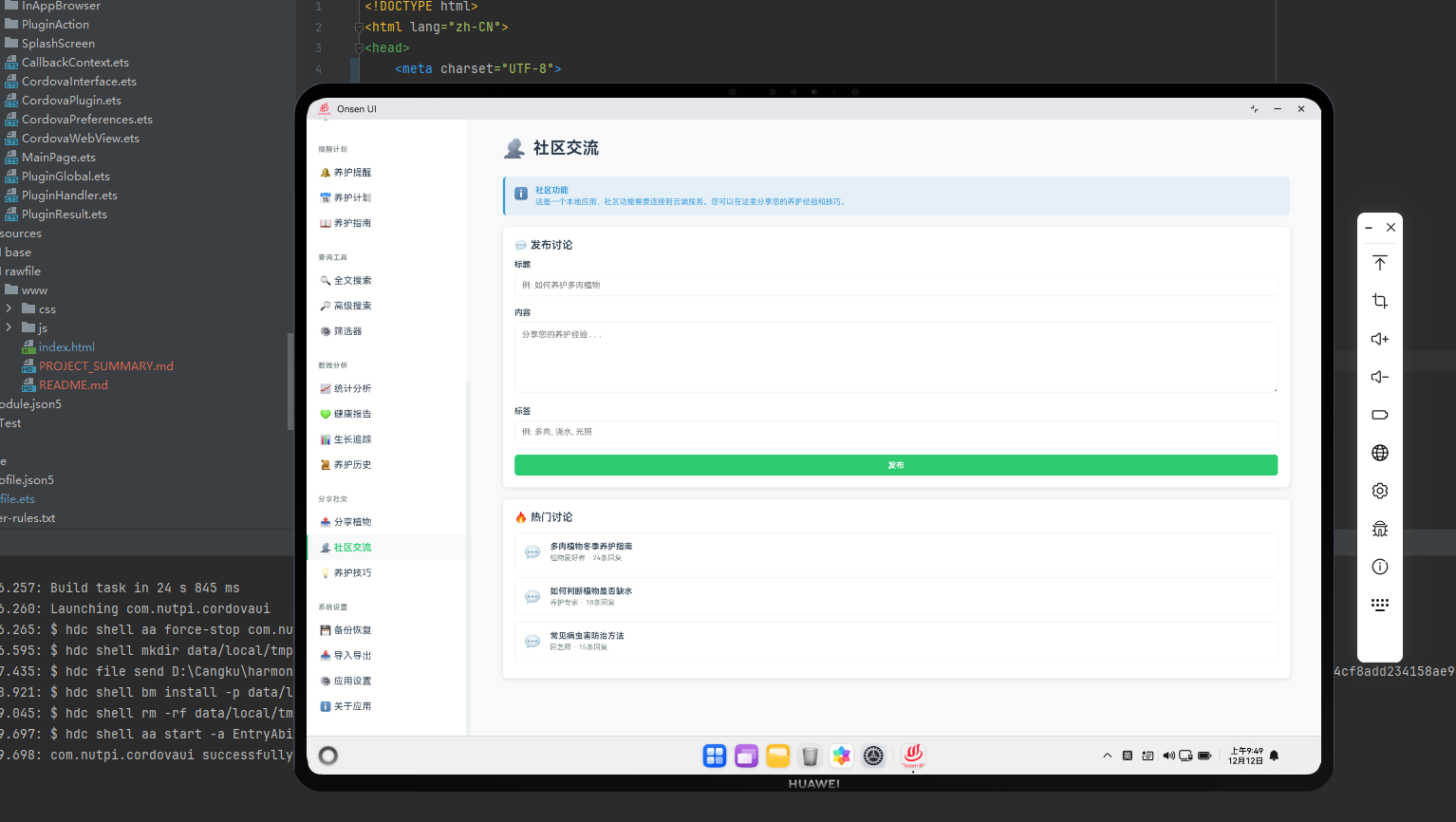
社区交流系统概述
社区交流系统为用户提供了与其他植物爱好者交流的平台。在Cordova框架与OpenHarmony系统的结合下,我们需要实现一个完整的社区系统,包括讨论、评论和用户互动功能。
社区内容数据模型
javascript
class CommunityPost {
    constructor(userId, title, content) {
        this.id = 'post_' + Date.now();
        this.userId = userId;
        this.title = title;
        this.content = content;
        this.createdDate = new Date();
        this.likes = 0;
        this.comments = [];
        this.tags = [];
    }
}

class CommunityComment {
    constructor(userId, content) {
        this.id = 'comment_' + Date.now();
        this.userId = userId;
        this.content = content;
        this.createdDate = new Date();
        this.likes = 0;
    }
}

class CommunityManager {
    constructor() {
        this.posts = [];
        this.users = new Map();
        this.loadFromStorage();
    }

    createPost(userId, title, content, tags) {
        const post = new CommunityPost(userId, title, content);
        post.tags = tags;
        this.posts.push(post);
        this.saveToStorage();
        return post;
    }

    addComment(postId, userId, content) {
        const post = this.posts.find(p => p.id === postId);
        if (post) {
            const comment = new CommunityComment(userId, content);
            post.comments.push(comment);
            this.saveToStorage();
            return comment;
        }
        return null;
    }

    likePost(postId) {
        const post = this.posts.find(p => p.id === postId);
        if (post) {
            post.likes++;
            this.saveToStorage();
        }
    }
}
这个社区交流数据模型定义了CommunityPost、CommunityComment和CommunityManager类。
与OpenHarmony的集成
javascript
function loadCommunityPostsFromServer() {
    cordova.exec(
        function(result) {
            console.log("社区帖子已加载");
            renderCommunityFeed(result);
        },
        function(error) {
            console.error("加载失败:", error);
        },
        "NetworkPlugin",
        "getCommunityPosts",
        [{
            limit: 20,
            offset: 0
        }]
    );
}

function syncCommunityData() {
    cordova.exec(
        function(result) {
            console.log("社区数据已同步");
        },
        function(error) {
            console.error("同步失败:", error);
        },
        "NetworkPlugin",
        "syncCommunityData",
        [{
            posts: communityManager.posts
        }]
    );
}
这段代码展示了如何与OpenHarmony的网络服务集成,加载和同步社区数据。
社区动态展示
javascript
function renderCommunityFeed() {
    const container = document.getElementById('page-container');
    container.innerHTML = `
        <div class="community-feed">
            <h2>社区交流</h2>
            <button onclick="showCreatePostDialog()">✍️ 发布帖子</button>
        </div>
    `;

    if (communityManager.posts.length === 0) {
        container.innerHTML += '<p class="empty-message">还没有帖子</p>';
        return;
    }

    const feedList = document.createElement('div');
    feedList.className = 'feed-list';

    communityManager.posts.forEach(post => {
        const postCard = document.createElement('div');
        postCard.className = 'post-card';

        postCard.innerHTML = `
            <div class="post-header">
                <h3>${post.title}</h3>
                <p class="post-date">${post.createdDate.toLocaleString('zh-CN')}</p>
            </div>
            <p class="post-content">${post.content}</p>
            <div class="post-tags">
                ${post.tags.map(tag => `<span class="tag">#${tag}</span>`).join('')}
            </div>
            <div class="post-stats">
                <span>👍 ${post.likes}</span>
                <span>💬 ${post.comments.length}</span>
            </div>
            <div class="post-actions">
                <button onclick="likePost('${post.id}')">👍 赞</button>
                <button onclick="showCommentDialog('${post.id}')">💬 评论</button>
            </div>
            <div class="post-comments">
                ${post.comments.slice(0, 3).map(comment => `
                    <div class="comment">
                        <p>${comment.content}</p>
                        <p class="comment-date">${comment.createdDate.toLocaleString('zh-CN')}</p>
                    </div>
                `).join('')}
                ${post.comments.length > 3 ? `<p class="more-comments">查看全部${post.comments.length}条评论</p>` : ''}
            </div>
        `;

        feedList.appendChild(postCard);
    });

    container.appendChild(feedList);
}
这个函数负责渲染社区动态。
发布帖子
javascript
function showCreatePostDialog() {
    const dialog = document.createElement('div');
    dialog.className = 'modal-dialog';
    dialog.innerHTML = `
        <div class="modal-content">
            <h3>发布帖子</h3>
            <form id="create-post-form">
                <div class="form-group">
                    <label>标题</label>
                    <input type="text" id="post-title" required>
                </div>
                <div class="form-group">
                    <label>内容</label>
                    <textarea id="post-content" required></textarea>
                </div>
                <div class="form-group">
                    <label>标签 (用逗号分隔)</label>
                    <input type="text" id="post-tags" placeholder="植物养护,经验分享">
                </div>
                <div class="form-actions">
                    <button type="submit">发布</button>
                    <button type="button" onclick="closeDialog()">取消</button>
                </div>
            </form>
        </div>
    `;

    document.getElementById('modal-container').appendChild(dialog);

    document.getElementById('create-post-form').addEventListener('submit', function(e) {
        e.preventDefault();

        const title = document.getElementById('post-title').value;
        const content = document.getElementById('post-content').value;
        const tagsStr = document.getElementById('post-tags').value;
        const tags = tagsStr.split(',').map(t => t.trim());

        const post = communityManager.createPost(getCurrentUserId(), title, content, tags);
        syncCommunityData();

        closeDialog();
        renderCommunityFeed();
        showToast('帖子已发布');
    });
}
这个函数创建发布帖子的对话框。
评论功能
javascript
function showCommentDialog(postId) {
    const dialog = document.createElement('div');
    dialog.className = 'modal-dialog';
    dialog.innerHTML = `
        <div class="modal-content">
            <h3>添加评论</h3>
            <form id="add-comment-form">
                <div class="form-group">
                    <label>评论内容</label>
                    <textarea id="comment-content" required></textarea>
                </div>
                <div class="form-actions">
                    <button type="submit">发布评论</button>
                    <button type="button" onclick="closeDialog()">取消</button>
                </div>
            </form>
        </div>
    `;

    document.getElementById('modal-container').appendChild(dialog);

    document.getElementById('add-comment-form').addEventListener('submit', function(e) {
        e.preventDefault();

        const content = document.getElementById('comment-content').value;
        communityManager.addComment(postId, getCurrentUserId(), content);
        syncCommunityData();

        closeDialog();
        renderCommunityFeed();
        showToast('评论已发布');
    });
}

function likePost(postId) {
    communityManager.likePost(postId);
    syncCommunityData();
    renderCommunityFeed();
}
这段代码实现了评论和点赞功能。
社区统计
javascript
class CommunityStatistics {
    constructor() {
        this.communityManager = communityManager;
    }

    getTotalPosts() {
        return this.communityManager.posts.length;
    }

    getTotalComments() {
        return this.communityManager.posts.reduce((sum, post) =>
            sum + post.comments.length, 0
        );
    }

    getMostPopularPost() {
        return this.communityManager.posts.reduce((max, post) =>
            post.likes > max.likes ? post : max
        );
    }

    getMostUsedTags() {
        const tagCounts = {};

        this.communityManager.posts.forEach(post => {
            post.tags.forEach(tag => {
                tagCounts[tag] = (tagCounts[tag] || 0) + 1;
            });
        });

        return Object.entries(tagCounts)
            .sort((a, b) => b[1] - a[1])
            .slice(0, 10)
            .map(([tag, count]) => ({ tag, count }));
    }
}
这个CommunityStatistics类提供了社区的统计功能。
总结
社区交流系统为用户提供了与其他植物爱好者交流的平台。通过帖子、评论和点赞功能,我们可以创建一个活跃的社区,促进用户之间的互动和知识分享。
欢迎加入开源鸿蒙跨平台社区:https://openharmonycrossplatform.csdn.net