欢迎大家加入开源鸿蒙跨平台开发者社区,一起共建开源鸿蒙跨平台生态。
概述
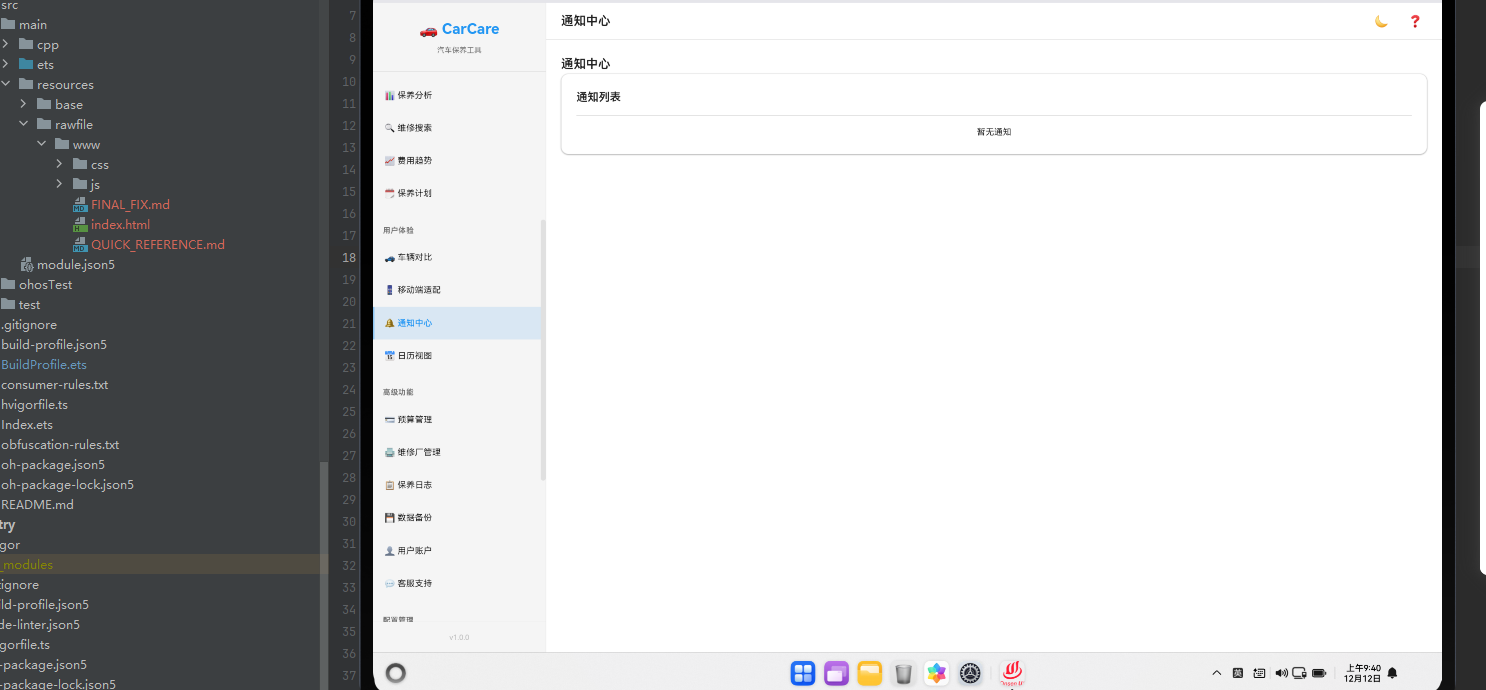
通知中心是应用与用户沟通的重要渠道。通过通知,应用可以及时提醒用户重要信息。本文将详细讲解如何在Cordova&OpenHarmony框架中实现一个完整的通知中心系统。
通知数据结构
通知包含标题、内容、时间、类型等信息。
javascript
const notification = {
    id: 1,
    title: '保养提醒',
    message: '您的车辆需要进行定期保养',
    type: 'maintenance',
    timestamp: '2024-02-15T10:30:00',
    read: false,
    actionUrl: '/maintenance'
};
这个数据结构定义了通知的基本属性。id用于唯一标识通知,title是通知标题,message是通知内容,type表示通知类型,timestamp记录通知时间,read表示是否已读,actionUrl是点击通知后的跳转链接。这样的结构设计使得我们可以灵活地管理各种通知。
通知列表展示
通知中心页面需要展示所有的通知。
javascript
async renderNotifications() {
    const reminders = await db.getAll('reminders');

    const notifications = reminders.map(reminder => ({
        id: reminder.id,
        title: '提醒',
        message: reminder.content,
        type: 'reminder',
        timestamp: reminder.dueDate,
        read: reminder.status === 'completed'
    }));

    return `
        <div class="notifications-container">
            <div class="page-header">
                <h2 class="page-title">通知中心</h2>
                <button class="btn btn-text" onclick="app.clearAllNotifications()">清空全部</button>
            </div>
            <div class="card">
                <div class="card-header"><h3 class="card-title">通知列表</h3></div>
                <div class="card-body">
                    \${notifications.map(notification => \`
                        <div class="notification-item \${notification.read ? 'read' : 'unread'}">
                            <div class="notification-content">
                                <div class="notification-title">\${notification.title}</div>
                                <div class="notification-message">\${notification.message}</div>
                                <div class="notification-time">\${Utils.formatDate(notification.timestamp)}</div>
                            </div>
                            <div class="notification-actions">
                                <button class="btn btn-text btn-sm" onclick="app.markNotificationRead(\${notification.id})">标记已读</button>
                                <button class="btn btn-text btn-danger btn-sm" onclick="app.deleteNotification(\${notification.id})">删除</button>
                            </div>
                        </div>
                    \`).join('') || '<p class="text-center">暂无通知</p>'}
                </div>
            </div>
        </div>
    `;
}
这段代码展示了如何展示通知列表。我们从提醒数据中生成通知对象,然后为每个通知生成一个列表项。每个通知显示标题、内容、时间和操作按钮。在Cordova框架中,这种通知展示是标准做法。
通知分类
系统可以按类型对通知进行分类。
javascript
async getNotificationsByType(type) {
    const reminders = await db.getAll('reminders');
    const plans = await db.getAll('maintenance_plans');

    let notifications = [];

    if (type === 'reminder' || type === 'all') {
        notifications = notifications.concat(reminders.map(r => ({
            id: r.id,
            title: '提醒',
            message: r.content,
            type: 'reminder',
            timestamp: r.dueDate
        })));
    }

    if (type === 'maintenance' || type === 'all') {
        notifications = notifications.concat(plans.map(p => ({
            id: p.id,
            title: '保养计划',
            message: p.type,
            type: 'maintenance',
            timestamp: p.nextDate
        })));
    }

    return notifications.sort((a, b) => new Date(b.timestamp) - new Date(a.timestamp));
}
这段代码展示了如何按类型获取通知。我们可以获取特定类型的通知或所有通知。这种分类功能在Cordova应用中非常常见。
通知标记已读
用户需要能够标记通知为已读。
javascript
async markNotificationRead(notificationId) {
    const notification = await db.get('reminders', notificationId);
    notification.status = 'completed';

    await db.update('reminders', notification);
    this.renderPage('notifications');
}

async markAllNotificationsRead() {
    const reminders = await db.getAll('reminders');

    reminders.forEach(async reminder => {
        reminder.status = 'completed';
        await db.update('reminders', reminder);
    });

    this.renderPage('notifications');
}
这段代码展示了如何标记通知为已读。我们可以标记单个通知或所有通知为已读。这种标记功能在Cordova应用中非常常见。
通知删除
用户需要能够删除通知。
javascript
async deleteNotification(notificationId) {
    await db.delete('reminders', notificationId);
    this.renderPage('notifications');
}

async clearAllNotifications() {
    if (confirm('确定要清空所有通知吗?')) {
        const reminders = await db.getAll('reminders');

        reminders.forEach(async reminder => {
            await db.delete('reminders', reminder.id);
        });

        this.renderPage('notifications');
    }
}
这段代码展示了如何删除通知。我们可以删除单个通知或清空所有通知。这种删除功能在Cordova应用中非常常见。
通知统计
系统可以统计通知的相关数据。
javascript
async getNotificationStats() {
    const reminders = await db.getAll('reminders');

    const stats = {
        total: reminders.length,
        unread: reminders.filter(r => r.status !== 'completed').length,
        read: reminders.filter(r => r.status === 'completed').length,
        byType: {}
    };

    reminders.forEach(reminder => {
        if (!stats.byType[reminder.type]) {
            stats.byType[reminder.type] = 0;
        }
        stats.byType[reminder.type] += 1;
    });

    return stats;
}
这段代码展示了如何统计通知的相关数据。我们计算总通知数、未读通知数、已读通知数和按类型的统计。这种统计功能在Cordova应用中非常常见。
通知徽章
应用可以在图标上显示未读通知数。
javascript
async updateNotificationBadge() {
    const stats = await this.getNotificationStats();
    const badge = document.querySelector('.notification-badge');

    if (stats.unread > 0) {
        badge.textContent = stats.unread;
        badge.style.display = 'block';
    } else {
        badge.style.display = 'none';
    }
}
这段代码展示了如何更新通知徽章。我们显示未读通知的数量。这种徽章显示在Cordova应用中非常常见。
推送通知
系统可以发送推送通知。
javascript
async sendPushNotification(title, message, data) {
    const notification = {
        title: title,
        message: message,
        type: data.type,
        timestamp: new Date().toISOString(),
        read: false,
        actionUrl: data.actionUrl
    };

    // 保存到数据库
    await db.add('reminders', notification);

    // 显示浏览器通知
    if ('Notification' in window && Notification.permission === 'granted') {
        new Notification(title, {
            body: message,
            icon: '/images/notification-icon.png',
            tag: data.type
        });
    }
}
这段代码展示了如何发送推送通知。我们首先将通知保存到数据库,然后使用Notification API显示浏览器通知。这种推送通知在Cordova应用中非常常见。
通知权限请求
应用需要请求用户的通知权限。
javascript
async requestNotificationPermission() {
    if ('Notification' in window) {
        if (Notification.permission === 'granted') {
            return true;
        } else if (Notification.permission !== 'denied') {
            const permission = await Notification.requestPermission();
            return permission === 'granted';
        }
    }
    return false;
}
这段代码展示了如何请求通知权限。我们检查用户是否已授予权限,如果没有,则请求权限。这种权限请求在Cordova应用中非常常见。
OpenHarmony中的通知
在OpenHarmony系统中,通知需要通过Cordova插件与原生系统进行交互。
typescript
export function pagePushNotify(data:Record<string, Object>|undefined) {
  if(data) {
    if (data["ohos.aafwk.param.callerBundleName"] == "com.huawei.hms.pushservice") {
      let result: ArkTsAttribute = { content: "receiveMessage", result: ["notification", JSON.stringify(data)] };
      cordova.onArkTsResult(JSON.stringify(result), "HuaweiPushPlugin", "");
    }
  }
}
这段ArkTS代码展示了如何在OpenHarmony系统中处理推送通知。通过pagePushNotify函数,我们可以接收来自华为推送服务的通知。这种推送机制在OpenHarmony系统中非常重要。
总结
通知中心是Cordova&OpenHarmony应用的重要功能。通过合理的通知管理、分类和推送机制,我们可以创建一个功能完整、用户体验良好的通知系统。在OpenHarmony系统中,通过Cordova框架的集成,我们可以充分利用原生系统的特性。