串口通信学习,使用 WinForm 读取串口发送数据(2)
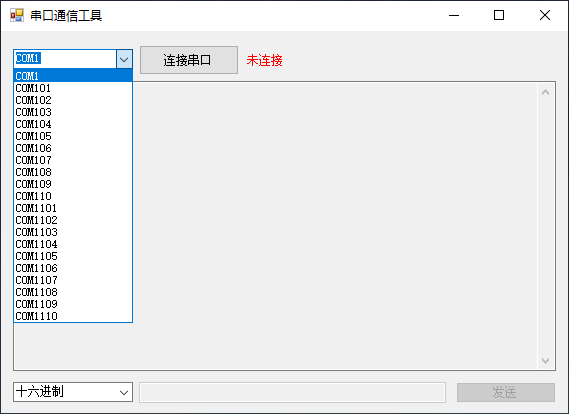
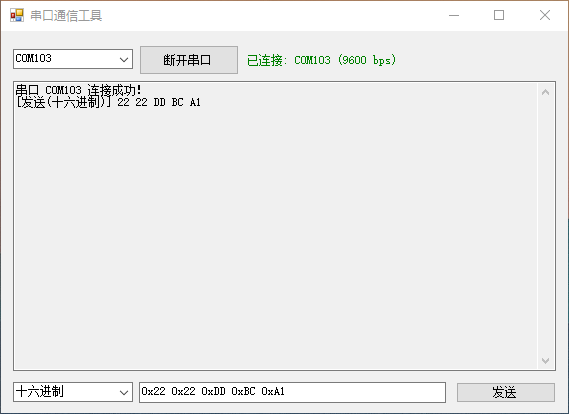
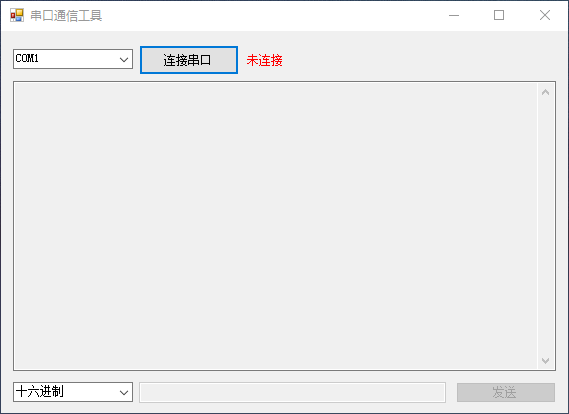
使用winform去实现最简单的数据发送与接收,获取串口之后点击连接串口,进行串口连接,在后续会显示连接的状态。串口的配置使用代码中写死的配置:
csharp
        #region 串口配置常量
        /// <summary>
        /// 波特率(默认9600)
        /// </summary>
        private readonly int BaudRate = 9600;

        /// <summary>
        /// 校验位(默认无)
        /// </summary>
        private readonly Parity Parity = Parity.None;

        /// <summary>
        /// 数据位(默认8)
        /// </summary>
        private readonly int DataBits = 8;

        /// <summary>
        /// 停止位(默认1)
        /// </summary>
        private readonly StopBits StopBits = StopBits.One;

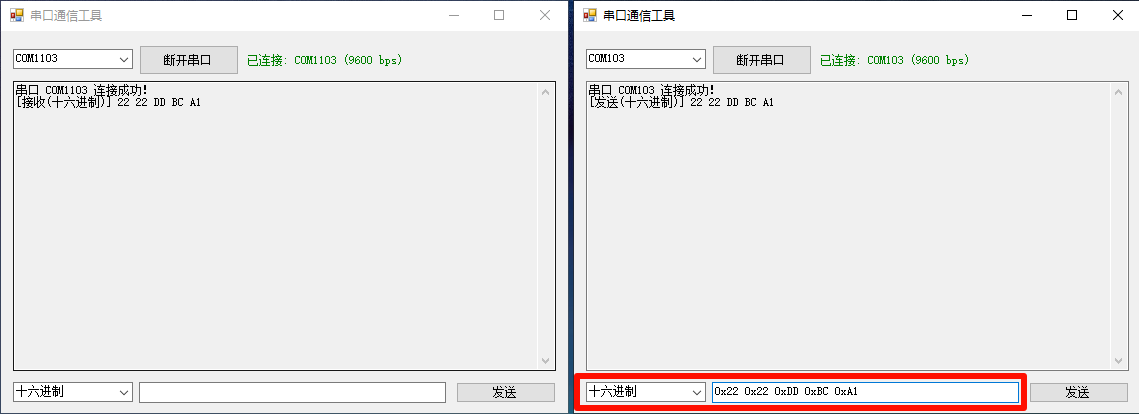
#endregion串口的名称使用:private SerialPort _serialPort; // 串口通信对象,用户可以发送可以使用"字符串"或"十六进制"格式发送数据,同时自动接收并显示来自串口的数据。用户使用发送数据的时候会以相同的发送方式去解析,比如发送十六进制数据的时候会以十六进制的方式去解析。
可以使用方向键去使用历史命令,类似命令行,使用方向键的上下去查询历史命令。
使用方式
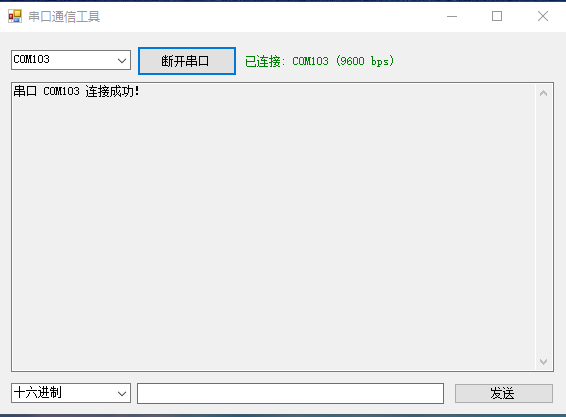
连接上串口了
发送与接收数据
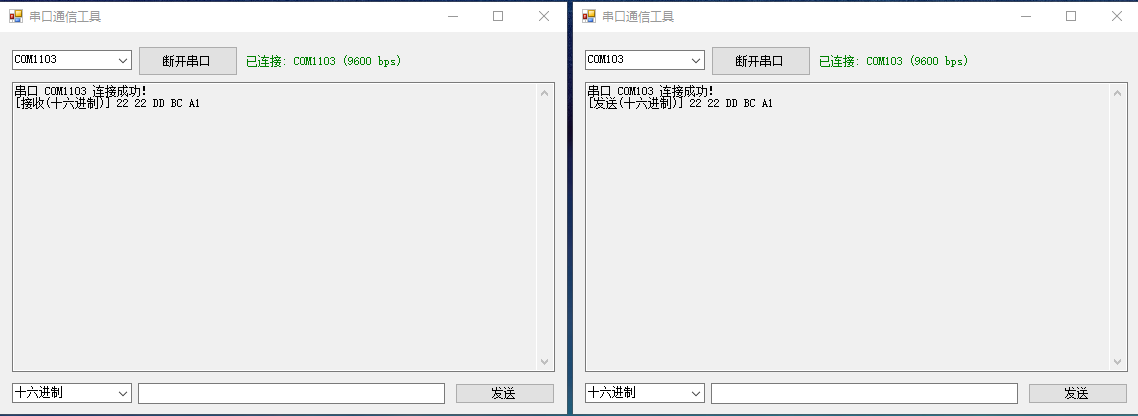
可以使用方向键去控制命令的上下行,按下Enter去发送消息。
代码
私有字段与配置常量
首先定义串口通信所需的私有字段和默认配置参数:
命名空间
csharp
using System;
using System.Collections.Generic;
using System.IO.Ports;
using System.Linq;
using System.Text;
using System.Text.RegularExpressions;
using System.Windows.Forms;
csharp
#region 私有字段
private SerialPort _serialPort;               // 串口通信对象
private bool _isConnected;                    // 串口连接状态标识
private string _selectedPortName;             // 当前选中的串口号

// 命令历史记录相关
private List<string> _commandHistory;         // 存储发送过的命令历史
private int _historyIndex;                    // 当前选中的历史命令索引
#endregion

#region 串口配置常量
/// <summary>
/// 波特率(默认9600)
/// </summary>
private readonly int BaudRate = 9600;

/// <summary>
/// 校验位(默认无)
/// </summary>
private readonly Parity Parity = Parity.None;

/// <summary>
/// 数据位(默认8)
/// </summary>
private readonly int DataBits = 8;

/// <summary>
/// 停止位(默认1)
/// </summary>
private readonly StopBits StopBits = StopBits.One;
#endregion
构造函数与初始化方法
窗体加载时完成组件初始化、端口列表刷新及串口对象创建:
csharp
#region 构造函数
/// <summary>
/// 初始化窗体及串口相关组件
/// </summary>
public Form1()
{
    InitializeComponent();
    RefreshPortList();
    InitializeSerialPort();
    InitSendFormatComboBox();
    UpdateControlStatus();

    // 初始化命令历史记录
    _commandHistory = new List<string>();
    _historyIndex = -1;
}
#endregion

#region 初始化方法
/// <summary>
/// 初始化发送格式下拉框
/// </summary>
private void InitSendFormatComboBox()
{
    comboBoxSendFormat.Items.Add(new ComboBoxItem("十六进制", SendDataFormat.Hex));
    comboBoxSendFormat.Items.Add(new ComboBoxItem("字符串", SendDataFormat.String));
    comboBoxSendFormat.DisplayMember = "DisplayName";
    comboBoxSendFormat.ValueMember = "Value";
    comboBoxSendFormat.SelectedIndex = 0;
}

/// <summary>
/// 刷新串口列表
/// </summary>
private void RefreshPortList()
{
    string currentSelectedPort = comboBoxPorts.SelectedItem?.ToString();
    string[] availablePorts = SerialPort.GetPortNames();
    var sortedPorts = availablePorts.OrderBy(port =>
    {
        if (int.TryParse(port.Replace("COM", ""), out int portNumber))
        {
            return portNumber;
        }
        return 0;
    }).ToArray();

    comboBoxPorts.Items.Clear();
    comboBoxPorts.Items.AddRange(sortedPorts);

    if (comboBoxPorts.Items.Count > 0)
    {
        comboBoxPorts.SelectedItem = !string.IsNullOrEmpty(currentSelectedPort)
            && comboBoxPorts.Items.Contains(currentSelectedPort)
            ? currentSelectedPort
            : comboBoxPorts.Items[0];
    }
}

/// <summary>
/// 初始化串口对象并注册数据接收事件
/// </summary>
private void InitializeSerialPort()
{
    _serialPort = new SerialPort
    {
        BaudRate = this.BaudRate,
        Parity = this.Parity,
        DataBits = this.DataBits,
        StopBits = this.StopBits,
        Encoding = Encoding.Default
    };
    _serialPort.DataReceived += SerialPort_DataReceived;
}
#endregion
串口通信核心逻辑
包括连接、断开、数据接收与发送等关键操作:
#region 串口通信
/// <summary>
/// 串口数据接收事件处理方法
/// </summary>
private void SerialPort_DataReceived(object sender, SerialDataReceivedEventArgs e)
{
    try
    {
        if (_serialPort.IsOpen && _serialPort.BytesToRead > 0)
        {
            int byteCount = _serialPort.BytesToRead;
            byte[] receiveBuffer = new byte[byteCount];
            _serialPort.Read(receiveBuffer, 0, byteCount);

            SendDataFormat currentFormat = SendDataFormat.Hex;
            this.Invoke(new Action(() =>
            {
                currentFormat = ((ComboBoxItem)comboBoxSendFormat.SelectedItem).Value;
            }));

            string displayContent = ParseReceiveData(receiveBuffer, currentFormat);
            string formatName = GetFormatFriendlyName(currentFormat);

            this.Invoke(new Action(() =>
            {
                AppendColoredLog($"[接收({formatName})] {displayContent}\r\n");
            }));
        }
    }
    catch (Exception ex)
    {
        this.Invoke(new Action(() =>
        {
            AppendColoredLog($"[错误] {ex.Message}\r\n");
        }));
    }
}

/// <summary>
/// 连接串口
/// </summary>
private void ConnectSerialPort()
{
    try
    {
        if (comboBoxPorts.SelectedItem == null)
        {
            AppendColoredLog("未选择可用串口\r\n");
            return;
        }

        if (!_serialPort.IsOpen)
        {
            _selectedPortName = comboBoxPorts.SelectedItem.ToString();
            _serialPort.PortName = _selectedPortName;
            _serialPort.Open();
            _isConnected = true;
            UpdateControlStatus();
            AppendColoredLog($"串口 {_selectedPortName} 连接成功!\r\n");
        }
    }
    catch (Exception ex)
    {
        MessageBox.Show($"串口连接失败: {ex.Message}", "错误",
            MessageBoxButtons.OK, MessageBoxIcon.Error);
    }
}

/// <summary>
/// 断开串口连接
/// </summary>
private void DisconnectSerialPort()
{
    try
    {
        if (_serialPort.IsOpen)
        {
            _serialPort.Close();
            _isConnected = false;
            UpdateControlStatus();
            AppendColoredLog("串口已断开连接\r\n");
        }
    }
    catch (Exception ex)
    {
        MessageBox.Show($"串口断开失败: {ex.Message}", "错误",
            MessageBoxButtons.OK, MessageBoxIcon.Error);
    }
}

/// <summary>
/// 发送数据到串口
/// </summary>
private void SendSerialData()
{
    if (!_isConnected || !_serialPort.IsOpen)
    {
        MessageBox.Show("请先连接串口!", "提示",
            MessageBoxButtons.OK, MessageBoxIcon.Warning);
        return;
    }

    string inputContent = txtMessage.Text.Trim();
    if (string.IsNullOrEmpty(inputContent))
    {
        MessageBox.Show("请输入要发送的数据!", "提示",
            MessageBoxButtons.OK, MessageBoxIcon.Warning);
        return;
    }

    try
    {
        SendDataFormat sendFormat = ((ComboBoxItem)comboBoxSendFormat.SelectedItem).Value;
        byte[] sendData = ProcessSendData(inputContent, sendFormat);

        _serialPort.Write(sendData, 0, sendData.Length);

        string formatName = GetFormatFriendlyName(sendFormat);
        string displayContent = sendFormat == SendDataFormat.Hex
            ? BytesToHexString(sendData)
            : inputContent;
        AppendColoredLog($"[发送({formatName})] {displayContent}\r\n");

        if (!_commandHistory.Contains(inputContent))
        {
            _commandHistory.Add(inputContent);
        }
        _historyIndex = _commandHistory.Count;

        txtMessage.Clear();
        txtMessage.Focus();
    }
    catch (FormatException ex)
    {
        MessageBox.Show($"数据格式错误:{ex.Message}\n示例:十六进制(01 0A FF 或 0x110x22) | 字符串(测试数据)",
            "格式错误", MessageBoxButtons.OK, MessageBoxIcon.Error);
    }
    catch (ArgumentException ex)
    {
        MessageBox.Show($"参数错误:{ex.Message}", "输入错误",
            MessageBoxButtons.OK, MessageBoxIcon.Error);
    }
    catch (Exception ex)
    {
        MessageBox.Show($"数据发送失败:{ex.Message}", "错误",
            MessageBoxButtons.OK, MessageBoxIcon.Error);
    }
}
#endregion
数据处理辅助方法
用于格式转换、解析与校验:
csharp
#region 数据处理辅助方法
/// <summary>
/// 解析接收到的字节数据
/// </summary>
private string ParseReceiveData(byte[] dataBytes, SendDataFormat format)
{
    if (dataBytes == null || dataBytes.Length == 0) return string.Empty;

    if (format == SendDataFormat.Hex)
    {
        return BytesToHexString(dataBytes);
    }
    else if (format == SendDataFormat.String)
    {
        return Encoding.UTF8.GetString(dataBytes);
    }
    else
    {
        return BytesToHexString(dataBytes);
    }
}

/// <summary>
/// 处理待发送的数据
/// </summary>
private byte[] ProcessSendData(string input, SendDataFormat format)
{
    if (format == SendDataFormat.Hex)
    {
        return HexStringToBytes(input);
    }
    else if (format == SendDataFormat.String)
    {
        return Encoding.UTF8.GetBytes(input);
    }
    else
    {
        throw new ArgumentException("不支持的发送格式");
    }
}

/// <summary>
/// 字节数组转十六进制字符串
/// </summary>
private string BytesToHexString(byte[] bytes)
{
    if (bytes == null || bytes.Length == 0) return string.Empty;

    StringBuilder hexBuilder = new StringBuilder(bytes.Length * 3);
    foreach (byte b in bytes)
    {
        hexBuilder.AppendFormat("{0:X2} ", b);
    }
    return hexBuilder.ToString().Trim();
}

/// <summary>
/// 十六进制字符串转字节数组
/// </summary>
private byte[] HexStringToBytes(string hexString)
{
    string cleanHex = hexString.ToLower()
                                  .Replace("0x", "")
                                  .Replace(" ", "")
                                  .Replace("\r", "")
                                  .Replace("\n", "")
                                  .Replace("\t", "");

    if (cleanHex.Length % 2 != 0)
    {
        throw new ArgumentException("十六进制字符串长度必须为偶数");
    }

    if (!Regex.IsMatch(cleanHex, "^[0-9a-f]+$"))
    {
        throw new FormatException("包含非法字符,仅允许0-9、A-F、a-f、0x/0X、空格");
    }

    byte[] result = new byte[cleanHex.Length / 2];
    for (int i = 0; i < result.Length; i++)
    {
        string hexByte = cleanHex.Substring(i * 2, 2);
        result[i] = Convert.ToByte(hexByte, 16);
    }
    return result;
}

/// <summary>
/// 获取枚举对应的友好显示名称
/// </summary>
private string GetFormatFriendlyName(SendDataFormat format)
{
    if (format == SendDataFormat.Hex)
    {
        return "十六进制";
    }
    else if (format == SendDataFormat.String)
    {
        return "字符串";
    }
    else
    {
        return "十六进制";
    }
}
#endregion
UI 操作与事件处理
确保线程安全地更新界面,并响应用户交互:
csharp
#region UI操作辅助方法
/// <summary>
/// 安全追加带颜色的日志
/// </summary>
private void AppendColoredLog(string text)
{
    if (txtReceived.InvokeRequired)
    {
        txtReceived.Invoke(new Action<string>(AppendColoredLog), text);
    }
    else
    {
        txtReceived.SelectionStart = txtReceived.TextLength;
        txtReceived.SelectionLength = 0;
        txtReceived.AppendText(text);
        txtReceived.ScrollToCaret();
    }
}

/// <summary>
/// 更新控件状态
/// </summary>
private void UpdateControlStatus()
{
    if (InvokeRequired)
    {
        Invoke(new Action(UpdateControlStatus));
        return;
    }

    btnConnect.Text = _isConnected ? "断开串口" : "连接串口";
    btnSend.Enabled = _isConnected;
    txtMessage.Enabled = _isConnected;

    _selectedPortName = comboBoxPorts.SelectedItem?.ToString() ?? string.Empty;
    lblStatus.Text = _isConnected
        ? $"已连接: {_selectedPortName} ({BaudRate} bps)"
        : "未连接";
    lblStatus.ForeColor = _isConnected ? System.Drawing.Color.Green : System.Drawing.Color.Red;
}

/// <summary>
/// 处理上下方向键调取历史命令
/// </summary>
private void HandleHistoryKey(Keys keyCode)
{
    if (_commandHistory.Count == 0) return;

    if (keyCode == Keys.Up)
    {
        _historyIndex--;
        if (_historyIndex < 0) _historyIndex = 0;
    }
    else if (keyCode == Keys.Down)
    {
        _historyIndex++;
        if (_historyIndex >= _commandHistory.Count)
        {
            _historyIndex = _commandHistory.Count;
            txtMessage.Clear();
            return;
        }
    }

    if (_historyIndex >= 0 && _historyIndex < _commandHistory.Count)
    {
        txtMessage.Text = _commandHistory[_historyIndex];
        txtMessage.SelectionStart = txtMessage.TextLength;
    }
}
#endregion

#region 控件事件处理
private void btnConnect_Click(object sender, EventArgs e)
{
    if (!_isConnected)
    {
        ConnectSerialPort();
    }
    else
    {
        DisconnectSerialPort();
    }
}

private void btnSend_Click(object sender, EventArgs e)
{
    SendSerialData();
}

private void txtMessage_KeyDown(object sender, KeyEventArgs e)
{
    if (e.KeyCode == Keys.Up || e.KeyCode == Keys.Down)
    {
        HandleHistoryKey(e.KeyCode);
        e.Handled = true;
        e.SuppressKeyPress = true;
        return;
    }

    if (e.KeyCode == Keys.Enter && _isConnected)
    {
        SendSerialData();
        e.Handled = true;
        e.SuppressKeyPress = true;
    }
}

private void MainForm_FormClosing(object sender, FormClosingEventArgs e)
{
    _serialPort?.Close();
    _serialPort?.Dispose();
}
#endregion
自定义类型定义
最后是用于下拉框绑定和数据格式枚举的辅助类:
csharp
#region 发送和解析的数据类型
/// <summary>
/// 发送和解析的数据类型
/// </summary>
public class ComboBoxItem
{
    public string DisplayName { get; set; }
    public SendDataFormat Value { get; set; }

    public ComboBoxItem(string displayName, SendDataFormat value)
    {
        DisplayName = displayName;
        Value = value;
    }
}

/// <summary>
/// 串口发送/接收数据格式枚举
/// </summary>
public enum SendDataFormat
{
    /// <summary>
    /// 十六进制格式
    /// </summary>
    Hex,
    /// <summary>
    /// 字符串格式(UTF8编码)
    /// </summary>
    String
}
#endregion
设计器代码
csharp
using System.Windows.Forms;

namespace SerialPortDemo
{
    partial class Form1
    {
        /// <summary>
        /// 必需的设计器变量。
        /// </summary>
        private System.ComponentModel.IContainer components = null;

        private TextBox txtMessage;
        private Button btnSend;
        private Button btnConnect;
        private TextBox txtReceived;
        private Label lblStatus;

        /// <summary>
        /// 清理所有正在使用的资源。
        /// </summary>
        /// <param name="disposing">如果应释放托管资源,为 true;否则为 false。</param>
        protected override void Dispose(bool disposing)
        {
            if (disposing && (components != null))
            {
                components.Dispose();
            }
            base.Dispose(disposing);
        }

        #region Windows 窗体设计器生成的代码

        /// <summary>
        /// 设计器支持所需的方法 - 不要修改
        /// 使用代码编辑器修改此方法的内容。
        /// </summary>
        private void InitializeComponent()
        {
            this.txtMessage = new System.Windows.Forms.TextBox();
            this.btnSend = new System.Windows.Forms.Button();
            this.btnConnect = new System.Windows.Forms.Button();
            this.txtReceived = new System.Windows.Forms.TextBox();
            this.lblStatus = new System.Windows.Forms.Label();
            this.comboBoxPorts = new System.Windows.Forms.ComboBox();
            this.comboBoxSendFormat = new System.Windows.Forms.ComboBox();
            this.SuspendLayout();
            //
            // txtMessage
            //
            this.txtMessage.Location = new System.Drawing.Point(138, 351);
            this.txtMessage.Name = "txtMessage";
            this.txtMessage.Size = new System.Drawing.Size(307, 21);
            this.txtMessage.TabIndex = 0;
            this.txtMessage.KeyDown += new System.Windows.Forms.KeyEventHandler(this.txtMessage_KeyDown);
            //
            // btnSend
            //
            this.btnSend.Location = new System.Drawing.Point(455, 351);
            this.btnSend.Name = "btnSend";
            this.btnSend.Size = new System.Drawing.Size(100, 21);
            this.btnSend.TabIndex = 1;
            this.btnSend.Text = "发送";
            this.btnSend.UseVisualStyleBackColor = true;
            this.btnSend.Click += new System.EventHandler(this.btnSend_Click);
            //
            // btnConnect
            //
            this.btnConnect.Location = new System.Drawing.Point(138, 14);
            this.btnConnect.Name = "btnConnect";
            this.btnConnect.Size = new System.Drawing.Size(100, 30);
            this.btnConnect.TabIndex = 2;
            this.btnConnect.Text = "连接串口";
            this.btnConnect.UseVisualStyleBackColor = true;
            this.btnConnect.Click += new System.EventHandler(this.btnConnect_Click);
            //
            // txtReceived
            //
            this.txtReceived.Location = new System.Drawing.Point(12, 50);
            this.txtReceived.Multiline = true;
            this.txtReceived.Name = "txtReceived";
            this.txtReceived.ReadOnly = true;
            this.txtReceived.ScrollBars = System.Windows.Forms.ScrollBars.Vertical;
            this.txtReceived.Size = new System.Drawing.Size(543, 290);
            this.txtReceived.TabIndex = 3;
            //
            // lblStatus
            //
            this.lblStatus.Location = new System.Drawing.Point(244, 14);
            this.lblStatus.Name = "lblStatus";
            this.lblStatus.Size = new System.Drawing.Size(311, 30);
            this.lblStatus.TabIndex = 4;
            this.lblStatus.Text = "未连接";
            this.lblStatus.TextAlign = System.Drawing.ContentAlignment.MiddleLeft;
            //
            // comboBoxPorts
            //
            this.comboBoxPorts.FormattingEnabled = true;
            this.comboBoxPorts.Location = new System.Drawing.Point(12, 18);
            this.comboBoxPorts.Name = "comboBoxPorts";
            this.comboBoxPorts.Size = new System.Drawing.Size(120, 20);
            this.comboBoxPorts.TabIndex = 5;
            //
            // comboBoxSendFormat
            //
            this.comboBoxSendFormat.FormattingEnabled = true;
            this.comboBoxSendFormat.Location = new System.Drawing.Point(12, 351);
            this.comboBoxSendFormat.Name = "comboBoxSendFormat";
            this.comboBoxSendFormat.Size = new System.Drawing.Size(120, 20);
            this.comboBoxSendFormat.TabIndex = 6;
            //
            // Form1
            //
            this.AutoScaleDimensions = new System.Drawing.SizeF(6F, 12F);
            this.AutoScaleMode = System.Windows.Forms.AutoScaleMode.Font;
            this.ClientSize = new System.Drawing.Size(567, 382);
            this.Controls.Add(this.comboBoxSendFormat);
            this.Controls.Add(this.comboBoxPorts);
            this.Controls.Add(this.lblStatus);
            this.Controls.Add(this.txtReceived);
            this.Controls.Add(this.btnConnect);
            this.Controls.Add(this.btnSend);
            this.Controls.Add(this.txtMessage);
            this.Name = "Form1";
            this.Text = "串口通信工具";
            this.FormClosing += new System.Windows.Forms.FormClosingEventHandler(this.MainForm_FormClosing);
            this.ResumeLayout(false);
            this.PerformLayout();

        }

        #endregion

        private ComboBox comboBoxPorts;
        private ComboBox comboBoxSendFormat;
    }
}