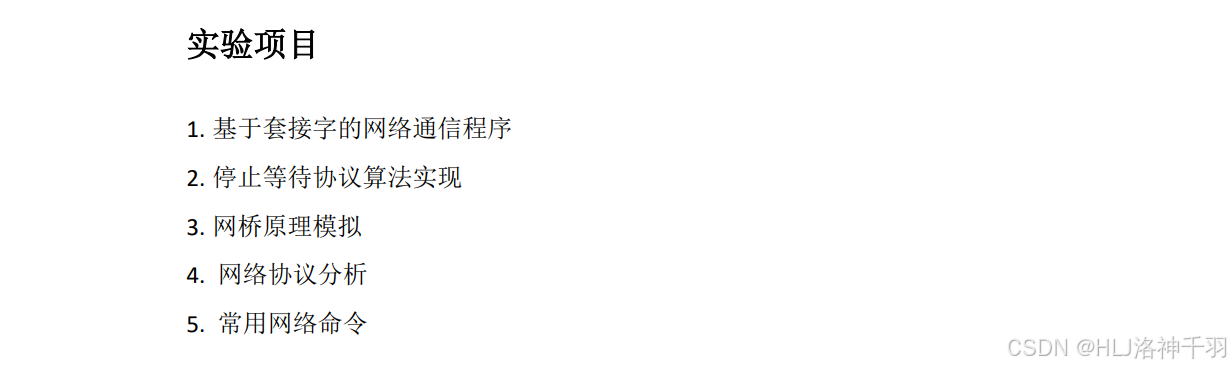
实验一 基于套接字的网络通信程序(2 学时)
一.实验目的
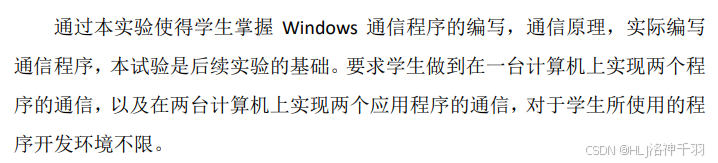
二.实验环境

三.实验内容及步骤
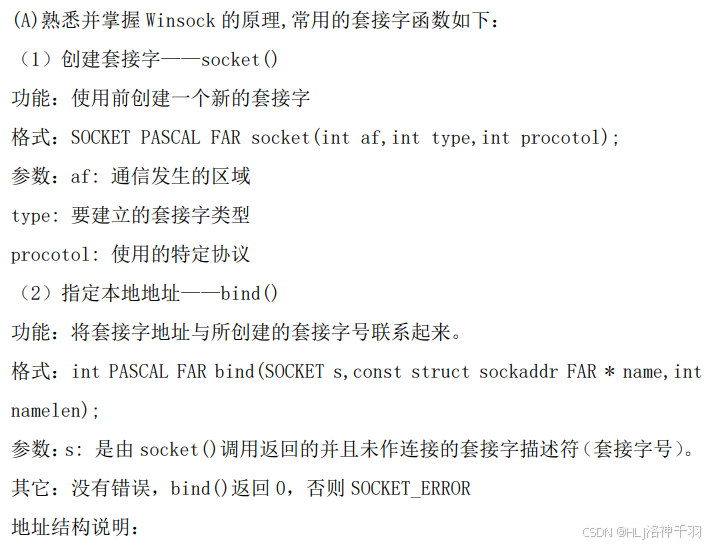
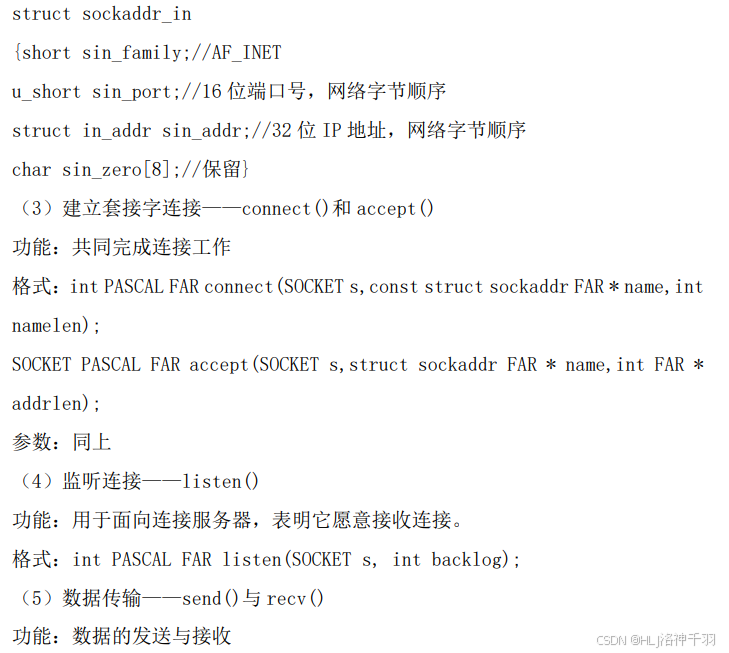
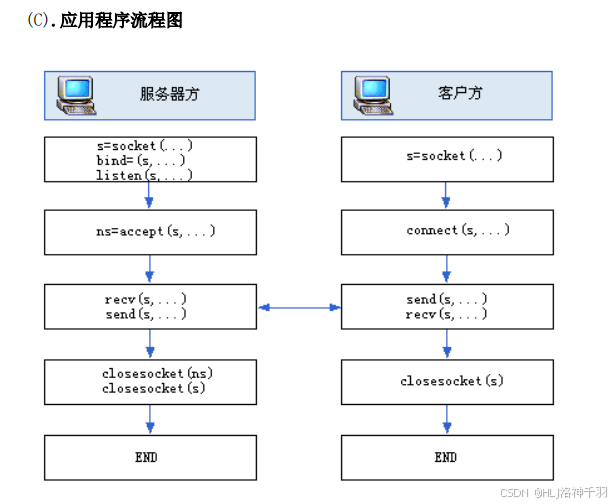
四.实验需要完成的功能
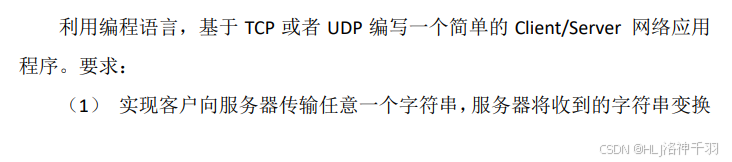
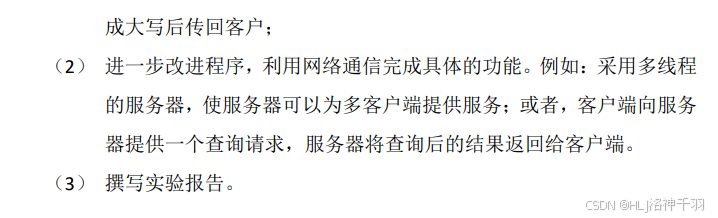
五、实验代码
ClientDemo
java
package cn.hd.sy1;

import java.io.IOException;
import java.io.InputStream;
import java.io.OutputStream;
import java.net.Socket;
import java.util.Scanner;

//客户端
public class ClientDemo {
    public static void main(String[] args) throws IOException {
        Scanner scanner = new Scanner(System.in);
        System.out.println("等待连接服务端...");
        OutputStream os;
        InputStream is = null;
        Socket s = new Socket("127.0.0.1", 1000);
        System.out.println("连接服务端成功!");
        while (true) {
            System.out.println("请输入:");
            os = s.getOutputStream();
            String str = scanner.next();
            if ("exit".equals(str)) {
                break;
            }
            os.write(str.getBytes());

            is = s.getInputStream();
            byte[] bytes = new byte[1024];
            int len = is.read(bytes);
            String data = new String(bytes, 0, len);
            System.out.println("服务端:" + data);
        }
        os.close();
        if (is != null) {
            is.close();
        }
        s.close();
    }
}ServerDemo
java
package cn.hd.sy1;

import java.io.IOException;
import java.io.InputStream;
import java.io.OutputStream;
import java.net.ServerSocket;
import java.net.Socket;

//服务端
public class ServerDemo {
    public static void main(String[] args) {
        InputStream is = null;
        OutputStream os = null;
        ServerSocket serverSocket = null;
        Socket socket = null;
        try {
            //服务器监听端口号1000
            serverSocket = new ServerSocket(1000);
            System.out.println("等待连接...");
            socket = serverSocket.accept();
            System.out.println("连接成功!");
            while (true) {
                is = socket.getInputStream();
                byte[] bytes = new byte[1024];
                int len = is.read(bytes);
                String data = new String(bytes, 0, len);
                System.out.println("客户端:" + data);
                os = socket.getOutputStream();
                os.write(data.toUpperCase().getBytes());
                if ("exit".equals(data)) {
                    break;
                }
            }
        } catch (Exception e) {
            e.printStackTrace();
        } finally {
            try {
                if (is != null) {
                    is.close();
                }
                if (os != null) {
                    os.close();
                }
                if (socket != null) {
                    socket.close();
                }
                if (serverSocket != null) {
                    serverSocket.close();
                }
            } catch (IOException e) {
                e.printStackTrace();
            }
        }
    }
}
实验二 停止等待协议算法实现(4 学时)
一.实验目的
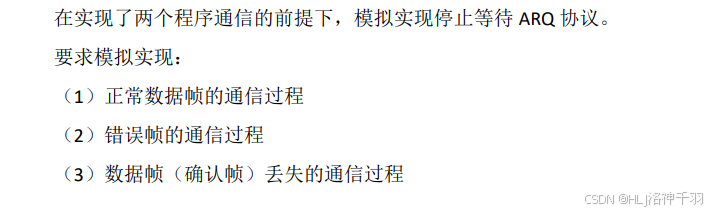
二.实验环境

三.实验内容及步骤
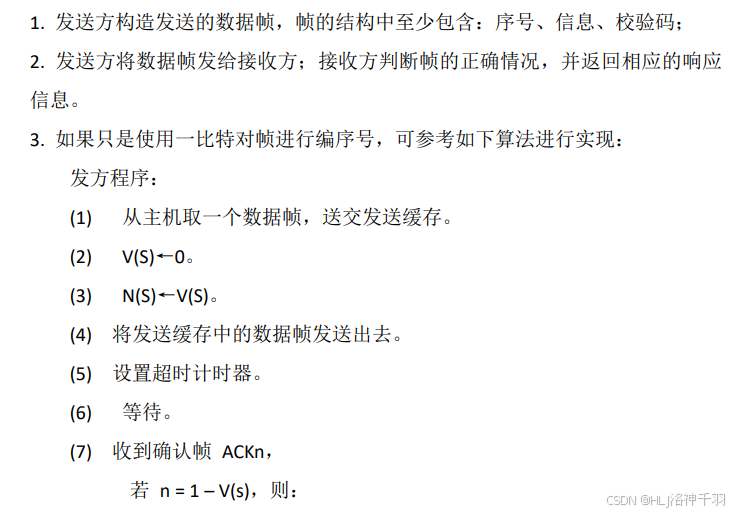
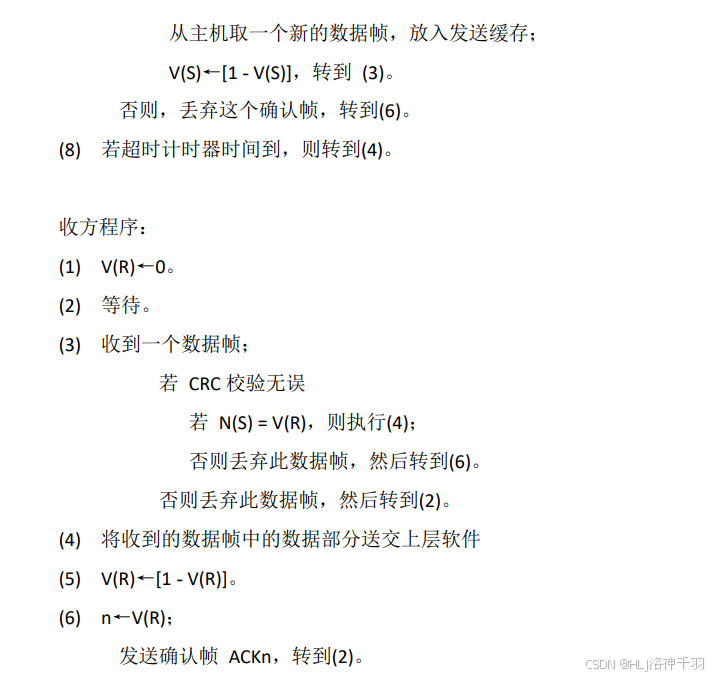
四.实验需要完成的功能
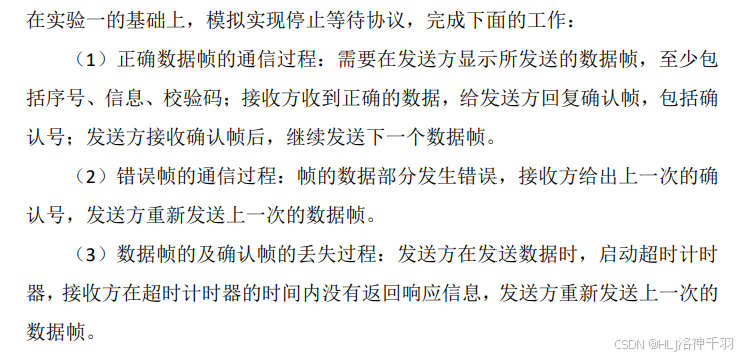

五、实验代码
CyclicRedundancyCheck
java
package cn.hd.sy2;

import java.util.Random;

public class CyclicRedundancyCheck {
    // 生成码 除数P
    private int[] generatingCode;
    public CyclicRedundancyCheck(String str) {
        this.generatingCode = stringToArray(str);
    }
    // 将01字符串转为数组
    private int[] stringToArray(String str) {
        char[] chars = str.toCharArray();
        int[] res = new int[chars.length];
        for (int i = 0; i < chars.length; i++) {
            res[i] = chars[i] - '0';//转换成整型
        }
        return res;
    }

    // 获取帧检验序列FCS
    public String getFCS(String dividend) {
        // 1. 传进来的是被除数:要发送的数据
        StringBuilder dividendBuilder = new StringBuilder(dividend);
        for (int i = 0; i < generatingCode.length - 1; i++) {
            //  往后面补充 除数位数-1个0
            dividendBuilder.append("0");
        }
        dividend = dividendBuilder.toString();
        return calRemainder(stringToArray(dividend));
    }

    // 获取余数
    public String getRemainder(String dividend) {
        return calRemainder(stringToArray(dividend));
    }

    // 计算余数:模2除法求余数
    private String calRemainder(int[] code) {
        // 将余数转换为二进制字符串表示
        int len = code.length - (generatingCode.length - 1); //len是数据部分的长度
        for (int i = 0; i < len; i++) {
            if (code[i] != 0) {
                for (int j = 0; j < generatingCode.length; j++) {
                    //将当前位置的code数组元素与生成码的第j个元素进行异或操作,并将结果赋值给当前位置的code数组元素。
                    code[i + j] ^= generatingCode[j];
                }
            }
        }
        StringBuilder res = new StringBuilder();
        for (int i = len; i < code.length; i++) {
            res.append(code[i]);
        }
        return res.toString();
    }

    // 判断余数是否为0
    public boolean isZero(String data) {
        // 获取余数
        int remainder = Integer.parseInt(data);
        return remainder == 0;
    }

    // 数据包突变
    public String setMutation(String data) {
        int[] res = stringToArray(data);
        Random random = new Random();
        int i = random.nextInt(res.length);
        // 突变
        if (res[i] == 0) {
            res[i] = 1;
        } else {
            res[i] = 0;
        }
        StringBuilder sb = new StringBuilder();
        for (int re : res) {
            sb.append(re);
        }
        return sb.toString();
    }

    public int[] getGeneratingCode() {
        return generatingCode;
    }

    public void setGeneratingCode(String str) {
        this.generatingCode = stringToArray(str);
    }
}Receive
java
package cn.hd.sy2;

import java.io.BufferedReader;
import java.io.InputStreamReader;
import java.io.PrintWriter;
import java.net.ServerSocket;
import java.net.Socket;

public class Receive {
    public static void main(String[] args) {
        try {
            ServerSocket serverSocket = new ServerSocket(8888);
            System.out.println("等待客户端连接...");
            Socket clientSocket = serverSocket.accept();
            System.out.println("客户端已连接");
            BufferedReader input = new BufferedReader(new InputStreamReader(clientSocket.getInputStream()));
            PrintWriter output = new PrintWriter(clientSocket.getOutputStream(),true);
            CyclicRedundancyCheck cyclicRedundancyCheck = new CyclicRedundancyCheck("10011");
            int count = 0;
            while (true) {
                // 从客户端接收数据并显示到控制台上
                String message = input.readLine();
                count = Integer.parseInt(input.readLine());
                if (count == 100) {
                    continue;
                }
                // 获取余数
                String remainder = cyclicRedundancyCheck.getRemainder(message);
                // 校验余数是否为0
                boolean isZero = cyclicRedundancyCheck.isZero(remainder);
                if (isZero) {
                    System.out.println("已经成功接收到第" + count + "帧,数据为:" + message.substring(0,message.length()-4));
                    output.println("ack" + ++count);
                }else {
                    output.println("发生错误!!!想收到ack"+ ++count  + ", 实际收到ack" + --count);
                    System.out.println("收到了错误的数据包:" + message);
                }
                if(message.equals("close")) {
                    break;
                }
            }
            clientSocket.close();
            serverSocket.close();
        } catch (Exception e) {
            e.printStackTrace();
        }
    }
}Sender
java
package cn.hd.sy2;

import java.io.BufferedReader;
import java.io.InputStreamReader;
import java.io.PrintWriter;
import java.net.Socket;
import java.util.Scanner;

public class Sender {
    public static void menu() {
        System.out.println("1->正常数据帧的通信过程");
        System.out.println("2->错误帧的通信过程");
        System.out.println("3->确认帧的丢失的通信过程");
        System.out.println("4->数据帧的丢失的通信过程");
    }

    public static void main(String[] args) {
        menu();
        Scanner scan = new Scanner(System.in);
        try {
            Socket socket = new Socket("127.0.0.1", 8888);
            PrintWriter output = new PrintWriter(socket.getOutputStream(), true);
            BufferedReader input = new BufferedReader(new InputStreamReader(socket.getInputStream()));
            CyclicRedundancyCheck cyclicRedundancyCheck = new CyclicRedundancyCheck("10011");
            int count = 0;
            while (true) {
                System.out.println("请选择菜单:");
                int choose = scan.nextInt();
                System.out.println("请输入数据,目前准备发送第" + count + "帧");
                String message = scan.next();
                String fcs = cyclicRedundancyCheck.getFCS(message);
                switch (choose) {
                    case 1:
                        // 向服务器发送数据包
                        output.println(message + fcs);
                        output.println(count);
                        System.out.println("数据包:" + message + fcs);
                        // 设置超时器
                        //  socket.setSoTimeout(2000);
                        // 从服务器接收响应消息并显示在控制台上
                        String response = input.readLine();
                        System.out.println("正确!想收到" + response + ", 实际收到" + response);
                        count++;
                        break;
                    case 2:
                        // 突变的数据
                        String newMessage = cyclicRedundancyCheck.setMutation(message);
                        // 向服务器发送数据包
                        output.println(newMessage + fcs);
                        output.println(count);
                        System.out.println("原来数据包:" + message + fcs);
                        System.out.println("突变数据包:" + newMessage + fcs);
                        // 从服务器接收响应消息并显示在控制台上
                        response = input.readLine();
                        System.out.println(response);
                        break;
                    case 3:
                        // 向服务器发送数据包
                        output.println(message + fcs);
                        System.out.println("数据包:" + message + fcs);
                        output.println(100);
                        // 设置超时器:睡眠2秒
                        Thread.sleep(2000);
                        System.out.println("ack丢失,超时自动重传!");
                        // 向服务器发送数据包
                        output.println(message + fcs);
                        output.println(count);
                        System.out.println("数据包:" + message + fcs);
                        // 设置超时器
                        //  socket.setSoTimeout(2000);
                        // 从服务器接收响应消息并显示在控制台上
                        response = input.readLine();
                        System.out.println("正确!想收到" + response + ", 实际收到" + response);
                        count++;
                        break;
                    case 4:
                        System.out.println("数据包:" + message + fcs);
                        // 设置超时器:睡眠2秒
                        Thread.sleep(2000);
                        System.out.println("数据帧丢失,超时重传!!!");
                        break;
                    default:
                        System.out.println("输入错误,请重新输入~!");
                        if (message.equals("exit")) {
                            socket.close();
                            break;
                        }
                        break;
                }
            }
        } catch (Exception e) {
            e.printStackTrace();
        }
    }
}
实验三 网桥原理模拟(4 学时)
一.实验目的
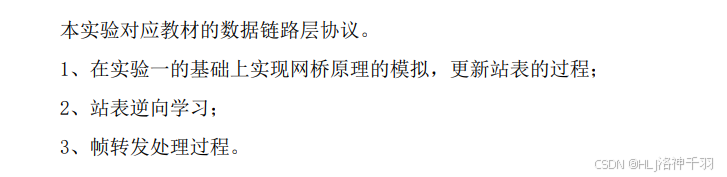
二.实验环境

三.实验内容及步骤
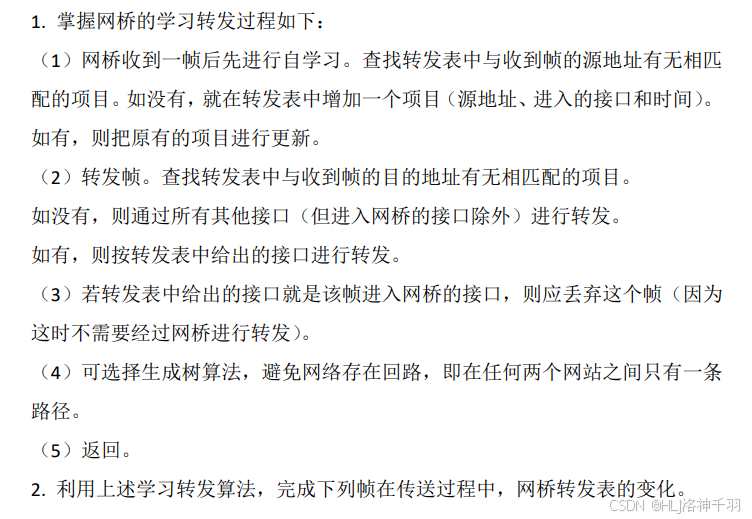
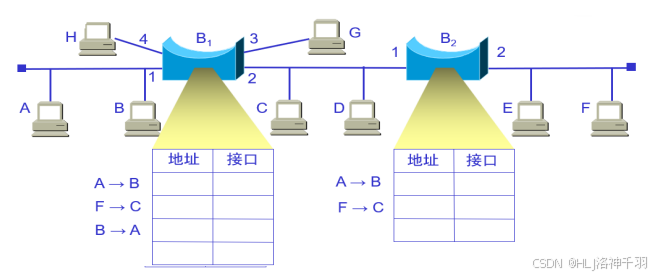
四.实验需要完成的功能
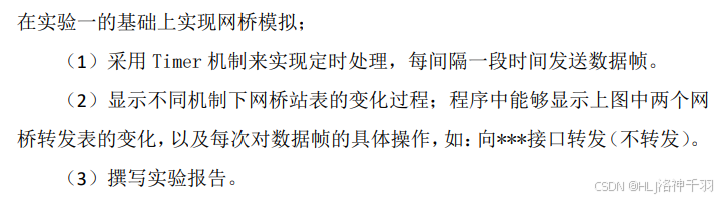
五、实验代码
Host
java
package cn.hd.sy3;

import java.util.HashMap;
import java.util.Map;

public class Host {
    String mac;// mac地址
    String port; // 端口号
    static Map<String, String> hostMap = new HashMap<>();// 存储所有主机信息 mac:port

    public Host(String mac, String port) {
        this.mac = mac;
        this.port = port;
        hostMap.put(mac, port);
    }

    public static void initHosts(Host[] hosts) {
        String[] macName = new String[hosts.length];
        String[] portName = new String[hosts.length];
        for (int i = 0; i < hosts.length; i++) {
            if (i < 10) {
                macName[i] = "liu-he-0" + i;
                portName[i] = "000" + i;
            } else {//主机个数大于10
                macName[i] = "liu-he-" + i;
                portName[i] = "00" + i;
            }
            hosts[i] = new Host(macName[i], portName[i]);
        }
    }

    public static void showHosts() {
        for (Map.Entry<String, String> entry : hostMap.entrySet()) {
            System.out.println("MAC:" + entry.getKey() + "   Port:" + entry.getValue());
        }
    }
}
NetBridge
java
package cn.hd.sy3;

import java.text.SimpleDateFormat;
import java.util.HashMap;
import java.util.Map;
import java.util.Scanner;

public class NetBridge {
    // 转发表
    static Map<String, String[]> exchangeTable = new HashMap<>();
    /*
     * liu-he-00 liu-he-01 aaa
     * liu-he-02 liu-he-02 bbb
     * liu-he-00 liu-he-01 ccc
     * liu-he-00 liu-he-00 eee
     * liu-he-00 liu-he-02 fff
     */
    public static void main(String[] args) {
        Scanner scanner = new Scanner(System.in);
        Host.initHosts(new Host[4]);// 初始化4台主机
        while (true) {
            System.out.println("1. 输入发送帧:源地址、目的地址、信息");
            System.out.println("2. 显示转发表信息");
            System.out.println("3. 显示所有主机信息");
            System.out.println("4. 退出");
            String choose = scanner.next();
            switch (choose) {
                case "1":
                    System.out.println("请输入:");
                    scanner.nextLine(); // 目的清除缓冲区
                    String frame = scanner.nextLine();
                    NetBridge.transferFrame(frame);
                    break;
                case "2":
                    NetBridge.showExchangeTable();
                    break;
                case "3":
                    Host.showHosts();
                    break;
                case "4":
                    System.exit(0);
                    break;
                default:
                    System.out.println("输入错误,请重新输入!");
                    break;
            }
        }
    }

    // 显示转发表信息
    public static void showExchangeTable() {
        for (Map.Entry<String, String[]> entry : exchangeTable.entrySet()) {
            System.out.println("MAC:" + entry.getKey() + "   Port:" + entry.getValue()[0] + "   Date:" + entry.getValue()[1]);
        }
    }

    // 传输帧
    public static void transferFrame(String frame) {
        String[] data = frame.split(" ");
        String srcMac = data[0]; // 源地址
        String dstMac = data[1]; // 目的地址
        String info = data[2];// 信息
        // 学习:查找转发表  entry:键值对 -> mac:port
        // 源地址是否存在
        boolean isSrcExist = exchangeTable.containsKey(srcMac);
        // 目的地址是否存在
        boolean isDestExist = exchangeTable.containsKey(dstMac);
        // 源地址不在转发表中:需要加入交换表
        // 源地址在转发表中:需要更新交换表中对应的进入接口和有效时间
        insertOrUpdateExchangeTable(srcMac, isSrcExist);
        // 目的地址存在
        if (isDestExist) {
            System.out.println("查找到目的地址:" + dstMac + ",直接转发信息" + info);
        } else {
            // 目的地址不存在:需要广播
            receiveBroadCast(srcMac, dstMac, info);
        }
    }

    public static void insertOrUpdateExchangeTable(String srcMac, boolean isSrcExist) {
        SimpleDateFormat dateFormat = new SimpleDateFormat("yyyy-MM-dd HH:mm:ss");
        // 1. 获取当前 mac:port
        String curMac = srcMac;
        String curPort = Host.hostMap.get(srcMac);
        String date = dateFormat.format(System.currentTimeMillis());
        exchangeTable.put(curMac, new String[]{curPort, date});
        // 2. 存在则更新
        if (isSrcExist) {
            System.out.println("源Mac地址为:" + srcMac);
            System.out.println("加入转发表的端口:" + curPort);
            System.out.println("更新加入的时间为:" + date);
        } else {
            // 不存在则新增
            System.out.println("源Mac地址为:" + srcMac);
            System.out.println("加入了转发表的端口:" + curPort);
            System.out.println("加入的时间为:" + date);
        }
    }

    //查找转发表中与收到帧的目的地址有无相匹配的项目
    //如果没有 -> 向所有其他接口转发
    //如果 有  -> 按转发表给出的接口进行转发
    //若转发表中给出的接口就是该帧进入网桥的接口,则丢弃该帧
    //(因为这时不需要经过网桥进行转发:同一个端口下)
    public static void receiveBroadCast(String srcMac, String dstMac, String info) {
        // 遍历所有主机
        for (Map.Entry<String, String> entry : Host.hostMap.entrySet()) {
            String curMac = entry.getKey();
            String curPort = entry.getValue();
            // 4.1 发送时的接口
            String srcPort = Host.hostMap.get(srcMac);
            // 4.2 接收时的接口
            String dstPort = Host.hostMap.get(dstMac);
            if (curMac.equals(dstMac) && srcPort.equals(dstPort)) {
                System.out.println(dstPort + "接口丢弃了该帧, 不需要经过网桥转发,该帧就是进入网桥的接口");
                System.out.println("已收到消息:" + info);
                continue;
            }
            if (dstMac.equals(curMac)) {
                System.out.println("转发:地址" + curMac + "通过" + curPort + "接口收下了该帧");
                System.out.println("消息为:" + info);
            }
        }
    }
}
实验四 网络协议分析(4 学时)
一.实验目的
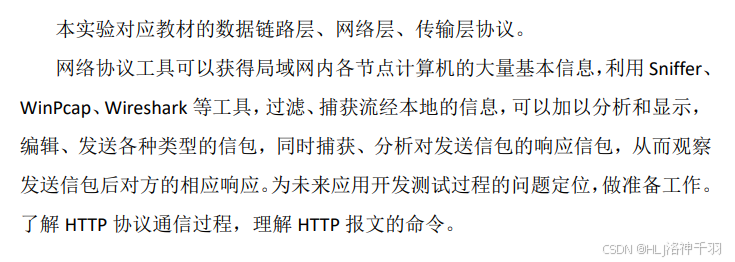
二.实验环境

三.实验内容及步骤
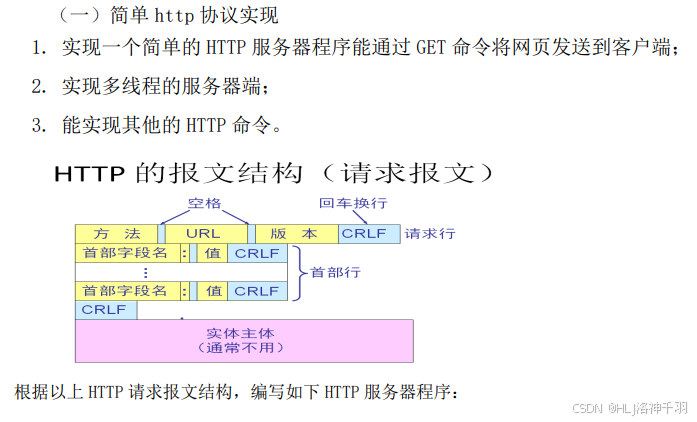
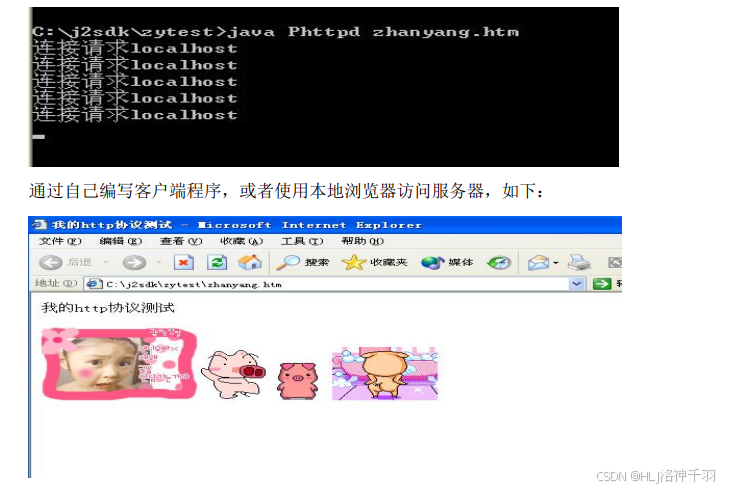
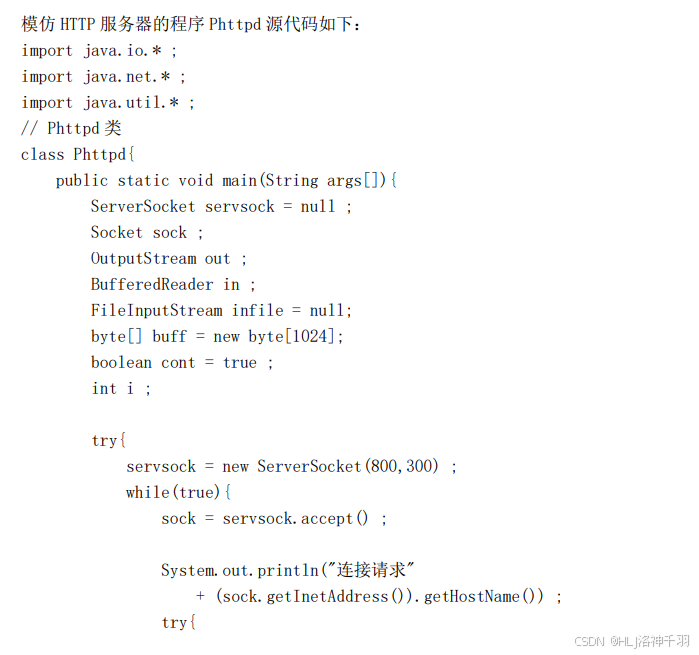
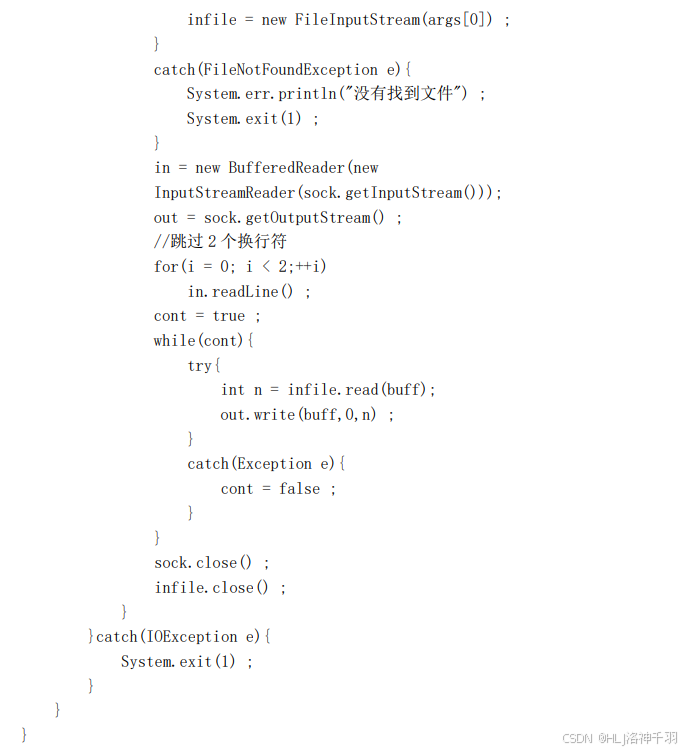
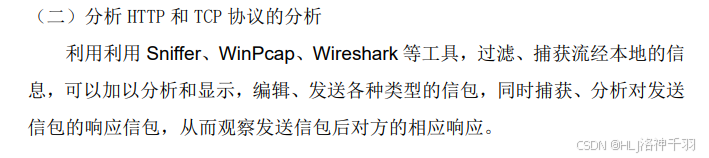
四.实验需要完成的功能

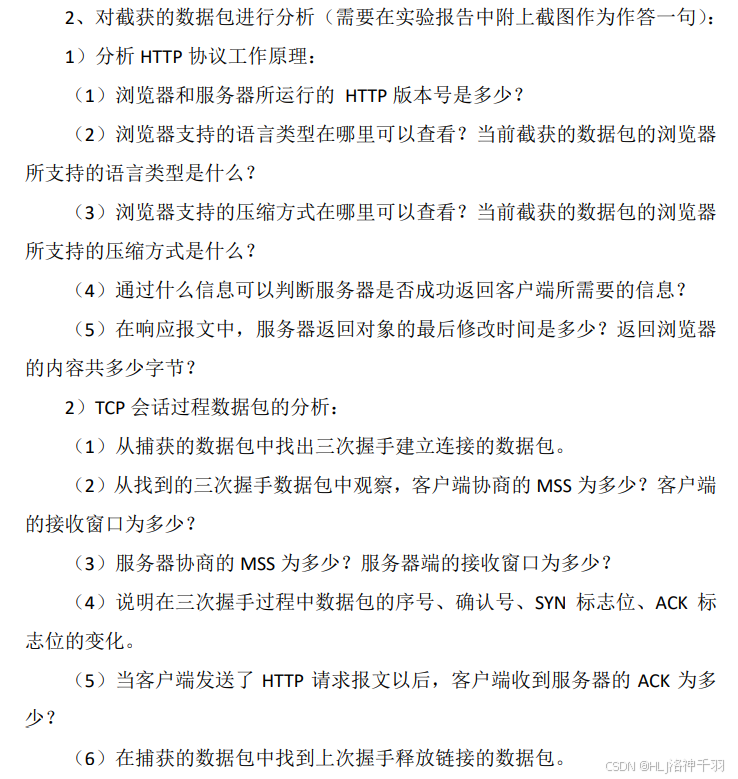
五、实验代码
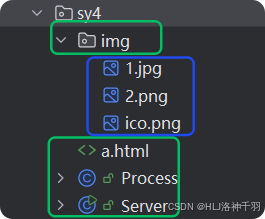
Process
java
package cn.hd.sy4;

import java.io.*;
import java.net.Socket;

public class Process implements Runnable {
    Socket socket;

    public Process(Socket socket) {
        this.socket = socket;
    }

    @Override
    public void run() {
        try {
            BufferedReader br = new BufferedReader(new InputStreamReader(socket.getInputStream()));//字节流转换成字符流
            String ss = br.readLine();//按行读
            System.out.println(ss);//打印请求行
            String s = ss.split(" ")[1];//显示数组中第二个
            System.out.println(s);//打印资源路径
            String path = s.substring(1);
            System.out.println(path);
            OutputStream os = socket.getOutputStream();
            int len;
            byte[] b = new byte[1024];
            //向客户端发送HTTP响应头,版本为1.1,状态码为200,表示请求成功
            os.write("HTTP/1.1 200 OK\r\n".getBytes());
            //根据资源路径的不同,设置不同的响应头中的content-Type字段
            if (path.endsWith(".html")) {
                os.write("content-Type:text/html\r\n".getBytes());//HTML类型
            } else if (path.endsWith(".jpg") || path.endsWith(".jpeg")) {
                os.write("content-Type:image/jpeg\r\n".getBytes());//JPEG类型
            } else if (path.endsWith(".png")) {
                os.write("content-Type:image/png\r\n".getBytes());//PNG类型
            } else if (path.equals("favicon.ico")) {
                os.write("content-Type:text/plain\r\n".getBytes());//文本类型
                os.write("\r\n".getBytes());
                os.close();
                br.close();
                return;
            }
            os.write("\r\n".getBytes());//添加空行作为响应头和响应体之间的分隔符
            FileInputStream fileInputStream = new FileInputStream("D:\\experimentDemo\\ComputerNetwork\\src\\cn\\hd\\sy4\\" + path);//数据单元
            while ((len = fileInputStream.read(b)) != -1) {
                os.write(b, 0, len);//将文件内容写入输出流
            }
            os.close();
            fileInputStream.close();
            br.close();
        } catch (IOException e) {
            e.printStackTrace();
        }
    }
}
Server
java
package cn.hd.sy4;

import java.io.IOException;
import java.net.ServerSocket;
import java.net.Socket;

public class Server {

    //http://localhost:8080/a.html
    public static void main(String[] args) {
        System.out.println("正在等待连接...");
        Server server = new Server();
        server.startServer();
    }

    public void startServer() {
        try {
            ServerSocket serverSocket = new ServerSocket(8080);
            while (true) {
                Socket socket = serverSocket.accept();
                Thread thread = new Thread(new Process(socket));//多线程
                thread.start();
            }
        } catch (IOException e) {
            e.printStackTrace();
        }
    }
}
a.html
html
<!DOCTYPE html>
<html lang="en">
<head>
    <meta charset="UTF-8">
    <title>webpage</title>
    <link rel="icon" type="image/png" href="img/ico.png">
</head>
<body>
<p style="font-size: xx-large;text-align: center">我的http协议测试</p>
<hr>
<div style="text-align: center;">
    <img src="img/1.jpg" style="width: 20%" alt="图片1">
    <img src="img/2.png" style="width: 20%" alt="图片2">
</div>
<hr/>
</body>
</html>
实验五 常用网络命令(2 学时)
一.实验目的
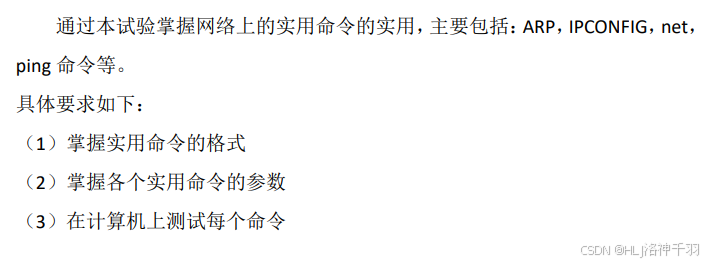
二.实验环境

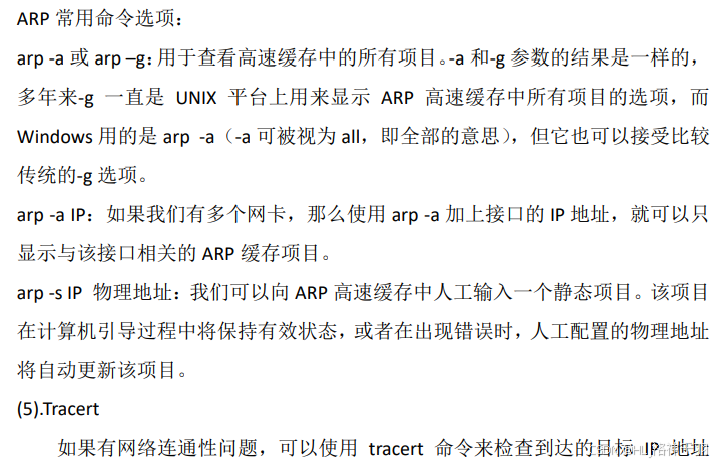
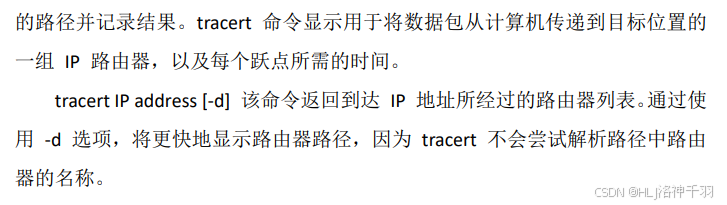
三.实验内容及步骤
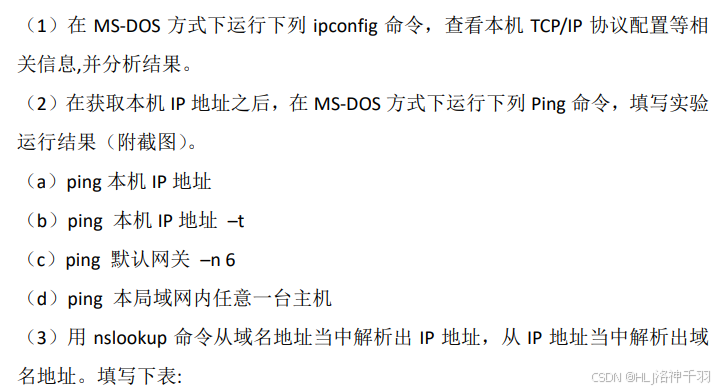
四.实验需要完成的功能
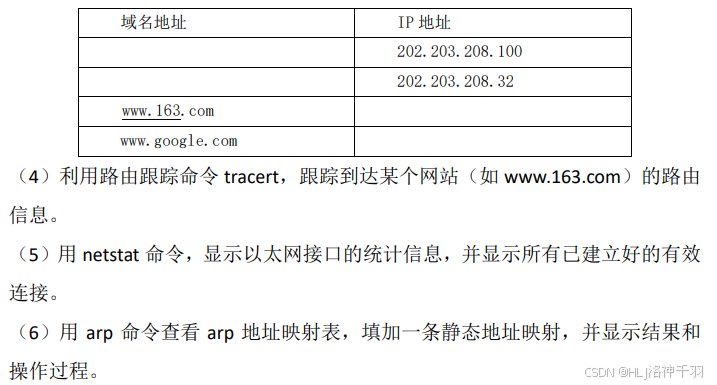
五、实验代码
略。
若觉得有帮助,欢迎点赞关注,一起成长进步~
声明:本文仅供学习交流,禁作商用;禁篡改、歪曲及有偿传播,引用需标明来源。侵权必究。