大家好,我是加洛斯。是一名全栈工程师👨💻,这里是我的知识笔记与分享,旨在把复杂的东西讲明白。如果发现有误🔍,万分欢迎你帮我指出来!废话不多说,正文开始 👇
一、什么是Pinia
Pinia是Vue.js的下一代状态管理库 ,由Vue.js核心团队维护。相比Vuex``Pinia提供了更简洁、直观的API。
"状态"就是当前程序运行时"留在内存里的、会变化的数据" 。
状态管理就是把这些数据从"散落在各个组件里"抽出来,集中存、集中改、集中通知 ,让任何组件都能同一份数据源、统一规则地读取和更新,避免:
- 父→子→孙,一层层 props 传递(props drilling)
- 事件一层层 $emit 回去
- 不同组件各自 copy 一份数据,改完互相不一致
二、上手Pinia
2.1 安装Pinia
js
# 使用npm
npm install pinia

# 使用yarn
yarn add pinia

# 使用pnpm
pnpm add pinia
2.2 初始化与基础配置
在Vue应用中初始化Pinia:
javascript
// main.js / main.ts
import { createApp } from 'vue'
import { createPinia } from 'pinia'
import App from './App.vue'

// 创建Pinia实例
const pinia = createPinia()

// 创建Vue应用并挂载Pinia
const app = createApp(App)
app.use(pinia)
app.mount('#app')
三、创建Stroe
3.1 什么是 Store?
Store是Pinia的核心概念,它是一个保存状态 和业务逻辑 的容器。可以把Store理解为:
- 数据仓库:存储应用程序的状态
- 业务逻辑中心:处理数据的获取、修改
- 可复用模块:可以在任何组件中使用
3.2 创建基础 Store
在项目中创建stores目录,然后创建一个Store,我们先来一个简单的案例,就弄一个计数器:counterStore
javascript
import { defineStore } from 'pinia'

// 使用 defineStore 定义 Store
// 第一个参数 'counter' 是 Store 的唯一ID,方便其他组件使用这个 Store
// 第二个参数是 Store 的配置
export const counterStore = defineStore('counter', {
  // state: 定义初始状态(相当于组件的data)
  state: () => ({
    count: 1,
    name: '我的计数器'
  }),
  // actions: 方法(相当于组件的方法)
  actions: {
    increment() {
      this.count++  // 使用 this 访问 state
    },
    decrement() {
      this.count--
    },
    reset() {
      this.count = 1
    },
    setName(newName) {
      this.name = newName
    }
  }
})
3.3 在组件中使用Store
这个我们一步一步来,先给各位讲清楚
- 我们首先引用刚刚创建的
counterStore,引用后我们获取这个组件的实例,接下来我们就可以使用这个stroe了。
js
import { counterStore } from '@/stores/counterStore'

// 使用Store
const store = counterStore()- 我们先在页面显示初始化的内容
js
<template>
  <div class="counter">
    <h2>{{ store.name }}</h2>
    <!-- 显示状态 -->
    <p>当前计数:{{ store.count }}</p>
  </div>
</template>

<script setup>
import { counterStore } from '@/stores/counterStore'

// 使用Store
const store = counterStore()
</script>
可以看到我们刚刚自定义的name与count已经成功被我们获取到了!

- 接下来我们可以调用组件中的一些方法,可以直接使用 实例.方法名 来调用方法,这些方法都是我们在counterStore中定义的。
js
<template>
  <div class="counter">
    <h2>{{ store.name }}</h2>
    <!-- 显示状态 -->
    <p>当前计数:{{ store.count }}</p>
    <!-- 调用action -->
    <div class="buttons" style="display: flex; gap: 5px">
      <button @click="store.increment()">增加</button>
      <button @click="store.decrement()">减少</button>
      <button @click="store.reset()">重置</button>
    </div>
  </div>
</template>

<script setup>
import { counterStore } from '@/stores/counterStore'

// 使用Store
const store = counterStore()
</script>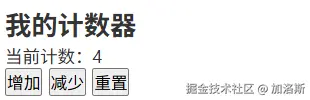
至此,一个简单的store就写好了。
3.4 数据持久化
Pinia的state只是运行时内存里的普通 JS 对象;一旦 F5/刷新,整个 JS 上下文被销毁,内存被清空,状态自然跟着消失;
Pinia 本身不负责持久化 ,它只做"状态管理",而不是"状态存档"。上面的例子我们可以进行刷新,然后当前计数就会重新变为1,但有的时候我们需要保持我们的状态,例如你登录时候存储的信息,不能一刷新就没了,所以我们需要用到pinia-plugin-persistedstate插件。
- 首先安装
pinia-plugin-persistedstate插件
js
npm i pinia-plugin-persistedstate- 接下来在
main.js/main.ts中引用
js
import { createPinia } from 'pinia'
import piniaPluginPersistedstate from 'pinia-plugin-persistedstate'

const pinia = createPinia()
pinia.use(piniaPluginPersistedstate)
app.use(pinia)- 在
Store中添加persist: true开启数据持久化
js
import { defineStore } from 'pinia'

// 使用 defineStore 定义 Store
// 第一个参数 'counter' 是 Store 的唯一ID,方便其他组件使用这个 Store
// 第二个参数是 Store 的配置
export const counterStore = defineStore('counter', {
  // 开启数据持久化
  persist: true,
  // state: 定义初始状态(相当于组件的data)
  state: () => ({
    count: 1,
    name: '我的计数器'
  }),
  // actions: 方法(相当于组件的方法)
  actions: {
    increment() {
      this.count++  // 使用 this 访问 state
    },
    decrement() {
      this.count--
    },
    reset() {
      this.count = 1
    },
    setName(newName) {
      this.name = newName
    }
  }
})
这样操作之后即使是刷新页面,计数器也会保持刚刚你所操作的结果。
四、State 详解
在Pinia里,state 就是 "一段会触发界面自动刷新的普通 JavaScript 数据" 。
- 它本质上是一个被 Vue 包装过的对象/基本类型 (底层用
reactive()/ref()做的代理)。 - 你对它做任何修改,Vue 都能感知到 ,然后自动把用到这份数据的组件重新渲染。
- 在 Pinia 的
defineStore里,state 通常写成函数返回对象,用来给每个Store实例提供独立的初始数据。
4.1 定义各种类型的State
js
// stores/user.js
export const useUserStore = defineStore('user', {
  state: () => ({
    // 基本类型
    id: null,
    username: '',
    isLoggedIn: false,
    age: 0,

    // 对象类型
    profile: {
      avatar: 'default-avatar.png',
      email: '',
      phone: '',
      address: {
        city: '',
        district: '',
        detail: ''
      }
    },

    // 数组类型
    roles: ['user'],  // 默认角色
    permissions: [],
    favoriteIds: [1, 3, 5],
  }),
})
4.2 响应式解构的正确方式
js
<template>
  <div>
    <!-- ❌ 错误做法 -->
    <div>
      <h3>❌ 错误:直接解构</h3>
      <p>用户名:{{ username }}</p>
      <p>主题:{{ theme }}</p>
      <input v-model="username" placeholder="修改用户名试试">
      <p>修改后视图不会更新!</p>
    </div>

    <!-- ✅ 正确做法 -->
    <div>
      <h3>✅ 正确:使用storeToRefs</h3>
      <p>用户名:{{ reactiveUsername }}</p>
      <p>主题:{{ reactiveTheme }}</p>
      <input v-model="reactiveUsername" placeholder="修改用户名">
      <p>视图会实时更新!</p>
    </div>

    <!-- ✅ 另一种正确做法 -->
    <div>
      <h3>✅ 正确:直接访问Store</h3>
      <p>用户名:{{ userStore.username }}</p>
      <p>年龄:{{ userStore.age }}</p>
      <input v-model="userStore.username" placeholder="直接修改">
    </div>
  </div>
</template>

<script setup>
import { useUserStore } from '@/stores/user'
import { storeToRefs } from 'pinia'

const userStore = useUserStore()

// ❌ 错误:直接解构(失去响应性)
const { username, settings } = userStore
const theme = settings.theme

// ✅ 正确:使用storeToRefs
const {
  username: reactiveUsername,
  age: reactiveAge,
  settings: reactiveSettings
} = storeToRefs(userStore)
const reactiveTheme = reactiveSettings.value.theme
</script>
4.3 解构赋值storeToRefs
storeToRefs 是 Pinia 官方提供的一个小工具函数 ,只做一件事儿: "把 Store 里的所有 state(包括嵌套对象)一次性转成 ref,同时保持响应性。"
js
<template>
  <div style="display: flex; gap: 40px">
    <!-- ❌ 错误:直接解构 -->
    <div>
      <h3>❌ 错误:直接解构(丢失响应性)</h3>
      <p>count:{{ count }}</p>
      <p>name:{{ name }}</p>
      <input v-model="name" placeholder="改名字" />
      <button @click="increment">+1</button>
      <p>点按钮 / 改输入框 → 视图<strong>不会</strong>更新</p>
    </div>

    <!-- ✅ 正确:storeToRefs -->
    <div>
      <h3>✅ 正确:storeToRefs</h3>
      <p>count:{{ reactiveCount }}</p>
      <p>name:{{ reactiveName }}</p>
      <input v-model="reactiveName" placeholder="改名字" />
      <button @click="inc">+1</button>
      <p>操作 → 视图<strong>会</strong>实时更新</p>
    </div>

    <!-- ✅ 直接访问 store -->
    <div>
      <h3>✅ 直接访问 store</h3>
      <p>count:{{ store.count }}</p>
      <p>name:{{ store.name }}</p>
      <input v-model="store.name" placeholder="直接改" />
      <button @click="store.increment">+1</button>
    </div>
  </div>
</template>

<script setup>
import { counterStore } from '@/stores/counterStore'
import { storeToRefs } from 'pinia'

const store = counterStore()

/* ❌ 直接解构 → 失去响应性 */
const { count, name, increment } = store

/* ✅ 保持响应性 */
const { count: reactiveCount, name: reactiveName } = storeToRefs(store)
function inc() {
  store.increment()
} // 方法不用解构,直接调
</script>
五、Getters
Getters是Pinia中用于计算派生状态的函数,类似于Vue中的计算属性。它们用于从store的状态中派生出新的值,并且会缓存结果,只有当依赖的状态发生变化时才会重新计算。
5.1 基本用法
js
import { defineStore } from 'pinia'

// 使用 defineStore 定义 Store
// 第一个参数 'counter' 是 Store 的唯一ID,方便其他组件使用这个 Store
// 第二个参数是 Store 的配置
export const counterStore = defineStore('counter', {
  // 开启数据持久化
  persist: true,
  // state: 定义初始状态(相当于组件的data)
  state: () => ({
    count: 1,
    name: '我的计数器'
  }),
  // getters: 计算属性(相当于组件的computed)
  getters: {
    doubleCount(state) {
      return state.count * 2
    }
  },
  // actions: 方法(相当于组件的方法)
  actions: {
    increment() {
      this.count++  // 使用 this 访问 state
    },
    decrement() {
      this.count--
    },
    reset() {
      this.count = 1
    },
    setName(newName) {
      this.name = newName
    }
  }
})
js
<template>
  <div class="counter">
    <h2>{{ store.name }}</h2>
    <!-- 显示状态 -->
    <p>当前计数:{{ store.count }}</p>
    <p>当前计数的两倍:{{ store.doubleCount }}</p>
    <!-- 调用action -->
    <div class="buttons" style="display: flex; gap: 5px">
      <button @click="store.increment()">增加</button>
      <button @click="store.decrement()">减少</button>
      <button @click="store.reset()">重置</button>
    </div>
  </div>
</template>

<script setup>
import { counterStore } from '@/stores/counterStore'

// 使用Store
const store = counterStore()
</script>
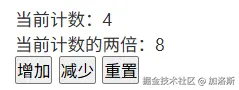
我们来看结果,是不是很简单!
5.2 高级特性
- 访问其他 Store 的 Getters
javascript
import { defineStore } from 'pinia'
import { useAuthStore } from './auth'

export const useUserStore = defineStore('user', {
  state: () => ({
    profile: null
  }),

  getters: {
    // 访问其他 store
    isAdmin() {
      const authStore = useAuthStore()
      return authStore.user?.role === 'admin'
    },

    // 结合本 store 状态
    userInfo(state) {
      const authStore = useAuthStore()
      return {
        ...state.profile,
        role: authStore.user?.role
      }
    }
  }
})- TypeScript 支持
typescript
import { defineStore } from 'pinia'

interface Item {
  id: number
  name: string
  price: number
}

interface CounterState {
  count: number
  items: Item[]
}

export const useCounterStore = defineStore('counter', {
  state: (): CounterState => ({
    count: 0,
    items: []
  }),

  getters: {
    // 明确指定返回类型
    doubleCount(state): number {
      return state.count * 2
    },

    // 带参数的 getter
    getItemById(state): (id: number) => Item | undefined {
      return (id: number) => state.items.find(item => item.id === id)
    },

    // 使用 this 的类型推断
    totalPrice(): number {
      return this.items.reduce((total, item) => total + item.price, 0)
    }
  }
})- 组合式 API 风格(Setup Store)
javascript
import { defineStore } from 'pinia'
import { ref, computed } from 'vue'

export const useCounterStore = defineStore('counter', () => {
  const count = ref(0)
  const items = ref([
    { id: 1, name: 'Item A', price: 10 },
    { id: 2, name: 'Item B', price: 20 }
  ])

  // Getters 使用 computed 定义
  const doubleCount = computed(() => count.value * 2)
  const totalPrice = computed(() =>
    items.value.reduce((total, item) => total + item.price, 0)
  )

  // 带参数的 getter(使用函数返回 computed)
  const getItemById = (id) =>
    computed(() => items.value.find(item => item.id === id))

  return {
    count,
    items,
    doubleCount,
    totalPrice,
    getItemById
  }
})
5.3 避免的常见问题
javascript
getters: {
  // ❌ 错误:直接修改状态
  incrementCount(state) {
    state.count++  // 不要在 getter 中修改状态!
  },

  // ❌ 错误:没有使用 state 参数
  doubleCount() {
    return this.count * 2  // 在选项式 API 中应该使用 state 参数
  },

  // ✅ 正确
  doubleCount(state) {
    return state.count * 2
  },

  // ✅ 正确(setup 风格中使用 this)
  doubleCount() {
    return this.count * 2  // 在 setup 风格中可以使用 this
  }
}