Redux、React Redux 快速学习上手、简单易懂、知识速查

作者GitHub:https://github.com/gitboyzcf 有兴趣可关注!!!
Redux 是什么?
-
首先理解 "Redux" 是什么?
Redux 是一个小型的独立 JS 库,它就是一个状态管理工具库,相当于Vue中的Pinia(Vuex)
-
它有什么作用?
对整个应用中使用的状态进行集中管理,并可以响应式的更新状态 -
它帮助我解决什么问题?
在型应用项目中每个组件的状态随着开发,逐渐增多 ,冗余也会变多,不易维护;当多个组件需要访问相同的数据时
-
我为什么要使用它?
跨组件共享状态、处理异步数据流
需要共享大量状态的组件(如用户信息、主题设置、购物车)
应用有复杂的状态更新逻辑
需要跟踪状态变化历史
大型团队协作,需要一致的状态管理方式
官网
https://www.redux.org.cn/(英)
https://www.redux.org.cn/(中)
执行流程
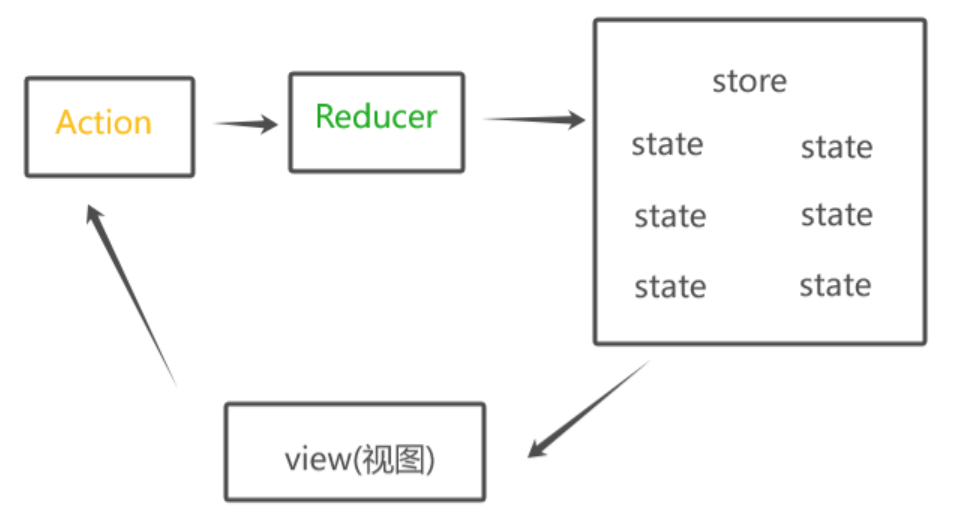
Redux把整个数据修改的流程分成了三个核心概念:State、Action、Reducer
state:一个对象存放数据的管理状态
action:一个对象用来描述如何修改数据
reducer:一个函数根据action的描述生成一个新的state
体验
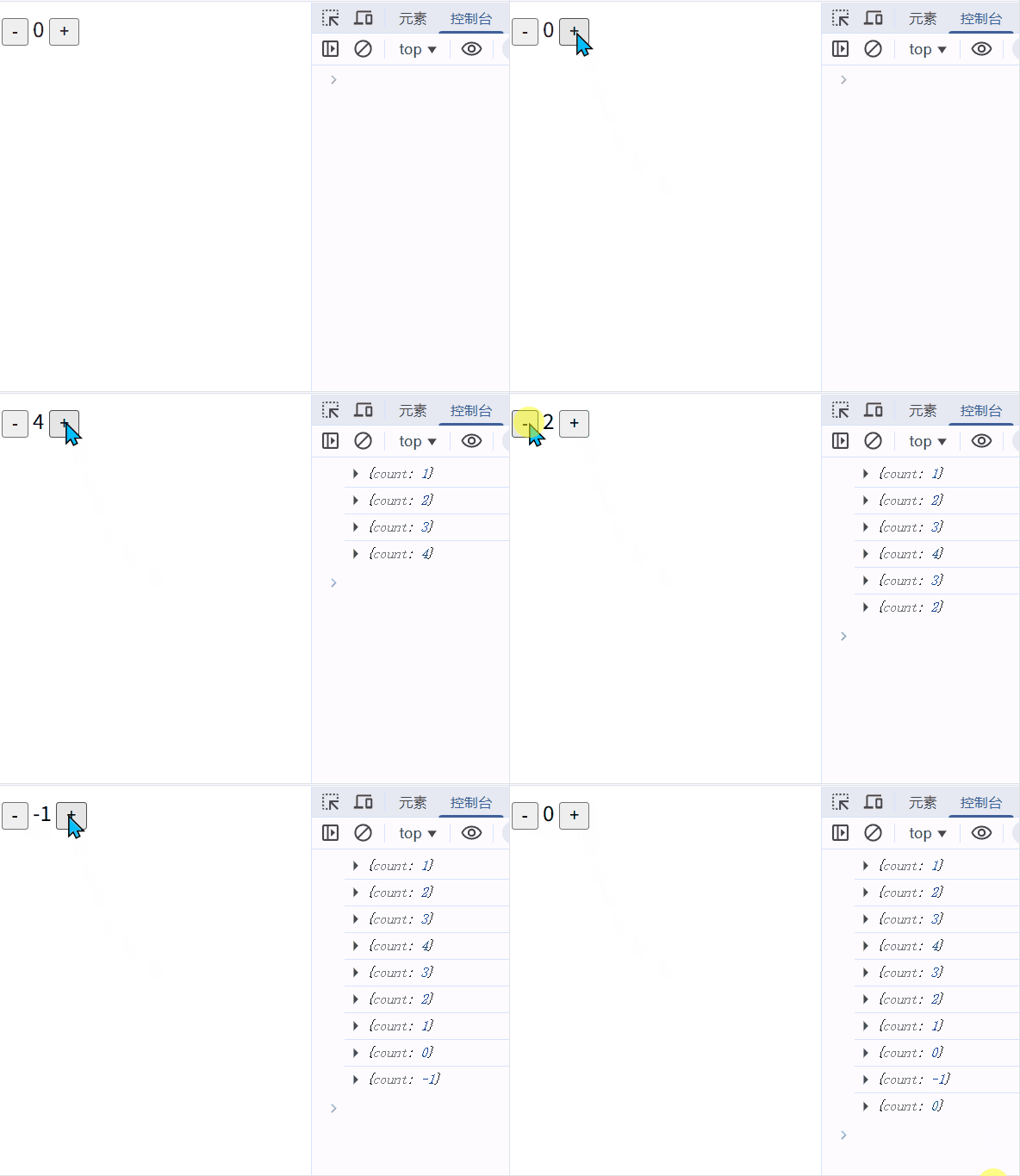
demo.html
html
<!DOCTYPE html>
<html lang="en">

<head>
  <meta charset="UTF-8">
  <meta name="viewport" content="width=device-width, initial-scale=1.0">
  <title>Document</title>
</head>

<body>
  <button id="decrement">-</button>
  <span id="count">0</span>
  <button id="increment">+</button>

  <script type="module">
    import { createStore } from 'https://cdnjs.cloudflare.com/ajax/libs/redux/5.0.1/redux.legacy-esm.min.js';
    // 1.定义reducer函数
    // 作用:根据不同的action对象,返回不同的新的state
    // state:管理的数据初始状态
    // action:对象 type 标记当前想要做什么样的修改

    function reducer(state = { count: 0 }, action) {
      // 数据不可变:基于原始状态生成一个新的状态
      switch (action.type) {
        case 'INCREMENT':
          return { count: state.count + 1 }
        case 'DECREMENT':
          return { count: state.count - 1 }
        default:
          return state
      }
    }
    // 2.使用reducer函数生成store实例
    const store = createStore(reducer)
    // 3.通过store实例的subscribe订阅数据变化
    // 回调函数可以在每次state发生变化的时候自动执行
    store.subscribe(() => {
      document.getElementById('count').innerHTML = store.getState().count
      console.log(store.getState())
    })

    // 4.通过store实例的dispatch函数提交action更改状态
    const inBtn = document.getElementById('decrement')
    inBtn.addEventListener('click', () => {
      store.dispatch({ type: 'DECREMENT' })
    })

    const outBtn = document.getElementById('increment')
    outBtn.addEventListener('click', () => {
      store.dispatch({ type: 'INCREMENT' })
    })
  </script>
</body>

</html>
快速上手
术语解析
在我们继续之前,你需要熟悉一些重要的 Redux 术语:
Action
action 是一个具有 type 字段的普通 JavaScript 对象。你可以将 action 视为描述应用程序中发生了什么的事件.
例如体验代码里的 { type: 'DECREMENT' },当然也可以携带数据,请看下面代码:
js
const addTodoAction = {
  type: "ADD_TODO",
  payload: "Learn Redux",
};
Reducer
reducer 是一个函数,接收当前的 state 和一个 action 对象,必要时决定如何更新状态,并返回新状态(state)。
例如:
js
function reducer(state = { count: 0 }, action) {
  // 数据不可变:基于原始状态生成一个新的状态
  switch (action.type) {
	case 'INCREMENT':
	  return { count: state.count + 1 }
	case 'DECREMENT':
	  return { count: state.count - 1 }
	default:
	  return state
  }
}
Store
当前 Redux 应用的 state 存在于一个名为 store 的对象中
例如 state = { count: 0 }
Dispatch
Redux store 有一个方法叫 dispatch,更新 state 的唯一方法是调用 store.dispatch() 并传入一个 action 对象。
例如 store.dispatch({ type: 'INCREMENT' })
数据流更新动图解析
该图来自redux官网提供
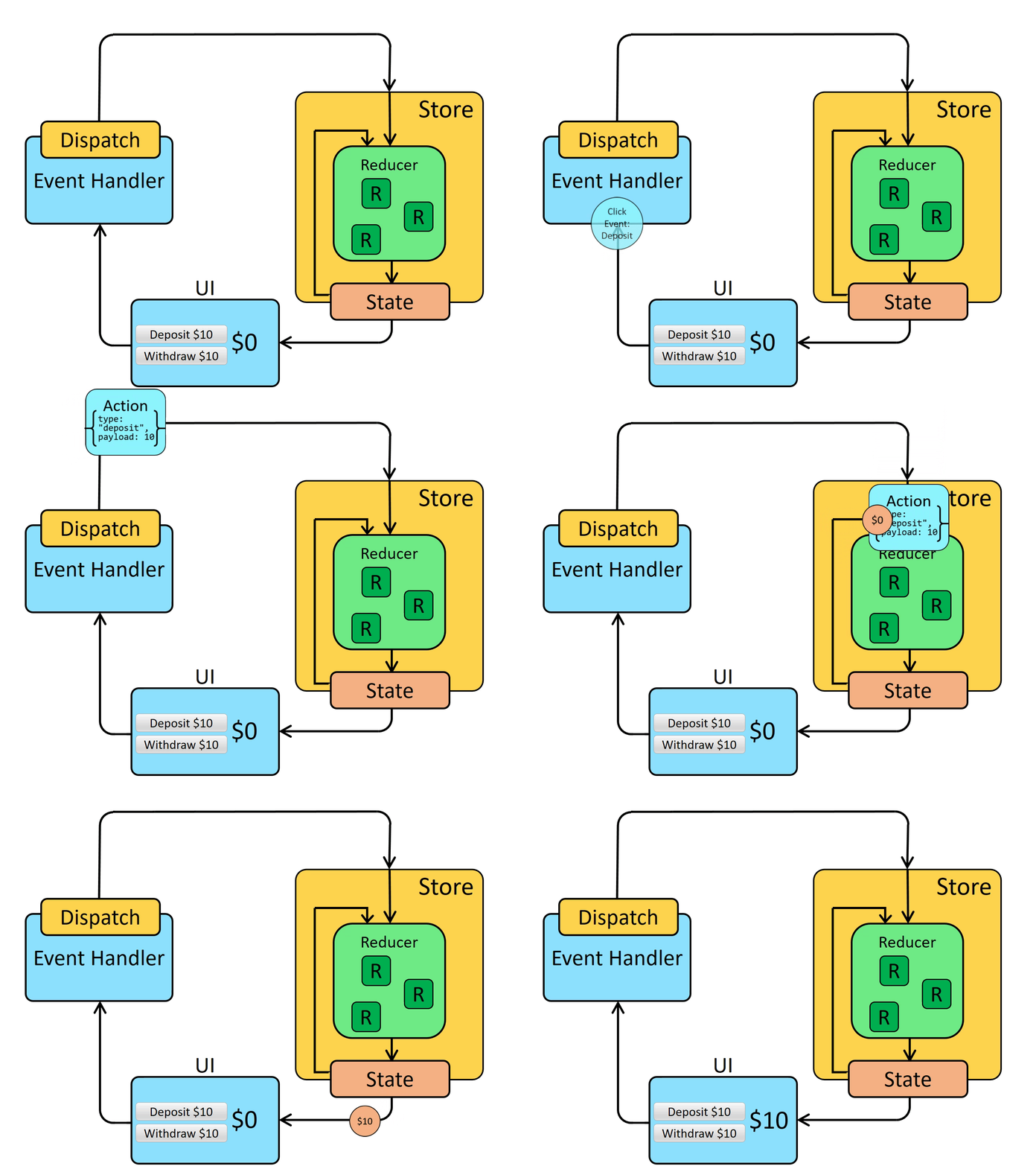
执行流程:
- 首先创建
Store定义自己要管理的state - 然后UI界面引用展示
- 当用户在界面上操作时,比如上图所示添加了一个商品
- 使用
Dispatch根据Action区分用户是什么操作 - 将新数据和旧数据合并,然后更新
Store中的金额state state变化通知UI界面更新操作
React使用Redux
在React中使用redux,官方要求安装俩个其他插件-ReduxToolkit和react-redux
Redux Toolkit 就是Redux的工具库,使其操作Redux更简便
React-Redux 就是React和Redux之间进行关联的工具
结合使用
为了节省时间可以直接使用 vite提供的模版,现成的环境结合使用;当然如果本地有创建好的项目也可以使用
https://stackblitz.com/edit/vitejs-vite-nmchxbgf?file=index.html&terminal=dev
-
安装插件(在终端界面执行下面命令)
bashnpm install @reduxjs/toolkit react-redux -
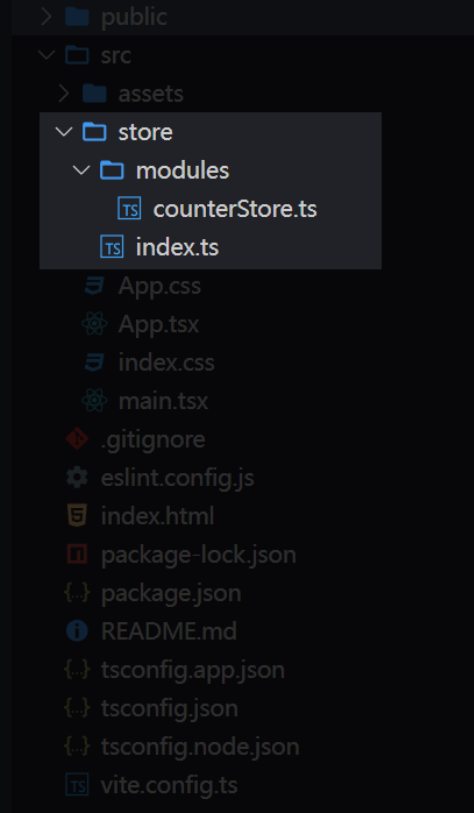
创建基本目录结构
-
写入
store/modules/counterStore.ts代码tsimport { createSlice } from '@reduxjs/toolkit'; const counterStore = createSlice({ name: 'counter', // 初始化state initialState: { count: 0, }, // 修改状态的方法 同步方法 支持直接修改 reducers: { increment(state) { state.count++; }, decrement(state) { state.count--; }, // 第二个参数中的payload属性是在dispatch是调用此方法传的参数 incrementByAmount(state, action: PayloadAction<number>) { state.count += action.payload; }, }, }); //解构出来actionCreater函数 const { increment, decrement } = counterStore.actions; // 获取reducer const reducer = counterStore.reducer; // 以按需导出的方式导出actionCreater export { increment, decrement }; //以默认导出的方式导出reducer export default reducer; -
写入
store/index.ts代码tsimport { configureStore } from '@reduxjs/toolkit'; // 导入子模块reducer import counterReducer from './modules/counterStore.ts'; const store = configureStore({ reducer: { counter: counterReducer, }, }); export default store; -
在React项目使用
react-redux中注入store,修改main.tstsimport { StrictMode } from 'react'; import { createRoot } from 'react-dom/client'; import './index.css'; import App from './App.tsx'; import store from './store'; import { Provider } from 'react-redux'; createRoot(document.getElementById('root')!).render( <StrictMode> <Provider store={store}> <App /> </Provider> </StrictMode> ); -
在
app.tsxUI 中引入使用tsimport { useSelector, useDispatch } from 'react-redux'; // 导入store中的action对象的方法 import { decrement, increment } from './store/modules/counterStore.ts'; function App() { // 用于获取store中的状态 const { count } = useSelector((state: any) => state.counter); // 用于修改store中的状态 const dispatch = useDispatch(); return ( <> <div className="card"> <button onClick={() => dispatch(increment())}>+</button> {count} <button onClick={() => dispatch(decrement())}>-</button> {/* 在此传参会放到counterStore中reducers选项中的incrementByAmount方法的action.payload上 */} <button onClick={() => dispatch(incrementByAmount(20))}>+20</button> </div> </> ); } export default App;
异步更新数据
接着上面示例写
store/modules/counterStore.ts
ts
import { createSlice } from '@reduxjs/toolkit';
import type { PayloadAction } from '@reduxjs/toolkit';

const counterStore = createSlice({
  name: 'counter',
  // 初始化state
  initialState: {
	count: 0,
  },
  reducers: {
	// ...
	 incrementByAmount(state, action: PayloadAction<number>) {
      state.count += action.payload;
    },
  },
});

//解构出来actionCreater函数
const { increment, decrement } = counterStore.actions;
const reducer = counterStore.reducer;

// 模拟异步请求
const incrementAsync = (amount: number) => {
	return (dispatch) => {
	    setTimeout(() => {
	      dispatch(incrementByAmount(amount));
	    }, 1000);
	}
};

export { increment, decrement, incrementAsync };
export default reducer;
app.tsx
在当前文件中引入后使用dispatch更新
ts
{/* 异步更新数据 */}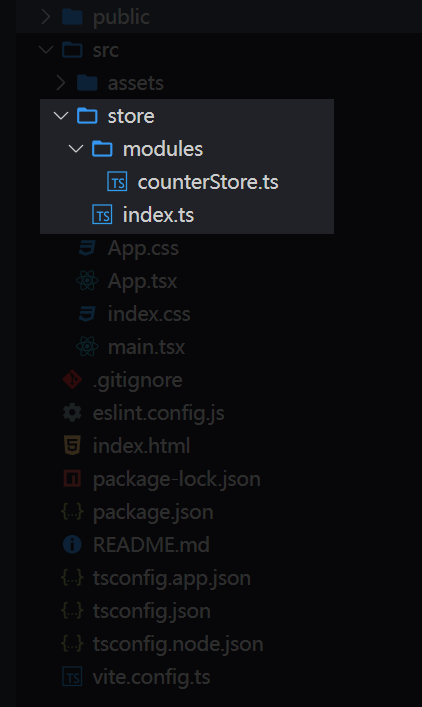
<button onClick={() => dispatch(incrementAsync(5))}>
+100 Async
</button>解析异步流程
点击按钮后 dispatch(incrementAsync(5)) 详细执行过程
-
第一步:incrementAsync(5) 函数调用
javascriptdispatch(incrementAsync(5))incrementAsync 函数执行
jsexport const incrementAsync = (amount) =>{ return (dispatch) => { setTimeout(() => { dispatch(incrementByAmount(amount)) }, 1000) } }- amount 参数被设置为 5
- 返回一个函数 :
(dispatch) => { setTimeout(...) }
此时 dispatch 接收到的内容
jsdispatch( // 接收的是一个函数,而不是普通 action 对象 (dispatch) => { setTimeout(() => { dispatch(incrementByAmount(5)) }, 1000) } ) -
第二步:Redux Thunk 中间件拦截
普通 dispatch vs Thunk dispatch
- 普通 action :
{ type: 'some-action', payload: data } - Thunk action :一个函数
(dispatch, getState) => {}
Redux 中间件链处理
javascript// Redux 中间件检查 dispatch 的内容 if (typeof action === 'function') { // 如果是函数,交给 Redux Thunk 处理 return action(dispatch, getState, extraArgument) } else { // 如果是普通 action,继续传递给 reducer return next(action) } - 普通 action :
-
第三步:Redux Thunk 执行返回的函数
函数被立即执行
javascript// Redux Thunk 执行: (dispatch) => { setTimeout(() => { dispatch(incrementByAmount(5)) // 1秒后执行 }, 1000) }传递 dispatch 参数
- Redux Thunk 将 store 的 dispatch 函数作为参数传入
- 现在函数内部可以使用 dispatch 来派发其他 action
-
第四步:setTimeout 设置定时器
异步任务启动
javascriptsetTimeout(() => { dispatch(incrementByAmount(5)) // 这部分 1 秒后执行 }, 1000)- 设置一个 1000 毫秒的定时器
- 当前 dispatch 调用结束,函数返回
- 主线程继续执行其他代码
-
第五步:1 秒后定时器回调执行
定时器到期
javascriptdispatch(incrementByAmount(5))incrementByAmount 执行流程
-
incrementByAmount 返回 action 对象:
javascript{ type: 'counter/incrementByAmount', payload: 5 } -
Redux 正常处理流程:
-
action 通过中间件链
-
到达 counterSlice 的 reducer
-
执行 incrementByAmount reducer 函数:
javascriptincrementByAmount: (state, action) => { state.value += action.payload // state.value += 5 }
-
-
状态更新并通知所有订阅的组件
-
-
执行时序总结
时刻 0ms: dispatch(incrementAsync(5)) ↓ 时刻 0ms: incrementAsync(5) 返回函数 ↓ 时刻 0ms: Redux Thunk 拦截并执行函数 ↓ 时刻 0ms: setTimeout 设置定时器,dispatch 调用结束 ↓ 时刻 1000ms: 定时器触发 ↓ 时刻 1000ms: dispatch(incrementByAmount(5)) ↓ 时刻 1000ms+: 执行 reducer,更新状态,组件重渲染关键点:dispatch 调用本身在 0ms 时就完成了,真正的状态更新发生在 1000ms 后。这就是 Redux Thunk 实现异步操作的机制。
源码
https://stackblitz.com/edit/vitejs-vite-zfusdp5l
到这里就结束了,后续还会更新 前端 系列相关,还请持续关注!
感谢阅读,若有错误可以在下方评论区留言哦!!!

推荐文章👇