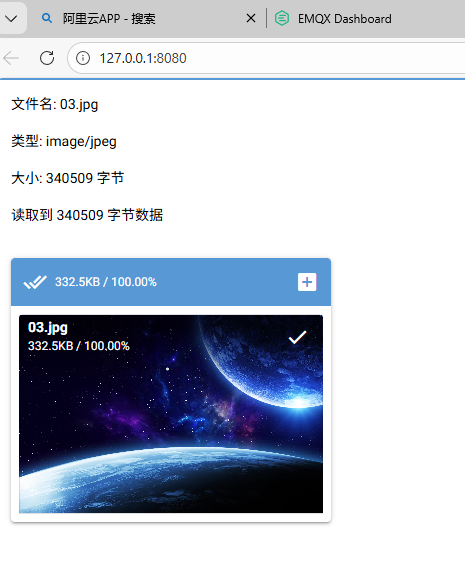
在 NiceGUI 中实现文件上传非常简单且功能强大,支持多种文件类型处理与保存。以下示例展示了如何构建一个带有文件信息展示、类型识别及保存功能的上传组件。
python
import os
from nicegui import ui

CURRENT_DIR = os.path.dirname(os.path.abspath(__file__))  # 获取当前脚本所在目录的绝对路径
upload_dir = os.path.join(CURRENT_DIR, 'uploads')
os.makedirs(upload_dir, exist_ok=True)


# upload_dir = './uploads'
# if not os.path.exists(upload_dir):
#    os.makedirs(upload_dir)

info_area = ui.column().classes('q-mb-md')
async def upload_handler(e):
   file = e.file
   info_area.clear()
   with info_area:
       ui.label(f'文件名: {file.name}')
       ui.label(f'类型: {file.content_type}')
       ui.label(f'大小: {file.size()} 字节')
       if file.content_type == 'application/json':
           data = await file.json()
           ui.json(data)
       elif file.content_type and file.content_type.startswith('text/'):
           text_content = await file.text()
           ui.label(text_content[:500] + '...' if len(text_content) > 500 else text_content)
       else:
           content = await file.read()
           ui.label(f'读取到 {len(content)} 字节数据')
       save_path = os.path.join(upload_dir, file.name)
       await file.save(save_path)
       ui.notify(f'文件已保存到 {save_path}', color='positive')
ui.upload(
   on_upload=upload_handler,
   on_rejected=lambda: ui.notify('文件被拒绝', color='negative'),
   multiple=True,
   max_file_size=10_000_000 # 限制为10MB
).classes('max-w-full')


ui.run()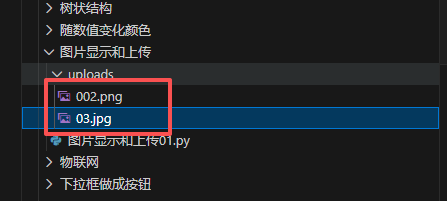
使用 multiple=True 支持多文件批量上传。
根据 content_type 自动选择读取方式(json()、text()、read())。
限制 max_file_size 防止过大文件占用资源。
可结合 ui.column() 动态刷新已上传文件列表,实现文件管理功能。
这样即可在 NiceGUI 中快速搭建一个功能完善的文件上传界面,并支持多种类型的文件处理与保存。
给出一个案例
python
import os
from nicegui import app, ui
from pathlib import Path

# 定义当前目录和上传目录(改用Path更规范)
CURRENT_DIR = Path(__file__).parent.absolute()
upload_dir = CURRENT_DIR / 'uploads'
upload_dir.mkdir(exist_ok=True)  # Path对象的创建目录方法

# 注册静态文件目录,让前端能访问上传的文件
app.add_static_files('/uploads', str(upload_dir))

# 信息展示区域
info_area = ui.column().classes('q-mb-md')

# 自定义文件名前缀(你想要的固定名称)
wenjian_name = '01'

async def upload_handler(e):
    global wenjian_name
    file = e.file
    info_area.clear()

    with info_area:
        # 关键修复:将字符串类型的文件名转为Path对象,再获取扩展名
        file_path = Path(file.name)  # 把"test.png"转为Path对象
        file_extension = file_path.suffix  # 此时能正确获取扩展名(比如.png)
        # 拼接新文件名:固定名称 + 原扩展名
        new_file_name = f"{wenjian_name}{file_extension}"

        # 展示文件基础信息
        ui.label(f'原文件名: {file.name}')
        ui.label(f'新文件名: {new_file_name}')
        ui.label(f'文件类型: {file.content_type}')
        ui.label(f'文件大小: {file.size()} 字节')

        # 处理不同类型的文件
        if file.content_type == 'application/json':
            data = await file.json()
            ui.json(data)
        elif file.content_type and file.content_type.startswith('text/'):
            text_content = await file.text()
            ui.label(text_content[:500] + '...' if len(text_content) > 500 else text_content)
        elif file.content_type and file.content_type.startswith('image/'):
            # 保存路径(改用Path拼接,避免路径分隔符问题)
            save_path = upload_dir / new_file_name
            await file.save(str(save_path))  # save方法需要字符串路径
            # 拼接访问图片的URL
            img_url = f'/uploads/{new_file_name}'
            ui.image(img_url).classes('max-w-full h-auto shadow-lg rounded')
            ui.notify(f'图片上传成功!保存路径: {save_path}', color='positive')
        else:
            # 处理其他类型文件
            content = await file.read()
            ui.label(f'读取到 {len(content)} 字节的非文本/非图片数据')
            save_path = upload_dir / new_file_name
            with open(save_path, 'wb') as f:
                f.write(content)
            ui.notify(f'文件保存成功!路径: {save_path}', color='positive')

# 上传组件配置
ui.upload(
    on_upload=upload_handler,
    on_rejected=lambda: ui.notify('文件被拒绝(可能是大小超限)', color='negative'),
    multiple=True,
    max_file_size=10_000_000  # 10MB限制
).classes('max-w-full')

# 启动NiceGUI
ui.run()
封装成函数直接被调用
python
import os
from nicegui import app, ui
from pathlib import Path

# 定义当前目录和上传目录(改用Path更规范)
CURRENT_DIR = Path(__file__).parent.absolute()
upload_dir = CURRENT_DIR / 'uploads'
upload_dir.mkdir(exist_ok=True)  # Path对象的创建目录方法


# 信息展示区域
info_area = ui.column().classes('q-mb-md')


async def upload_handler(e,canshu01):
    path_name = canshu01[0]
    path_dir = canshu01[1]
    file = e.file
    info_area.clear()


    # 关键修复:将字符串类型的文件名转为Path对象,再获取扩展名
    file_path = Path(file.name)  # 把"test.png"转为Path对象
    file_extension = file_path.suffix  # 此时能正确获取扩展名(比如.png)
    # 拼接新文件名:固定名称 + 原扩展名
    new_file_name = f"{path_name}{file_extension}"


    # 处理不同类型的文件
    if file.content_type == 'application/json':
        data = await file.json()
        ui.json(data)
    elif file.content_type and file.content_type.startswith('text/'):
        text_content = await file.text()
        ui.label(text_content[:500] + '...' if len(text_content) > 500 else text_content)
    elif file.content_type and file.content_type.startswith('image/'):
        # 保存路径(改用Path拼接,避免路径分隔符问题)
        save_path = Path(path_dir) / new_file_name
        await file.save(str(save_path))  # save方法需要字符串路径
        # 拼接访问图片的URL
        img_url = f'/uploads/{new_file_name}'
        ui.image(img_url).classes('max-w-full h-auto shadow-lg rounded')
        ui.notify(f'图片上传成功!保存路径: {save_path}', color='positive')
    else:
        # 处理其他类型文件
        content = await file.read()
        ui.label(f'读取到 {len(content)} 字节的非文本/非图片数据')
        save_path = Path(path_dir) / new_file_name
        with open(save_path, 'wb') as f:
            f.write(content)
        ui.notify(f'文件保存成功!路径: {save_path}', color='positive')

some_variable = [upload_dir,"custom_info_0"]
# 上传组件配置
ui.upload(
    on_upload=lambda e: upload_handler(e, some_variable),
    on_rejected=lambda: ui.notify('文件被拒绝(可能是大小超限)', color='negative'),
    multiple=False,
    auto_upload=True,
    max_files=1,
    max_file_size=10_000_000  # 10MB限制
).classes('max-w-full')

# 启动NiceGUI
ui.run()