欢迎大家加入开源鸿蒙跨平台开发者社区,一起共建开源鸿蒙跨平台生态。
概述
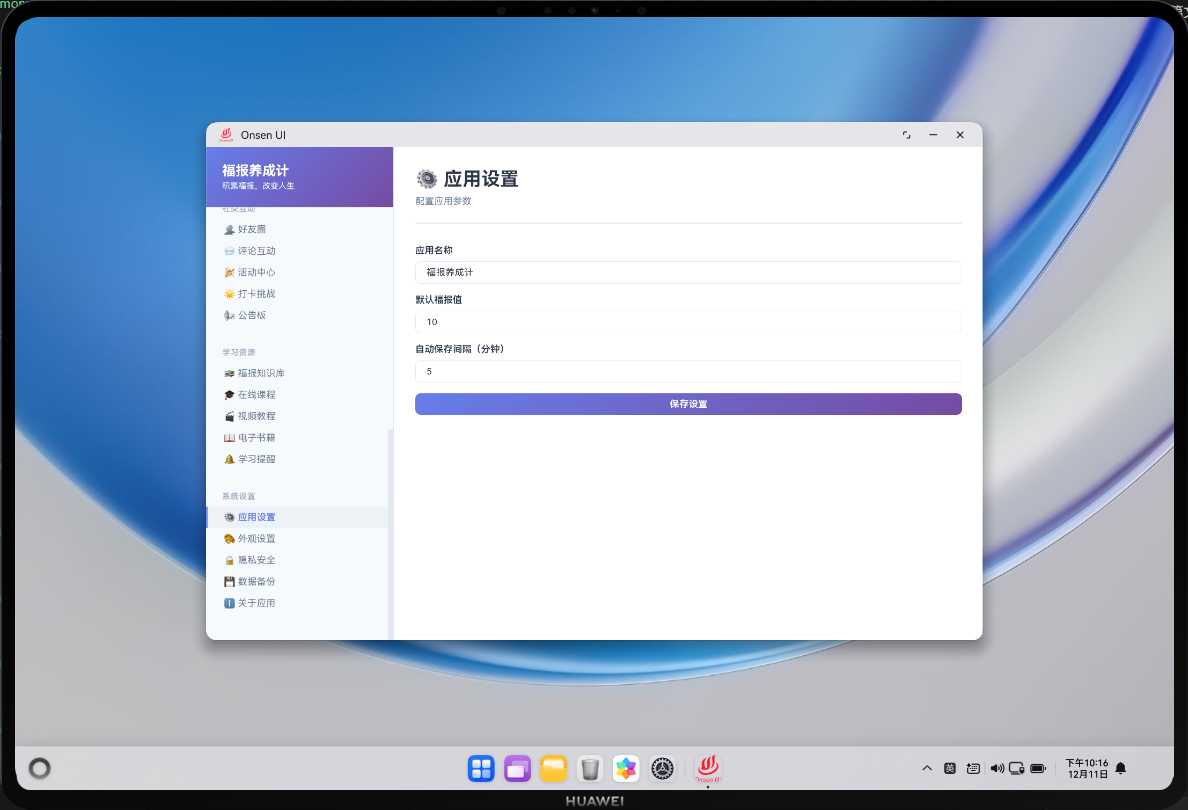
应用设置模块是福报养成计应用中的一个配置功能,它为用户提供了各种应用设置选项。用户可以在这个模块中配置应用的基本设置,如语言、通知开关、数据同步等。这个模块的设计目的是为用户提供个性化的应用体验,让用户能够根据自己的偏好和需求调整应用的行为。
应用设置模块支持多种设置选项。用户可以设置应用的语言、通知提醒、数据自动备份等。系统会将用户的设置保存到本地,下次打开应用时会应用这些设置。用户可以随时修改设置,修改会立即生效。
完整流程
第一部分:设置选项展示
系统展示所有可用的设置选项,包括基本设置、通知设置、数据设置等。用户可以浏览所有设置选项,了解各个设置的含义和当前值。
第二部分:设置修改与保存
用户选择要修改的设置,更改设置的值。系统会验证设置值的有效性。用户点击保存按钮,系统将设置保存到本地存储。
第三部分:设置应用与反馈
系统立即应用用户修改的设置。如果设置涉及应用的行为改变,系统会相应地调整应用的运行方式。系统会显示设置保存成功的提示。
Web 代码实现
html
<div class="settings-container">
  <h1>应用设置</h1>
  <div class="settings-form">
    <div class="setting-item">
      <label>语言</label>
      <select id="language" onchange="saveSetting()">
        <option value="zh">中文</option>
        <option value="en">English</option>
      </select>
    </div>

    <div class="setting-item">
      <label>通知</label>
      <input type="checkbox" id="notifications" onchange="saveSetting()">
    </div>

    <div class="setting-item">
      <label>主题</label>
      <select id="theme" onchange="saveSetting()">
        <option value="light">浅色</option>
        <option value="dark">深色</option>
      </select>
    </div>
  </div>
</div>
HTML 结构包含设置表单,用户可以在表单中修改各种设置选项。
JavaScript 逻辑
javascript
class SettingsModule {
  saveSetting() {
    const settings = {
      language: document.getElementById('language').value,
      notifications: document.getElementById('notifications').checked,
      theme: document.getElementById('theme').value
    };

    cordova.exec(
      (result) => {
        console.log('设置已保存');
      },
      (error) => console.error('保存设置失败:', error),
      'SettingsPlugin',
      'saveSetting',
      [settings]
    );
  }

  loadSettings() {
    cordova.exec(
      (result) => {
        document.getElementById('language').value = result.language;
        document.getElementById('notifications').checked = result.notifications;
        document.getElementById('theme').value = result.theme;
      },
      (error) => console.error('加载设置失败:', error),
      'SettingsPlugin',
      'getSettings',
      []
    );
  }
}

const settingsModule = new SettingsModule();
settingsModule.loadSettings();
JavaScript 代码通过 Cordova 的 exec 方法调用原生插件保存和加载设置。saveSetting 方法收集用户修改的设置值,提交到原生层保存。loadSettings 方法加载已保存的设置,并填充到表单中。
原生代码
typescript
export class SettingsPlugin {
  saveSetting(settings: any, callback: (success: boolean) => void): void {
    try {
      const db = this.getDatabase();
      const userId = this.getUserId();

      db.execute(
        'UPDATE settings SET language = ?, notifications = ?, theme = ? WHERE user_id = ?',
        [settings.language, settings.notifications ? 1 : 0, settings.theme, userId]
      );

      callback(true);
    } catch (error) {
      callback(false);
    }
  }

  getSettings(callback: (data: any) => void): void {
    try {
      const db = this.getDatabase();
      const userId = this.getUserId();

      const settings = db.query(
        'SELECT language, notifications, theme FROM settings WHERE user_id = ?',
        [userId]
      )[0];

      callback(settings || { language: 'zh', notifications: true, theme: 'light' });
    } catch (error) {
      callback({ language: 'zh', notifications: true, theme: 'light' });
    }
  }

  private getDatabase(): any { return null; }
  private getUserId(): string { return ''; }
}
原生代码使用 ArkTS 实现设置的保存和加载。saveSetting 方法将用户修改的设置更新到数据库。getSettings 方法从数据库查询用户的设置,如果不存在则返回默认值。
📝 总结
应用设置模块提供了个性化配置功能,提升用户体验。关键技术包括:设置展示、设置保存、设置应用等。通过 Cordova 与 OpenHarmony 的结合,实现了完整的应用设置功能。