一、基本概念
二、练习
2.1 webapp/control/ProductRating.js
- 导入模块依赖:Control, RatingIndicator, Label, Button
- 创建控件ProductRating :Control.extend("sap.ui5.walkthrough.control.ProductRating")
- 定义控件元数据(metadata):
properties(属性):定义一个名为value的属性
aggregations(聚合):定义三个聚合RatingIndicator,Label和Button均隐藏
events(事件):定义一个change时间,传参为value为评分只
初始化函数(init):创建内部聚合控件并绑定事件
自定义方法:setValue, reset, _onRate, _onSubmit
渲染器(renderer):定义控件的HTML结构
javascript
sap.ui.define([
	"sap/ui/core/Control",
	"sap/m/RatingIndicator",
	"sap/m/Label",
	"sap/m/Button"

], function (Control, RatingIndicator, Label, Button) {
	"use strict";
	return Control.extend("sap.ui5.walkthrough.control.ProductRating", {
		metadata : {
			properties : {
				value: 	{type : "float", defaultValue : 0}
			},
			aggregations : {
				_rating : {type : "sap.m.RatingIndicator", multiple: false, visibility : "hidden"},
				_label : {type : "sap.m.Label", multiple: false, visibility : "hidden"},
				_button : {type : "sap.m.Button", multiple: false, visibility : "hidden"}
			},
			events : {
				change : {
					parameters : {
						value : {type : "int"}
					}
				}
			}
		},
		init : function () {
			// 评分指示器
			this.setAggregation("_rating", new RatingIndicator({
				value: this.getValue(),  // 初始值
				iconSize: "2rem",         // 图标大小
				visualMode: "Half",        // 半星模式
				liveChange: this._onRate.bind(this)   // 实时评分变化事件
			}));
			//文本标签
			this.setAggregation("_label", new Label({
				text: "{i18n>productRatingLabelInitial}" //显示文本
			}).addStyleClass("sapUiSmallMargin"));
			//提交按钮
			this.setAggregation("_button", new Button({
				text: "{i18n>productRatingButton}",  //按钮文本
				press: this._onSubmit.bind(this)     //点击提交事件
			}).addStyleClass("sapUiTinyMarginTopBottom"));
		},

		setValue: function (fValue) {
			this.setProperty("value", fValue, true);  //更新属性值
			this.getAggregation("_rating").setValue(fValue); //同步到评分指示器控件
		},

		reset: function () {
			var oResourceBundle = this.getModel("i18n").getResourceBundle();

			this.setValue(0); //重置评分值
			this.getAggregation("_label").setDesign("Standard");//重置标签样式
			this.getAggregation("_rating").setEnabled(true); //启用评分
			this.getAggregation("_label").setText(oResourceBundle.getText("productRatingLabelInitial"));
			//重置文本
			this.getAggregation("_button").setEnabled(true);//启用按钮
		},
        //评分变化处理
		_onRate : function (oEvent) {
			var oRessourceBundle = this.getModel("i18n").getResourceBundle();
			var fValue = oEvent.getParameter("value");

			this.setProperty("value", fValue, true);// 更新属性值
           // 更新标签显示:显示当前评分和最大值的对比
			this.getAggregation("_label").setText(oRessourceBundle.getText("productRatingLabelIndicator", [fValue, oEvent.getSource().getMaxValue()]));
			this.getAggregation("_label").setDesign("Bold");//文本标签加粗显示
		},
         //提交处理
		_onSubmit : function (oEvent) {
			var oResourceBundle = this.getModel("i18n").getResourceBundle();
            // 禁用评分和按钮(防止重复提交)
			this.getAggregation("_rating").setEnabled(false);
			// 更新标签为最终状态
			this.getAggregation("_label").setText(oResourceBundle.getText("productRatingLabelFinal"));
			this.getAggregation("_button").setEnabled(false);//按钮提交后不可用
			//触发 change 事件
			this.fireEvent("change", {
				value: this.getValue()
			});
		},,
		//渲染
		renderer : function (oRm, oControl) {
			oRm.openStart("div", oControl);
			oRm.class("myAppDemoWTProductRating");
			oRm.openEnd();
			oRm.renderControl(oControl.getAggregation("_rating"));
			oRm.renderControl(oControl.getAggregation("_label"));
			oRm.renderControl(oControl.getAggregation("_button"));
			oRm.close("div");
		}
	});
});
2.2 webapp/view/Detail.view.xml
新增自定义控件,首先添加自定义控件命名控件
xmlns:wt="sap.ui5.walkthrough.control"
ObjectHeader 新增定义控件,id为"rating"
javascript
<mvc:View
    controllerName="sap.ui5.walkthrough.controller.Detail"
	xmlns="sap.m"
	xmlns:mvc="sap.ui.core.mvc"
    xmlns:wt="sap.ui5.walkthrough.control">
	<Page
		title="{i18n>detailPageTitle}"
		showNavButton="true"
		navButtonPress=".onNavBack">
		<ObjectHeader
		    title="ProductName:{invoice>ProductName}"
		    intro="ShipperName:{invoice>ShipperName}"/>
		    <wt:ProductRating id="rating" class="sapUiSmallMarginBeginEnd" change=".onRatingChange"/>
	</Page>
</mvc:View>
2.3 webapp/controller/Detail.controller.js
1.新增依赖"sap/m/MessageToast",回调函数传参新增MessageToast
2._onObjectMatched: function函数中新增this.byId("rating").reset();对上一步骤中新增的控件实例进行重置
3.新增Detail.view.xml文件中添加的事件onRatingChange实现函数
javascript
sap.ui.define([
	"sap/ui/core/mvc/Controller",
	"sap/ui/core/routing/History",
	"sap/m/MessageToast"
], function (Controller, History,MessageToast) {
	"use strict";
	return Controller.extend("sap.ui5.walkthrough.controller.Detail", {
		onInit: function () {
            // 获取路由
			var oRouter = this.getOwnerComponent().getRouter();
            // 监听路由匹配
			oRouter.getRoute("detail").attachPatternMatched(this._onObjectMatched, this);
		},
     /* oEvent.getParameter获取列表传入参数invoicePath
        window.decodeURIComponent对路径解码
        this.getView().bindElement 绑定到视图*/
		_onObjectMatched: function (oEvent) {
			this.byId("rating").reset();
			this.getView().bindElement({
				path: "/" + window.decodeURIComponent(oEvent.getParameter("arguments").invoicePath),
				model: "invoice"
			});
		},
		onNavBack: function () {
            // 获取History单例实例
			var oHistory = History.getInstance();
		    // 获取前一个哈希值(即前一个路由的哈希)
			var sPreviousHash = oHistory.getPreviousHash();
             // 如果存在前一个哈希(即当前页面不是用户直接访问的第一个页面)
			if (sPreviousHash !== undefined) {
		     // 使用浏览器历史记录的go方法返回上一页
				window.history.go(-1);
			} else {
		    // 不存在,获取路由器实例,导航到名为"overview"的路由
				var oRouter = this.getOwnerComponent().getRouter();
				oRouter.navTo("overview", {}, true);
			}
		},

		onRatingChange: function (oEvent) {
			var fValue = oEvent.getParameter("value");
			var oResourceBundle = this.getView().getModel("i18n").getResourceBundle();

			MessageToast.show(oResourceBundle.getText("ratingConfirmation", [fValue]));
		}
	});
});
2.4 webapp/css/style.css
ProductRating.js控制器文件中渲染部分renderer有添加自定义样式CSS 类 ,oRm.class("myAppDemoWTProductRating"); 所以 style.css文件要新增 定义样式
css
html .myAppDemoWT .myCustomButton.sapMBtn {
  margin-right: 10px;
  margin-left: 0.125rem;
  color: rgb(18, 92, 239);
}

.myAppDemoWT .myCustomText {
  display: inline-block;
  font-weight: bold;
  color: rgb(18, 92, 239);
}

/*  ProductRating */
.myAppDemoWTProductRating {
	padding: 0.75rem;
}
.myAppDemoWTProductRating .sapMRI {
	vertical-align: initial;
}
2.5 webapp/i18n/i18n.properties
css
apptitle=SAPUI5 Walkthrough
Step 33: Custom Controls 自定义控件
appTitle=SAPUI5 Walkthrough Step 33: Custom Controls 自定义控件
appDescription= 应用描述配置

homePageTitle=主页标题
panelTitle1=面板标题

ButtonText=点击我
Msg=欢迎 {0}
inputText= Step 33: Custom Controls 自定义控件
textDesc=欢迎
openDialogButtonText=对话框 和片段
helloDialogMsg = helloDialoginf
dialogCloseButtonText=确认
invoiceListTitle=Invoices
invoiceStatusA=新建
invoiceStatusB=处理中
invoiceStatusC=已完成
# Detail Page
detailPageTitle=Walkthrough - Details明细页面
ratingConfirmation=You have rated this product with {0} stars

# Product Rating
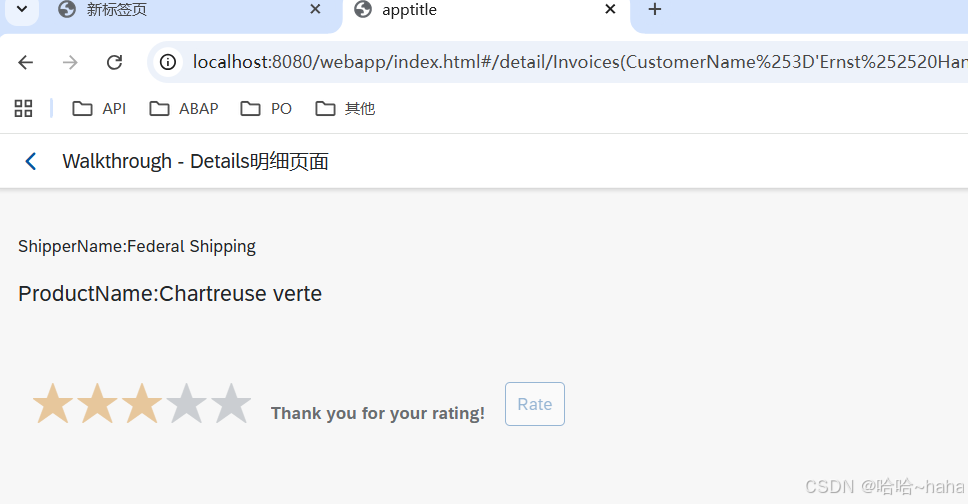
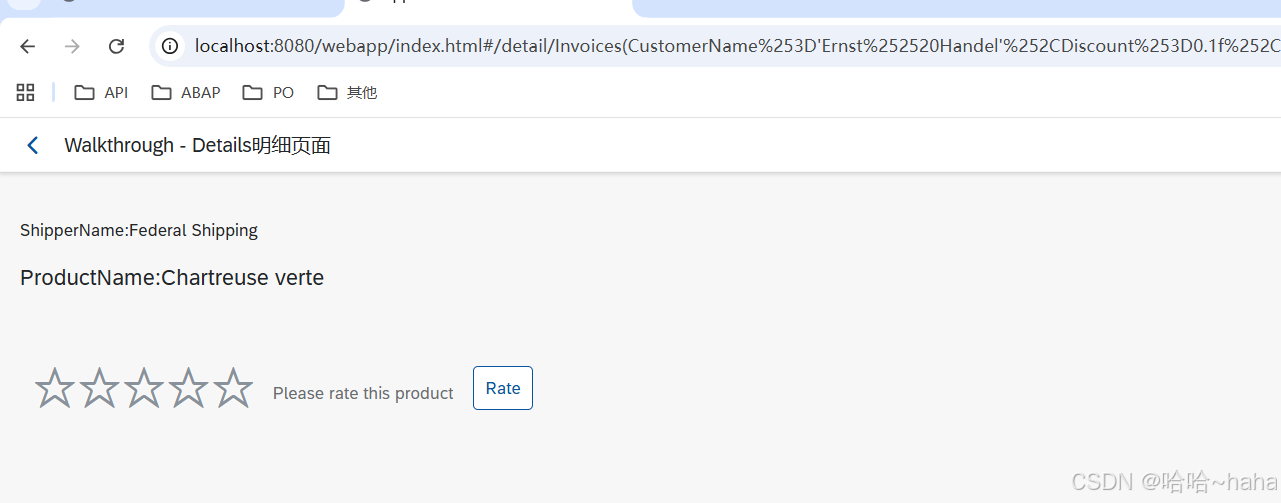
productRatingLabelInitial=Please rate this product
productRatingLabelIndicator=Your rating: {0} out of {1}
productRatingLabelFinal=Thank you for your rating!
productRatingButton=Rate
三、运行结果
http://localhost:8080/webapp/index.html

双击进入详情页面
点击评分
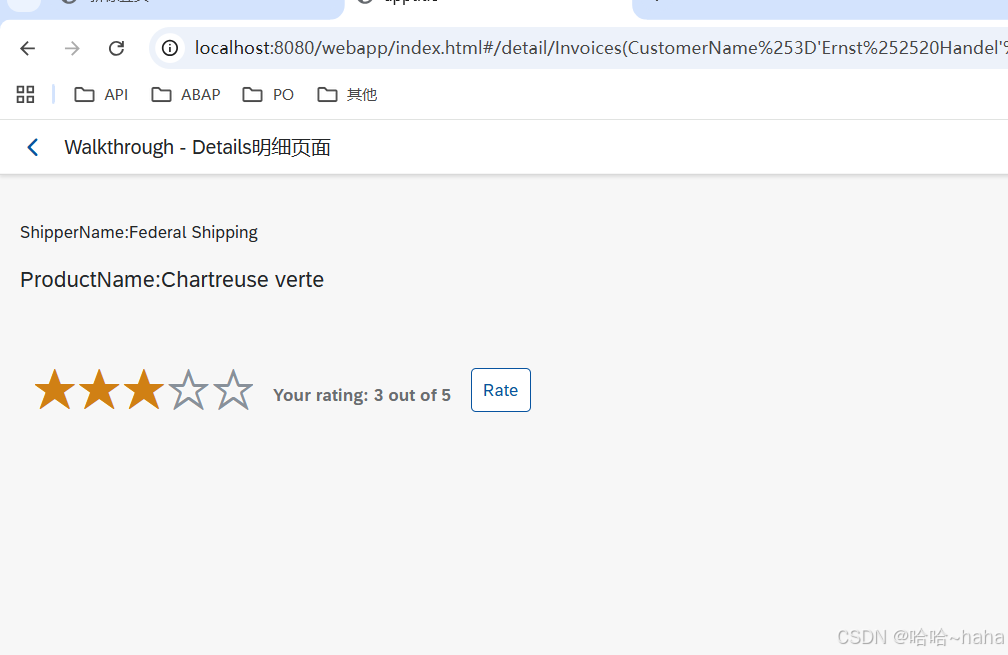
点击Rate按钮