消息组件开发
包括:消息组件和消息弹窗组件开发。
实现效果: 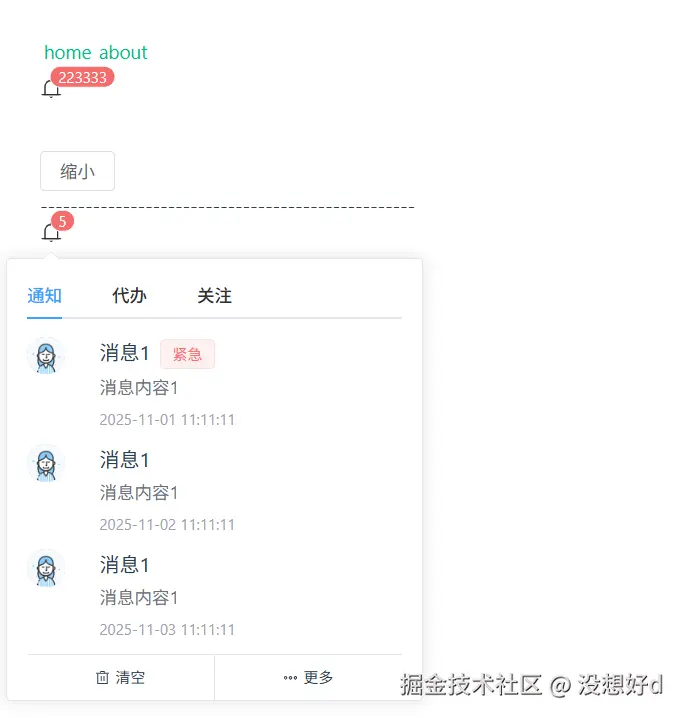
1.消息组件
Notification.vue
xml
<template>
  <el-badge :value="value">
    <slot>
      <Icon
        icon="ep:bell"
        :style="{
          color: iconColor ?? '#333',
          fontSize: iconSize ? `${iconSize}px` : '18px'
        }"
      />
    </slot>
  </el-badge>
</template>

<script setup lang="ts">
import { Icon, type IconifyIcon } from '@iconify/vue'
import type { NotificationProps } from './type'

const props = withDefaults(defineProps<NotificationProps>(), {
  value: '',
  icon: 'ep:bell',
  size: 12,
  color: '',
  scale: 1
})

// 设置translateX和scale对应关系,让它合理显示
function calcuateTranslate(scale: number) {
  // 设置translateX和scale范围值
  const minScale = 0.4
  const maxScale = 1
  const minTranslateX = 75
  const maxTranslateX = 100

  // 计算translateX和scale的对应关系
  const translateX =
    minTranslateX + ((maxTranslateX - minTranslateX) * (scale - minScale)) / (maxScale - minScale)

  return {
    translateX,
    scale
  }
}

const transformData = computed(() => calcuateTranslate(props.scale))

// 计算icon颜色和大小、移动、缩放
const bgColor = computed(() => props.color || 'var(--el-color-danger)')
const fontSize = computed(() => props.size + 'px' || 'var(--el-badge-size)')
const translateX = computed(() => (transformData.value?.translateX || 100) + '%')
const contentScale = computed(() => transformData.value?.scale || 100)

</script>

<style scoped lang="scss">
// 通过传递的数据添加样式
// $color: var(--bg-color);
// $size: var(--font-size);
// $translate-x: var(--translate-x);
// $scale: var(--scale);

:deep(.el-badge__content) {
  // v-bind() 样式中动态绑定响应式数据,值不支持js表达式
  background-color: v-bind(bgColor);
  font-size: v-bind(fontSize);
  transform: translateY(-50%) translateX(v-bind(translateX)) scale(v-bind(contentScale));
}
</style>
2.消息弹窗组件
(1)消息弹窗内容组件NoticeMessageList.vue
ini
<template>
  <div class="mx-4 mt-2">
    <el-tabs v-model="activeName" class="demo-tabs" @tab-click="handleTabClick" :class="wrapClass">
      <el-tab-pane :label="tab.title" :name="tab.title" v-for="(tab, index) in lists" :key="index">
        <div v-if="tab.content && tab.content.length > 0">
          <el-row
            v-for="(item, tIndex) in tab.content"
            :key="tIndex"
            class="mb-1 cursor-pointer hover:bg-sky-100"
          >
            <el-col :span="4">
              <el-avatar
                v-if="item.avatar"
                v-bind="Object.assign({ size: 30 }, item.avatar)"
                @click="handleClickAvatar(item.avatar)"
              />
            </el-col>
            <el-col v-if="item.content" :span="20" class="pl-2" @click="handleClickItem(item)">
              <div class="flex align-center flex-nowrap max-w-60">
                <span class="text-base line-clamp-1">{{ item.title }}</span>
                <el-tag v-if="item.tag" v-bind="item.tagProps" class="ml-2 mt-0.5">{{
                  item.tag
                }}</el-tag>
              </div>
              <div class="text-gray-500 text-sm mt-1 max-w-60" v-if="item.content">
                {{ item.content }}
              </div>
              <div class="text-xs text-gray-400 my-2" v-if="item.time">{{ item.time }}</div>
            </el-col>
          </el-row>
        </div>
      </el-tab-pane>
    </el-tabs>
    <div class="w-full flex align-middle">
      <div
        class="w-50% border-t justify-center flex items-center py-2 hover:bg-sky-200 hover:text-sky-500"
        :class="{ 'border-r': index === 0 }"
        v-for="(action, index) in actions"
        :key="index"
        @click="action.click"
      >
        <Icon v-if="action.icon" :icon="action.icon" class="inline-block mr-1" />
        <span>{{ action.title }}</span>
      </div>
    </div>
  </div>
</template>

<script setup lang="ts">
import type { AvatarProps, TabsPaneContext } from 'element-plus'
import { Icon } from '@iconify/vue'
import type { MessageListItem, NoticeMessageListProps } from './type'

const props = defineProps<NoticeMessageListProps>()

const activeName = ref(props.lists[0]?.title || '')

// 传回点击事件
const emits = defineEmits<{
  clickAvatar: [avatar: Partial<AvatarProps>]
  clickItem: [item: MessageListItem]
  clickTab: [tab: TabsPaneContext, event: Event]
}>()
const handleClickAvatar = (avatar: Partial<AvatarProps>) => {
  emits('clickAvatar', avatar)
}
const handleClickItem = (item: MessageListItem) => {
  emits('clickItem', item)
}
const handleTabClick = (tab: TabsPaneContext, event: Event) => {
  emits('clickTab', tab, event)
}
</script>

<style scoped lang="scss"></style>
(2)消息弹窗组件Notice.vue
xml
<template>
  <div>
    <el-dropdown trigger="click">
      <Notification v-bind="filterProps" />
      <template #dropdown>
        <NoticeMessageList
          :lists="lists"
          :actions="actions"
          :wrap-class="wrapClass"
          v-on="forwordedEvents"
        />
      </template>
    </el-dropdown>
  </div>
</template>

<script setup lang="ts">
import type { NoticeProps, MessageListItem } from './type'
import type { AvatarProps, TabsPaneContext } from 'element-plus'

const props = defineProps<NoticeProps>()

const filterProps = computed(() => {
  // 过滤掉actions和lists,获取Notification组件的props
  const { lists, actions, wrapClass, ...restProps } = props
  return restProps
})

// 事件传递
const emits = defineEmits<{
  clickAvatar: [avatar: Partial<AvatarProps>]
  clickItem: [item: MessageListItem]
  clickTab: [tab: TabsPaneContext, event: Event]
}>()
// 透传事件
const forwordedEvents = {
  clickAvatar: (avatar: Partial<AvatarProps>) => emits('clickAvatar', avatar),
  clickItem: (item: MessageListItem) => emits('clickItem', item),
  clickTab: (tab: TabsPaneContext, event: Event) => emits('clickTab', tab, event)
}
</script>

<style scoped></style>
(3)类型文件type.d.ts
typescript
import type { BadgeProps, AvatarProps, TagProps } from 'element-plus'

// 消息组件接口
export interface NotificationProps extends Partial<BadgeProps> {
  value?: number | string
  icon?: string | IconifyIcon
  iconSize?: number
  iconColor?: string
  size?: number
  color?: string
  scale?: number
}

// 消息内容项
export interface MessageListItem {
  avatar?: Partial<AvatarProps>
  title: string
  content?: string
  time?: string
  tagProps?: Partial<TagProps>
  tag?: string
}

// 消息操作按钮,清空和更多
export interface NoticeActionsItem {
  title: string
  icon?: string
  click: () => void
}

// 消息类型tab页
export interface NoticeMessageListOptions {
  title: string
  content?: MessageListItem[]
}

// 消息弹窗传入数据接口
export interface NoticeMessageListProps {
  lists: NoticeMessageListOptions[]
  actions: NoticeActionsItem[]
  wrapClass?: string
}

// 消息组件+消息弹窗传入数据接口,Partial<T>:将T中属性全部转为可选属性,类似?
export interface NoticeProps extends NoticeMessageListProps, Partial<NotificationProps> {}
3.组件的使用文件notice-message.vue
xml
<template>
  <Notification value="223333" :scale="scale" />
  <p></p>
  <el-button class="mt-10" @click="scale = 0.5">缩小</el-button>

  <div>--------------------------------------------------</div>

  <Notice
    value="5"
    :actions="actions"
    :lists="lists"
    wrap-class="w-[300px]"
    @click-item="handleClickItem"
  />
</template>

<script setup lang="ts">
import type { NoticeActionsItem, NoticeMessageListOptions } from '@/components/Notice/type'

const scale = ref(1)

const actions = ref<NoticeActionsItem[]>([
  {
    title: '清空',
    icon: 'ep:delete',
    click: () => console.log('查看详情')
  },
  {
    title: '更多',
    icon: 'ep:more',
    click: () => console.log('更多')
  }
])

const lists = ref<NoticeMessageListOptions[]>([
  {
    title: '通知',
    content: [
      {
        title: '消息1',
        time: '2025-11-01 11:11:11',
        avatar: { src: 'https://cube.elemecdn.com/0/88/03b0d39583f48206768a7534e55bcpng.png' },
        content: '消息内容1',
        tagProps: { type: 'danger' },
        tag: '紧急'
      },
      {
        title: '消息1',
        time: '2025-11-02 11:11:11',
        avatar: { src: 'https://cube.elemecdn.com/0/88/03b0d39583f48206768a7534e55bcpng.png' },
        content: '消息内容1'
      },
      {
        title: '消息1',
        time: '2025-11-03 11:11:11',
        avatar: { src: 'https://cube.elemecdn.com/0/88/03b0d39583f48206768a7534e55bcpng.png' },
        content: '消息内容1'
      }
    ]
  },
  {
    title: '代办',
    content: [
      {
        title: '消息2',
        time: '2025-12-01 11:11:11',
        avatar: { src: 'https://cube.elemecdn.com/0/88/03b0d39583f48206768a7534e55bcpng.png' },
        content: '消息内容2'
      }
    ]
  },
  {
    title: '关注',
    content: [
      {
        title: '消息3',
        time: '2025-12-01 11:11:11',
        avatar: { src: 'https://cube.elemecdn.com/0/88/03b0d39583f48206768a7534e55bcpng.png' },
        content: '消息内容3'
      }
    ]
  }
])

const handleClickItem = (item: any) => {
  console.log('🚀 ~ handleClickItem ~ item:', item)
}
</script>

<style scoped></style>