第一步:创建setting.xml文件
自己创建一个settings.xml文件(放在C:\Users\你的用户名\.m2目录下,Windows),Eclipse 会自动识别这个目录的配置。
在文件内添加如下代码:
XML
<?xml version="1.0" encoding="UTF-8"?>
<settings xmlns="http://maven.apache.org/SETTINGS/1.2.0"
          xmlns:xsi="http://www.w3.org/2001/XMLSchema-instance"
          xsi:schemaLocation="http://maven.apache.org/SETTINGS/1.2.0 https://maven.apache.org/xsd/settings-1.2.0.xsd">

  <!-- 阿里云镜像 -->
  <mirrors>
    <mirror>
      <id>aliyunmaven</id>
      <mirrorOf>central</mirrorOf>
      <url>https://maven.aliyun.com/repository/public</url>
    </mirror>
  </mirrors>
</settings>
第二步:在 Eclipse 中指定这个配置文件
打开 Eclipse → 顶部菜单栏Window → Preferences
左侧展开Maven → 选择User Settings
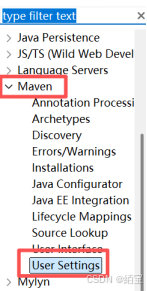
右侧User Settings栏点击Browse,选择你刚创建的settings.xml文件
重新再选一遍确保 Eclipse 当前用的settings.xml是你刚才配置了阿里云镜像的那个文件。
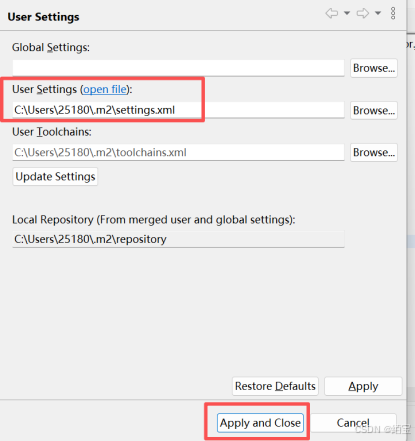
点击Update Settings → 再点击Apply and Close 就可以了