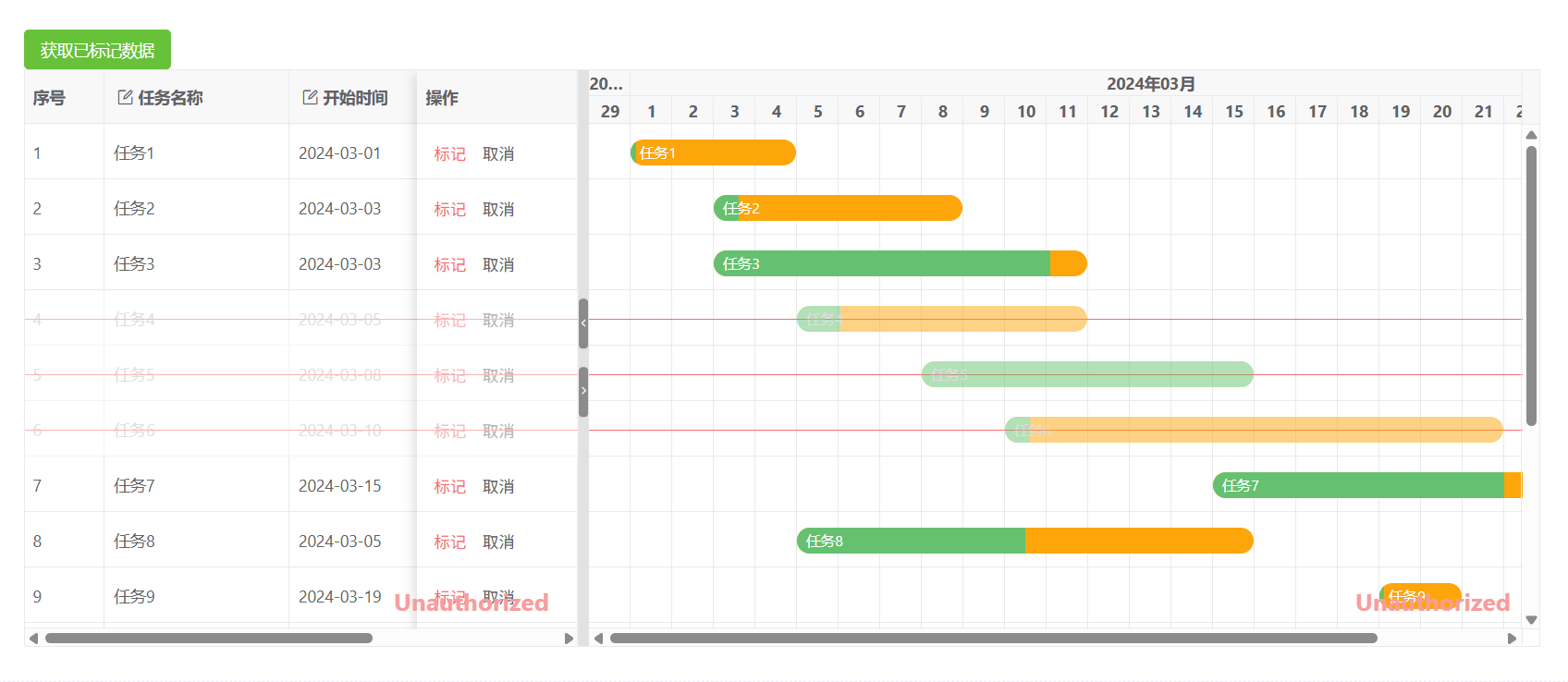
vue 甘特图 vxe-gantt 如何实现标记删除数据,显示标记删除后行效果,获取已标记的行数据
标记为待删除状态,通过调用 setPendingRow 方法标记为待删除状态,由内部 CRUD 管理器自动记录操作行为,可以通过 getPendingRecords 获取;
html
<template>
  <div>
    <vxe-button status="success" @click="getPendingEvent">获取已标记数据</vxe-button>
    <vxe-gantt ref="ganttRef" v-bind="ganttOptions">
      <template #action="{ row }">
        <vxe-button mode="text" status="error" @click="pendingRow(row, true)">标记</vxe-button>
        <vxe-button mode="text" @click="pendingRow(row, false)">取消</vxe-button>
      </template>
    </vxe-gantt>
  </div>
</template>

<script lang="ts" setup>
import { ref, reactive } from 'vue'
import { VxeUI, VxeGanttProps, VxeGanttInstance } from 'vxe-gantt'

interface RowVO {
  id: number
  title: string
  start: string
  end: string
  progress: number
}

const ganttRef = ref<VxeGanttInstance<RowVO>>()

const ganttOptions = reactive<VxeGanttProps<RowVO>>({
  border: true,
  showOverflow: true,
  keepSource: true,
  height: 500,
  taskBarConfig: {
    showProgress: true, // 是否显示进度条
    showContent: true, // 是否在任务条显示内容
    moveable: true, // 是否允许拖拽任务移动日期
    barStyle: {
      round: true, // 圆角
      bgColor: '#fca60b', // 任务条的背景颜色
      completedBgColor: '#65c16f' // 已完成部分任务条的背景颜色
    }
  },
  taskViewConfig: {
    tableStyle: {
      width: 480 // 表格宽度
    }
  },
  editConfig: {
    trigger: 'dblclick',
    mode: 'cell',
    showStatus: true
  },
  keyboardConfig: {
    isEdit: true, // 是否开启任意键进入编辑(功能键除外)
    isDel: true, // 是否开启删除键功能
    isEsc: true // 是否开启Esc键关闭编辑功能
  },
  columns: [
    { type: 'seq', width: 70 },
    { field: 'title', title: '任务名称', minWidth: 160, editRender: { name: 'VxeInput' } },
    { field: 'start', title: '开始时间', width: 120, editRender: { name: 'VxeDatePicker' } },
    { field: 'end', title: '结束时间', width: 120, editRender: { name: 'VxeDatePicker' } },
    { field: 'progress', title: '进度(%)', width: 140, editRender: { name: 'VxeNumberInput' } },
    { field: 'action', title: '操作', fixed: 'right', width: 140, slots: { default: 'action' } }
  ],
  data: [
    { id: 10001, title: '任务1', start: '2024-03-01', end: '2024-03-04', progress: 3 },
    { id: 10002, title: '任务2', start: '2024-03-03', end: '2024-03-08', progress: 10 },
    { id: 10003, title: '任务3', start: '2024-03-03', end: '2024-03-11', progress: 90 },
    { id: 10004, title: '任务4', start: '2024-03-05', end: '2024-03-11', progress: 15 },
    { id: 10005, title: '任务5', start: '2024-03-08', end: '2024-03-15', progress: 100 },
    { id: 10006, title: '任务6', start: '2024-03-10', end: '2024-03-21', progress: 5 },
    { id: 10007, title: '任务7', start: '2024-03-15', end: '2024-03-24', progress: 70 },
    { id: 10008, title: '任务8', start: '2024-03-05', end: '2024-03-15', progress: 50 },
    { id: 10009, title: '任务9', start: '2024-03-19', end: '2024-03-20', progress: 5 },
    { id: 10010, title: '任务10', start: '2024-03-12', end: '2024-03-20', progress: 10 },
    { id: 10011, title: '任务11', start: '2024-03-01', end: '2024-03-08', progress: 90 },
    { id: 10012, title: '任务12', start: '2024-03-03', end: '2024-03-06', progress: 60 },
    { id: 10013, title: '任务13', start: '2024-03-02', end: '2024-03-05', progress: 50 },
    { id: 10014, title: '任务14', start: '2024-03-04', end: '2024-03-15', progress: 0 },
    { id: 10015, title: '任务15', start: '2024-03-01', end: '2024-03-05', progress: 30 }
  ]
})

const pendingRow = async (row: RowVO, status: boolean) => {
  const $gantt = ganttRef.value
  if ($gantt) {
    $gantt.setPendingRow(row, status)
  }
}

const getPendingEvent = () => {
  const $gantt = ganttRef.value
  if ($gantt) {
    const pendingRecords = $gantt.getPendingRecords()
    VxeUI.modal.alert(`标记:${pendingRecords.length} 行`)
  }
}
</script>