效果图
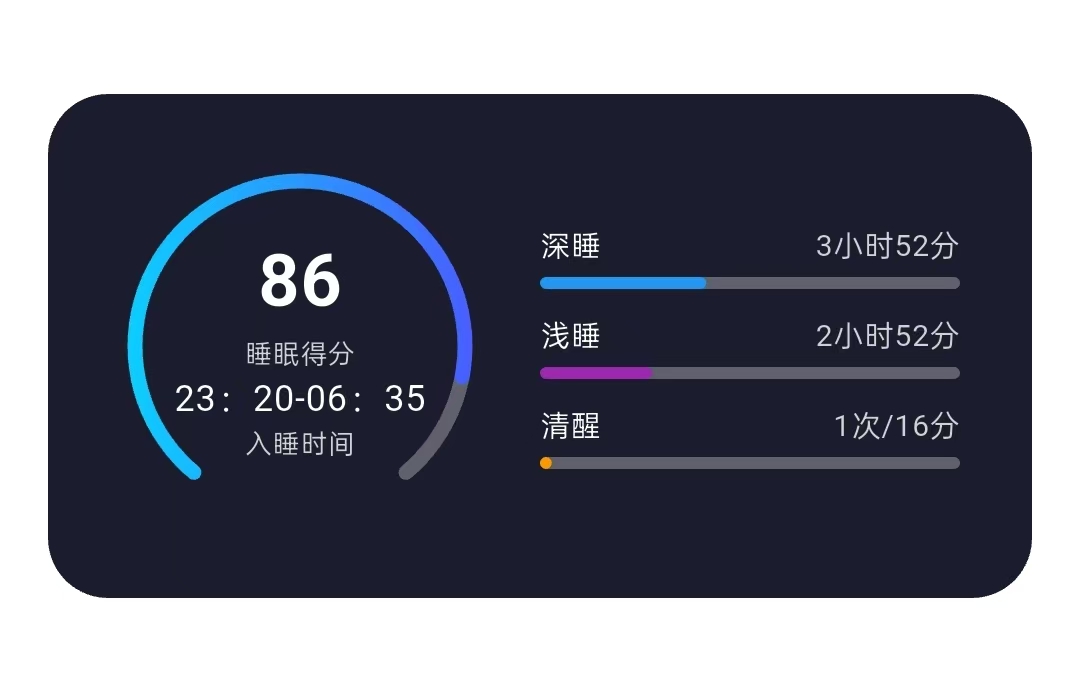
实现步骤
1.定义变量
Dart
  late AnimationController _controller; //动画控制器
  late Animation<double> _animation; //动画值
2.初始化
Dart
  @override
  void initState() {
    super.initState();

    _controller = AnimationController(
      duration: Duration(milliseconds: 1500), //动画时长
      vsync: this, //同步信号源
    );

    //进度条绘制比例 86/100
    _animation = Tween<double>(begin: 0, end: 0.86).animate(
      CurvedAnimation(parent: _controller, curve: Curves.easeOut),
    );
    //启动动画
    _controller.forward();

  }
3.注销
Dart
  @override
  void dispose() {
    _controller.dispose();
    super.dispose();
  }
4.仪表盘背景绘制器
Dart
class GaugeBackgroundPainter extends CustomPainter {
  @override
  void paint(Canvas canvas, Size size) {
    final center = Offset(size.width / 2, size.height / 2); //圆心
    final radius = size.width / 2 - 5; //半径

    final backgroundPaint = Paint()
      ..color = Colors.white.withOpacity(0.3)
      ..style = PaintingStyle.stroke //描边模式
      ..strokeWidth = 5  //线宽5像素
      ..strokeCap = StrokeCap.round; //线端圆角

    // 绘制背景圆弧(240度,从-230度到280度)
    final rect = Rect.fromCircle(
        center: center, //圆心坐标
        radius: radius //圆的半径
    );
    canvas.drawArc(
        rect, //限定圆弧的矩形区域
        -230 * pi / 180, //起始角度 -230°
        280 * pi / 180, //扫过的角度 280°
        false,  //是否连接圆心
        backgroundPaint //画笔配置
    );
  }

  @override
  bool shouldRepaint(covariant CustomPainter oldDelegate) => false;
}
5.仪表盘进度绘制器
Dart
class GaugeProgressPainter extends CustomPainter {
  final double progress; //进度值

  GaugeProgressPainter({required this.progress});

  @override
  void paint(Canvas canvas, Size size) {
    final center = Offset(size.width / 2, size.height / 2); //圆心
    final radius = size.width / 2 - 5; //半径

    final rect = Rect.fromCircle(center: center, radius: radius);

    final progressPaint = Paint()

      ..style = PaintingStyle.stroke
      ..strokeWidth = 5
      ..strokeCap = StrokeCap.round
      ..shader = LinearGradient(
        colors: [
          Color(0xFF0DCCFF),  // 开始颜色
          Color(0xFF4760FF),  // 结束颜色
        ],
        begin: Alignment(-1.0, 0.0),  // 左侧开始
        end: Alignment(1.0, 0.0),     // 右侧结束
        tileMode: TileMode.clamp,
      ).createShader(rect);

    // 计算进度对应的角度(从-230度开始)
    final startAngle = -230 * pi / 180;
    final sweepAngle = 280 * pi / 180 * progress;


    canvas.drawArc(rect, startAngle, sweepAngle, false, progressPaint);

  }

  @override
  bool shouldRepaint(covariant GaugeProgressPainter oldDelegate) =>
      oldDelegate.progress != progress;
}
6.睡眠详情--条形进度条的子项
Dart
Widget _buildSleepDetailBar(String title, String value, Color color, double widthFactor) {
    return Column(
      crossAxisAlignment: CrossAxisAlignment.start,
      children: [
        Row(
          children: [
            Text(
              title,
              style: TextStyle(
                color: Colors.white,
                fontSize: 10,
              ),
            ),
            Spacer(),
            Text(
              value,
              style: TextStyle(
                color: Colors.white.withOpacity(0.8),
                fontSize: 10,
              ),
            ),
          ],
        ),
        SizedBox(height: 4),

        // 添加背景条的容器
        Container(
          width: MediaQuery.of(context).size.width * 0.4, // 背景条总宽度
          height: 4,
          decoration: BoxDecoration(
            color: Colors.white.withOpacity(0.3), //背景条颜色
            borderRadius: BorderRadius.circular(2),
          ),
          child: Align(
            alignment: Alignment.centerLeft,
            child: Container(
              height: 4,
              width: MediaQuery.of(context).size.width * 0.4 * widthFactor, // 彩色进度条宽度
              decoration: BoxDecoration(
                color: color,
                borderRadius: BorderRadius.circular(2),
              ),
            ),
          ),
        ),
      ],
    );
  }
7.定义UI架构
Dart
  @override
  Widget build(BuildContext context) {
    return Scaffold(
      backgroundColor: Colors.white,

      //滚动视图
      body: SingleChildScrollView(
        physics: BouncingScrollPhysics(), //回弹滚动效果
        child: Column(

          children: [
            SizedBox(height: 150),

            // 睡眠得分卡片
            _buildSleepScoreCard(),
            SizedBox(height: 20),

          ],
        ),
      ),
    );
  }
8.详细的进度条布局
Dart
Widget _buildSleepScoreCard() {
    return Container(
      margin: EdgeInsets.symmetric(horizontal: 16),
      padding: EdgeInsets.all(24),
      decoration: BoxDecoration(
        color: Color(0xFF1B1D2E),
        borderRadius: BorderRadius.circular(20),
      ),
      child: Column(
        children: [
          // 睡眠得分和仪表盘式进度条
          Row(
            children: [
              //左侧的仪表盘
              Container(
                width: 120,
                height: 120,
                child: Stack(
                  alignment: Alignment.center,
                  children: [
                    // 仪表盘背景
                    CustomPaint(
                      size: Size(120, 120),
                      painter: GaugeBackgroundPainter(),
                    ),

                    // 仪表盘动态进度条
                    AnimatedBuilder(
                      animation: _animation,
                      builder: (context, child) {
                        return CustomPaint(
                          size: Size(120, 120),
                          painter: GaugeProgressPainter(progress: _animation.value),
                        );
                      },
                    ),

                    // 中间的文本
                    Column(
                      mainAxisAlignment: MainAxisAlignment.center,
                      children: [
                        AnimatedBuilder(
                          animation: _animation,
                          builder: (context, child) {
                            return Text(
                              '${(_animation.value * 100).toInt()}',
                              style: TextStyle(
                                color: Colors.white,
                                fontSize: 24,
                                fontWeight: FontWeight.bold,
                              ),
                            );
                          },
                        ),
                        Text(
                          "睡眠得分",
                          style: TextStyle(
                            color: Colors.white.withOpacity(0.8),
                            fontSize: 9,
                          ),
                        ),
                        Text(
                          "23:20-06:35",
                          style: TextStyle(
                            color: Colors.white,
                            fontSize: 12,
                          ),
                        ),
                        Text(
                          "入睡时间",
                          style: TextStyle(
                            color: Colors.white.withOpacity(0.8),
                            fontSize: 9,
                          ),
                        ),
                      ],
                    ),
                  ],
                ),
              ),

              SizedBox(width: 20),

              // 右侧条形图区域
              Expanded(
                child: Column(
                  crossAxisAlignment: CrossAxisAlignment.start,
                  children: [

                    // 睡眠时长详情
                    _buildSleepDetailBar("深睡", "3小时52分", Colors.blue, 0.385),
                    SizedBox(height: 8),
                    _buildSleepDetailBar("浅睡", "2小时52分", Colors.purple, 0.26),
                    SizedBox(height: 8),
                    _buildSleepDetailBar("清醒", "1次/16分", Colors.orange, 0.027),
                  ],
                ),
              ),
            ],
          ),

        ],
      ),
    );
  }