作者:张华 发表于:2026-01-05
版权声明:可以任意转载,转载时请务必以超链接形式标明文章原始出处和作者信息及本版权声明
问题
客户想要集中存储下列日志:
- User activity on the cloud/infra servers (SSH login/out etc.) - /var/log/auth.log
- Security group firewall logs (any drop would need to emit a log) - ovn-controller.log
rsyslog test
rsyslog server side:
sudo apt install -y rsyslog
sudo cp /etc/rsyslog.conf /etc/rsyslog.conf.bak
sudo sed -i '/^#module(load="imudp")/s/^#//' /etc/rsyslog.conf
sudo sed -i '/^#input(type="imudp" port="514")/s/^#//' /etc/rsyslog.conf
sudo sed -i '/^#module(load="imtcp")/s/^#//' /etc/rsyslog.conf
sudo sed -i '/^#input(type="imtcp" port="514")/s/^#//' /etc/rsyslog.conf
cat <<EOF | sudo tee -a /etc/rsyslog.conf
\$template RemoteLogs,"/var/log/remote/%fromhost-ip%/%\$YEAR%-%\$MONTH%-%\$DAY%.log"
*.* ?RemoteLogs
#& ~
EOF
sudo mkdir -p /var/log/remote
sudo chown -R syslog:syslog /var/log/remote
sudo ufw allow 514/tcp
sudo ufw allow 514/udp
sudo systemctl restart rsyslog
sudo netstat -tulnp | grep rsyslog

#tell rsyslog how to store the log, add them before the 'GLOBAL DIRECTIVE' section
$template IPLog, "/var/log/network/%fromhost-ip%.log"
*.*   ?IPLog
#$template remote-incoming-logs,"/var/log/%HOSTNAME%/%PROGRAMNAME%.log"
#*.*  ?remote-incoming-logs
#$template RouterAuditLogs, "/var/log/router/%fromhost-ip%.log"
#:fromhost-ip, !isequal, "127.0.0.1" ?RouterAuditLogs
rsyslog client side:
sudo apt install rsyslog -y
#can also add log type in the file /etc/rsyslog.d/50-default.conf
echo "*.* @192.168.99.220:514" | sudo tee -a /etc/rsyslog.conf
sudo systemctl restart rsyslog
#test it
logger -t TEST "This is a test message from client"
logger -t kern -p err "addddddddddd"
#sudo tail -f /var/log/remote/192.168.99.213/2026-01-05.log
logrotate
logrotate -f /etc/logrotate.d/ovn
logrotate -d /etc/logrotate.d/ovn
#other - log rotate - eg: /etc/logrotate.d/ovn
/var/log/remote/*/*.log {
    daily
    missingok
    rotate 30
    compress
    delaycompress
    notifempty
    sharedscripts
    postrotate
        systemctl reload rsyslog > /dev/null 2>&1 || true
    endscript
}
如何设置将 /var/log/auth.log 和 ovn-controller.log及它的logrotate文件设置为通过rsync上传到日志服务器呢? 例如(未测试):
# /etc/rsyslog.d/50-remote-logs.conf

module(load="imfile" PollingInterval="10")

input(type="imfile"
      File="/var/log/auth.log"
      Tag="auth:"
      Severity="info"
      Facility="authpriv"
      StateFile="state-auth"
      PersistStateInterval="100")

input(type="imfile"
      File="/var/log/ovn/ovn-controller.log"
      Tag="ovn-controller:"
      Severity="info"
      Facility="local0"
      StateFile="state-ovn-controller"
      PersistStateInterval="100")

authpriv.* @@192.168.10.100:514
local0.*   @@192.168.10.100:514
openstack rsyslog
openstack各工程支持rsyslog - https://docs.openstack.org/ocata/admin-guide/compute-manage-logs.html
rsyslog server side, 日志中hostname等于COMPUTE_01写到/mnt/rsyslog/logs/compute-01.log:
$ModLoad imtcp
$InputTCPServerRun 1024
:hostname, isequal, "COMPUTE_01" /mnt/rsyslog/logs/compute-01.log
rsyslog client side:
local0.error @@172.20.1.43:1024ovn-controller rsyslog
ovn-controller也是支持rsyslog的 - https://www.ovn.org/support/dist-docs/ovn-controller.8.pdf
但是显然ovn-controller charm是不支持的, 所以无法用这种ovn native rsyslog
−−syslog−target=host:port
Send syslog messages to UDP port on host, in addition to the system syslog. The host must be a
numerical IP address, not a hostname.

−−syslog−method=method
Specify method as how syslog messages should be sent to syslog daemon. The following forms are
supported:
• libc, to use the libc syslog() function. Downside of using this options is that libc adds
fixed prefix to every message before it is actually sent to the syslog daemon over /dev/log
UNIX domain socket.
• unix:file, to use a UNIX domain socket directly. It is possible to specify arbitrary message format with this option. However, rsyslogd 8.9 and older versions use hard coded
parser function anyway that limits UNIX domain socket use. If you want to use arbitrary
message format with older rsyslogd versions, then use UDP socket to localhost IP address instead.
• udp:ip:port, to use a UDP socket. With this method it is possible to use arbitrary message
format also with older rsyslogd. When sending syslog messages over UDP socket extra
precaution needs to be taken into account, for example, syslog daemon needs to be configured to listen on the specified UDP port, accidental iptables rules could be interfering
with local syslog traffic and there are some security considerations that apply to UDP
sockets, but do not apply to UNIX domain sockets.
• null, to discard all messages logged to syslog.
The default is taken from the OVS_SYSLOG_METHOD environment variable; if it is unset, the
default is libc.
Neutron Packet Logging
neutron支持SG log - https://docs.openstack.org/neutron/latest/admin/config-logging.html
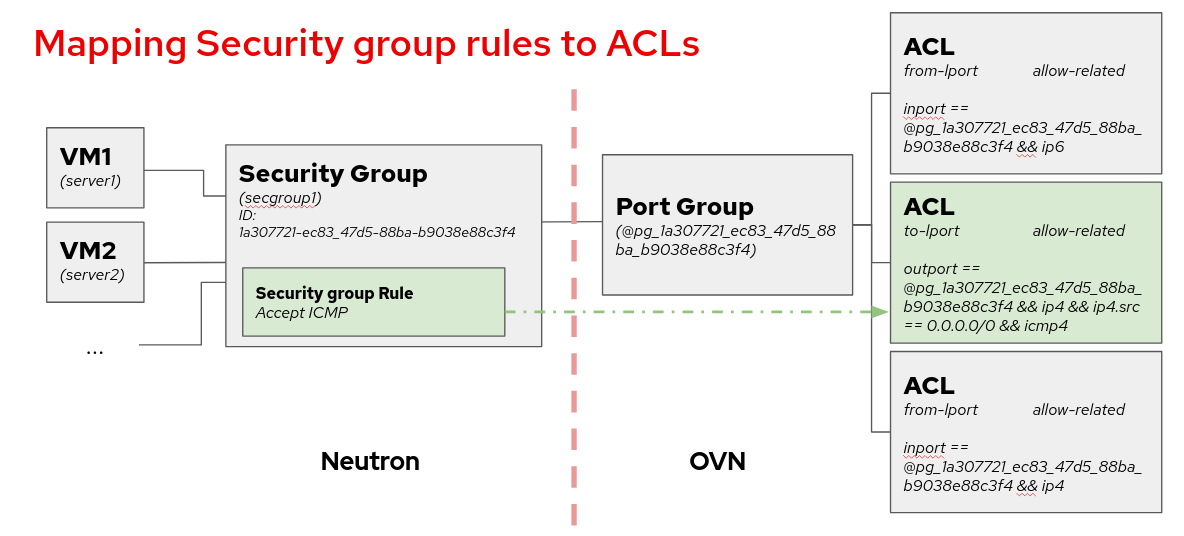
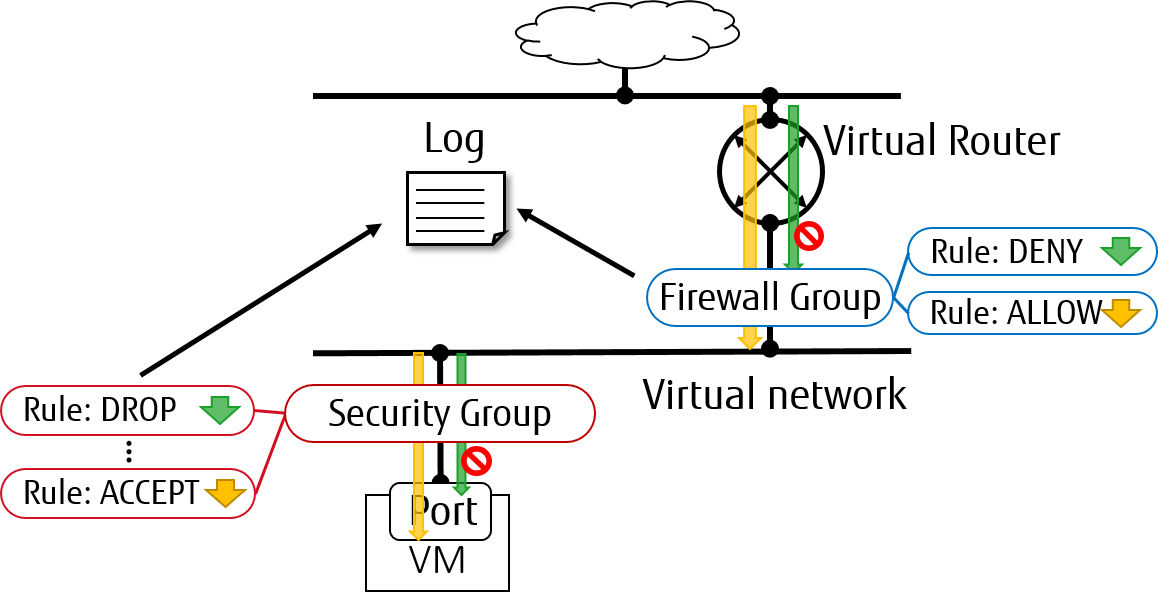
ovs的配置:
1, neutron-api /etc/neutron/neutron.conf
   service_plugins = router,metering,log
2, ovn没有agent故无须配置这个, 但对于ovs需配置, 在neutron-api /etc/neutron/plugins/ml2/ml2_conf.ini与nova-compute /etc/neutron/plugins/ml2/openvswitch_agent.ini中配置:
   [agent]
   extensions = log
3, ovn没有agent故无须配置这个, 但对于ovs且需enable logging for FWaaS需配置, 在neutron-api /etc/neutron/plugins/ml2/ml2_conf.ini与nova-compute /etc/neutron/plugins/ml2/openvswitch_agent.ini中配置:
  [AGENT]
  extensions = fwaas_v2,fwaas_v2_log
4, ovn没有agent故无须配置这个, 但对于ovn需配置, 在nova-compute /etc/neutron/plugins/ml2/openvswitch_agent.ini中配置:
  [network_log]
  rate_limit = 100
  burst_limit = 25
  #local_output_log_base = <None>
ovn的配置:
1, neutron-api /etc/neutron/neutron.conf
   service_plugins = router,metering,log
2, neutron-api /etc/neutron/plugins/ml2/ml2_conf.ini
  [network_log]
  rate_limit = 150
  burst_limit = 50
  #ovn-nbctl list meter-band
policy的配置:
neutrona-api /etc/neutron/policy.json
  "get_loggable_resources": "rule:regular_user",
  "create_log": "rule:regular_user",
  "get_log": "rule:regular_user",
  "get_logs": "rule:regular_user",
  "update_log": "rule:regular_user",
  "delete_log": "rule:regular_user",
CLI demo
juju config neutron-api config-flags="service_plugins=metering,segments,ovn-router,log"

openstack network loggable resources list
openstack network log create --resource-type security_group --description "Collecting all security events" --event ALL Log_Created
#openstack network log create --resource-type security_group --resource sg1 --event ALL log1
#OVN SG drops can't be enabled per security group but they can only be enabled for all security groups in once:
openstack network log create --resource-type security_group --event DROP drop-logging
#openstack network log create --resource-type security_group --resource sg1 --event DROP drop-logging
openstack network log set --disable Log_Created
openstack network log show Log_Created
#In the case of --resource and --target are not specified from the request, these arguments will be assigned to ALL by default.
#and ovn doesn't support --target
openstack network log create my-log --resource-type security_group --resource sg1
openstack network log create my-log --resource-type firewall_group --resource fwg1
openstack network log create my-log --resource-type security_group --target portA
注意, 由于下列ovn driver的限制, OVN the security groups drops can't be enabled per security group but they can only be enabled for all security groups in once:
Due to the internal design of the ML2/OVN driver, there is one ACL that aggregates all dropped traffic, instead of having one drop ACL per security group. Since the smallest logging unit in OVN is the ACL, that means that if we choose to log DROP traffic, we will get traffic logged from all security groups.
openstack network log create --resource-type security_group --event DROP drop-logging
#openstack network log create --resource-type security_group --resource sg1 --event DROP drop-logging
日志的格式如下:
2025-06-20T08:10:32.737Z|168460|acl_log(ovn_pinctrl0)|INFO|name="neutron-e9550bd3-b246-4e3f-af93-3f21cd7289ac", verdict=drop, severity=info, direction=to-lport: ip,vlan_tci=0x0000,dl_src=00:50:56:ae:de:7f,dl_dst=01:00:5e:00:00:12,nw_src=51.148.81.194,nw_dst=224.0.0.18,nw_proto=112,nw_tos=192,nw_ecn=0,nw_ttl=255,nw_frag=no目前遇到的2个问题
octavia units运行在lxd containers中, ovs会检测下列不正确的东西(2025-07-29T04:13:08.058Z|00036|dpif_netlink|INFO|The kernel module has a broken meter implementation.), 从而造成lxd的octavia units打开rsync后cause octavia to be unable to communicate with loadbalancers.
另外, ovn-controller.log is owned by root but service runs as syslog, 所以也会报下列错:
error accessing file '/var/log/ovn/ovn-controller.log': Permission denied v8.2112.0
一个workaround是用下列配置create 0640 root syslog, 然后运行'sudo logrotate -f /etc/logrotate.d/ovn-common' (debug it: sudo logrotate -d /etc/logrotate.d/ovn-common ), but after a reboot the file is recreate with root:root permission.
#vim /etc/logrotate.d/ovn-common
var/log/ovn/*.log {
    su root root
    create 0640 root syslog # I added this line here
    daily
    compress
    sharedscripts
    missingok
    postrotate
        # Tell OVN daemons to reopen their log files
        if [ -d /var/run/ovn ]; then
            for ctl in /var/run/ovn/*.ctl; do
                ovs-appctl -t "$ctl" vlog/reopen 2>/dev/null || :
            done
        fi
    endscript
}
Reference
1 Linux系统基于rsyslog搭建中央日志服务器全攻略 - https://comate.baidu.com/zh/page/qoe6ga2iu69