使用教程:
效果:
1.消息框变窄
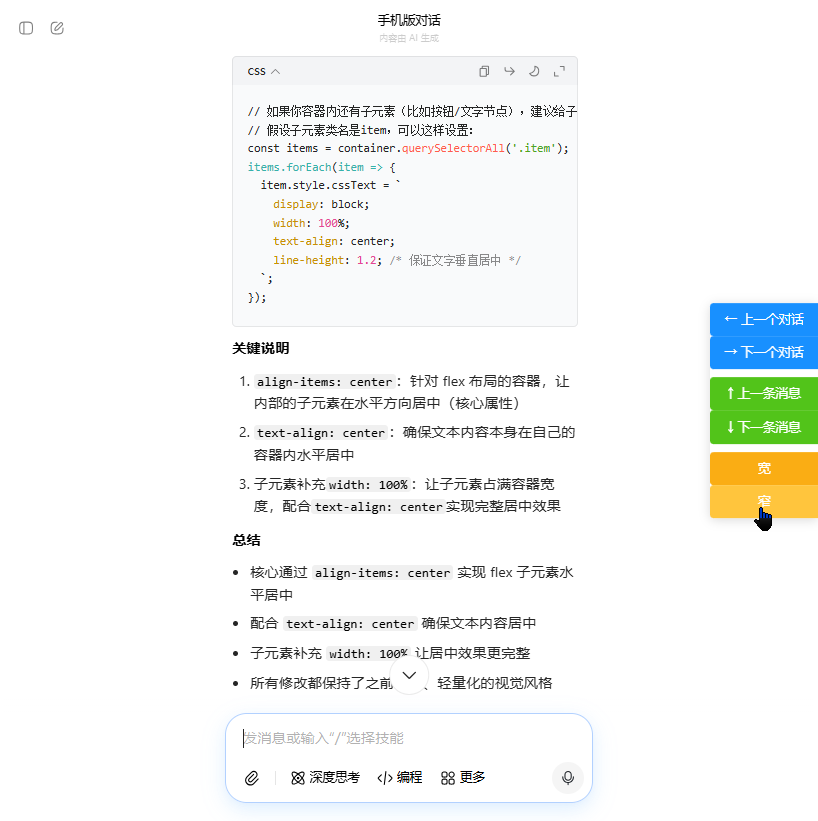
2.消息框变宽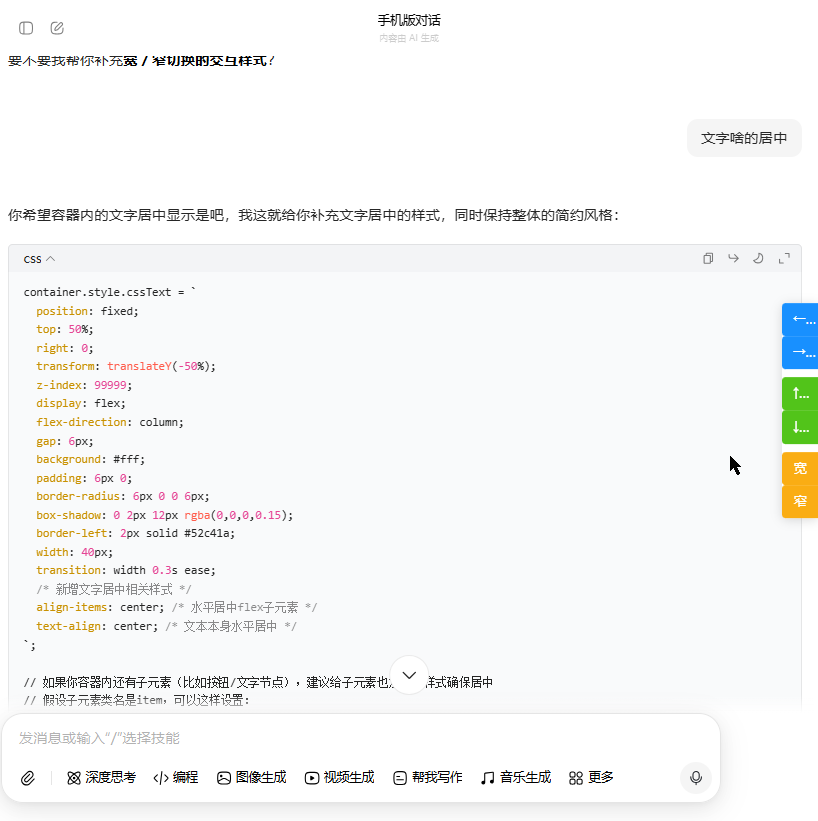
3.切换上下消息
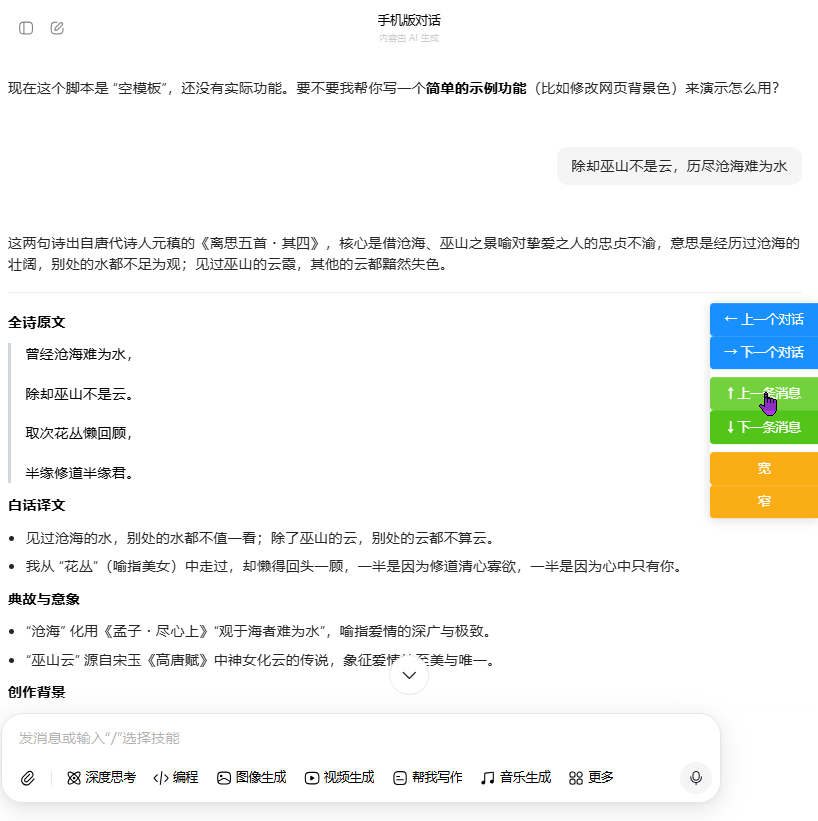
感谢您的使用,有什么需求可以评论噢,新年快乐!
源代码:
javascript
// ==UserScript==
// @name 豆包对话导航6.8 消息列控制
// @namespace http://tampermonkey.net/
// @version 2026-01-05
// @description 在豆包网页版中快速跳转到上一个或下一个对话
// @author You
// @match https://www.doubao.com/*
// @icon data:image/gif;base64,R0lGODlhAQABAAAAACH5BAEKAAEALAAAAAABAAEAAAICTAEAOw==
// @grant none
// ==/UserScript==
/**
* 豆包对话导航脚本
* 提供键盘快捷键和UI按钮,用于在豆包网页版中快速跳转到上一个或下一个对话
*/
(function () {
'use strict';
// 对话列表选择器
const CONVERSATION_LIST_SELECTOR = '[data-testid="sidebar-section-item"] + div';
const CONVERSATION_ITEM_SELECTOR = '[data-testid="chat_list_thread_item"]';
const ACTIVE_CONVERSATION_SELECTOR = '[data-testid="chat_list_thread_item"][aria-current="page"]';
const CONVERSATION_LIST_WRAPPER_SELECTOR = '.flow-scrollbar';
const CONVERSATION_LIST_TESTID_SELECTOR = '[data-testid="sidebar-section-item"]';
// 消息选择器(用于对话内消息导航)
const MESSAGE_BLOCK_SELECTOR = '.message-block-container-PggqdK';
const MESSAGE_TESTID_SELECTOR = '[data-testid="message-block-container"]';
const MESSAGE_ID_ATTRIBUTE = 'data-message-id';
/**
* 获取当前激活的对话项
* @returns {HTMLElement|null} 当前激活的对话项
*/
function getActiveConversation() {
// 尝试使用aria-current="page"属性查找激活的对话
let activeConversation = document.querySelector(ACTIVE_CONVERSATION_SELECTOR);
// 如果没有找到,尝试通过特殊的背景色或其他视觉特征查找
if (!activeConversation) {
const conversations = getAllConversations();
if (conversations.length > 0) {
// 遍历所有对话,查找具有特殊样式的对话项
conversations.forEach(conversation => {
if (conversation.classList.contains('e2e-test-active')) {
activeConversation = conversation;
}
});
}
}
return activeConversation;
}
/**
* 获取所有对话项
* @returns {NodeList|null} 所有对话项的集合
*/
function getAllConversations() {
return document.querySelectorAll(CONVERSATION_ITEM_SELECTOR);
}
/**
* 跳转到指定的对话项
* @param {HTMLElement} conversationItem 对话项元素
*/
function jumpToConversation(conversationItem) {
if (!conversationItem) {
console.error('豆包对话导航 - 对话项元素不存在,无法跳转');
return;
}
console.log('豆包对话导航 - 尝试跳转到对话项:', conversationItem);
try {
// 先滚动到对话项使其可见
conversationItem.scrollIntoView({
behavior: 'smooth',
block: 'center'
});
// 延迟更长时间确保元素可见和交互可用
setTimeout(() => {
try {
// 先检查元素是否可见
const rect = conversationItem.getBoundingClientRect();
const isVisible = rect.top >= 0 && rect.bottom <= window.innerHeight;
console.log('豆包对话导航 - 对话项可见性:', isVisible, rect);
// 确保元素在视口中
if (!isVisible) {
console.log('豆包对话导航 - 对话项不可见,再次滚动到可见区域');
conversationItem.scrollIntoView({
behavior: 'instant',
block: 'center'
});
}
// 尝试多种点击方式
console.log('豆包对话导航 - 尝试直接点击对话项');
if (conversationItem.click) {
// 先获取点击位置
const clickX = rect.left + rect.width / 2;
const clickY = rect.top + rect.height / 2;
// 直接点击
conversationItem.click();
console.log('豆包对话导航 - 直接点击成功');
}
// 尝试点击对话项的子元素(如果有的话)
else if (conversationItem.firstElementChild) {
console.log('豆包对话导航 - 尝试点击对话项的子元素');
conversationItem.firstElementChild.click();
} else {
console.log('豆包对话导航 - 直接点击不可用,尝试使用dispatchEvent');
// 如果直接点击失败,尝试使用dispatchEvent触发点击事件
const clickEvent = new MouseEvent('click', {
bubbles: true,
cancelable: true,
view: window,
clientX: rect.left + rect.width / 2,
clientY: rect.top + rect.height / 2,
screenX: window.screenX + rect.left + rect.width / 2,
screenY: window.screenY + rect.top + rect.height / 2,
button: 0,
buttons: 1,
mozInputSource: 1,
webkitForce: 1,
pointerId: 1,
pointerType: 'mouse'
});
const result = conversationItem.dispatchEvent(clickEvent);
console.log('豆包对话导航 - dispatchEvent点击结果:', result);
}
// 额外尝试触发mouseover和mousedown事件,模拟真实点击过程
setTimeout(() => {
console.log('豆包对话导航 - 尝试模拟完整的鼠标事件序列');
const mouseoverEvent = new MouseEvent('mouseover', {
bubbles: true,
cancelable: true,
clientX: rect.left + rect.width / 2,
clientY: rect.top + rect.height / 2
});
const mousedownEvent = new MouseEvent('mousedown', {
bubbles: true,
cancelable: true,
clientX: rect.left + rect.width / 2,
clientY: rect.top + rect.height / 2,
button: 0,
buttons: 1
});
const mouseupEvent = new MouseEvent('mouseup', {
bubbles: true,
cancelable: true,
clientX: rect.left + rect.width / 2,
clientY: rect.top + rect.height / 2,
button: 0,
buttons: 0
});
conversationItem.dispatchEvent(mouseoverEvent);
conversationItem.dispatchEvent(mousedownEvent);
conversationItem.dispatchEvent(mouseupEvent);
}, 50);
} catch (clickError) {
console.error('豆包对话导航 - 点击对话项时出错:', clickError);
// 最后的尝试:如果是链接元素,直接跳转
if (conversationItem.tagName === 'A' && conversationItem.href) {
console.log('豆包对话导航 - 尝试直接跳转到链接:', conversationItem.href);
window.location.href = conversationItem.href;
}
}
}, 300); // 增加延迟时间
} catch (error) {
console.error('豆包对话导航 - 跳转对话时出错:', error);
}
}
/**
* 跳转到上一个对话
*/
function jumpToPreviousConversation() {
const active = getActiveConversation();
const allConversations = getAllConversations();
if (!active || !allConversations.length) return;
const conversations = Array.from(allConversations);
const activeIndex = conversations.indexOf(active);
if (activeIndex > 0) {
jumpToConversation(conversations[activeIndex - 1]);
}
}
/**
* 跳转到下一个对话
*/
function jumpToNextConversation() {
const active = getActiveConversation();
const allConversations = getAllConversations();
if (!active || !allConversations.length) return;
const conversations = Array.from(allConversations);
const activeIndex = conversations.indexOf(active);
if (activeIndex < conversations.length - 1) {
jumpToConversation(conversations[activeIndex + 1]);
}
}
/**
* 获取当前对话中的所有消息块
* @returns {NodeList|null} 所有消息块的集合
*/
function getAllMessages() {
let messages = document.querySelectorAll(MESSAGE_BLOCK_SELECTOR);
// 如果使用class选择器没有找到,尝试使用data-testid选择器
if (!messages.length) {
messages = document.querySelectorAll(MESSAGE_TESTID_SELECTOR);
}
return messages;
}
/**
* 获取当前可见的消息(最接近视口中心的消息)
* @returns {HTMLElement|null} 当前可见的消息元素
*/
function getCurrentVisibleMessage() {
const messages = getAllMessages();
if (!messages.length) return null;
// 获取视口中心位置
const viewportCenter = window.innerHeight / 2;
let currentMessage = null;
let minDistance = Infinity;
// 遍历所有消息,找到最接近视口中心的消息
messages.forEach(message => {
const rect = message.getBoundingClientRect();
const messageCenter = rect.top + rect.height / 2;
const distance = Math.abs(messageCenter - viewportCenter);
// 如果消息完全在视口外,跳过
if (rect.bottom < 0 || rect.top > window.innerHeight) {
return;
}
// 更新最接近中心的消息
if (distance < minDistance) {
minDistance = distance;
currentMessage = message;
}
});
return currentMessage;
}
/**
* 跳转到上一条消息
*/
function jumpToPreviousMessage() {
const messages = Array.from(getAllMessages());
if (!messages.length) return;
const currentMessage = getCurrentVisibleMessage();
if (!currentMessage) return;
const currentIndex = messages.indexOf(currentMessage);
if (currentIndex > 0) {
// 平滑滚动到上一条消息,使其居中显示
messages[currentIndex - 1].scrollIntoView({
behavior: 'smooth',
block: 'center'
});
}
}
/**
* 跳转到下一条消息
*/
function jumpToNextMessage() {
const messages = Array.from(getAllMessages());
if (!messages.length) return;
const currentMessage = getCurrentVisibleMessage();
if (!currentMessage) return;
const currentIndex = messages.indexOf(currentMessage);
if (currentIndex < messages.length - 1) {
// 平滑滚动到下一条消息,使其居中显示
messages[currentIndex + 1].scrollIntoView({
behavior: 'smooth',
block: 'center'
});
}
}
/**
* 创建导航UI按钮
*/
function createNavigationButtons() {
console.log('豆包对话导航 - 开始创建导航UI按钮');
// 检查是否已存在按钮
let container = document.getElementById('doubao-nav-buttons');
if (container) {
console.log('豆包对话导航 - 导航UI按钮已存在,不再创建');
return;
}
// 确保document.body已经存在
if (!document.body) {
console.error('豆包对话导航 - document.body不存在,无法添加按钮,将重试');
// 稍后重试,增加重试次数
setTimeout(createNavigationButtons, 500);
return;
}
// 创建按钮容器
container = document.createElement('div');
container.id = 'doubao-nav-buttons';
container.style.cssText = `
position: fixed;
top: 50%;
right: 0;
transform: translateY(-50%);
z-index: 99999;
display: flex;
flex-direction: column;
background: #fff;
border-radius: 6px 0 0 6px;
box-shadow: 0 2px 12px rgba(0,0,0,0.15);
width: 40px;
transition: width 0.3s ease;
align-items: center;
text-align: center;
`;
/* container.style.cssText = `
position: fixed;
top: 50%;
right: 0;
transform: translateY(-50%);
z-index: 99999;
display: flex;
flex-direction: column;
gap: 6px;
background: #fff;
padding: 6px 0;
border-radius: 6px 0 0 6px;
box-shadow: 0 2px 12px rgba(0,0,0,0.15);
border-left: 2px solid #52c41a;
width: 40px;
transition: width 0.3s ease;
`; */
// 容器悬浮效果
container.onmouseenter = () => {
container.style.width = '120px'; /* 悬浮时展开宽度 */
};
container.onmouseleave = () => {
container.style.width = '40px'; /* 离开时恢复窄宽度 */
};
// 创建上一个对话按钮
const prevConversationButton = document.createElement('button');
prevConversationButton.textContent = '← 上一个对话';
prevConversationButton.onclick = jumpToPreviousConversation;
prevConversationButton.style.cssText = `
padding: 8px 12px;
background-color: #1890ff;
color: white;
border: none;
border-radius: 4px 0 0 4px;
cursor: pointer;
font-size: 14px;
transition: background-color 0.3s;
width: 100%;
text-align: left;
overflow: hidden;
text-overflow: ellipsis;
white-space: nowrap;
align-items: center;
text-align: center;
`;
prevConversationButton.onmouseenter = () => prevConversationButton.style.backgroundColor = '#40a9ff';
prevConversationButton.onmouseleave = () => prevConversationButton.style.backgroundColor = '#1890ff';
// 创建下一个对话按钮
const nextConversationButton = document.createElement('button');
nextConversationButton.textContent = '→ 下一个对话';
nextConversationButton.onclick = jumpToNextConversation;
nextConversationButton.style.cssText = `
padding: 8px 12px;
background-color: #1890ff;
color: white;
border: none;
border-radius: 4px 0 0 4px;
cursor: pointer;
font-size: 14px;
transition: background-color 0.3s;
width: 100%;
text-align: left;
overflow: hidden;
text-overflow: ellipsis;
white-space: nowrap;
align-items: center;
text-align: center;
`;
nextConversationButton.onmouseenter = () => nextConversationButton.style.backgroundColor = '#40a9ff';
nextConversationButton.onmouseleave = () => nextConversationButton.style.backgroundColor = '#1890ff';
// 创建消息导航分隔线
const separator = document.createElement('div');
separator.style.cssText = `
height: 1px;
background-color: rgba(0, 0, 0, 0.2);
margin: 4px 8px;
`;
// 创建上一条消息按钮
const prevMessageButton = document.createElement('button');
prevMessageButton.textContent = '↑ 上一条消息';
prevMessageButton.onclick = jumpToPreviousMessage;
prevMessageButton.style.cssText = `
padding: 8px 12px;
background-color: #52c41a;
color: white;
border: none;
border-radius: 4px 0 0 4px;
cursor: pointer;
font-size: 14px;
transition: background-color 0.3s;
width: 100%;
text-align: left;
overflow: hidden;
text-overflow: ellipsis;
white-space: nowrap;
align-items: center;
text-align: center;
`;
prevMessageButton.onmouseenter = () => prevMessageButton.style.backgroundColor = '#73d13d';
prevMessageButton.onmouseleave = () => prevMessageButton.style.backgroundColor = '#52c41a';
// 创建下一条消息按钮
const nextMessageButton = document.createElement('button');
nextMessageButton.textContent = '↓ 下一条消息';
nextMessageButton.onclick = jumpToNextMessage;
nextMessageButton.style.cssText = `
padding: 8px 12px;
background-color: #52c41a;
color: white;
border: none;
border-radius: 4px 0 0 4px;
cursor: pointer;
font-size: 14px;
transition: background-color 0.3s;
width: 100%;
text-align: left;
overflow: hidden;
text-overflow: ellipsis;
white-space: nowrap;
align-items: center;
text-align: center;
`;
nextMessageButton.onmouseenter = () => nextMessageButton.style.backgroundColor = '#73d13d';
nextMessageButton.onmouseleave = () => nextMessageButton.style.backgroundColor = '#52c41a';
// 创建宽度调整分隔线
const widthSeparator = document.createElement('div');
widthSeparator.style.cssText = `
height: 1px;
background-color: rgba(0, 0, 0, 0.2);
margin: 4px 8px;
`;
// 创建增大宽度按钮
const increaseWidthButton = document.createElement('button');
increaseWidthButton.textContent = '宽';
increaseWidthButton.onclick = decreaseContentPadding;
increaseWidthButton.style.cssText = `
padding: 8px 12px;
background-color: #faad14;
color: white;
border: none;
border-radius: 4px 0 0 4px;
cursor: pointer;
font-size: 14px;
transition: background-color 0.3s;
width: 100%;
text-align: left;
overflow: hidden;
text-overflow: ellipsis;
white-space: nowrap;
align-items: center;
text-align: center;
`;
increaseWidthButton.onmouseenter = () => increaseWidthButton.style.backgroundColor = '#ffc53d';
increaseWidthButton.onmouseleave = () => increaseWidthButton.style.backgroundColor = '#faad14';
// 创建减小宽度按钮
const decreaseWidthButton = document.createElement('button');
decreaseWidthButton.textContent = '窄';
decreaseWidthButton.onclick = increaseContentPadding;
decreaseWidthButton.style.cssText = `
padding: 8px 12px;
background-color: #faad14;
color: white;
border: none;
border-radius: 4px 0 0 4px;
cursor: pointer;
font-size: 14px;
transition: background-color 0.3s;
width: 100%;
text-align: left;
overflow: hidden;
text-overflow: ellipsis;
white-space: nowrap;
align-items: center;
text-align: center;
`;
decreaseWidthButton.onmouseenter = () => decreaseWidthButton.style.backgroundColor = '#ffc53d';
decreaseWidthButton.onmouseleave = () => decreaseWidthButton.style.backgroundColor = '#faad14';
// 添加按钮到容器
console.log('豆包对话导航 - 按钮创建完成,添加到容器');
container.appendChild(prevConversationButton);
container.appendChild(nextConversationButton);
container.appendChild(separator);
container.appendChild(prevMessageButton);
container.appendChild(nextMessageButton);
container.appendChild(widthSeparator);
container.appendChild(increaseWidthButton);
container.appendChild(decreaseWidthButton);
// 添加到页面
try {
document.body.appendChild(container);
console.log('豆包对话导航 - 导航UI按钮已成功添加到页面');
// 验证按钮是否在DOM中
const addedContainer = document.getElementById('doubao-nav-buttons');
if (addedContainer) {
console.log('豆包对话导航 - 导航UI按钮已在DOM中找到');
} else {
console.error('豆包对话导航 - 导航UI按钮添加失败,DOM中未找到');
}
} catch (error) {
console.error('豆包对话导航 - 添加按钮到页面时出错:', error);
}
}
/**
* 初始化导航功能
*/
function initNavigation() {
// 监听键盘事件
document.addEventListener('keydown', (event) => {
// Alt+左箭头 跳转到上一个对话
if (event.altKey && event.key === 'ArrowLeft') {
event.preventDefault();
jumpToPreviousConversation();
}
// Alt+右箭头 跳转到下一个对话
else if (event.altKey && event.key === 'ArrowRight') {
event.preventDefault();
jumpToNextConversation();
}
// Alt+PgUp 跳转到上一条消息
else if (event.altKey && event.key === 'PageUp') {
event.preventDefault();
jumpToPreviousMessage();
}
// Alt+PgDn 跳转到下一条消息
else if (event.altKey && event.key === 'PageDown') {
event.preventDefault();
jumpToNextMessage();
}
});
// 创建导航按钮
createNavigationButtons();
console.log('豆包对话导航已初始化');
}
/**
* 检查页面是否加载完成并初始化
*/
function checkPageReady() {
// 尝试多种方式检查对话列表是否存在
const conversationList = document.querySelector(CONVERSATION_LIST_SELECTOR) ||
document.querySelector(CONVERSATION_LIST_WRAPPER_SELECTOR) ||
document.querySelector('[data-testid="chat_list_thread_item"]');
// 同时检查消息块是否存在
const messageBlock = document.querySelector(MESSAGE_BLOCK_SELECTOR) ||
document.querySelector(MESSAGE_TESTID_SELECTOR);
console.log('豆包对话导航 - 页面加载检查:', {
conversationListExists: !!conversationList,
messageBlockExists: !!messageBlock,
readyState: document.readyState
});
// 使用新的CSS选择器设置初始padding值
// 使用CSS样式表确保优先级
const styleSheet = document.createElement('style');
styleSheet.textContent = `
.container-SrVXPg.chrome70-container {
padding: 0 200px !important;
}
`;
document.head.appendChild(styleSheet);
console.log('豆包对话导航 - 已将.container-SrVXPg.chrome70-container的padding设置为0 200px(使用样式表)');
// 直接设置DOM样式作为备份
const targetContainer = document.querySelector('.container-SrVXPg.chrome70-container');
if (targetContainer) {
targetContainer.style.padding = '0 200px !important';
console.log('豆包对话导航 - 已将.container-SrVXPg.chrome70-container的padding设置为0 200px(直接设置)');
}
// 设置定时器,在页面加载完成后再次检查并更新样式,防止被其他脚本覆盖
setTimeout(() => {
const container = document.querySelector('.container-SrVXPg.chrome70-container');
if (container) {
// 不强制设置固定值,而是使用当前值
const currentPadding = getCurrentContentPadding();
console.log('豆包对话导航 - 1秒后检查并保持当前padding值:', currentPadding);
// 重新应用当前padding值
modifyCenterContentPadding(currentPadding);
}
}, 1000);
// 3秒后再次检查
setTimeout(() => {
const container = document.querySelector('.container-SrVXPg.chrome70-container');
if (container) {
// 不强制设置固定值,而是使用当前值
const currentPadding = getCurrentContentPadding();
console.log('豆包对话导航 - 3秒后检查并保持当前padding值:', currentPadding);
// 重新应用当前padding值
modifyCenterContentPadding(currentPadding);
}
}, 3000);
// 初始化导航功能
initNavigation();
// 定期检查按钮是否存在,确保按钮在页面动态加载时也能显示
const buttonCheckInterval = setInterval(() => {
const container = document.getElementById('doubao-nav-buttons');
if (!container) {
console.log('豆包对话导航 - 定期检查:按钮不存在,重新创建');
createNavigationButtons();
} else {
// 检查按钮是否可见
const style = window.getComputedStyle(container);
if (style.display === 'none' || style.visibility === 'hidden' || style.opacity === '0') {
console.log('豆包对话导航 - 定期检查:按钮被隐藏,修复可见性');
container.style.display = 'flex';
container.style.visibility = 'visible';
container.style.opacity = '1';
}
// 最多检查10次
clearInterval(buttonCheckInterval);
}
}, 1000);
}
/**
* 分析目标容器的样式情况
*/
function analyzeContainerStyle() {
console.log('豆包对话导航 - 开始分析目标容器的样式情况');
// 查找目标容器
const targetContainer = document.querySelector('.container-SrVXPg.chrome70-container');
if (targetContainer) {
const currentStyle = window.getComputedStyle(targetContainer);
const currentPadding = currentStyle.padding;
const currentPaddingLeft = currentStyle.paddingLeft;
const currentPaddingRight = currentStyle.paddingRight;
const elementClass = targetContainer.className;
const elementId = targetContainer.id;
console.log(`豆包对话导航 - 容器详情: class="${elementClass}", id="${elementId}"`);
console.log(`豆包对话导航 - 当前padding: ${currentPadding}`);
console.log(`豆包对话导航 - 当前padding-left: ${currentPaddingLeft}`);
console.log(`豆包对话导航 - 当前padding-right: ${currentPaddingRight}`);
// 应用当前样式
modifyCenterContentPadding();
} else {
console.log('豆包对话导航 - 未找到目标容器');
}
}
/**
* 修改中心内容区域的padding
* @param {number} padding - 目标padding值(像素),如果未提供则使用当前值
*/
function modifyCenterContentPadding(padding) {
// 如果未提供padding参数,获取当前padding值
if (padding === undefined) {
padding = getCurrentContentPadding();
}
console.log(`豆包对话导航 - 开始修改中心内容区域的padding为 0 ${padding}px`);
// 方法1:直接设置DOM样式
const targetContainer = document.querySelector('.container-SrVXPg.chrome70-container');
if (targetContainer) {
// 获取容器的当前样式信息
const currentStyle = window.getComputedStyle(targetContainer);
const currentPadding = currentStyle.padding;
const elementClass = targetContainer.className;
const elementId = targetContainer.id;
console.log(`豆包对话导航 - 容器详情: class="${elementClass}", id="${elementId}", 当前padding: ${currentPadding}`);
// 设置padding样式,使用!important确保优先级
targetContainer.style.padding = `0 ${padding}px !important`;
targetContainer.style.paddingLeft = `${padding}px !important`;
targetContainer.style.paddingRight = `${padding}px !important`;
console.log(`豆包对话导航 - 已修改容器的样式: padding=${padding}px ${padding}px`);
} else {
console.log('豆包对话导航 - 未找到目标容器,无法修改padding');
}
// 方法2:使用样式表注入确保最高优先级
const styleId = 'doubao-padding-style';
let styleSheet = document.getElementById(styleId);
if (!styleSheet) {
styleSheet = document.createElement('style');
styleSheet.id = styleId;
document.head.appendChild(styleSheet);
}
styleSheet.textContent = `
.container-SrVXPg.chrome70-container {
padding: 0 ${padding}px !important;
padding-left: ${padding}px !important;
padding-right: ${padding}px !important;
}
`;
console.log(`豆包对话导航 - 已通过样式表注入设置padding为 0 ${padding}px`);
}
/**
* 获取当前内容区域的padding值
* @returns {number} 当前padding值(像素)
*/
function getCurrentContentPadding() {
// 尝试获取目标容器的padding值
const targetContainer = document.querySelector('.container-SrVXPg.chrome70-container');
if (targetContainer) {
const currentPadding = getComputedStyle(targetContainer).paddingRight;
const match = currentPadding.match(/(\d+)px/);
if (match && match[1]) {
return parseInt(match[1], 10);
}
}
// 默认返回200px
return 200;
}
/**
* 增大内容区域的padding(使内容变窄)
*/
function increaseContentPadding() {
const currentPadding = getCurrentContentPadding();
const newPadding = Math.min(800, currentPadding + 50); // 最大padding限制为400px
console.log(`豆包对话导航 - 增大内容padding: ${currentPadding}px → ${newPadding}px`);
// 应用新padding
modifyCenterContentPadding(newPadding);
}
/**
* 减小内容区域的padding(使内容变宽)
*/
function decreaseContentPadding() {
const currentPadding = getCurrentContentPadding();
const newPadding = Math.max(1, currentPadding - 50); // 最小padding限制为1px
console.log(`豆包对话导航 - 减小内容padding: ${currentPadding}px → ${newPadding}px`);
// 应用新padding
modifyCenterContentPadding(newPadding);
}
// 定期检查按钮是否存在,确保按钮在页面动态加载时也能显示
const buttonCheckInterval = setInterval(() => {
const container = document.getElementById('doubao-nav-buttons');
if (!container) {
console.log('豆包对话导航 - 定期检查:按钮不存在,重新创建');
createNavigationButtons();
} else {
// 检查按钮是否可见
const style = window.getComputedStyle(container);
if (style.display === 'none' || style.visibility === 'hidden' || style.opacity === '0') {
console.log('豆包对话导航 - 定期检查:按钮被隐藏,修复可见性');
container.style.display = 'flex';
container.style.visibility = 'visible';
container.style.opacity = '1';
}
// 最多检查10次
clearInterval(buttonCheckInterval);
}
}, 1000);
// 当DOM加载完成后开始检查页面
if (document.readyState === 'loading') {
document.addEventListener('DOMContentLoaded', checkPageReady);
} else {
checkPageReady();
}
// 当页面完全加载后再次应用样式修改
window.addEventListener('load', () => {
console.log('豆包对话导航 - 页面完全加载完成,再次应用样式修改');
modifyCenterContentPadding();
});
// 增加一个定期调用样式修改函数的定时器,确保在页面动态加载内容时也能应用样式
// 每5秒调用一次,共调用10次
let styleUpdateCount = 0;
const maxStyleUpdates = 10;
const styleUpdateInterval = setInterval(() => {
if (styleUpdateCount < maxStyleUpdates) {
console.log(`豆包对话导航 - 定期更新样式 (${styleUpdateCount + 1}/${maxStyleUpdates})`);
// 重新修改中心内容区域的padding,使用当前值
modifyCenterContentPadding();
styleUpdateCount++;
} else {
clearInterval(styleUpdateInterval);
console.log('豆包对话导航 - 定期样式更新完成');
}
}, 5000);
})();