
SQLite 是一个软件库,实现了自给自足的、无服务器的、零配置的、事务性的 SQL 数据库引擎。SQLite 是在世界上最广泛部署的 SQL 数据库引擎。SQLite 源代码不受版权限制。
以下代码可以快读本地可视化查看数据库结构、数据、导出
虽然线上有很多工具,但避免数据泄露,本地查看最保险
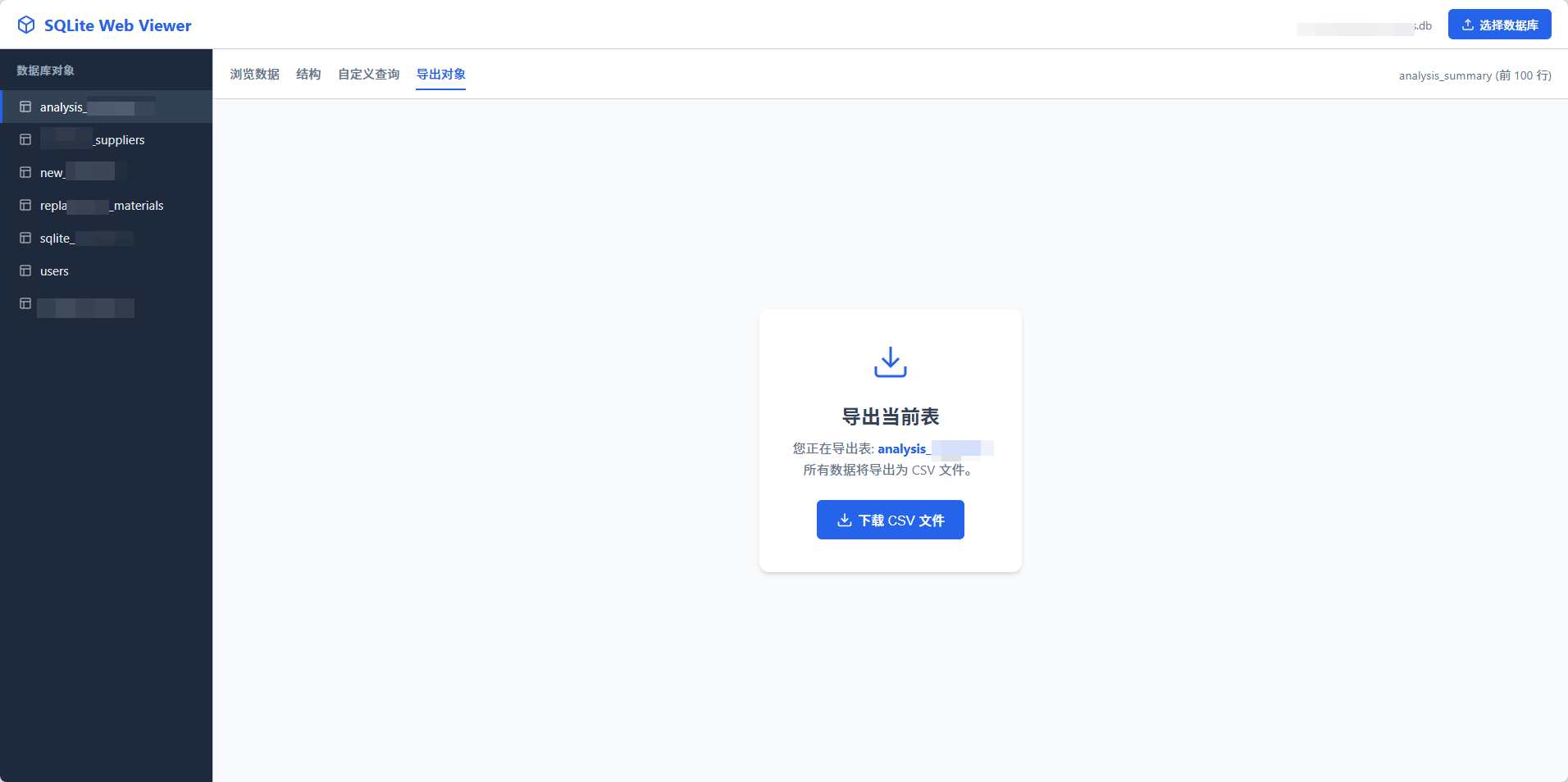
sqllite本地网页读取.html
代码如下:
html
<!DOCTYPE html>
<html lang="zh-CN">
<head>
<meta charset="UTF-8">
<meta name="viewport" content="width=device-width, initial-scale=1.0">
<title>SQLite 本地查看器 (支持导出)</title>
<!-- 引入 sql.js 核心库 -->
<script src="https://cdnjs.cloudflare.com/ajax/libs/sql.js/1.8.0/sql-wasm.js"></script>
<style>
:root {
--primary-color: #2563eb;
--primary-hover: #1d4ed8;
--bg-color: #f1f5f9;
--sidebar-bg: #1e293b;
--sidebar-text: #e2e8f0;
--sidebar-active: #334155;
--text-main: #334155;
--border-color: #cbd5e1;
--header-height: 60px;
}
* { box-sizing: border-box; margin: 0; padding: 0; }
body { font-family: -apple-system, BlinkMacSystemFont, "Segoe UI", Roboto, "Helvetica Neue", Arial, sans-serif; height: 100vh; display: flex; flex-direction: column; color: var(--text-main); background: var(--bg-color); overflow: hidden; position: relative; }
/* 顶部导航栏 */
header {
height: var(--header-height);
background: white;
border-bottom: 1px solid var(--border-color);
display: flex;
align-items: center;
justify-content: space-between;
padding: 0 20px;
box-shadow: 0 1px 2px rgba(0,0,0,0.05);
z-index: 10;
}
.brand { font-size: 1.25rem; font-weight: 700; color: var(--primary-color); display: flex; align-items: center; gap: 10px; }
.brand svg { width: 24px; height: 24px; }
.controls { display: flex; gap: 10px; align-items: center; }
.btn {
padding: 8px 16px;
border-radius: 6px;
border: none;
cursor: pointer;
font-size: 0.9rem;
font-weight: 500;
transition: all 0.2s;
display: inline-flex;
align-items: center;
gap: 6px;
}
.btn-primary { background: var(--primary-color); color: white; }
.btn-primary:hover { background: var(--primary-hover); }
.btn-outline { background: white; border: 1px solid var(--border-color); color: var(--text-main); }
.btn-outline:hover { background: #f8fafc; border-color: #94a3b8; }
.btn-lg { padding: 12px 24px; font-size: 1rem; }
input[type="file"] { display: none; }
/* 主布局 */
.layout { display: flex; flex: 1; overflow: hidden; }
/* 侧边栏 */
aside {
width: 260px;
background: var(--sidebar-bg);
color: var(--sidebar-text);
display: flex;
flex-direction: column;
border-right: 1px solid var(--border-color);
flex-shrink: 0;
}
.sidebar-header { padding: 15px 20px; font-size: 0.85rem; text-transform: uppercase; letter-spacing: 0.05em; color: #94a3b8; font-weight: 600; }
.table-list { flex: 1; overflow-y: auto; list-style: none; }
.table-item {
padding: 10px 20px;
cursor: pointer;
border-left: 3px solid transparent;
display: flex;
align-items: center;
gap: 10px;
font-size: 0.95rem;
}
.table-item:hover { background: rgba(255,255,255,0.05); }
.table-item.active { background: var(--sidebar-active); border-left-color: var(--primary-color); color: white; }
.table-item svg { opacity: 0.7; width: 16px; height: 16px; }
/* 主内容区 */
main { flex: 1; display: flex; flex-direction: column; overflow: hidden; position: relative; background: white; }
/* 工具栏/Tab切换 */
.view-controls {
padding: 10px 20px;
background: white;
border-bottom: 1px solid var(--border-color);
display: flex;
justify-content: space-between;
align-items: center;
}
.tabs { display: flex; gap: 20px; }
.tab-btn {
background: none;
border: none;
padding: 8px 0;
cursor: pointer;
font-size: 0.95rem;
color: #64748b;
border-bottom: 2px solid transparent;
font-weight: 500;
}
.tab-btn.active { color: var(--primary-color); border-bottom-color: var(--primary-color); }
.table-info { font-size: 0.9rem; color: #64748b; }
/* 数据表格容器 */
.data-container { flex: 1; overflow: auto; background: white; position: relative; }
table { width: 100%; border-collapse: collapse; font-size: 0.9rem; min-width: 800px; }
th {
background: #f8fafc;
position: sticky;
top: 0;
text-align: left;
padding: 12px 16px;
border-bottom: 2px solid var(--border-color);
color: #475569;
font-weight: 600;
z-index: 5;
}
td {
padding: 10px 16px;
border-bottom: 1px solid #e2e8f0;
color: #334155;
max-width: 300px;
overflow: hidden;
text-overflow: ellipsis;
white-space: nowrap;
}
tr:hover td { background: #f1f5f9; }
/* 状态提示 */
#status-msg {
position: absolute;
top: 50%; left: 50%;
transform: translate(-50%, -50%);
text-align: center;
color: #64748b;
z-index: 1;
}
.spinner {
width: 40px; height: 40px; border: 4px solid #e2e8f0; border-top-color: var(--primary-color);
border-radius: 50%; animation: spin 1s linear infinite; margin: 0 auto 15px;
}
@keyframes spin { to { transform: rotate(360deg); } }
/* SQL 编辑器区域 */
.query-area {
padding: 20px;
height: 100%;
display: flex;
flex-direction: column;
gap: 15px;
background: white;
}
textarea {
width: 100%;
flex: 1;
padding: 15px;
font-family: "Fira Code", monospace;
border: 1px solid var(--border-color);
border-radius: 6px;
resize: none;
font-size: 14px;
background: #f8fafc;
color: #334155;
}
textarea:focus { outline: 2px solid var(--primary-color); background: white; border-color: transparent; }
/* Toast 通知 */
.toast {
position: fixed; bottom: 20px; right: 20px;
background: #334155; color: white;
padding: 12px 24px; border-radius: 6px;
box-shadow: 0 4px 6px rgba(0,0,0,0.1);
transform: translateY(100px); transition: transform 0.3s cubic-bezier(0.175, 0.885, 0.32, 1.275);
z-index: 100;
}
.toast.show { transform: translateY(0); }
.toast.error { background: #ef4444; }
/* 无数据状态 */
.empty-state {
display: flex;
flex-direction: column;
align-items: center;
justify-content: center;
height: 100%;
color: #94a3b8;
gap: 15px;
}
.empty-state svg { width: 64px; height: 64px; opacity: 0.5; }
/* 拖拽上传样式 */
.drop-overlay {
position: fixed;
top: 0; left: 0; right: 0; bottom: 0;
background: rgba(37, 99, 235, 0.9);
z-index: 9999;
display: none;
flex-direction: column;
align-items: center;
justify-content: center;
color: white;
backdrop-filter: blur(4px);
border: 5px dashed rgba(255,255,255,0.4);
transition: all 0.3s ease;
}
.drop-overlay.active { display: flex; animation: fadeIn 0.2s; }
.drop-overlay svg { width: 80px; height: 80px; margin-bottom: 20px; }
.drop-overlay h2 { font-size: 2rem; margin-bottom: 10px; }
.drop-overlay p { font-size: 1.2rem; opacity: 0.9; }
@keyframes fadeIn { from { opacity: 0; } to { opacity: 1; } }
/* 导出页特定样式 */
.export-container {
display: flex;
flex-direction: column;
align-items: center;
justify-content: center;
height: 100%;
background: #f8fafc;
}
.export-box {
background: white;
padding: 40px;
border-radius: 12px;
box-shadow: 0 4px 6px -1px rgba(0, 0, 0, 0.1), 0 2px 4px -1px rgba(0, 0, 0, 0.06);
text-align: center;
max-width: 500px;
}
.export-box h3 { font-size: 1.5rem; margin-bottom: 10px; color: var(--text-main); }
.export-box p { color: #64748b; margin-bottom: 25px; line-height: 1.6; }
.export-icon {
width: 48px; height: 48px; color: var(--primary-color); margin-bottom: 20px;
}
</style>
</head>
<body>
<!-- 拖拽上传遮罩层 -->
<div id="drop-zone" class="drop-overlay">
<svg viewBox="0 0 24 24" fill="none" stroke="currentColor" stroke-width="2"><path d="M21 15v4a2 2 0 0 1-2 2H5a2 2 0 0 1-2-2v-4"></path><polyline points="17 8 12 3 7 8"></polyline><line x1="12" y1="3" x2="12" y2="15"></line></svg>
<h2>释放以导入数据库</h2>
<p>支持 .db, .sqlite, .sqlite3 文件</p>
</div>
<header>
<div class="brand">
<svg viewBox="0 0 24 24" fill="none" stroke="currentColor" stroke-width="2" stroke-linecap="round" stroke-linejoin="round"><path d="M21 16V8a2 2 0 0 0-1-1.73l-7-4a2 2 0 0 0-2 0l-7 4A2 2 0 0 0 3 8v8a2 2 0 0 0 1 1.73l7 4a2 2 0 0 0 2 0l7-4A2 2 0 0 0 21 16z"></path><polyline points="3.27 6.96 12 12.01 20.73 6.96"></polyline><line x1="12" y1="22.08" x2="12" y2="12"></line></svg>
SQLite Web Viewer
</div>
<div class="controls">
<span id="db-name" style="font-size: 0.85rem; color: #64748b; margin-right: 10px;">未选择文件</span>
<label class="btn btn-primary">
<svg width="16" height="16" viewBox="0 0 24 24" fill="none" stroke="currentColor" stroke-width="2"><path d="M21 15v4a2 2 0 0 1-2 2H5a2 2 0 0 1-2-2v-4"></path><polyline points="17 8 12 3 7 8"></polyline><line x1="12" y1="3" x2="12" y2="15"></line></svg>
选择数据库
<input type="file" id="file-input" accept=".db,.sqlite,.sqlite3">
</label>
</div>
</header>
<div class="layout">
<aside>
<div class="sidebar-header">数据库对象</div>
<ul class="table-list" id="table-list">
<!-- 表格列表将动态生成 -->
<li style="padding: 20px; color: #64748b; text-align: center; font-size: 0.85rem;">
请先上传数据库文件
</li>
</ul>
</aside>
<main>
<div class="view-controls" id="view-controls" style="display: none;">
<div class="tabs">
<button class="tab-btn active" data-tab="browse">浏览数据</button>
<button class="tab-btn" data-tab="structure">结构</button>
<button class="tab-btn" data-tab="query">自定义查询</button>
<button class="tab-btn" data-tab="export">导出对象</button>
</div>
<div class="table-info" id="table-info"></div>
</div>
<!-- 浏览数据视图 -->
<div id="tab-browse" class="data-container">
<div id="status-msg">
<div class="empty-state">
<svg viewBox="0 0 24 24" fill="none" stroke="currentColor" stroke-width="1.5"><path d="M14 2H6a2 2 0 0 0-2 2v16a2 2 0 0 0 2 2h12a2 2 0 0 0 2-2V8z"></path><polyline points="14 2 14 8 20 8"></polyline><line x1="12" y1="18" x2="12" y2="12"></line><line x1="9" y1="15" x2="15" y2="15"></line></svg>
<p>请拖拽 .db 文件到页面,或点击右上角上传</p>
</div>
</div>
<div id="table-wrapper"></div>
</div>
<!-- 结构视图 -->
<div id="tab-structure" class="data-container" style="display: none;">
<div id="structure-wrapper"></div>
</div>
<!-- 查询视图 -->
<div id="tab-query" class="query-area" style="display: none;">
<textarea id="sql-editor" placeholder="输入 SQL 语句,例如: SELECT * FROM users LIMIT 10">SELECT * FROM sqlite_master;</textarea>
<div style="display: flex; gap: 10px; justify-content: flex-end;">
<button class="btn btn-outline" onclick="app.clearQuery()">清空</button>
<button class="btn btn-primary" onclick="app.runQuery()">
<svg width="16" height="16" viewBox="0 0 24 24" fill="none" stroke="currentColor" stroke-width="2"><polygon points="5 3 19 12 5 21 5 3"></polygon></svg>
执行查询
</button>
</div>
<div id="query-result" class="data-container" style="border: 1px solid var(--border-color); border-radius: 6px; flex: 0 0 50%;"></div>
</div>
<!-- 导出视图 -->
<div id="tab-export" class="export-container" style="display: none;">
<div class="export-box">
<svg class="export-icon" viewBox="0 0 24 24" fill="none" stroke="currentColor" stroke-width="1.5"><path d="M21 15v4a2 2 0 0 1-2 2H5a2 2 0 0 1-2-2v-4"></path><polyline points="7 10 12 15 17 10"></polyline><line x1="12" y1="15" x2="12" y2="3"></line></svg>
<h3>导出当前表</h3>
<p>您正在导出表: <strong id="export-table-name-display" style="color:var(--primary-color)"></strong><br>所有数据将导出为 CSV 文件。</p>
<button class="btn btn-primary btn-lg" onclick="app.exportTableToCSV()" id="btn-download">
<svg width="20" height="20" viewBox="0 0 24 24" fill="none" stroke="currentColor" stroke-width="2"><path d="M21 15v4a2 2 0 0 1-2 2H5a2 2 0 0 1-2-2v-4"></path><polyline points="7 10 12 15 17 10"></polyline><line x1="12" y1="15" x2="12" y2="3"></line></svg>
下载 CSV 文件
</button>
</div>
</div>
</main>
</div>
<div id="toast" class="toast">消息提示</div>
<script>
/**
* 应用逻辑封装
*/
const app = {
db: null,
tableName: null,
SQL: null,
// 初始化
async init() {
try {
const config = {
locateFile: filename => `https://cdnjs.cloudflare.com/ajax/libs/sql.js/1.8.0/${filename}`
};
this.SQL = await initSqlJs(config);
this.showToast('SQL 引擎加载完成');
} catch (err) {
console.error(err);
this.showToast('加载 SQL 引擎失败,请检查网络连接', true);
}
this.bindEvents();
this.bindDragEvents();
},
bindEvents() {
// 文件上传
document.getElementById('file-input').addEventListener('change', (e) => {
if (e.target.files.length > 0) {
this.processFile(e.target.files[0]);
}
});
// Tab 切换
document.querySelectorAll('.tab-btn').forEach(btn => {
btn.addEventListener('click', () => this.switchTab(btn.dataset.tab));
});
},
// 拖拽事件绑定
bindDragEvents() {
const dropZone = document.getElementById('drop-zone');
const body = document.body;
['dragenter', 'dragover', 'dragleave', 'drop'].forEach(eventName => {
body.addEventListener(eventName, (e) => {
e.preventDefault();
e.stopPropagation();
}, false);
});
body.addEventListener('dragenter', () => {
dropZone.classList.add('active');
});
dropZone.addEventListener('dragleave', (e) => {
if (e.clientX === 0 && e.clientY === 0) {
dropZone.classList.remove('active');
}
});
body.addEventListener('drop', (e) => {
dropZone.classList.remove('active');
const dt = e.dataTransfer;
const files = dt.files;
if (files.length > 0) {
this.processFile(files[0]);
}
});
},
// 通用文件处理逻辑
processFile(file) {
if (!file.name.match(/\.(db|sqlite|sqlite3)$/i)) {
this.showToast('文件格式不支持,请上传 .db 或 .sqlite 文件', true);
return;
}
document.getElementById('db-name').textContent = file.name;
this.showToast('正在读取数据库...');
const reader = new FileReader();
reader.onload = (e) => {
try {
const uInt8Array = new Uint8Array(e.target.result);
this.db = new this.SQL.Database(uInt8Array);
this.loadTableList();
document.getElementById('view-controls').style.display = 'flex';
document.getElementById('status-msg').style.display = 'none';
this.showToast('数据库加载成功');
} catch (err) {
console.error(err);
this.showToast('解析数据库文件失败,文件可能已损坏或加密', true);
}
};
reader.readAsArrayBuffer(file);
},
// 加载表列表
loadTableList() {
const stmt = this.db.exec("SELECT name FROM sqlite_master WHERE type='table' ORDER BY name");
const listEl = document.getElementById('table-list');
listEl.innerHTML = '';
if (stmt.length > 0 && stmt[0].values.length > 0) {
stmt[0].values.forEach(row => {
const name = row[0];
const li = document.createElement('li');
li.className = 'table-item';
li.innerHTML = `
<svg viewBox="0 0 24 24" fill="none" stroke="currentColor" stroke-width="2"><rect x="3" y="3" width="18" height="18" rx="2" ry="2"></rect><line x1="3" y1="9" x2="21" y2="9"></line><line x1="9" y1="21" x2="9" y2="9"></line></svg>
${name}
`;
li.onclick = () => this.selectTable(name, li);
listEl.appendChild(li);
});
if(listEl.firstChild) this.selectTable(stmt[0].values[0][0], listEl.firstChild);
} else {
listEl.innerHTML = '<li style="padding:20px; text-align:center; color:#64748b;">没有找到表</li>';
}
},
// 选择表
selectTable(name, el) {
this.tableName = name;
document.querySelectorAll('.table-item').forEach(i => i.classList.remove('active'));
el.classList.add('active');
this.switchTab('browse');
this.renderTableData(name);
this.renderTableStructure(name);
document.getElementById('sql-editor').value = `SELECT * FROM ${name} LIMIT 100;`;
// 更新导出页显示的表名
document.getElementById('export-table-name-display').textContent = name;
},
// 渲染表数据
renderTableData(tableName) {
try {
const stmt = this.db.exec(`SELECT * FROM [${tableName}] LIMIT 100`);
const wrapper = document.getElementById('table-wrapper');
if (stmt.length === 0) {
wrapper.innerHTML = '<div style="padding:20px; text-align:center; color:#94a3b8;">表中无数据</div>';
document.getElementById('table-info').textContent = `${tableName} (0 行)`;
return;
}
const cols = stmt[0].columns;
const values = stmt[0].values;
let html = '<table><thead><tr>';
cols.forEach(col => html += `<th>${col}</th>`);
html += '</tr></thead><tbody>';
values.forEach(row => {
html += '<tr>';
row.forEach(cell => {
const display = (cell === null) ? '<span style="color:#cbd5e1; font-style:italic;">NULL</span>' : this.escapeHtml(String(cell));
html += `<td title="${display}">${display}</td>`;
});
html += '</tr>';
});
html += '</tbody></table>';
wrapper.innerHTML = html;
document.getElementById('table-info').textContent = `${tableName} (前 100 行)`;
} catch (err) {
console.error(err);
this.showToast('读取表数据失败: ' + err.message, true);
}
},
// 渲染表结构
renderTableStructure(tableName) {
try {
const stmt = this.db.exec(`PRAGMA table_info([${tableName}])`);
const wrapper = document.getElementById('structure-wrapper');
if (stmt.length === 0) {
wrapper.innerHTML = '无法读取结构';
return;
}
const values = stmt[0].values;
let html = '<table><thead><tr><th>CID</th><th>Name</th><th>Type</th><th>NotNull</th><th>Default</th><th>PK</th></tr></thead><tbody>';
values.forEach(row => {
html += `<tr>
<td>${row[0]}</td>
<td style="font-weight:500;">${row[1]}</td>
<td><span style="background:#e2e8f0; padding:2px 6px; border-radius:4px; font-size:0.8em;">${row[2] || 'ANY'}</span></td>
<td>${row[3] ? 'Yes' : 'No'}</td>
<td>${row[4] || ''}</td>
<td>${row[5] ? '✅' : ''}</td>
</tr>`;
});
html += '</tbody></table>';
wrapper.innerHTML = html;
} catch (err) {
console.error(err);
wrapper.innerHTML = '读取结构出错';
}
},
// 切换 Tab
switchTab(tabName) {
document.querySelectorAll('.tab-btn').forEach(b => b.classList.remove('active'));
document.querySelector(`.tab-btn[data-tab="${tabName}"]`).classList.add('active');
document.getElementById('tab-browse').style.display = 'none';
document.getElementById('tab-structure').style.display = 'none';
document.getElementById('tab-query').style.display = 'none';
document.getElementById('tab-export').style.display = 'none';
const target = document.getElementById(`tab-${tabName}`);
// 布局修复:browse/structure 是 block,query/export 需要 flex 居中或特定布局
if (tabName === 'browse' || tabName === 'structure') {
target.style.display = 'block';
} else if (tabName === 'query') {
target.style.display = 'flex';
} else if (tabName === 'export') {
target.style.display = 'flex'; // 使用 flex 居中导出框
}
},
// 导出逻辑
exportTableToCSV() {
if (!this.tableName || !this.db) return;
const btn = document.getElementById('btn-download');
const originalText = btn.innerHTML;
btn.innerHTML = `<div class="spinner" style="width:16px; height:16px; border-width:2px; margin:0;"></div> 正在生成...`;
btn.disabled = true;
// 使用 setTimeout 让 UI 有机会渲染 Spinner
setTimeout(() => {
try {
// 查询全部数据,不带 LIMIT
const stmt = this.db.exec(`SELECT * FROM [${this.tableName}]`);
if (stmt.length === 0) {
this.showToast('表中没有数据可导出', true);
btn.innerHTML = originalText;
btn.disabled = false;
return;
}
const cols = stmt[0].columns;
const values = stmt[0].values;
// 构建 CSV 字符串
let csvContent = "";
// 添加表头
csvContent += cols.map(col => this.formatCsvCell(col)).join(",") + "\r\n";
// 添加数据行
values.forEach(row => {
csvContent += row.map(cell => this.formatCsvCell(cell)).join(",") + "\r\n";
});
// 添加 BOM 使得 Excel 能正确识别 UTF-8 中文
const blob = new Blob(["\uFEFF" + csvContent], { type: "text/csv;charset=utf-8;" });
const url = URL.createObjectURL(blob);
// 创建下载链接
const link = document.createElement("a");
link.setAttribute("href", url);
link.setAttribute("download", `${this.tableName}_export.csv`);
document.body.appendChild(link);
link.click();
document.body.removeChild(link);
this.showToast(`成功导出 ${values.length} 行数据`);
} catch (err) {
console.error(err);
this.showToast('导出失败: ' + err.message, true);
} finally {
btn.innerHTML = originalText;
btn.disabled = false;
}
}, 100);
},
// CSV 格式化辅助函数:处理逗号、引号和换行
formatCsvCell(value) {
if (value === null) return "";
const str = String(value);
// 如果包含逗号、双引号或换行符,需要用双引号包裹,并将内部双引号转义为两个双引号
if (str.includes(",") || str.includes('"') || str.includes("\n") || str.includes("\r")) {
return `"${str.replace(/"/g, '""')}"`;
}
return str;
},
// 执行自定义查询
runQuery() {
const sql = document.getElementById('sql-editor').value;
if (!sql.trim()) return;
const wrapper = document.getElementById('query-result');
wrapper.innerHTML = '<div style="padding:20px; text-align:center;"><div class="spinner" style="width:20px; height:20px; margin:0 auto;"></div></div>';
try {
setTimeout(() => {
const stmt = this.db.exec(sql);
if (stmt.length === 0) {
wrapper.innerHTML = '<div style="padding:20px; text-align:center; color:#64748b;">查询执行成功,无返回结果。</div>';
return;
}
const cols = stmt[0].columns;
const values = stmt[0].values;
let html = '<table><thead><tr>';
cols.forEach(col => html += `<th>${col}</th>`);
html += '</tr></thead><tbody>';
const limit = 500;
let count = 0;
values.forEach(row => {
if (count >= limit) return;
html += '<tr>';
row.forEach(cell => {
const display = (cell === null) ? '<span style="color:#cbd5e1;">NULL</span>' : this.escapeHtml(String(cell));
html += `<td>${display}</td>`;
});
html += '</tr>';
count++;
});
html += '</tbody></table>';
if (values.length > limit) {
html += `<div style="padding:10px; background:#fff3cd; color:#856404; font-size:0.85rem;">结果过多,仅显示前 ${limit} 条。</div>`;
}
wrapper.innerHTML = html;
this.showToast('查询成功');
}, 50);
} catch (err) {
wrapper.innerHTML = `<div style="padding:20px; color:#ef4444;">SQL 错误: ${err.message}</div>`;
this.showToast('SQL 执行出错', true);
}
},
clearQuery() {
document.getElementById('sql-editor').value = '';
},
// 转义 HTML 防止 XSS
escapeHtml(text) {
if (!text) return '';
return text
.replace(/&/g, "&")
.replace(/</g, "<")
.replace(/>/g, ">")
.replace(/"/g, """)
.replace(/'/g, "'");
},
// Toast 提示
showToast(msg, isError = false) {
const toast = document.getElementById('toast');
toast.textContent = msg;
toast.className = `toast show ${isError ? 'error' : ''}`;
setTimeout(() => {
toast.classList.remove('show');
}, 3000);
}
};
app.init();
</script>
</body>
</html>