查看近20条提交记录
git log --oneline -20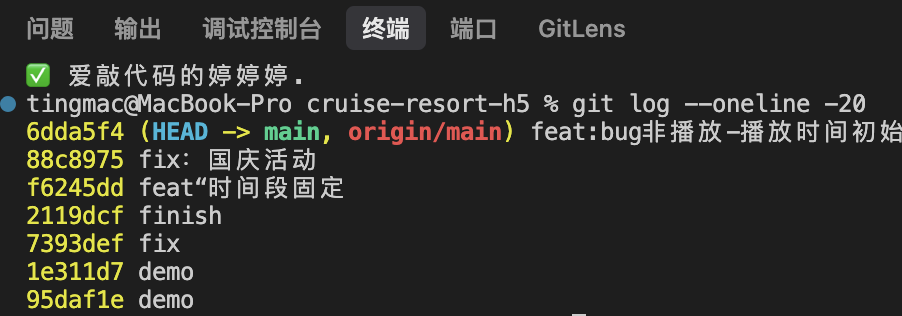
场景一:本地回退,不影响远端(最安全)
bash
# 只是想本地代码回上一次提交后
git reset --hard HEAD~1
# 等价于:
git reset --hard 88c8975
注意:--hard 会丢弃未提交的修改
场景二:本地 + 远端都回退(你是唯一开发 / 已确认)
bash
git reset --hard 88c8975
git push -f origin master
注意: 6dda5f4 会在远端历史中被"抹掉",如果别人已经拉了 6dda5f4,会造成历史冲突
场景三:不改历史,用"反向提交"撤销(最规范)
bash
git revert 6d308ce结果:新增一个 commit,撤销 6dda5f4 的所有修改
日志最新的那条会变成类似:xxxxx Revert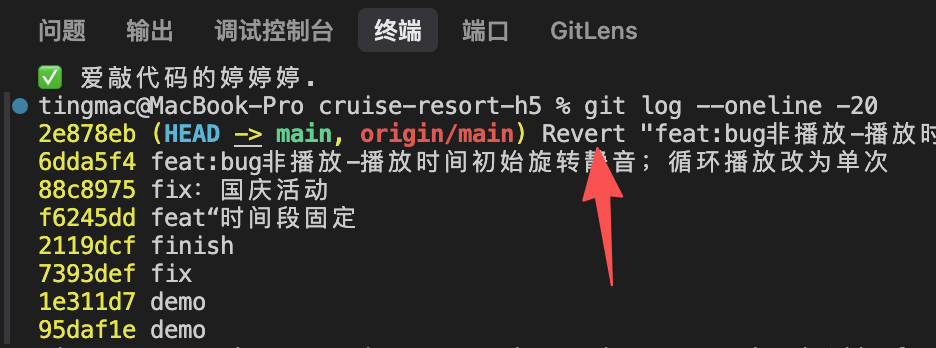
场景四:改动要保留,但不想现在提交
bash
git stash
# 以后想恢复:
git stash pop
"防翻车"小技巧(很实用),回退前先打个 tag
tag = 给某个提交打一个"书签 / 保险点",等价于在 Git 历史里说:"我给 6d308ce 这个状态存个档"
bash
git tag backup-6dda5f4
# 万一后悔了:
git reset --hard backup-6dda5f4
给你一套「不翻车标准流程」(建议你以后照抄)
bash
# 1. 看状态
git status

# 2. 如果有改动,先存
git stash

# 3. 打保险 tag
git tag backup-before-reset

# 4. 回退
git reset --hard HEAD~1
恢复方案:
bash
# 恢复回退点
git reset --hard backup-before-reset

# 恢复改动
git stash pop
总结:
reset = 改历史(危险)
revert = 不改历史(安全)
tag = 后悔药
stash = 临时抽屉