界止签章宗地号替换工具 - 项目文档
项目概述
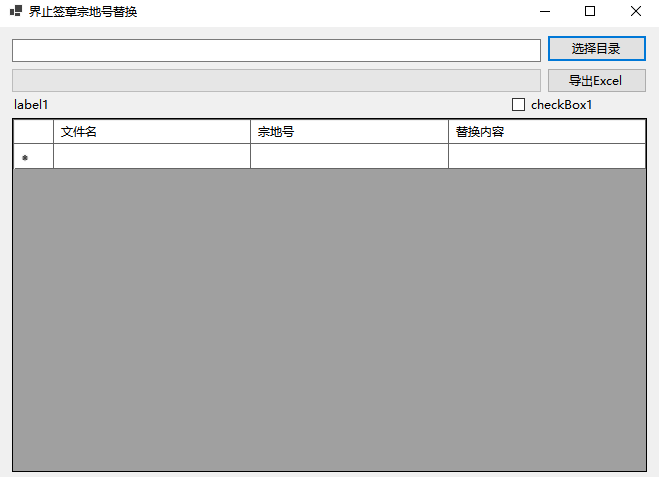
这是一个 Windows Forms 应用程序,用于批量处理 Word 文档,实现宗地号的批量替换和页眉编号插入功能,并支持导出签章明细表到 Excel。
功能特性
-
批量处理 Word 文档
- 支持递归扫描目录下的所有 .docx 文件
- 自动替换文档中的宗地号
- 在文档页眉中插入编号
-
多格式宗地号匹配
- 支持带括号格式:
(123123123123JC14008) - 支持不带括号格式:
123123123123JC14008 - 支持通配符格式:
123123123123J******
- 支持带括号格式:
-
实时处理显示
- DataGridView 显示处理进度
- 进度条显示整体进度
- 显示每个文件的处理详情
-
Excel 导出功能
- 导出签章明细表到 Excel
- 包含文件名、替换编号、状态、替换内容等信息
- 自动调整列宽
-
日志记录
- 生成详细的处理日志文件
- 记录每个文件的处理结果
- 统计处理数据
技术栈
- 开发框架:.NET 8.0 Windows
- UI 框架:Windows Forms
- 文档处理库:DocumentFormat.OpenXml 3.3.0
- 编程语言:C#
项目结构
14界止签章宗地号替换/
├── Form1.cs                 # 主窗体代码
├── Form1.Designer.cs         # 窗体设计器代码
├── Form1.resx               # 窗体资源文件
├── Program.cs               # 程序入口
├── 14界止签章宗地号替换.csproj  # 项目文件
└── 14界止签章宗地号替换.sln     # 解决方案文件
核心类说明
Form1 类
主窗体类,包含所有 UI 逻辑和业务逻辑。
主要字段
csharp
private DataTable logTable;              // 存储处理日志的数据表
private const string NEW_LAND_NUMBER = ""; // 新宗地号(待设置)
主要方法
| 方法名 | 功能说明 |
|---|---|
InitializeDataGridView() |
初始化 DataGridView 数据表结构 |
button1_Click() |
选择目录并开始批量处理 |
button2_Click() |
导出数据到 Excel |
ProcessWordDocumentsAsync() |
异步批量处理 Word 文档 |
ProcessWordDocumentWithHeader() |
处理单个 Word 文档 |
ExtractCodeFromFileName() |
从文件名提取编号 |
ProcessSingleDocumentContent() |
替换文档中的宗地号 |
ProcessElement() |
处理文档元素并替换文本 |
FindAllLandNumbers() |
使用正则表达式查找宗地号 |
CreateHeader() |
创建文档页眉 |
ProcessHeader() |
处理现有页眉 |
AddLogRow() |
添加处理记录到 DataGridView |
ExportToExcel() |
导出数据到 Excel |
CreateCellWithInlineString() |
创建 Excel 单元格 |
GetCellReference() |
获取 Excel 单元格引用 |
ProcessResult 类
处理结果数据模型。
csharp
public class ProcessResult
{
    public bool Success;                 // 是否成功处理
    public bool WasReplaced;             // 是否执行了替换
    public int ReplaceCount;             // 替换次数
    public string SampleReplacements;     // 替换示例
    public bool HeaderProcessed;          // 是否处理了页眉
    public string ErrorMessage;           // 错误信息
    public List<string> FoundLandNumbers; // 找到的宗地号列表
}
数据结构
DataGridView 列结构
| 列名 | 数据类型 | 说明 |
|---|---|---|
| 序号 | int | 文件处理序号 |
| 文件名 | string | Word 文档文件名 |
| 替换编号 | string | 所有被替换的宗地号(分号分隔) |
| 状态 | string | 处理状态(已处理/无匹配/错误) |
| 替换内容 | string | 详细的替换信息 |
| 处理时间 | string | 处理时间 |
使用说明
1. 准备工作
- 打开项目,设置
NEW_LAND_NUMBER常量为需要替换成的新宗地号 - 编译并运行程序
2. 处理文档
- 点击"选择目录"按钮
- 选择包含 Word 文档的目录
- 程序自动扫描并处理所有 .docx 文件
- 查看处理进度和结果
3. 导出明细
- 处理完成后,点击"导出 Excel"按钮
- 选择保存位置
- 程序生成签章明细表.xlsx 文件
宗地号匹配规则
程序使用正则表达式匹配以下格式的宗地号:
regex
(?:\(123123123123J(?:[A-Z0-9]{6}|\*{6})\)|123123123123J(?:[A-Z0-9]{6}|\*{6}))支持的格式示例
| 格式 | 示例 |
|---|---|
| 带括号完整格式 | (123123123123JC14008) |
| 不带括号格式 | 123123123123JC14008 |
| 带通配符格式 | (123123123123J******) |
| 不带括号通配符 | 123123123123J****** |
编号提取规则
从文件名中提取编号:
regex
123123123123([A-Z0-9]{6,7})示例:123123123123JC14008-界址签章表.docx → JC14008
页眉处理规则
字体样式
- 字体:宋体
- 字号:五号(10.5磅)
- 颜色:灰色(RGB: 128, 128, 128)
- 对齐方式:右对齐
处理逻辑
- 检查文档是否存在页眉
- 如果存在,检查是否已包含编号
- 如果不存在编号,添加新段落
- 如果不存在页眉,创建新页眉并插入编号
Excel 导出格式
文件命名
签章明细表_yyyyMMdd_HHmmss.xlsx工作表结构
| 列名 | 说明 |
|---|---|
| 序号 | 文件序号 |
| 文件名 | Word 文档名称 |
| 替换编号 | 被替换的所有宗地号(分号分隔) |
| 状态 | 处理状态 |
| 替换内容 | 详细替换信息 |
| 处理时间 | 处理时间(HH:mm:ss) |
单元格格式
- 数据类型:InlineString
- 列宽:根据内容自动调整(最大 50 字符)
日志文件格式
文件命名
宗地号替换日志_yyyyMMdd_HHmmss.txt日志内容示例
=== 宗地号批量替换处理日志 ===
开始处理时间: 2026-01-04 10:30:00
处理目录: D:\Documents\WordFiles
文件总数: 10
替换规则: 所有 (123123123123Jxxxxxx) 格式的宗地号
替换为: NEW_LAND_NUMBER
页眉处理: 插入JC14008 宋体五号灰色
==========================================
[已处理] 123123123123JC14008.docx
  替换数量: 3
  具体内容: (123123123123JC14008) -> NEW_LAND_NUMBER
  页眉处理: 已插入JC14008
==========================================
处理完成时间: 2026-01-04 10:35:00
总文件数: 10
成功处理: 9
已替换文件: 5
替换总数: 15 处
已处理页眉: 8
错误文件: 1
工作流程
是
否
用户选择目录
获取所有.docx文件
遍历每个文件
从文件名提取编号
打开Word文档
处理文档内容
查找并替换宗地号
处理页眉
记录替换信息
插入编号到页眉
保存文档
添加记录到DataGridView
还有文件?
处理完成
生成日志文件
显示统计结果
等待用户导出Excel
用户点击导出
生成Excel文件
异步处理机制
程序使用异步处理避免 UI 冻结:
csharp
await Task.Run(() => ProcessWordDocumentWithHeader(filePath));UI 线程安全
从后台线程更新 UI 需要使用 Invoke:
csharp
this.Invoke(new Action(() => AddLogRow(...)));命名空间处理
由于同时引用了 Wordprocessing 和 Spreadsheet 命名空间,需要明确指定:
Word 相关类型
csharp
DocumentFormat.OpenXml.Wordprocessing.*- Paragraph
- Run
- Text
- FontSize
- Color
- RunProperties
- Header
- 等
Excel 相关类型
csharp
DocumentFormat.OpenXml.Spreadsheet.*- Cell
- Row
- Column
- SheetData
- InlineString
- 等
注意事项
-
新宗地号设置
- 需要在代码中手动设置
NEW_LAND_NUMBER常量 - 当前为空字符串
- 需要在代码中手动设置
-
文件备份
- 程序直接修改原文件
- 建议处理前备份原始文件
-
编码问题
- 日志文件使用 UTF-8 编码
- 支持中文文件名和内容
-
性能考虑
- 大批量文件处理可能需要较长时间
- 建议分批处理(每次不超过 100 个文件)
-
错误处理
- 处理失败的文件会记录在日志中
- 不会中断其他文件的处理
依赖项
NuGet 包
xml
<ItemGroup>
  <PackageReference Include="DocumentFormat.OpenXml" Version="3.3.0" />
</ItemGroup>
系统要求
- .NET 8.0 Windows Runtime
- Windows 10 或更高版本
- Visual Studio 2022 或更高版本(用于开发)
编译和运行
编译项目
bash
dotnet build "14界止签章宗地号替换.csproj"运行项目
bash
dotnet run --project "14界止签章宗地号替换.csproj"或在 Visual Studio 中按 F5 运行。
常见问题
Q1: 为什么导出的 Excel 文件没有内容?
A: 确保 DataGridView 中有数据后再点击导出按钮。
Q2: 替换编号列显示空白?
A: 检查文档中是否有匹配的宗地号格式,以及是否设置了 NEW_LAND_NUMBER。
Q3: 页眉没有正确插入?
A: 确保文件名中包含符合格式的编号(如 123123123123JC14008)。
Q4: 处理速度较慢?
A: 这是正常现象,大量文件处理需要时间,可以查看进度条了解进度。
更新日志
Version 1.0.0 (2026-01-04)
- 初始版本
- 支持批量替换宗地号
- 支持页眉编号插入
- 支持 Excel 导出
- 完整的日志记录功能
完整代码
Form1.cs
csharp
using System;
using System.Collections.Generic;
using System.ComponentModel;
using System.Data;
using System.Diagnostics;
using System.Drawing;
using System.IO;
using System.Linq;
using System.Text.RegularExpressions;
using System.Windows.Forms;
using DocumentFormat.OpenXml;
using DocumentFormat.OpenXml.Packaging;
using DocumentFormat.OpenXml.Wordprocessing;
using OfficeOpenXml;
using Excel = OfficeOpenXml;
using WordFontSize = DocumentFormat.OpenXml.Wordprocessing.FontSize;
using WordColor = DocumentFormat.OpenXml.Wordprocessing.Color;
namespace _14界止签章宗地号替换
{
public partial class Form1 : Form
{
// 存储处理结果的数据表
private DataTable resultTable;
private BackgroundWorker backgroundWorker;
private int totalFiles;
private int processedFiles;
private string currentDirectory;
public Form1()
{
InitializeComponent();
InitializeDataGridView();
InitializeBackgroundWorker();
}
private void InitializeDataGridView()
{
resultTable = new DataTable();
resultTable.Columns.Add("文件名", typeof(string));
resultTable.Columns.Add("宗地号", typeof(string));
resultTable.Columns.Add("替换内容", typeof(string));
resultTable.Columns.Add("原始文件名", typeof(string)); // 隐藏列,存储完整路径
dataGridView1.DataSource = resultTable;
dataGridView1.AutoSizeColumnsMode = DataGridViewAutoSizeColumnsMode.Fill;
dataGridView1.ReadOnly = true;
dataGridView1.CellClick += DataGridView1_CellClick;
// 隐藏原始文件名列
if (dataGridView1.Columns["原始文件名"] != null)
{
dataGridView1.Columns["原始文件名"].Visible = false;
}
}
private void InitializeBackgroundWorker()
{
backgroundWorker = new BackgroundWorker();
backgroundWorker.WorkerReportsProgress = true;
backgroundWorker.WorkerSupportsCancellation = true;
backgroundWorker.DoWork += BackgroundWorker_DoWork;
backgroundWorker.ProgressChanged += BackgroundWorker_ProgressChanged;
backgroundWorker.RunWorkerCompleted += BackgroundWorker_RunWorkerCompleted;
}
// DataGridView 单元格点击事件
private void DataGridView1_CellClick(object sender, DataGridViewCellEventArgs e)
{
if (e.RowIndex < 0 || e.ColumnIndex < 0) return;
// 只处理文件名列的点击
if (dataGridView1.Columns[e.ColumnIndex].Name == "文件名")
{
// 获取原始文件路径
string originalPath = dataGridView1.Rows[e.RowIndex].Cells["原始文件名"].Value?.ToString();
if (!string.IsNullOrEmpty(originalPath))
{
try
{
OpenWordDocument(originalPath);
}
catch (Exception ex)
{
MessageBox.Show($"打开Word文档失败:{ex.Message}", "错误",
MessageBoxButtons.OK, MessageBoxIcon.Error);
}
}
}
}
// 打开Word文档
private void OpenWordDocument(string filePath)
{
if (File.Exists(filePath))
{
Process.Start(new ProcessStartInfo(filePath) { UseShellExecute = true });
}
else
{
MessageBox.Show($"文件不存在:{filePath}", "错误",
MessageBoxButtons.OK, MessageBoxIcon.Error);
}
}
// 选择目录按钮
private void button1_Click(object sender, EventArgs e)
{
using (FolderBrowserDialog folderDialog = new FolderBrowserDialog())
{
folderDialog.Description = "选择包含Word文档的目录";
if (folderDialog.ShowDialog() == DialogResult.OK)
{
textBox1.Text = folderDialog.SelectedPath;
currentDirectory = folderDialog.SelectedPath;
// 清空之前的结果
resultTable.Rows.Clear();
dataGridView1.Refresh();
// 重置进度条
progressBar1.Value = 0;
progressBar1.Maximum = 100;
// 禁用按钮,防止重复操作
button1.Enabled = false;
button2.Enabled = false;
button2.Text = "正在处理...";
// 开始处理
backgroundWorker.RunWorkerAsync(folderDialog.SelectedPath);
}
}
}
// 后台工作线程
private void BackgroundWorker_DoWork(object sender, DoWorkEventArgs e)
{
string directoryPath = e.Argument as string;
if (string.IsNullOrEmpty(directoryPath))
{
return;
}
try
{
// 获取所有docx文件
string[] docxFiles = Directory.GetFiles(directoryPath, "*.docx", SearchOption.AllDirectories);
totalFiles = docxFiles.Length;
processedFiles = 0;
if (totalFiles == 0)
{
backgroundWorker.ReportProgress(100, "目录中没有找到Word文档");
return;
}
// 处理每个文件
foreach (string filePath in docxFiles)
{
if (backgroundWorker.CancellationPending)
{
e.Cancel = true;
return;
}
ProcessSingleDocument(filePath, directoryPath);
// 更新进度
processedFiles++;
int progress = (int)((processedFiles * 100) / totalFiles);
backgroundWorker.ReportProgress(progress, $"正在处理: {Path.GetFileName(filePath)}");
}
e.Result = directoryPath;
}
catch (Exception ex)
{
e.Result = ex;
}
}
// 进度更新
private void BackgroundWorker_ProgressChanged(object sender, ProgressChangedEventArgs e)
{
progressBar1.Value = e.ProgressPercentage;
if (e.UserState != null)
{
this.Text = $"界止签章宗地号替换 - {e.UserState}";
labelStatus.Text = e.UserState.ToString();
}
}
// 处理完成
private void BackgroundWorker_RunWorkerCompleted(object sender, RunWorkerCompletedEventArgs e)
{
button1.Enabled = true;
button2.Enabled = true;
button2.Text = "导出Excel";
if (e.Cancelled)
{
MessageBox.Show("处理已取消", "提示", MessageBoxButtons.OK, MessageBoxIcon.Information);
this.Text = "界止签章宗地号替换 - 已取消";
}
else if (e.Error != null)
{
MessageBox.Show($"处理过程中出现错误:{e.Error.Message}", "错误",
MessageBoxButtons.OK, MessageBoxIcon.Error);
this.Text = "界止签章宗地号替换 - 错误";
}
else
{
if (e.Result is string directoryPath)
{
progressBar1.Value = 100;
// 处理完成后自动导出并打开Excel
AutoExportAndOpenExcel(directoryPath);
this.Text = "界止签章宗地号替换 - 完成";
}
else if (e.Result is Exception ex)
{
MessageBox.Show($"处理过程中出现错误:{ex.Message}", "错误",
MessageBoxButtons.OK, MessageBoxIcon.Error);
}
}
}
// 自动导出并打开Excel
private void AutoExportAndOpenExcel(string directoryPath)
{
try
{
if (resultTable.Rows.Count == 0)
{
MessageBox.Show("没有数据可以导出!", "提示",
MessageBoxButtons.OK, MessageBoxIcon.Information);
return;
}
// 生成Excel文件名
string excelFileName = $"签章明细表_{DateTime.Now:yyyyMMdd_HHmmss}.xlsx";
string excelFilePath = Path.Combine(directoryPath, excelFileName);
// 导出Excel
ExportToExcel(excelFilePath);
// 打开Excel文件
OpenExcelFile(excelFilePath);
MessageBox.Show($"处理完成!共处理 {totalFiles} 个文档。\nExcel文件已自动打开:{excelFilePath}",
"完成", MessageBoxButtons.OK, MessageBoxIcon.Information);
}
catch (Exception ex)
{
MessageBox.Show($"自动导出Excel时出错:{ex.Message}\n请手动导出。", "警告",
MessageBoxButtons.OK, MessageBoxIcon.Warning);
}
}
// 打开Excel文件
private void OpenExcelFile(string filePath)
{
try
{
if (File.Exists(filePath))
{
Process.Start(new ProcessStartInfo(filePath) { UseShellExecute = true });
}
}
catch (Exception ex)
{
MessageBox.Show($"打开Excel文件时出错:{ex.Message}", "错误",
MessageBoxButtons.OK, MessageBoxIcon.Warning);
}
}
// 处理单个文档
private void ProcessSingleDocument(string filePath, string baseDirectory)
{
try
{
string fileName = Path.GetFileName(filePath);
string relativePath = filePath.Substring(baseDirectory.Length + 1);
// 从文件名中提取宗地号
string parcelNumber = ExtractParcelNumber(fileName);
// 检查是否需要设置眉页(根据checkBox1状态)
bool headerAdded = false;
if (checkBox1.Checked)
{
// 1. 眉页左插入宗地号
headerAdded = AddHeaderWithParcelNumber(filePath, parcelNumber);
}
// 2. 查找并替换括号内容
List<string> replacedContents = FindAndReplaceBracketContent(filePath);
// 3. 添加到DataGridView(需要在UI线程中执行)
AddToDataGridView(relativePath, parcelNumber, replacedContents, headerAdded, filePath);
}
catch (Exception ex)
{
// 记录错误但不停止处理其他文件
AddToDataGridView(filePath, "错误", new List<string> { $"处理失败: {ex.Message}" }, false, filePath);
}
}
// 从文件名提取宗地号(修改版本:取最后7位)
private string ExtractParcelNumber(string fileName)
{
try
{
// 移除扩展名
string nameWithoutExt = Path.GetFileNameWithoutExtension(fileName);
// 移除"-界址签章表"等后缀
if (nameWithoutExt.Contains("-界址签章表"))
{
nameWithoutExt = nameWithoutExt.Replace("-界址签章表", "");
}
else if (nameWithoutExt.Contains("-界址签..."))
{
nameWithoutExt = nameWithoutExt.Replace("-界址签...", "");
}
else if (nameWithoutExt.Contains("-界址签"))
{
nameWithoutExt = nameWithoutExt.Replace("-界址签", "");
}
else if (nameWithoutExt.Contains("-界址"))
{
nameWithoutExt = nameWithoutExt.Replace("-界址", "");
}
else if (nameWithoutExt.Contains("-"))
{
nameWithoutExt = nameWithoutExt.Split('-')[0];
}
// 提取完整宗地号(如:110113113001JC14800 或 110113113001JB50553)
// 正则表达式匹配:数字开头 + JC/JB + 数字
Match match = Regex.Match(nameWithoutExt, @"\d{6,}(JC|JB)\d+");
if (match.Success)
{
// 取最后7位
string fullNumber = match.Value;
if (fullNumber.Length >= 7)
{
return fullNumber.Substring(fullNumber.Length - 7);
}
return fullNumber;
}
// 如果上面的正则不匹配,尝试更通用的模式
match = Regex.Match(nameWithoutExt, @"\d{12,}");
if (match.Success)
{
string fullNumber = match.Value;
if (fullNumber.Length >= 7)
{
return fullNumber.Substring(fullNumber.Length - 7);
}
return fullNumber;
}
// 如果还是找不到,返回整个文件名(不含扩展名)的最后7位
if (nameWithoutExt.Length >= 7)
{
return nameWithoutExt.Substring(nameWithoutExt.Length - 7);
}
return nameWithoutExt;
}
catch
{
// 如果出错,返回最后7位
string nameWithoutExt = Path.GetFileNameWithoutExtension(fileName);
if (nameWithoutExt.Length >= 7)
{
return nameWithoutExt.Substring(nameWithoutExt.Length - 7);
}
return nameWithoutExt;
}
}
// 眉页左插入宗地号 - 修复版本
private bool AddHeaderWithParcelNumber(string filePath, string parcelNumber)
{
try
{
// 备份原文件
string backupPath = filePath + ".backup";
File.Copy(filePath, backupPath, true);
try
{
using (WordprocessingDocument doc = WordprocessingDocument.Open(filePath, true))
{
// 获取主文档部分
MainDocumentPart mainPart = doc.MainDocumentPart;
// 检查是否已有页眉部分
HeaderPart headerPart = mainPart.HeaderParts.FirstOrDefault();
if (headerPart == null)
{
// 创建新的页眉部分
headerPart = mainPart.AddNewPart<HeaderPart>();
// 获取页眉的ID
string headerPartId = mainPart.GetIdOfPart(headerPart);
// 获取或创建SectionProperties
var sectionProps = mainPart.Document.Body.Descendants<SectionProperties>().FirstOrDefault();
if (sectionProps == null)
{
sectionProps = new SectionProperties();
mainPart.Document.Body.Append(sectionProps);
}
// 添加页眉引用
sectionProps.PrependChild(new HeaderReference
{
Id = headerPartId,
Type = HeaderFooterValues.Default
});
}
// 确保Header不为null
if (headerPart.Header == null)
{
headerPart.Header = new Header();
}
else
{
// 清空现有内容
headerPart.Header.RemoveAllChildren();
}
// 创建段落
Paragraph paragraph = new Paragraph();
// 设置段落属性
ParagraphProperties paragraphProperties = new ParagraphProperties();
// 设置对齐方式
paragraphProperties.Append(new Justification()
{
Val = JustificationValues.Left
});
// 设置段落间距
paragraphProperties.Append(new SpacingBetweenLines()
{
After = "0",
Line = "240",
LineRule = LineSpacingRuleValues.Auto
});
paragraph.AppendChild(paragraphProperties);
// 创建文本运行
Run run = new Run();
// 设置运行属性(字体、大小、颜色)
RunProperties runProperties = new RunProperties();
// 设置字体:宋体
runProperties.Append(new RunFonts()
{
Ascii = "宋体",
HighAnsi = "宋体",
EastAsia = "宋体"
});
// 设置字体大小:5号字体(约10.5磅 = 21半磅)
runProperties.Append(new WordFontSize()
{
Val = "21" // 半磅单位
});
// 设置字体颜色:灰色
runProperties.Append(new WordColor()
{
Val = "808080" // RGB: 80,80,80
});
run.RunProperties = runProperties;
// 添加文本
run.AppendChild(new Text(parcelNumber));
// 将运行添加到段落
paragraph.AppendChild(run);
// 将段落添加到页眉
headerPart.Header.AppendChild(paragraph);
// 保存更改
doc.Save();
// 删除备份文件
if (File.Exists(backupPath))
{
File.Delete(backupPath);
}
return true;
}
}
catch (Exception)
{
// 如果出错,恢复备份
if (File.Exists(backupPath))
{
File.Copy(backupPath, filePath, true);
File.Delete(backupPath);
}
throw;
}
}
catch (Exception ex)
{
Console.WriteLine($"添加页眉时出错:{ex.Message}");
// 记录详细错误信息
Debug.WriteLine($"详细错误信息: {ex.ToString()}");
return false;
}
}
// 查找并替换括号内容
private List<string> FindAndReplaceBracketContent(string filePath)
{
List<string> replacedContents = new List<string>();
try
{
// 备份原文件
string backupPath = filePath + ".replace_backup";
File.Copy(filePath, backupPath, true);
try
{
using (WordprocessingDocument doc = WordprocessingDocument.Open(filePath, true))
{
Body body = doc.MainDocumentPart.Document.Body;
// 查找所有文本元素
var textElements = body.Descendants<Text>().ToList();
foreach (var textElement in textElements)
{
string originalText = textElement.Text;
if (string.IsNullOrEmpty(originalText))
continue;
// 使用正则表达式查找括号内容
string pattern = @"\(([^)]+)\)";
MatchCollection matches = Regex.Matches(originalText, pattern);
if (matches.Count > 0)
{
string newText = originalText;
foreach (Match match in matches)
{
string bracketContent = match.Groups[1].Value;
// 添加到替换内容列表
if (!replacedContents.Contains(bracketContent))
{
replacedContents.Add(bracketContent);
}
// 替换为空字符串
newText = newText.Replace(match.Value, "");
}
// 更新文本元素
textElement.Text = newText;
}
}
// 保存文档
doc.MainDocumentPart.Document.Save();
// 删除备份文件
if (File.Exists(backupPath))
{
File.Delete(backupPath);
}
}
}
catch (Exception)
{
// 如果出错,恢复备份
if (File.Exists(backupPath))
{
File.Copy(backupPath, filePath, true);
File.Delete(backupPath);
}
throw;
}
}
catch (Exception ex)
{
replacedContents.Add($"处理括号时出错: {ex.Message}");
}
return replacedContents;
}
// 添加到DataGridView(线程安全)
private void AddToDataGridView(string fileName, string parcelNumber, List<string> replacedContents, bool headerAdded, string fullPath)
{
if (this.InvokeRequired)
{
this.Invoke(new Action(() =>
AddToDataGridView(fileName, parcelNumber, replacedContents, headerAdded, fullPath)));
return;
}
string displayFileName = fileName.Length > 30 ? fileName.Substring(0, 30) + "..." : fileName;
if (replacedContents.Count == 0)
{
DataRow row = resultTable.NewRow();
row["文件名"] = displayFileName;
row["宗地号"] = parcelNumber;
row["替换内容"] = headerAdded ? "已添加页眉(无括号内容)" : "无括号内容";
row["原始文件名"] = fullPath;
resultTable.Rows.Add(row);
}
else
{
foreach (string content in replacedContents)
{
DataRow row = resultTable.NewRow();
row["文件名"] = displayFileName;
row["宗地号"] = parcelNumber;
row["替换内容"] = content;
row["原始文件名"] = fullPath;
resultTable.Rows.Add(row);
}
}
// 自动刷新显示
dataGridView1.Refresh();
}
// 导出Excel按钮(手动导出)
private void button2_Click(object sender, EventArgs e)
{
if (resultTable.Rows.Count == 0)
{
MessageBox.Show("没有数据可以导出!", "提示",
MessageBoxButtons.OK, MessageBoxIcon.Information);
return;
}
using (SaveFileDialog saveDialog = new SaveFileDialog())
{
saveDialog.Filter = "Excel文件 (*.xlsx)|*.xlsx";
saveDialog.FileName = $"签章明细表_{DateTime.Now:yyyyMMdd_HHmmss}.xlsx";
saveDialog.DefaultExt = "xlsx";
saveDialog.InitialDirectory = currentDirectory ?? textBox1.Text;
if (saveDialog.ShowDialog() == DialogResult.OK)
{
try
{
ExportToExcel(saveDialog.FileName);
// 询问是否打开文件
if (MessageBox.Show($"导出成功!是否打开Excel文件?",
"导出成功", MessageBoxButtons.YesNo, MessageBoxIcon.Question) == DialogResult.Yes)
{
OpenExcelFile(saveDialog.FileName);
}
}
catch (Exception ex)
{
MessageBox.Show($"导出Excel时出错:{ex.Message}", "错误",
MessageBoxButtons.OK, MessageBoxIcon.Error);
}
}
}
}
// 导出到Excel
private void ExportToExcel(string filePath)
{
// 设置EPPlus的LicenseContext
ExcelPackage.LicenseContext = OfficeOpenXml.LicenseContext.NonCommercial;
using (ExcelPackage excelPackage = new ExcelPackage())
{
// 创建工作表
ExcelWorksheet worksheet = excelPackage.Workbook.Worksheets.Add("签章明细");
// 设置列标题
worksheet.Cells[1, 1].Value = "文件名";
worksheet.Cells[1, 2].Value = "宗地号";
worksheet.Cells[1, 3].Value = "替换内容";
// 设置标题样式
using (var headerRange = worksheet.Cells[1, 1, 1, 3])
{
headerRange.Style.Font.Bold = true;
headerRange.Style.Fill.PatternType = Excel.Style.ExcelFillStyle.Solid;
headerRange.Style.Fill.BackgroundColor.SetColor(System.Drawing.Color.LightBlue);
headerRange.Style.HorizontalAlignment = Excel.Style.ExcelHorizontalAlignment.Center;
headerRange.Style.Border.Bottom.Style = Excel.Style.ExcelBorderStyle.Thin;
}
// 填充数据
for (int i = 0; i < resultTable.Rows.Count; i++)
{
worksheet.Cells[i + 2, 1].Value = resultTable.Rows[i]["文件名"].ToString();
worksheet.Cells[i + 2, 2].Value = resultTable.Rows[i]["宗地号"].ToString();
worksheet.Cells[i + 2, 3].Value = resultTable.Rows[i]["替换内容"].ToString();
}
// 设置列宽
worksheet.Column(1).Width = 40; // 文件名列
worksheet.Column(2).Width = 15; // 宗地号列
worksheet.Column(3).Width = 40; // 替换内容列
// 添加边框
using (var dataRange = worksheet.Cells[1, 1, resultTable.Rows.Count + 1, 3])
{
dataRange.Style.Border.Top.Style = Excel.Style.ExcelBorderStyle.Thin;
dataRange.Style.Border.Bottom.Style = Excel.Style.ExcelBorderStyle.Thin;
dataRange.Style.Border.Left.Style = Excel.Style.ExcelBorderStyle.Thin;
dataRange.Style.Border.Right.Style = Excel.Style.ExcelBorderStyle.Thin;
}
// 添加统计信息
int lastRow = resultTable.Rows.Count + 4;
worksheet.Cells[lastRow, 1].Value = "统计信息:";
worksheet.Cells[lastRow, 1].Style.Font.Bold = true;
worksheet.Cells[lastRow + 1, 1].Value = "处理文件总数:";
worksheet.Cells[lastRow + 1, 2].Value = totalFiles;
worksheet.Cells[lastRow + 2, 1].Value = "设置眉页:";
worksheet.Cells[lastRow + 2, 2].Value = checkBox1.Checked ? "是" : "否";
worksheet.Cells[lastRow + 3, 1].Value = "处理时间:";
worksheet.Cells[lastRow + 3, 2].Value = DateTime.Now.ToString("yyyy-MM-dd HH:mm:ss");
// 保存文件
excelPackage.SaveAs(new FileInfo(filePath));
}
}
// 窗体关闭时
private void Form1_FormClosing(object sender, FormClosingEventArgs e)
{
if (backgroundWorker.IsBusy)
{
if (MessageBox.Show("正在处理文件,确定要退出吗?", "确认退出",
MessageBoxButtons.YesNo, MessageBoxIcon.Question) == DialogResult.No)
{
e.Cancel = true;
}
else
{
backgroundWorker.CancelAsync();
}
}
}
}
}Form1.Designer.cs
csharp
namespace _14界止签章宗地号替换
{
    partial class Form1
    {
        /// <summary>
        ///  Required designer variable.
        /// </summary>
        private System.ComponentModel.IContainer components = null;

        /// <summary>
        ///  Clean up any resources being used.
        /// </summary>
        /// <param name="disposing">true if managed resources should be disposed; otherwise, false.</param>
        protected override void Dispose(bool disposing)
        {
            if (disposing && (components != null))
            {
                components.Dispose();
            }
            base.Dispose(disposing);
        }

        #region Windows Form Designer generated code

        /// <summary>
        ///  Required method for Designer support - do not modify
        ///  the contents of this method with the code editor.
        /// </summary>
        private void InitializeComponent()
        {
            button1 = new Button();
            button2 = new Button();
            textBox1 = new TextBox();
            progressBar1 = new ProgressBar();
            dataGridView1 = new DataGridView();
            labelStatus = new Label();
            checkBox1 = new CheckBox();
            ((System.ComponentModel.ISupportInitialize)dataGridView1).BeginInit();
            SuspendLayout();
            //
            // button1
            //
            button1.Location = new Point(547, 8);
            button1.Name = "button1";
            button1.Size = new Size(100, 27);
            button1.TabIndex = 0;
            button1.Text = "选择目录";
            button1.UseVisualStyleBackColor = true;
            button1.Click += button1_Click;
            //
            // button2
            //
            button2.Location = new Point(547, 41);
            button2.Name = "button2";
            button2.Size = new Size(100, 25);
            button2.TabIndex = 4;
            button2.Text = "导出Excel";
            button2.UseVisualStyleBackColor = true;
            button2.Click += button2_Click;
            //
            // textBox1
            //
            textBox1.Location = new Point(12, 12);
            textBox1.Name = "textBox1";
            textBox1.Size = new Size(529, 23);
            textBox1.TabIndex = 1;
            //
            // progressBar1
            //
            progressBar1.Location = new Point(12, 42);
            progressBar1.Name = "progressBar1";
            progressBar1.Size = new Size(529, 23);
            progressBar1.TabIndex = 2;
            //
            // dataGridView1
            //
            dataGridView1.ColumnHeadersHeightSizeMode = DataGridViewColumnHeadersHeightSizeMode.AutoSize;
            dataGridView1.Location = new Point(12, 91);
            dataGridView1.Name = "dataGridView1";
            dataGridView1.Size = new Size(635, 354);
            dataGridView1.TabIndex = 3;
            //
            // labelStatus
            //
            labelStatus.AutoSize = true;
            labelStatus.Location = new Point(11, 69);
            labelStatus.Name = "labelStatus";
            labelStatus.Size = new Size(43, 17);
            labelStatus.TabIndex = 5;
            labelStatus.Text = "label1";
            //
            // checkBox1
            //
            checkBox1.AutoSize = true;
            checkBox1.Location = new Point(512, 68);
            checkBox1.Name = "checkBox1";
            checkBox1.Size = new Size(89, 21);
            checkBox1.TabIndex = 6;
            checkBox1.Text = "checkBox1";
            checkBox1.UseVisualStyleBackColor = true;
            //
            // Form1
            //
            AutoScaleDimensions = new SizeF(7F, 17F);
            AutoScaleMode = AutoScaleMode.Font;
            ClientSize = new Size(659, 450);
            Controls.Add(checkBox1);
            Controls.Add(labelStatus);
            Controls.Add(dataGridView1);
            Controls.Add(button2);
            Controls.Add(progressBar1);
            Controls.Add(textBox1);
            Controls.Add(button1);
            Name = "Form1";
            Text = "界止签章宗地号替换";
            ((System.ComponentModel.ISupportInitialize)dataGridView1).EndInit();
            ResumeLayout(false);
            PerformLayout();
        }

        #endregion

        private System.Windows.Forms.Button button1;
        private System.Windows.Forms.Button button2;
        private System.Windows.Forms.TextBox textBox1;
        private ProgressBar progressBar1;
        private DataGridView dataGridView1;
        private Label labelStatus;
        private CheckBox checkBox1;
    }
}