大家好,我是忒可君!
3分钟讲明白,uni-app + AI 实现数据大屏开发。
一、前端UI界面实现
uni-app vue3
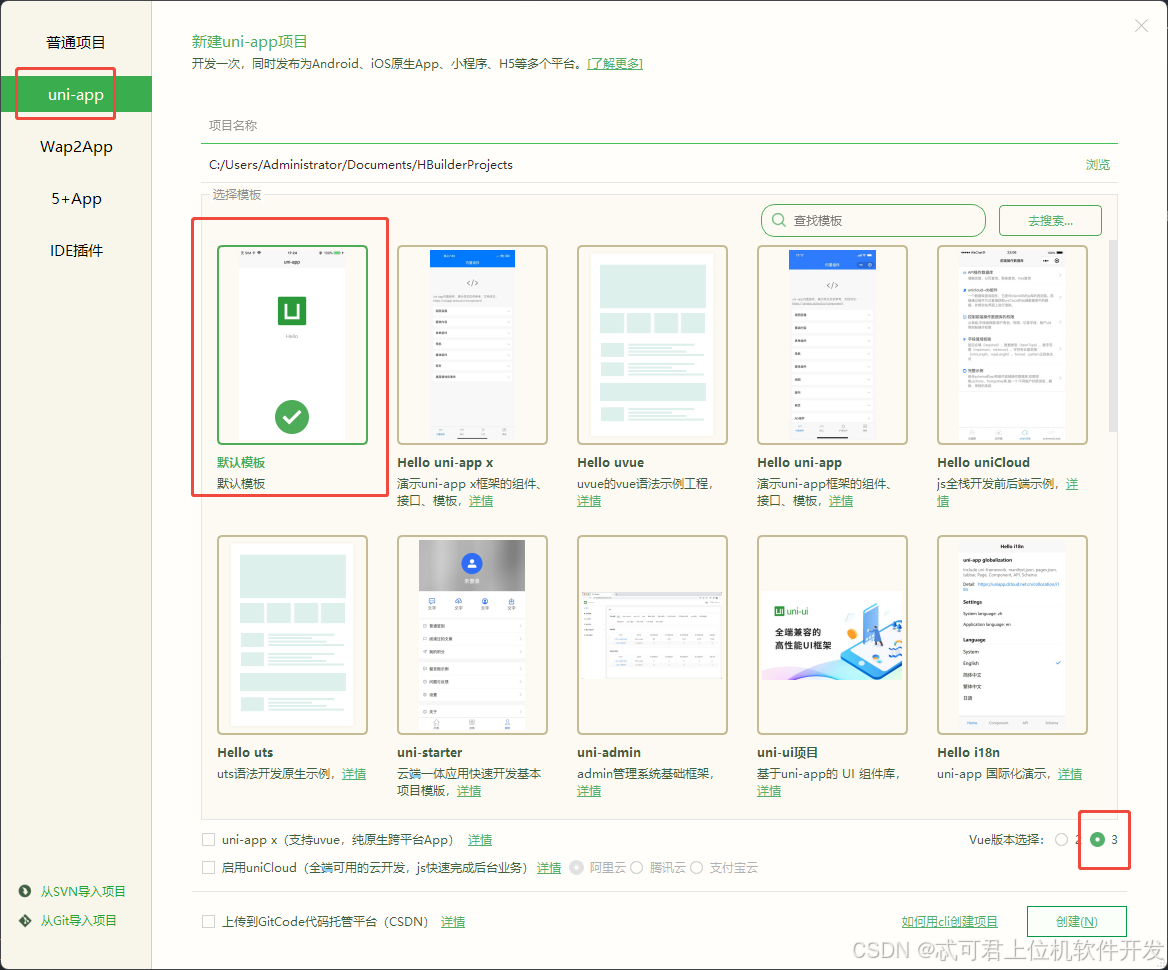
因为页面是由三段式构成,所以AI友好性大大增加,直接复制可以使用,以后叫我 AICV工程师。
结构如下:
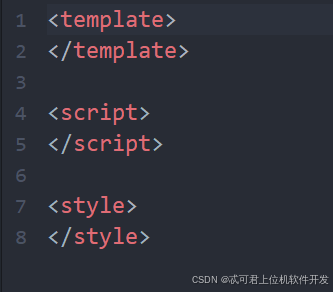
AI出来的代码直接复制,demo如下:
html
<template>
    <view class="dashboard-container">
        <!-- 顶部标题栏 -->
        <view class="header">
            <view class="title-container">
                <text class="title">数据大屏</text>
                <text class="subtitle">实时监控与数据分析平台</text>
            </view>
            <view class="time-info">
                <text class="time">{{ currentTime }}</text>
                <text class="date">{{ currentDate }}</text>
            </view>
        </view>

        <!-- 统计数据栏 -->
        <view class="stats-bar">
            <view class="stat-card" :class="stats.totalEquipment > 0 ? 'active' : ''">
                <view class="stat-icon">🏭</view>
                <view class="stat-info">
                    <text class="stat-value">{{ stats.totalEquipment || 0 }}</text>
                    <text class="stat-label">设备总数</text>
                </view>
            </view>

            <view class="stat-card" :class="stats.runningEquipment > 0 ? 'active' : ''">
                <view class="stat-icon">✅</view>
                <view class="stat-info">
                    <text class="stat-value">{{ stats.runningEquipment || 0 }}</text>
                    <text class="stat-label">运行中</text>
                </view>
            </view>

            <view class="stat-card" :class="stats.activeAlarms > 0 ? 'warning' : ''">
                <view class="stat-icon">⚠️</view>
                <view class="stat-info">
                    <text class="stat-value">{{ stats.activeAlarms || 0 }}</text>
                    <text class="stat-label">未处理警报</text>
                </view>
            </view>

            <view class="stat-card" :class="stats.todayProduction > 0 ? 'active' : ''">
                <view class="stat-icon">📊</view>
                <view class="stat-info">
                    <text class="stat-value">{{ stats.todayProduction || 0 }}</text>
                    <text class="stat-label">今日产量</text>
                </view>
            </view>
        </view>

        <!-- 主要内容区域 -->
        <scroll-view class="main-content" scroll-y>
            <view class="content-grid">
                <!-- 左侧:设备总览 -->
                <view class="grid-column" style="flex: 2;">
                    <view class="section-card">
                        <view class="section-header">
                            <text class="section-title">设备总览</text>
                            <text class="section-subtitle">实时状态监控</text>
                        </view>
                        <view class="equipment-grid">
                            <EquipmentCard
                                v-for="equipment in equipmentList"
                                :key="equipment.id"
                                :equipment="equipment"
                                @click="viewEquipmentDetail(equipment.id)"
                            />
                        </view>
                    </view>
                </view>

                <!-- 右侧:警报和产能 -->
                <view class="grid-column" style="flex: 1;">
                    <!-- 警报信息 -->
                    <view class="section-card alarm-section">
                        <view class="section-header">
                            <text class="section-title">警报信息</text>
                            <text class="section-subtitle">未处理:{{ activeAlarms.length }}</text>
                        </view>
                        <AlarmList :alarms="activeAlarms" @resolve="resolveAlarm" />
                    </view>

                    <!-- 产能信息 -->
                    <view class="section-card production-section">
                        <view class="section-header">
                            <text class="section-title">产能信息</text>
                            <text class="section-subtitle">今日生产数据</text>
                        </view>
                        <ProductionChart :data="productionData" />
                    </view>
                </view>
            </view>
        </scroll-view>

        <!-- 底部状态栏 -->
        <view class="footer">
            <view class="status-indicators">
                <view class="status-item">
                    <view class="status-dot normal"></view>
                    <text class="status-text">正常</text>
                </view>
                <view class="status-item">
                    <view class="status-dot warning"></view>
                    <text class="status-text">警告</text>
                </view>
                <view class="status-item">
                    <view class="status-dot error"></view>
                    <text class="status-text">故障</text>
                </view>
                <view class="status-item">
                    <view class="status-dot offline"></view>
                    <text class="status-text">离线</text>
                </view>
            </view>
            <text class="update-time">最后更新:{{ lastUpdateTime }}</text>
        </view>
    </view>
</template>

<script setup>
import { ref, onMounted, onUnmounted } from 'vue'
import EquipmentCard from '@/components/EquipmentCard.vue'
import AlarmList from '@/components/AlarmList.vue'
import ProductionChart from '@/components/ProductionChart.vue'

// 导入API - 使用正确的相对路径
import {
    equipmentApi,
    alarmApi,
    productionApi,
    dashboardApi
} from '../../utils/api.js'


// 页面变量定义
const currentTime = ref('')
const currentDate = ref('')
const equipmentList = ref([])
const activeAlarms = ref([])
const productionData = ref([])
const stats = ref({
    totalEquipment: 0,
    runningEquipment: 0,
    activeAlarms: 0,
    todayProduction: 0,
    todayQualified: 0,
    qualificationRate: 0
})
const lastUpdateTime = ref('')
let updateTimer = null

// 更新时间函数
const updateDateTime = () => {
    const now = new Date()
    currentTime.value = now.toLocaleTimeString('zh-CN', {
        hour12: false,
        hour: '2-digit',
        minute: '2-digit',
        second: '2-digit'
    })
    currentDate.value = now.toLocaleDateString('zh-CN', {
        year: 'numeric',
        month: '2-digit',
        day: '2-digit',
        weekday: 'long'
    })
    lastUpdateTime.value = currentTime.value
}

// 加载设备数据
const loadEquipmentData = async () => {
    try {
        console.log('开始加载设备数据...')
        const response = await equipmentApi.getAll()
        console.log('设备数据响应:', response)

        if (response && response.success) {
            equipmentList.value = response.data || []
            // 计算运行中的设备数量
            stats.value.runningEquipment = equipmentList.value.filter(
                eq => eq.status === 'running' || eq.status === 'normal'
            ).length
            console.log('设备数据加载成功,数量:', equipmentList.value.length)
        } else {
            console.error('设备数据加载失败:', response?.error)
            // 使用模拟数据作为fallback
            useMockData()
        }
    } catch (error) {
        console.error('加载设备数据失败:', error)
        useMockData()
    }
}

// 加载警报数据
const loadAlarmData = async () => {
    try {
        console.log('开始加载警报数据...')
        const response = await alarmApi.getAlarms(0)
        console.log('警报数据响应:', response)

        if (response && response.success) {
            activeAlarms.value = response.data || []
            console.log('警报数据加载成功,数量:', activeAlarms.value.length)
        } else {
            console.error('警报数据加载失败:', response?.error)
        }
    } catch (error) {
        console.error('加载警报数据失败:', error)
    }
}

// 加载产能数据
const loadProductionData = async () => {
    try {
        console.log('开始加载产能数据...')
        const response = await productionApi.getTodayProduction()
        console.log('产能数据响应:', response)

        if (response && response.success) {
            productionData.value = response.data || []
            console.log('产能数据加载成功,数量:', productionData.value.length)
        } else {
            console.error('产能数据加载失败:', response?.error)
        }
    } catch (error) {
        console.error('加载产能数据失败:', error)
    }
}

// 加载统计数据
const loadStats = async () => {
    try {
        console.log('开始加载统计数据...')
        const response = await dashboardApi.getStats()
        console.log('统计数据响应:', response)

        if (response && response.success) {
            // 合并统计数据
            stats.value = { ...stats.value, ...response.data }
            console.log('统计数据加载成功:', stats.value)
        } else {
            console.error('统计数据加载失败:', response?.error)
        }
    } catch (error) {
        console.error('加载统计数据失败:', error)
    }
}

// 使用模拟数据(当API不可用时)
const useMockData = () => {
    console.log('使用模拟数据...')
    // 模拟设备数据
    equipmentList.value = [

    ]

    // 模拟警报数据
    activeAlarms.value = [
        {
            id: 1,
            equipment_id: 2,
            alarm_type: '高温警报',
            severity: 'high',
            message: '温度超过安全阈值',
            alarm_time: '2024-01-25 14:30:00',
            resolved: 0
        },
        {
            id: 2,
            equipment_id: 4,
            alarm_type: '气压不足',
            severity: 'low',
            message: '气压低于工作标准',
            alarm_time: '2024-01-25 09:45:00',
            resolved: 0
        }
    ]

    // 模拟产能数据
    productionData.value = [

    ]

    // 模拟统计数据
    stats.value = {
        totalEquipment: 7,
        runningEquipment: 5,
        activeAlarms: 2,
        todayProduction: 920,
        todayQualified: 897,
        qualificationRate: 97.5
    }
}

// 处理警报
const resolveAlarm = async (alarmId) => {
    try {
        console.log('处理警报:', alarmId)
        const response = await alarmApi.resolveAlarm(alarmId)

        if (response && response.success) {
            // 重新加载警报数据
            loadAlarmData()
            loadStats()
            uni.showToast({
                title: '警报已处理',
                icon: 'success'
            })
        } else {
            uni.showToast({
                title: '处理失败: ' + (response?.error || '未知错误'),
                icon: 'error'
            })
        }
    } catch (error) {
        console.error('处理警报失败:', error)
        uni.showToast({
            title: '网络请求失败',
            icon: 'error'
        })
    }
}

// 查看设备详情
const viewEquipmentDetail = (equipmentId) => {
    uni.navigateTo({
        url: `/pages/detail/detail?id=${equipmentId}`
    })
}

// 初始化数据加载
const loadAllData = async () => {
    updateDateTime()
    await Promise.all([
        loadEquipmentData(),
        loadAlarmData(),
        loadProductionData(),
        loadStats()
    ])
}

// 生命周期钩子
onMounted(() => {
    console.log('页面加载完成,开始初始化数据...')
    loadAllData()

    // 每30秒更新一次数据
    updateTimer = setInterval(loadAllData, 30000)

    // 每秒更新时间
    setInterval(updateDateTime, 1000)
})

onUnmounted(() => {
    if (updateTimer) {
        clearInterval(updateTimer)
    }
})
</script>

<style scoped>
.dashboard-container {
    display: flex;
    flex-direction: column;
    height: 100vh;
    background: linear-gradient(135deg, #1a237e 0%, #283593 100%);
    color: #ffffff;
}

/* 头部样式 */
.header {
    display: flex;
    justify-content: space-between;
    align-items: center;
    padding: 20px 30px;
    background: rgba(0, 0, 0, 0.2);
    border-bottom: 1px solid rgba(255, 255, 255, 0.1);
}

.title-container {
    display: flex;
    flex-direction: column;
}

.title {
    font-size: 24px;
    font-weight: bold;
    color: #ffffff;
}

.subtitle {
    font-size: 14px;
    color: rgba(255, 255, 255, 0.7);
    margin-top: 5px;
}

.time-info {
    display: flex;
    flex-direction: column;
    align-items: flex-end;
}

.time {
    font-size: 20px;
    font-weight: bold;
    font-family: 'Courier New', monospace;
}

.date {
    font-size: 14px;
    color: rgba(255, 255, 255, 0.7);
    margin-top: 5px;
}

/* 统计数据栏 */
.stats-bar {
    display: grid;
    grid-template-columns: repeat(4, 1fr);
    gap: 15px;
    padding: 20px 30px;
}

.stat-card {
    display: flex;
    align-items: center;
    padding: 20px;
    background: rgba(255, 255, 255, 0.1);
    border-radius: 10px;
    backdrop-filter: blur(10px);
    border: 1px solid rgba(255, 255, 255, 0.1);
    transition: all 0.3s ease;
}

.stat-card.active {
    background: rgba(76, 175, 80, 0.2);
    border-color: rgba(76, 175, 80, 0.3);
}

.stat-card.warning {
    background: rgba(255, 193, 7, 0.2);
    border-color: rgba(255, 193, 7, 0.3);
}

.stat-icon {
    font-size: 32px;
    margin-right: 15px;
}

.stat-info {
    display: flex;
    flex-direction: column;
}

.stat-value {
    font-size: 28px;
    font-weight: bold;
    line-height: 1;
}

.stat-label {
    font-size: 12px;
    color: rgba(255, 255, 255, 0.7);
    margin-top: 5px;
}

/* 主要内容区域 */
.main-content {
    flex: 1;
    padding: 0 30px 20px;
}

.content-grid {
    display: flex;
    gap: 20px;
    height: 100%;
}

.grid-column {
    display: flex;
    flex-direction: column;
    gap: 20px;
}

/* 区域卡片样式 */
.section-card {
    background: rgba(255, 255, 255, 0.05);
    border-radius: 15px;
    padding: 20px;
    border: 1px solid rgba(255, 255, 255, 0.1);
    backdrop-filter: blur(10px);
}

.section-header {
    margin-bottom: 20px;
    padding-bottom: 15px;
    border-bottom: 1px solid rgba(255, 255, 255, 0.1);
}

.section-title {
    display: block;
    font-size: 18px;
    font-weight: bold;
    margin-bottom: 5px;
}

.section-subtitle {
    font-size: 12px;
    color: rgba(255, 255, 255, 0.7);
}

/* 设备网格 */
.equipment-grid {
    display: grid;
    grid-template-columns: repeat(auto-fill, minmax(200px, 1fr));
    gap: 15px;
}

/* 底部样式 */
.footer {
    display: flex;
    justify-content: space-between;
    align-items: center;
    padding: 15px 30px;
    background: rgba(0, 0, 0, 0.3);
    border-top: 1px solid rgba(255, 255, 255, 0.1);
}

.status-indicators {
    display: flex;
    gap: 20px;
}

.status-item {
    display: flex;
    align-items: center;
    gap: 8px;
}

.status-dot {
    width: 10px;
    height: 10px;
    border-radius: 50%;
}

.status-dot.normal {
    background: #4CAF50;
    box-shadow: 0 0 10px #4CAF50;
}

.status-dot.warning {
    background: #FFC107;
    box-shadow: 0 0 10px #FFC107;
}

.status-dot.error {
    background: #F44336;
    box-shadow: 0 0 10px #F44336;
}

.status-dot.offline {
    background: #9E9E9E;
    box-shadow: 0 0 10px #9E9E9E;
}

.update-time {
    font-size: 12px;
    color: rgba(255, 255, 255, 0.7);
}

/* 响应式设计 */
@media (max-width: 768px) {
    .content-grid {
        flex-direction: column;
    }

    .stats-bar {
        grid-template-columns: repeat(2, 1fr);
    }

    .equipment-grid {
        grid-template-columns: 1fr;
    }
}
</style>
二、node.js实现后端功能
目录demo如下:
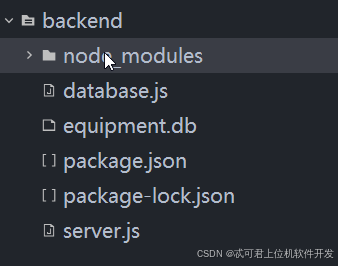
在cmd中启动:
-
npm install:安装项目依赖(根据package.json文件) -
node server.js:运行 Node.js 服务器
npm start(启动后端服务)三、选择适配自己的AI功能
我个人推荐,deepseek。对会写代码的人更加友好,不会乱七叭嗦的。
四、问题汇总
1、跨域:自己搜一搜
2、该项目适合本地,云端可以使用uni-cloud,会更加简单。
3、有参考的效果图,可以给AI直接生成代码。如果只有想法可以给元宝、豆包生成效果图或者可运行的demo,截图生成uni-app三段式代码即可。