文章目录
- 前言
- 介绍
- 详细步骤
-
- 1、创建索引生命周期管理(ILM)策略
- [2、创建索引模板(使用 `file-document-*` 模式)](#2、创建索引模板(使用
file-document-*模式)) - [3、查看 ILM 的检查频率](#3、查看 ILM 的检查频率)
- 4、初始化第一个索引
- 5、监测命令
- 应用层使用方式
- 完整删除方案
- 问题缺陷
- 资料获取

前言
博主介绍:✌目前全网粉丝4W+,csdn博客专家、Java领域优质创作者,博客之星、阿里云平台优质作者、专注于Java后端技术领域。
涵盖技术内容:Java后端、大数据、算法、分布式微服务、中间件、前端、运维等。
博主所有博客文件目录索引:博客目录索引(持续更新)
CSDN搜索:长路
视频平台:b站-Coder长路
介绍
要实现时序数据的自动化管理,确实可以通过 索引别名 结合 索引生命周期管理(ILM) 的滚动(Rollover)机制来完成。这套方案能自动处理索引的创建、切换和归档,让你无需手动干预。
整个流程主要涉及三个核心环节:创建ILM策略、定义索引模板、初始化起始索引。
官网博客(rollover):https://www.elastic.co/docs/reference/elasticsearch/index-lifecycle-actions/ilm-rollover
详细步骤
1、创建索引生命周期管理(ILM)策略
测试的时候可以设置1gb,然后后续查看
自定义策略为file_document_policy,初步测试设置最大主分片大小为30gb:
json
PUT /_ilm/policy/file_document_policy
{
  "policy": {
    "phases": {
      "hot": {
        "min_age": "0ms",
        "actions": {
          "rollover": {
            "max_size": "30gb",    // 🎯 核心参数:单个主分片达到30GB时触发滚动
            // "max_age": "7d",                     // 保险策略:7天未达30GB也创建新索引
            // "max_docs": 50000000                 // 保险策略:文档数达到5000万也创建新索引
          },
          "set_priority": {
            "priority": 100
          }
        }
      },
    }
  }
}
相关删除命令:
shell
# 删除ILM策略
DELETE /_ilm/policy/file_document_policy
2、创建索引模板(使用 file-document-* 模式)
**注意:**因为当触发 Rollover 时,ILM 需要根据当前的索引名(如 file-document-000001)来自动计算出下一个索引名(file-document-000002)。这个 ...-<数字> 的格式是它进行计算的唯一可靠依据。
这里匹配索引模式,同时设置应用层访问索引
json
PUT /_index_template/file_document_template
{
  "index_patterns": ["file-document-*"],         // 🎯 使用您指定的索引模式
  "template": {
    "settings": {
      "number_of_shards": 1,
      "number_of_replicas": 1,
      "index.lifecycle.name": "file_document_policy",
      "index.lifecycle.rollover_alias": "search_file_document",  // 🎯 应用层访问的别名
      "refresh_interval": "10s",
      "analysis": {
        "analyzer": {
          "path_analyzer": {
            "type": "custom",
            "tokenizer": "path_tokenizer"
          }
        },
        "tokenizer": {
          "path_tokenizer": {
            "type": "path_hierarchy"
          }
        }
      }
    },
    "mappings": {
      "properties": {
        "id": {
          "type": "keyword"
        },
        "fileName": {
          "type": "text",
          "analyzer": "ik_max_word",
          "search_analyzer": "ik_smart",
          "fields": {
            "keyword": {
              "type": "keyword",
              "ignore_above": 256
            },
            "raw": {
              "type": "text",
              "analyzer": "standard"
            }
          }
        },
        "fileContent": {
          "type": "text",
          "analyzer": "ik_max_word",
          "search_analyzer": "ik_smart"
        },
        "fileType": {
          "type": "keyword"
        },
        "filePath": {
          "type": "text",
          "analyzer": "path_analyzer",
          "fields": {
            "keyword": {
              "type": "keyword"
            }
          }
        },
        "fileSize": {
          "type": "float"
        },
        "createUserId": {
          "type": "keyword"
        },
        "catalogStatus": {
          "type": "integer"
        },
        "tags": {
          "type": "keyword",
          "fields": {
            "text": {
              "type": "text",
              "analyzer": "ik_smart"
            }
          }
        },
        "catalogNames": {
          "type": "keyword",
          "fields": {
            "text": {
              "type": "text",
              "analyzer": "ik_smart"
            }
          }
        },
        "catalogFields": {
          "type": "keyword",
          "fields": {
            "text": {
              "type": "text",
              "analyzer": "ik_smart"
            }
          }
        },
        "catalogFieldValues": {
          "type": "text",
          "analyzer": "ik_max_word",
          "search_analyzer": "ik_smart",
          "fields": {
            "keyword": {
              "type": "keyword",
              "ignore_above": 256
            }
          }
        },
        "tagIds": {
          "type": "long"
        },
        "catalogIds": {
          "type": "long"
        },
        "updateTime": {
          "type": "date",
          "format": "yyyy-MM-dd HH:mm:ss||epoch_millis"
        },
        "createTime": {
          "type": "date",
          "format": "yyyy-MM-dd HH:mm:ss||epoch_millis"
        },
        "yearMonth": {
          "type": "date",
          "format": "yyyy-MM"
        }
      }
    }
  },
  "priority": 200
}
删除对应索引模板:
shell
# 删除索引模板
DELETE /_index_template/file_document_template
3、查看 ILM 的检查频率
查看集群的配置选项:
shell
GET /_cluster/settings?include_defaults=true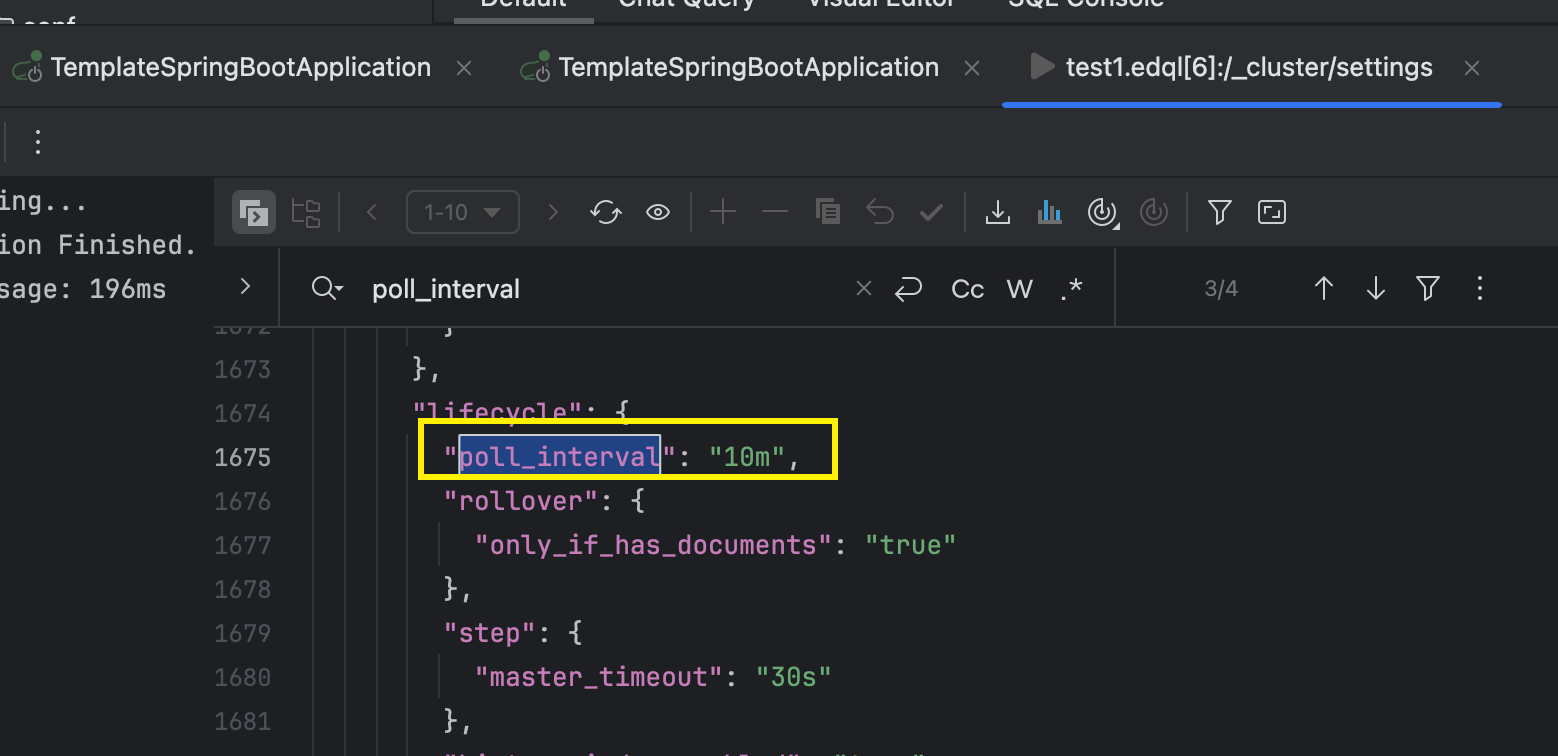
设置频率:
json
PUT "/_cluster/settings"
{
  "transient": {
    "indices.lifecycle.poll_interval": "1m"
  }
}
参数说明:
- 数据写入不受轮询间隔影响 :您的应用程序通过别名
**search_file_document**写入数据。只要这个别名指向一个可写的索引(例如**file-document-000001**),数据就会持续不断地写入这个索引,无论 ILM 是否在检查。 - ILM 的检查是异步的 :ILM 是一个后台管理进程。它按照
**poll_interval**的频率(例如默认10分钟)去"巡视"所有受其管理的索引,检查它们是否满足了当前阶段定义的条件(如**rollover**的**max_size**或**max_age**)。 - 阈值达到与动作执行的延迟:
-
- T=0分钟 : 索引
**file-document-000001**创建,开始写入数据。 - T=5分钟 : 索引大小达到了30GB的
**max_size**阈值。此时,数据仍然会继续写入**file-document-000001**,索引大小会超过30GB(例如变成31GB、32GB...)。 - T=10分钟 : ILM 检查器第一次运行。它发现
**file-document-000001**的大小(比如32GB)已经超过了**max_size: 30gb**的条件。 - T=10分钟+ : ILM 立即执行
**rollover**动作:
- T=0分钟 : 索引
-
-
- 创建一个新索引
**file-document-000002**。 - 将别名
**search_file_document**的写入指针从**file-document-000001**切换到**file-document-000002**。 **file-document-000001**变为只读状态。
- 创建一个新索引
-
-
- T=10分钟之后 : 所有新的数据都会被写入到新的
**file-document-000002**索引中。
- T=10分钟之后 : 所有新的数据都会被写入到新的
4、初始化第一个索引
java
// is_write_index: true🎯 关键:标记为当前写入索引
PUT /file-document-000001
{
    "aliases": {
        "search_file_document": {
            "is_write_index": true
        }
    }
}
5、监测命令
shell
# 查看当前别名状态
GET /_cat/aliases/search_file_document?v

# 查看所有文件文档索引【关于search_file_document锁对应的】
GET /_cat/indices/search_file_document

# 检查ILM执行状态
GET /file-document-*/_ilm/explain

# 查看模板应用情况
GET /_index_template/file_document_template
查看所有别名映射情况:
shell
GET /_cat/aliases/search_file_document?v
查看关联的的search_file_document所有索引:
json
GET /_cat/indices/search_file_document
shell
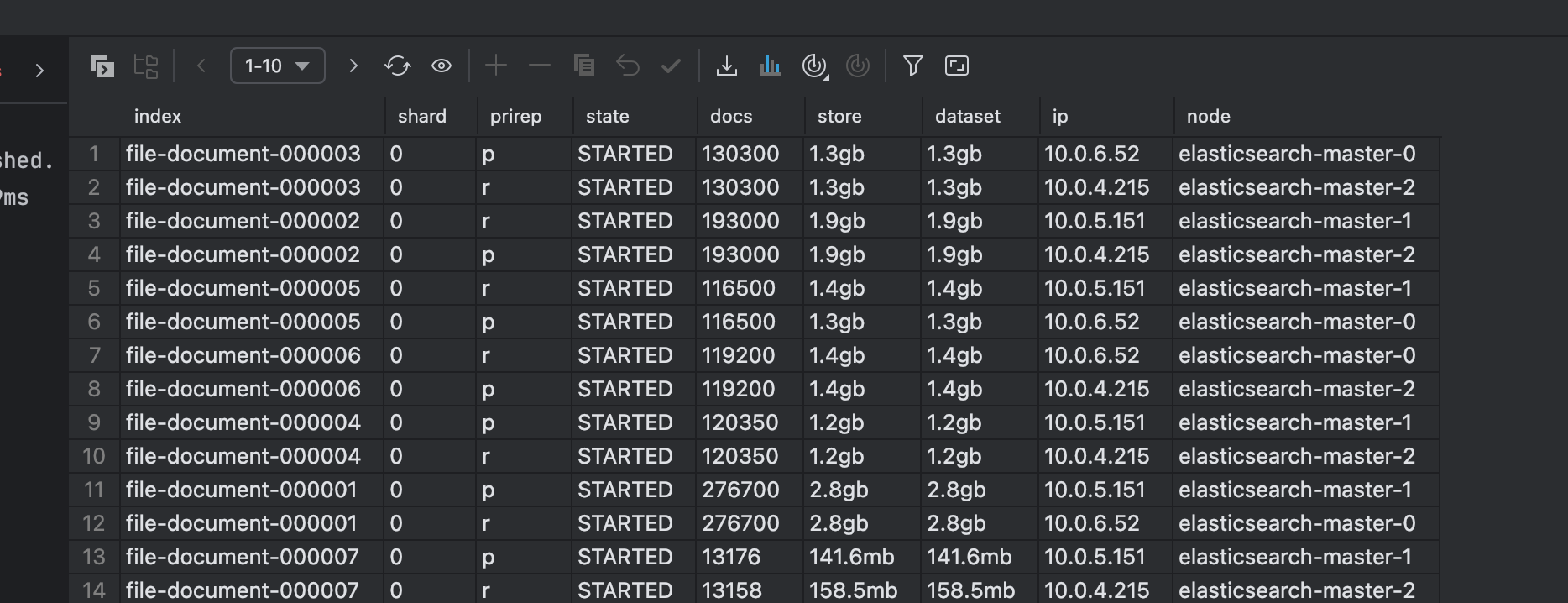
# 查看所有索引的分片信息(汇总)
GET _cat/indices/search_file_document?v&s=index
# 查看索引的分片详情(单独某一个片,列举出来)
GET _cat/shards/search_file_document?v
可以发现能够正常进行分片
检查查看ILM执行状态例子:
shell
GET /file_document_*/_ilm/explain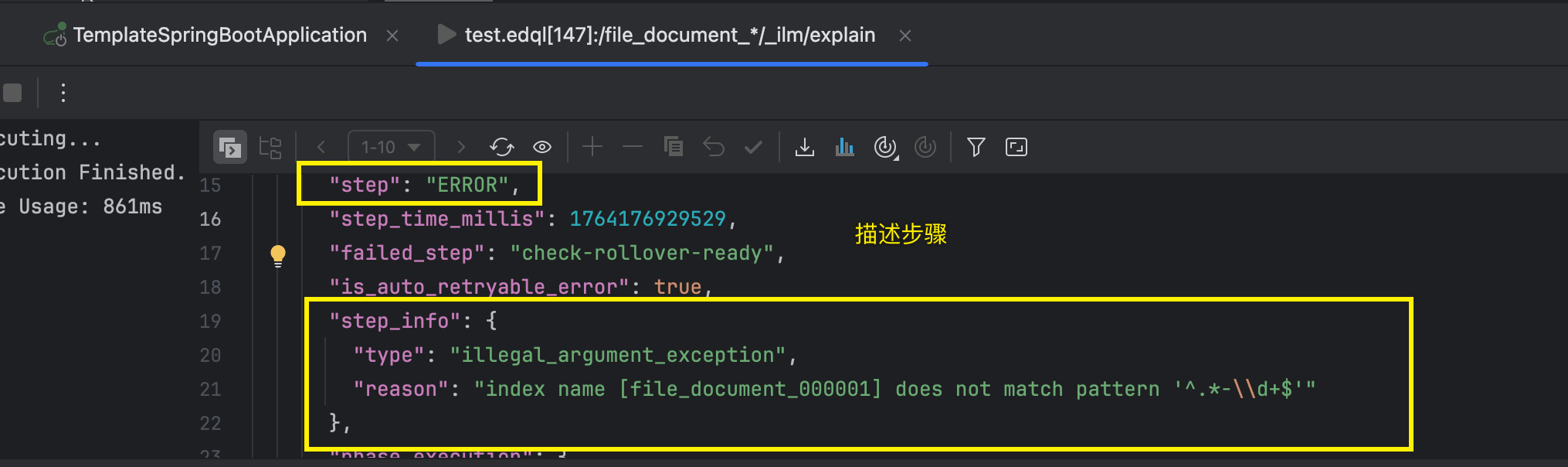
这个报错表示:
Elasticsearch 的 Rollover 机制强制要求索引名称的格式必须是: **<任意名称>-<数字>**。
- ✅ 正确的例子 :
**logs-000001**,**my-app-2023-00001**,**file-document-000001** - ❌ 错误的例子 :
**file_document_000001**(使用了下划线**_**而不是连字符**-**)
为什么会有这个强制要求? 因为当触发 Rollover 时,ILM 需要根据当前的索引名(如 **file-document-000001**)来自动计算出下一个索引名(**file-document-000002**)。这个 **...-<数字>** 的格式是它进行计算的唯一可靠依据。
官网博客(rollover):https://www.elastic.co/docs/reference/elasticsearch/index-lifecycle-actions/ilm-rollover
应用层使用方式
写入数据(始终使用别名)
json
POST /search_file_document/_doc
{
  "@timestamp": "2024-01-15T10:00:00.000Z",
  "file_name": "产品需求文档.pdf",
  "file_content": "这是产品的详细需求说明文档,包含功能规格和设计要点...",
  "file_type": "pdf",
  "file_size": 2048576,
  "upload_time": "2024-01-15T10:00:00.000Z",
  "category": "requirements"
}
检索数据(使用别名搜索所有文件)
json
GET /search_file_document/_search
{
  "query": {
    "match": {
      "file_content": "产品需求"
    }
  }
}
完整删除方案
shell
# 1. 查看下别名映射
GET /_cat/aliases/search_file_document?v

# 2、删除索引模板
DELETE /_index_template/file_document_template

# 删除所有相关索引
# 单个删除
# 查看所有相关索引
GET /_cat/indices/search_file_document
# 逐个删除索引
DELETE /file-document-000001
DELETE /file-document-000002
DELETE /file-document-000003

# 批量删除所有匹配的索引 【-格式有些问题可能】
DELETE /file-document-*

# 一旦索引全部删除,此时别名就无法查看了
GET /_cat/indices/search_file_document

# 3、删除 ILM 策略【删除了所有数据之后即可删除】
DELETE /_ilm/policy/file_document_policy

# 4、验证别名已不存在
GET /_cat/aliases/search_file_document?v执行的GET /_cat/indices/search_file_document即可查看:

问题缺陷
自动分片有时间gap
对于索引生命周期管理ILM会有扫描策略,默认10分钟扫描一整轮,所以可能会有10分钟的gap,如果你的索引是30GB一个分片,但是10分钟如果疯狂写入会出现超过30GB的情况,这个也是有可能的。
比如我这里设置了最大分片1gb,但是会出现超过的情况:

**处理方式:**调整ILM间隔扫描时间
json
PUT "/_cluster/settings"
{
  "transient": {
    "indices.lifecycle.poll_interval": "1m"
  }
}
资料获取
大家点赞、收藏、关注、评论啦~
精彩专栏推荐订阅:在下方专栏👇🏻
- 长路-文章目录汇总(算法、后端Java、前端、运维技术导航):博主所有博客导航索引汇总
- 开源项目Studio-Vue---校园工作室管理系统(含前后台,SpringBoot+Vue):博主个人独立项目,包含详细部署上线视频,已开源
- 学习与生活-专栏:可以了解博主的学习历程
- 算法专栏:算法收录
更多博客与资料可查看👇🏻获取联系方式👇🏻,🍅文末获取开发资源及更多资源博客获取🍅