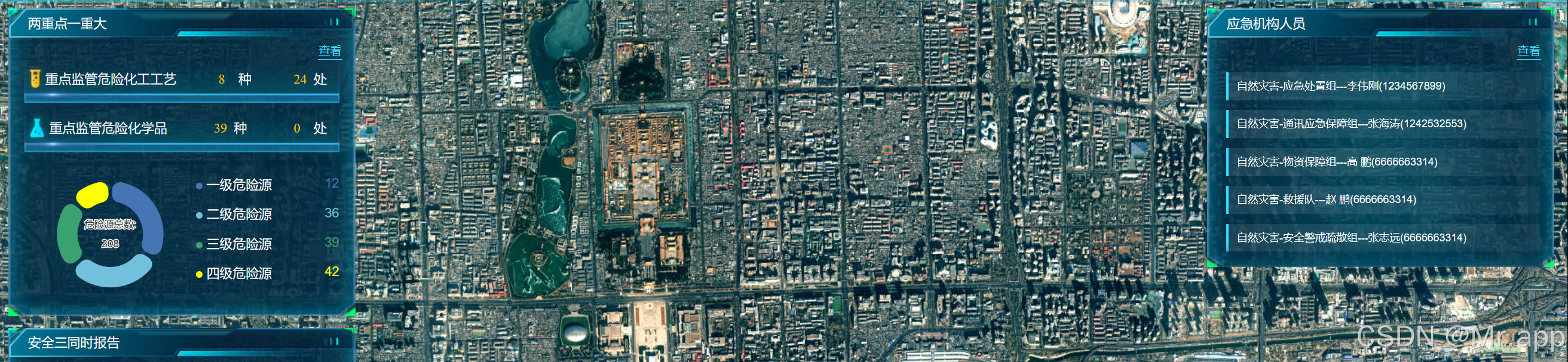
1.每隔3秒,容器内的元素滚动一次。
2.鼠标移入移出事件:移入时,元素停止滚动。
tips: 不需要背景图将 background 相关删除就行
html
<template>
  <div class="container">
    <div class="layout-right">
      <div class="border-box mb">
        <div class="border-title box-1_title">应急机构人员</div>
        <div class="border-container">
          <div class="view">
            <div class="view-button">查看</div>
          </div>

          <div
            class="scrollbar"
            ref="scrollbarRef"
            @mouseenter="onMouseEnter"
            @mouseleave="onMouseLeave">
            <div class="info-list">
              <ul>
                <li
                  v-for="(item, index) in visibleList"
                  :class="{ 'no-animation': index === 0 }"
                  :key="`${item}`">
                  {{ item }}
                </li>
              </ul>
            </div>
            <!-- 底部渐变遮罩,提示可滚动 -->
            <div v-if="emergencyList.length > 5" class="scroll-mask-bottom"></div>
          </div>
        </div>
      </div>
    </div>
  </div>
</template>
js
<script setup lang="ts">
  import { onMounted, onUnmounted, ref } from "vue";
  const scrollbarRef = ref(null);

  // 应急机构人员列表数据
  const emergencyList = ref([
    "自然灾害-环境监测组------刘 洋(15775692743)",
    "自然灾害-应急处置组------李伟刚(1234567899)",
    "自然灾害-通讯应急保障组------张海涛(1242532553)",
    "自然灾害-物资保障组------高 鹏(6666663314)",
    "自然灾害-救援队------赵 鹏(6666663314)",
    "自然灾害-安全警戒疏散组------张志远(6666663314)",
    "自然灾害-应急处置组------李伟刚(1234567899)",
    "自然灾害-通讯应急保障组------张海涛(1242532553)",
    "自然灾害-物资保障组------高 鹏(6666663314)",
    "自然灾害-救援队------赵 鹏(6666663314)",
    "自然灾害-安全警戒疏散组------张志远(6666663314)",
  ]);

  const visibleList = ref([...emergencyList.value.slice(0, 5)]);
  let timer: number | null = null;
  let isPaused = false;
  let currentIndex = 0;

  // 滚动列表 - 使用平滑滚动方式
  const scrollList = () => {
    if (isPaused) return;

    currentIndex = (currentIndex + 1) % emergencyList.value.length;
    const nextItems = [];
    for (let i = 0; i < 5; i++) {
      const index = (currentIndex + i) % emergencyList.value.length;
      nextItems.push(emergencyList.value[index]);
    }

    // 直接更新为新数据,通过 CSS 类控制第一条不显示动画
    visibleList.value = nextItems;
  };

  // 鼠标移入暂停滚动
  const onMouseEnter = () => {
    isPaused = true;
  };

  // 鼠标移出恢复滚动
  const onMouseLeave = () => {
    isPaused = false;
  };

  onMounted(() => {
    // 仅当数据超过5条时才启动自动滚动定时器(每隔3秒滚动一次)
    if (emergencyList.value.length > 5) {
      timer = window.setInterval(() => {
        scrollList();
      }, 3000);
    }
  });

  // 组件卸载时清除定时器
  onUnmounted(() => {
    if (timer) {
      clearInterval(timer);
      timer = null;
    }
  });
</script>
css
<style scoped lang="scss">
  $app-header-height: 70px;

  .border-box {
    position: relative;
    z-index: 999;
    width: 424px;
    min-height: 160px;
    background-image: url("../assets/images/box.png");
    background-repeat: no-repeat;
    background-size: 100% 100%;
    background-color: #cacaca;
  }
  .border-title {
    background-image: url("../assets/images/box-header.png");
    background-repeat: no-repeat;
    background-size: 100% 100%;
  }

  .box-1_title {
    height: 36px;
    line-height: 37px;
    padding-left: 24px;
    color: #fff;
    font-size: 16px;
  }

  .border-container {
    padding-left: 1.25rem;
    padding-right: 1.25rem;
  }

  .view {
    padding-top: 1rem;
    padding-bottom: 0.25rem;
    .view-button {
      font-size: 14px;
      color: #35dbff;
      border-bottom: 1px solid #35dbff;
      width: 30px;
      text-align: center;
      position: absolute;
      right: 16px;
      top: 42px;
      padding-bottom: 1px;
      cursor: pointer;
    }
  }

  .mb {
    margin-bottom: 0.875rem;
  }

  .layout-right {
    position: absolute;
    left: 16px;
    top: calc($app-header-height + 14px);
    min-width: 200px;
    height: calc(100% - $app-header-height);
    z-index: 99;
    .scrollbar {
      position: relative;
      z-index: 999;
      width: 100%;
      height: 230px;
      padding: 8px 3px;
      margin-top: 14px;
      font-size: 14px;
      overflow: hidden;

      background-image: url("../../assets/images/应急机构人员背景.png");
      background-repeat: no-repeat;
      background-size: 100% 100%;

      .info-list {
        height: 100%;
        overflow: hidden;

        ul {
          margin: 0;
          padding: 0;
        }

        li {
          list-style: none;
          padding: 8px 10px;
          margin-bottom: 12px;
          background: linear-gradient(
            90deg,
            rgba(255, 255, 255, 0.1),
            rgba(255, 255, 255, 0.05)
          );
          border-left: 3px solid #35dbff;
          color: #ffffff;
          font-size: 13px;
          line-height: 1.4;
          cursor: pointer;
          transition: all 0.3s ease;

          // 使用等宽字体,解决数字显示不对齐问题
          font-family: 'Courier New', Courier, monospace;

          // 第一条信息不应用动画,直接隐藏
          &.no-animation {
            transition: none !important;
            animation: none !important;
          }

          &:hover {
            background: linear-gradient(
              90deg,
              rgba(53, 219, 255, 0.2),
              rgba(53, 219, 255, 0.1)
            );
            border-left-color: #ffc002;
            transform: translateX(5px);
          }
        }
      }

      // 底部渐变遮罩
      .scroll-mask-bottom {
        position: absolute;
        bottom: 0;
        left: 0;
        right: 0;
        height: 30px;
        background: linear-gradient(to bottom, transparent, rgba(0, 42, 64, 0.5));
        pointer-events: none;
      }
    }

    // 列表滚动动画 - 只对非第一条应用动画
    .info-list {
      ul {
        position: relative;
      }

      li {
        will-change: transform, opacity;
        backface-visibility: hidden;
        -webkit-backface-visibility: hidden;
        transform: translateZ(0);
        -webkit-transform: translateZ(0);
      }
    }

    // 列表项优化,避免残影
    .info-list {
      ul {
        position: relative;
      }

      li {
        will-change: transform, opacity;
        backface-visibility: hidden;
        -webkit-backface-visibility: hidden;
        transform: translateZ(0);
        -webkit-transform: translateZ(0);
      }
    }
  }
</style>