Elementor 自带的progress bar 使用的时候,如下图:
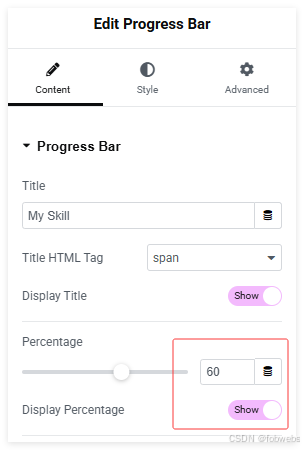
则在前端,它会显示成这样:

如果想去掉百分比%符号,可以按下面的方法步骤:
-
选中组件,然后到Advanced>CSS Classes 中填写
no-percent-progress: -
在Advanced里添加自定义CSS:
.no-percent-progress .elementor-progress-percentage {
font-size: 0 !important;
color: transparent !important;
position: relative !important;
z-index: 1 !important;
}.no-percent-progress .elementor-progress-bar {
counter-reset: progress-value attr(data-max number) !important;
}.no-percent-progress .elementor-progress-percentage::before {
content: counter(progress-value) !important;
font-size: 14px !important; /* 改成你页面的实际字体大小 /
color: #333 !important; / 改成你页面的实际字体颜色 */
z-index: 2 !important;
}
但是这样有一个问题,就是因为这个数字本身是百分比,所以填的数字只能是0-100之间的数字,而且如果数字很小的时候,这个百分比的颜色条会非常的短,看起来也会很难看。
那如果想这里能显示任意的数字,则用下面的方法步骤:
-
第一步一样的,选中组件,然后到Advanced>CSS Classes 中填写
no-percent-progress: -
在Advanced里添加自定义CSS:
.no-percent-progress .elementor-progress-percentage {
position: relative !important;
visibility: hidden !important;
display: inline-block !important;
}.no-percent-progress .elementor-progress-percentage::before {
content: "50" !important; /* 这里填写你的进度条纯数字*/
visibility: visible !important;
font-size: 16px !important;
color: #333 !important;
font-weight: normal !important;
}
这个时候,进度条的长短还是通过原面板里的百分比数字来控制,但是显示的数字就是在上面的代码里来填写了。
可以达到如下的效果:
