public static readonly DependencyProperty IsSpinningProperty = DependencyProperty.Register(
    	"IsSpinning",
    	typeof(bool),
    	typeof(MainWindow)
    );

public bool IsSpinning
{
    get => (bool)GetValue(IsSpinningProperty);
    set => SetValue(IsSpinningProperty, value);
}
2.定义 - 中译中后
在看定义之前,先来看两段代码,一个是C#中普通属性的示例代码,一个是WPF的依赖属性的示例代码
c#复制代码
	// C# -> 普通属性(CLR普通属性)
    public string Name
    {
        set => name = value;
        get => name;
    }


/* ================================================================================= */

	// WPF -> 依赖属性
	// 输入propdp,然后连续按两下Tab键,VS会帮我们自动生成下面的这段代码
    public int MyProperty
    {
        get { return (int)GetValue(MyPropertyProperty); }
        set { SetValue(MyPropertyProperty, value); }
    }

    // Using a DependencyProperty as the backing store for MyProperty.
    // This enables animation, styling, binding, etc...
    public static readonly DependencyProperty MyPropertyProperty =
        DependencyProperty.Register(
        "MyProperty",
        typeof(int),
        typeof(ownerclass),
        new PropertyMetadata(0));
然后,初见依赖属性的这段代码,大多数人都是看不懂的,我们来逐行解释一下
c#复制代码
	// MyProperty成员,使用CLR属性包装器实现get和set => 参考普通属性
	public int MyProperty
    {
        // 并且使用了GetValue 和 SetValue成员 读/写 依赖属性 MyPropertyProperty
        // GetValue和SetValue -> 由DependencyObject类定义的
        // GetValue -> 获取依赖属性值
        // SetValue -> 写入依赖属性值
        get { return (int)GetValue(MyPropertyProperty); }
        set { SetValue(MyPropertyProperty, value); }
    }

    // Using a DependencyProperty as the backing store for MyProperty.
    // This enables animation, styling, binding, etc...
	// 翻译一下官方的这两句话:
        // 使用依赖属性作为 MyProperty 的存储方式
			// 再翻译一下:MyProperty 的真实存储位置是一个 DependencyProperty,而不是字段
        // 从而启用动画、样式、数据绑定等功能

	/* 注册int类型的依赖属性 MyProperty */
	// 被声明为 DependencyProperty 类型的静态只读类型的 MyPropertyProperty 成员
	// 使用 DependencyProperty 的Register方法注册
    public static readonly DependencyProperty MyPropertyProperty =
        DependencyProperty.Register(
        "MyProperty",				// 属性名,必须与上面的包装属性名称一致
        typeof(int),				// 属性类型
        typeof(ownerclass),			 // 属性所属类型 -> 这个属性"属于谁"
        new PropertyMetadata(0));	 // 默认值   -> 可以不写
但是上面只是一个依赖属性的模板,下面是一个实际的代码案例
c#复制代码
    // 依赖属性(读取和写入) -> 具备自动通知界面的能力
    public string MyPasswordVM
    {
        get { return (string)GetValue(MyPasswordVMProperty); }
        set { SetValue(MyPasswordVMProperty, value); }
    }

    // 注册string类型的依赖属性 MyPasswordVM
    public static readonly DependencyProperty MyPasswordVMProperty =
        DependencyProperty.Register(
            "MyPasswordVM",         // 属性名,必须与上面的包装属性名称一致
            typeof(string),         // 属性类型
            typeof(MainWindow));    // 所属类型
/* MyControl.cs */
using System;
using System.Collections.Generic;
using System.Linq;
using System.Text;
using System.Threading.Tasks;
using System.Windows;
using System.Windows.Controls;

namespace Test
{
    public class MyControl : Control
    {
        static MyControl()
        {
            // 指定默认样式,如果有自定义样式可以用这个
            DefaultStyleKeyProperty.OverrideMetadata(
                typeof(MyControl),
                new FrameworkPropertyMetadata(typeof(MyControl)));
        }


        public static readonly DependencyProperty MyTitleProperty =
            DependencyProperty.Register(
                "MyTitle",                      // 属性名
                typeof(string),               // 属性类型
                typeof(MyControl),            // 所属类
                new PropertyMetadata(         // 元数据
                    "默认标题",               // 默认值
                    new PropertyChangedCallback(OnMyTitleChanged)) // 改变回调
            );

        public string MyTitle
        {
            get => (string)GetValue(MyTitleProperty);
            set => SetValue(MyTitleProperty, value);
        }

        // 改变回调
        private static void OnMyTitleChanged(DependencyObject d, DependencyPropertyChangedEventArgs e)
        {
            var control = d as MyControl;
            // 当属性变化时打印新值
            System.Diagnostics.Debug.WriteLine($"MyTitle 改变为:{e.NewValue}");

            // 更新主窗口标题
            if (control != null)
            {
                // 找到依赖属性所在的窗口
                var window = Window.GetWindow(control);
                if (window != null)
                {
                    window.Title = e.NewValue?.ToString(); // 更新主窗口标题
                }
            }
        }
    }
}
c#复制代码
/* MainWindow.xaml.cs */
using System;
using System.Windows;

namespace Test
{
    /// <summary>
    /// MainWindow.xaml 的交互逻辑
    /// </summary>
    public partial class MainWindow : Window
    {
        public MainWindow()
        {
            InitializeComponent();

            // myControl 是 MainWindow.xaml 中定义的控件实例
            // 对应创建的自定义控件 MyControl
            myControl.MyTitle = "我是窗口";
        }

        private void Button_Click(object sender, RoutedEventArgs e)
        {
            // 点击按钮时更新依赖属性
            myControl.MyTitle = textBox.Text;
        }
    }
}
	// WPF -> 依赖属性
	// 输入propdp,然后连续按两下Tab键,VS会帮我们自动生成下面的这段代码


    public int MyProperty
    {
        get { return (int)GetValue(MyPropertyProperty); }
        set { SetValue(MyPropertyProperty, value); }
    }

    // Using a DependencyProperty as the backing store for MyProperty.
    // This enables animation, styling, binding, etc...
    public static readonly DependencyProperty MyPropertyProperty =
        DependencyProperty.Register(
        "MyProperty",
        typeof(int),
        typeof(ownerclass),
        new PropertyMetadata(0));
 	// WPF -> 附加属性
	// 输入propa,然后连续按两下Tab键,VS会帮我们自动生成下面的这段代码


	public static int GetMyProperty(DependencyObject obj)
    {
        return (int)obj.GetValue(MyPropertyProperty);
    }

    public static void SetMyProperty(DependencyObject obj, int value)
    {
        obj.SetValue(MyPropertyProperty, value);
    }

    // Using a DependencyProperty as the backing store for MyProperty.
    //This enables animation, styling, binding, etc...
    public static readonly DependencyProperty MyPropertyProperty =
        DependencyProperty.RegisterAttached(
            "MyProperty",
            typeof(int),
            typeof(ownerclass),
            new PropertyMetadata(0));
using System.Windows;
using MVVM.ViewModel;
using MVVM.Helpers;

namespace MVVM.Views
{
    /// <summary>
    /// Interaction logic for MainWindow.xaml
    /// </summary>
    public partial class MainWindow : Window
    {
        public MainWindow()
        {
            InitializeComponent();

            DataContext = new VMod();
        }

        private void Button_Click(object sender, RoutedEventArgs e)
        {
            var vm = (VMod)DataContext;
            MessageBox.Show(vm.Password);
        }
    }
}
c#复制代码
/* PasswordHelper.cs */

using System.Windows;
using System.Windows.Controls;

namespace MVVM.Helpers
{
    public static class PasswordHelper
    {
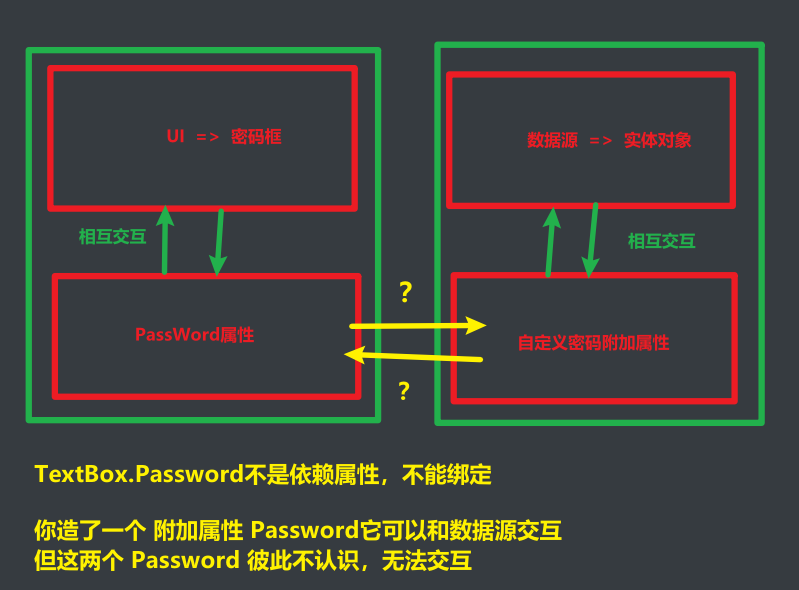
        public static readonly DependencyProperty PasswordProperty =
            DependencyProperty.RegisterAttached(
                "Password",
                typeof(string),
                typeof(PasswordHelper),
                new FrameworkPropertyMetadata(
                    string.Empty,
                    //null,
                    FrameworkPropertyMetadataOptions.BindsTwoWayByDefault,
                    OnPasswordChanged));

        public static void SetPassword(DependencyObject obj, string value)
        {
            obj.SetValue(PasswordProperty, value);
        }

        public static string GetPassword(DependencyObject obj)
        {
            return (string)obj.GetValue(PasswordProperty);
        }

        private static void OnPasswordChanged(DependencyObject d, DependencyPropertyChangedEventArgs e)
        {
            if (d is not PasswordBox box)
                return;

            box.PasswordChanged -= PasswordBox_PasswordChanged;

            if (box.Password != (string)e.NewValue)
            {
                box.Password = (string)e.NewValue;
            }

            box.PasswordChanged += PasswordBox_PasswordChanged;
        }

        private static void PasswordBox_PasswordChanged(object sender, RoutedEventArgs e)
        {
            var box = (PasswordBox)sender;
            SetPassword(box, box.Password);
        }
    }
}
c#复制代码
/* VMod.cs */

using System.ComponentModel;

namespace MVVM.ViewModel
{
    public class VMod: INotifyPropertyChanged
    {
        private string? _password;

        public string? Password
        {
            get => _password;
            set
            {
                if (_password == value) return;
                _password = value;
                OnPropertyChanged(nameof(Password));
            }
        }

        public event PropertyChangedEventHandler? PropertyChanged;

        protected void OnPropertyChanged(string name)
        {
            PropertyChanged?.Invoke(this, new PropertyChangedEventArgs(name));
        }
    }
}