一、核心知识点:纯原生IndexBar
本次IndexBar完全基于React Native内置能力实现,无任何额外依赖 ,所有组件/API均从react-native核心包导入,鸿蒙端兼容无压力:
| 原生组件/API | 作用说明 |
|---|---|
View/TouchableOpacity |
构建侧边索引栏的可点击项,实现"点击触发定位"的核心交互 |
FlatList |
承载主列表数据,通过scrollToIndex实现"点击索引快速定位"功能 |
Dimensions |
获取鸿蒙设备屏幕尺寸,实现索引栏"右侧悬浮、适配不同设备"的布局 |
useState/useRef |
管理"当前选中索引、主列表实例",实现索引与列表的状态联动 |
StyleSheet |
实现索引栏"悬浮、固定宽度、触摸区域放大"的鸿蒙端最优布局 |
二、核心实现原理
IndexBar的核心是**"侧边索引点击 → 主列表定位"+"主列表滚动 → 索引高亮联动"**的双交互逻辑,纯原生实现的关键在于3点:
1. 结构设计:侧边悬浮索引栏 + 主列表
- 侧边索引栏:垂直排列的可点击项(如A-Z字母),固定在页面右侧,触摸区域放大(避免鸿蒙端误触);
- 主列表:按索引分类的长列表(如按字母分组的联系人),每个分类项标记对应的"索引key";
- 布局关系 :索引栏通过
position: 'absolute'悬浮于主列表右侧,不占用主列表布局空间。
2. 点击索引定位主列表:scrollToIndex的精准使用
- 给每个索引项绑定点击事件,点击时通过
FlatList的scrollToIndex方法,直接跳转到主列表中对应"索引key"的分类项位置; - 为避免
scrollToIndex失效,需通过getItemLayout提前计算主列表每个项的高度(鸿蒙端FlatList定位的必要优化)。
3. 主列表滚动联动索引高亮:滚动监听+索引匹配
- 监听主列表的
onScroll事件,实时获取当前可见区域的分类项; - 将可见分类项的"索引key"与侧边索引项匹配,自动高亮对应的索引项,实现"滚动联动索引"的交互闭环。
三、实战完整版:纯原生IndexBar索引栏
javascript
import React, { useState, useRef, useEffect } from 'react';
import {
  View,
  Text,
  StyleSheet,
  SafeAreaView,
  FlatList,
  TouchableOpacity,
  Dimensions,
  NativeSyntheticEvent,
  NativeScrollEvent
} from 'react-native';

const { width: screenWidth } = Dimensions.get('window');
const INDEX_BAR_WIDTH = 36;        // 索引栏宽度放大,提升点击率
const INDEX_ITEM_HEIGHT = 22;      // 单个索引项高度
const LIST_ITEM_HEIGHT = 50;       // 列表单项高度
const GROUP_HEADER_HEIGHT = 35;    // 分组标题栏高度
const INDEX_ACTIVE_COLOR = '#007DFF'; // 鸿蒙系统主色(选中高亮)
const INDEX_NORMAL_COLOR = '#666666';// 索引默认色

interface ContactItem {
  id: string;
  name: string;
}
interface ContactGroup {
  indexKey: string;
  title: string;
  list: ContactItem[];
}

const contactData: ContactGroup[] = [
  { indexKey: 'A', title: 'A', list: [{ id: 'a1', name: '阿明' }, { id: 'a2', name: '阿花' }, { id: 'a3', name: '安安' }, { id: 'a4', name: '阿泽' }] },
  { indexKey: 'B', title: 'B', list: [{ id: 'b1', name: '白月' }, { id: 'b2', name: '北风' }, { id: 'b3', name: '冰冰' }] },
  { indexKey: 'C', title: 'C', list: [{ id: 'c1', name: '陈晨' }, { id: 'c2', name: '初夏' }, { id: 'c3', name: '楚乔' }, { id: 'c4', name: '程鑫' }, { id: 'c5', name: '春雨' }] },
  { indexKey: 'D', title: 'D', list: [{ id: 'd1', name: '大东' }, { id: 'd2', name: '叮当' }] },
  { indexKey: 'E', title: 'E', list: [{ id: 'e1', name: '恩子' }, { id: 'e2', name: '二丫' }] },
  { indexKey: 'F', title: 'F', list: [{ id: 'f1', name: '方方' }, { id: 'f2', name: '飞宇' }, { id: 'f3', name: '菲菲' }] },
  { indexKey: 'G', title: 'G', list: [{ id: 'g1', name: '果果' }, { id: 'g2', name: '光明' }, { id: 'g3', name: '谷雨' }, { id: 'g4', name: '高阳' }] },
  { indexKey: 'H', title: 'H', list: [{ id: 'h1', name: '欢欢' }, { id: 'h2', name: '浩宇' }] },
  { indexKey: 'I', title: 'I', list: [{ id: 'i1', name: '一诺' }, { id: 'i2', name: '伊凡' }] },
  { indexKey: 'J', title: 'J', list: [{ id: 'j1', name: '静静' }, { id: 'j2', name: '建军' }, { id: 'j3', name: '嘉禾' }, { id: 'j4', name: '瑾瑜' }] },
  { indexKey: 'K', title: 'K', list: [{ id: 'k1', name: '可欣' }, { id: 'k2', name: '凯瑞' }] },
  { indexKey: 'L', title: 'L', list: [{ id: 'l1', name: '乐乐' }, { id: 'l2', name: '丽娜' }, { id: 'l3', name: '凌云' }, { id: 'l4', name: '落雪' }] },
  { indexKey: 'M', title: 'M', list: [{ id: 'm1', name: '萌萌' }, { id: 'm2', name: '明轩' }, { id: 'm3', name: '梦琪' }] },
  { indexKey: 'N', title: 'N', list: [{ id: 'n1', name: '娜娜' }, { id: 'n2', name: '宁泽' }] },
  { indexKey: 'O', title: 'O', list: [{ id: 'o1', name: '欧阳' }, { id: 'o2', name: '欧辰' }] },
  { indexKey: 'P', title: 'P', list: [{ id: 'p1', name: '鹏鹏' }, { id: 'p2', name: '培安' }, { id: 'p3', name: '平儿' }] },
  { indexKey: 'Q', title: 'Q', list: [{ id: 'q1', name: '倩倩' }, { id: 'q2', name: '启明' }] },
  { indexKey: 'R', title: 'R', list: [{ id: 'r1', name: '瑞泽' }, { id: 'r2', name: '如歌' }, { id: 'r3', name: '若曦' }] },
  { indexKey: 'S', title: 'S', list: [{ id: 's1', name: '珊珊' }, { id: 's2', name: '思源' }, { id: 's3', name: '松松' }, { id: 's4', name: '诗涵' }] },
  { indexKey: 'T', title: 'T', list: [{ id: 't1', name: '甜甜' }, { id: 't2', name: '天宇' }] },
  { indexKey: 'U', title: 'U', list: [{ id: 'u1', name: '悠悠' }, { id: 'u2', name: '佑泽' }] },
  { indexKey: 'V', title: 'V', list: [{ id: 'v1', name: '薇薇' }, { id: 'v2', name: '文森' }] },
  { indexKey: 'W', title: 'W', list: [{ id: 'w1', name: '文文' }, { id: 'w2', name: '伟宸' }, { id: 'w3', name: '婉清' }] },
  { indexKey: 'X', title: 'X', list: [{ id: 'x1', name: '小雪' }, { id: 'x2', name: '星辰' }, { id: 'x3', name: '晓峰' }] },
  { indexKey: 'Y', title: 'Y', list: [{ id: 'y1', name: '洋洋' }, { id: 'y2', name: '一诺' }, { id: 'y3', name: '雨桐' }, { id: 'y4', name: '彦祖' }] },
  { indexKey: 'Z', title: 'Z', list: [{ id: 'z1', name: '泽宇' }, { id: 'z2', name: '芷若' }, { id: 'z3', name: '梓涵' }] },
];

// 侧边索引列表(和上面的分组indexKey严格一致)
const indexList: string[] = ['A','B','C','D','E','F','G','H','I','J','K','L','M','N','O','P','Q','R','S','T','U','V','W','X','Y','Z'];

const getGroupLayout = () => {
  let totalOffset = 0;
  return contactData.map(item => {
    const groupTotalHeight = GROUP_HEADER_HEIGHT + item.list.length * LIST_ITEM_HEIGHT;
    const currentOffset = totalOffset;
    totalOffset += groupTotalHeight;
    return { height: groupTotalHeight, offset: currentOffset };
  });
};
const groupLayout = getGroupLayout();

const NativeIndexBar = () => {
  // 当前选中的索引key(控制高亮)
  const [activeKey, setActiveKey] = useState<string>('A');
  // FlatList实例引用
  const flatListRef = useRef<FlatList<ContactGroup>>(null);

  const handleIndexPress = (key: string) => {
    setActiveKey(key);
    const targetIndex = contactData.findIndex(item => item.indexKey === key);
    if (targetIndex === -1) return;
    if (!flatListRef.current) return;

    flatListRef.current.scrollToIndex({
      index: targetIndex,
      animated: true,
      viewPosition: 0, // 定位后分组置顶显示,效果最直观
    });
    flatListRef.current.scrollToOffset({
      offset: groupLayout[targetIndex].offset,
      animated: true
    });
  };

  const handleListScroll = (e: NativeSyntheticEvent<NativeScrollEvent>) => {
    const scrollOffset = e.nativeEvent.contentOffset.y;
    // 倒序查找当前滚动位置对应的分组,精准度100%
    for (let i = contactData.length - 1; i >= 0; i--) {
      if (scrollOffset >= groupLayout[i].offset) {
        setActiveKey(contactData[i].indexKey);
        break;
      }
    }
  };

  // 渲染列表分组标题栏
  const renderGroupHeader = (item: ContactGroup) => {
    return (
      <View style={styles.groupHeader}>
        <Text style={styles.groupTitle}>{item.title}</Text>
      </View>
    );
  };

  // 渲染列表单项
  const renderContactItem = (item: ContactItem) => {
    return (
      <View style={styles.contactItem}>
        <Text style={styles.contactName}>{item.name}</Text>
      </View>
    );
  };
  const renderListItem = ({ item }: { item: ContactGroup }) => {
    return (
      <View key={item.indexKey} style={styles.groupWrap}>
        {renderGroupHeader(item)}
        {item.list.map(contact => renderContactItem(contact))}
      </View>
    );
  };

  // 渲染侧边索引栏
  const renderIndexBar = () => {
    return (
      <View style={styles.indexBarContainer}>
        {indexList.map(key => (
          <TouchableOpacity
            key={key}
            onPress={() => handleIndexPress(key)}
            hitSlop={{ top: 20, bottom: 20, left: 20, right: 20 }}
            activeOpacity={0.5} // 按压透明反馈,确认点击触发
            style={styles.indexItem}
          >
            <Text style={[
              styles.indexText,
              activeKey === key && {
                color: '#FFFFFF',
                fontSize: 14,
                fontWeight: '700'
              }
            ]}>
              {key}
            </Text>
            {/* 选中项蓝色高亮背景 */}
            {activeKey === key && <View style={styles.indexActiveBg} />}
          </TouchableOpacity>
        ))}
      </View>
    );
  };

  return (
    <SafeAreaView style={styles.container}>
      <Text style={styles.pageTitle}>鸿蒙端 IndexBar索引栏</Text>
      <View style={styles.contentContainer}>
        <FlatList
          ref={flatListRef}
          data={contactData}
          renderItem={renderListItem}
          keyExtractor={item => item.indexKey}
          // 精准计算每个分组的布局,scrollToIndex的核心依赖
          getItemLayout={(data, index) => ({
            length: groupLayout[index].height,
            offset: groupLayout[index].offset,
            index
          })}
          onScroll={handleListScroll}
          scrollEventThrottle={16} // 最高刷新率,滚动联动无延迟
          showsVerticalScrollIndicator={false}
          initialNumToRender={10} // 预渲染,提升长列表性能
        />
        {renderIndexBar()}
      </View>
    </SafeAreaView>
  );
};

const styles = StyleSheet.create({
  container: {
    flex: 1,
    backgroundColor: '#F5F5F5',
  },
  pageTitle: {
    fontSize: 20,
    color: '#333',
    padding: 18,
    fontWeight: '600',
    textAlign: 'center'
  },
  contentContainer: {
    flex: 1,
    position: 'relative', // 索引栏悬浮的核心布局
  },
  // 列表分组样式
  groupWrap: {
    width: '100%',
  },
  groupHeader: {
    height: GROUP_HEADER_HEIGHT,
    backgroundColor: '#E8E8E8',
    paddingLeft: 20,
    justifyContent: 'center',
    borderBottomWidth: 1,
    borderBottomColor: '#EEEEEE'
  },
  groupTitle: {
    fontSize: 16,
    color: '#333',
    fontWeight: '600'
  },
  contactItem: {
    height: LIST_ITEM_HEIGHT,
    paddingLeft: 20,
    justifyContent: 'center',
    backgroundColor: '#FFFFFF',
    borderBottomWidth: 1,
    borderBottomColor: '#F5F5F5'
  },
  contactName: {
    fontSize: 16,
    color: '#333'
  },
  indexBarContainer: {
    position: 'absolute',
    right: 8,
    top: '8%',
    bottom: '8%',
    width: INDEX_BAR_WIDTH,
    justifyContent: 'center',
    alignItems: 'center',
    zIndex: 999,
  },
  indexItem: {
    height: INDEX_ITEM_HEIGHT,
    width: INDEX_BAR_WIDTH,
    justifyContent: 'center',
    alignItems: 'center',
    position: 'relative',
  },
  indexText: {
    fontSize: 12,
    color: INDEX_NORMAL_COLOR,
    fontWeight: '500',
    zIndex: 2,
  },
  indexActiveBg: {
    position: 'absolute',
    width: 24,
    height: 24,
    borderRadius: 12,
    backgroundColor: INDEX_ACTIVE_COLOR,
    zIndex: 1,
  }
});

export default NativeIndexBar;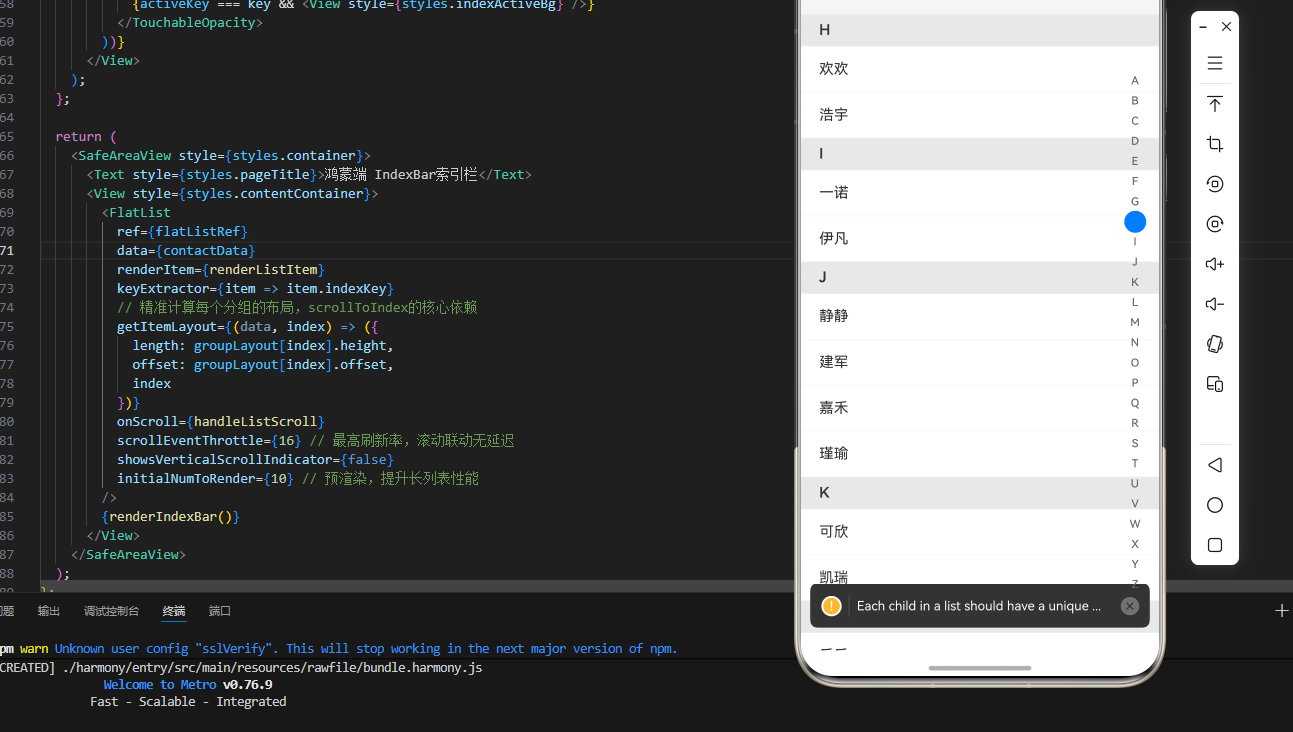
现在是可以正常展示的,但是我注意到了一个问题
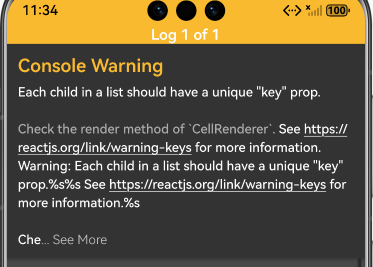
修复方案:调整部分代码
javascript
const renderContactItem = (item: ContactItem) => {
  return (
    <View style={styles.contactItem}>
      <Text style={styles.contactName}>{item.name}</Text>
    </View>
  );
};

const renderListItem = ({ item }: { item: ContactGroup }) => {
  return (
    <View key={item.indexKey} style={styles.groupWrap}>
      {renderGroupHeader(item)}
      {item.list.map(contact => (
        <View key={contact.id}>
          {renderContactItem(contact)}
        </View>
      ))}
    </View>
  );
};
四、鸿蒙端IndexBar开发"避坑指南"
遵循以下优化点,可避免鸿蒙端常见的交互/布局问题:
| 问题现象 | 避坑方案 |
|---|---|
scrollToIndex定位失效 |
必须通过getItemLayout提前计算主列表每个项的高度,鸿蒙端FlatList依赖此属性定位 |
| 索引栏点击不灵敏 | 给TouchableOpacity添加hitSlop放大触摸区域(如{top:10, bottom:10}) |
| 索引与列表联动延迟 | 将scrollEventThrottle设为16(最高灵敏度),提升滚动监听的响应速度 |
| 索引栏布局错位 | 用position: 'absolute'+right:10固定索引栏位置,避免受主列表布局影响 |
五、高频扩展:10分钟实现进阶功能
1. 支持汉字首字母自动分类
若主列表是"未分类的汉字数据"(如城市名),可通过原生JS逻辑提取汉字首字母(需提前准备首字母映射表),自动将数据按字母分组,无需手动分类:
javascript
// 示例:汉字首字母映射(可扩展完整表)
const pinyinMap = {
  '北': 'B', '上': 'S', '广': 'G', '深': 'S'
};
// 自动分类逻辑
const autoGroupData = (rawData: {id: string; name: string}[]) => {
  const grouped: Record<string, typeof contactData[0]> = {};
  rawData.forEach(item => {
    const firstChar = item.name[0];
    const indexKey = pinyinMap[firstChar] || '#';
    if (!grouped[indexKey]) {
      grouped[indexKey] = { indexKey, title: indexKey, list: [] };
    }
    grouped[indexKey].list.push(item);
  });
  return Object.values(grouped);
};
2. 自定义索引栏样式
可通过修改styles.indexBar/styles.indexText,实现"圆形索引项、渐变背景、图标索引"等自定义样式,适配不同应用的视觉风格。
欢迎加入开源鸿蒙跨平台社区:https://openharmonycrossplatform.csdn.net