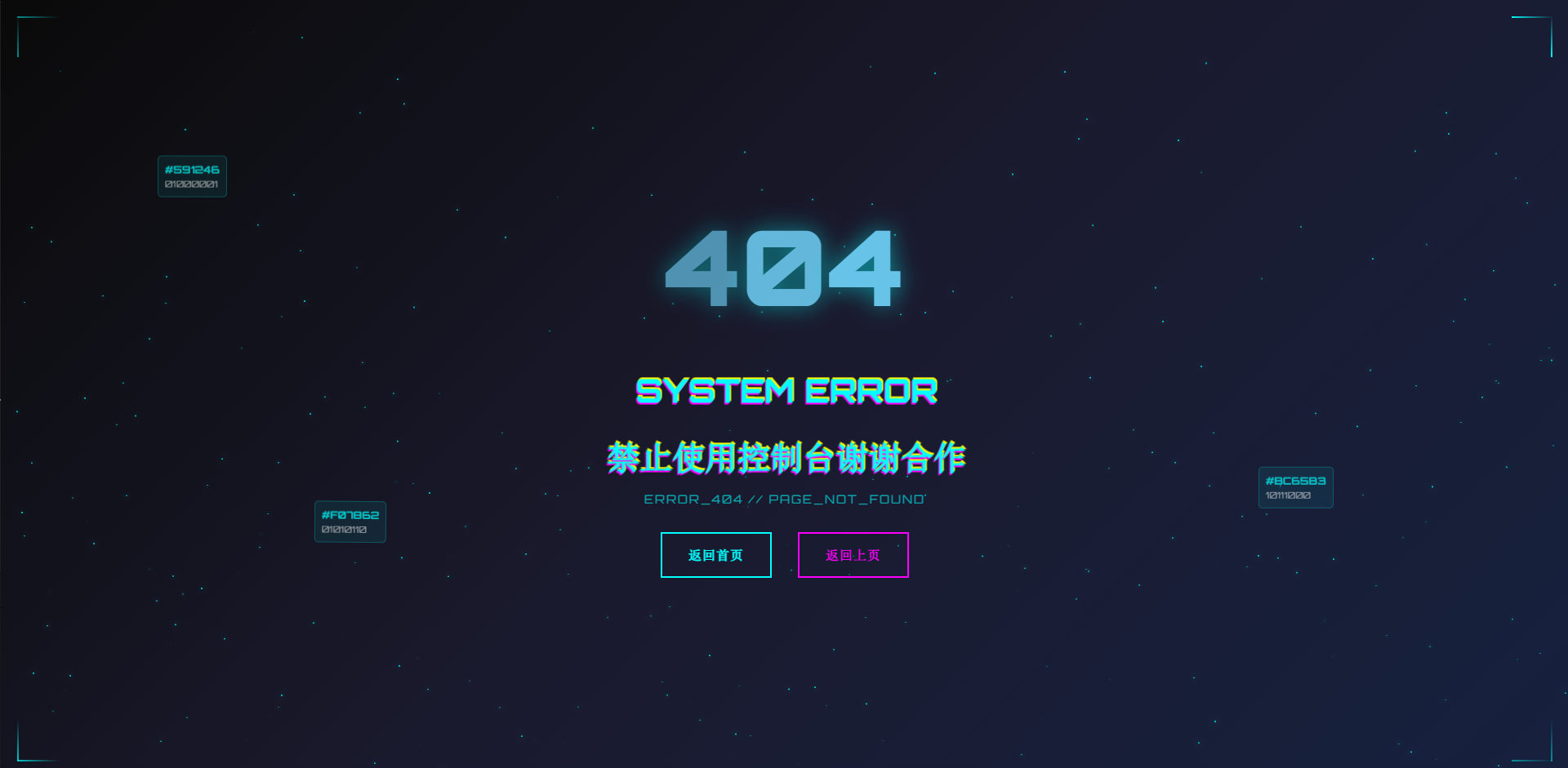
我是防止用户使用控制台用来跳转的,有动画,直接复制就可以用,喜欢留个赞谢谢
<template>
  <div class="error-404">
    <!-- 背景粒子效果 -->
    <div class="particles-container">
      <div
        v-for="n in 500"
        :key="n"
        class="particle"
        :style="getParticleStyle()"
      ></div>
    </div>

    <!-- 主内容区域 -->
    <div class="main-content">
      <!-- 404数字显示 -->
      <div class="error-code">
        <span class="digit" v-for="(digit, index) in '404'" :key="index">
          {{ digit }}
        </span>
      </div>

      <!-- 错误信息 -->
      <div class="error-info">
        <h1 class="glitch-text" data-text="SYSTEM ERROR">SYSTEM ERROR</h1>
        <br />
        <h1 class="glitch-text" data-text="禁止使用控制台谢谢合作" >禁止使用控制台谢谢合作</h1>
        <p class="error-subtitle">ERROR_404 // PAGE_NOT_FOUND</p>
      </div>

      <!-- 返回按钮 -->
      <div class="action-buttons">
        <button class="cyber-button" @click="goHome">
          <span class="button-text">返回首页</span>
          <div class="button-effect"></div>
        </button>
        <button class="cyber-button secondary" @click="goBack">
          <span class="button-text">返回上页</span>
          <div class="button-effect"></div>
        </button>
      </div>

      <!-- 扫描线效果 -->
      <div class="scan-line"></div>
    </div>

    <!-- 侧边装饰线条 -->
    <div class="corner-lines">
      <div class="line line-top-left"></div>
      <div class="line line-top-right"></div>
      <div class="line line-bottom-left"></div>
      <div class="line line-bottom-right"></div>
    </div>

    <!-- 浮动数据块 -->
    <div class="floating-data">
      <div class="data-block" v-for="n in 3" :key="n" :style="{ animationDelay: n * 0.5 + 's' }">
        <div class="data-content">
          <span class="hex-code">{{ generateHexCode() }}</span>
          <span class="binary-code">{{ generateBinary() }}</span>
        </div>
      </div>
    </div>
  </div>
</template>

<script>
export default {
  name: 'Error404',
  methods: {
    goHome() {
      this.$router.push('/');
    },
    goBack() {
      this.$router.go(-1);
    },
    getParticleStyle() {
      return {
        left: Math.random() * 100 + '%',
        top: Math.random() * 100 + '%',
        animationDelay: Math.random() * 20 + 's',
        animationDuration: (Math.random() * 10 + 10) + 's'
      };
    },
    generateHexCode() {
      return '#' + Math.floor(Math.random()*16777215).toString(16).padStart(6, '0').toUpperCase();
    },
    generateBinary() {
      return Array.from({length: 8}, () => Math.round(Math.random())).join('');
    }
  }
};
</script>

<style scoped>
@import url('https://fonts.googleapis.com/css2?family=Orbitron:wght@400;700;900&display=swap');

.error-404 {
  position: relative;
  width: 100vw;
  height: 100vh;
  background: linear-gradient(135deg, #0a0a0a 0%, #1a1a2e 50%, #16213e 100%);
  overflow: hidden;
  font-family: 'Orbitron', monospace;
  display: flex;
  align-items: center;
  justify-content: center;
}

/* 粒子背景 */
.particles-container {
  position: absolute;
  top: 0;
  left: 0;
  width: 100%;
  height: 100%;
  pointer-events: none;
}

.particle {
  position: absolute;
  width: 2px;
  height: 2px;
  background: #00ffff;
  border-radius: 50%;
  box-shadow: 0 0 10px #00ffff;
  animation: float 20s infinite linear;
}

@keyframes float {
  0% {
    transform: translateY(100vh) scale(0);
    opacity: 0;
  }
  10% {
    opacity: 1;
  }
  90% {
    opacity: 1;
  }
  100% {
    transform: translateY(-100px) scale(1);
    opacity: 0;
  }
}

/* 主内容 */
.main-content {
  text-align: center;
  z-index: 10;
  position: relative;
}

/* 404数字 */
.error-code {
  font-size: 8rem;
  font-weight: 900;
  color: #67c3e8;
  background: linear-gradient(45deg, #00ffff, #ff00ff, #ffff00, #00ffff);
  background-size: 400% 400%;
  -webkit-background-clip: text;
  background-clip: text;
  /* animation: gradientShift 3s ease-in-out infinite; */
  margin-bottom: 2rem;
  text-shadow: 0 0 30px rgba(0, 255, 255, 0.5);
}

.digit {
  display: inline-block;
  animation: pulse 2s infinite;
}

.digit:nth-child(2) {
  animation-delay: 0.2s;
}

.digit:nth-child(3) {
  animation-delay: 0.4s;
}

@keyframes gradientShift {
  0%, 100% { background-position: 0% 50%; }
  50% { background-position: 100% 50%; }
}

@keyframes bounce {
  0%, 20%, 50%, 80%, 100% {
    transform: translateY(0) scale(1);
  }
  40% {
    transform: translateY(-20px) scale(1.1);
  }
  60% {
    transform: translateY(-10px) scale(1.05);
  }
}

/* 错误信息 */
.error-info h1 {
  font-size: 2.5rem;
  color: #00ffff;
  margin: 1rem 0;
  position: relative;
  display: inline-block;
}

.glitch-text {
  animation: glitch 2s infinite;
}

.glitch-text::before,
.glitch-text::after {
  content: attr(data-text);
  position: absolute;
  top: 0;
  left: 0;
  width: 100%;
  height: 100%;
}

.glitch-text::before {
  animation: glitch-1 0.5s infinite;
  color: #ff00ff;
  z-index: -1;
}

.glitch-text::after {
  animation: glitch-2 0.5s infinite;
  color: #ffff00;
  z-index: -2;
}

@keyframes glitch {
  0%, 100% { transform: translate(0); }
  20% { transform: translate(-2px, 2px); }
  40% { transform: translate(-2px, -2px); }
  60% { transform: translate(2px, 2px); }
  80% { transform: translate(2px, -2px); }
}

@keyframes glitch-1 {
  0%, 100% { transform: translate(0); }
  10% { transform: translate(-2px, -2px); }
  20% { transform: translate(2px, 2px); }
  30% { transform: translate(-2px, 2px); }
  40% { transform: translate(2px, -2px); }
  50% { transform: translate(-2px, -2px); }
  60% { transform: translate(2px, 2px); }
  70% { transform: translate(-2px, 2px); }
  80% { transform: translate(2px, -2px); }
  90% { transform: translate(-2px, -2px); }
}

@keyframes glitch-2 {
  0%, 100% { transform: translate(0); }
  10% { transform: translate(2px, 2px); }
  20% { transform: translate(-2px, -2px); }
  30% { transform: translate(2px, -2px); }
  40% { transform: translate(-2px, 2px); }
  50% { transform: translate(2px, 2px); }
  60% { transform: translate(-2px, -2px); }
  70% { transform: translate(2px, -2px); }
  80% { transform: translate(-2px, 2px); }
  90% { transform: translate(2px, 2px); }
}

.error-description {
  font-size: 1.2rem;
  color: #ffffff;
  margin: 1rem 0;
  opacity: 0.8;
}

.error-subtitle {
  font-size: 0.9rem;
  color: #00ffff;
  opacity: 0.6;
  letter-spacing: 2px;
  margin-bottom: 2rem;
}

/* 按钮样式 */
.action-buttons {
  display: flex;
  gap: 2rem;
  justify-content: center;
  flex-wrap: wrap;
}

.cyber-button {
  position: relative;
  padding: 1rem 2rem;
  background: transparent;
  border: 2px solid #00ffff;
  color: #00ffff;
  font-family: 'Orbitron', monospace;
  font-size: 1rem;
  font-weight: 700;
  cursor: pointer;
  overflow: hidden;
  transition: all 0.3s ease;
  text-transform: uppercase;
  letter-spacing: 1px;
}

.cyber-button.secondary {
  border-color: #ff00ff;
  color: #ff00ff;
}

.button-text {
  position: relative;
  z-index: 2;
}

.button-effect {
  position: absolute;
  top: 0;
  left: -100%;
  width: 100%;
  height: 100%;
  background: linear-gradient(90deg, transparent, rgba(0, 255, 255, 0.2), transparent);
  transition: left 0.5s ease;
}

.cyber-button.secondary .button-effect {
  background: linear-gradient(90deg, transparent, rgba(255, 0, 255, 0.2), transparent);
}

.cyber-button:hover {
  box-shadow: 0 0 20px currentColor;
  transform: translateY(-2px);
}

.cyber-button:hover .button-effect {
  left: 100%;
}

.cyber-button:active {
  transform: translateY(0);
}

/* 扫描线效果 */
.scan-line {
  position: absolute;
  top: 0;
  left: 0;
  width: 100%;
  height: 2px;
  background: linear-gradient(90deg, transparent, #00ffff, transparent);
  animation: scan 3s infinite;
  box-shadow: 0 0 10px #00ffff;
}

@keyframes scan {
  0% {
    top: 0;
    opacity: 1;
  }
  100% {
    top: 100vh;
    opacity: 0;
  }
}

/* 角落装饰线条 */
.corner-lines {
  position: absolute;
  top: 0;
  left: 0;
  width: 100%;
  height: 100%;
  pointer-events: none;
}

.line {
  position: absolute;
  background: linear-gradient(45deg, #00ffff, transparent);
}

.line-top-left {
  top: 20px;
  left: 20px;
  width: 50px;
  height: 2px;
  animation: pulse 2s infinite;
}

.line-top-left::after {
  content: '';
  position: absolute;
  top: 0;
  left: 0;
  width: 2px;
  height: 50px;
  background: linear-gradient(45deg, #00ffff, transparent);
}

.line-top-right {
  top: 20px;
  right: 20px;
  width: 50px;
  height: 2px;
  animation: pulse 2s infinite 0.5s;
}

.line-top-right::after {
  content: '';
  position: absolute;
  top: 0;
  right: 0;
  width: 2px;
  height: 50px;
  background: linear-gradient(45deg, #00ffff, transparent);
}

.line-bottom-left {
  bottom: 20px;
  left: 20px;
  width: 50px;
  height: 2px;
  animation: pulse 2s infinite 1s;
}

.line-bottom-left::after {
  content: '';
  position: absolute;
  bottom: 0;
  left: 0;
  width: 2px;
  height: 50px;
  background: linear-gradient(45deg, #00ffff, transparent);
}

.line-bottom-right {
  bottom: 20px;
  right: 20px;
  width: 50px;
  height: 2px;
  animation: pulse 2s infinite 1.5s;
}

.line-bottom-right::after {
  content: '';
  position: absolute;
  bottom: 0;
  right: 0;
  width: 2px;
  height: 50px;
  background: linear-gradient(45deg, #00ffff, transparent);
}

@keyframes pulse {
  0%, 100% { opacity: 0.5; }
  50% { opacity: 1; }
}

/* 浮动数据块 */
.floating-data {
  position: absolute;
  width: 100%;
  height: 100%;
  pointer-events: none;
}

.data-block {
  position: absolute;
  background: rgba(0, 255, 255, 0.1);
  border: 1px solid rgba(0, 255, 255, 0.3);
  border-radius: 5px;
  padding: 0.5rem;
  animation: floatData 6s infinite ease-in-out;
  /* backdrop-filter: blur(5px); */
}

.data-block:nth-child(1) {
  top: 20%;
  left: 10%;
}

.data-block:nth-child(2) {
  top: 60%;
  right: 15%;
}

.data-block:nth-child(3) {
  bottom: 30%;
  left: 20%;
}

.data-content {
  display: flex;
  flex-direction: column;
  gap: 0.2rem;
}

.hex-code {
  font-size: 0.8rem;
  color: #00ffff;
  font-weight: 700;
}

.binary-code {
  font-size: 0.7rem;
  color: #ffffff;
  opacity: 0.7;
}

@keyframes floatData {
  0%, 100% {
    transform: translateY(0) rotate(0deg);
    opacity: 0.7;
  }
  50% {
    transform: translateY(-20px) rotate(5deg);
    opacity: 1;
  }
}

/* 响应式设计 */
@media (max-width: 768px) {
  .error-code {
    font-size: 4rem;
  }

  .error-info h1 {
    font-size: 1.5rem;
  }

  .action-buttons {
    flex-direction: column;
    align-items: center;
  }

  .cyber-button {
    width: 200px;
  }
}
</style>