不知道上一次写博客是啥时候了,趁现在有空写一下,因为海外业务拓展,现在客服系统需要接入Line,做批量发送信息,VIP私域等工作因此需要对接Line Messaging API
环境openJDK17
Springboot3.3.0
一、依赖
xml
<dependency>
    <groupId>com.linecorp.bot</groupId>
    <artifactId>line-bot-spring-boot</artifactId>
    <version>5.0.3</version>
</dependency>
二、Line Webhook
简单来说,Webhook就是Line服务器发给你服务器的一个"通知单"。
当用户在Line上给你的Bot发消息、加好友、或者拉群时,Line的服务器会把这些动作封装成一个HTTP POST请求,发送到你预先配置好的URL上。这个URL就是Webhook URL。
我们需要做的就是写一个接口,等着接收这些请求,解析里面的Event然后根据业务逻辑做出响应。
三、获取配置与项目设置
1. 申请官方账号
登录 Log in with LINE Business ID 创建一个 官方账号 ,只有官方账号才能开Messaging API
2. 获取Channel配置
然后到控制台 Line Developers Console 创建一个 Messaging API 类型的channel并启用。 并拿到唯一标识、密钥和令牌:
- Channel ID:频道的唯一标识
- Channel Secret:频道的密钥,用于校验签名
- Channel Access Token:访问令牌,你调用Line API(比如主动发消息)时需要带上它。
四、代码实现
1. 配置类和接口
java
@Data
public class LineChannelConfig {
    private String channelId;
    private String channelSecret;
    private String accessToken;
}


public interface ChannelClient {

    /**
     * 发送消息
     *
     * @param userId channel内用户的唯一标识,同个用户在不同channel之间的userId是不同的,需要注意
     * @param message   消息内容
     * @return 发送结果,成功返回true,失败返回false
     */
    boolean sendMessage(String userId, String message);
}
2. 获取Line配置
java
@Slf4j
@Configuration
@RequiredArgsConstructor
public class ThirdChannelConfiguration {
    /**
     * 存储 LINE 渠道配置
     * Key: channelId, Value: LineChannelConfig
     */
    public static Map<String, LineChannelConfig> lineChannelConfigMap = new ConcurrentHashMap<>();
    /**
     * 定时刷新配置(每1分钟执行一次)
     */
    @Scheduled(fixedRate = 1 * 60 * 1000 L, initialDelay = 1 * 60 * 1000 L)
    public void refreshConfigs() {
        log.info("开始刷新 Line Bot Channel 配置");
        loadChannelConfigs();
    }
    /**
     * 从数据库加载配置
     */
    public void loadChannelConfigs() {
        try {
            var lineChannelConfigList = loadFromDatabase();
            if(CollectionUtilisNotEmpty(lineChannelConfigList)) {
                lineChannelConfigMap = lineChannelConfigList.stream()
                .collect(Collectors.toMap(
                        LineChannelConfig::getChannelId,
                        Function.identity()
                ));
            }
        } catch (Exception e) {
            log.error("加载配置失败: {}", e.getMessage(), e);
        }
    }
}
3. 获取LINE渠道客户端
java
@Slf4j
public class LineChannelClient implements ChannelClient {
    private final LineChannelConfig config;
    public LineChannelClient(LineChannelConfig config) {
        this.config = config;
    }

    @Override
    public boolean sendMessage(String userId, String message) {
        // 1. 基础校验
        if (StrUtil.isBlank(userId) || StrUtil.isBlank(message)) {
            return false;
        }

        try {
            // 2. 构建Line API请求体 (JSON格式)
            // 格式参考: https://developers.line.biz/en/reference/messaging-api/#send-push-message
            Map<String, Object> body = new HashMap<>();
            body.put("to", userId);
            List<Map<String, String>> messages = new ArrayList<>();
            Map<String, String> textMessage = new HashMap<>();
            textMessage.put("type", "text");
            textMessage.put("text", message);
            messages.add(textMessage);

            String jsonBody = JSONUtil.toJsonStr(body);

            // 3. 使用Hutool发送HTTP POST请求
            String result = HttpRequest.post("https://api.line.me/v2/bot/message/push")
                .header(Header.AUTHORIZATION, "Bearer " + config.getAccessToken())
                .header(Header.CONTENT_TYPE, "application/json")
                .body(jsonBody)
                .timeout(5000) // 设置超时
                .execute()
                .body();

            // 4. 解析响应结果
            // Line API成功通常返回空JSON对象 {},状态码200
            // 这里简化判断,如果结果不为空且包含错误信息则认为失败
            if (StrUtil.contains(result, "error")) {
                log.error("Line推送失败: {}", result);
                return false;
            }

            log.info("Line推送成功");
            return true;

        } catch (Exception e) {
            log.error("Line推送异常", e);
            return false;
        }
    }
}
4. 收发消息(Webhook处理)
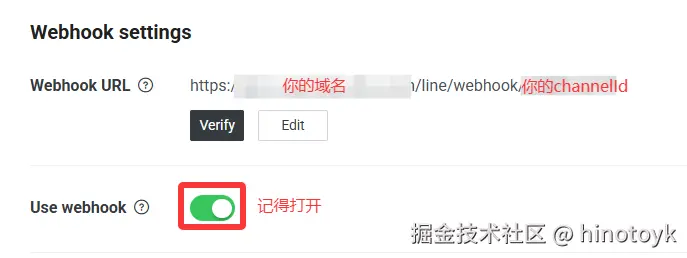
- 在此之前你需要一个公网ip,以及配置Webhook URL、开启webhook功能
java
    @Slf4j
    @RestController
    @RequestMapping("/line/webhook")
    public class LineWebhookController {
        @Resource
        private ThirdChannelConfiguration thirdChannelConfiguration;

        private final ObjectMapper objectMapper = new ObjectMapper();

        /**
         * 处理 Line Bot Webhook 回调
         * 支持多个 Channel,通过路径参数区分不同的 Channel
         *
         * @param channelId 频道ID
         * @param body      请求体
         * @return 响应结果
         */
        @PostMapping("/{channelId}")
        public ResultBean handleWebhook(@PathVariable String channelId,
                                        @RequestHeader("X-Line-Signature") String signature,
                                        @RequestBody String body) {
            try {

                // 1. 签名验证
                if (!validateSignature(channelId, signature, body)) {
                    throw new RuntimeException("Invalid Signature");
                }

                // 解析 webhook 事件
                JsonNode webhookData = objectMapper.readTree(body);
                JsonNode events = webhookData.get("events");

                if (events != null && events.isArray()) {
                    for (JsonNode event : events) {
                        handleMessageEvent(channelId, event);
                    }
                }

                return ResultBean.success("OK");

            } catch (Exception e) {
                log.error("处理 Webhook 请求失败 - Channel: {}, Error: {}", channelId, e.getMessage(), e);
                return failure("Internal Server Error");
            }
        }
    }


        /**
     * 验证 Line Bot 签名
     *
     * @param channelId 频道ID
     * @param signature 签名
     * @param body      请求体
     * @return 是否验证通过
     */
    private boolean validateSignature(String channelId, String signature, String body) {
        try {
            String channelSecret = ThirdChannelConfiguration.lineChannelConfigMap.get(channelId).getChannelSecret();
            if (channelSecret == null || channelSecret.trim().isEmpty()) {
                log.warn("Channel {} 的 Secret 未配置或为空", channelId);
                return false;
            }

            if (signature == null || signature.trim().isEmpty()) {
                log.warn("Channel {} 的签名为空", channelId);
                return false;
            }

            Mac mac = Mac.getInstance("HmacSHA256");
            SecretKeySpec secretKeySpec = new SecretKeySpec(channelSecret.getBytes(StandardCharsets.UTF_8), "HmacSHA256");
            mac.init(secretKeySpec);

            byte[] digest = mac.doFinal(body.getBytes(StandardCharsets.UTF_8));
            String computedSignature = Base64.getEncoder().encodeToString(digest);

            boolean isValid = signature.equals(computedSignature);
            if (!isValid) {
                log.warn("签名验证失败 - Channel: {}, Expected: {}, Actual: {}",
                        channelId, computedSignature, signature);
            }

            return isValid;

        } catch (NoSuchAlgorithmException | InvalidKeyException e) {
            log.error("签名验证时发生错误 - Channel: {}, Error: {}", channelId, e.getMessage(), e);
            return false;
        } catch (Exception e) {
            log.error("签名验证时发生未知错误 - Channel: {}, Error: {}", channelId, e.getMessage(), e);
            return false;
        }
    }

        /**
     * 处理消息事件
     *
     * <p>当用户向官方账号发送消息时触发。支持文本、图片、视频、音频、位置、贴纸等多种消息类型。
     *
     * @param channelId 频道ID
     * @param event     事件数据
     * @see <a href="https://developers.line.biz/en/reference/messaging-api/#message-event">
     * LINE Messaging API - Message Event</a>
     */
    private void handleMessageEvent(String channelId, JsonNode event) {
        try {
            JsonNode message = event.get("message");
            String messageType = message.get("type").asText();
            String replyToken = event.get("replyToken").asText();

            // 获取用户信息
            JsonNode source = event.get("source");
            String userId = source.get("userId").asText();
            String sourceType = source.get("type").asText();
            String groupId = source.has("groupId") ? source.get("groupId").asText() : null;

            if ("text".equals(messageType)) {
                //接收信息
                String text = message.get("text").asText();
                log.info("文本消息内容: {}", text);

                //测试发送demo
                var channelConfig = ThirdChannelConfiguration.lineChannelConfigMap.get(channelId);
                var lineChannelClient = new LineChannelClient(channelConfig);
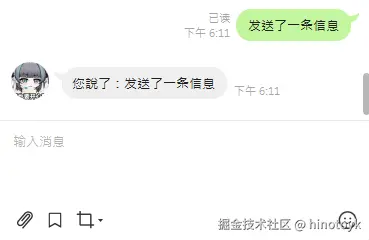
                String replyText = "您說了:" + text;
                //发送信息
                lineChannelClient.sendMessage(userId, replyText);
            }

        } catch (Exception e) {
            log.error("处理消息事件失败 - Channel: {}, Error: {}", channelId, e.getMessage(), e);
        }
    }
五、总结
整个接入过程其实还是比较简单的,万事开头难,最难的一步还是申请官方账号里。