1、需求痛点
在使用yudao-ui-go-view进行数据大屏设计时出现了一个问题:
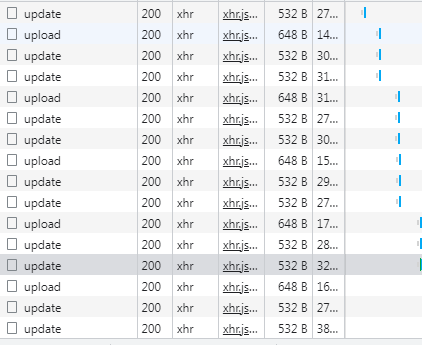
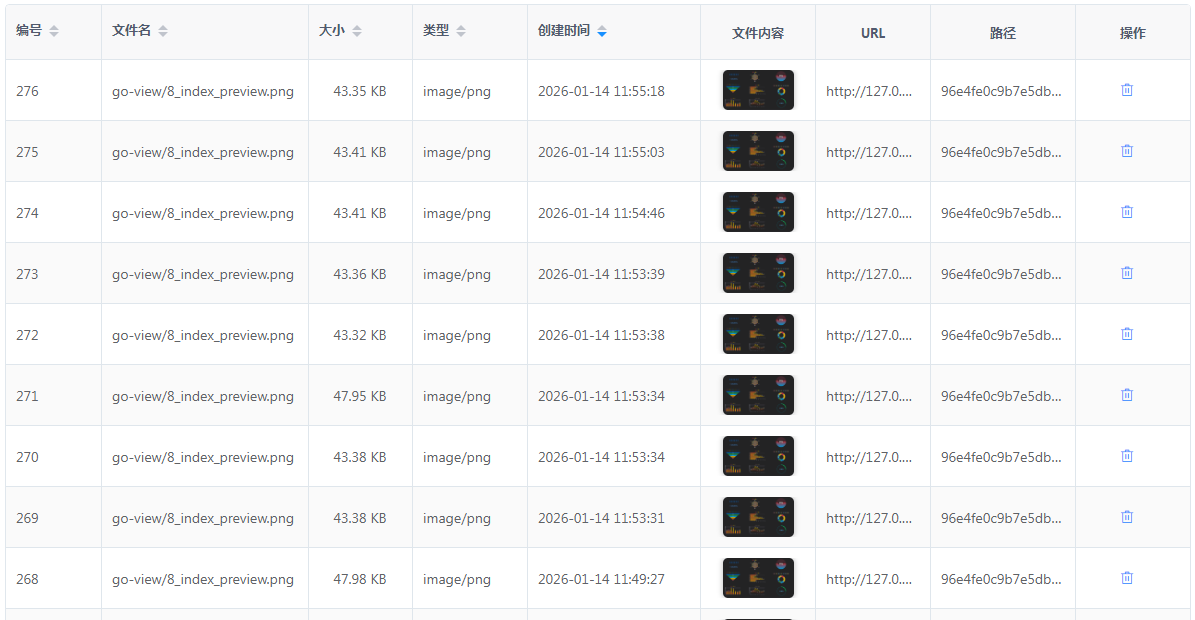
系统会每隔30秒保存一次大屏设计缩略图及layout,鼠标每次离开设计区时也会做一次保存,在业务上是合理的,但实际实现的时候却导致同一个大屏报表在数据库中存储了大量的图片如下图,这是不可接受的脏数据。
2、原因分析
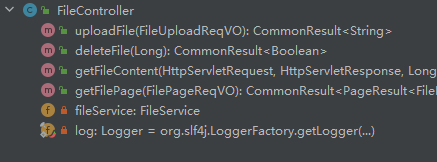
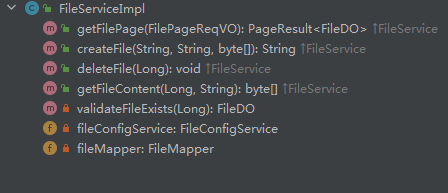
实现upload的关键代码在如下两个类的函数中:
cn/iocoder/yudao/module/infra/controller/admin/file/FileController.java
java
    @PostMapping("/upload")
    @Operation(summary = "上传文件")
    @OperateLog(logArgs = false) // 上传文件,没有记录操作日志的必要
    public CommonResult<String> uploadFile(FileUploadReqVO uploadReqVO) throws Exception {
        MultipartFile file = uploadReqVO.getFile();
        String path = uploadReqVO.getPath();
        return success(fileService.createFile(file.getOriginalFilename(), path, IoUtil.readBytes(file.getInputStream())));
    }
cn/iocoder/yudao/module/infra/service/file/FileServiceImpl.java
java
 @Override
    @SneakyThrows
    public String createFile(String name, String path, byte[] content) {
        // 计算默认的 path 名
        String type = FileTypeUtils.getMineType(content, name);
        if (StrUtil.isEmpty(path)) {
            path = FileUtils.generatePath(content, name);
        }
        // 如果 name 为空,则使用 path 填充
        if (StrUtil.isEmpty(name)) {
            name = path;
        }

        // 上传到文件存储器
        FileClient client = fileConfigService.getMasterFileClient();
        Assert.notNull(client, "客户端(master) 不能为空");
        String url = client.upload(content, path, type);

        // 保存到数据库
        FileDO file = new FileDO();
        file.setConfigId(client.getId());
        file.setName(name);
        file.setPath(path);
        file.setUrl(url);
        file.setType(type);
        file.setSize(content.length);
        fileMapper.insert(file);
        return url;
    }
在FileServiceImpl.createFile中正常情况下业务逻辑是没有问题,但是在数据大屏这个业务场景下就存在问题,前端页面没有判断大屏是否已存在缩略图,就直接提交upload请求,而FileController.upload action也没有多想就直接create insert到数据库,FileControllerFileServiceImpl也都没有提供update方法。
3、解决方案
知道了问题,那么解决方案就有有两种:
A)在后端增加update方法,在前端判断增加逻辑判断是调用upload还是update。
B)在后端upload 中判断是insert还是update,只需在前端把path这个参数补上就ok。
4、实现步骤
我这里的解决方法选择了 B),因为这样前端基本不需要修改 ,而且修改了后端的upload逻辑后也解决了其他类似场景的需求。
为什么要补上path这个参数呢?
一方面,现在的upload方法的参数FileUploadReqVO中已经存在path这个参数的
另一方面,path 是一个uuid值,在表记录中是唯一的,getFileContent()这个函数就是通过path来获取文件内容的。
1)前端修改提供参数path
yudao-ui-go-view\src\views\chart\hooks\useSync.hook.ts 中找到函数 dataSyncUpdate,在构建表单数据的时候增加一行代码即可:
uploadParams.append("path", image.substring(image.indexOf("/get/")+5))
java
// 上传预览图
        let image = chartEditStore.getProjectInfo[ProjectInfoEnum.THUMBNAIL];
        let uploadParams = new FormData()
        uploadParams.append("path", image.substring(image.indexOf("/get/")+5))
        uploadParams.append('file',
          base64toFile(canvasImage.toDataURL(),
            `go-view/${fetchRouteParamsLocation()}_index_preview.png`)) // 名字使用 go-view 作为前缀
        const uploadRes = await uploadFile(uploadParams)
        // 保存预览图
2)后端修改文件保存逻辑
cn/iocoder/yudao/module/infra/dal/mysql/file/FileContentDAOImpl.java
java
    public void insert(Long configId, String path, byte[] content) {
        FileContentDO entity = new FileContentDO().setConfigId(configId)
                .setPath(path).setContent(content);
        List<FileContentDO> fileContentDOs = fileContentMapper.selectList(buildQuery(configId, path));
        if(fileContentDOs == null || fileContentDOs.size()<1){
            fileContentMapper.insert(entity);
        } else {
            FileContentDO fileContentDO = fileContentDOs.get(0);
            fileContentDO.setContent(content);
            fileContentMapper.updateById(fileContentDO);
        }
    }
cn/iocoder/yudao/module/infra/service/file/FileServiceImpl.java
java
@Override
    @SneakyThrows
    public String createFile(String name, String path, byte[] content) {
        // 计算默认的 path 名
        String type = FileTypeUtils.getMineType(content, name);
        if (StrUtil.isEmpty(path)) {
            path = FileUtils.generatePath(content, name);
        }
        // 如果 name 为空,则使用 path 填充
        if (StrUtil.isEmpty(name)) {
            name = path;
        }

        // 上传到文件存储器
        FileClient client = fileConfigService.getMasterFileClient();
        Assert.notNull(client, "客户端(master) 不能为空");
        String url = client.upload(content, path, type);

        List<FileDO> fileDOs = fileMapper.selectList(FileDO::getPath, path);
        if(fileDOs == null || fileDOs.size()<1) {
            // 保存到数据库
            FileDO file = new FileDO();
            file.setConfigId(client.getId());
            file.setName(name);
            file.setPath(path);
            file.setUrl(url);
            file.setType(type);
            file.setSize(content.length);
            fileMapper.insert(file);
        } else {
            FileDO file = fileDOs.get(0);
            file.setConfigId(client.getId());
            file.setName(name);
            file.setPath(path);
            file.setUrl(url);
            file.setType(type);
            file.setSize(content.length);
            fileMapper.updateById(file);
        }
        return url;
    }
============= 更多优化 ============
ruoyi-vue-pro本地环境搭建(超级详细,带异常处理)
ruoyi-vue-pro报表设计器及积木报表模块启用及相关SQL脚本
ruoyi-vue-pro数据大屏------路由支持history,告别难看的hash路由
ruoyi-vue-pro数据大屏------纯前端单点登录,告别手输密码
ruoyi-vue-pro优化------如何将一个模块快速变成一个独立的应用进行开发,部署,管理
ruoyi-vue-pro增强------新增通用单点登录模块yudao-module-sso(下载链接在博文末尾)
ruoyi-vue-pro本地环境搭建(超级详细,带异常处理)
ruoyi-vue-pro报表设计器及积木报表模块启用及相关SQL脚本
============= 相关博文 ============