效果图
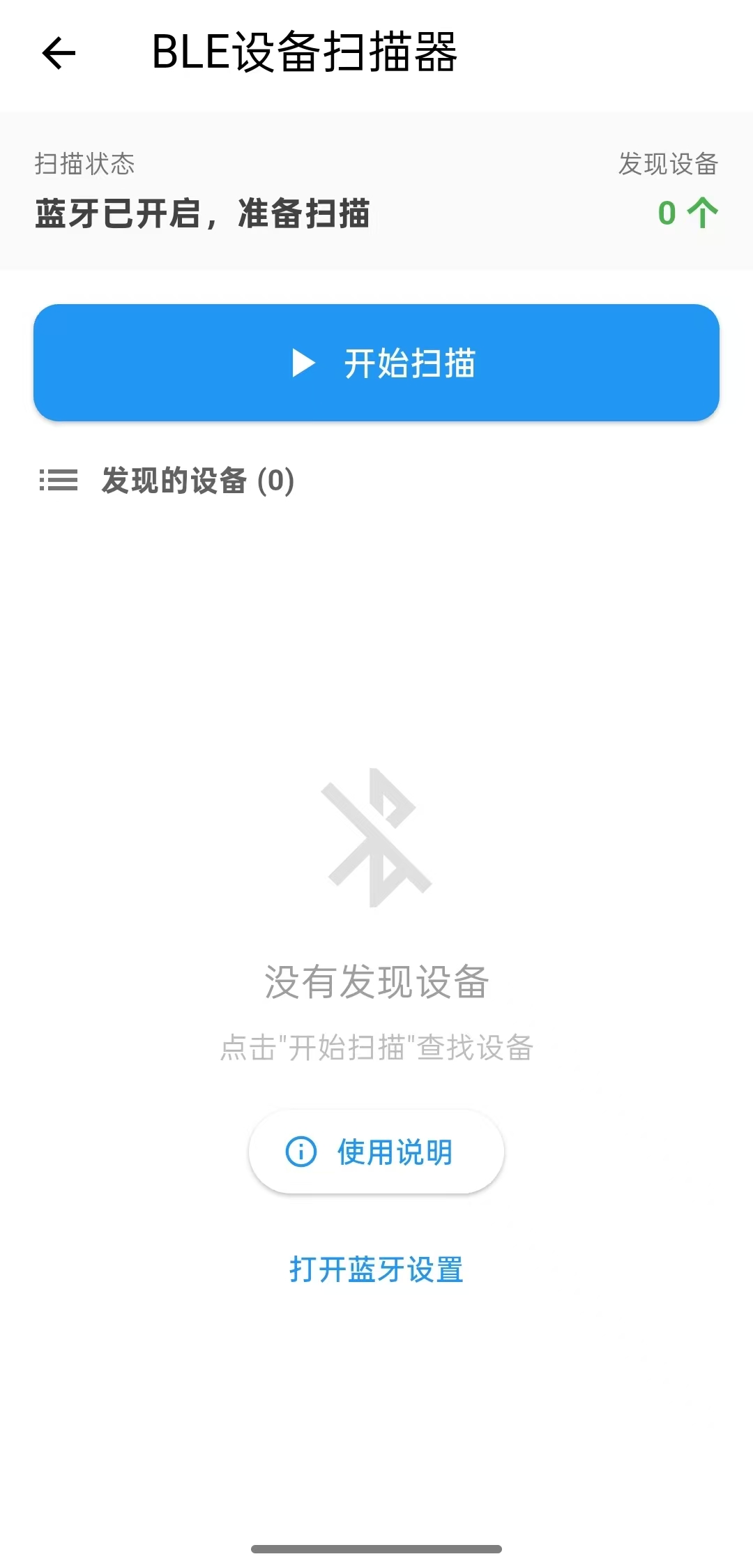
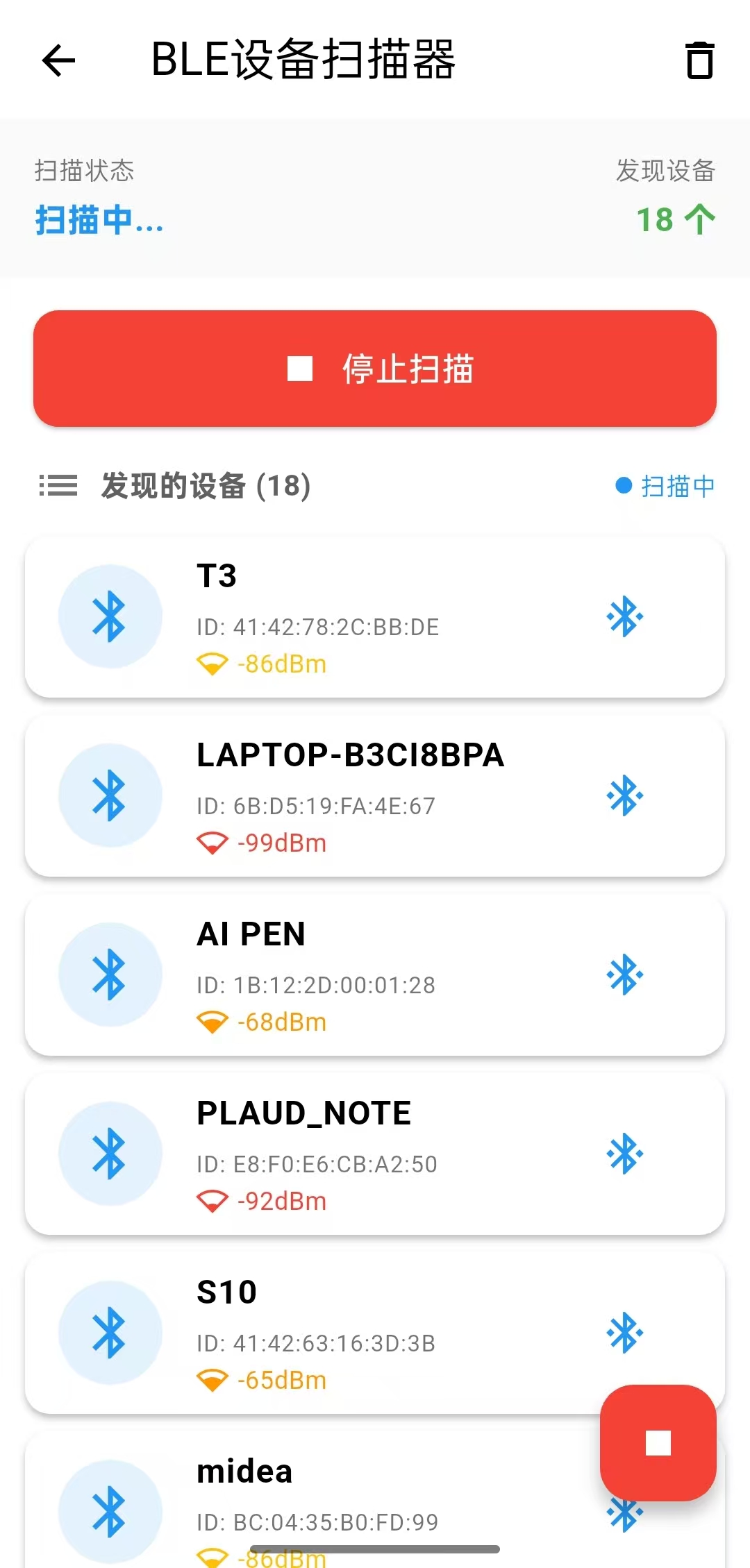
架构图
Dart
┌─────────────────────────────────────────────────────────┐
│                    UI层 (Presentation Layer)            │
├─────────────────────────────────────────────────────────┤
│  Widget树构建 │ 事件响应 │ 状态更新 │ 用户交互反馈        │
└─────────────────────────────────────────────────────────┘
                            ↓
┌─────────────────────────────────────────────────────────┐
│             业务逻辑层 (Business Logic Layer)           │
├─────────────────────────────────────────────────────────┤
│ 扫描管理 │ 设备管理 │ 连接管理 │ 权限管理 │ 状态管理     │
└─────────────────────────────────────────────────────────┘
                            ↓
┌─────────────────────────────────────────────────────────┐
│             数据访问层 (Data Access Layer)              │
├─────────────────────────────────────────────────────────┤
│  Bluetooth Adapter │ 扫描结果流 │ 设备操作 │ 平台适配   │
└─────────────────────────────────────────────────────────┘
                            ↓
┌─────────────────────────────────────────────────────────┐
│                原生层 (Native Layer)                    │
├─────────────────────────────────────────────────────────┤
│  FlutterBluePlus插件 │ Android/iOS原生蓝牙API │ 硬件     │
└─────────────────────────────────────────────────────────┘
扫描数据流
Dart
蓝牙硬件 → 原生系统 → FlutterBluePlus插件 → Stream<ScanResult> → 监听器 → BleDeviceInfo → _devices Map → UI更新
     ↑           ↑            ↑                 ↑          ↑            ↑            ↑            ↑
  信号强度    设备信息     封装为对象        流式传输    过滤/转换    业务模型     状态管理    重建Widget
事件流
Dart
用户点击"开始扫描"
    ↓
_checkPermissions() 权限检查
    ↓
_startScanning() 开始扫描
    ↓
FlutterBluePlus.startScan() 原生调用
    ↓
scanResults.listen() 监听结果
    ↓
数据处理 → 添加到_devices
    ↓
setState() → UI更新
关键设计模式
Dart
1.观察者模式

// 监听蓝牙状态变化
_bluetoothStateSubscription = FlutterBluePlus.adapterState.listen((state) {
  _updateBluetoothStatus(state);
});

// 监听扫描结果
_scanSubscription = FlutterBluePlus.scanResults.listen((results) {
  // 处理扫描结果
});

2.状态模式

// 根据扫描状态显示不同UI
_isScanning ? "停止扫描" : "开始扫描"
_isScanning ? Colors.red : Colors.blue
_isScanning ? Icons.stop : Icons.play_arrow

3.工厂模式

// BleDeviceInfo 封装扫描结果
BleDeviceInfo deviceInfo = BleDeviceInfo(
  id: device.remoteId.str,
  name: device.platformName,
  rssi: result.rssi,
  // ...
);

4.策略模式

// 根据连接状态显示不同操作
if (_isDeviceConnected(deviceInfo.id)) {
  _showConnectedDeviceOptions(deviceInfo);  // 已连接策略
} else {
  _connectToDevice(deviceInfo);  // 未连接策略
}
组件层级
Dart
Scaffold
├── AppBar
├── Column
│   ├── StatusBar (状态显示)
│   ├── ControlButtons (控制按钮)
│   ├── ConnectedDevicesHeader (已连接设备标题)
│   ├── DevicesHeader (设备列表标题)
│   └── Expanded
│       └── ConditionalWidget
│           ├── LoadingWidget
│           ├── EmptyWidget
│           └── RefreshIndicator
│               └── ListView.builder
│                   └── DeviceItem
└── FloatingActionButton (条件显示)
从哪些方面学习这个项目
Dart
一、技术栈学习路径

1. Flutter基础(必学)
Dart语言核心:async/await、Future、Stream、空安全、扩展方法
Flutter Widget体系:StatefulWidget、StatelessWidget、生命周期方法
状态管理:setState()、mounted检查、状态提升
UI组件:Material Design组件、布局系统、主题样式
2. 蓝牙开发核心
BLE协议基础:GATT、服务、特征值、UUID
FlutterBluePlus插件:API调用、权限管理、设备发现、连接管理
平台差异:Android和iOS的蓝牙权限和配置
3. 异步编程
Future链式调用:then、catchError、whenComplete
Stream流处理:listen、where、map、transform
并发控制:async/await、Future.wait、StreamSubscription管理

二、项目架构学习要点

1. 分层架构设计
UI层:学习如何将业务逻辑与UI分离
业务逻辑层:权限检查、扫描管理、连接管理
数据层:BleDeviceInfo数据模型、设备列表管理
2. 状态管理模式
setState模式:理解何时调用setState、如何避免过度重建
状态变量设计:isScanning、devices、_connectedDevices的作用
mounted检查:防止dispose后调用setState
3. 生命周期管理
initState:初始化蓝牙状态监听
dispose:清理StreamSubscription和Timer
mounted:异步操作中的组件状态检查

三、核心功能实现学习
1. 权限管理
2. 蓝牙扫描
3. 设备连接管理
4. 数据模型设计

四、UI/UX设计学习

1. 状态反馈
扫描状态:_scanStatus文本、按钮状态、颜色变化
连接状态:已连接设备高亮、连接状态标签
加载状态:CircularProgressIndicator、SnackBar提示
2. 交互设计
列表项设计:ListTile + Card布局
长按操作:onLongPress显示详情
下拉刷新:RefreshIndicator
底部弹窗:showModalBottomSheet
3. 错误处理
权限拒绝:SnackBar提示
连接失败:错误弹窗
蓝牙关闭:状态提示

五、扩展学习方向

1. 进阶功能
服务发现:发现设备的GATT服务
特征值读写:读取/写入设备数据
通知监听:监听特征值变化
OTA升级:固件升级功能
2. 架构升级
状态管理库:Provider、Riverpod、Bloc
路由管理:Navigator 2.0、GoRouter
数据持久化:SharedPreferences、Hive
3. 测试覆盖
单元测试:业务逻辑测试
Widget测试:UI组件测试
集成测试:完整流程测试
相关知识点
Dart
1.蓝牙的相关状态

enum BluetoothAdapterState {
  unknown,     // 状态未知
  unavailable, // 不可用(设备不支持)
  unauthorized,// 未授权
  turningOn,   // 正在开启
  on,          // 已开启
  turningOff,  // 正在关闭
  off,         // 已关闭
}

2.adapterState

FlutterBluePlus.adapterState 是 FlutterBluePlus 插件提供的蓝牙适配器状态流。它是一个 Stream<BluetoothAdapterState>,用于实时监听和获取设备的蓝牙状态变化。

相关方法

listen - 监听状态变化
first - 获取当前/第一个状态
where - 过滤特定状态
distinct - 去重连续相同状态
skip / take - 跳过/获取部分事件
map - 转换状态值
asyncMap / asyncExpand - 异步处理
timeout - 超时控制

3.scanResults

FlutterBluePlus.scanResults 是 蓝牙扫描结果的数据流。当蓝牙扫描启动后,所有发现的设备都会通过这个 Stream 实时推送出来。

优点
实时数据流:持续接收扫描结果
丰富信息:包含设备信息、广播数据、信号强度等
灵活处理:支持各种Stream操作符进行数据处理
跨平台:统一Android和iOS的扫描结果
关键代码
Dart
1.获取蓝牙的当前状态
BluetoothAdapterState state = await FlutterBluePlus.adapterState.first;

逻辑
创建对 adapterState Stream 的监听
等待第一个状态数据到来
收到数据(比如 BluetoothAdapterState.on)
取消监听(因为只需要第一个)
返回数据,完成 await

2.Permission.location.request();//获取位置权限
Permission.bluetooth.request();//获取蓝牙权限

判断权限是否给予
Permission.location.isGranted
Permission.bluetooth.isGranted


3.获取已连接的设备
FlutterBluePlus.connectedDevices;

逻辑
Flutter端: 调用 FlutterBluePlus.connectedDevices
平台通道: 通过 MethodChannel 传递到原生平台
Android端: 调用 BluetoothAdapter.getBondedDevices() 或类似API
iOS端: 调用 CBCentralManager.retrieveConnectedPeripherals()
返回: 原生平台返回设备列表给Flutter
转换: FlutterBluePlus将数据转换为 BluetoothDevice 对象列表

4.开始扫描
FlutterBluePlus.startScan(timeout: const Duration(seconds: 15),);

5.获取扫描结果
FlutterBluePlus.scanResults

6.创建设备信息对象
BleDeviceInfo deviceInfo = BleDeviceInfo(
id: device.remoteId.str,
name: device.platformName.isNotEmpty ? device.platformName : null,
localName: result.advertisementData.localName,
rssi: result.rssi,
device: device,
manufacturerData: manufacturerData,
);

7.停止扫描
FlutterBluePlus.stopScan();

8.连接设备
await deviceInfo.device.connect(
  autoConnect: false,// 不自动重连
  timeout: const Duration(seconds: 10),// 10秒超时
      );
9.断开连接
device.disconnect();
实现步骤
1.在pubspec.yaml导入外部类
Dart
  flutter_blue_plus: ^1.10.0  # BLE插件
  permission_handler: ^11.0.1
2.在Android的AndroidManifest中添加权限
Dart
  <!-- BLE 权限 -->
    <uses-permission android:name="android.permission.BLUETOOTH"/>
    <uses-permission android:name="android.permission.BLUETOOTH_ADMIN"/>

    <!-- Android 6.0+ 需要位置权限扫描BLE -->
    <uses-permission android:name="android.permission.ACCESS_FINE_LOCATION"/>
    <uses-permission android:name="android.permission.ACCESS_COARSE_LOCATION"/>

    <!-- Android 12+ 新增权限 -->
    <uses-permission android:name="android.permission.BLUETOOTH_SCAN"
       />
    <uses-permission android:name="android.permission.BLUETOOTH_CONNECT"/>

    <!-- 声明使用BLE -->
    <uses-feature android:name="android.hardware.bluetooth_le" android:required="true"/>
3.新建一个BLE设备模型,接收扫描到的设备
Dart
import 'dart:ui';

import 'package:flutter/cupertino.dart';
import 'package:flutter/material.dart';
import 'package:flutter_blue_plus/flutter_blue_plus.dart';


/// BLE设备模型

class BleDeviceInfo {
  final String id; //设备唯一标识符
  final String? name;
  final String? localName;
  final int rssi;
  final BluetoothDevice device; //核心设备对象
  final int? manufacturerData;
  final String? macAddress;

  BleDeviceInfo({
    required this.id,
    required this.name,
    required this.localName,
    required this.rssi,
    required this.device,
    this.manufacturerData,
    this.macAddress,
  });

  // 获取显示名称
  String get displayName {
    if (localName != null && localName!.isNotEmpty) return localName!;
    if (name != null && name!.isNotEmpty) return name!;
    if (macAddress != null) return '设备 $macAddress';
    return '未知设备';
  }

  // 格式化信号强度
  String get formattedRssi {
    if (rssi == 0) return '未知';
    return '${rssi}dBm';
  }

  Color get signalColor {
    if (rssi >= -50) return Colors.green;
    if (rssi >= -70) return Colors.orange;
    if (rssi >= -90) return Colors.amber;
    return Colors.red;
  }

// 信号强度图标
  IconData get signalIcon {
    if (rssi >= -50) return Icons.network_wifi;      // 满格WiFi
    if (rssi >= -70) return Icons.network_wifi_3_bar; // 3格WiFi
    if (rssi >= -90) return Icons.network_wifi_2_bar; // 2格WiFi
    return Icons.network_wifi_1_bar;                 // 1格WiFi
  }

}
4.新建BLE扫描类,这个类里面包括了UI的实现,先定义一些变量
Dart
 // 扫描状态
  bool _isScanning = false;
  bool _isLoading = false;
  String _scanStatus = '准备扫描';

  // 设备列表
  final Map<String, BleDeviceInfo> _devices = {};
  List<BluetoothDevice> _connectedDevices = [];

  // 扫描控制器
  StreamSubscription<List<ScanResult>>? _scanSubscription;
  Timer? _scanTimeoutTimer;
  StreamSubscription<BluetoothAdapterState>? _bluetoothStateSubscription;
5.初始化和销毁
Dart
  @override
  void initState() {
    super.initState();
    _initBluetooth();
  }

  @override
  void dispose() {
    _stopScanning();
    _scanSubscription?.cancel();
    _scanTimeoutTimer?.cancel();
    _bluetoothStateSubscription?.cancel();
    super.dispose();
  }
6.初始化蓝牙
Dart
Future<void> _initBluetooth() async {
    //先获取当前状态
    try {
      BluetoothAdapterState currentState = await FlutterBluePlus.adapterState.first;
      _updateBluetoothStatus(currentState);
    } catch (e) {
      // 错误处理
      setState(() {
        _scanStatus = '获取蓝牙状态失败';
      });
      return;
    }

    //然后设置监听器(监听未来变化)
    _bluetoothStateSubscription = FlutterBluePlus.adapterState.listen((state) {
      _updateBluetoothStatus(state);
    });
  }
7.获取蓝牙的当前状态
Dart
  void _updateBluetoothStatus(BluetoothAdapterState state) {
    setState(() {
      if (state == BluetoothAdapterState.on) {
        _scanStatus = '蓝牙已开启,准备扫描';
      } else {
        _scanStatus = '蓝牙未开启';
        _isScanning = false;
      }
    });

    // 如果蓝牙关闭,停止扫描
    if (state != BluetoothAdapterState.on) {
      _stopScanning();
    }
  }
8.检查并请求权限
Dart
Future<bool> _checkPermissions() async {
    // 检查蓝牙状态
    BluetoothAdapterState state = await FlutterBluePlus.adapterState.first;
    if (state != BluetoothAdapterState.on) {
      if (mounted) {
        ScaffoldMessenger.of(context).showSnackBar(
          const SnackBar(
            content: Text('请先开启蓝牙'),
            backgroundColor: Colors.orange,
          ),
        );
      }
      return false;
    }

    // 请求位置权限(Android需要)
    if (!await Permission.location.isGranted) {
      var status = await Permission.location.request();
      if (!status.isGranted) {
        if (mounted) {
          ScaffoldMessenger.of(context).showSnackBar(
            const SnackBar(
              content: Text('需要位置权限来扫描蓝牙设备'),
              backgroundColor: Colors.red,
            ),
          );
        }
        return false;
      }
    }

    // 检查蓝牙权限
    if (!await Permission.bluetooth.isGranted) {
      var status = await Permission.bluetooth.request();
      if (!status.isGranted) {
        if (mounted) {
          ScaffoldMessenger.of(context).showSnackBar(
            const SnackBar(
              content: Text('需要蓝牙权限'),
              backgroundColor: Colors.red,
            ),
          );
        }
        return false;
      }
    }

    return true;
  }
9.开始扫描
Dart
Future<void> _startScanning() async {

    //防止重复扫描
    if (_isScanning) return;

    // 检查权限
    if (!await _checkPermissions()) {
      return;
    }

    setState(() {
      _isLoading = true;
      _devices.clear(); // 清空旧设备列表
    });

    try {

      // 获取已连接的设备
      _connectedDevices = await FlutterBluePlus.connectedDevices;

      setState(() {
        _isScanning = true;
        _isLoading = false;
        _scanStatus = '扫描中...';
      });

      // 开始扫描
      await FlutterBluePlus.startScan(timeout: const Duration(seconds: 15),);

      // 设置扫描超时
      _scanTimeoutTimer = Timer(const Duration(seconds: 15), () {
        _stopScanning();
      });

      // 监听扫描结果
      _scanSubscription = FlutterBluePlus.scanResults.listen((results) {

        if (!mounted) return;

        setState(() {
          for (ScanResult result in results) {

            // 获取设备基本信息
            BluetoothDevice device = result.device;

            // 提取制造商数据
            int? manufacturerData;
            if (result.advertisementData.manufacturerData.isNotEmpty) {
              manufacturerData = result.advertisementData.manufacturerData.keys.first;
            }

            // 获取设备名称(优先使用广播名称)
            String? deviceName = result.advertisementData.localName ?? device.platformName;

            // 如果设备没有名字,跳过
            if (deviceName.isEmpty) {
              continue;  // 跳过这个设备
            }

            // 创建设备信息对象
            BleDeviceInfo deviceInfo = BleDeviceInfo(
              id: device.remoteId.str,
              name: device.platformName.isNotEmpty ? device.platformName : null,
              localName: result.advertisementData.localName,
              rssi: result.rssi,
              device: device,
              manufacturerData: manufacturerData,
            );

            // 更新设备列表
            _devices[device.remoteId.str] = deviceInfo;
          }
        });
      }, onError: (error) {
        print('扫描错误: $error');
      });


    } catch (e) {
      print('扫描失败: $e');
      if (mounted) {
        setState(() {
          _isLoading = false;
          _scanStatus = '扫描失败';
        });
        ScaffoldMessenger.of(context).showSnackBar(
          SnackBar(
            content: Text('扫描失败: ${e.toString()}'),
            backgroundColor: Colors.red,
          ),
        );
      }
    }
  }
10.停止扫描
Dart
  void _stopScanning() {

    if (!_isScanning) return;

    FlutterBluePlus.stopScan();
    _scanSubscription?.cancel();
    _scanTimeoutTimer?.cancel();

    if (mounted) {
      setState(() {
        _isScanning = false;
        _scanStatus = '扫描完成';
      });
    }
  }
11.清理设备列表
Dart
  void _clearDevices() {
    if (mounted) {
      setState(() {
        _devices.clear();
      });
    }
  }
12.检查设备是否已连接
Dart
bool _isDeviceConnected(String deviceId) {
    return _connectedDevices.any((device) => device.remoteId.str == deviceId);
  }
13.连接设备
Dart
Future<void> _connectToDevice(BleDeviceInfo deviceInfo) async {

    if (_isDeviceConnected(deviceInfo.id)) {
      // 设备已连接,显示选项
      _showConnectedDeviceOptions(deviceInfo);
      return;
    }

    showDialog(
      context: context,
      barrierDismissible: false,//用户不能点击外部关闭
      builder: (context) => AlertDialog(
        title: const Text('连接设备'),
        content: Text('正在连接到 ${deviceInfo.displayName}...'),
      ),
    );

    try {

      //发起连接设备的请求
      await deviceInfo.device.connect(
        autoConnect: false,// 不自动重连
        timeout: const Duration(seconds: 10),// 10秒超时
      );

      if (mounted) {

        Navigator.pop(context);

        // 更新已连接设备列表
        _connectedDevices = await FlutterBluePlus.connectedDevices;

        ScaffoldMessenger.of(context).showSnackBar(
          SnackBar(
            content: Text('连接成功: ${deviceInfo.displayName}'),
            backgroundColor: Colors.green,
            duration: const Duration(seconds: 2),
          ),
        );

        // 刷新UI
        setState(() {});
      }

    } catch (e) {
      if (mounted) {
        Navigator.pop(context);
        ScaffoldMessenger.of(context).showSnackBar(
          SnackBar(
            content: Text('连接失败: ${e.toString()}'),
            backgroundColor: Colors.red,
          ),
        );
      }
    }
  }
14.断开连接
Dart
Future<void> _disconnectDevice(BluetoothDevice device) async {

    showDialog(
      context: context,
      barrierDismissible: false,
      builder: (context) => AlertDialog(
        title: const Text('断开连接'),
        content: Text('正在断开与 ${device.platformName} 的连接...'),
      ),
    );

    try {

      await device.disconnect();

      if (mounted) {
        Navigator.pop(context);

        // 更新已连接设备列表
        _connectedDevices = await FlutterBluePlus.connectedDevices;

        ScaffoldMessenger.of(context).showSnackBar(
          const SnackBar(
            content: Text('已断开连接'),
            backgroundColor: Colors.green,
            duration: Duration(seconds: 2),
          ),
        );

        // 刷新UI
        setState(() {});
      }
    } catch (e) {
      if (mounted) {
        Navigator.pop(context);
        ScaffoldMessenger.of(context).showSnackBar(
          SnackBar(
            content: Text('断开连接失败: ${e.toString()}'),
            backgroundColor: Colors.red,
          ),
        );
      }
    }
  }
15.显示已连接设备的设备选项
Dart
void _showConnectedDeviceOptions(BleDeviceInfo deviceInfo) {

    showModalBottomSheet(
      context: context,
      builder: (context) => Container(
        padding: const EdgeInsets.all(16),
        child: Column(
          mainAxisSize: MainAxisSize.min,
          children: [

            ListTile(
              leading: const Icon(Icons.bluetooth_connected, color: Colors.green),
              title: Text('${deviceInfo.displayName} 已连接'),
              subtitle: const Text('点击管理连接'),
            ),

            const Divider(),

            ListTile(
              leading: const Icon(Icons.settings),
              title: const Text('设备设置'),
              onTap: () {
                Navigator.pop(context);
                // TODO: 跳转到设备设置页面
              },
            ),
            ListTile(
              leading: const Icon(Icons.link_off, color: Colors.red),
              title: const Text('断开连接'),
              onTap: () {
                Navigator.pop(context);
                _disconnectDevice(deviceInfo.device);
              },
            ),
            const SizedBox(height: 8),
            TextButton(
              onPressed: () => Navigator.pop(context),
              child: const Text('取消'),
            ),
          ],
        ),
      ),
    );
  }
16.构建设备列表项
Dart
 Widget _buildDeviceItem(BleDeviceInfo device) {

    bool isConnected = _isDeviceConnected(device.id);

    return Card(
      margin: const EdgeInsets.symmetric(horizontal: 12, vertical: 4),
      elevation: 2,
      color: isConnected ? Colors.green[50] : null,
      child: ListTile(

        //左侧图标
        leading: Container(
          width: 50,
          height: 50,
          decoration: BoxDecoration(
            color: isConnected ? Colors.green[100] : Colors.blue[50],
            borderRadius: BorderRadius.circular(25),
          ),
          child: Icon(
            isConnected ? Icons.bluetooth_connected : Icons.bluetooth,
            color: isConnected ? Colors.green : Colors.blue,
            size: 30,
          ),
        ),

        //标题
        title: Column(
          crossAxisAlignment: CrossAxisAlignment.start,
          children: [
            Row(
              children: [
                Expanded(
                  child: Text(
                    device.displayName,
                    style: TextStyle(
                      fontWeight: FontWeight.bold,
                      fontSize: 16,
                      color: isConnected ? Colors.green[800] : Colors.black,
                    ),
                    maxLines: 1,
                    overflow: TextOverflow.ellipsis,
                  ),
                ),
                if (isConnected)
                  Container(
                    padding: const EdgeInsets.symmetric(horizontal: 8, vertical: 2),
                    decoration: BoxDecoration(
                      color: Colors.green[100],
                      borderRadius: BorderRadius.circular(12),
                    ),
                    child: Text(
                      '已连接',
                      style: TextStyle(
                        fontSize: 10,
                        color: Colors.green[800],
                        fontWeight: FontWeight.bold,
                      ),
                    ),
                  ),
              ],
            ),
            const SizedBox(height: 4),

            //ID
            Text(
              'ID: ${device.id}',
              style: TextStyle(
                fontSize: 11,
                color: Colors.grey[600],
              ),
              maxLines: 1,
              overflow: TextOverflow.ellipsis,
            ),
          ],
        ),

        //副标题
        subtitle: Row(
          children: [
            Icon(
              device.signalIcon,
              size: 16,
              color: device.signalColor,
            ),
            const SizedBox(width: 4),
            Text(
              device.formattedRssi,
              style: TextStyle(
                fontSize: 12,
                color: device.signalColor,
              ),
            ),
            const SizedBox(width: 8),

          ],
        ),

        //右侧操作按钮
        trailing: IconButton(
          icon: Icon(
            isConnected ? Icons.settings : Icons.bluetooth_connected,
            color: isConnected ? Colors.green : Colors.blue,
          ),
          onPressed: () => _connectToDevice(device),
          tooltip: isConnected ? '管理连接' : '连接设备',
        ),
        onTap: () => _connectToDevice(device),
        onLongPress: () {
          _showDeviceDetails(device); //长按显示详细信息
        },
      ),
    );
  }
17.显示设备详细信息
Dart
void _showDeviceDetails(BleDeviceInfo device) {
    bool isConnected = _isDeviceConnected(device.id);

    showModalBottomSheet(
      context: context,
      isScrollControlled: true,
      builder: (context) => Container(
        padding: const EdgeInsets.all(16),
        child: Column(
          mainAxisSize: MainAxisSize.min,
          crossAxisAlignment: CrossAxisAlignment.start,
          children: [
            Center(
              child: Container(
                width: 60,
                height: 4,
                decoration: BoxDecoration(
                  color: Colors.grey[300],
                  borderRadius: BorderRadius.circular(2),
                ),
              ),
            ),
            const SizedBox(height: 16),
            Text(
              '设备详情',
              style: const TextStyle(
                fontSize: 20,
                fontWeight: FontWeight.bold,
              ),
            ),
            const SizedBox(height: 16),
            _buildDetailRow('设备名称', device.displayName),
            _buildDetailRow('设备ID', device.id),
            _buildDetailRow('信号强度', device.formattedRssi),
            _buildDetailRow('连接状态', isConnected ? '已连接' : '未连接'),

            const SizedBox(height: 20),
            Row(
              children: [
                Expanded(
                  child: ElevatedButton(
                    onPressed: () {
                      Navigator.pop(context);
                      _connectToDevice(device);
                    },
                    style: ElevatedButton.styleFrom(
                      backgroundColor: isConnected ? Colors.orange : Colors.blue,
                      foregroundColor: Colors.white,
                    ),
                    child: Text(isConnected ? '管理连接' : '连接设备'),
                  ),
                ),
                const SizedBox(width: 12),
                Expanded(
                  child: OutlinedButton(
                    onPressed: () => Navigator.pop(context),
                    child: const Text('关闭'),
                  ),
                ),
              ],
            ),
            SizedBox(height: MediaQuery.of(context).padding.bottom),
          ],
        ),
      ),
    );
  }
18.行UI的子项
Dart
Widget _buildDetailRow(String label, String value) {
    return Padding(
      padding: const EdgeInsets.symmetric(vertical: 4),
      child: Row(
        children: [
          SizedBox(
            width: 80,
            child: Text(
              '$label:',
              style: TextStyle(
                fontWeight: FontWeight.w500,
                color: Colors.grey[700],
              ),
            ),
          ),
          Expanded(
            child: Text(
              value,
              style: TextStyle(color: Colors.grey[900]),
            ),
          ),
        ],
      ),
    );
  }
19.具体的UI的架构
Dart
 @override
  Widget build(BuildContext context) {
    return Scaffold(

      //1.标题栏
      appBar: AppBar(
        title: const Text('BLE设备扫描器'),
        actions: [
          if (_devices.isNotEmpty)
            IconButton(
              icon: const Icon(Icons.delete_outline),
              onPressed: _clearDevices,
              tooltip: '清空列表',
            ),
        ],
      ),
      body: Column(
        children: [

          // 2.状态栏
          Container(
            padding: const EdgeInsets.all(16),
            color: Colors.grey[50],
            child: Row(
              mainAxisAlignment: MainAxisAlignment.spaceBetween,
              children: [
                Column(
                  crossAxisAlignment: CrossAxisAlignment.start,
                  children: [

                    Text(
                      '扫描状态',
                      style: TextStyle(
                        fontSize: 12,
                        color: Colors.grey[600],
                      ),
                    ),
                    const SizedBox(height: 4),

                    Text(
                      _scanStatus,
                      style: TextStyle(
                        fontSize: 16,
                        fontWeight: FontWeight.bold,
                        color: _isScanning ? Colors.blue : Colors.grey[800],
                      ),
                    ),
                  ],
                ),
                Column(
                  crossAxisAlignment: CrossAxisAlignment.end,
                  children: [

                    Text(
                      '发现设备',
                      style: TextStyle(
                        fontSize: 12,
                        color: Colors.grey[600],
                      ),
                    ),
                    const SizedBox(height: 4),

                    Text(
                      '${_devices.length} 个',
                      style: const TextStyle(
                        fontSize: 16,
                        fontWeight: FontWeight.bold,
                        color: Colors.green,
                      ),
                    ),
                  ],
                ),
              ],
            ),
          ),

          //3. 控制按钮
          Container(
            padding: const EdgeInsets.all(16),
            child: Row(
              children: [
                Expanded(
                  child: ElevatedButton.icon(
                    icon: Icon(
                      _isScanning ? Icons.stop : Icons.play_arrow,
                      size: 24,
                    ),
                    label: Text(
                      _isScanning ? '停止扫描' : '开始扫描',
                      style: const TextStyle(fontSize: 16),
                    ),
                    onPressed: () {
                      if (_isScanning) {
                        _stopScanning();
                      } else {
                        _startScanning();
                      }
                    },
                    style: ElevatedButton.styleFrom(
                      padding: const EdgeInsets.symmetric(vertical: 16),
                      backgroundColor: _isScanning ? Colors.red : Colors.blue,
                      foregroundColor: Colors.white,
                      shape: RoundedRectangleBorder(
                        borderRadius: BorderRadius.circular(12),
                      ),
                    ),
                  ),
                ),
              ],
            ),
          ),

          // 4.显示已连接设备
          if (_connectedDevices.isNotEmpty) ...[
            Padding(
              padding: const EdgeInsets.symmetric(horizontal: 16),
              child: Row(
                children: [
                  const Icon(Icons.bluetooth_connected, color: Colors.green, size: 20),
                  const SizedBox(width: 8),
                  Text(
                    '已连接设备 (${_connectedDevices.length})',
                    style: const TextStyle(
                      fontWeight: FontWeight.bold,
                      color: Colors.green,
                    ),
                  ),
                ],
              ),
            ),
            const SizedBox(height: 8),
          ],

          // 设备列表标题
          Padding(
            padding: const EdgeInsets.symmetric(horizontal: 16),
            child: Row(
              children: [
                Icon(Icons.list, color: Colors.grey[600]),
                const SizedBox(width: 8),
                Text(
                  '发现的设备 (${_devices.length})',
                  style: TextStyle(
                    fontWeight: FontWeight.bold,
                    color: Colors.grey[700],
                  ),
                ),
                const Spacer(),
                if (_isScanning)
                  Row(
                    children: [
                      Container(
                        width: 8,
                        height: 8,
                        decoration: const BoxDecoration(
                          color: Colors.blue,
                          shape: BoxShape.circle,
                        ),
                      ),
                      const SizedBox(width: 4),
                      const Text(
                        '扫描中',
                        style: TextStyle(
                          fontSize: 12,
                          color: Colors.blue,
                        ),
                      ),
                    ],
                  ),
              ],
            ),
          ),

          // 设备列表
          Expanded(
            child: _isLoading
                ? const Center(
                  child: Column(
                    mainAxisAlignment: MainAxisAlignment.center,
                    children: [
                      CircularProgressIndicator(),
                      SizedBox(height: 16),
                      Text('正在检查权限和蓝牙状态...'),
                    ],
                  ),
                )
                : _devices.isEmpty
                ? buildEmpty()
                : RefreshIndicator(
              onRefresh: () async {
                if (!_isScanning) {
                  await _startScanning();
                }
              },
              child: ListView.builder(
                padding: const EdgeInsets.symmetric(vertical: 8),
                itemCount: _devices.length,
                itemBuilder: (context, index) {
                  String deviceId = _devices.keys.elementAt(index);
                  BleDeviceInfo device = _devices[deviceId]!;
                  return _buildDeviceItem(device);
                },
              ),
            ),
          ),
        ],
      ),

      //浮动操作按钮
      floatingActionButton: _isScanning
          ? FloatingActionButton(
        onPressed: _stopScanning,
        backgroundColor: Colors.red,
        foregroundColor: Colors.white,
        child: const Icon(Icons.stop),
        tooltip: '停止扫描',
      )
          : null,
    );
  }
20.当列表为空的UI显示
Dart
Widget buildEmpty() {
    return Center(
      child: Column(
        mainAxisAlignment: MainAxisAlignment.center,
        children: [
          Icon(
            Icons.bluetooth_disabled,
            size: 80,
            color: Colors.grey[300],
          ),
          const SizedBox(height: 16),
          Text(
            '没有发现设备',
            style: TextStyle(
              fontSize: 18,
              color: Colors.grey[500],
            ),
          ),
          const SizedBox(height: 8),
          Text(
            _isScanning
                ? '正在搜索附近的蓝牙设备...'
                : '点击"开始扫描"查找设备',
            style: TextStyle(
              color: Colors.grey[400],
            ),
          ),
          if (!_isScanning)
            Padding(
              padding: const EdgeInsets.only(top: 16),
              child: Column(
                children: [
                  ElevatedButton.icon(
                    icon: const Icon(Icons.info_outline),
                    label: const Text('使用说明'),
                    onPressed: () {
                      showDialog(
                        context: context,
                        builder: (context) => AlertDialog(
                          title: const Text('使用说明'),
                          content: const Text(
                            '1. 确保蓝牙已开启\n'
                                '2. 需要位置和蓝牙权限\n'
                                '3. 确保目标设备处于可发现状态\n'
                                '4. 扫描通常需要10-15秒\n'
                                '5. 某些设备可能需要配对',
                          ),
                          actions: [
                            TextButton(
                              onPressed: () => Navigator.pop(context),
                              child: const Text('确定'),
                            ),
                          ],
                        ),
                      );
                    },
                  ),
                  const SizedBox(height: 8),
                  TextButton(
                    onPressed: () {
                      //提示
                      ScaffoldMessenger.of(context).showSnackBar(
                        SnackBar(
                          content: Text('请手动打开系统蓝牙设置'),
                          duration: Duration(seconds: 2),
                        ),
                      );
                    },
                    child: const Text('打开蓝牙设置'),
                  ),
                ],
              ),
            ),
        ],
      ),
    );
  }
代码实例
ble_scanner
Dart
import 'dart:async';
import 'package:flutter/material.dart';
import 'package:flutter_blue_plus/flutter_blue_plus.dart';
import 'package:permission_handler/permission_handler.dart';
import 'ble_device_info.dart';
/// BLE扫描类
class BleScanner extends StatefulWidget {
const BleScanner({super.key});
@override
State<BleScanner> createState() => _BleScannerState();
}
class _BleScannerState extends State<BleScanner> {
// 扫描状态
bool _isScanning = false;
bool _isLoading = false;
String _scanStatus = '准备扫描';
// 设备列表
final Map<String, BleDeviceInfo> _devices = {};
List<BluetoothDevice> _connectedDevices = [];
// 扫描控制器
StreamSubscription<List<ScanResult>>? _scanSubscription;
Timer? _scanTimeoutTimer;
StreamSubscription<BluetoothAdapterState>? _bluetoothStateSubscription;
@override
void initState() {
super.initState();
_initBluetooth();
}
@override
void dispose() {
_stopScanning();
_scanSubscription?.cancel();
_scanTimeoutTimer?.cancel();
_bluetoothStateSubscription?.cancel();
super.dispose();
}
//=============================初始化蓝牙=======================================
Future<void> _initBluetooth() async {
//先获取当前状态
try {
BluetoothAdapterState currentState = await FlutterBluePlus.adapterState.first;
_updateBluetoothStatus(currentState);
} catch (e) {
// 错误处理
setState(() {
_scanStatus = '获取蓝牙状态失败';
});
return;
}
//然后设置监听器(监听未来变化)
_bluetoothStateSubscription = FlutterBluePlus.adapterState.listen((state) {
_updateBluetoothStatus(state);
});
}
//========================获取蓝牙适配器当前状态=================================
void _updateBluetoothStatus(BluetoothAdapterState state) {
setState(() {
if (state == BluetoothAdapterState.on) {
_scanStatus = '蓝牙已开启,准备扫描';
} else {
_scanStatus = '蓝牙未开启';
_isScanning = false;
}
});
// 如果蓝牙关闭,停止扫描
if (state != BluetoothAdapterState.on) {
_stopScanning();
}
}
//===========================检查并请求权限====================================
Future<bool> _checkPermissions() async {
// 检查蓝牙状态
BluetoothAdapterState state = await FlutterBluePlus.adapterState.first;
if (state != BluetoothAdapterState.on) {
if (mounted) {
ScaffoldMessenger.of(context).showSnackBar(
const SnackBar(
content: Text('请先开启蓝牙'),
backgroundColor: Colors.orange,
),
);
}
return false;
}
// 请求位置权限(Android需要)
if (!await Permission.location.isGranted) {
var status = await Permission.location.request();
if (!status.isGranted) {
if (mounted) {
ScaffoldMessenger.of(context).showSnackBar(
const SnackBar(
content: Text('需要位置权限来扫描蓝牙设备'),
backgroundColor: Colors.red,
),
);
}
return false;
}
}
// 检查蓝牙权限
if (!await Permission.bluetooth.isGranted) {
var status = await Permission.bluetooth.request();
if (!status.isGranted) {
if (mounted) {
ScaffoldMessenger.of(context).showSnackBar(
const SnackBar(
content: Text('需要蓝牙权限'),
backgroundColor: Colors.red,
),
);
}
return false;
}
}
return true;
}
//===============================开始扫描=========================================
Future<void> _startScanning() async {
//防止重复扫描
if (_isScanning) return;
// 检查权限
if (!await _checkPermissions()) {
return;
}
setState(() {
_isLoading = true;
_devices.clear(); // 清空旧设备列表
});
try {
// 获取已连接的设备
_connectedDevices = await FlutterBluePlus.connectedDevices;
setState(() {
_isScanning = true;
_isLoading = false;
_scanStatus = '扫描中...';
});
// 开始扫描
await FlutterBluePlus.startScan(timeout: const Duration(seconds: 15),);
// 设置扫描超时
_scanTimeoutTimer = Timer(const Duration(seconds: 15), () {
_stopScanning();
});
// 监听扫描结果
_scanSubscription = FlutterBluePlus.scanResults.listen((results) {
if (!mounted) return;
setState(() {
for (ScanResult result in results) {
// 获取设备基本信息
BluetoothDevice device = result.device;
// 提取制造商数据
int? manufacturerData;
if (result.advertisementData.manufacturerData.isNotEmpty) {
manufacturerData = result.advertisementData.manufacturerData.keys.first;
}
// 获取设备名称(优先使用广播名称)
String? deviceName = result.advertisementData.localName ?? device.platformName;
// 如果设备没有名字,跳过
if (deviceName.isEmpty) {
continue; // 跳过这个设备
}
// 创建设备信息对象
BleDeviceInfo deviceInfo = BleDeviceInfo(
id: device.remoteId.str,
name: device.platformName.isNotEmpty ? device.platformName : null,
localName: result.advertisementData.localName,
rssi: result.rssi,
device: device,
manufacturerData: manufacturerData,
);
// 更新设备列表
_devices[device.remoteId.str] = deviceInfo;
}
});
}, onError: (error) {
print('扫描错误: $error');
});
} catch (e) {
print('扫描失败: $e');
if (mounted) {
setState(() {
_isLoading = false;
_scanStatus = '扫描失败';
});
ScaffoldMessenger.of(context).showSnackBar(
SnackBar(
content: Text('扫描失败: ${e.toString()}'),
backgroundColor: Colors.red,
),
);
}
}
}
//=================================停止扫描===================================
void _stopScanning() {
if (!_isScanning) return;
FlutterBluePlus.stopScan();
_scanSubscription?.cancel();
_scanTimeoutTimer?.cancel();
if (mounted) {
setState(() {
_isScanning = false;
_scanStatus = '扫描完成';
});
}
}
//===============================清空设备列表===================================
void _clearDevices() {
if (mounted) {
setState(() {
_devices.clear();
});
}
}
//===========================检查设备是否已连接==================================
bool _isDeviceConnected(String deviceId) {
return _connectedDevices.any((device) => device.remoteId.str == deviceId);
}
//=============================连接设备======================================
Future<void> _connectToDevice(BleDeviceInfo deviceInfo) async {
if (_isDeviceConnected(deviceInfo.id)) {
// 设备已连接,显示选项
_showConnectedDeviceOptions(deviceInfo);
return;
}
showDialog(
context: context,
barrierDismissible: false,//用户不能点击外部关闭
builder: (context) => AlertDialog(
title: const Text('连接设备'),
content: Text('正在连接到 ${deviceInfo.displayName}...'),
),
);
try {
//发起连接设备的请求
await deviceInfo.device.connect(
autoConnect: false,// 不自动重连
timeout: const Duration(seconds: 10),// 10秒超时
);
if (mounted) {
Navigator.pop(context);
// 更新已连接设备列表
_connectedDevices = await FlutterBluePlus.connectedDevices;
ScaffoldMessenger.of(context).showSnackBar(
SnackBar(
content: Text('连接成功: ${deviceInfo.displayName}'),
backgroundColor: Colors.green,
duration: const Duration(seconds: 2),
),
);
// 刷新UI
setState(() {});
}
} catch (e) {
if (mounted) {
Navigator.pop(context);
ScaffoldMessenger.of(context).showSnackBar(
SnackBar(
content: Text('连接失败: ${e.toString()}'),
backgroundColor: Colors.red,
),
);
}
}
}
//===============================断开连接====================================
Future<void> _disconnectDevice(BluetoothDevice device) async {
showDialog(
context: context,
barrierDismissible: false,
builder: (context) => AlertDialog(
title: const Text('断开连接'),
content: Text('正在断开与 ${device.platformName} 的连接...'),
),
);
try {
await device.disconnect();
if (mounted) {
Navigator.pop(context);
// 更新已连接设备列表
_connectedDevices = await FlutterBluePlus.connectedDevices;
ScaffoldMessenger.of(context).showSnackBar(
const SnackBar(
content: Text('已断开连接'),
backgroundColor: Colors.green,
duration: Duration(seconds: 2),
),
);
// 刷新UI
setState(() {});
}
} catch (e) {
if (mounted) {
Navigator.pop(context);
ScaffoldMessenger.of(context).showSnackBar(
SnackBar(
content: Text('断开连接失败: ${e.toString()}'),
backgroundColor: Colors.red,
),
);
}
}
}
//===========================已连接设备的设置选项=================================
void _showConnectedDeviceOptions(BleDeviceInfo deviceInfo) {
showModalBottomSheet(
context: context,
builder: (context) => Container(
padding: const EdgeInsets.all(16),
child: Column(
mainAxisSize: MainAxisSize.min,
children: [
ListTile(
leading: const Icon(Icons.bluetooth_connected, color: Colors.green),
title: Text('${deviceInfo.displayName} 已连接'),
subtitle: const Text('点击管理连接'),
),
const Divider(),
ListTile(
leading: const Icon(Icons.settings),
title: const Text('设备设置'),
onTap: () {
Navigator.pop(context);
// TODO: 跳转到设备设置页面
},
),
ListTile(
leading: const Icon(Icons.link_off, color: Colors.red),
title: const Text('断开连接'),
onTap: () {
Navigator.pop(context);
_disconnectDevice(deviceInfo.device);
},
),
const SizedBox(height: 8),
TextButton(
onPressed: () => Navigator.pop(context),
child: const Text('取消'),
),
],
),
),
);
}
//==========================构建设备列表项=======================================
Widget _buildDeviceItem(BleDeviceInfo device) {
bool isConnected = _isDeviceConnected(device.id);
return Card(
margin: const EdgeInsets.symmetric(horizontal: 12, vertical: 4),
elevation: 2,
color: isConnected ? Colors.green[50] : null,
child: ListTile(
//左侧图标
leading: Container(
width: 50,
height: 50,
decoration: BoxDecoration(
color: isConnected ? Colors.green[100] : Colors.blue[50],
borderRadius: BorderRadius.circular(25),
),
child: Icon(
isConnected ? Icons.bluetooth_connected : Icons.bluetooth,
color: isConnected ? Colors.green : Colors.blue,
size: 30,
),
),
//标题
title: Column(
crossAxisAlignment: CrossAxisAlignment.start,
children: [
Row(
children: [
Expanded(
child: Text(
device.displayName,
style: TextStyle(
fontWeight: FontWeight.bold,
fontSize: 16,
color: isConnected ? Colors.green[800] : Colors.black,
),
maxLines: 1,
overflow: TextOverflow.ellipsis,
),
),
if (isConnected)
Container(
padding: const EdgeInsets.symmetric(horizontal: 8, vertical: 2),
decoration: BoxDecoration(
color: Colors.green[100],
borderRadius: BorderRadius.circular(12),
),
child: Text(
'已连接',
style: TextStyle(
fontSize: 10,
color: Colors.green[800],
fontWeight: FontWeight.bold,
),
),
),
],
),
const SizedBox(height: 4),
//ID
Text(
'ID: ${device.id}',
style: TextStyle(
fontSize: 11,
color: Colors.grey[600],
),
maxLines: 1,
overflow: TextOverflow.ellipsis,
),
],
),
//副标题
subtitle: Row(
children: [
Icon(
device.signalIcon,
size: 16,
color: device.signalColor,
),
const SizedBox(width: 4),
Text(
device.formattedRssi,
style: TextStyle(
fontSize: 12,
color: device.signalColor,
),
),
const SizedBox(width: 8),
],
),
//右侧操作按钮
trailing: IconButton(
icon: Icon(
isConnected ? Icons.settings : Icons.bluetooth_connected,
color: isConnected ? Colors.green : Colors.blue,
),
onPressed: () => _connectToDevice(device),
tooltip: isConnected ? '管理连接' : '连接设备',
),
onTap: () => _connectToDevice(device),
onLongPress: () {
_showDeviceDetails(device); //长按显示详细信息
},
),
);
}
//=============================显示设备详细信息==================================
void _showDeviceDetails(BleDeviceInfo device) {
bool isConnected = _isDeviceConnected(device.id);
showModalBottomSheet(
context: context,
isScrollControlled: true,
builder: (context) => Container(
padding: const EdgeInsets.all(16),
child: Column(
mainAxisSize: MainAxisSize.min,
crossAxisAlignment: CrossAxisAlignment.start,
children: [
Center(
child: Container(
width: 60,
height: 4,
decoration: BoxDecoration(
color: Colors.grey[300],
borderRadius: BorderRadius.circular(2),
),
),
),
const SizedBox(height: 16),
Text(
'设备详情',
style: const TextStyle(
fontSize: 20,
fontWeight: FontWeight.bold,
),
),
const SizedBox(height: 16),
_buildDetailRow('设备名称', device.displayName),
_buildDetailRow('设备ID', device.id),
_buildDetailRow('信号强度', device.formattedRssi),
_buildDetailRow('连接状态', isConnected ? '已连接' : '未连接'),
const SizedBox(height: 20),
Row(
children: [
Expanded(
child: ElevatedButton(
onPressed: () {
Navigator.pop(context);
_connectToDevice(device);
},
style: ElevatedButton.styleFrom(
backgroundColor: isConnected ? Colors.orange : Colors.blue,
foregroundColor: Colors.white,
),
child: Text(isConnected ? '管理连接' : '连接设备'),
),
),
const SizedBox(width: 12),
Expanded(
child: OutlinedButton(
onPressed: () => Navigator.pop(context),
child: const Text('关闭'),
),
),
],
),
SizedBox(height: MediaQuery.of(context).padding.bottom),
],
),
),
);
}
//======================行UI的子项============================================
Widget _buildDetailRow(String label, String value) {
return Padding(
padding: const EdgeInsets.symmetric(vertical: 4),
child: Row(
children: [
SizedBox(
width: 80,
child: Text(
'$label:',
style: TextStyle(
fontWeight: FontWeight.w500,
color: Colors.grey[700],
),
),
),
Expanded(
child: Text(
value,
style: TextStyle(color: Colors.grey[900]),
),
),
],
),
);
}
@override
Widget build(BuildContext context) {
return Scaffold(
//1.标题栏
appBar: AppBar(
title: const Text('BLE设备扫描器'),
actions: [
if (_devices.isNotEmpty)
IconButton(
icon: const Icon(Icons.delete_outline),
onPressed: _clearDevices,
tooltip: '清空列表',
),
],
),
body: Column(
children: [
// 2.状态栏
Container(
padding: const EdgeInsets.all(16),
color: Colors.grey[50],
child: Row(
mainAxisAlignment: MainAxisAlignment.spaceBetween,
children: [
Column(
crossAxisAlignment: CrossAxisAlignment.start,
children: [
Text(
'扫描状态',
style: TextStyle(
fontSize: 12,
color: Colors.grey[600],
),
),
const SizedBox(height: 4),
Text(
_scanStatus,
style: TextStyle(
fontSize: 16,
fontWeight: FontWeight.bold,
color: _isScanning ? Colors.blue : Colors.grey[800],
),
),
],
),
Column(
crossAxisAlignment: CrossAxisAlignment.end,
children: [
Text(
'发现设备',
style: TextStyle(
fontSize: 12,
color: Colors.grey[600],
),
),
const SizedBox(height: 4),
Text(
'${_devices.length} 个',
style: const TextStyle(
fontSize: 16,
fontWeight: FontWeight.bold,
color: Colors.green,
),
),
],
),
],
),
),
//3. 控制按钮
Container(
padding: const EdgeInsets.all(16),
child: Row(
children: [
Expanded(
child: ElevatedButton.icon(
icon: Icon(
_isScanning ? Icons.stop : Icons.play_arrow,
size: 24,
),
label: Text(
_isScanning ? '停止扫描' : '开始扫描',
style: const TextStyle(fontSize: 16),
),
onPressed: () {
if (_isScanning) {
_stopScanning();
} else {
_startScanning();
}
},
style: ElevatedButton.styleFrom(
padding: const EdgeInsets.symmetric(vertical: 16),
backgroundColor: _isScanning ? Colors.red : Colors.blue,
foregroundColor: Colors.white,
shape: RoundedRectangleBorder(
borderRadius: BorderRadius.circular(12),
),
),
),
),
],
),
),
// 4.显示已连接设备
if (_connectedDevices.isNotEmpty) ...[
Padding(
padding: const EdgeInsets.symmetric(horizontal: 16),
child: Row(
children: [
const Icon(Icons.bluetooth_connected, color: Colors.green, size: 20),
const SizedBox(width: 8),
Text(
'已连接设备 (${_connectedDevices.length})',
style: const TextStyle(
fontWeight: FontWeight.bold,
color: Colors.green,
),
),
],
),
),
const SizedBox(height: 8),
],
// 设备列表标题
Padding(
padding: const EdgeInsets.symmetric(horizontal: 16),
child: Row(
children: [
Icon(Icons.list, color: Colors.grey[600]),
const SizedBox(width: 8),
Text(
'发现的设备 (${_devices.length})',
style: TextStyle(
fontWeight: FontWeight.bold,
color: Colors.grey[700],
),
),
const Spacer(),
if (_isScanning)
Row(
children: [
Container(
width: 8,
height: 8,
decoration: const BoxDecoration(
color: Colors.blue,
shape: BoxShape.circle,
),
),
const SizedBox(width: 4),
const Text(
'扫描中',
style: TextStyle(
fontSize: 12,
color: Colors.blue,
),
),
],
),
],
),
),
// 设备列表
Expanded(
child: _isLoading
? const Center(
child: Column(
mainAxisAlignment: MainAxisAlignment.center,
children: [
CircularProgressIndicator(),
SizedBox(height: 16),
Text('正在检查权限和蓝牙状态...'),
],
),
)
: _devices.isEmpty
? buildEmpty()
: RefreshIndicator(
onRefresh: () async {
if (!_isScanning) {
await _startScanning();
}
},
child: ListView.builder(
padding: const EdgeInsets.symmetric(vertical: 8),
itemCount: _devices.length,
itemBuilder: (context, index) {
String deviceId = _devices.keys.elementAt(index);
BleDeviceInfo device = _devices[deviceId]!;
return _buildDeviceItem(device);
},
),
),
),
],
),
//浮动操作按钮
floatingActionButton: _isScanning
? FloatingActionButton(
onPressed: _stopScanning,
backgroundColor: Colors.red,
foregroundColor: Colors.white,
child: const Icon(Icons.stop),
tooltip: '停止扫描',
)
: null,
);
}
//==================================空列表==================================
Widget buildEmpty() {
return Center(
child: Column(
mainAxisAlignment: MainAxisAlignment.center,
children: [
Icon(
Icons.bluetooth_disabled,
size: 80,
color: Colors.grey[300],
),
const SizedBox(height: 16),
Text(
'没有发现设备',
style: TextStyle(
fontSize: 18,
color: Colors.grey[500],
),
),
const SizedBox(height: 8),
Text(
_isScanning
? '正在搜索附近的蓝牙设备...'
: '点击"开始扫描"查找设备',
style: TextStyle(
color: Colors.grey[400],
),
),
if (!_isScanning)
Padding(
padding: const EdgeInsets.only(top: 16),
child: Column(
children: [
ElevatedButton.icon(
icon: const Icon(Icons.info_outline),
label: const Text('使用说明'),
onPressed: () {
showDialog(
context: context,
builder: (context) => AlertDialog(
title: const Text('使用说明'),
content: const Text(
'1. 确保蓝牙已开启\n'
'2. 需要位置和蓝牙权限\n'
'3. 确保目标设备处于可发现状态\n'
'4. 扫描通常需要10-15秒\n'
'5. 某些设备可能需要配对',
),
actions: [
TextButton(
onPressed: () => Navigator.pop(context),
child: const Text('确定'),
),
],
),
);
},
),
const SizedBox(height: 8),
TextButton(
onPressed: () {
//提示
ScaffoldMessenger.of(context).showSnackBar(
SnackBar(
content: Text('请手动打开系统蓝牙设置'),
duration: Duration(seconds: 2),
),
);
},
child: const Text('打开蓝牙设置'),
),
],
),
),
],
),
);
}
}