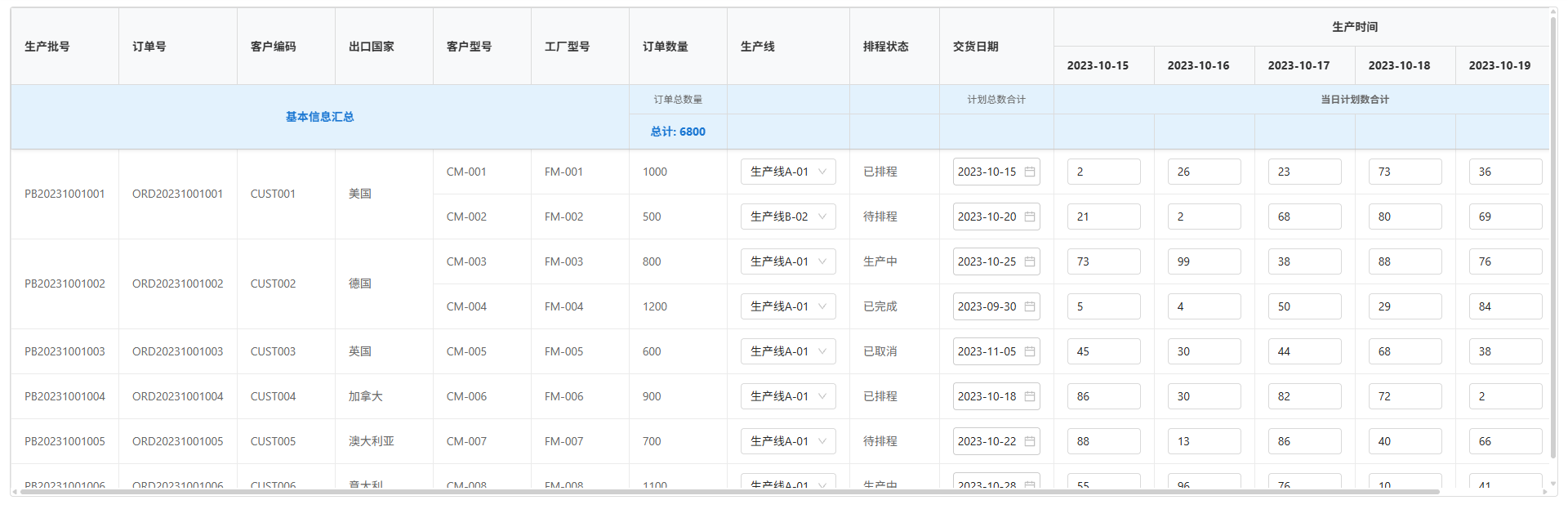
此篇内容暂未完善表格编辑,仅对数据进行展示
c
<template>
  <div class="guns-layout">
    <div class="guns-layout-content">
      <div class="guns-layout">
        <div class="guns-layout-content-application">
          <div class="content-mian">
            <div class="table-container">
              <div class="table-wrapper">
                <table class="data-table">
                  <thead class="table-header">
                    <!-- 表头第一行 -->
                    <tr>
                      <th
                        rowspan="2"
                        v-for="column in allColumns.slice(0, -dateColumns.length)"
                        :key="column.dataIndex"
                        :style="{ width: column.width ? column.width + 'px' : 'auto' }"
                      >
                        {{ column.title }}
                      </th>
                      <th :colspan="dateColumns.length" :style="{ width: 'auto', textAlign: 'center' }">生产时间</th>
                    </tr>
                    <tr>
                      <th
                        v-for="column in dateColumns"
                        :key="column.dataIndex"
                        :style="{ width: column.width ? column.width + 'px' : 'auto' }"
                      >
                        {{ column.title }}
                      </th>
                    </tr>
                    <!-- 表头第二行 -->
                    <tr>
                      <td :colspan="6" class="summary-cell merged-cell" rowspan="2">基本信息汇总</td>
                      <td
                        v-for="(column, index) in columns.slice(6)"
                        :key="column.dataIndex"
                        :style="{ width: column.width ? column.width + 'px' : 'auto' }"
                        class="header-sub-row"
                      >
                        {{ getSubHeaderContent(column.dataIndex) }}
                      </td>
                      <td :colspan="dateColumns.length" class="header-sub-row merged-cell">当日计划数合计</td>
                    </tr>
                    <!-- 汇总行 -->
                    <tr class="summary-row">
                      <td
                        v-for="column in allColumns.slice(6)"
                        :key="column.dataIndex"
                        :style="{ width: column.width ? column.width + 'px' : 'auto' }"
                        class="summary-cell"
                      >
                        {{ getSummaryContent(column.dataIndex) }}
                      </td>
                    </tr>
                  </thead>
                  <tbody class="table-body">
                    <tr v-for="(row, index) in processedTableData" :key="row.uniqueId">
                      <td
                        v-for="column in allColumns"
                        :key="`${row.uniqueId}-${column.dataIndex}`"
                        :style="{ width: column.width ? column.width + 'px' : 'auto' }"
                        :rowspan="
                          column.dataIndex === 'productionBatchNumber' ||
                          column.dataIndex === 'orderNumber' ||
                          column.dataIndex === 'customerCode' ||
                          column.dataIndex === 'exportCountry'
                            ? row[column.dataIndex + '_rowspan']
                            : undefined
                        "
                        v-show="!row[column.dataIndex + '_hidden']"
                      >
                        <template v-if="column.dataIndex === 'productionLine'">
                          <a-select v-model:value="row[column.dataIndex]" style="width: 100%" placeholder="请选择">
                            <a-select-option value="生产线A-01">生产线A-01</a-select-option>
                            <a-select-option value="生产线B-02">生产线B-02</a-select-option>
                            <a-select-option value="生产线C-03">生产线C-03</a-select-option>
                          </a-select>
                        </template>
                        <template v-else-if="column.dataIndex === 'address4'">
                          <a-date-picker v-model:value="row[column.dataIndex]" class="status-select" value-format="YYYY-MM-DD" />
                        </template>
                        <template v-else-if="isEditableColumn(column.dataIndex)">
                          <a-input-number :min="1" v-model:value="row[column.dataIndex]" allowClear />
                        </template>
                        <template v-else>
                          {{ getCellContent(row, column.dataIndex) }}
                        </template>
                      </td>
                    </tr>
                  </tbody>
                </table>
              </div>
            </div>
          </div>
        </div>
      </div>
    </div>
  </div>
</template>

<script setup>
import { ref, computed, onMounted } from 'vue';

// 表格列配置
const columns = ref([
  {
    title: '生产批号',
    dataIndex: 'productionBatchNumber',
    width: 120
  },
  {
    title: '订单号',
    dataIndex: 'orderNumber',
    width: 120
  },
  {
    title: '客户编码',
    dataIndex: 'customerCode',
    width: 120
  },
  {
    title: '出口国家',
    dataIndex: 'exportCountry',
    width: 120
  },
  {
    title: '客户型号',
    dataIndex: 'customerModel',
    width: 120
  },
  {
    title: '工厂型号',
    dataIndex: 'factoryModel',
    width: 120
  },
  {
    title: '订单数量',
    dataIndex: 'orderQuantity',
    width: 120
  },
  {
    title: '生产线',
    dataIndex: 'productionLine',
    width: 150
  },
  {
    title: '排程状态',
    dataIndex: 'orderStatus',
    width: 110
  },
  {
    title: '交货日期',
    dataIndex: 'address4',
    width: 140
  }
]);

// 日期区间配置
const dateRange = ref(['2023-10-15', '2023-10-20']); // 示例日期区间

// 生成动态日期列
const dateColumns = computed(() => {
  const start = new Date(dateRange.value[0]);
  const end = new Date(dateRange.value[1]);
  const dates = [];

  // 计算日期差
  const timeDiff = end.getTime() - start.getTime();
  const dayDiff = Math.ceil(timeDiff / (1000 * 3600 * 24));

  // 生成日期数组
  for (let i = 0; i <= dayDiff; i++) {
    const date = new Date(start);
    date.setDate(start.getDate() + i);
    const formattedDate = date.toISOString().split('T')[0];
    dates.push({
      title: formattedDate,
      dataIndex: `deliveryTime_${formattedDate}`,
      width: 110
    });
  }

  return dates;
});

// 合并所有列
const allColumns = computed(() => {
  return [...columns.value, ...dateColumns.value];
});

// 表格数据
const originalData = [
  {
    productionBatchNumber: 'PB20231001001',
    orderNumber: 'ORD20231001001',
    customerCode: 'CUST001',
    exportCountry: '美国',
    customerModel: 'CM-001',
    factoryModel: 'FM-001',
    orderQuantity: 1000,
    productionLine: '生产线A-01',
    orderStatus: '已排程',
    address4: '2023-10-15'
  },
  {
    productionBatchNumber: 'PB20231001001', // 与上一行相同
    orderNumber: 'ORD20231001001', // 与上一行相同
    customerCode: 'CUST001', // 与上一行相同
    exportCountry: '美国', // 与上一行相同
    customerModel: 'CM-002',
    factoryModel: 'FM-002',
    orderQuantity: 500,
    productionLine: '生产线B-02',
    orderStatus: '待排程',
    address4: '2023-10-20'
  },
  {
    productionBatchNumber: 'PB20231001002',
    orderNumber: 'ORD20231001002',
    customerCode: 'CUST002',
    exportCountry: '德国',
    customerModel: 'CM-003',
    factoryModel: 'FM-003',
    orderQuantity: 800,
    productionLine: '生产线A-01',
    orderStatus: '生产中',
    address4: '2023-10-25'
  },
  {
    productionBatchNumber: 'PB20231001002', // 与上一行相同
    orderNumber: 'ORD20231001002', // 与上一行相同
    customerCode: 'CUST002', // 与上一行相同
    exportCountry: '德国', // 与上一行相同
    customerModel: 'CM-004',
    factoryModel: 'FM-004',
    orderQuantity: 1200,
    productionLine: '生产线A-01',
    orderStatus: '已完成',
    address4: '2023-09-30'
  },
  {
    productionBatchNumber: 'PB20231001003',
    orderNumber: 'ORD20231001003',
    customerCode: 'CUST003',
    exportCountry: '英国',
    customerModel: 'CM-005',
    factoryModel: 'FM-005',
    orderQuantity: 600,
    productionLine: '生产线A-01',
    orderStatus: '已取消',
    address4: '2023-11-05'
  },
  {
    productionBatchNumber: 'PB20231001004',
    orderNumber: 'ORD20231001004',
    customerCode: 'CUST004',
    exportCountry: '加拿大',
    customerModel: 'CM-006',
    factoryModel: 'FM-006',
    orderQuantity: 900,
    productionLine: '生产线A-01',
    orderStatus: '已排程',
    address4: '2023-10-18'
  },
  {
    productionBatchNumber: 'PB20231001005',
    orderNumber: 'ORD20231001005',
    customerCode: 'CUST005',
    exportCountry: '澳大利亚',
    customerModel: 'CM-007',
    factoryModel: 'FM-007',
    orderQuantity: 700,
    productionLine: '生产线A-01',
    orderStatus: '待排程',
    address4: '2023-10-22'
  },
  {
    productionBatchNumber: 'PB20231001006',
    orderNumber: 'ORD20231001006',
    customerCode: 'CUST006',
    exportCountry: '意大利',
    customerModel: 'CM-008',
    factoryModel: 'FM-008',
    orderQuantity: 1100,
    productionLine: '生产线A-01',
    orderStatus: '生产中',
    address4: '2023-10-28'
  }
];

// 添加唯一ID并创建深拷贝
const data = ref(
  originalData.map((item, index) => ({
    ...item,
    uniqueId: `row_${index}_${item.productionBatchNumber}${item.orderNumber}${item.customerCode}${item.exportCountry}${item.customerModel}` // 添加唯一ID
  }))
);

// 判断是否为可编辑列(后六列)
const isEditableColumn = dataIndex => {
  const editableColumns = ['productionLine'];
  return editableColumns.includes(dataIndex) || dataIndex.startsWith('deliveryTime_');
};

// 处理表格数据,添加rowspan和hidden字段
const processedTableData = computed(() => {
  const result = [];
  const keysToMerge = ['productionBatchNumber', 'orderNumber', 'customerCode', 'exportCountry'];

  for (let i = 0; i < data.value.length; i++) {
    const currentRow = { ...data.value[i] };
    let rowspan = 1;

    // 计算相同行的数量
    for (let j = i + 1; j < data.value.length; j++) {
      let isSame = true;
      for (const key of keysToMerge) {
        if (data.value[i][key] !== data.value[j][key]) {
          isSame = false;
          break;
        }
      }

      if (isSame) {
        rowspan++;
      } else {
        break;
      }
    }

    // 为需要合并的列设置rowspan和hidden字段
    for (const key of keysToMerge) {
      currentRow[key + '_rowspan'] = rowspan;
      currentRow[key + '_hidden'] = false;
    }

    result.push(currentRow);

    // 为重复行设置hidden字段
    for (let j = 1; j < rowspan; j++) {
      const nextRowIndex = i + j;
      if (nextRowIndex < data.value.length) {
        const nextRow = { ...data.value[nextRowIndex] };
        for (const key of keysToMerge) {
          nextRow[key + '_rowspan'] = 1;
          nextRow[key + '_hidden'] = true;
        }
        result.push(nextRow);
      }
    }

    // 跳过已处理的重复行
    i += rowspan - 1;
  }

  // 为日期列生成数据
  return result.map(row => {
    const newRow = { ...row };
    dateColumns.value.forEach(column => {
      // 模拟交付时间数据,实际应用中可以是时间或其他数据
      newRow[column.dataIndex] = newRow[column.dataIndex] || `${Math.floor(Math.random() * 100)}`;
      newRow[column.dataIndex + '_rowspan'] = 1;
      newRow[column.dataIndex + '_hidden'] = false;
    });
    return newRow;
  });
});

// 获取第二行表头内容
const getSubHeaderContent = dataIndex => {
  if (dataIndex.startsWith('deliveryTime_')) {
    return '交付时间';
  }

  const subHeaders = {
    orderQuantity: '订单总数量',
    productionLine: '',
    orderStatus: '',
    address4: '计划总数合计'
  };
  return subHeaders[dataIndex] || '';
};

// 获取汇总行内容
const getSummaryContent = dataIndex => {
  if (dataIndex === 'orderQuantity') {
    // 计算订单数量总和
    const total = data.value.reduce((sum, row) => sum + (parseInt(row['orderQuantity']) || 0), 0);
    return `总计: ${total}`;
  }
  if (dataIndex.startsWith('deliveryTime_')) {
    return '';
  }
  if (dataIndex === 'productionBatchNumber') {
    return '汇总行';
  }
  return '';
};

// 获取单元格内容
const getCellContent = (row, dataIndex) => {
  if (dataIndex.startsWith('deliveryTime_')) {
    return row[dataIndex] || '-';
  }
  return row[dataIndex];
};
</script>

<style scoped>
.table-container {
  width: 100%;
  height: 600px;
  overflow: hidden;
}

.table-wrapper {
  height: 100%;
  overflow-x: auto;
  overflow-y: auto;
  border: 1px solid #dcdcdc;
  border-radius: 4px;
}

.data-table {
  width: max-content;
  min-width: 100%;
  border-collapse: collapse;
  table-layout: fixed;
  border: 1px solid #dcdcdc;
}

.table-header {
  position: sticky;
  top: 0;
  z-index: 10;
  box-shadow: 0 2px 4px rgba(0, 0, 0, 0.1);
}

.table-header th {
  padding: 12px 16px;
  text-align: left;
  border: 1px solid #dcdcdc;
  font-weight: bold;
  color: #333;
  background-color: #f8f9fa;
}

.header-sub-row {
  padding: 8px 16px;
  text-align: center;
  border: 1px solid #dcdcdc;
  font-size: 12px;
  color: #666;
  background-color: #e3f2fd; /* 浅蓝色背景 */
}

.summary-row {
  background-color: #e3f2fd !important; /* 浅蓝色背景 */
}

.summary-cell {
  padding: 10px 16px;
  text-align: center;
  border: 1px solid #dcdcdc;
  font-weight: bold;
  color: #1976d2;
  background-color: #e3f2fd !important; /* 浅蓝色背景 */
}

.merged-cell {
  text-align: center !important;
  font-weight: bold;
}

.table-body td {
  padding: 10px 16px;
  border: 1px solid #ebebeb;
  color: #666;
  white-space: nowrap;
  overflow: hidden;
  text-overflow: ellipsis;
}

.editable-input {
  width: 100%;
  padding: 5px;
  border: 1px solid #ccc;
  border-radius: 4px;
  font-size: 14px;
  box-sizing: border-box;
}

.status-select {
  width: 100%;
  padding: 5px;
  border: 1px solid #ccc;
  border-radius: 4px;
  font-size: 14px;
  box-sizing: border-box;
  background-color: white;
}

.data-table tr:hover {
  background-color: #f9f9f9;
}

/* 滚动条样式 */
.table-wrapper::-webkit-scrollbar {
  width: 8px;
  height: 8px;
}

.table-wrapper::-webkit-scrollbar-track {
  background: #f1f1f1;
  border-radius: 4px;
}

.table-wrapper::-webkit-scrollbar-thumb {
  background: #c1c1c1;
  border-radius: 4px;
}

.table-wrapper::-webkit-scrollbar-thumb:hover {
  background: #a8a8a8;
}
</style>