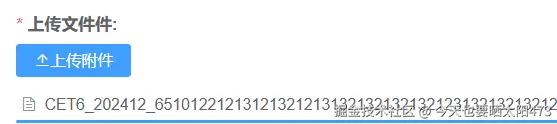
通过css样式my-upload对el-upload的上传文件显示名做长度限制
ini
<el-upload
                  style="
                    display: flex;
                    flex-direction: column;
                    align-items: flex-start;
                  "
                  :action="x"
                  class="upload-demo my-upload"
                  :headers="{ token: $cookie.get('token') }"
                  ref="upload"
                  :on-preview="p_onPreview"
                  :on-success="
                    (response, file, fileList) => {
                      p_onSuccess(response, file, fileList, 'decideDoc');
                    }
                  "
                  :before-upload="beforeVideoUpload"
                  :on-remove="
                    (file, fileList) => {
                      handleRemove2(file, fileList, 'decideDoc');
                    }
                  "
                  :before-remove="beforeRemove"

                  :file-list="p_fileList_decideDoc"
                  :limit="3"
                  :on-exceed="
                    (files, fileList) => {
                      $message.warning(
                        `当前限制选择 3 个文件,本次选择了 ${
                          files.length
                        } 个文件,共选择了 ${
                          files.length + fileList.length
                        } 个文件`
                      );
                    }
                  "
                >
                  <el-button
                    slot="trigger"
                    size="mini"
                    type="primary"
                    icon="el-icon-upload2"
                    v-if="method != 'view'"
                    >上传附件</el-button
                  >
                </el-upload>
xml
<style lang="scss" scoped>
.my-upload ::v-deep .el-upload-list__item-name {
  max-width: 180px;
  overflow: hidden;
  text-overflow: ellipsis;
  white-space: nowrap;
  display: inline-block;
}
</style>