文章目录
- 1.PS800-E1相机
-
- [1.1 PS800-E1工作场景](#1.1 PS800-E1工作场景)
- [1.2 PS800-E1 IO线和数据线定义](#1.2 PS800-E1 IO线和数据线定义)
-
- [1.2.1 IO接口定义](#1.2.1 IO接口定义)
- [1.2.2 数据接口线](#1.2.2 数据接口线)
- [1.2.3 M12 X-Code转RJ45网线说明](#1.2.3 M12 X-Code转RJ45网线说明)
- [1.2.4 PS800-E1相机连接拓扑网络](#1.2.4 PS800-E1相机连接拓扑网络)
- [1.2.5 PS800-E1相机正面安装方向](#1.2.5 PS800-E1相机正面安装方向)
- [1.2.6 上下面螺纹孔安装](#1.2.6 上下面螺纹孔安装)
- [1.2.7 相机IO指示灯](#1.2.7 相机IO指示灯)
- [1.3 PS800-E1相机性能指标](#1.3 PS800-E1相机性能指标)
- 2.PS800-E1相机调参技巧
-
- [2.1 下载看图软件连接相机](#2.1 下载看图软件连接相机)
- [2.2 图漾PercipioViewer软件更改相机IP](#2.2 图漾PercipioViewer软件更改相机IP)
- [2.3 深度图调参](#2.3 深度图调参)
-
- [2.3.1 相机的IR参数](#2.3.1 相机的IR参数)
- [2.3.2 相机的Depth参数](#2.3.2 相机的Depth参数)
- [2.3.3 FS/PM带SGBM参数相机调参说明](#2.3.3 FS/PM带SGBM参数相机调参说明)
-
- [2.3.3.1 disparityNum和disparityOffset参数调整技巧](#2.3.3.1 disparityNum和disparityOffset参数调整技巧)
- [2.3.3.2 matchWinW和matchWinH参数调整技巧](#2.3.3.2 matchWinW和matchWinH参数调整技巧)
- [2.3.3.3 P1和P2参数调整技巧](#2.3.3.3 P1和P2参数调整技巧)
- [2.3.3.4 uniqueFator和uniqueAbsDiff参数调整技巧](#2.3.3.4 uniqueFator和uniqueAbsDiff参数调整技巧)
- [2.3.4 相机的RGB参数](#2.3.4 相机的RGB参数)
- [2.4 深度图评估](#2.4 深度图评估)
-
- [2.4.1 评估点云](#2.4.1 评估点云)
- [2.4.2 填充空洞](#2.4.2 填充空洞)
- [2.4.3 滤波功能](#2.4.3 滤波功能)
- [2.4.4 时域滤波功能](#2.4.4 时域滤波功能)
- [2.4.5 中值滤波](#2.4.5 中值滤波)
- [2.4.6 调节深度图渲染效果](#2.4.6 调节深度图渲染效果)
- [2.5 保存图像](#2.5 保存图像)
-
- [2.5.1 单张存图](#2.5.1 单张存图)
- [2.5.2 连续存图](#2.5.2 连续存图)
- [2.6 相机保存参数配置](#2.6 相机保存参数配置)
-
- [2.6.1 保存参数限制](#2.6.1 保存参数限制)
- [2.6.2 保存参数注意事项](#2.6.2 保存参数注意事项)
- 3.PS800-E1相机SDK相关
-
- [3.1 TYCamera之C++语言SDK(`推荐`)](#3.1 TYCamera之C++语言SDK(
推荐)) - [3.2 TYCamera之ROS1版本(`推荐`)](#3.2 TYCamera之ROS1版本(
推荐)) - [3.3 TYCamera之ROS2版本(`推荐`)](#3.3 TYCamera之ROS2版本(
推荐)) - 3.4 TYCamera之C#语言SDK
- [3.5 TYCamera之Python语言SDK](#3.5 TYCamera之Python语言SDK)
- [3.6 Halcon语言SDK](#3.6 Halcon语言SDK)
- [3.7 VisionPro语言SDK](#3.7 VisionPro语言SDK)
- [3.1 TYCamera之C++语言SDK(`推荐`)](#3.1 TYCamera之C++语言SDK(
- 4.PS800-E1相机常见FAQ
-
- [4.1 如何获取PS800-E1相机内参?](#4.1 如何获取PS800-E1相机内参?)
-
- [4.1.1 方法一 运行DumpCalibInfo](#4.1.1 方法一 运行DumpCalibInfo)
- [4.1.2 方法二 运行DumpAllFeature例子](#4.1.2 方法二 运行DumpAllFeature例子)
- [4.1.3 通过PV软件](#4.1.3 通过PV软件)
- [4.2 PS800-E1相机内参说明](#4.2 PS800-E1相机内参说明)
-
- [4.2.1 深度图内参](#4.2.1 深度图内参)
- [4.2.2 彩色图内参/畸变系数/外参](#4.2.2 彩色图内参/畸变系数/外参)
- [4.2.3 左右IR极限约束前内参/极限校正后内参](#4.2.3 左右IR极限约束前内参/极限校正后内参)
- [4.3 PS800-E1相机光心位置](#4.3 PS800-E1相机光心位置)
- 5.成像问题FAQ
-
- [5.1 PS800 成像问题](#5.1 PS800 成像问题)
-
- [5.1.1 拍摄物体时,点云噪点较多](#5.1.1 拍摄物体时,点云噪点较多)
- 6.PS800-E1相机测试结果
-
- [6.1 PS800-E1 帧率测试](#6.1 PS800-E1 帧率测试)
-
- [6.1.1 PS800-E1 出图延迟时间](#6.1.1 PS800-E1 出图延迟时间)
- [6.1.2 PS800-E1 帧率测试](#6.1.2 PS800-E1 帧率测试)
- 7.其他学习资料
1.PS800-E1相机
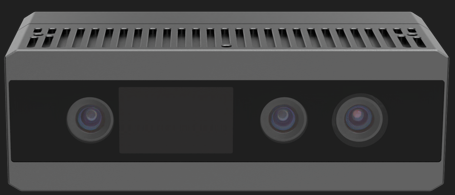
PS800-E1相机外观
1.1 PS800-E1工作场景
适用场景 :在中距离场景具有较高的精度,及较好的抗阳光效果,适用于室内外的识别,定位,抓取等场景。
典型应用:3D上料抓取,3D拆垛等。
1.2 PS800-E1 IO线和数据线定义
1.2.1 IO接口定义
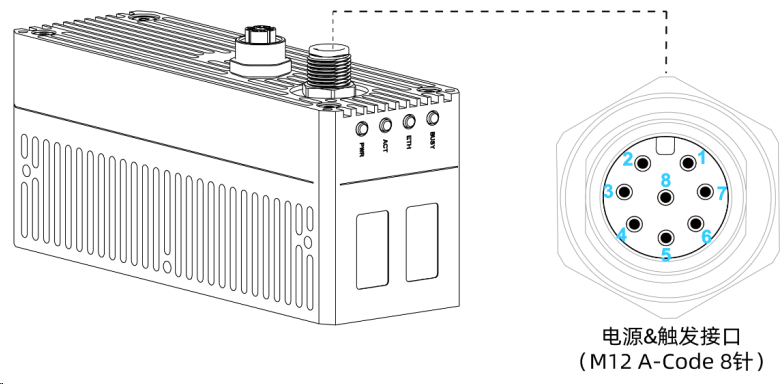
电源&触发接口外观
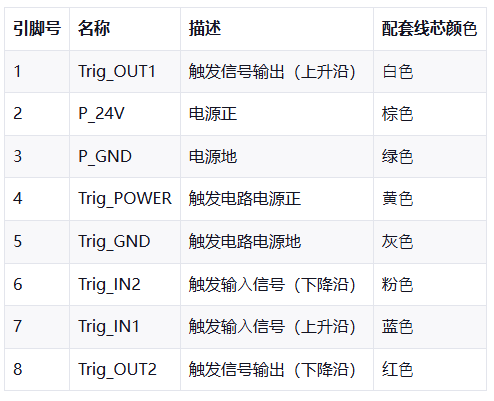
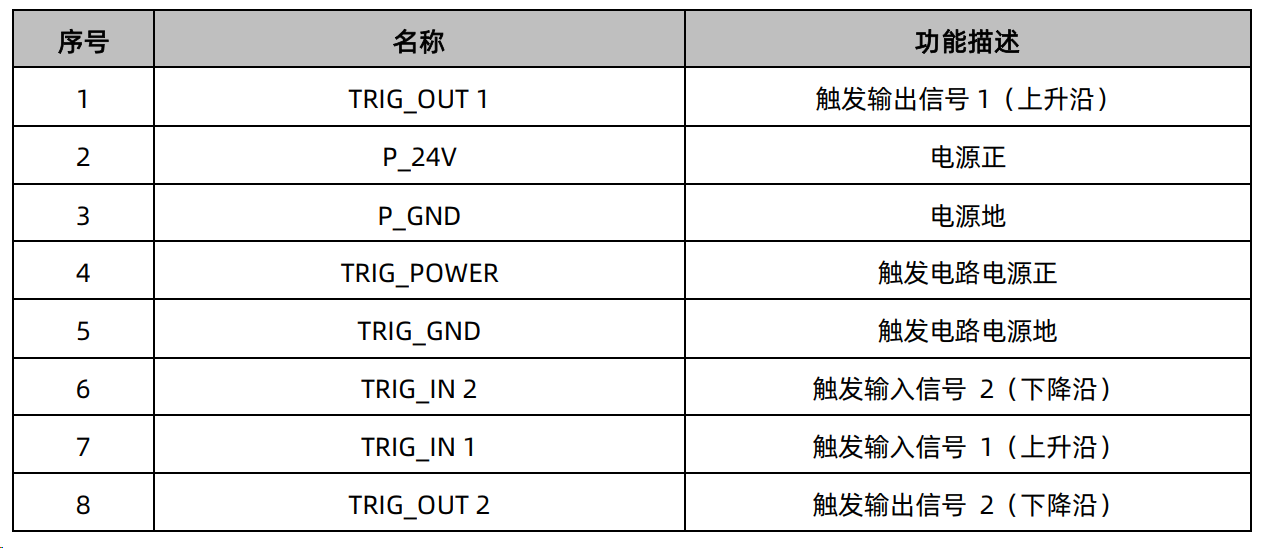
IO触发接口线序
1.2.2 数据接口线
PS800-E1相机,网路数据线如下图所示:
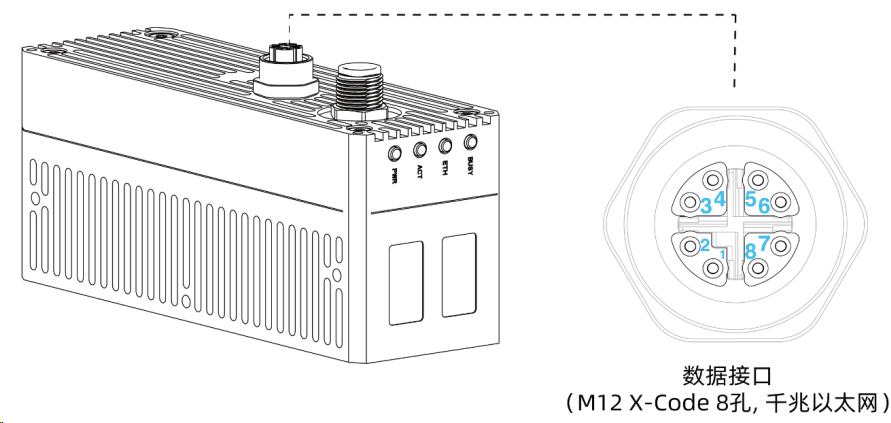
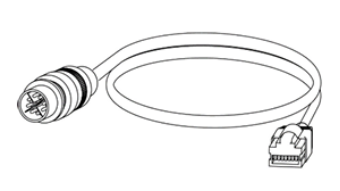
如果相机在动态场景中使用,建议使用高柔线,非高柔线容易引发掉线问题。
1.2.3 M12 X-Code转RJ45网线说明
RJ45端符合EIA/TIA 568B标准,线缆说明如下图所示。
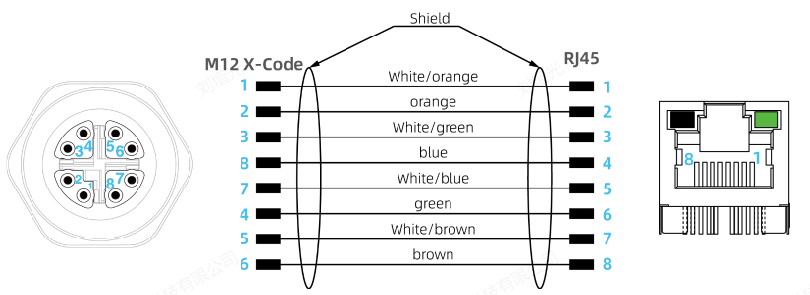
如想详细了解EIA/TIA 568A与B网线标准的区别,请查看如下链接:网线色标编码标准
1.2.4 PS800-E1相机连接拓扑网络
PS800-E1相机拓扑网络如下图:
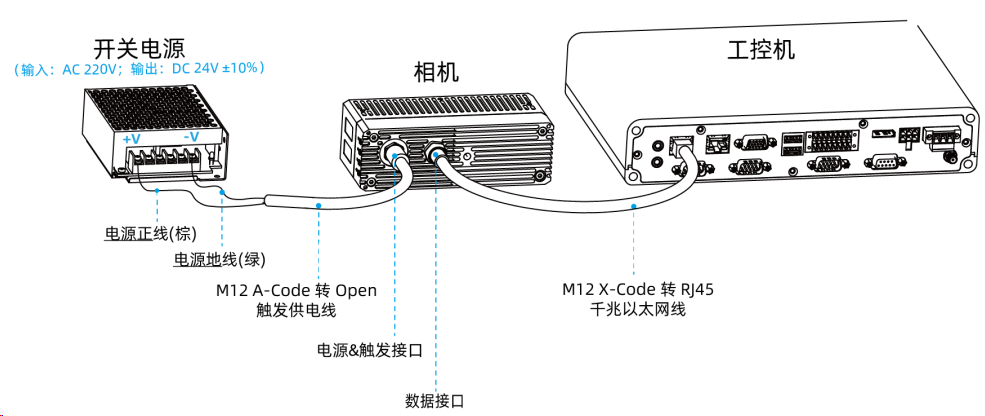
DC供电方式
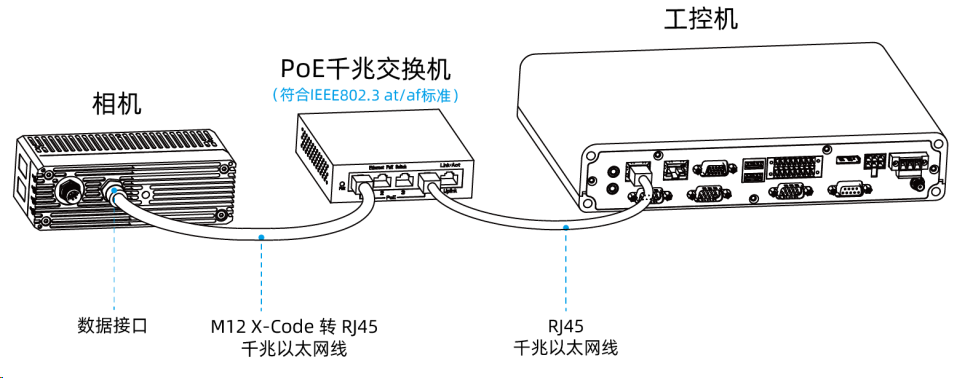
POE供电方式 1. 将千兆以太网线的M12 X-Code 端连接到相机的数据接口,另外一侧RJ45 端连接到千兆以太网交换机的端口。
2.通过RJ45千兆以太网线连接工控机(上位机)和交换机。
1.2.5 PS800-E1相机正面安装方向
PS800-E1相机正面 安装方向如下:
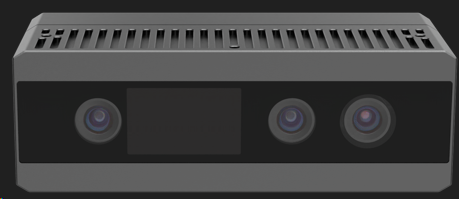
从左到右依次是右IR镜头,散斑投射器,RGB相机,左IR镜头。
1.2.6 上下面螺纹孔安装
PS800-E1相机上下面有一组M3螺纹孔(螺纹深度8mm)
1.2.7 相机IO指示灯
PS800-E1相机状态指示灯如下图所示:
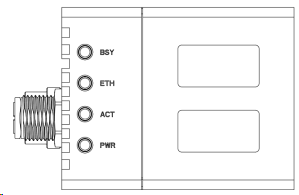
指示灯图示
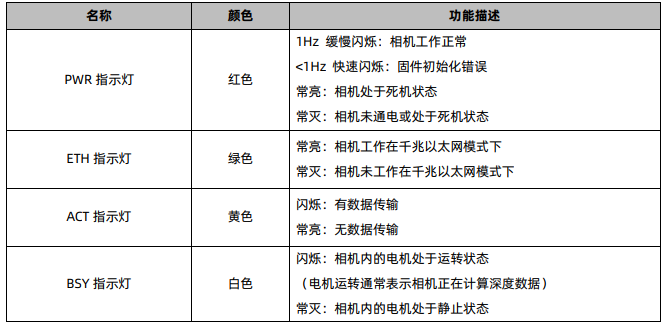
指示灯说明
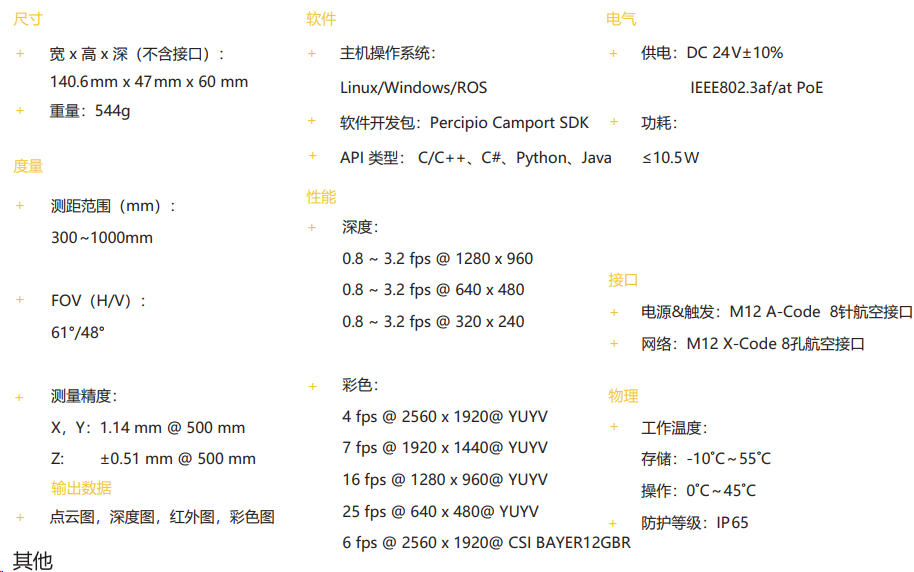
1.3 PS800-E1相机性能指标
PS800-E1相机的性能指标如下:
2.PS800-E1相机调参技巧
1.PS800-E1相机,仍建议使用官网PercipioViewer软件打开相机。
2.1 下载看图软件连接相机
1.PS800-E1相机,建议搭配图漾官网PercipioViewer看图软件使用,看图软件下载链接:图漾官网
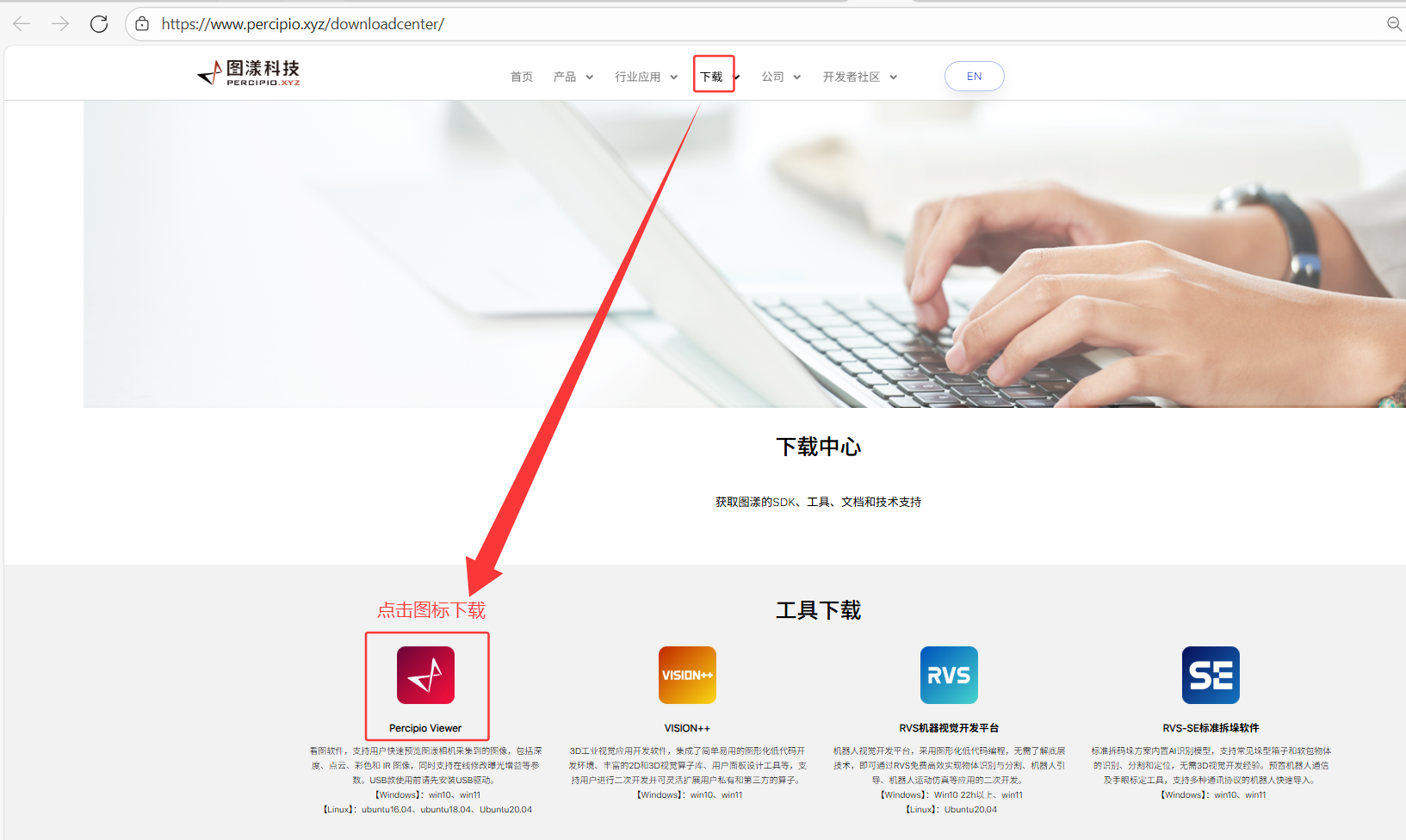
2.PercipioViewer看图软件详细操作,可查看此链接:图漾官网PercipioViewer软件操作手册
2.2 图漾PercipioViewer软件更改相机IP
详细更改相机的IP操作,可打开链接:
2.3 深度图调参
2.3.1 相机的IR参数
PercipioViewer软件参数设置:
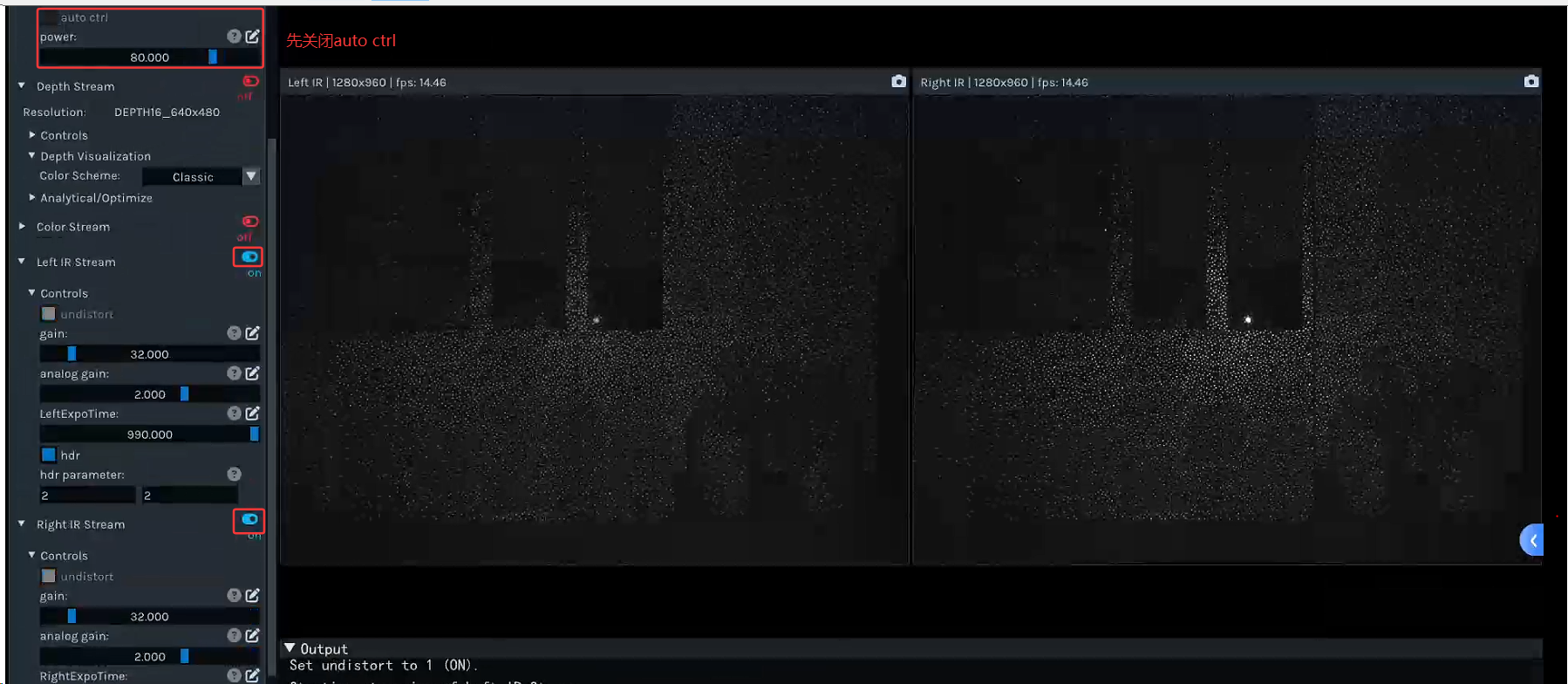
注 :关闭Light Source模块下的auto ctrl属性,这个时候,打开相机的左右IR取流,才能看到散斑图。
个人推荐的参数配置:
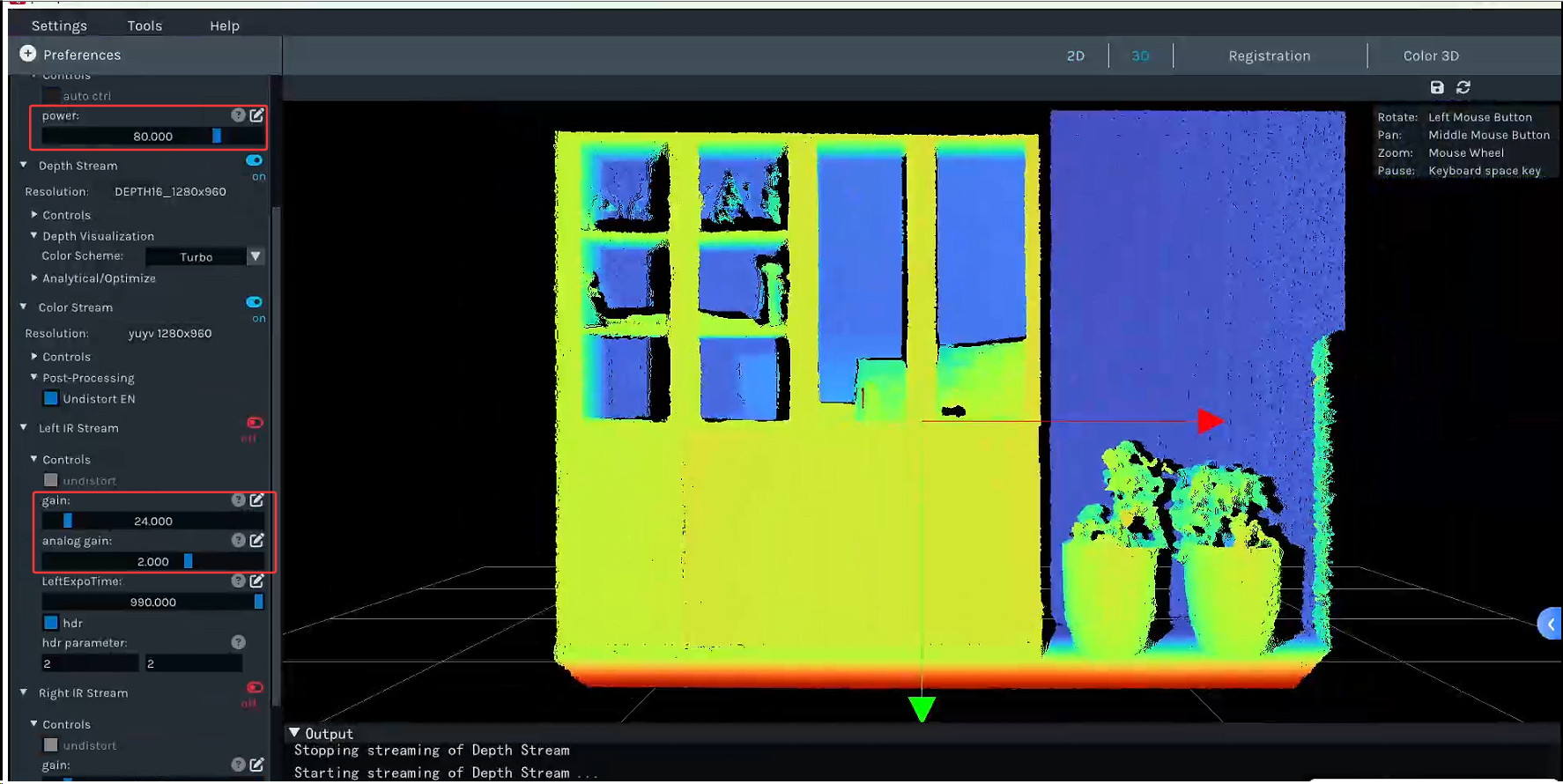
2.3.2 相机的Depth参数
PercipioViewer软件参数设置:
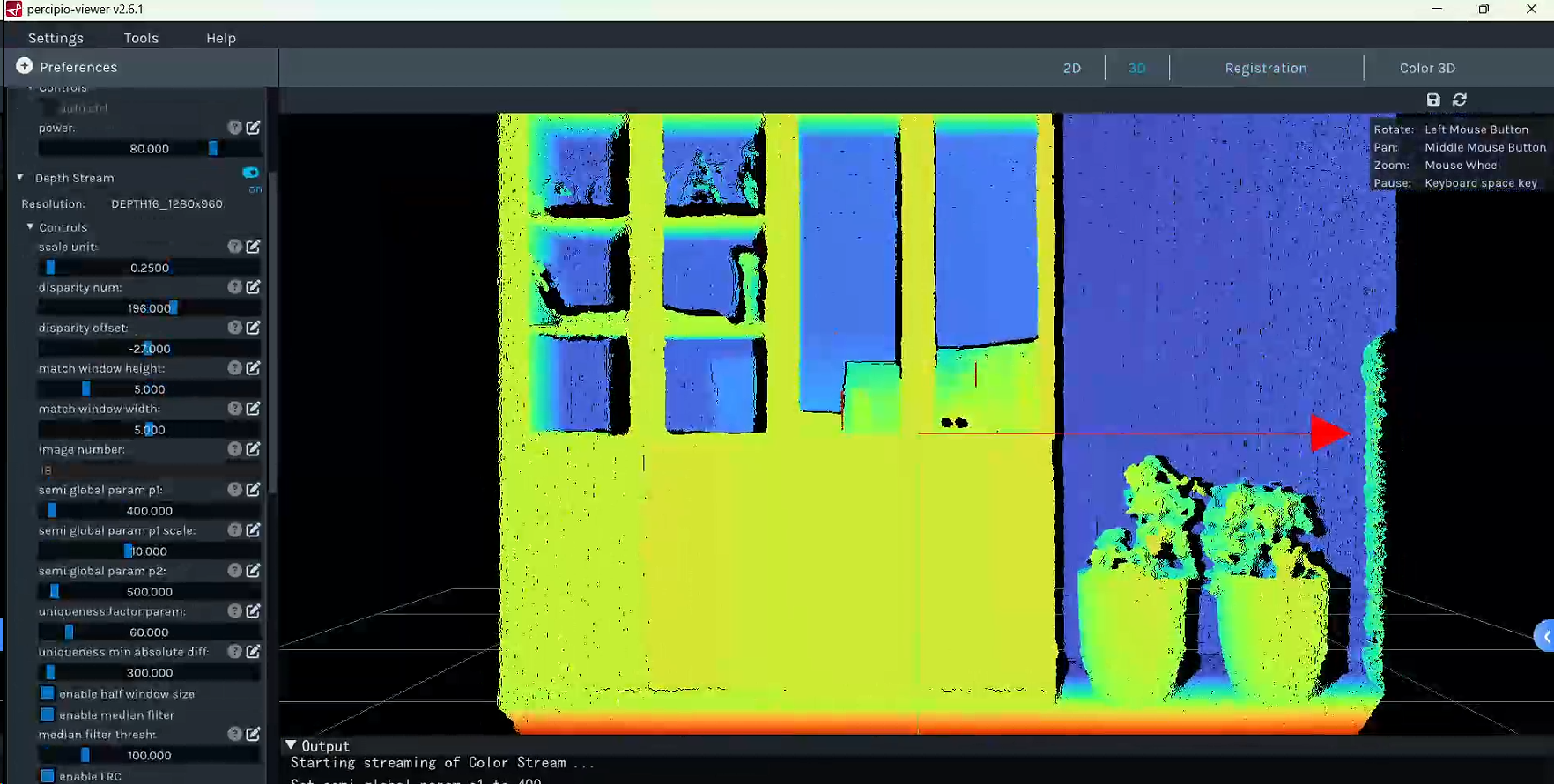
同时建议开启滤波设置,不然会有很多误匹配的点。
2.3.3 FS/PM带SGBM参数相机调参说明
诸如FM855-E1,FM815-IX-E1,PS800,PS802等带有SGBM参数的相机,需要进行如下操作,才能打开SGBM参数:
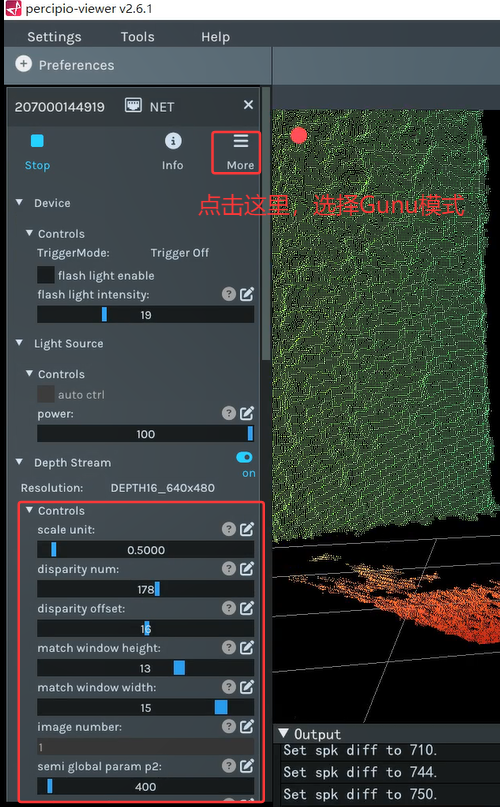
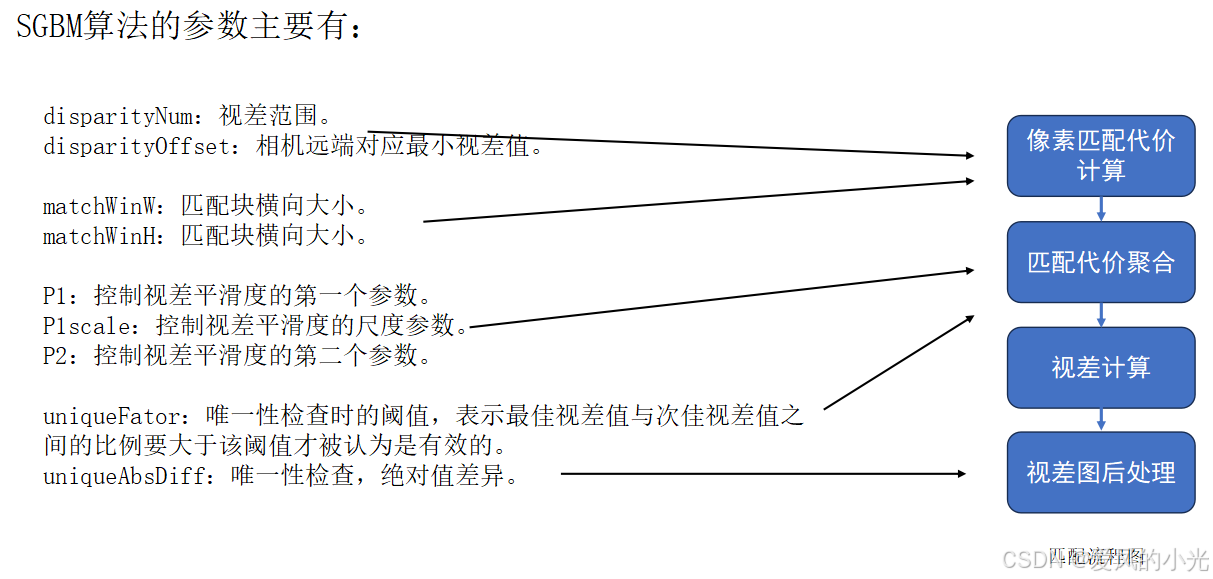
而SGBM参数主要作用如下:
2.3.3.1 disparityNum和disparityOffset参数调整技巧
disparityNum:视差范围。
disparityOffset:最小视差值。
使用场景 :
客户想要更改预定义的深度范围(近远端值)。
调整方向 :深度范围减小, disparityNum大概率减小。
深度范围远端往相机端缩进, disparityOffset变大,反之亦反。
而disparityNum和disparityOffset参数设置,计算公式如下:
cpp
disparityNum = (baseline* fx) / depth_thres.first - (baseline* fx) / depth_thres.second + 15;
disparityOffset = ((baseline * fx) / (depth_thres.second)) - DISPARITY_TRANSLATION;
计算公式里的每个参数的具体含义如下:
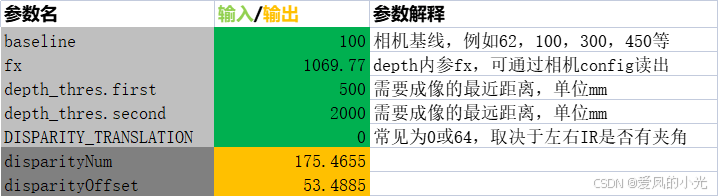
完整的计算表格从本帖子置顶位置下载。
2.3.3.2 matchWinW和matchWinH参数调整技巧
matchWinW:匹配块横向大小
matchWinH:匹配块纵向大小
使用场景 :
针对被测物要测量的特征(针对的是平滑面,还是物体细节),进行细微的调整。
调整方向 :一般的预设置的匹配块大小可认为是一个全局考虑的值;深度图越需要平滑的,匹配块大概率是从预设值向大调整,反之,亦反。
注意事项:请首先按照 matchWinW = matchWinH 的方式进行调整;
一般匹配块大小必须是奇数且大于等于3;
2.3.3.3 P1和P2参数调整技巧
P1:控制视差平滑度的第一个参数。`已取消该设置`
P1scale:控制视差平滑度的尺度参数。`已取消该设置`
P2:控制视差平滑度的第二个参数。
使用场景 : 需要调整深度图平滑度的情况。
调整方向 P1越大,越倾向于生成连续的视差图。 P1scale作用在平滑度上,P1sacle范围是0\~1,越大就越平滑。 P2越大,越倾向于消除小的视差变化。P2必须大于P1。
注意事项:建议先调整P1sacle,后P1,再P2。
2.3.3.4 uniqueFator和uniqueAbsDiff参数调整技巧
uniqueFator:唯一性检查阈值,最优与次优的比值约束。
uniqueAbsDiff:唯一性检查阈值,绝对值差阈值。
使用场景 :被测物有杂点、飞点、空洞过多等情况。
调整方向 :后处理约束参数调整过小会产生杂点或飞点;过大则会产生大片空洞。 一般uniqueAbsDiff 比 uniqueFator约束性更强。
2.3.4 相机的RGB参数
PercipioViewer软件参数设置:
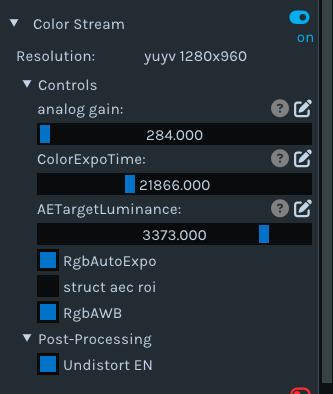
个人推荐的参数配置:
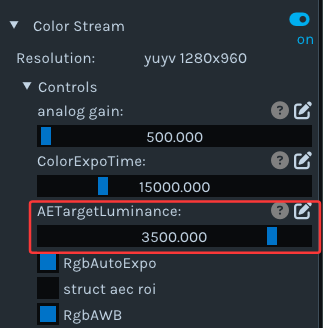
1.主要是将自动曝光目标亮度设置在3500 左右。
2.如果是在色温较大的工作场景,建议把RgbAWB自动白平衡 关掉。
3.每个参数的作用,可参看链接:相机参数作用
2.4 深度图评估
2.4.1 评估点云
打开深度取图开关,打开下图如下位置:
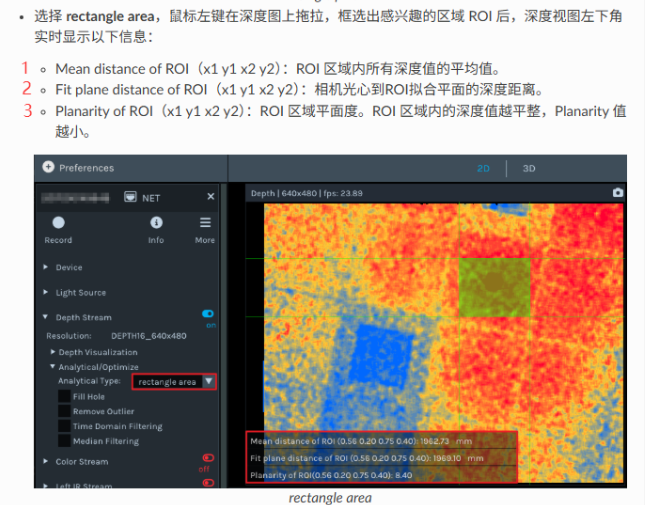
个人建议参考上图中的1 和3,2的数值会收到ROI大小和ROI是否平整等因素有关,会波动较大。
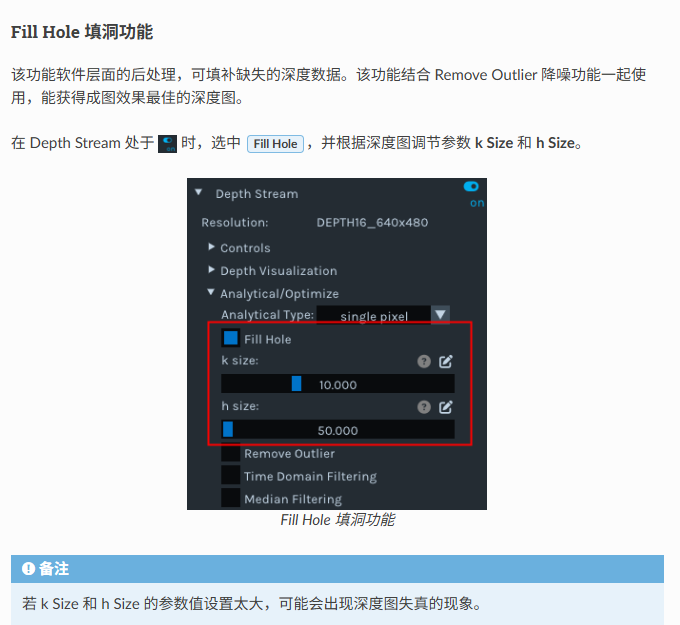
2.4.2 填充空洞
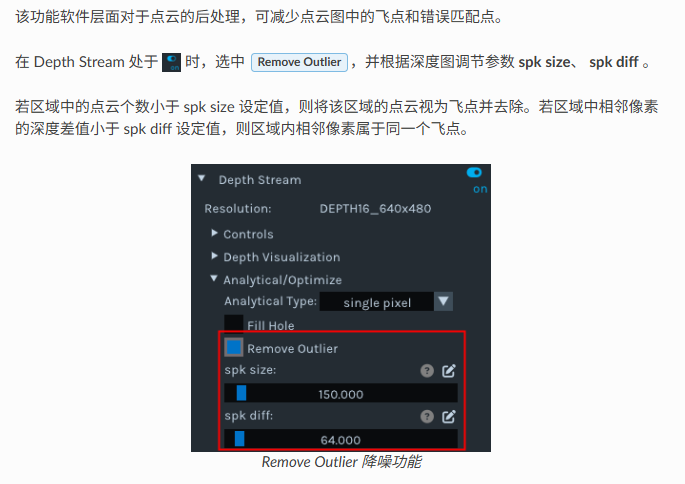
2.4.3 滤波功能
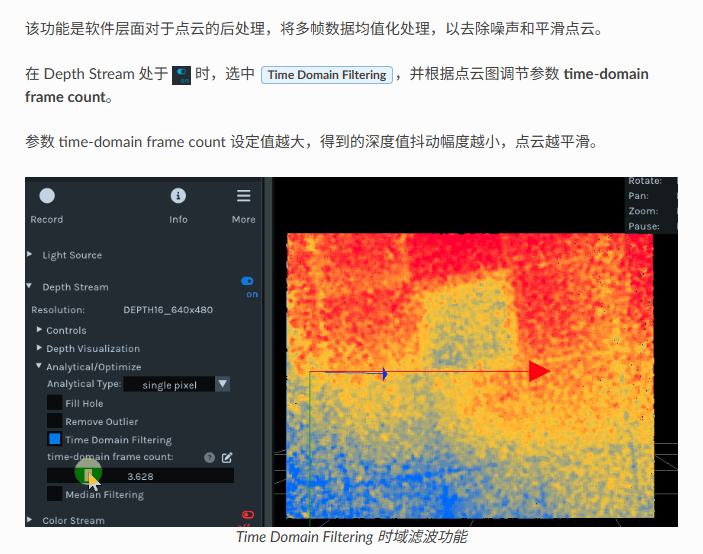
2.4.4 时域滤波功能
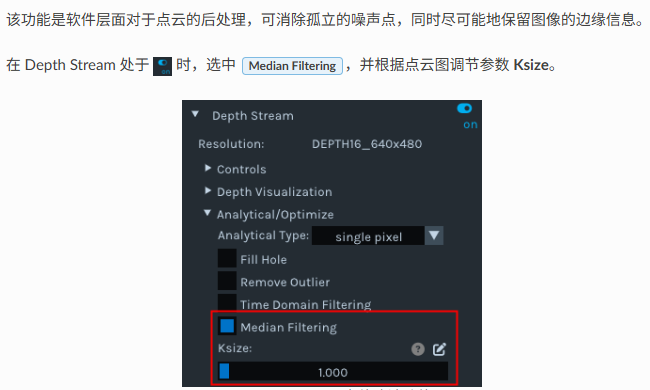
2.4.5 中值滤波
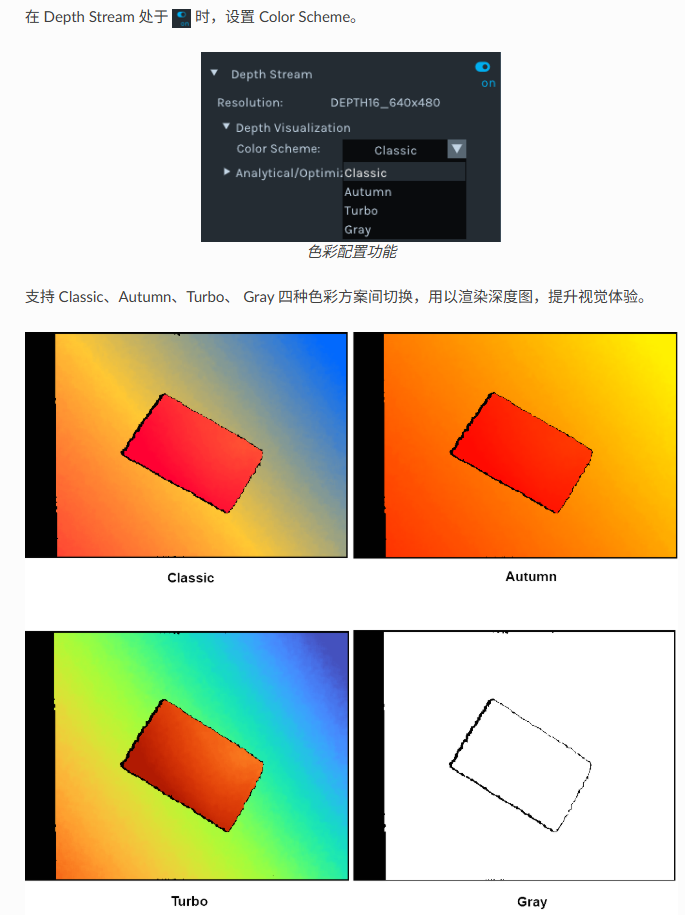
2.4.6 调节深度图渲染效果
个人推荐使用Turto 渲染功能,该功能类似Opencv中的colorformap函数。
2.5 保存图像
详细操作和图像格式,可打开链接:图漾看图软件保存图片
2.5.1 单张存图
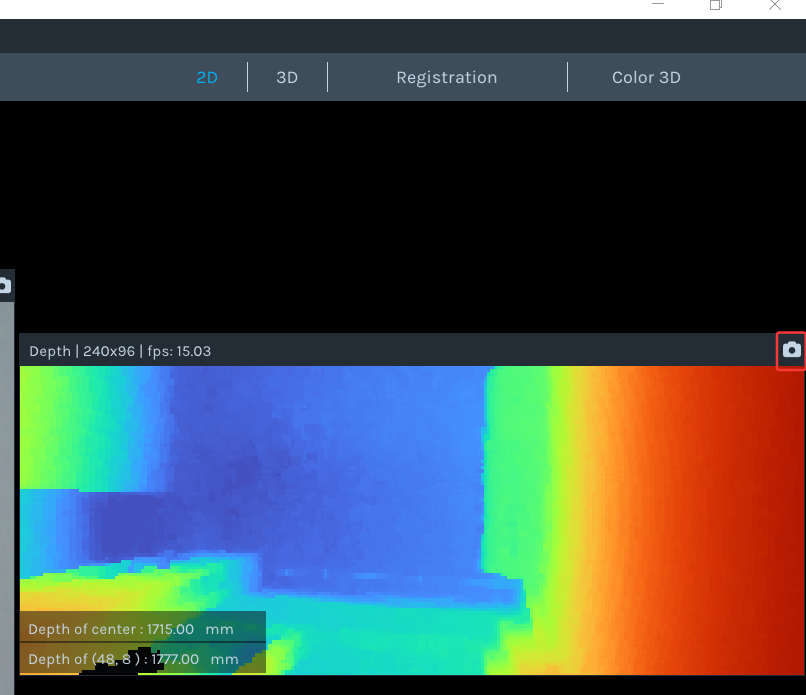
具体操作步骤如下:

2.5.2 连续存图
Percipio Viewer 可以按照预设帧数连续保存图像(深度图、彩色图、左右灰度图、深度图映射至彩色图的对齐图、彩色图映射至深度图的对齐图、点云图、深度与彩色对齐后生成的点云图)。
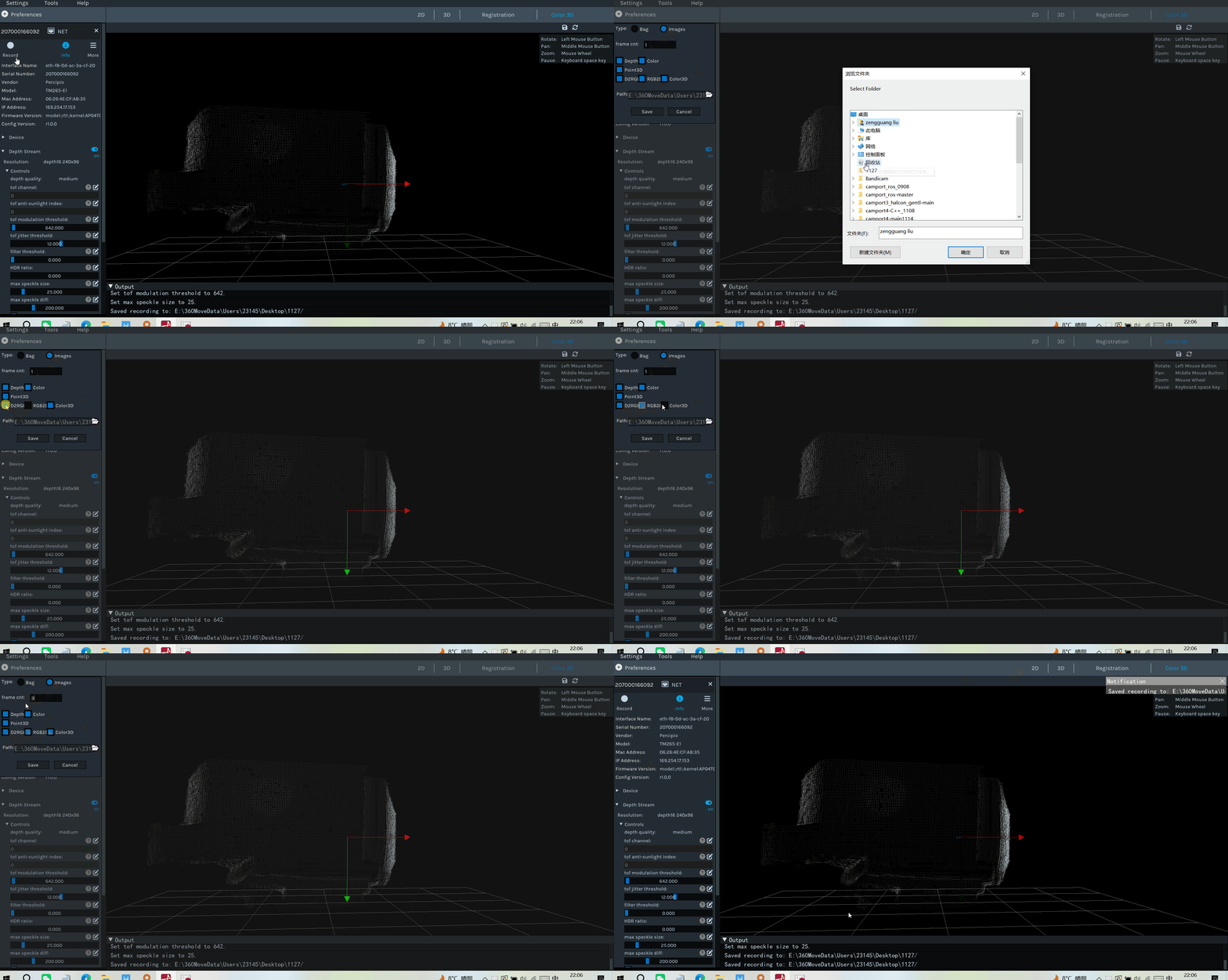
保存的格式,具体说明如下:连续保存图片
2.6 相机保存参数配置
保存相机参数进相机storage区域,具体操作流程如下图:
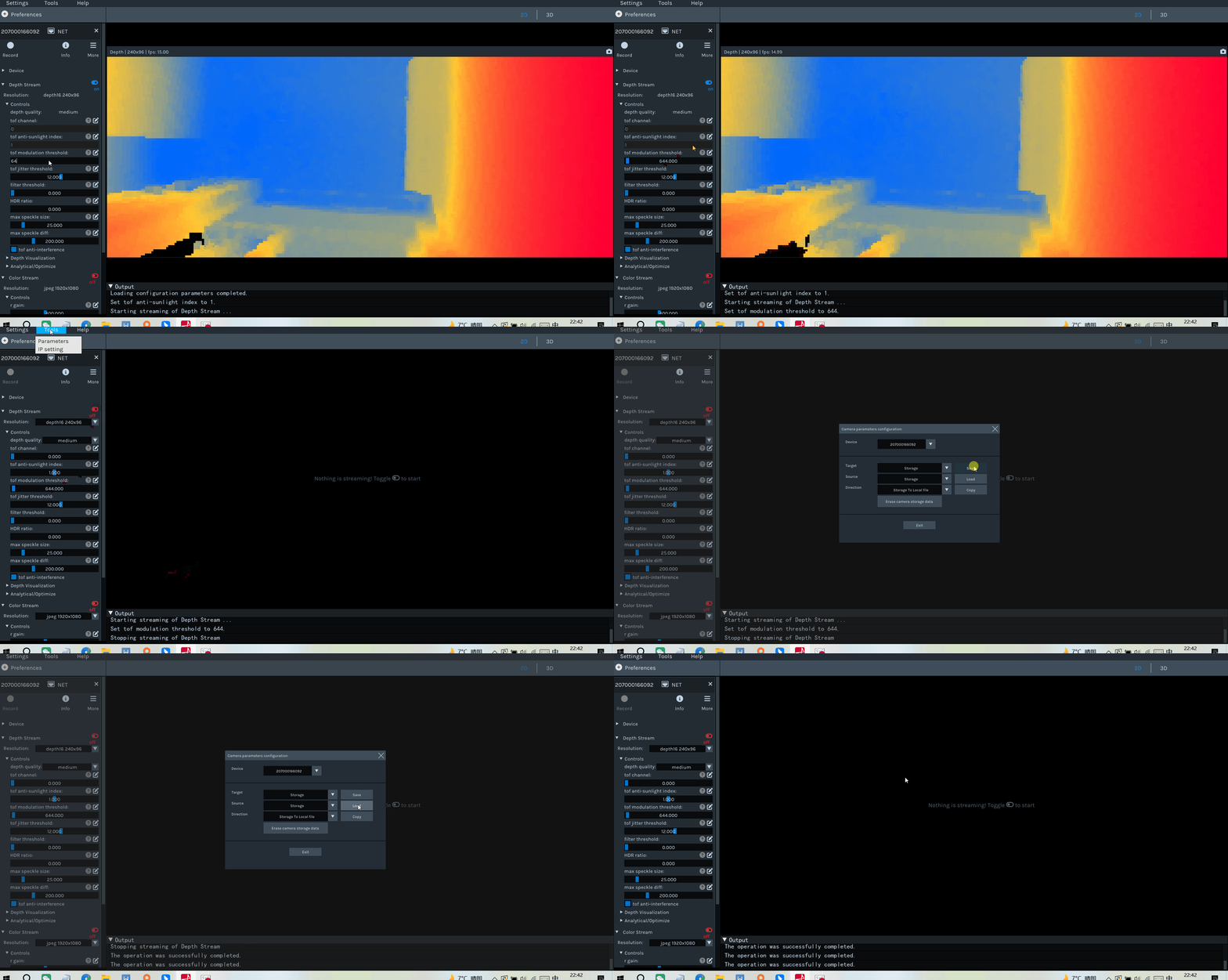
2.6.1 保存参数限制
只能保存每个组件control 下的属性,其他的参数无法保存进相机里。
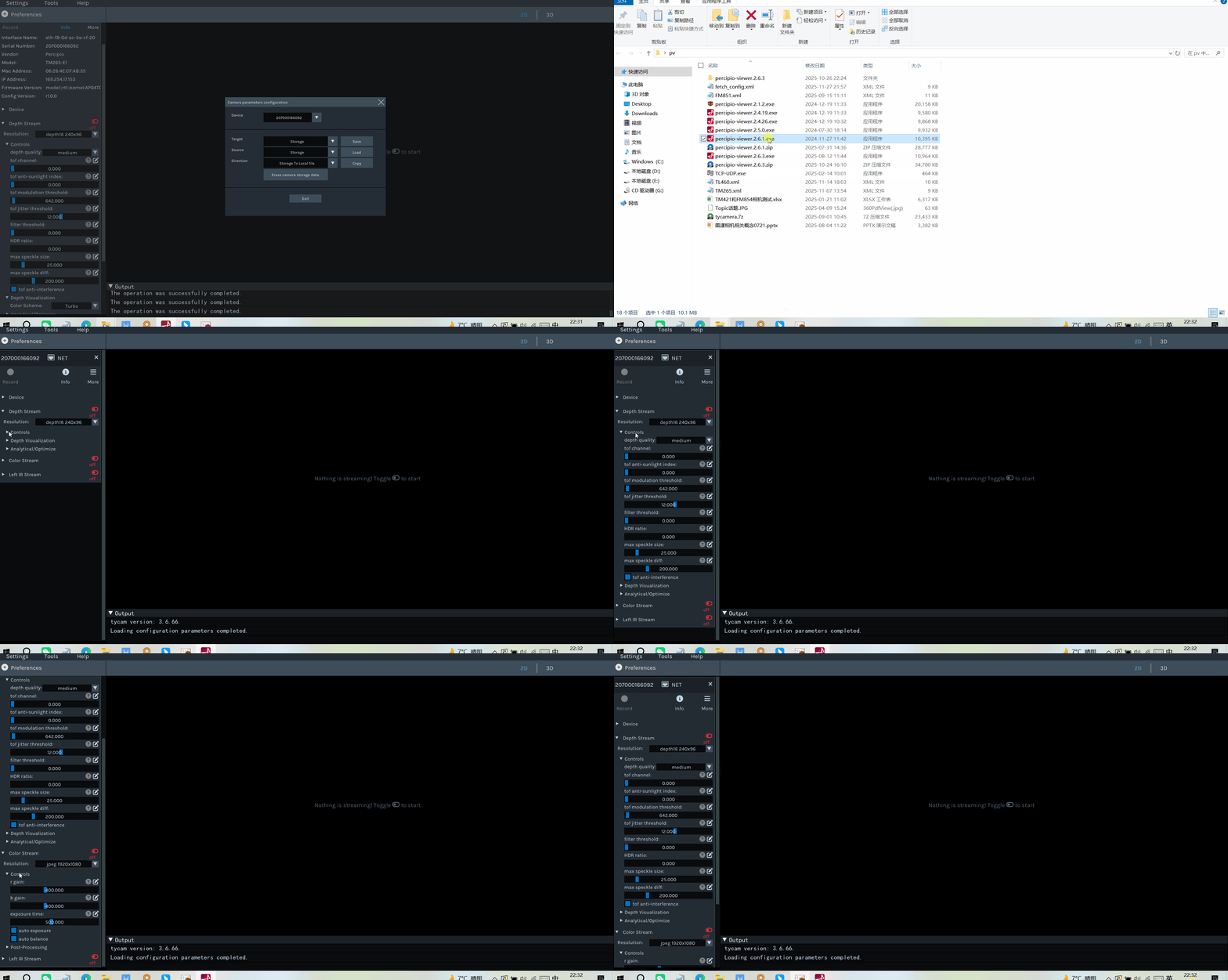
2.6.2 保存参数注意事项
1.在打开相机取流的时候,无法进行参数保存,需要关闭相机取流后,再进行保存参数。
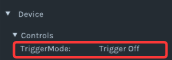
2.无法保存相机Device组件里的触发属性,。
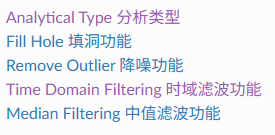
3.无法保存深度图和点云图的质量评估及后处理功能。
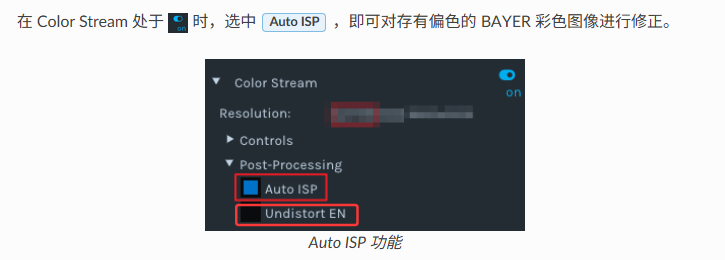
4.无法保存Color组件的校正畸变,以及AutoISP功能。
5.相机系统层的属性无法保存,如对时设置,接收包比例,图像重传等功能。
3.PS800-E1相机SDK相关
PS800-E1相机,推荐使用的编程语言和SDK版本如下:
3.1 TYCamera之C++语言SDK(推荐)
PS800-E1 相机,既可以使用官网3.X.X版本的SDK,也可以使用4.X.X版本的SDK。
具体操作和Sample和案例,可打开如下链接:
官网修改后的C++语言SDK,可参考链接:官网修改后的C++语言的SDK
1.如果只是单纯使用PS800-E1相机,或者其他旧的相机,没有使用GM46X和PMD相机,建议使用3.6.66 版本SDK。
2.如果同时使用PS800-E1和GM46X新相机,个人仍建议使用4.X.X版本中的Sample_V1例子。
3.2 TYCamera之ROS1版本(推荐)
PS800-E1 相机,既可以使用官网3.X.X版本的SDK,也可以使用4.X.X版本的SDK。
具体操作和Sample和案例,可打开如下链接:
1.图漾相机-ROS1_SDK_ubuntu_3.X.X版本编译
2.图漾相机-ROS1_SDK_ubuntu 4.X.X版本编译
4.官网修改后的SDK,增加打印相机外参+修改相机参数的SDK,下载链接:官网修改后ROS1的SDK
cpp
git clone git@gitee.com:damaoyou/ty_-ros1.git修改说明:
1.将SDK版本从4.0.21升级到4.1.1 。
2.增加了打印colorforleftIR的外参打印。
3.添加了相机左右IR参数,深度图后处理,SGBM参数纹理滤波,RGB自动白平衡,自动曝光开启/关闭等功能。
4.每个相机增加独立的camera_link。
5.在launch文件中设置帧率限制功能
5.适配新旧相机ROS1的SDK:官网修改后的4.1.18版本的SDK
3.3 TYCamera之ROS2版本(推荐)
PS800-E1 相机,既可以使用官网3.X.X版本的SDK,也可以使用4.X.X版本的SDK。
具体操作和Sample和案例,可打开如下链接:
1.图漾相机-ROS2-SDK-Ubuntu 3.X.X版本编译
2.图漾相机-ROS2-SDK-Ubuntu 4.X.X版本编译
官网修改后的ROS2的SDK,可适配所有新旧相机,下载链接如下:官网修改后的ROS2的SDK
cpp
git clone git@gitee.com:damaoyou/ty_ros2.git注意 :个人修改的版本,是在官网基础上增加的新功能,同时会比官网的SDK版本要高一些。
1.如果只是单纯使用PS800-E1相机,或者其他旧的相机,没有使用GM46X和PMD相机,建议使用3.6.66 版本SDK。
2.如果同时使用PS800-E1和GM46X新相机,建议使用4.1.18及其以上版本SDK。
3.4 TYCamera之C#语言SDK
1.目前只建议使用3.X.X版本
建议参考以下链接
如果涉及到和GM46X和PMD相机混用的情况,建议使用官网VPCamera的SDK。
3.5 TYCamera之Python语言SDK
1.目前只建议使用3.X.X版本
建议参考以下链接:
1.图漾相机------Python 3.X.X版本属性设置
如果涉及到和GM46X和PMD相机混用的情况,建议使用官网VPCamera的SDK。
3.6 Halcon语言SDK
建议参考以下链接:
1.图漾Halcon版本SDK使用教程【V1.1.X新版本】
3.7 VisionPro语言SDK
建议参考以下链接:
如果使用VisionPro调用TOF相机,请联系图漾技术,获取最新版本SDK。
4.PS800-E1相机常见FAQ
4.1 如何获取PS800-E1相机内参?
4.1.1 方法一 运行DumpCalibInfo
SDK3.6.52之后版本,新增示例程序,此示例程序可以将相机的标定参数以json文件的形式导出到本地。
编译C++语言中的例子,之后运行Sample_V1文件夹中的DumpCalibInfo 例子,会生成一个json文件,里面记录PS800--E1相机的内外参信息。
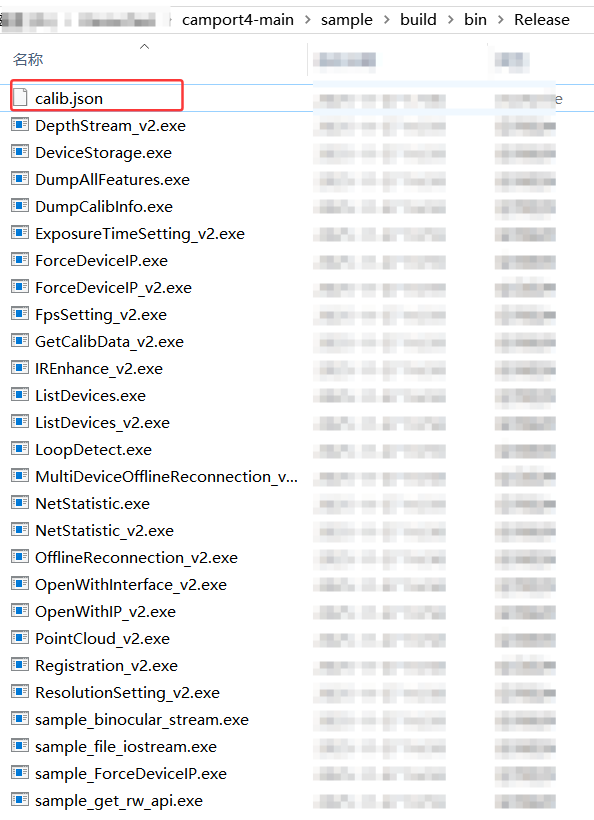
生成的json文件如下图:
cpp
{
	"sn": "207000154438",
	"timestamp": "2026-01-04 10:50:05",
	"depth_calib_info" : {
		"intri": [
		1052.337280,
		0.000000,
		605.615784,
		0.000000,
		1052.337280,
		461.207275,
		0.000000,
		0.000000,
		1.000000
		],
		"image_width": 1280,
		"image_height": 960,
		"scale_unit": 0.250000
	},
	"color_calib_info" : {
		"intri": [
		1855.273071,
		0.000000,
		1297.408203,
		0.000000,
		1855.705322,
		955.576782,
		0.000000,
		0.000000,
		1.000000
		],
		"extri": [
		0.999997,
		0.002316,
		0.000151,
		-24.248329,
		-0.002316,
		0.999994,
		-0.002596,
		-0.011450,
		-0.000157,
		0.002596,
		0.999997,
		0.312363,
		0.000000,
		0.000000,
		0.000000,
		1.000000,
		0.158439
		],
		"distortion": [
		0.158439,
		0.413161,
		-0.000472,
		0.000459,
		0.182131,
		0.419623,
		0.361128,
		0.315609,
		-0.001268,
		0.000506,
		0.001193,
		-0.000321
		],
		"image_width": 2560,
		"image_height": 1920
	}
}
4.1.2 方法二 运行DumpAllFeature例子
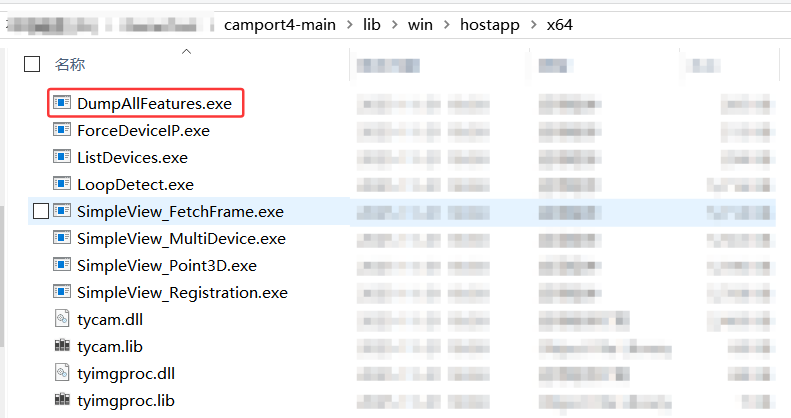
使用官网如下路径下的x64 压缩包,通过鼠标右键+shift键 ,进入到PowerShell界面,运行DumpAllFeatures例子,生成对应内容:
cpp
4.1.3 通过PV软件
具体方法如下:

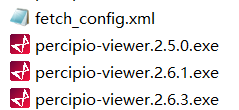
通过PercipioViewer看图软件,生成的fetch_config.xml内容如下:
cpp
<?xml version="1.0" ?>
<config version="1">
<comprotocol>1.0</comprotocol>
<component id="0x80000000" addr="0x01000000" name="device">
<feature id="0x5f00" name="SN" rw="1">207000154438</feature>
<feature id="0x5f01" name="vendor" rw="1">Percipio</feature>
<feature id="0x5f02" name="model" rw="1">PS800-E1</feature>
<feature id="0x5f08" name="user defined name" rw="1">Percipio</feature>
<feature id="0x1202" addr="0x204" name="frame per trigger" rw="3">1</feature>
<feature id="0x7523" addr="0x208" name="struct trigger mode" rw="3"/>
<feature id="0x7525" addr="0x218" name="struct trigger mode ex" rw="3"/>
<feature id="0x1010" absaddr="0x64c" name="persistent IP" rw="3"/>
<feature id="0x1011" absaddr="0x65c" name="persistent netmask" rw="3"/>
<feature id="0x1012" absaddr="0x66c" name="persistent gateway" rw="3"/>
<feature id="0x1014" addr="0x400020" name="packet delay" rw="3" min="0" max="10000" inc="1"/>
<feature id="0x1017" addr="0x40002c" name="packet size" rw="3" min="100" max="1500" inc="1"/>
<feature id="0x1016" addr="0x400024" name="ntp server ip" rw="3"/>
<feature id="0x4207" addr="0x214" name="trigger out io" rw="2" writableAtRun="1"/>
<feature id="0x4203" name="keep alive onoff" rw="3"/>
<feature id="0x1204" name="keep alive timeout" rw="3" min="2000" inc="1" max="30000"/>
<feature id="0x1206" addr="0x210" name="trigger delay us" rw="3" min="0" max="1300000" inc="1"/>
<feature id="0x1208" addr="0x21C" name="trigger duration us" rw="3" min="1" max="1300000" inc="1"/>
<feature id="0x3209" addr="0x220" name="stream async" rw="3">
<entry name="async off" value="0"/>
<entry name="async depth" value="1"/>
<entry name="async rgb" value="2"/>
<entry name="async depth rgb" value="3"/>
<entry name="async all" value="255"/>
</feature>
<feature id="0x3221" addr="0x400038" name="PreSetMode" rw="3" hide="0" ver="316a33e643386d602b2ccfa6da074e13236136f3" >
<entry name="Default" value="0" desc="Default"></entry>
<entry name="Fast" value="1" desc="Fast"></entry>
<entry name="Quality" value="2" desc="Quality"></entry>
</feature>
<feature id="0x3201" addr="0x200" name="trig pol" rw="3">
<entry name="falling edge" value="0"/>
<entry name="rising edge" value="1"/>
</feature>
<feature id="0x1210" addr="0x228" name="capture time us" rw="1" volatile="1"/>
<feature id="0x3211" addr="0x22c" name="sync type" rw="3" volatile="1">
<entry name="sync type none" value="0"/>
<entry name="sync type host" value="1"/>
<entry name="sync type ntp" value="2"/>
<entry name="sync type ptp slave" value="3"/>
<entry name="sync type can" value="4"/>
<entry name="sync type ptp master" value="5"/>
</feature>
<feature id="0x4212" addr="0x230" name="sync ready" rw="1" volatile="1"/>
<feature id="0x7216" addr="0x268" name="struct DI0 workmode" rw="3" volatile="1"/>
<intpf>AWQAUAA=</intpf>
<feature id="0x5f03" name="hardware version" rw="1" hide="0">1.3.0</feature>
<feature id="0x5f04" name="firmware version" rw="1" hide="0">3.13.85</feature>
<build>
<hash>model:AP03B04-019PS80X_X_X_F107_XXL15_DVP_DF64_FC6_V4;rtl:R0.3.0_0_gc23555507f_dirty;kernel:R3.13.85-0-ga373fc27dc;tycam:R3.6.67-cab5c6c5;gevcam:R3.13.85-0-ga18b737b</hash>
</build>
<config_version>r3.19.0-316a33e643386d602b2ccfa6da074e13236136f3</config_version>
<tech_model>PS801-GTIS3-46-CBS-MT4-V4-FC6</tech_model>
<generated_time>2025-04-25T151204</generated_time>
<calibration_time>2025-03-17T140542</calibration_time>
<feature id="0x3223" addr="0x26c" name="temperatureID" rw="3" desc="temperature sensor index">
<entry value="0x0" name="Left Sensor"></entry>
<entry value="0x1" name="Right Sensor"></entry>
<entry value="0x2" name="Color Sensor"></entry>
<entry value="0x4" name="MainBoard"></entry>
</feature>
<feature id="0x7224" addr="0x270" name="temperatureInfo" rw="1" desc="struct temperature sensor value" volatile="1"/>
</component>
<component id="0x00010000" addr="0x02000000" name="depth">
<feature id="0x210a" addr="0x63c" name="scale unit" rw="3" hide="0" min="0.0125" max="8.0" writableAtRun="1">0.25</feature>
<feature id="0x1003" name="intrinsic width" rw="1" hide="1">1280</feature>
<feature id="0x1004" name="intrinsic height" rw="1" hide="1">960</feature>
<feature id="0x7000" name="depth intrinsic" rw="1" hide="0">1052.3372591180234 0.0 605.6157569885254 0.0 1052.3372591180234 461.20727920532227 0.0 0.0 1.0</feature>
<feature id="0x1104" addr="0x10" name="image width" rw="1" hide="0"/>
<feature id="0x1105" addr="0x14" name="image height" rw="1" hide="0"/>
<feature id="0x3109" addr="0x18" name="image mode" rw="3" hide="0">
<entry value="0x202801e0" name="DEPTH16_640x480"/>
<entry value="0x205003c0" name="DEPTH16_1280x960"/>
<entry value="0x201400f0" name="DEPTH16_320x240"/>
</feature>
<feature id="0x1610" addr="0x600" name="image number" rw="3" hide="1" min="1" max="20">
<pInvalidator>PreSetMode</pInvalidator>
</feature>
<feature id="0x1611" addr="0x604" name="disparity num" rw="3" hide="1" min="1" max="320" writableAtRun="1">
<pInvalidator>PreSetMode</pInvalidator>
</feature>
<feature id="0x1612" addr="0x608" name="disparity offset" rw="3" hide="1" min="-1280" max="1280" writableAtRun="1">
<pInvalidator>PreSetMode</pInvalidator>
</feature>
<feature id="0x1613" addr="0x60c" name="match window height" rw="3" hide="1" min="1" inc="2" max="21" writableAtRun="1">
<pInvalidator>PreSetMode</pInvalidator>
</feature>
<feature id="0x1614" addr="0x610" name="semi global param p1" rw="3" hide="1" min="0" max="10000" writableAtRun="1" available="1">100</feature>
<feature id="0x161f" addr="0x640" name="semi global param p1 scale" rw="3" hide="1" min="0" max="25" writableAtRun="1" available="1">6</feature>
<feature id="0x1615" addr="0x614" name="semi global param p2" rw="3" hide="1" min="0" max="10000" writableAtRun="1">400</feature>
<feature id="0x1616" addr="0x618" name="uniqueness factor param" rw="3" hide="1" min="0" max="511" writableAtRun="1">10</feature>
<feature id="0x1617" addr="0x61c" name="uniqueness min absolute diff" rw="3" hide="1" min="0" max="10000" writableAtRun="1">400</feature>
<feature id="0x4619" addr="0x624" name="enable half window size" rw="3" hide="1" writableAtRun="1">true</feature>
<feature id="0x161a" addr="0x628" name="match window width" rw="3" hide="1" min="1" inc="2" max="9" writableAtRun="1">
<pInvalidator>PreSetMode</pInvalidator>
</feature>
<feature id="0x461b" addr="0x62C" name="enable median filter" rw="3" hide="1" writableAtRun="1">1</feature>
<feature id="0x461c" addr="0x630" name="enable LRC" rw="3" hide="1" writableAtRun="1">true</feature>
<feature id="0x161d" addr="0x634" name="max LRC diff" rw="3" hide="1" min="1" max="4095" writableAtRun="1">8</feature>
<feature id="0x161e" addr="0x638" name="median filter thresh" rw="3" hide="1" min="1" max="511" writableAtRun="1">100</feature>
<feature id="0x162f" addr="0x65c" name="TextureFilterOff" rw="1" desc="Offset in TextureFilter"/>
<feature id="0x1630" addr="0x660" name="TextureFilterThresh" rw="3" hide="1" min="0" max="65535" writableAtRun="1" desc="ThreshHold in TextureFilter">0</feature>
</component>
<component id="0x00040000" addr="0x03000000" name="leftir">
<feature id="0x3109" addr="0x18" name="image mode" rw="1">
<entry value="0x105003c0" name="mono8 1280x960"/>
</feature>
<feature id="0x1104" addr="0x10" name="image width" rw="1">1280</feature>
<feature id="0x1105" addr="0x14" name="image height" rw="1">960</feature>
<feature id="0x1003" name="intrinsic width" rw="1">1280</feature>
<feature id="0x1004" name="intrinsic height" rw="1">960</feature>
<feature id="0x7000" name="intrinsic" rw="1">1099.1813014204238 0.0 626.9086472408505 0.0 1099.6575465845553 452.824078210802 0.0 0.0 1.0</feature>
<feature id="0x7006" name="distortion" rw="1">0.17228587649842592 -0.33930635683799987 -4.130250960201616e-05 -0.0012340359281527602 0.031015078310697452 0.4401590909043719 -0.40384143490867574 -0.0012902343850730424 0.0025919548455530478 -0.00020570254642891429 0.0002023497735068536 -0.000259784433419793</feature>
<feature id="0x7008" name="rectified intrinsic" rw="1">1052.3372591180234 0.0 605.6157569885254 0.0 1052.3372591180234 461.20727920532227 0.0 0.0 1.0</feature>
<feature id="0x4510" addr="0x324" name="undistort" rw="3"/>
<feature id="0x1301" addr="0x304" name="LeftExpoTime" rw="3" min="3" max="990" inc="1" writableAtRun="1">
<pInvalidator>PreSetMode</pInvalidator>
</feature>
<feature id="0x2308" name="Left exposure time us" rw="3" writableAtRun="1" volatile="1">
<pValue>LeftExpoTimeUs</pValue>
</feature>
<Converter Name="LeftExpoTimeUs">
<FormulaTo>FROM/(2500/74.25)</FormulaTo>
<FormulaFrom>((2500/74.25)*TO)</FormulaFrom>
<pValue id="0x41301">LeftExpoTime</pValue>
</Converter>
<feature id="0x1303" addr="0x310" name="gain" rw="3" min="0" max="255" inc="1" writableAtRun="1"/>
<feature id="0x1524" addr="0x328" name="analog gain" rw="3" min="0" max="3" inc="1" writableAtRun="1"/>
<feature id="0x4525" addr="0x32C" name="hdr" rw="3" inc="1" max="1" min="0" writableAtRun="1"/>
<feature id="0x6526" addr="0x330" name="hdr parameter" rw="3" inc="1" size="32" valid_size="8" unit_size="4" writableAtRun="1" volatile="1"/>
</component>
<component id="0x00080000" addr="0x04000000" name="rightir">
<feature id="0x3109" addr="0x18" name="image mode" rw="1">
<entry value="0x105003c0" name="mono8 1280x960"/>
</feature>
<feature id="0x1104" addr="0x10" name="image width" rw="1">1280</feature>
<feature id="0x1105" addr="0x14" name="image height" rw="1">960</feature>
<feature id="0x1003" name="intrinsic width" rw="1">1280</feature>
<feature id="0x1004" name="intrinsic height" rw="1">960</feature>
<feature id="0x7000" name="intrinsic" rw="1">1102.0422228320601 0.0 627.0652993114447 0.0 1102.3232408808783 473.2862358485532 0.0 0.0 1.0</feature>
<feature id="0x7006" name="distortion" rw="1">0.1405177243680109 0.2765089884789445 -0.0005889827273878326 -0.0015284969060846082 0.26937189204645023 0.4084818275636246 0.20184475710118988 0.40792635166815966 0.0031535838513067228 -0.000622589531021631 0.0016937552676227912 -0.0008256626321947722</feature>
<feature id="0x7008" name="rectified intrinsic" rw="1">1052.3372591180234 0.0 669.6157569885254 0.0 1052.3372591180234 461.20727920532227 0.0 0.0 1.0</feature>
<feature id="0x7001" name="leftIR to rightIR extrinsic" rw="1"> 0.9972713615673389 0.009489186706788543 0.07321056435562913 -62.11391043508435 -0.00923812285544947 0.9999502313939785 -0.0037672033707279572 0.18782228084901084 -0.07324266846404238 0.0030805958469928363 0.9973093910344443 2.9200283680252004 0.0 0.0 0.0 1.0</feature>
<feature bind="0x00044510"/>
<feature id="0x1301" addr="0x304" name="RightExpoTime" rw="3" min="3" max="990" inc="1" writableAtRun="1">
<pInvalidator>PreSetMode</pInvalidator>
</feature>
<feature id="0x2308" name="Right exposure time us" rw="3" writableAtRun="1" volatile="1">
<pValue>RightExpoTimeUs</pValue>
</feature>
<Converter Name="RightExpoTimeUs">
<FormulaTo>FROM/(2500/74.25)</FormulaTo>
<FormulaFrom>((2500/74.25)*TO)</FormulaFrom>
<pValue id="0x81301">RightExpoTime</pValue>
</Converter>
<feature id="0x1303" addr="0x310" name="gain" rw="3" min="0" max="255" inc="1" writableAtRun="1"/>
<feature id="0x1524" addr="0x328" name="analog gain" rw="3" min="0" max="3" inc="1" writableAtRun="1"/>
<feature id="0x4525" addr="0x32C" name="hdr" rw="3" inc="1" max="1" min="0" writableAtRun="1"/>
<feature id="0x6526" addr="0x330" name="hdr parameter" rw="3" inc="1" size="32" valid_size="8" unit_size="4" writableAtRun="1" volatile="1"/>
</component>
<component id="0x00100000" addr="0x05000000" name="rgb">
<feature id="0x3109" addr="0x18" name="RgbImageMode" rw="3">
<entry value="0x22a00780" name="yuyv 2560x1920"/>
<entry value="0x227805a0" name="yuyv 1920x1440"/>
<entry value="0x225003c0" name="yuyv 1280x960"/>
<entry value="0x222801e0" name="yuyv 640x480"/>
<entry value="0x63a00780" name="CSI BAYER12GR_2560x1920"/>
</feature>
<feature id="0x7305" addr="0x224" name="struct aec roi" rw="3" writableAtRun="1" volatile="1">
<pIsAvailable>RgbROIEnabled</pIsAvailable>
<pInvalidator>RgbImageMode</pInvalidator>
</feature>
<feature id="0x4300" addr="0x300" name="RgbAutoExpo" rw="3" writableAtRun="1">
<pIsAvailable>ImageFormatIsYUV</pIsAvailable>
<pInvalidator>RgbImageMode</pInvalidator>
</feature>
<feature addr="0x304" id="0x1301" inc="1" max="66600" min="0" name="ColorExpoTime" rw="3" writableAtRun="1">
<pInvalidator>RgbImageMode</pInvalidator>
<pInvalidator>RgbAutoExpo</pInvalidator>
</feature>
<feature id="0x2308" name="Color exposure time us" rw="3" writableAtRun="1" volatile="1">
<pValue>ColorExpoTimeUs</pValue>
</feature>
<Converter Name="ColorExpoTimeUs">
<FormulaTo>FROM</FormulaTo>
<FormulaFrom>TO</FormulaFrom>
<pValue id="0x101301">ColorExpoTime</pValue>
</Converter>
<feature id="0x4304" addr="0x314" name="RgbAWB" rw="3" writableAtRun="1">
<pIsAvailable>ImageFormatIsYUV</pIsAvailable>
<pInvalidator>RgbImageMode</pInvalidator>
</feature>
<feature addr="0x328" id="0x1524" inc="1" max="65535" min="1" name="analog gain" rw="3" writableAtRun="1">
<pInvalidator>RgbImageMode</pInvalidator>
<pInvalidator>RgbAutoExpo</pInvalidator>
</feature>
<feature addr="0x33c" id="0x1527" inc="1" max="4000" min="0" name="AETargetLuminance" rw="3" writableAtRun="1">
<pIsAvailable>ImageFormatIsYUV</pIsAvailable>
</feature>
<feature id="0x1104" addr="0x10" name="image width" rw="1" volatile="1"/>
<feature id="0x1105" addr="0x14" name="image height" rw="1" volatile="1"/>
<feature id="0x1003" name="intrinsic width" rw="1">2560</feature>
<feature id="0x1004" name="intrinsic height" rw="1">1920</feature>
<feature id="0x7000" name="rgb intrinsic" rw="1"> 1855.2730811204906 0.0 1297.4081949584809 0.0 1855.7052814924211 955.5767964914013 0.0 0.0 1.0</feature>
<feature id="0x7001" name="rgb to leftIR extrinsic" rw="1"> 0.9999973059316882 0.0023163124312592996 0.00015108304460922234 -24.248329719396228 -0.002315912457085483 0.9999939488963809 -0.0025959044885151047 -0.01144988731911487 -0.0001570950562271821 0.0025955475998660146 0.9999966192211851 0.3123626828954821 0.0 0.0 0.0 1.0</feature>
<feature id="0x7006" name="distortion" rw="1">0.1584385513946271 0.41316060214315015 -0.0004724553375375349 0.0004588833657085748 0.182130637348422 0.41962280151829234 0.36112848964745625 0.31560940999873205 -0.0012675589805833966 0.0005062709214253814 0.0011934387806925278 -0.0003208566698672989</feature>
</component>
<component id="0x00400000" addr="0x07000000" name="laser">
<feature id="0x1500" addr="0x500" name="power" rw="3" min="0" max="100" inc="1" writableAtRun="1">
<pInvalidator>PreSetMode</pInvalidator>
</feature>
<feature id="0x4501" addr="0x504" name="auto ctrl" rw="3"/>
<feature id="0x4213" addr="0x23c" name="ir flashlight enable" rw="3" volatile="1" writableAtRun="1">
<pIsLocked>LightCtrl1</pIsLocked>
</feature>
<feature id="0x1214" addr="0x240" name="ir flashlight intensity" rw="3" min="0" max="100" inc="1" volatile="1" writableAtRun="1"/>
<IntSwissKnife Name="LightCtrl1">
<Formula>false</Formula>
</IntSwissKnife>
</component>
<component id="0x02000000" addr="0x09000000" name="storage">
<feature id="0x600a" addr="0x100000" name="custom block" rw="3" volatile="1" size="65536"/>
<feature id="0x600b" addr="0x200000" name="isp block" rw="3" volatile="1" size="65536"/>
</component>
<constraint id="0x00000001">
<rules id="0x0001" msg="image_num x match_h out of range">
<script>
FunctionCheck(a,b)
{
if (1) {
return ((a + 1) >> 1) * b <= 48;
} else {
return a * b <= 48;
}
}
</script>
<parameter id="0x00011610" rw="1" hide="1">a</parameter>
<parameter id="0x00011613" rw="1" hide="1">b</parameter>
</rules>
</constraint>
<IntSwissKnife Name="ImageFormatIsYUV">
<pVariable id="0x00103109">IMG_MODE</pVariable>
<Formula>(IMG_MODE & 0xff000000) == 0x22000000</Formula>
</IntSwissKnife>
<IntSwissKnife Name="RgbROIEnabled">
<pVariable id="0x00104300">AEC</pVariable>
<pVariable id="0x00103109">IMG_MODE</pVariable>
<Formula>((IMG_MODE & 0xff000000) == 0x22000000) && AEC</Formula>
</IntSwissKnife>
</config>4.2 PS800-E1相机内参说明
运行DumpCalibInfo例子,打印出来的内参如下:
cpp
{
	"sn": "207000154463",
	"timestamp": "2025-12-23 11:43:16",
	"depth_calib_info" : {
		"intri": [
		1042.716553,
		0.000000,
		605.167358,
		0.000000,
		1042.716553,
		476.697266,
		0.000000,
		0.000000,
		1.000000
		],
		"image_width": 1280,
		"image_height": 960,
		"scale_unit": 0.250000
	},
	"color_calib_info" : {
		"intri": [
		1854.987549,
		0.000000,
		1287.692505,
		0.000000,
		1854.763184,
		956.685608,
		0.000000,
		0.000000,
		1.000000
		],
		"extri": [
		0.999987,
		-0.000389,
		0.005066,
		24.960472,
		0.000391,
		1.000000,
		-0.000356,
		-0.167734,
		-0.005066,
		0.000358,
		0.999987,
		-0.016189,
		0.000000,
		0.000000,
		0.000000,
		1.000000,
		0.226290
		],
		"distortion": [
		0.226290,
		-0.411801,
		-0.000390,
		0.000865,
		-0.102095,
		0.488078,
		-0.445645,
		-0.190648,
		-0.002840,
		0.000765,
		0.000794,
		-0.000075
		],
		"image_width": 2560,
		"image_height": 1920
	}
}而运行DumpAllFeature例子,得到的内参如下:
cpp
  TY_COMPONENT_DEPTH_CAM:
         TY_STRUCT_CAM_INTRINSIC: comp(0x10000) feat(0x7000) name(depth intrinsic) access(1) bindComponent(0x0) bindFeature(0x0)
                       521.358276 0.000000 302.583679
                       0.000000 521.358276 238.348633
                       0.000000 0.000000 1.000000
         TY_INT_WIDTH: comp(0x10000) feat(0x1104) name(image width) access(1) bindComponent(0x0) bindFeature(0x0)
                       : 640
         TY_INT_HEIGHT: comp(0x10000) feat(0x1105) name(image height) access(1) bindComponent(0x0) bindFeature(0x0)
                       : 480


  TY_COMPONENT_IR_CAM_LEFT:
        TY_STRUCT_CAM_INTRINSIC: comp(0x40000) feat(0x7000) name(intrinsic) access(1) bindComponent(0x0) bindFeature(0x0)
                       1099.755005 0.000000 637.097656
                       0.000000 1099.667969 471.662628
                       0.000000 0.000000 1.000000
         TY_STRUCT_CAM_DISTORTION: comp(0x40000) feat(0x7006) name(distortion) access(1) bindComponent(0x0) bindFeature(0x0)
                       0.138954 -0.296742 -0.001013 0.001627
                       0.015947 0.409195 -0.365898 -0.014235
                       -0.003664 0.000691 0.002149 -0.000525
         TY_INT_WIDTH: comp(0x40000) feat(0x1104) name(image width) access(1) bindComponent(0x0) bindFeature(0x0)
                       : 1280
         TY_INT_HEIGHT: comp(0x40000) feat(0x1105) name(image height) access(1) bindComponent(0x0) bindFeature(0x0)
                       : 960

  TY_COMPONENT_IR_CAM_RIGHT:
         TY_STRUCT_CAM_INTRINSIC: comp(0x80000) feat(0x7000) name(intrinsic) access(1) bindComponent(0x0) bindFeature(0x0)
                       1104.557495 0.000000 645.091492
                       0.000000 1104.522461 483.191315
                       0.000000 0.000000 1.000000
         TY_STRUCT_EXTRINSIC_TO_DEPTH: comp(0x80000) feat(0x7001) name(leftIR to rightIR extrinsic) access(1) bindComponent(0x0) bindFeature(0x0)
                       0.999987 0.004517 0.002490 -100.097878
                       -0.004505 0.999979 -0.004711 0.617611
                       -0.002511 0.004700 0.999986 -0.160294
                       0.000000 0.000000 0.000000 1.000000
         TY_STRUCT_CAM_DISTORTION: comp(0x80000) feat(0x7006) name(distortion) access(1) bindComponent(0x0) bindFeature(0x0)
                       0.154606 -0.326864 -0.000453 0.000241
                       0.054861 0.426630 -0.402215 0.034075
                       -0.000609 0.000003 0.000622 -0.000153
         TY_INT_WIDTH: comp(0x80000) feat(0x1104) name(image width) access(1) bindComponent(0x0) bindFeature(0x0)
                       : 1280
         TY_INT_HEIGHT: comp(0x80000) feat(0x1105) name(image height) access(1) bindComponent(0x0) bindFeature(0x0)
                       : 960

  TY_COMPONENT_RGB_CAM_LEFT:
         TY_STRUCT_CAM_INTRINSIC: comp(0x100000) feat(0x7000) name(rgb intrinsic) access(1) bindComponent(0x0) bindFeature(0x0)
                       1854.987549 0.000000 1287.692505
                       0.000000 1854.763184 956.685608
                       0.000000 0.000000 1.000000
         TY_STRUCT_EXTRINSIC_TO_DEPTH: comp(0x100000) feat(0x7001) name(rgb to leftIR extrinsic) access(1) bindComponent(0x0) bindFeature(0x0)
                       0.999987 -0.000389 0.005066 24.960472
                       0.000391 1.000000 -0.000356 -0.167734
                       -0.005066 0.000358 0.999987 -0.016189
                       0.000000 0.000000 0.000000 1.000000
         TY_STRUCT_CAM_DISTORTION: comp(0x100000) feat(0x7006) name(distortion) access(1) bindComponent(0x0) bindFeature(0x0)
                       0.226290 -0.411801 -0.000390 0.000865
                       -0.102095 0.488078 -0.445645 -0.190648
                       -0.002840 0.000765 0.000794 -0.000075
         TY_INT_WIDTH: comp(0x100000) feat(0x1104) name(image width) access(1) bindComponent(0x0) bindFeature(0x0)
                       : 2560
         TY_INT_HEIGHT: comp(0x100000) feat(0x1105) name(image height) access(1) bindComponent(0x0) bindFeature(0x0)
: 1920 从此处看出,DumpCalibInfo 例子打印的是出厂标定的内外参,而DumpAllFeature例子,则是会根据分辨率,内参相应做出变化。
4.2.1 深度图内参

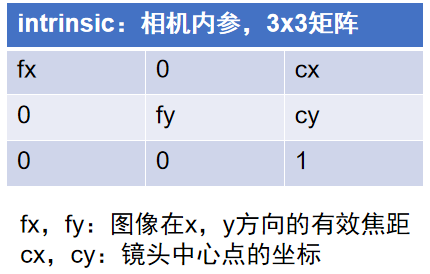
1.cx和cy通常大约是图像分辨率W和H的一半,得出PS802-E1相机深度图出厂标定分辨率为1280x960
2.由于深度相机是虚拟相机,所以其畸变参数以及外参都是零矩阵。
4.2.2 彩色图内参/畸变系数/外参
cpp
  TY_COMPONENT_RGB_CAM_LEFT:
         TY_STRUCT_CAM_INTRINSIC: comp(0x100000) feat(0x7000) name(rgb intrinsic) access(1) bindComponent(0x0) bindFeature(0x0)
                       1854.987549 0.000000 1287.692505
                       0.000000 1854.763184 956.685608
                       0.000000 0.000000 1.000000
         TY_STRUCT_EXTRINSIC_TO_DEPTH: comp(0x100000) feat(0x7001) name(rgb to leftIR extrinsic) access(1) bindComponent(0x0) bindFeature(0x0)
                       0.999987 -0.000389 0.005066 24.960472
                       0.000391 1.000000 -0.000356 -0.167734
                       -0.005066 0.000358 0.999987 -0.016189
                       0.000000 0.000000 0.000000 1.000000
         TY_STRUCT_CAM_DISTORTION: comp(0x100000) feat(0x7006) name(distortion) access(1) bindComponent(0x0) bindFeature(0x0)
                       0.226290 -0.411801 -0.000390 0.000865
                       -0.102095 0.488078 -0.445645 -0.190648
                       -0.002840 0.000765 0.000794 -0.000075
         TY_INT_WIDTH: comp(0x100000) feat(0x1104) name(image width) access(1) bindComponent(0x0) bindFeature(0x0)
                       : 2560
         TY_INT_HEIGHT: comp(0x100000) feat(0x1105) name(image height) access(1) bindComponent(0x0) bindFeature(0x0)
: 19201.cx和cy通常大约是图像分辨率W和H的一半,得出PS802相机深度图出厂标定分辨率为2560x1920
2.彩色图相机的畸变系数如下:

3.彩色图相机的外参如下:
cpp
   TY_STRUCT_EXTRINSIC_TO_DEPTH: comp(0x100000) feat(0x7001) name(rgb to leftIR extrinsic) access(1) bindComponent(0x0) bindFeature(0x0)
                       0.999987 -0.000389 0.005066 24.960472
                       0.000391 1.000000 -0.000356 -0.167734
                       -0.005066 0.000358 0.999987 -0.016189
                       0.000000 0.000000 0.000000 1.000000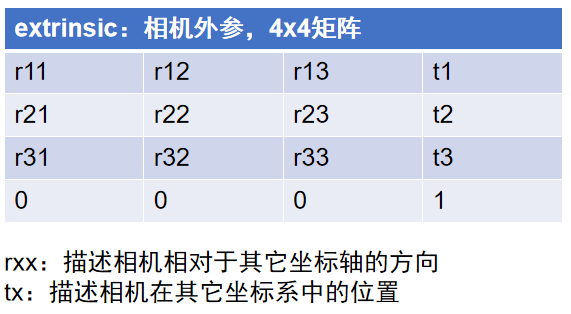
4.2.3 左右IR极限约束前内参/极限校正后内参
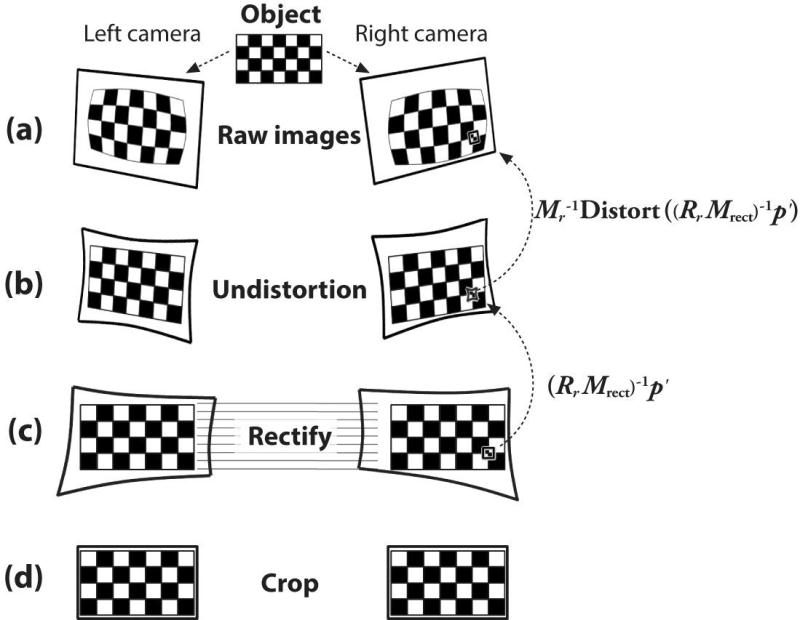
双目立体匹配模型

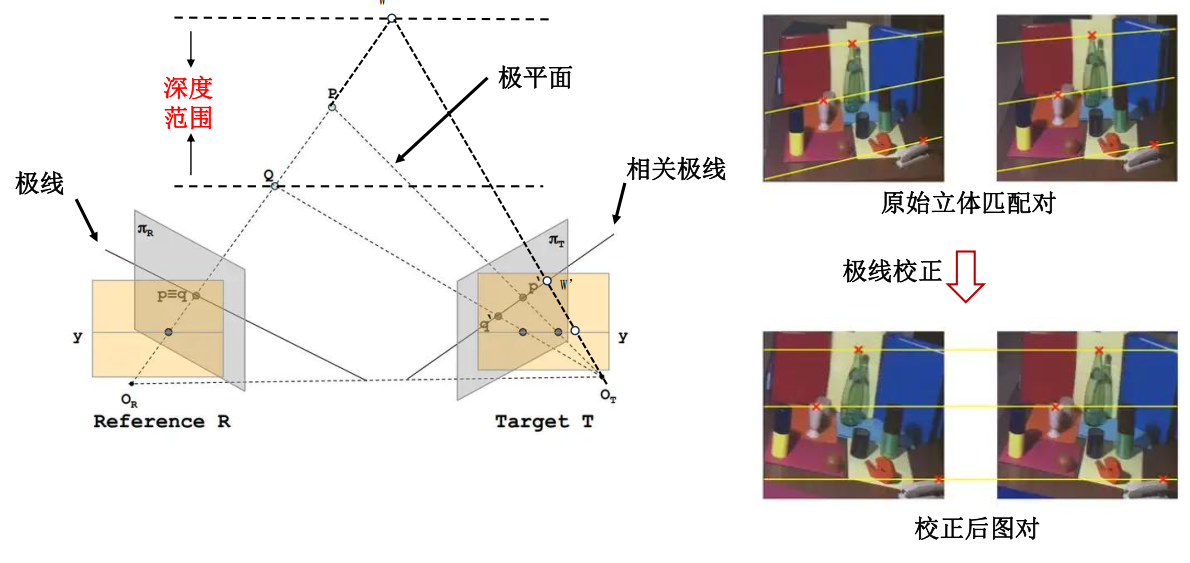
cpp
 TY_COMPONENT_IR_CAM_LEFT:
        TY_STRUCT_CAM_INTRINSIC: comp(0x40000) feat(0x7000) name(intrinsic) access(1) bindComponent(0x0) bindFeature(0x0)
                       1099.755005 0.000000 637.097656
                       0.000000 1099.667969 471.662628
                       0.000000 0.000000 1.000000
         TY_STRUCT_CAM_DISTORTION: comp(0x40000) feat(0x7006) name(distortion) access(1) bindComponent(0x0) bindFeature(0x0)
                       0.138954 -0.296742 -0.001013 0.001627
                       0.015947 0.409195 -0.365898 -0.014235
                       -0.003664 0.000691 0.002149 -0.000525
         TY_INT_WIDTH: comp(0x40000) feat(0x1104) name(image width) access(1) bindComponent(0x0) bindFeature(0x0)
                       : 1280
         TY_INT_HEIGHT: comp(0x40000) feat(0x1105) name(image height) access(1) bindComponent(0x0) bindFeature(0x0)
                       : 960
cpp
  TY_COMPONENT_IR_CAM_RIGHT:
         TY_STRUCT_CAM_INTRINSIC: comp(0x80000) feat(0x7000) name(intrinsic) access(1) bindComponent(0x0) bindFeature(0x0)
                       1104.557495 0.000000 645.091492
                       0.000000 1104.522461 483.191315
                       0.000000 0.000000 1.000000
         TY_STRUCT_EXTRINSIC_TO_DEPTH: comp(0x80000) feat(0x7001) name(leftIR to rightIR extrinsic) access(1) bindComponent(0x0) bindFeature(0x0)
                       0.999987 0.004517 0.002490 -100.097878
                       -0.004505 0.999979 -0.004711 0.617611
                       -0.002511 0.004700 0.999986 -0.160294
                       0.000000 0.000000 0.000000 1.000000
         TY_STRUCT_CAM_DISTORTION: comp(0x80000) feat(0x7006) name(distortion) access(1) bindComponent(0x0) bindFeature(0x0)
                       0.154606 -0.326864 -0.000453 0.000241
                       0.054861 0.426630 -0.402215 0.034075
                       -0.000609 0.000003 0.000622 -0.000153
         TY_INT_WIDTH: comp(0x80000) feat(0x1104) name(image width) access(1) bindComponent(0x0) bindFeature(0x0)
                       : 1280
         TY_INT_HEIGHT: comp(0x80000) feat(0x1105) name(image height) access(1) bindComponent(0x0) bindFeature(0x0)
                       : 960
4.3 PS800-E1相机光心位置
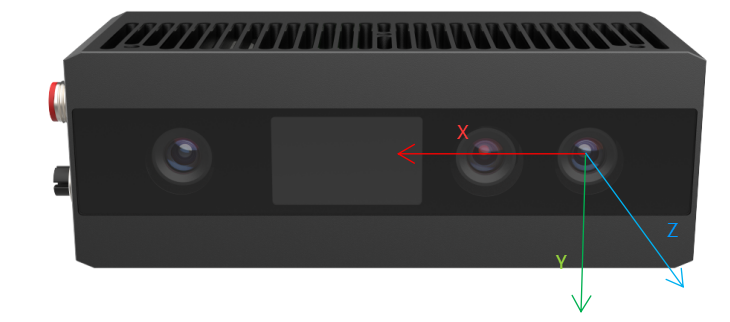
同时通过RGB外参,可得知RGB至左IR应该在25mm左右。
cpp
  TY_STRUCT_EXTRINSIC_TO_DEPTH: comp(0x100000) feat(0x7001) name(rgb to leftIR extrinsic) access(1) bindComponent(0x0) bindFeature(0x0)
                       0.999987 -0.000389 0.005066 24.960472
                       0.000391 1.000000 -0.000356 -0.167734
                       -0.005066 0.000358 0.999987 -0.016189
                       0.000000 0.000000 0.000000 1.000000
5.成像问题FAQ
5.1 PS800 成像问题
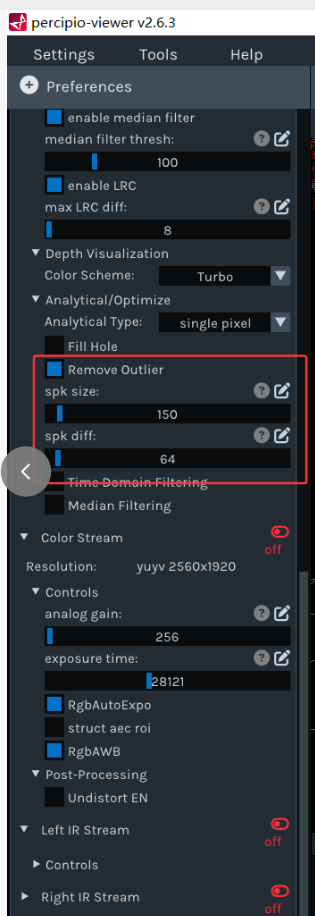
5.1.1 拍摄物体时,点云噪点较多
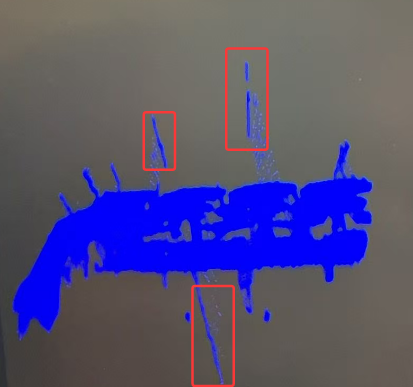
遇到此种情况,需要开启斑点滤波功能。
6.PS800-E1相机测试结果
6.1 PS800-E1 帧率测试
6.1.1 PS800-E1 出图延迟时间
出图延迟时间 :相机使用默认UserSet,在连续采集模式下统计从开始曝光到系统完全处理完图像的总之时间,单位微秒。
出图延时时间测试结果如下所示:
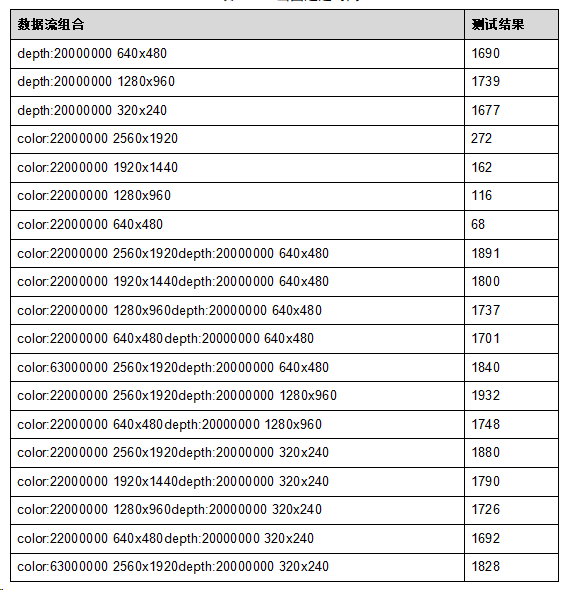
PS800-E1相机出图延迟时间结果
6.1.2 PS800-E1 帧率测试
FPS(帧率) :指相机设置在自由采集模式下,上位机每秒采集的图像帧数。
PS800-E1 帧率测试结果如下所示:
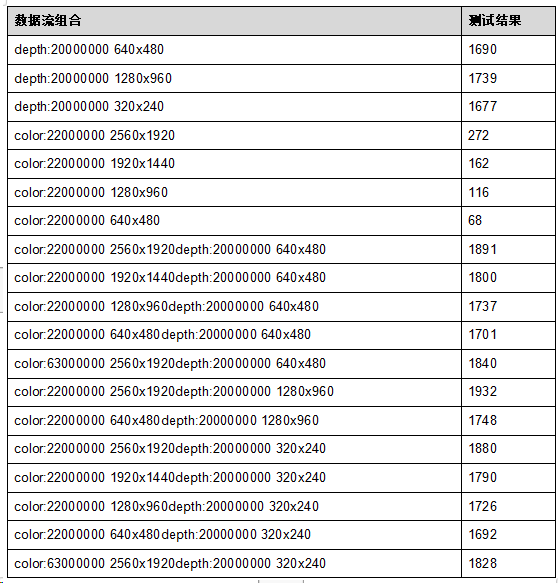
PS800-E1相机帧率结果
7.其他学习资料
1. 图漾官网相机规格书