一、背景
随着Android硬件架构的持续演进,新一代设备开始采用16KB内存页(Page Size)机制,逐步替代传统的4KB内存页设计。此项底层变更对应用兼容性产生直接影响,特别是对依赖Native层库、JNI接口或自定义内存管理模块的应用程序。
Google Developer 链接:https://developer.android.com/guide/practices/page-sizes?hl=zh-cn
相关政策截图如下:

二、现状
Google Play官方已明确发布合规要求:自2025年11月1日起,所有提交至Google Play商店的应用必须完整支持16KB Page Size特性,未适配应用将被拒绝上架。
国内应用商店目前暂无强制要求,但建议提前布局。
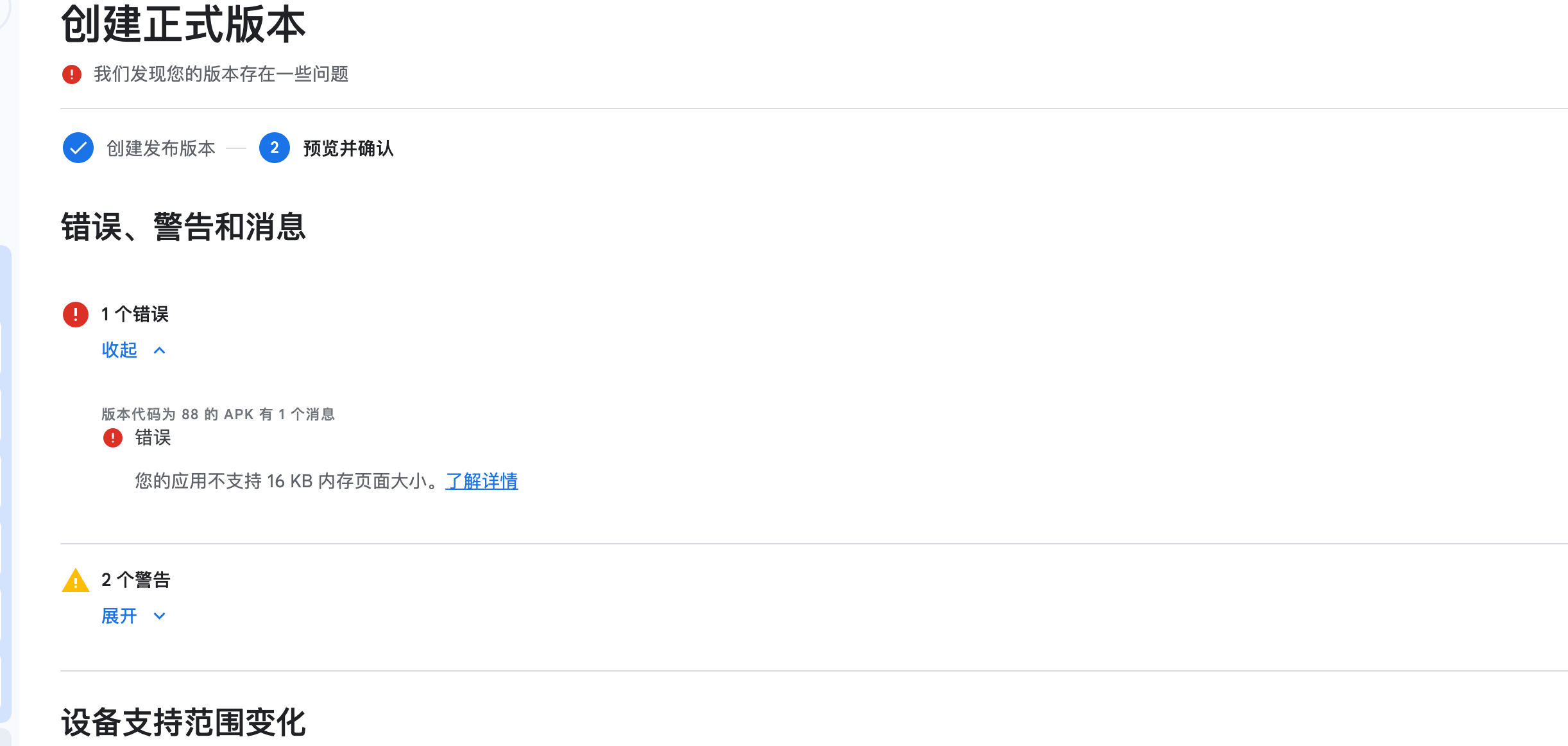
Google Play Console 提审后 商店会显示错误,并且禁止发布,截图如下:
三、影响范围评估
若您的应用计划通过Google Play渠道分发,且存在以下任一技术特征,均需完成16KB Page Size适配工作:
Native层代码依赖:应用包含C/C++实现的so库,且未进行16KB对齐处理,可能导致运行时崩溃。
第三方Native库集成:依赖FFmpeg、OpenSSL等第三方库时,需验证其16KB Page Size兼容性。
底层内存管理:直接调用mmap、munmap、mprotect等系统API,且存在4096字节硬编码假设的实现。
确保所有so文件的segment实现16KB内存对齐。
检查并修正Native代码中硬编码的内存页大小假设,建议通过getpagesize()或sysconf(_SC_PAGESIZE)动态获取系统实际页大小。
四、如何检查哪些so有问题
4.1、Android Studio检查( APK Analyzer)
这个操作其实一般就是直接把APK或者AAB 放在Android Studio中 直接解析出so和对应的提示:
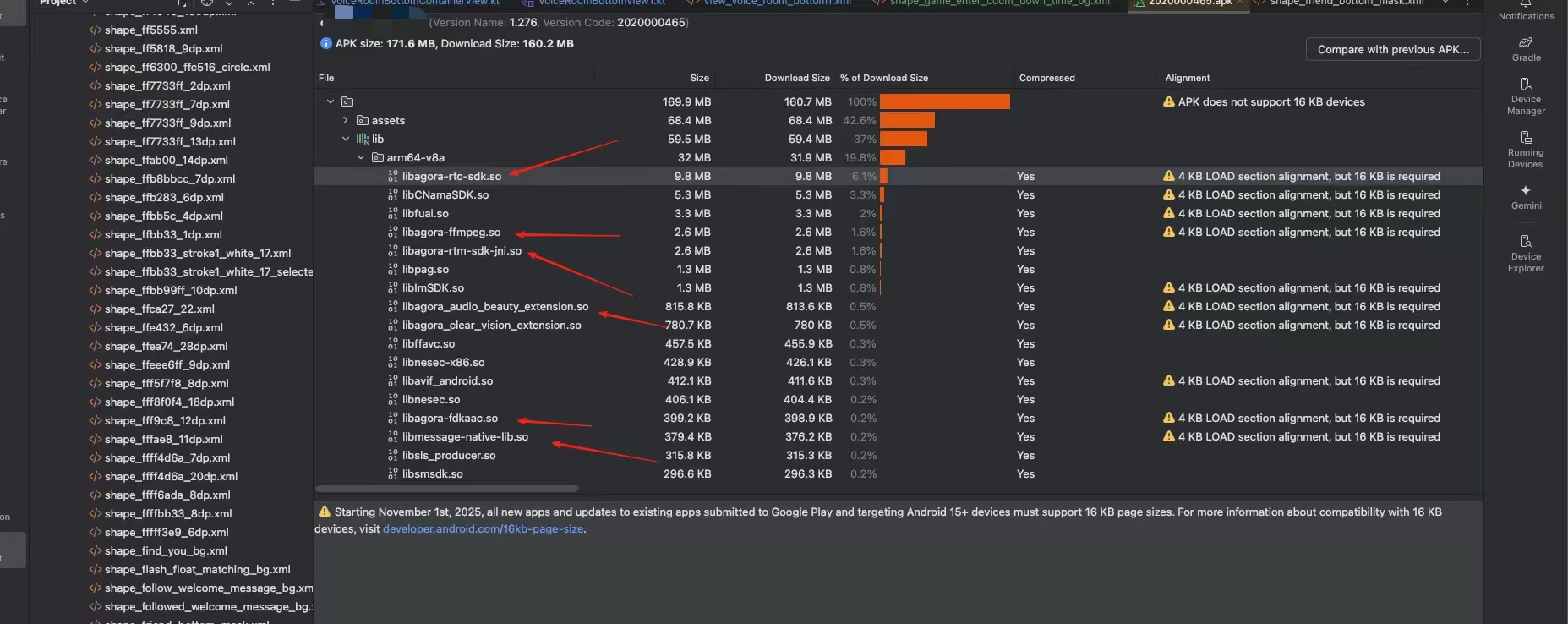
这个方式最快,最高效,但是最近新版本的Android studio不再提示16kb错误了,让人头大
4.2 使用脚本检测
使用官方提供的check_elf_alignment.sh脚本,验证共享库的ELF段是否使用16 KB ELF对齐方式正确对齐。
Google官方推荐使用check_elf_alignment.sh脚本进行自动化检测:
#!/bin/bash
progname="${0##*/}"
progname="${progname%.sh}"

# usage: check_elf_alignment.sh [path to *.so files|path to *.apk]

cleanup_trap() {
  if [ -n "${tmp}" -a -d "${tmp}" ]; then
    rm -rf ${tmp}
  fi
  exit $1
}

usage() {
  echo "Host side script to check the ELF alignment of shared libraries."
  echo "Shared libraries are reported ALIGNED when their ELF regions are"
  echo "16 KB or 64 KB aligned. Otherwise they are reported as UNALIGNED."
  echo
  echo "Usage: ${progname} [input-path|input-APK|input-APEX]"
}

if [ ${#} -ne 1 ]; then
  usage
  exit
fi

case ${1} in
  --help | -h | -\?)
    usage
    exit
    ;;

  *)
    dir="${1}"
    ;;
esac

if ! [ -f "${dir}" -o -d "${dir}" ]; then
  echo "Invalid file: ${dir}" >&2
  exit 1
fi

if [[ "${dir}" == *.apk ]]; then
  trap 'cleanup_trap' EXIT

  echo
  echo "Recursively analyzing $dir"
  echo

  if { zipalign --help 2>&1 | grep -q "\-P <pagesize_kb>"; }; then
    echo "=== APK zip-alignment ==="
    zipalign -v -c -P 16 4 "${dir}" | egrep 'lib/arm64-v8a|lib/x86_64|Verification'
    echo "========================="
  else
    echo "NOTICE: Zip alignment check requires build-tools version 35.0.0-rc3 or higher."
    echo "  You can install the latest build-tools by running the below command"
    echo "  and updating your \$PATH:"
    echo
    echo "    sdkmanager \"build-tools;35.0.0-rc3\""
  fi

  dir_filename=$(basename "${dir}")
  tmp=$(mktemp -d -t "${dir_filename%.apk}_out_XXXXX")
  unzip "${dir}" lib/* -d "${tmp}" >/dev/null 2>&1
  dir="${tmp}"
fi

if [[ "${dir}" == *.apex ]]; then
  trap 'cleanup_trap' EXIT

  echo
  echo "Recursively analyzing $dir"
  echo

  dir_filename=$(basename "${dir}")
  tmp=$(mktemp -d -t "${dir_filename%.apex}_out_XXXXX")
  deapexer extract "${dir}" "${tmp}" || { echo "Failed to deapex." && exit 1; }
  dir="${tmp}"
fi

RED="\e[31m"
GREEN="\e[32m"
ENDCOLOR="\e[0m"

unaligned_libs=()

echo
echo "=== ELF alignment ==="

matches="$(find "${dir}" -type f)"
IFS=$'\n'
for match in $matches; do
  # We could recursively call this script or rewrite it to though.
  [[ "${match}" == *".apk" ]] && echo "WARNING: doesn't recursively inspect .apk file: ${match}"
  [[ "${match}" == *".apex" ]] && echo "WARNING: doesn't recursively inspect .apex file: ${match}"

  [[ $(file "${match}") == *"ELF"* ]] || continue

  res="$(objdump -p "${match}" | grep LOAD | awk '{ print $NF }' | head -1)"
  if [[ $res =~ 2\*\*(1[4-9]|[2-9][0-9]|[1-9][0-9]{2,}) ]]; then
    echo -e "${match}: ${GREEN}ALIGNED${ENDCOLOR} ($res)"
  else
    echo -e "${match}: ${RED}UNALIGNED${ENDCOLOR} ($res)"
    unaligned_libs+=("${match}")
  fi
done

if [ ${#unaligned_libs[@]} -gt 0 ]; then
  echo -e "${RED}Found ${#unaligned_libs[@]} unaligned libs (only arm64-v8a/x86_64 libs need to be aligned).${ENDCOLOR}"
elif [ -n "${dir_filename}" ]; then
  echo -e "ELF Verification Successful"
fi
echo "====================="
步骤:1.在本地生成一个check_elf_alignment.sh的文件,将上面的脚本copy进去,然后开始对打包好的apk进行检测:
bash check_elf_alignment.sh xxx.apk这个是检查出有16kb的so

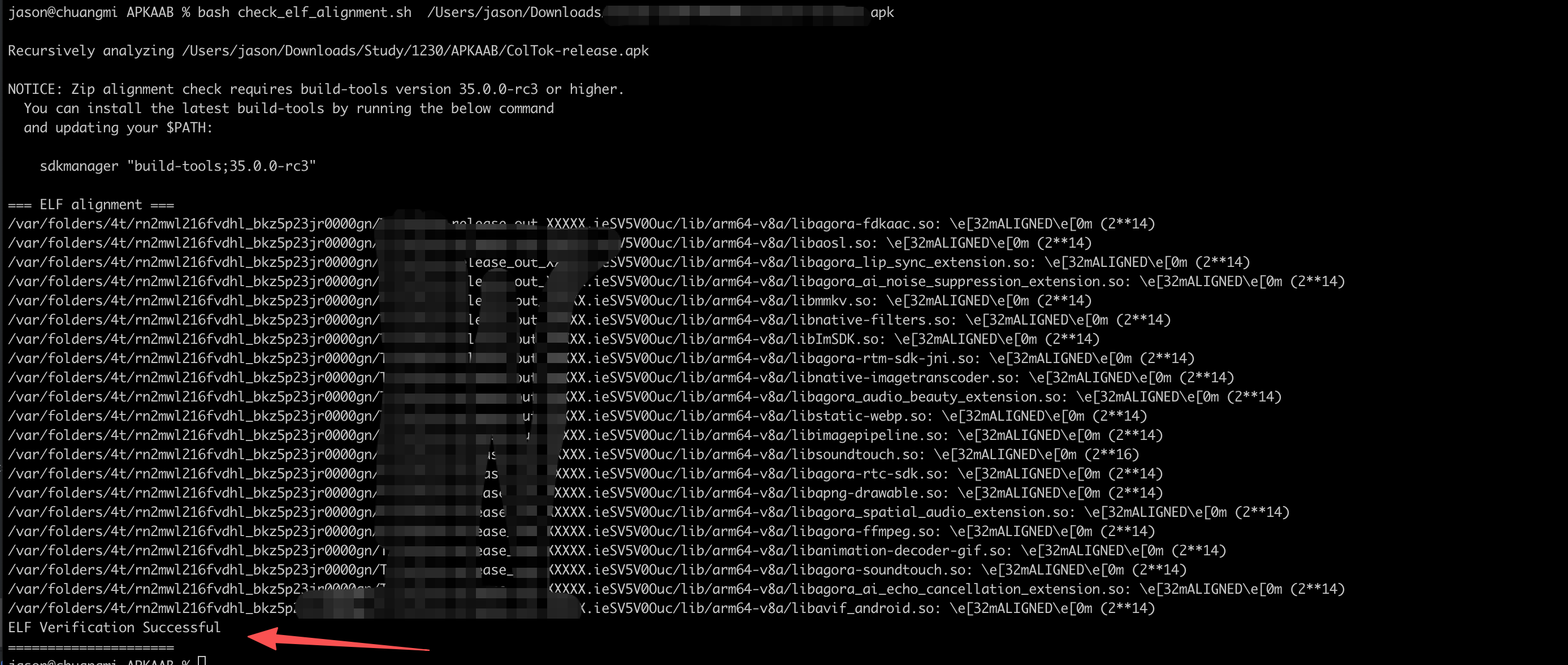
下面的截图是修改过后成功的截图:走到了ELF Verification Successful
五、解决16kb错误办法
5.1 针对自己封装的so 在打包的时候要使用25以上的NDK
5.2 针对三方SDK 找对应的解决so的版本 一般最新的版本基本兼容这个问题
总结:针对谷歌要求16KB问题,只能从代码层去修改和升级,这个必须要去兼容