富文本输入后带上了拼音/英文字母,怎么解决,效果如下
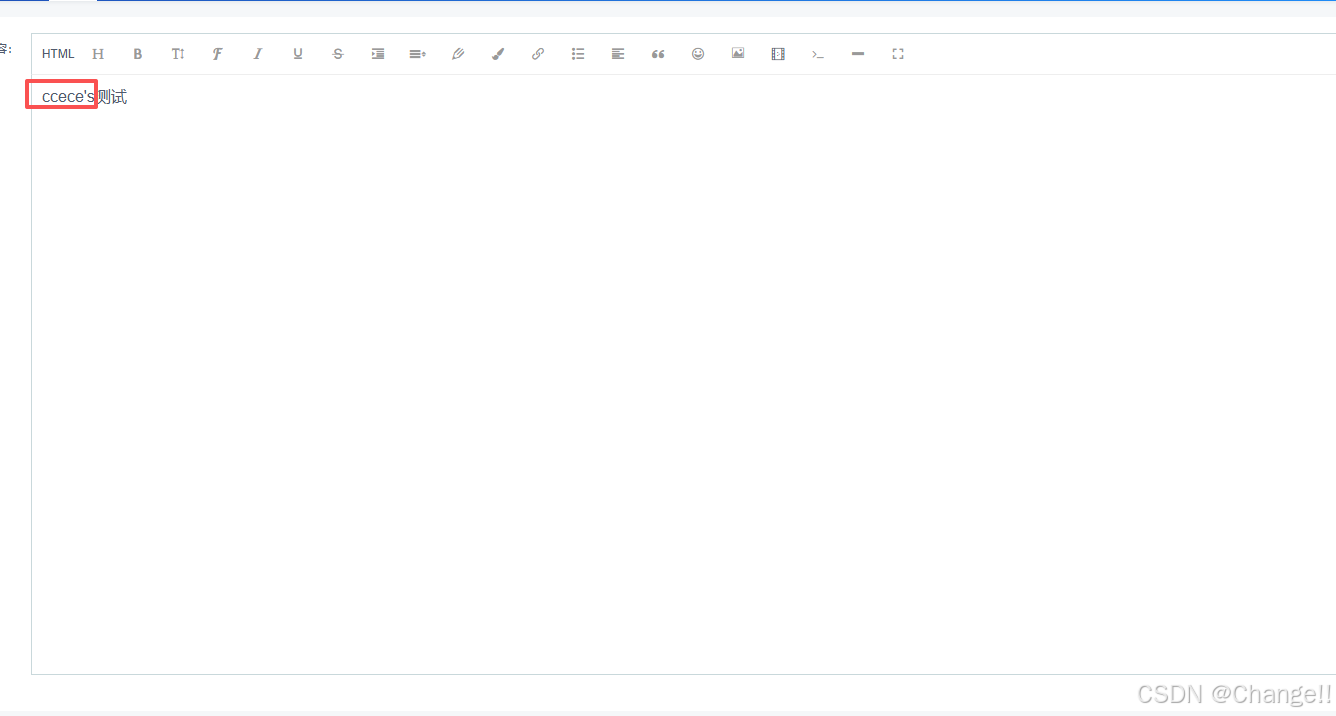
这里用的富文本为:wangeditor,
1.分析原因:
wangEditor 在输入时(尤其是输入法打拼音未确认时),会实时触发内容变更事件(如 onChange),并把包含拼音的「临时输入内容」传给你的 @editorContent 方法;
javascript
// 错误逻辑(直接绑content):
getEditorContent(data){
  this.content = data; // 拼音未确认时,data包含拼音,直接更新响应式变量
}
Vue 对 data 中第一层简单类型变量(如 content: '') 的响应式更新是「即时的」,编辑器会立刻读取 this.content 的最新值(包含拼音)并回显,导致拼音残留;
2. 解决方法:(1).嵌套对象;(2).加短防抖
原理:
套一层 agreement.content 正常的原因:当你把值赋值给 this.agreement.content(嵌套对象的属性)时:Vue 对嵌套对象属性的响应式更新存在「微任务延迟」(Vue2 的 Object.defineProperty 对嵌套属性的监听,更新通知会晚于简单类型);
输入法的拼音是「瞬时临时态」,在 Vue 触发视图更新前,输入法已完成 "拼音→确认文字" 的转换,最终传给 agreement.content 的是确认后的文字,因此不会显示拼音;
简单说:嵌套对象的响应式延迟,刚好避开了输入法的拼音临时态,而第一层变量的即时更新,会捕获到拼音。
(1)嵌套对象修复后代码如下:
javascript
<template>
<!-- 入驻协议 -->
    <div>
      <Card :bordered="false" dis-hover class="ivu-mt">
        <Form :label-width="80" @submit.native.prevent>
            <FormItem label="协议内容:">
              <WangEditor :content="content" @editorContent="getEditorContent"></WangEditor>
            </FormItem>
        </Form>
        <Spin fix v-if="spinShow"></Spin>
      </Card>
      <Card :bordered="false" dis-hover class="fixed-card" :style="{left: `${!menuCollapse?'200px':isMobile?'0':'80px'}`}">
        <div class="acea-row row-center">
          <Button type="primary" @click="handleSave">保存</Button>
        </div>
      </Card>
    </div>
</template>

<script>
import WangEditor from "@/components/wangEditor/index.vue";
import { mapState,mapMutations } from "vuex";
export default {
    components: { WangEditor },
    data() {
        return {
            agreement: {
                content: "",
            },
            content:'',
            spinShow:false
        };
    },
    created() {
      this.agreeDetail();
    },
	computed: {
	  ...mapState("admin/layout", ["isMobile","menuCollapse"]),
	  labelWidth() {
	    return this.isMobile ? undefined : 120;
	  },
	  labelPosition() {
	    return this.isMobile ? "top" : "right";
	  },
	  labelBottom() {
	    return this.isMobile ? undefined : 15;
	  }
	},
    methods: {
        //内容回显
        getEditorContent(data){
            this.agreement.content = data
        },
        //详情
        agreeDetail() {
          this.spinShow = true;
          let key = 'aaa'
          详情接口(key).then(res => {
              this.spinShow = false;
              this.agreement.content = res.data.value;
              this.content = res.data.value;
          })
          .catch(err => {
              this.$Message.error(err);
              this.spinShow = false;
          });
        },
        // 保存
        handleSave() {
          this.$Spin.show();
          let key = 'aaa'
          let value = this.agreement.content
          保存接口({key,value}).then(res => {
              this.$Spin.hide();
              this.$Message.success("保存成功");
              this.agreeDetail();
          })
          .catch(err => {
              this.$Spin.hide();
              this.$Message.error(err.msg);
          });
        }
    }
};
</script>

<style scoped lang="stylus">
	.fixed-card {
	    position: fixed;
	    right: 0;
	    bottom: 0;
	    left: 200px;
	    z-index: 99;
	    box-shadow: 0 -1px 2px rgb(240, 240, 240);

	    /deep/ .ivu-card-body {
	        padding: 15px 16px 14px;
	    }

	    .ivu-form-item {
	        margin-bottom: 0;
	    }

	    /deep/ .ivu-form-item-content {
	        margin-right: 124px;
	        text-align: center;
	    }

	    .ivu-btn {
	        height: 36px;
	        padding: 0 20px;
	    }
	}
</style>
(2)加短防抖:
javascript
<template>
<!-- 入驻协议 -->
    <div>
      <Card :bordered="false" dis-hover class="ivu-mt">
        <Form :label-width="80" @submit.native.prevent>
            <FormItem label="协议内容:">
              <WangEditor :content="content" @editorContent="editorContentProxy"></WangEditor>
            </FormItem>
        </Form>
        <Spin fix v-if="spinShow"></Spin>
      </Card>
      <Card :bordered="false" dis-hover class="fixed-card" :style="{left: `${!menuCollapse?'200px':isMobile?'0':'80px'}`}">
        <div class="acea-row row-center">
          <Button type="primary" @click="handleSave">保存</Button>
        </div>
      </Card>
    </div>
</template>

<script>
import WangEditor from "@/components/wangEditor/index.vue";
import { agreementSave,agreementInfo } from "@/api/xiaonuo/marketingShop";
import { mapState,mapMutations } from "vuex";
import { Debounce } from "@/utils";//引用公共防抖方法/lodash
// 手写防抖函数(无需引入lodash,开箱即用)
function debounce(fn, delay) {
  let timer = null;
  return function(...args) {
    clearTimeout(timer);
    timer = setTimeout(() => {
      fn.apply(this, args);
    }, delay);
  };
}

export default {
    components: { WangEditor },
    data() {
        return {
            // agreement: {
            //     content: "",
            // },
            content:'',
            spinShow:false
        };
    },
    created() {
         // 初始化防抖函数(300ms防抖)
        this.handleEditorContent = debounce(this.getEditorContent, 300);
      this.agreeDetail();
    },
	computed: {
	  ...mapState("admin/layout", ["isMobile","menuCollapse"]),
	  labelWidth() {
	    return this.isMobile ? undefined : 120;
	  },
	  labelPosition() {
	    return this.isMobile ? "top" : "right";
	  },
	  labelBottom() {
	    return this.isMobile ? undefined : 15;
	  }
	},
    methods: {
        //内容回显
        getEditorContent(data){
            // this.agreement.content = data
            this.content = data
        },
          // 新增:防抖代理方法(模板绑定这个方法)
          editorContentProxy(data) {
            this.handleEditorContent(data);
          },
        //详情
        agreeDetail() {
          this.spinShow = true;
          let key = 'merchant_settlement_agreement'
          详情接口(key).then(res => {
              this.spinShow = false;
              // this.agreement.content = res.data.value;
              this.content = res.data.value;
          })
          .catch(err => {
              this.$Message.error(err);
              this.spinShow = false;
          });
        },
        // 保存
        handleSave() {
          this.$Spin.show();
          let key = 'aaa'
          let value = this.agreement.content
          保存接口({key,value}).then(res => {
              this.$Spin.hide();
              this.$Message.success("保存成功");
              this.agreeDetail();
          })
          .catch(err => {
              this.$Spin.hide();
              this.$Message.error(err.msg);
          });
        }
    }
};
</script>

<style scoped lang="stylus">
	.fixed-card {
	    position: fixed;
	    right: 0;
	    bottom: 0;
	    left: 200px;
	    z-index: 99;
	    box-shadow: 0 -1px 2px rgb(240, 240, 240);

	    /deep/ .ivu-card-body {
	        padding: 15px 16px 14px;
	    }

	    .ivu-form-item {
	        margin-bottom: 0;
	    }

	    /deep/ .ivu-form-item-content {
	        margin-right: 124px;
	        text-align: center;
	    }

	    .ivu-btn {
	        height: 36px;
	        padding: 0 20px;
	    }
	}
</style>