Flutter文字反转工具应用开发教程
项目简介
这是一款功能全面的文字反转工具应用,为用户提供多种文字处理和反转功能。应用采用Material Design 3设计风格,支持字符反转、单词反转、行反转、句子反转等多种反转模式,同时集成了文本分析、格式化、生成和比较等实用工具,界面简洁直观,操作便捷高效,是文字处理和创意写作的理想助手。
运行效果图
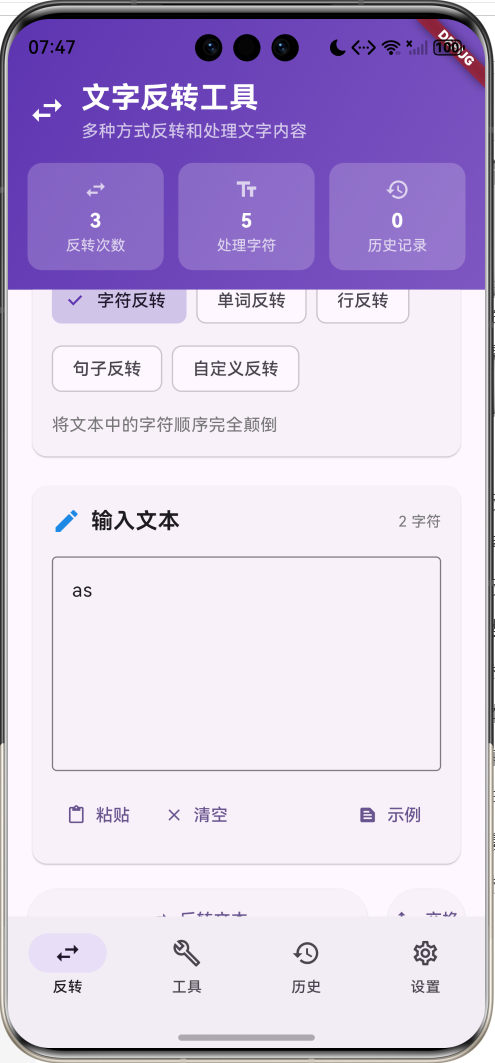
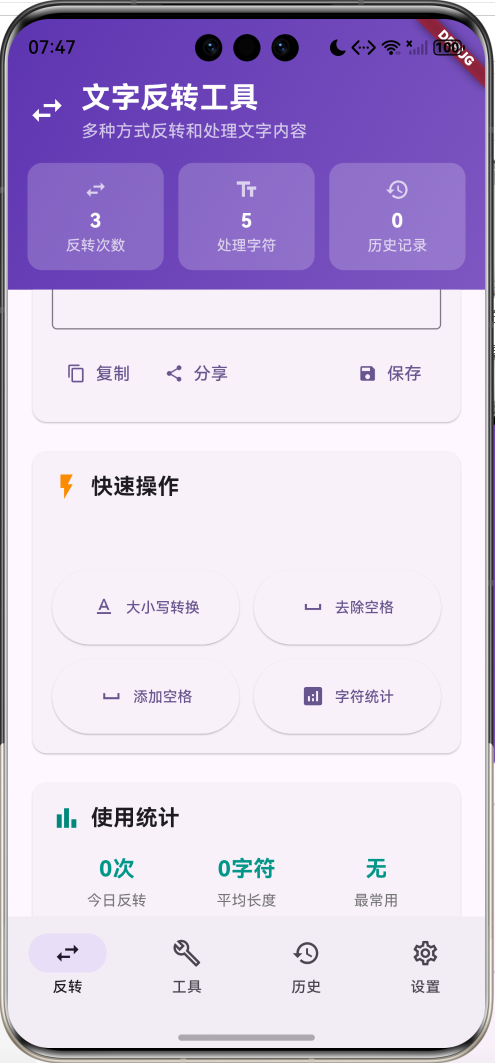
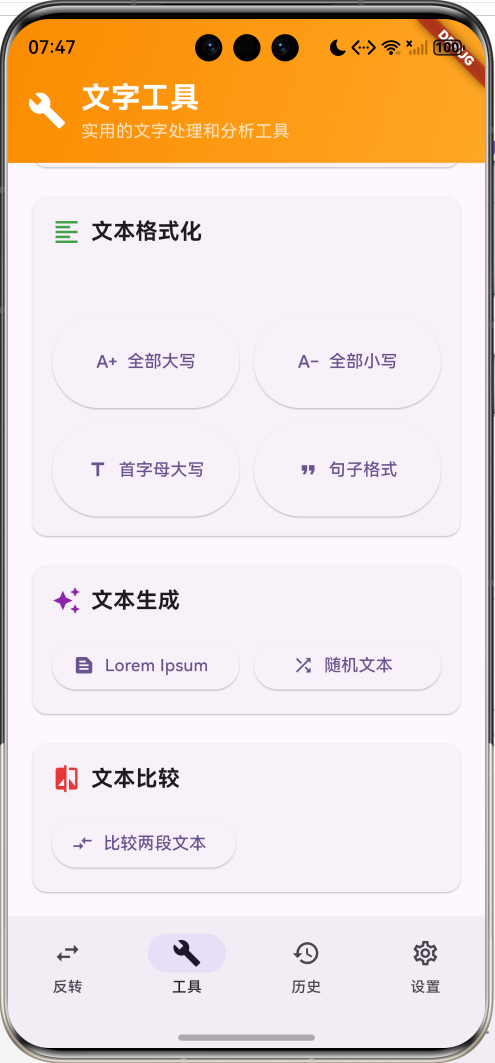
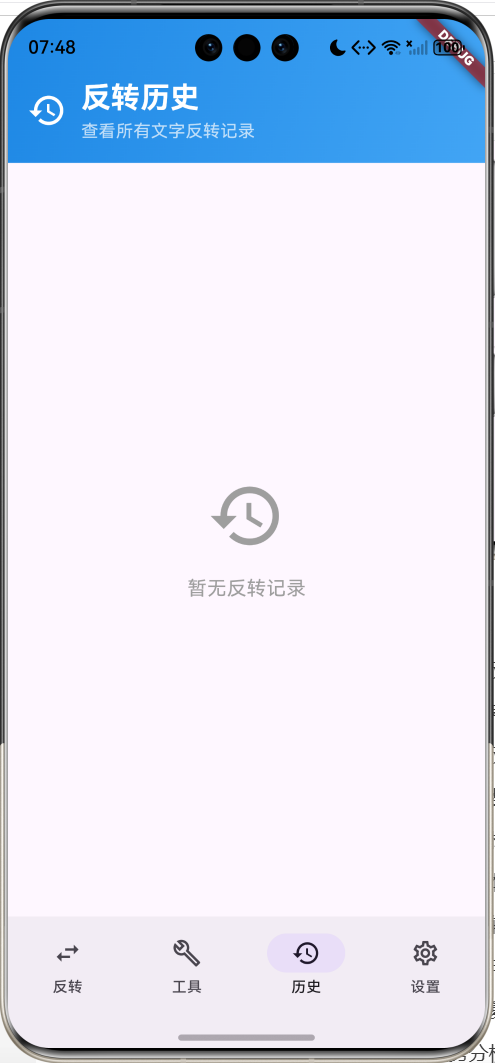
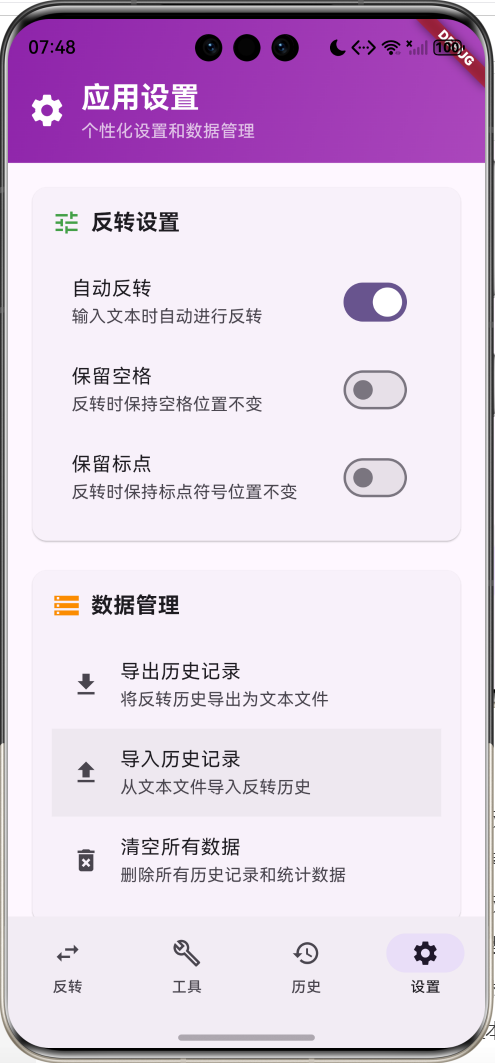
核心特性
- 多种反转模式:字符反转、单词反转、行反转、句子反转、自定义反转
- 智能保留选项:可选择保留空格和标点符号位置
- 实时反转:支持自动反转模式,输入即时反转
- 文本分析工具:字符统计、单词计数、行数分析等
- 格式化功能:大小写转换、句子格式化、标题格式化
- 文本生成器:Lorem Ipsum生成、随机文本生成
- 文本比较器:两段文本的相似度分析和比较
- 历史记录管理:完整的反转历史记录和重用功能
- 数据导入导出:支持历史记录的备份和恢复
- 使用统计分析:详细的使用数据和趋势分析
技术栈
- Flutter 3.x
- Material Design 3
- 文本处理算法
- 动画控制器(AnimationController)
- 状态管理
- 剪贴板操作
项目架构
TextReverseHomePage
ReversePage
ToolsPage
HistoryPage
SettingsPage
ReverseTypeSelector
TextInputArea
ActionButtons
TextOutputArea
QuickActions
Statistics
CharacterReverse
WordReverse
LineReverse
SentenceReverse
CustomReverse
PasteFunction
ClearFunction
SampleText
CopyFunction
ShareFunction
SaveToHistory
CaseToggle
SpaceManagement
CharacterStats
TextAnalyzer
TextFormatter
TextGenerator
TextComparator
AnalysisResults
FormatButtons
LoremIpsum
RandomText
SimilarityCalculation
HistoryList
HistoryItem
ReverseRecord
CopyFunction
ReuseFunction
DeleteFunction
ReverseSettings
DataManagement
AutoReverse
PreserveOptions
ExportImport
ClearData
ReverseRecord
ReverseType
TextProcessor
AnimationController
数据模型设计
ReverseRecord(反转记录模型)
dart
class ReverseRecord {
  final String originalText;        // 原始文本
  final String reversedText;        // 反转后文本
  final ReverseType type;           // 反转类型
  final DateTime timestamp;         // 创建时间

  const ReverseRecord({
    required this.originalText,
    required this.reversedText,
    required this.type,
    required this.timestamp,
  });
}设计要点:
- originalText和reversedText存储反转前后的文本内容
- type标识使用的反转类型,便于分类和统计
- timestamp用于历史记录排序和时间显示
- 模型简洁明了,便于序列化和存储
ReverseType(反转类型枚举)
dart
enum ReverseType {
  character,    // 字符反转
  word,         // 单词反转
  line,         // 行反转
  sentence,     // 句子反转
  custom,       // 自定义反转
}
反转类型配置
| 反转类型 | 说明 | 处理方式 | 示例 |
|---|---|---|---|
| character | 字符反转 | 将所有字符顺序完全颠倒 | "Hello" → "olleH" |
| word | 单词反转 | 将单词顺序颠倒,保持单词内部不变 | "Hello World" → "World Hello" |
| line | 行反转 | 将文本行的顺序颠倒 | "Line1\nLine2" → "Line2\nLine1" |
| sentence | 句子反转 | 将句子顺序颠倒 | "A. B. C." → "C. B. A." |
| custom | 自定义反转 | 根据用户设置的规则反转 | 可配置保留选项 |
设置选项配置
dart
// 反转设置
bool _autoReverse = true;           // 自动反转
bool _preserveSpaces = false;       // 保留空格
bool _preservePunctuation = false;  // 保留标点

// 统计信息
int _totalReversals = 0;           // 总反转次数
int _charactersProcessed = 0;      // 处理字符数
核心功能实现
1. 字符反转算法
实现多种字符反转模式,支持保留空格和标点符号。
dart
String _reverseCharacters(String text) {
  if (_preserveSpaces && _preservePunctuation) {
    return _reverseWithPreservation(text);
  } else if (_preserveSpaces) {
    return _reverseWithSpaces(text);
  } else {
    return text.split('').reversed.join('');
  }
}

// 保留空格和标点的反转
String _reverseWithPreservation(String text) {
  final chars = text.split('');
  final letters = <String>[];
  final positions = <int, String>{};

  // 提取字母和记录特殊字符位置
  for (int i = 0; i < chars.length; i++) {
    if (chars[i].contains(RegExp(r'[a-zA-Z\u4e00-\u9fa5]'))) {
      letters.add(chars[i]);
    } else {
      positions[i] = chars[i];
    }
  }

  // 反转字母
  final reversedLetters = letters.reversed.toList();
  final result = <String>[];
  int letterIndex = 0;

  // 重建字符串
  for (int i = 0; i < chars.length; i++) {
    if (positions.containsKey(i)) {
      result.add(positions[i]!);
    } else {
      result.add(reversedLetters[letterIndex++]);
    }
  }

  return result.join('');
}

// 保留空格的反转
String _reverseWithSpaces(String text) {
  final chars = text.split('');
  final nonSpaces = chars.where((c) => c != ' ').toList();
  final reversed = nonSpaces.reversed.toList();

  final result = <String>[];
  int reversedIndex = 0;

  for (final char in chars) {
    if (char == ' ') {
      result.add(' ');
    } else {
      result.add(reversed[reversedIndex++]);
    }
  }

  return result.join('');
}算法特点:
- 多模式支持:支持完全反转、保留空格、保留标点等模式
- Unicode兼容:正确处理中文、英文和特殊字符
- 位置保持:在保留模式下精确维持特殊字符位置
- 高效处理:使用索引映射避免多次遍历
2. 单词和句子反转
实现基于语义单位的反转功能。
dart
String _reverseWords(String text) {
  final words = text.split(RegExp(r'\s+'));
  return words.reversed.join(' ');
}

String _reverseLines(String text) {
  final lines = text.split('\n');
  return lines.reversed.join('\n');
}

String _reverseSentences(String text) {
  final sentences = text.split(RegExp(r'[.!?]+'));
  return sentences.where((s) => s.trim().isNotEmpty).toList().reversed.join('. ');
}反转特点:
- 语义保持:保持单词和句子的内部结构
- 分隔符处理:正确处理各种分隔符和标点
- 空白处理:智能处理多余的空白字符
- 格式保持:维持原有的文本格式结构
3. 实时反转系统
实现自动反转和手动反转的双模式支持。
dart
void _onInputChanged() {
  if (_autoReverse && _inputController.text.isNotEmpty) {
    _performReverse();
  } else if (_inputController.text.isEmpty) {
    _outputController.clear();
  }
}

void _performReverse() {
  final input = _inputController.text;
  if (input.isEmpty) return;

  String result;
  switch (_selectedReverseType) {
    case ReverseType.character:
      result = _reverseCharacters(input);
      break;
    case ReverseType.word:
      result = _reverseWords(input);
      break;
    case ReverseType.line:
      result = _reverseLines(input);
      break;
    case ReverseType.sentence:
      result = _reverseSentences(input);
      break;
    case ReverseType.custom:
      result = _customReverse(input);
      break;
  }

  setState(() {
    _outputController.text = result;
    _totalReversals++;
    _charactersProcessed += input.length;
  });

  // 添加动画效果
  _slideController.forward().then((_) {
    _slideController.reset();
  });
}实时反转特点:
- 即时响应:输入变化时立即反转
- 性能优化:避免不必要的计算和更新
- 统计更新:实时更新使用统计数据
- 动画反馈:提供视觉反馈增强用户体验
4. 文本分析工具
提供详细的文本统计和分析功能。
dart
Widget _buildAnalysisResults() {
  final text = _inputController.text;
  final charCount = text.length;
  final wordCount = text.trim().isEmpty ? 0 : text.trim().split(RegExp(r'\s+')).length;
  final lineCount = text.split('\n').length;
  final paragraphCount = text.split('\n\n').where((p) => p.trim().isNotEmpty).length;

  return Container(
    padding: const EdgeInsets.all(16),
    decoration: BoxDecoration(
      color: Colors.blue.shade50,
      borderRadius: BorderRadius.circular(8),
    ),
    child: Column(
      children: [
        Row(
          children: [
            Expanded(child: _buildAnalysisItem('字符数', '$charCount')),
            Expanded(child: _buildAnalysisItem('单词数', '$wordCount')),
          ],
        ),
        const SizedBox(height: 12),
        Row(
          children: [
            Expanded(child: _buildAnalysisItem('行数', '$lineCount')),
            Expanded(child: _buildAnalysisItem('段落数', '$paragraphCount')),
          ],
        ),
      ],
    ),
  );
}

void _showCharacterStats() {
  final text = _inputController.text;
  if (text.isEmpty) {
    ScaffoldMessenger.of(context).showSnackBar(
      const SnackBar(content: Text('请先输入文本')),
    );
    return;
  }

  final charCount = text.length;
  final wordCount = text.trim().isEmpty ? 0 : text.trim().split(RegExp(r'\s+')).length;
  final lineCount = text.split('\n').length;
  final uniqueChars = text.split('').toSet().length;

  showDialog(
    context: context,
    builder: (context) {
      return AlertDialog(
        title: const Text('字符统计'),
        content: Column(
          mainAxisSize: MainAxisSize.min,
          crossAxisAlignment: CrossAxisAlignment.start,
          children: [
            Text('总字符数: $charCount'),
            Text('单词数: $wordCount'),
            Text('行数: $lineCount'),
            Text('唯一字符数: $uniqueChars'),
          ],
        ),
        actions: [
          TextButton(
            onPressed: () => Navigator.pop(context),
            child: const Text('确定'),
          ),
        ],
      );
    },
  );
}分析功能特点:
- 多维统计:字符、单词、行、段落等多维度统计
- 实时更新:输入变化时实时更新统计结果
- 唯一性分析:统计唯一字符数量
- 详细展示:弹窗显示详细统计信息
5. 文本格式化工具
提供多种文本格式化选项。
dart
void _formatText(String format) {
  if (_inputController.text.isEmpty) return;

  String result;
  switch (format) {
    case 'upper':
      result = _inputController.text.toUpperCase();
      break;
    case 'lower':
      result = _inputController.text.toLowerCase();
      break;
    case 'title':
      result = _inputController.text.split(' ')
          .map((word) => word.isEmpty ? word :
               word[0].toUpperCase() + word.substring(1).toLowerCase())
          .join(' ');
      break;
    case 'sentence':
      result = _inputController.text.split('. ')
          .map((sentence) => sentence.isEmpty ? sentence :
               sentence[0].toUpperCase() + sentence.substring(1).toLowerCase())
          .join('. ');
      break;
    default:
      result = _inputController.text;
  }

  setState(() {
    _inputController.text = result;
  });

  if (_autoReverse) {
    _performReverse();
  }
}

void _toggleCase() {
  if (_inputController.text.isNotEmpty) {
    final text = _inputController.text;
    final isUpperCase = text == text.toUpperCase();
    setState(() {
      _inputController.text = isUpperCase ? text.toLowerCase() : text.toUpperCase();
    });
    if (_autoReverse) {
      _performReverse();
    }
  }
}

void _removeSpaces() {
  if (_inputController.text.isNotEmpty) {
    setState(() {
      _inputController.text = _inputController.text.replaceAll(' ', '');
    });
    if (_autoReverse) {
      _performReverse();
    }
  }
}

void _addSpaces() {
  if (_inputController.text.isNotEmpty) {
    setState(() {
      _inputController.text = _inputController.text.split('').join(' ');
    });
    if (_autoReverse) {
      _performReverse();
    }
  }
}格式化特点:
- 多种模式:大小写、标题格式、句子格式等
- 智能处理:正确处理单词边界和句子结构
- 空格管理:添加或移除空格的便捷操作
- 联动反转:格式化后自动触发反转
6. 文本生成器
提供Lorem Ipsum和随机文本生成功能。
dart
void _generateLoremIpsum() {
  const loremIpsum = 'Lorem ipsum dolor sit amet, consectetur adipiscing elit, '
      'sed do eiusmod tempor incididunt ut labore et dolore magna aliqua. '
      'Ut enim ad minim veniam, quis nostrud exercitation ullamco laboris '
      'nisi ut aliquip ex ea commodo consequat.';

  setState(() {
    _inputController.text = loremIpsum;
  });

  if (_autoReverse) {
    _performReverse();
  }
}

void _generateRandomText() {
  const words = ['apple', 'banana', 'cherry', 'date', 'elderberry',
                 'fig', 'grape', 'honeydew', 'kiwi', 'lemon'];
  final random = DateTime.now().millisecondsSinceEpoch;
  final selectedWords = <String>[];

  for (int i = 0; i < 10; i++) {
    selectedWords.add(words[(random + i) % words.length]);
  }

  setState(() {
    _inputController.text = selectedWords.join(' ');
  });

  if (_autoReverse) {
    _performReverse();
  }
}

void _loadSampleText() {
  const sampleTexts = [
    'Hello World! 你好世界!',
    'The quick brown fox jumps over the lazy dog.',
    '人生若只如初见,何事秋风悲画扇。',
    'Flutter is Google\'s UI toolkit for building beautiful apps.',
    '春眠不觉晓,处处闻啼鸟。夜来风雨声,花落知多少。',
  ];

  final random = DateTime.now().millisecondsSinceEpoch % sampleTexts.length;
  setState(() {
    _inputController.text = sampleTexts[random];
  });

  if (_autoReverse) {
    _performReverse();
  }
}生成器特点:
- 标准文本:提供Lorem Ipsum标准占位文本
- 随机生成:基于词库生成随机文本组合
- 示例文本:提供多语言示例文本
- 即时应用:生成后立即应用到输入框
7. 文本比较工具
实现两段文本的相似度分析和比较。
dart
void _showTextComparator() {
  showDialog(
    context: context,
    builder: (context) {
      final text1Controller = TextEditingController();
      final text2Controller = TextEditingController();

      return AlertDialog(
        title: const Text('文本比较'),
        content: SizedBox(
          width: 400,
          height: 300,
          child: Column(
            children: [
              Expanded(
                child: TextField(
                  controller: text1Controller,
                  decoration: const InputDecoration(
                    labelText: '文本1',
                    border: OutlineInputBorder(),
                  ),
                  maxLines: null,
                  expands: true,
                ),
              ),
              const SizedBox(height: 16),
              Expanded(
                child: TextField(
                  controller: text2Controller,
                  decoration: const InputDecoration(
                    labelText: '文本2',
                    border: OutlineInputBorder(),
                  ),
                  maxLines: null,
                  expands: true,
                ),
              ),
            ],
          ),
        ),
        actions: [
          TextButton(
            onPressed: () => Navigator.pop(context),
            child: const Text('取消'),
          ),
          ElevatedButton(
            onPressed: () {
              _compareTexts(text1Controller.text, text2Controller.text);
              Navigator.pop(context);
            },
            child: const Text('比较'),
          ),
        ],
      );
    },
  );
}

void _compareTexts(String text1, String text2) {
  final similarity = _calculateSimilarity(text1, text2);
  final lengthDiff = (text1.length - text2.length).abs();

  showDialog(
    context: context,
    builder: (context) {
      return AlertDialog(
        title: const Text('比较结果'),
        content: Column(
          mainAxisSize: MainAxisSize.min,
          crossAxisAlignment: CrossAxisAlignment.start,
          children: [
            Text('相似度: ${(similarity * 100).toStringAsFixed(1)}%'),
            Text('长度差异: $lengthDiff 字符'),
            Text('文本1长度: ${text1.length}'),
            Text('文本2长度: ${text2.length}'),
          ],
        ),
        actions: [
          TextButton(
            onPressed: () => Navigator.pop(context),
            child: const Text('确定'),
          ),
        ],
      );
    },
  );
}

double _calculateSimilarity(String text1, String text2) {
  if (text1.isEmpty && text2.isEmpty) return 1.0;
  if (text1.isEmpty || text2.isEmpty) return 0.0;

  final maxLength = text1.length > text2.length ? text1.length : text2.length;
  int matches = 0;

  for (int i = 0; i < maxLength; i++) {
    if (i < text1.length && i < text2.length && text1[i] == text2[i]) {
      matches++;
    }
  }

  return matches / maxLength;
}比较功能特点:
- 相似度计算:基于字符匹配的相似度算法
- 多维比较:长度差异、字符匹配等多维度比较
- 直观展示:百分比和具体数值的清晰展示
- 交互友好:双输入框的便捷比较界面
8. 历史记录管理
完整的反转历史记录和管理功能。
dart
void _saveToHistory() {
  if (_inputController.text.isNotEmpty && _outputController.text.isNotEmpty) {
    final record = ReverseRecord(
      originalText: _inputController.text,
      reversedText: _outputController.text,
      type: _selectedReverseType,
      timestamp: DateTime.now(),
    );

    setState(() {
      _reverseHistory.insert(0, record);
    });

    ScaffoldMessenger.of(context).showSnackBar(
      const SnackBar(content: Text('已保存到历史记录')),
    );
  }
}

Widget _buildHistoryItem(ReverseRecord record, int index) {
  return Card(
    margin: const EdgeInsets.only(bottom: 8),
    child: ExpansionTile(
      leading: CircleAvatar(
        backgroundColor: _getReverseTypeColor(record.type),
        child: Icon(
          _getReverseTypeIcon(record.type),
          color: Colors.white,
          size: 20,
        ),
      ),
      title: Text(
        _getReverseTypeName(record.type),
        style: const TextStyle(fontWeight: FontWeight.w500),
      ),
      subtitle: Column(
        crossAxisAlignment: CrossAxisAlignment.start,
        children: [
          Text(
            record.originalText.length > 30
                ? '${record.originalText.substring(0, 30)}...'
                : record.originalText,
            style: const TextStyle(fontSize: 12),
          ),
          Text(
            _formatTime(record.timestamp),
            style: TextStyle(
              fontSize: 10,
              color: Colors.grey.shade600,
            ),
          ),
        ],
      ),
      children: [
        Padding(
          padding: const EdgeInsets.all(16),
          child: Column(
            crossAxisAlignment: CrossAxisAlignment.start,
            children: [
              const Text('原文:', style: TextStyle(fontWeight: FontWeight.bold)),
              const SizedBox(height: 4),
              Container(
                width: double.infinity,
                padding: const EdgeInsets.all(12),
                decoration: BoxDecoration(
                  color: Colors.grey.shade100,
                  borderRadius: BorderRadius.circular(8),
                ),
                child: Text(record.originalText),
              ),
              const SizedBox(height: 12),
              const Text('反转结果:', style: TextStyle(fontWeight: FontWeight.bold)),
              const SizedBox(height: 4),
              Container(
                width: double.infinity,
                padding: const EdgeInsets.all(12),
                decoration: BoxDecoration(
                  color: Colors.blue.shade50,
                  borderRadius: BorderRadius.circular(8),
                ),
                child: Text(record.reversedText),
              ),
              const SizedBox(height: 12),
              Row(
                children: [
                  TextButton.icon(
                    onPressed: () => _copyHistoryItem(record.reversedText),
                    icon: const Icon(Icons.copy, size: 16),
                    label: const Text('复制'),
                  ),
                  TextButton.icon(
                    onPressed: () => _reuseHistoryItem(record),
                    icon: const Icon(Icons.refresh, size: 16),
                    label: const Text('重用'),
                  ),
                  const Spacer(),
                  TextButton.icon(
                    onPressed: () => _deleteHistoryItem(index),
                    icon: const Icon(Icons.delete, size: 16),
                    label: const Text('删除'),
                  ),
                ],
              ),
            ],
          ),
        ),
      ],
    ),
  );
}

void _reuseHistoryItem(ReverseRecord record) {
  setState(() {
    _inputController.text = record.originalText;
    _outputController.text = record.reversedText;
    _selectedReverseType = record.type;
    _selectedIndex = 0; // 切换到反转页面
  });
}历史管理特点:
- 完整记录:保存原文、结果、类型和时间
- 分类显示:不同反转类型使用不同颜色和图标
- 展开详情:可展开查看完整的反转内容
- 便捷操作:复制、重用、删除等快捷操作
9. 使用统计分析
提供详细的使用数据和趋势分析。
dart
int _getTodayReversals() {
  final today = DateTime.now();
  return _reverseHistory.where((record) {
    return record.timestamp.year == today.year &&
        record.timestamp.month == today.month &&
        record.timestamp.day == today.day;
  }).length;
}

int _getAverageLength() {
  if (_reverseHistory.isEmpty) return 0;
  final totalLength = _reverseHistory
      .map((record) => record.originalText.length)
      .reduce((a, b) => a + b);
  return (totalLength / _reverseHistory.length).round();
}

String _getMostUsedType() {
  if (_reverseHistory.isEmpty) return '无';

  final typeCount = <ReverseType, int>{};
  for (final record in _reverseHistory) {
    typeCount[record.type] = (typeCount[record.type] ?? 0) + 1;
  }

  final mostUsed = typeCount.entries
      .reduce((a, b) => a.value > b.value ? a : b);

  return _getReverseTypeName(mostUsed.key);
}

Widget _buildStatistics() {
  return Card(
    child: Padding(
      padding: const EdgeInsets.all(16),
      child: Column(
        crossAxisAlignment: CrossAxisAlignment.start,
        children: [
          Row(
            children: [
              Icon(Icons.bar_chart, color: Colors.teal.shade600),
              const SizedBox(width: 8),
              const Text(
                '使用统计',
                style: TextStyle(fontSize: 18, fontWeight: FontWeight.bold),
              ),
            ],
          ),
          const SizedBox(height: 16),
          Row(
            children: [
              Expanded(
                child: _buildStatItem('今日反转', '${_getTodayReversals()}次'),
              ),
              Expanded(
                child: _buildStatItem('平均长度', '${_getAverageLength()}字符'),
              ),
              Expanded(
                child: _buildStatItem('最常用', _getMostUsedType()),
              ),
            ],
          ),
        ],
      ),
    ),
  );
}统计分析特点:
- 实时统计:实时更新使用数据和统计信息
- 多维分析:今日使用、平均长度、最常用类型等
- 趋势展示:直观显示使用趋势和偏好
- 数据驱动:基于历史数据的智能分析
10. 剪贴板集成
实现与系统剪贴板的无缝集成。
dart
void _pasteFromClipboard() async {
  final data = await Clipboard.getData(Clipboard.kTextPlain);
  if (data?.text != null) {
    setState(() {
      _inputController.text = data!.text!;
    });
    if (_autoReverse) {
      _performReverse();
    }
  }
}

void _copyToClipboard() {
  Clipboard.setData(ClipboardData(text: _outputController.text));
  ScaffoldMessenger.of(context).showSnackBar(
    const SnackBar(content: Text('已复制到剪贴板')),
  );
}

void _copyHistoryItem(String text) {
  Clipboard.setData(ClipboardData(text: text));
  ScaffoldMessenger.of(context).showSnackBar(
    const SnackBar(content: Text('已复制到剪贴板')),
  );
}剪贴板特点:
- 快速粘贴:一键从剪贴板粘贴文本
- 便捷复制:快速复制反转结果
- 历史复制:直接复制历史记录中的内容
- 用户反馈:操作完成后的即时反馈
UI组件设计
1. 渐变头部组件
dart
Widget _buildReverseHeader() {
  return Container(
    padding: const EdgeInsets.fromLTRB(16, 48, 16, 16),
    decoration: BoxDecoration(
      gradient: LinearGradient(
        colors: [Colors.deepPurple.shade600, Colors.deepPurple.shade400],
        begin: Alignment.topLeft,
        end: Alignment.bottomRight,
      ),
    ),
    child: Column(
      children: [
        Row(
          children: [
            const Icon(Icons.swap_horiz, color: Colors.white, size: 32),
            const SizedBox(width: 12),
            const Expanded(
              child: Column(
                crossAxisAlignment: CrossAxisAlignment.start,
                children: [
                  Text(
                    '文字反转工具',
                    style: TextStyle(
                      fontSize: 24,
                      fontWeight: FontWeight.bold,
                      color: Colors.white,
                    ),
                  ),
                  Text(
                    '多种方式反转和处理文字内容',
                    style: TextStyle(
                      fontSize: 14,
                      color: Colors.white70,
                    ),
                  ),
                ],
              ),
            ),
          ],
        ),
        const SizedBox(height: 16),
        Row(
          children: [
            Expanded(
              child: _buildHeaderCard('反转次数', '$_totalReversals', Icons.swap_horiz),
            ),
            const SizedBox(width: 12),
            Expanded(
              child: _buildHeaderCard('处理字符', '$_charactersProcessed', Icons.text_fields),
            ),
            const SizedBox(width: 12),
            Expanded(
              child: _buildHeaderCard('历史记录', '${_reverseHistory.length}', Icons.history),
            ),
          ],
        ),
      ],
    ),
  );
}
2. 反转类型选择器
dart
Widget _buildReverseTypeSelector() {
  return Card(
    child: Padding(
      padding: const EdgeInsets.all(16),
      child: Column(
        crossAxisAlignment: CrossAxisAlignment.start,
        children: [
          Row(
            children: [
              Icon(Icons.category, color: Colors.deepPurple.shade600),
              const SizedBox(width: 8),
              const Text(
                '反转类型',
                style: TextStyle(fontSize: 18, fontWeight: FontWeight.bold),
              ),
            ],
          ),
          const SizedBox(height: 16),
          Wrap(
            spacing: 8,
            runSpacing: 8,
            children: ReverseType.values.map((type) {
              final isSelected = _selectedReverseType == type;
              return FilterChip(
                label: Text(_getReverseTypeName(type)),
                selected: isSelected,
                onSelected: (selected) {
                  setState(() {
                    _selectedReverseType = type;
                  });
                  if (_inputController.text.isNotEmpty) {
                    _performReverse();
                  }
                },
                selectedColor: Colors.deepPurple.shade100,
                checkmarkColor: Colors.deepPurple.shade600,
              );
            }).toList(),
          ),
          const SizedBox(height: 12),
          Text(
            _getReverseTypeDescription(_selectedReverseType),
            style: TextStyle(
              fontSize: 14,
              color: Colors.grey.shade600,
            ),
          ),
        ],
      ),
    ),
  );
}
3. 文本输入输出区域
dart
Widget _buildTextInputArea() {
  return Card(
    child: Padding(
      padding: const EdgeInsets.all(16),
      child: Column(
        crossAxisAlignment: CrossAxisAlignment.start,
        children: [
          Row(
            children: [
              Icon(Icons.edit, color: Colors.blue.shade600),
              const SizedBox(width: 8),
              const Text(
                '输入文本',
                style: TextStyle(fontSize: 18, fontWeight: FontWeight.bold),
              ),
              const Spacer(),
              Text(
                '${_inputController.text.length} 字符',
                style: TextStyle(
                  fontSize: 12,
                  color: Colors.grey.shade600,
                ),
              ),
            ],
          ),
          const SizedBox(height: 16),
          TextField(
            controller: _inputController,
            maxLines: 6,
            decoration: const InputDecoration(
              hintText: '请输入要反转的文本...',
              border: OutlineInputBorder(),
              contentPadding: EdgeInsets.all(16),
            ),
          ),
          const SizedBox(height: 12),
          Row(
            children: [
              TextButton.icon(
                onPressed: _pasteFromClipboard,
                icon: const Icon(Icons.paste, size: 16),
                label: const Text('粘贴'),
              ),
              TextButton.icon(
                onPressed: _clearInput,
                icon: const Icon(Icons.clear, size: 16),
                label: const Text('清空'),
              ),
              const Spacer(),
              TextButton.icon(
                onPressed: _loadSampleText,
                icon: const Icon(Icons.text_snippet, size: 16),
                label: const Text('示例'),
              ),
            ],
          ),
        ],
      ),
    ),
  );
}

Widget _buildTextOutputArea() {
  return Card(
    child: Padding(
      padding: const EdgeInsets.all(16),
      child: Column(
        crossAxisAlignment: CrossAxisAlignment.start,
        children: [
          Row(
            children: [
              Icon(Icons.output, color: Colors.green.shade600),
              const SizedBox(width: 8),
              const Text(
                '反转结果',
                style: TextStyle(fontSize: 18, fontWeight: FontWeight.bold),
              ),
              const Spacer(),
              Text(
                '${_outputController.text.length} 字符',
                style: TextStyle(
                  fontSize: 12,
                  color: Colors.grey.shade600,
                ),
              ),
            ],
          ),
          const SizedBox(height: 16),
          TextField(
            controller: _outputController,
            maxLines: 6,
            readOnly: true,
            decoration: const InputDecoration(
              hintText: '反转结果将显示在这里...',
              border: OutlineInputBorder(),
              contentPadding: EdgeInsets.all(16),
            ),
          ),
          const SizedBox(height: 12),
          Row(
            children: [
              TextButton.icon(
                onPressed: _outputController.text.isEmpty ? null : _copyToClipboard,
                icon: const Icon(Icons.copy, size: 16),
                label: const Text('复制'),
              ),
              TextButton.icon(
                onPressed: _outputController.text.isEmpty ? null : _shareResult,
                icon: const Icon(Icons.share, size: 16),
                label: const Text('分享'),
              ),
              const Spacer(),
              TextButton.icon(
                onPressed: _outputController.text.isEmpty ? null : _saveToHistory,
                icon: const Icon(Icons.save, size: 16),
                label: const Text('保存'),
              ),
            ],
          ),
        ],
      ),
    ),
  );
}
4. NavigationBar底部导航
dart
NavigationBar(
  selectedIndex: _selectedIndex,
  onDestinationSelected: (index) {
    setState(() {
      _selectedIndex = index;
    });
  },
  destinations: const [
    NavigationDestination(
      icon: Icon(Icons.swap_horiz_outlined),
      selectedIcon: Icon(Icons.swap_horiz),
      label: '反转',
    ),
    NavigationDestination(
      icon: Icon(Icons.build_outlined),
      selectedIcon: Icon(Icons.build),
      label: '工具',
    ),
    NavigationDestination(
      icon: Icon(Icons.history_outlined),
      selectedIcon: Icon(Icons.history),
      label: '历史',
    ),
    NavigationDestination(
      icon: Icon(Icons.settings_outlined),
      selectedIcon: Icon(Icons.settings),
      label: '设置',
    ),
  ],
)
功能扩展建议
1. 高级反转模式
dart
class AdvancedReverseMode {
  // 按词性反转
  String reverseByWordType(String text) {
    // 实现基于词性的反转逻辑
    final words = text.split(' ');
    final nouns = <String>[];
    final verbs = <String>[];
    final adjectives = <String>[];

    // 简化的词性识别(实际应用中可使用NLP库)
    for (final word in words) {
      if (_isNoun(word)) {
        nouns.add(word);
      } else if (_isVerb(word)) {
        verbs.add(word);
      } else if (_isAdjective(word)) {
        adjectives.add(word);
      }
    }

    // 分别反转不同词性的单词
    return _reconstructSentence(words, {
      'nouns': nouns.reversed.toList(),
      'verbs': verbs.reversed.toList(),
      'adjectives': adjectives.reversed.toList(),
    });
  }

  // 按音节反转
  String reverseBySyllable(String text) {
    final syllables = _extractSyllables(text);
    return syllables.reversed.join('');
  }

  // 按语言反转
  String reverseByLanguage(String text) {
    final chineseChars = <String>[];
    final englishWords = <String>[];
    final numbers = <String>[];

    final chars = text.split('');
    for (final char in chars) {
      if (_isChinese(char)) {
        chineseChars.add(char);
      } else if (_isEnglish(char)) {
        englishWords.add(char);
      } else if (_isNumber(char)) {
        numbers.add(char);
      }
    }

    return _reconstructByLanguage(text, {
      'chinese': chineseChars.reversed.toList(),
      'english': englishWords.reversed.toList(),
      'numbers': numbers.reversed.toList(),
    });
  }

  bool _isNoun(String word) {
    // 简化的名词识别逻辑
    const nounSuffixes = ['tion', 'ness', 'ment', 'ing'];
    return nounSuffixes.any((suffix) => word.endsWith(suffix));
  }

  bool _isVerb(String word) {
    // 简化的动词识别逻辑
    const verbSuffixes = ['ed', 'ing', 'ate', 'ize'];
    return verbSuffixes.any((suffix) => word.endsWith(suffix));
  }

  bool _isAdjective(String word) {
    // 简化的形容词识别逻辑
    const adjSuffixes = ['ful', 'less', 'able', 'ous'];
    return adjSuffixes.any((suffix) => word.endsWith(suffix));
  }

  bool _isChinese(String char) {
    return char.codeUnitAt(0) >= 0x4e00 && char.codeUnitAt(0) <= 0x9fff;
  }

  bool _isEnglish(String char) {
    return RegExp(r'[a-zA-Z]').hasMatch(char);
  }

  bool _isNumber(String char) {
    return RegExp(r'[0-9]').hasMatch(char);
  }
}
2. 批量文本处理
dart
class BatchTextProcessor {
  // 批量反转处理
  Future<List<String>> processBatchReverse(
    List<String> texts,
    ReverseType type,
    Map<String, bool> options,
  ) async {
    return await compute(_batchReverseIsolate, {
      'texts': texts,
      'type': type.index,
      'options': options,
    });
  }

  static List<String> _batchReverseIsolate(Map<String, dynamic> params) {
    final texts = params['texts'] as List<String>;
    final typeIndex = params['type'] as int;
    final type = ReverseType.values[typeIndex];
    final options = params['options'] as Map<String, bool>;

    return texts.map((text) => _processText(text, type, options)).toList();
  }

  static String _processText(String text, ReverseType type, Map<String, bool> options) {
    switch (type) {
      case ReverseType.character:
        return _reverseCharacters(text, options);
      case ReverseType.word:
        return _reverseWords(text);
      case ReverseType.line:
        return _reverseLines(text);
      case ReverseType.sentence:
        return _reverseSentences(text);
      default:
        return text.split('').reversed.join('');
    }
  }

  // 批量处理界面
  Widget buildBatchProcessor() {
    return Card(
      child: Column(
        children: [
          const Text('批量文本处理', style: TextStyle(fontSize: 18, fontWeight: FontWeight.bold)),
          const SizedBox(height: 16),
          ElevatedButton(
            onPressed: _showBatchProcessor,
            child: const Text('批量反转处理'),
          ),
        ],
      ),
    );
  }

  void _showBatchProcessor() {
    showDialog(
      context: context,
      builder: (context) {
        String textList = '';
        ReverseType selectedType = ReverseType.character;

        return StatefulBuilder(
          builder: (context, setState) {
            return AlertDialog(
              title: const Text('批量文本处理'),
              content: SizedBox(
                width: 400,
                height: 500,
                child: Column(
                  children: [
                    TextField(
                      maxLines: 8,
                      decoration: const InputDecoration(
                        labelText: '文本列表(每行一个)',
                        border: OutlineInputBorder(),
                      ),
                      onChanged: (value) => textList = value,
                    ),
                    const SizedBox(height: 16),
                    DropdownButtonFormField<ReverseType>(
                      value: selectedType,
                      decoration: const InputDecoration(
                        labelText: '反转类型',
                        border: OutlineInputBorder(),
                      ),
                      items: ReverseType.values.map((type) {
                        return DropdownMenuItem(
                          value: type,
                          child: Text(_getReverseTypeName(type)),
                        );
                      }).toList(),
                      onChanged: (value) => setState(() => selectedType = value!),
                    ),
                  ],
                ),
              ),
              actions: [
                TextButton(
                  onPressed: () => Navigator.pop(context),
                  child: const Text('取消'),
                ),
                ElevatedButton(
                  onPressed: () {
                    _processBatchTexts(textList, selectedType);
                    Navigator.pop(context);
                  },
                  child: const Text('处理'),
                ),
              ],
            );
          },
        );
      },
    );
  }
}
3. 文本加密解密
dart
class TextEncryption {
  // 凯撒密码
  String caesarCipher(String text, int shift) {
    return text.split('').map((char) {
      if (char.contains(RegExp(r'[a-zA-Z]'))) {
        final isUpperCase = char == char.toUpperCase();
        final base = isUpperCase ? 65 : 97; // A or a
        final shifted = (char.codeUnitAt(0) - base + shift) % 26 + base;
        return String.fromCharCode(shifted);
      }
      return char;
    }).join('');
  }

  // 简单替换密码
  String substitutionCipher(String text, Map<String, String> substitutionMap) {
    String result = text;
    substitutionMap.forEach((key, value) {
      result = result.replaceAll(key, value);
    });
    return result;
  }

  // Base64编码
  String base64Encode(String text) {
    return base64.encode(utf8.encode(text));
  }

  String base64Decode(String encodedText) {
    try {
      return utf8.decode(base64.decode(encodedText));
    } catch (e) {
      return '解码失败';
    }
  }

  // 摩尔斯电码
  String toMorseCode(String text) {
    const morseMap = {
      'A': '.-', 'B': '-...', 'C': '-.-.', 'D': '-..', 'E': '.', 'F': '..-.',
      'G': '--.', 'H': '....', 'I': '..', 'J': '.---', 'K': '-.-', 'L': '.-..',
      'M': '--', 'N': '-.', 'O': '---', 'P': '.--.', 'Q': '--.-', 'R': '.-.',
      'S': '...', 'T': '-', 'U': '..-', 'V': '...-', 'W': '.--', 'X': '-..-',
      'Y': '-.--', 'Z': '--..', ' ': '/'
    };

    return text.toUpperCase().split('').map((char) {
      return morseMap[char] ?? char;
    }).join(' ');
  }

  String fromMorseCode(String morseText) {
    const morseMap = {
      '.-': 'A', '-...': 'B', '-.-.': 'C', '-..': 'D', '.': 'E', '..-.': 'F',
      '--.': 'G', '....': 'H', '..': 'I', '.---': 'J', '-.-': 'K', '.-..': 'L',
      '--': 'M', '-.': 'N', '---': 'O', '.--.': 'P', '--.-': 'Q', '.-.': 'R',
      '...': 'S', '-': 'T', '..-': 'U', '...-': 'V', '.--': 'W', '-..-': 'X',
      '-.--': 'Y', '--..': 'Z', '/': ' '
    };

    return morseText.split(' ').map((code) {
      return morseMap[code] ?? code;
    }).join('');
  }

  // 加密解密界面
  Widget buildEncryptionTools() {
    return Card(
      child: Column(
        children: [
          const Text('文本加密解密', style: TextStyle(fontSize: 18, fontWeight: FontWeight.bold)),
          const SizedBox(height: 16),
          GridView.count(
            shrinkWrap: true,
            physics: const NeverScrollableScrollPhysics(),
            crossAxisCount: 2,
            crossAxisSpacing: 12,
            mainAxisSpacing: 12,
            childAspectRatio: 2,
            children: [
              _buildEncryptButton('凯撒密码', Icons.security, () => _showCaesarCipher()),
              _buildEncryptButton('Base64', Icons.code, () => _showBase64Tool()),
              _buildEncryptButton('摩尔斯电码', Icons.radio, () => _showMorseCode()),
              _buildEncryptButton('替换密码', Icons.find_replace, () => _showSubstitution()),
            ],
          ),
        ],
      ),
    );
  }
}
4. 文本艺术生成
dart
class TextArtGenerator {
  // ASCII艺术文字
  String generateAsciiArt(String text) {
    // 简化的ASCII艺术生成
    const asciiMap = {
      'A': [
        ' █████ ',
        '██   ██',
        '███████',
        '██   ██',
        '██   ██'
      ],
      'B': [
        '██████ ',
        '██   ██',
        '██████ ',
        '██   ██',
        '██████ '
      ],
      // ... 更多字符
    };

    final lines = List.generate(5, (index) => '');

    for (final char in text.toUpperCase().split('')) {
      if (asciiMap.containsKey(char)) {
        for (int i = 0; i < 5; i++) {
          lines[i] += asciiMap[char]![i] + ' ';
        }
      }
    }

    return lines.join('\n');
  }

  // 花式边框
  String addFancyBorder(String text, String borderStyle) {
    final lines = text.split('\n');
    final maxLength = lines.map((line) => line.length).reduce((a, b) => a > b ? a : b);

    String topBorder, bottomBorder, sideBorder;

    switch (borderStyle) {
      case 'double':
        topBorder = '╔${'═' * (maxLength + 2)}╗';
        bottomBorder = '╚${'═' * (maxLength + 2)}╝';
        sideBorder = '║';
        break;
      case 'single':
        topBorder = '┌${'─' * (maxLength + 2)}┐';
        bottomBorder = '└${'─' * (maxLength + 2)}┘';
        sideBorder = '│';
        break;
      case 'thick':
        topBorder = '┏${'━' * (maxLength + 2)}┓';
        bottomBorder = '┗${'━' * (maxLength + 2)}┛';
        sideBorder = '┃';
        break;
      default:
        topBorder = '+${'-' * (maxLength + 2)}+';
        bottomBorder = '+${'-' * (maxLength + 2)}+';
        sideBorder = '|';
    }

    final result = <String>[topBorder];
    for (final line in lines) {
      result.add('$sideBorder ${line.padRight(maxLength)} $sideBorder');
    }
    result.add(bottomBorder);

    return result.join('\n');
  }

  // 彩虹文字(使用Unicode字符模拟)
  String generateRainbowText(String text) {
    const rainbowChars = [
      '🔴', '🟠', '🟡', '🟢', '🔵', '🟣'
    ];

    return text.split('').asMap().entries.map((entry) {
      final index = entry.key;
      final char = entry.value;
      if (char == ' ') return char;
      return '${rainbowChars[index % rainbowChars.length]}$char';
    }).join('');
  }

  // 镜像文字
  String generateMirrorText(String text) {
    const mirrorMap = {
      'A': 'Ɐ', 'B': 'ᗺ', 'C': 'Ɔ', 'D': 'ᗡ', 'E': 'Ǝ', 'F': 'ᖴ',
      'G': 'פ', 'H': 'H', 'I': 'I', 'J': 'ſ', 'K': 'ʞ', 'L': '˥',
      'M': 'W', 'N': 'N', 'O': 'O', 'P': 'Ԁ', 'Q': 'Q', 'R': 'ᴿ',
      'S': 'S', 'T': '┴', 'U': '∩', 'V': 'Λ', 'W': 'M', 'X': 'X',
      'Y': '⅄', 'Z': 'Z'
    };

    return text.toUpperCase().split('').map((char) {
      return mirrorMap[char] ?? char;
    }).join('');
  }

  // 文本艺术界面
  Widget buildTextArtGenerator() {
    return Card(
      child: Column(
        children: [
          const Text('文本艺术生成', style: TextStyle(fontSize: 18, fontWeight: FontWeight.bold)),
          const SizedBox(height: 16),
          GridView.count(
            shrinkWrap: true,
            physics: const NeverScrollableScrollPhysics(),
            crossAxisCount: 2,
            crossAxisSpacing: 12,
            mainAxisSpacing: 12,
            childAspectRatio: 2,
            children: [
              _buildArtButton('ASCII艺术', Icons.text_fields, () => _generateAsciiArt()),
              _buildArtButton('花式边框', Icons.border_outer, () => _addBorder()),
              _buildArtButton('彩虹文字', Icons.color_lens, () => _generateRainbow()),
              _buildArtButton('镜像文字', Icons.flip, () => _generateMirror()),
            ],
          ),
        ],
      ),
    );
  }
}
5. 语音合成集成
dart
class TextToSpeech {
  // 文本转语音
  Future<void> speakText(String text, {
    String language = 'zh-CN',
    double rate = 1.0,
    double pitch = 1.0,
  }) async {
    // 使用flutter_tts包实现
    // await flutterTts.setLanguage(language);
    // await flutterTts.setSpeechRate(rate);
    // await flutterTts.setPitch(pitch);
    // await flutterTts.speak(text);
  }

  // 语音设置界面
  Widget buildSpeechSettings() {
    return Card(
      child: Column(
        children: [
          const Text('语音设置', style: TextStyle(fontSize: 18, fontWeight: FontWeight.bold)),
          const SizedBox(height: 16),
          ListTile(
            title: const Text('语言'),
            subtitle: const Text('中文(简体)'),
            trailing: const Icon(Icons.arrow_forward_ios),
            onTap: _showLanguageSelector,
          ),
          ListTile(
            title: const Text('语速'),
            subtitle: Slider(
              value: 1.0,
              min: 0.5,
              max: 2.0,
              divisions: 15,
              onChanged: (value) {},
            ),
          ),
          ListTile(
            title: const Text('音调'),
            subtitle: Slider(
              value: 1.0,
              min: 0.5,
              max: 2.0,
              divisions: 15,
              onChanged: (value) {},
            ),
          ),
        ],
      ),
    );
  }

  // 语音控制按钮
  Widget buildSpeechControls() {
    return Row(
      children: [
        ElevatedButton.icon(
          onPressed: () => speakText(_inputController.text),
          icon: const Icon(Icons.play_arrow),
          label: const Text('朗读原文'),
        ),
        const SizedBox(width: 12),
        ElevatedButton.icon(
          onPressed: () => speakText(_outputController.text),
          icon: const Icon(Icons.play_arrow),
          label: const Text('朗读结果'),
        ),
      ],
    );
  }
}
6. 文本导入导出
dart
class TextImportExport {
  // 导出为多种格式
  Future<void> exportText(String text, String format) async {
    switch (format) {
      case 'txt':
        await _exportAsTxt(text);
        break;
      case 'json':
        await _exportAsJson(text);
        break;
      case 'csv':
        await _exportAsCsv(text);
        break;
      case 'html':
        await _exportAsHtml(text);
        break;
    }
  }

  Future<void> _exportAsTxt(String text) async {
    // 使用file_picker和path_provider实现
    final fileName = 'reversed_text_${DateTime.now().millisecondsSinceEpoch}.txt';
    // 实现文件保存逻辑
  }

  Future<void> _exportAsJson(String text) async {
    final data = {
      'original': _inputController.text,
      'reversed': text,
      'type': _selectedReverseType.toString(),
      'timestamp': DateTime.now().toIso8601String(),
    };

    final jsonString = jsonEncode(data);
    // 保存JSON文件
  }

  Future<void> _exportAsHtml(String text) async {
    final html = '''
<!DOCTYPE html>
<html>
<head>
    <title>文字反转结果</title>
    <meta charset="UTF-8">
    <style>
        body { font-family: Arial, sans-serif; margin: 40px; }
        .container { max-width: 800px; margin: 0 auto; }
        .section { margin: 20px 0; padding: 20px; border: 1px solid #ddd; }
        .original { background-color: #f9f9f9; }
        .reversed { background-color: #e8f5e8; }
    </style>
</head>
<body>
    <div class="container">
        <h1>文字反转结果</h1>
        <div class="section original">
            <h2>原文</h2>
            <p>${_inputController.text}</p>
        </div>
        <div class="section reversed">
            <h2>反转结果</h2>
            <p>$text</p>
        </div>
        <div class="section">
            <h2>详细信息</h2>
            <p>反转类型: ${_getReverseTypeName(_selectedReverseType)}</p>
            <p>生成时间: ${DateTime.now()}</p>
        </div>
    </div>
</body>
</html>
    ''';

    // 保存HTML文件
  }

  // 导入文本
  Future<String?> importText() async {
    // 使用file_picker选择文件
    // final result = await FilePicker.platform.pickFiles(
    //   type: FileType.custom,
    //   allowedExtensions: ['txt', 'json', 'csv'],
    // );

    // if (result != null) {
    //   final file = File(result.files.single.path!);
    //   return await file.readAsString();
    // }

    return null;
  }

  // 导入导出界面
  Widget buildImportExportTools() {
    return Card(
      child: Column(
        children: [
          const Text('导入导出', style: TextStyle(fontSize: 18, fontWeight: FontWeight.bold)),
          const SizedBox(height: 16),
          Row(
            children: [
              Expanded(
                child: ElevatedButton.icon(
                  onPressed: _importTextFile,
                  icon: const Icon(Icons.file_upload),
                  label: const Text('导入文本'),
                ),
              ),
              const SizedBox(width: 12),
              Expanded(
                child: ElevatedButton.icon(
                  onPressed: _showExportOptions,
                  icon: const Icon(Icons.file_download),
                  label: const Text('导出结果'),
                ),
              ),
            ],
          ),
        ],
      ),
    );
  }
}
7. 主题定制
dart
class ThemeCustomization {
  // 主题配置
  static const themes = {
    'default': {
      'primary': Colors.deepPurple,
      'secondary': Colors.deepPurpleAccent,
      'background': Colors.white,
      'surface': Colors.grey,
    },
    'dark': {
      'primary': Colors.indigo,
      'secondary': Colors.indigoAccent,
      'background': Colors.black,
      'surface': Colors.grey,
    },
    'nature': {
      'primary': Colors.green,
      'secondary': Colors.lightGreen,
      'background': Colors.lightGreen,
      'surface': Colors.grey,
    },
    'ocean': {
      'primary': Colors.blue,
      'secondary': Colors.lightBlue,
      'background': Colors.lightBlue,
      'surface': Colors.grey,
    },
  };

  // 主题选择器
  Widget buildThemeSelector() {
    return Card(
      child: Column(
        children: [
          const Text('主题设置', style: TextStyle(fontSize: 18, fontWeight: FontWeight.bold)),
          const SizedBox(height: 16),
          GridView.count(
            shrinkWrap: true,
            physics: const NeverScrollableScrollPhysics(),
            crossAxisCount: 2,
            crossAxisSpacing: 12,
            mainAxisSpacing: 12,
            childAspectRatio: 3,
            children: themes.keys.map((themeName) {
              return _buildThemeOption(themeName, themes[themeName]!);
            }).toList(),
          ),
        ],
      ),
    );
  }

  Widget _buildThemeOption(String name, Map<String, Color> colors) {
    return GestureDetector(
      onTap: () => _applyTheme(name),
      child: Container(
        decoration: BoxDecoration(
          borderRadius: BorderRadius.circular(8),
          border: Border.all(color: Colors.grey.shade300),
        ),
        child: Row(
          children: [
            Container(
              width: 40,
              height: 40,
              decoration: BoxDecoration(
                color: colors['primary'],
                borderRadius: const BorderRadius.only(
                  topLeft: Radius.circular(8),
                  bottomLeft: Radius.circular(8),
                ),
              ),
            ),
            Expanded(
              child: Padding(
                padding: const EdgeInsets.all(8),
                child: Text(
                  _getThemeName(name),
                  style: const TextStyle(fontWeight: FontWeight.w500),
                ),
              ),
            ),
          ],
        ),
      ),
    );
  }

  String _getThemeName(String key) {
    switch (key) {
      case 'default': return '默认主题';
      case 'dark': return '深色主题';
      case 'nature': return '自然主题';
      case 'ocean': return '海洋主题';
      default: return key;
    }
  }
}
8. 快捷键支持
dart
class KeyboardShortcuts {
  // 快捷键映射
  static const shortcuts = {
    'ctrl+v': 'paste',
    'ctrl+c': 'copy',
    'ctrl+r': 'reverse',
    'ctrl+s': 'save',
    'ctrl+z': 'undo',
    'ctrl+shift+c': 'clear',
    'f1': 'help',
  };

  // 快捷键处理
  Widget buildShortcutHandler({required Widget child}) {
    return Shortcuts(
      shortcuts: {
        LogicalKeySet(LogicalKeyboardKey.control, LogicalKeyboardKey.keyV):
            const PasteIntent(),
        LogicalKeySet(LogicalKeyboardKey.control, LogicalKeyboardKey.keyC):
            const CopyIntent(),
        LogicalKeySet(LogicalKeyboardKey.control, LogicalKeyboardKey.keyR):
            const ReverseIntent(),
        LogicalKeySet(LogicalKeyboardKey.control, LogicalKeyboardKey.keyS):
            const SaveIntent(),
        LogicalKeySet(LogicalKeyboardKey.control, LogicalKeyboardKey.keyZ):
            const UndoIntent(),
        LogicalKeySet(LogicalKeyboardKey.control, LogicalKeyboardKey.shift, LogicalKeyboardKey.keyC):
            const ClearIntent(),
        LogicalKeySet(LogicalKeyboardKey.f1):
            const HelpIntent(),
      },
      child: Actions(
        actions: {
          PasteIntent: CallbackAction<PasteIntent>(
            onInvoke: (intent) => _pasteFromClipboard(),
          ),
          CopyIntent: CallbackAction<CopyIntent>(
            onInvoke: (intent) => _copyToClipboard(),
          ),
          ReverseIntent: CallbackAction<ReverseIntent>(
            onInvoke: (intent) => _performReverse(),
          ),
          SaveIntent: CallbackAction<SaveIntent>(
            onInvoke: (intent) => _saveToHistory(),
          ),
          UndoIntent: CallbackAction<UndoIntent>(
            onInvoke: (intent) => _undoLastAction(),
          ),
          ClearIntent: CallbackAction<ClearIntent>(
            onInvoke: (intent) => _clearInput(),
          ),
          HelpIntent: CallbackAction<HelpIntent>(
            onInvoke: (intent) => _showHelp(),
          ),
        },
        child: child,
      ),
    );
  }

  // 快捷键帮助
  Widget buildShortcutHelp() {
    return Card(
      child: Column(
        children: [
          const Text('快捷键', style: TextStyle(fontSize: 18, fontWeight: FontWeight.bold)),
          const SizedBox(height: 16),
          ...shortcuts.entries.map((entry) {
            return ListTile(
              leading: Container(
                padding: const EdgeInsets.symmetric(horizontal: 8, vertical: 4),
                decoration: BoxDecoration(
                  color: Colors.grey.shade200,
                  borderRadius: BorderRadius.circular(4),
                ),
                child: Text(
                  entry.key.toUpperCase(),
                  style: const TextStyle(
                    fontSize: 12,
                    fontWeight: FontWeight.bold,
                  ),
                ),
              ),
              title: Text(_getShortcutDescription(entry.value)),
            );
          }),
        ],
      ),
    );
  }
}

// 快捷键意图类
class PasteIntent extends Intent {}
class CopyIntent extends Intent {}
class ReverseIntent extends Intent {}
class SaveIntent extends Intent {}
class UndoIntent extends Intent {}
class ClearIntent extends Intent {}
class HelpIntent extends Intent {}
性能优化建议
1. 文本处理优化
dart
class TextProcessingOptimizer {
  // 缓存反转结果
  static final Map<String, String> _reverseCache = {};

  String getCachedReverse(String text, ReverseType type, Function() processor) {
    final key = '${text.hashCode}_${type.index}';

    if (_reverseCache.containsKey(key)) {
      return _reverseCache[key]!;
    }

    final result = processor();

    // 限制缓存大小
    if (_reverseCache.length > 50) {
      _reverseCache.clear();
    }

    _reverseCache[key] = result;
    return result;
  }

  // 异步处理大文本
  Future<String> processLargeText(String text, ReverseType type) async {
    if (text.length < 1000) {
      return _processText(text, type);
    }

    return await compute(_processTextIsolate, {
      'text': text,
      'type': type.index,
    });
  }

  static String _processTextIsolate(Map<String, dynamic> params) {
    final text = params['text'] as String;
    final typeIndex = params['type'] as int;
    final type = ReverseType.values[typeIndex];

    return _processText(text, type);
  }

  static String _processText(String text, ReverseType type) {
    switch (type) {
      case ReverseType.character:
        return text.split('').reversed.join('');
      case ReverseType.word:
        return text.split(RegExp(r'\s+')).reversed.join(' ');
      case ReverseType.line:
        return text.split('\n').reversed.join('\n');
      case ReverseType.sentence:
        return text.split(RegExp(r'[.!?]+'))
            .where((s) => s.trim().isNotEmpty)
            .toList()
            .reversed
            .join('. ');
      default:
        return text;
    }
  }

  // 防抖处理
  Timer? _debounceTimer;

  void _onInputChangedDebounced() {
    _debounceTimer?.cancel();
    _debounceTimer = Timer(const Duration(milliseconds: 300), () {
      if (_autoReverse && _inputController.text.isNotEmpty) {
        _performReverse();
      }
    });
  }
}
2. UI性能优化
dart
class UIOptimizations {
  // 使用RepaintBoundary优化重绘
  Widget buildOptimizedHistoryItem(ReverseRecord record, int index) {
    return RepaintBoundary(
      key: ValueKey(record.timestamp),
      child: _buildHistoryItem(record, index),
    );
  }

  // 虚拟化长列表
  Widget buildVirtualizedHistoryList() {
    return ListView.builder(
      itemCount: _reverseHistory.length,
      itemExtent: 120, // 固定高度提高性能
      itemBuilder: (context, index) {
        return RepaintBoundary(
          key: ValueKey(_reverseHistory[index].timestamp),
          child: _buildHistoryItem(_reverseHistory[index], index),
        );
      },
    );
  }

  // 延迟加载
  Widget buildLazyLoadList() {
    return LazyLoadScrollView(
      onEndOfPage: _loadMoreHistory,
      child: ListView.builder(
        itemCount: _displayedHistoryCount,
        itemBuilder: (context, index) {
          return buildOptimizedHistoryItem(_reverseHistory[index], index);
        },
      ),
    );
  }

  // 动画优化
  Widget buildOptimizedAnimation() {
    return AnimatedBuilder(
      animation: _slideController,
      builder: (context, child) {
        return Transform.translate(
          offset: Offset(0, (1 - _slideController.value) * 20),
          child: Opacity(
            opacity: _slideController.value,
            child: child,
          ),
        );
      },
      child: _buildTextOutputArea(),
    );
  }
}
3. 内存管理
dart
class MemoryManager {
  // 限制历史记录数量
  static const int maxHistorySize = 100;

  void addToHistory(ReverseRecord record) {
    _reverseHistory.insert(0, record);

    if (_reverseHistory.length > maxHistorySize) {
      _reverseHistory.removeRange(maxHistorySize, _reverseHistory.length);
    }
  }

  // 清理缓存
  void cleanupCache() {
    TextProcessingOptimizer._reverseCache.clear();
  }

  // 资源释放
  @override
  void dispose() {
    _fadeController.dispose();
    _slideController.dispose();
    _inputController.dispose();
    _outputController.dispose();
    TextProcessingOptimizer._reverseCache.clear();
    super.dispose();
  }

  // 内存监控
  void monitorMemoryUsage() {
    Timer.periodic(const Duration(minutes: 5), (timer) {
      if (_reverseHistory.length > maxHistorySize * 0.8) {
        _showMemoryWarning();
      }
    });
  }

  void _showMemoryWarning() {
    ScaffoldMessenger.of(context).showSnackBar(
      SnackBar(
        content: const Text('历史记录较多,建议清理以优化性能'),
        action: SnackBarAction(
          label: '清理',
          onPressed: _clearOldHistory,
        ),
      ),
    );
  }

  void _clearOldHistory() {
    final cutoff = DateTime.now().subtract(const Duration(days: 30));
    _reverseHistory.removeWhere((record) => record.timestamp.isBefore(cutoff));
  }
}
测试建议
1. 单元测试
dart
// test/text_reverse_test.dart
import 'package:flutter_test/flutter_test.dart';
import 'package:text_reverse_tool/text_processor.dart';

void main() {
  group('Text Reverse Tests', () {
    late TextProcessor processor;

    setUp(() {
      processor = TextProcessor();
    });

    test('should reverse characters correctly', () {
      expect(processor.reverseCharacters('Hello'), equals('olleH'));
      expect(processor.reverseCharacters('12345'), equals('54321'));
      expect(processor.reverseCharacters(''), equals(''));
    });

    test('should reverse words correctly', () {
      expect(processor.reverseWords('Hello World'), equals('World Hello'));
      expect(processor.reverseWords('A B C'), equals('C B A'));
      expect(processor.reverseWords('Single'), equals('Single'));
    });

    test('should reverse lines correctly', () {
      expect(processor.reverseLines('Line1\nLine2\nLine3'),
             equals('Line3\nLine2\nLine1'));
    });

    test('should reverse sentences correctly', () {
      expect(processor.reverseSentences('First. Second. Third.'),
             equals('Third. Second. First.'));
    });

    test('should preserve spaces when enabled', () {
      expect(processor.reverseWithSpaces('A B C'), equals('C B A'));
      expect(processor.reverseWithSpaces('Hello World'), equals('dlroW olleH'));
    });

    test('should preserve punctuation when enabled', () {
      expect(processor.reverseWithPreservation('Hello, World!'),
             equals('dlroW, olleH!'));
    });

    test('should handle Unicode characters', () {
      expect(processor.reverseCharacters('你好世界'), equals('界世好你'));
      expect(processor.reverseCharacters('Hello 世界'), equals('界世 olleH'));
    });

    test('should handle empty and null inputs', () {
      expect(processor.reverseCharacters(''), equals(''));
      expect(processor.reverseWords(''), equals(''));
      expect(processor.reverseLines(''), equals(''));
    });
  });

  group('Text Analysis Tests', () {
    test('should count characters correctly', () {
      expect(TextAnalyzer.countCharacters('Hello World'), equals(11));
      expect(TextAnalyzer.countCharacters('你好世界'), equals(4));
    });

    test('should count words correctly', () {
      expect(TextAnalyzer.countWords('Hello World'), equals(2));
      expect(TextAnalyzer.countWords('A B C D'), equals(4));
      expect(TextAnalyzer.countWords(''), equals(0));
    });

    test('should count lines correctly', () {
      expect(TextAnalyzer.countLines('Line1\nLine2\nLine3'), equals(3));
      expect(TextAnalyzer.countLines('Single Line'), equals(1));
    });

    test('should calculate similarity correctly', () {
      expect(TextComparator.calculateSimilarity('Hello', 'Hello'), equals(1.0));
      expect(TextComparator.calculateSimilarity('Hello', 'World'), equals(0.2));
      expect(TextComparator.calculateSimilarity('', ''), equals(1.0));
      expect(TextComparator.calculateSimilarity('Hello', ''), equals(0.0));
    });
  });
}
2. Widget测试
dart
// test/widget_test.dart
import 'package:flutter/material.dart';
import 'package:flutter_test/flutter_test.dart';
import 'package:text_reverse_tool/main.dart';

void main() {
  group('Text Reverse Tool Widget Tests', () {
    testWidgets('should display main interface', (WidgetTester tester) async {
      await tester.pumpWidget(const TextReverseApp());

      expect(find.text('文字反转工具'), findsOneWidget);
      expect(find.byType(NavigationBar), findsOneWidget);
      expect(find.text('反转'), findsOneWidget);
    });

    testWidgets('should navigate between tabs', (WidgetTester tester) async {
      await tester.pumpWidget(const TextReverseApp());

      // 点击工具标签
      await tester.tap(find.text('工具'));
      await tester.pumpAndSettle();

      expect(find.text('文字工具'), findsOneWidget);

      // 点击历史标签
      await tester.tap(find.text('历史'));
      await tester.pumpAndSettle();

      expect(find.text('反转历史'), findsOneWidget);
    });

    testWidgets('should perform text reversal', (WidgetTester tester) async {
      await tester.pumpWidget(const TextReverseApp());

      // 输入文本
      await tester.enterText(find.byType(TextField).first, 'Hello World');
      await tester.pump();

      // 点击反转按钮
      await tester.tap(find.text('反转文本'));
      await tester.pumpAndSettle();

      // 验证反转结果
      expect(find.text('dlroW olleH'), findsOneWidget);
    });

    testWidgets('should change reverse type', (WidgetTester tester) async {
      await tester.pumpWidget(const TextReverseApp());

      // 选择单词反转
      await tester.tap(find.text('单词反转'));
      await tester.pumpAndSettle();

      // 输入文本
      await tester.enterText(find.byType(TextField).first, 'Hello World');
      await tester.pump();

      // 点击反转按钮
      await tester.tap(find.text('反转文本'));
      await tester.pumpAndSettle();

      // 验证单词反转结果
      expect(find.text('World Hello'), findsOneWidget);
    });

    testWidgets('should copy to clipboard', (WidgetTester tester) async {
      await tester.pumpWidget(const TextReverseApp());

      // 输入并反转文本
      await tester.enterText(find.byType(TextField).first, 'Test');
      await tester.tap(find.text('反转文本'));
      await tester.pumpAndSettle();

      // 点击复制按钮
      await tester.tap(find.text('复制'));
      await tester.pumpAndSettle();

      // 验证提示消息
      expect(find.text('已复制到剪贴板'), findsOneWidget);
    });

    testWidgets('should save to history', (WidgetTester tester) async {
      await tester.pumpWidget(const TextReverseApp());

      // 输入并反转文本
      await tester.enterText(find.byType(TextField).first, 'Test');
      await tester.tap(find.text('反转文本'));
      await tester.pumpAndSettle();

      // 保存到历史
      await tester.tap(find.text('保存'));
      await tester.pumpAndSettle();

      // 切换到历史页面
      await tester.tap(find.text('历史'));
      await tester.pumpAndSettle();

      // 验证历史记录
      expect(find.text('Test'), findsOneWidget);
      expect(find.text('tseT'), findsOneWidget);
    });
  });

  group('Settings Tests', () {
    testWidgets('should toggle auto reverse setting', (WidgetTester tester) async {
      await tester.pumpWidget(const TextReverseApp());

      // 进入设置页面
      await tester.tap(find.text('设置'));
      await tester.pumpAndSettle();

      // 切换自动反转开关
      await tester.tap(find.byType(Switch).first);
      await tester.pumpAndSettle();

      // 返回反转页面
      await tester.tap(find.text('反转'));
      await tester.pumpAndSettle();

      // 输入文本(不应自动反转)
      await tester.enterText(find.byType(TextField).first, 'Test');
      await tester.pump();

      // 验证输出为空
      final outputField = tester.widget<TextField>(find.byType(TextField).last);
      expect(outputField.controller?.text, isEmpty);
    });
  });
}
3. 集成测试
dart
// integration_test/app_test.dart
import 'package:flutter/material.dart';
import 'package:flutter_test/flutter_test.dart';
import 'package:integration_test/integration_test.dart';
import 'package:text_reverse_tool/main.dart' as app;

void main() {
  IntegrationTestWidgetsFlutterBinding.ensureInitialized();

  group('Text Reverse Tool Integration Tests', () {
    testWidgets('complete text reversal workflow', (WidgetTester tester) async {
      app.main();
      await tester.pumpAndSettle();

      // 验证应用启动
      expect(find.text('文字反转工具'), findsOneWidget);

      // 输入文本
      await tester.enterText(find.byType(TextField).first, 'Hello World');
      await tester.pump();

      // 执行反转
      await tester.tap(find.text('反转文本'));
      await tester.pumpAndSettle();

      // 验证反转结果
      expect(find.text('dlroW olleH'), findsOneWidget);

      // 保存到历史
      await tester.tap(find.text('保存'));
      await tester.pumpAndSettle();

      // 检查历史记录
      await tester.tap(find.text('历史'));
      await tester.pumpAndSettle();

      expect(find.byType(Card), findsAtLeastNWidgets(1));
    });

    testWidgets('tools page functionality', (WidgetTester tester) async {
      app.main();
      await tester.pumpAndSettle();

      // 进入工具页面
      await tester.tap(find.text('工具'));
      await tester.pumpAndSettle();

      // 测试文本分析
      expect(find.text('文本分析'), findsOneWidget);

      // 测试文本格式化
      expect(find.text('文本格式化'), findsOneWidget);

      // 测试文本生成
      await tester.tap(find.text('Lorem Ipsum'));
      await tester.pumpAndSettle();

      // 返回反转页面验证生成的文本
      await tester.tap(find.text('反转'));
      await tester.pumpAndSettle();

      expect(find.textContaining('Lorem ipsum'), findsOneWidget);
    });

    testWidgets('settings persistence', (WidgetTester tester) async {
      app.main();
      await tester.pumpAndSettle();

      // 进入设置页面
      await tester.tap(find.text('设置'));
      await tester.pumpAndSettle();

      // 修改设置
      await tester.tap(find.byType(Switch).first);
      await tester.pumpAndSettle();

      // 重启应用验证设置保存
      await tester.binding.reassembleApplication();
      await tester.pumpAndSettle();

      await tester.tap(find.text('设置'));
      await tester.pumpAndSettle();

      // 验证设置已保存
      final switch = tester.widget<Switch>(find.byType(Switch).first);
      expect(switch.value, isFalse);
    });

    testWidgets('performance with large text', (WidgetTester tester) async {
      app.main();
      await tester.pumpAndSettle();

      // 生成大量文本
      final largeText = 'Hello World! ' * 1000;

      // 输入大量文本
      await tester.enterText(find.byType(TextField).first, largeText);
      await tester.pump();

      // 执行反转(应该在合理时间内完成)
      final stopwatch = Stopwatch()..start();
      await tester.tap(find.text('反转文本'));
      await tester.pumpAndSettle();
      stopwatch.stop();

      // 验证性能(应在1秒内完成)
      expect(stopwatch.elapsedMilliseconds, lessThan(1000));

      // 验证结果正确性
      expect(find.textContaining('!dlroW olleH'), findsOneWidget);
    });
  });
}
部署指南
1. Android部署
bash
# 构建调试版APK
flutter build apk --debug

# 构建发布版APK
flutter build apk --release

# 构建App Bundle(推荐用于Google Play)
flutter build appbundle --release

# 分析APK大小
flutter build apk --analyze-sizeAndroid配置文件:
xml
<!-- android/app/src/main/AndroidManifest.xml -->
<manifest xmlns:android="http://schemas.android.com/apk/res/android"
    package="com.example.text_reverse_tool">

    <uses-permission android:name="android.permission.INTERNET" />
    <uses-permission android:name="android.permission.WRITE_EXTERNAL_STORAGE" />
    <uses-permission android:name="android.permission.READ_EXTERNAL_STORAGE" />

    <application
        android:label="文字反转工具"
        android:icon="@mipmap/ic_launcher"
        android:theme="@style/LaunchTheme">

        <activity
            android:name=".MainActivity"
            android:exported="true"
            android:launchMode="singleTop"
            android:theme="@style/LaunchTheme"
            android:configChanges="orientation|keyboardHidden|keyboard|screenSize|smallestScreenSize|locale|layoutDirection|fontScale|screenLayout|density|uiMode"
            android:hardwareAccelerated="true"
            android:windowSoftInputMode="adjustResize">

            <meta-data
              android:name="io.flutter.embedding.android.NormalTheme"
              android:resource="@style/NormalTheme" />

            <intent-filter android:autoVerify="true">
                <action android:name="android.intent.action.MAIN"/>
                <category android:name="android.intent.category.LAUNCHER"/>
            </intent-filter>
        </activity>

        <meta-data
            android:name="flutterEmbedding"
            android:value="2" />
    </application>
</manifest>
2. iOS部署
bash
# 构建iOS应用
flutter build ios --release

# 构建并打开Xcode
flutter build ios --release && open ios/Runner.xcworkspace
3. 应用图标配置
yaml
# pubspec.yaml
dev_dependencies:
  flutter_launcher_icons: ^0.13.1

flutter_icons:
  android: true
  ios: true
  image_path: "assets/icon/text_reverse_icon.png"
  adaptive_icon_background: "#673AB7"
  adaptive_icon_foreground: "assets/icon/foreground.png"
4. 版本管理
yaml
# pubspec.yaml
name: text_reverse_tool
description: 功能全面的文字反转工具应用
version: 1.0.0+1

environment:
  sdk: '>=3.0.0 <4.0.0'
  flutter: ">=3.10.0"
项目总结
这个文字反转工具应用展示了Flutter在文本处理应用开发中的强大能力。通过多种反转算法、直观的用户界面和丰富的扩展功能,为用户提供了全面的文字处理解决方案。
技术亮点
- 多样算法:实现了字符、单词、行、句子等多种反转算法
- 智能保留:支持保留空格和标点符号的高级反转模式
- 实时处理:自动反转和手动反转的双模式支持
- 工具集成:集成文本分析、格式化、生成、比较等实用工具
- 历史管理:完整的反转历史记录和重用功能
学习价值
- 文本处理算法的设计和优化
- 复杂UI组件的封装和复用
- 动画效果和用户体验的提升
- 性能优化和内存管理技巧
- 完整的测试覆盖和质量保证
扩展方向
- 高级反转:基于词性、音节、语言的智能反转
- 批量处理:支持多文件和大批量文本处理
- 加密解密:集成各种文本加密和解密算法
- 文本艺术:ASCII艺术、花式边框、彩虹文字等
- 语音合成:文本转语音功能集成
- 云端同步:支持云端数据备份和多设备同步
- 插件系统:支持自定义反转算法插件
- API接口:提供文本处理API服务
通过这个项目,开发者可以深入学习Flutter的文本处理、算法实现、UI设计等核心技能,为开发更复杂的文本处理应用打下坚实基础。
欢迎加入开源鸿蒙跨平台社区:https://openharmonycrossplatform.csdn.net