在制作日志的导出功能时,使用jspdf插件导出,虽成功导出但是发现表头和中文内容全是乱码。
经查阅资料发现jsPDF是对中文支持非常差的PDF库,所以需要外部引入中文库注册使用。
下面是解决办法
-
选择字体(选择开源 免费商用的字体ttf版)我选择的是思源黑体
https://gitcode.com/open-source-toolkit/d2b1d(下载链接)
下载完成后如图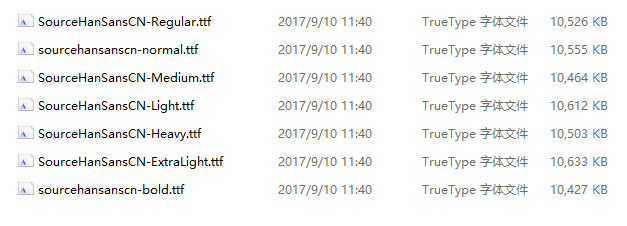
将自己要用的字体重命名为小写
-
下载转换器
git clone https://github.com/MrRio/jsPDF.git(cmd中)也可直接在github下载
下载完成后得到如图目录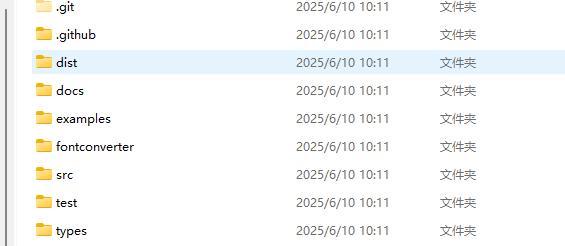
找到fontconverter目录下的fontconverter.html打开即可
-
转换为js(选择umd编码格式)
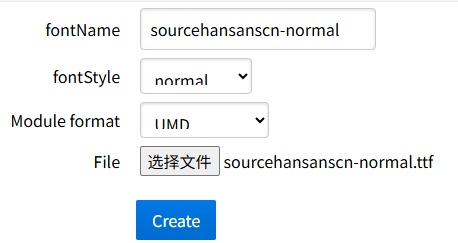
-
转换完成后

可重命名
5.注册及使用
修改js文件注册内容: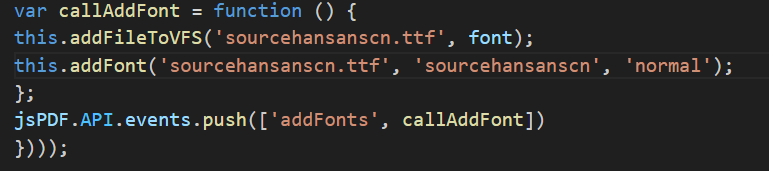
使用:一定要注意注册和使用的字体名称一致
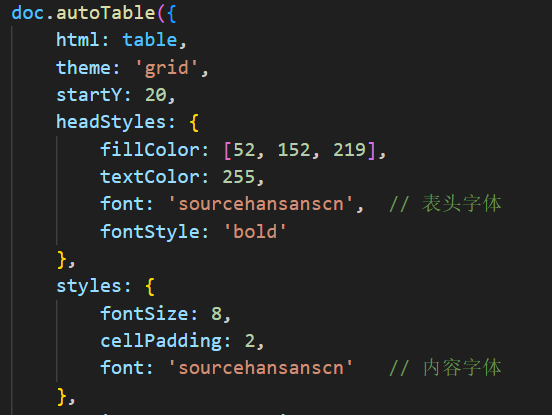
至此中文乱码问题就解决了
转换网站
实例:
<template>
<div class="app-container">
<!-- 搜索条件 -->
<el-form :model="queryParams" ref="queryForm" :inline="true" v-show="showSearch" label-width="90px">
<el-form-item label="日期" prop="reportDate">
<el-date-picker v-model="queryParams.reportDate" type="date" placeholder="选择日期"
value-format="yyyy-MM-dd" size="small" clearable style="width: 240px;" />
</el-form-item>
<el-form-item label="实施班组" prop="workTeamOrDeptId">
<el-cascader v-model="queryParams.workTeamOrDeptId" :options="deptOptions" placeholder="请选择实施班组"
:props="{ checkStrictly: true, expandTrigger: 'hover', emitPath: false, multiple: false, label: 'deptName', value: 'deptId' }"
clearable filterable style="width: 240px;"></el-cascader>
</el-form-item>
<el-form-item label="施工内容" prop="projectName">
<el-input v-model="queryParams.projectName" placeholder="请输入施工检维修内容" clearable size="small"
@keyup.enter.native="handleQuery" style="width: 240px;" />
</el-form-item>
<el-form-item label="部门" prop="reportDeptId">
<el-select v-model="queryParams.reportDeptId" placeholder="请选择部门" clearable size="small"
@change="handleQuery" style="width: 240px;">
<el-option v-for="item in deptList" :key="item.deptId" :label="item.deptName"
:value="item.deptId" />
</el-select>
</el-form-item>
<el-form-item label="实施相关方" prop="workCompanyId">
<el-select v-model="queryParams.workCompanyId" placeholder="请选择实施相关方" clearable size="small"
@change="handleQuery" style="width: 240px;">
<el-option v-for="item in companyList" :key="item.id" :label="item.name" :value="item.id" />
</el-select>
</el-form-item>
<el-form-item label="风险等级" prop="riskLevel">
<el-select v-model="queryParams.riskLevel" placeholder="请选择风险等级" clearable size="small"
@change="handleQuery" style="width: 240px;">
<el-option v-for="item in dict.type.sys_risk_level" :key="item.value" :label="item.label"
:value="item.value" />
</el-select>
</el-form-item>
<el-form-item label="作业类型" prop="workTypes">
<el-select v-model="queryParams.workTypes" placeholder="请选择作业类型" clearable size="small"
@change="handleQuery" style="width: 240px;">
<el-option v-for="item in dict.type.sys_work_type" :key="item.value" :label="item.label"
:value="item.value" />
</el-select>
</el-form-item>
<el-form-item label="审批状态" prop="checkStatus">
<el-select v-model="queryParams.checkStatus" placeholder="请选择审批状态" clearable size="small"
@change="handleQuery" style="width: 240px;">
<el-option v-for="item in dict.type.work_form_approve_status" :key="item.value" :label="item.label"
:value="item.value" />
</el-select>
</el-form-item>
<el-form-item label="是否有方案" prop="hasPlaned">
<el-select v-model="queryParams.hasPlaned" placeholder="请选择" clearable size="small"
@change="handleQuery" style="width: 240px;">
<el-option v-for="item in dict.type.sys_yes_no" :key="item.value" :label="item.label"
:value="item.value" />
</el-select>
</el-form-item>
<el-form-item label="方案审核" prop="hasReviewed">
<el-select v-model="queryParams.hasReviewed" placeholder="请选择方案是否审核已通过" clearable size="small"
@change="handleQuery" style="width: 240px;">
<el-option v-for="item in dict.type.sys_yes_no" :key="item.value" :label="item.label"
:value="item.value" />
</el-select>
</el-form-item>
<el-form-item label="完工状态" prop="status">
<el-select v-model="queryParams.status" placeholder="请选择" clearable size="small" @change="handleQuery"
style="width: 240px;">
<el-option v-for="item in statusOptions" :key="item.value" :label="item.label"
:value="item.value" />
</el-select>
</el-form-item>
<el-form-item>
<el-button type="primary" icon="el-icon-search" size="mini" @click="handleQuery">搜索</el-button>
<el-button icon="el-icon-refresh" size="mini" @click="resetQuery">重置</el-button>
</el-form-item>
</el-form>
<!-- 工具栏 -->
<el-row :gutter="10" class="mb8">
<el-col :span="1.5">
<el-button type="success" plain icon="el-icon-download" size="mini" @click="handleExport">导出</el-button>
</el-col>
<el-col :span="1.5">
<right-toolbar :showSearch.sync="showSearch" @queryTable="getList" />
</el-col>
</el-row>
<!-- 数据展示表格 -->
<el-table border v-loading="loading" :data="tableList" size="small" :span-method="tableSpanMethod">
<el-table-column label="序号" type="index" :index="indexMethod" align="left" width="70" />
<el-table-column label="填报部门" prop="deptMergeName" align="left" width="140" :show-overflow-tooltip="true" />
<el-table-column label="编号" prop="reportCode" align="left" width="100" :show-overflow-tooltip="true" />
<el-table-column label="施工检维修地点" prop="projectLocation" align="left" min-width="120"
:show-overflow-tooltip="true" />
<el-table-column label="施工检维修内容" prop="projectName" align="left" min-width="130"
:show-overflow-tooltip="true" />
<el-table-column label="施工类型" prop="projectName" align="left" min-width="130"
:show-overflow-tooltip="true" />
<el-table-column label="风险分级" prop="riskLevelValue" align="left" width="90">
<template slot-scope="scope">
<el-tag :type="getRiskLevelType(scope.row.riskLevel)" effect="plain">{{
scope.row.riskLevelValue }}</el-tag>
</template>
</el-table-column>
<el-table-column label="作业类型" prop="workTypesValue" align="left" min-width="110"
:show-overflow-tooltip="true" />
<el-table-column label="是否有方案" prop="hasPlanedValue" min-width="120" width="90" />
<el-table-column label="方案是否已审核" prop="hasReviewedValue" align="left" width="120" />
<el-table-column label="风险辨识" prop="riskIdentificationsValue" align="left" min-width="120"
:show-overflow-tooltip="true" />
<el-table-column label="安全措施" prop="safetyMeasures" align="left" min-width="130"
:show-overflow-tooltip="true" />
<el-table-column label="实施单位" align="center">
<el-table-column label="班组" prop="workTeamName" align="center" width="100"
:show-overflow-tooltip="true" />
<el-table-column label="相关方" prop="workDeptName" align="left" min-width="110"
:show-overflow-tooltip="true" />
</el-table-column>
<el-table-column label="施工时间(几点至几点)" align="left" width="240">
<template slot-scope="scope">
<span>{{ scope.row.startTime }} 至 {{ scope.row.endTime }}</span>
</template>
</el-table-column>
<el-table-column label="部门负责人" prop="workDeptLeader" align="left" width="100"
:show-overflow-tooltip="true" />
<el-table-column label="相关方负责人" prop="workCompanyLeader" align="left" width="110"
:show-overflow-tooltip="true" />
<el-table-column label="施工方案附件" align="left" width="150">
<template slot-scope="scope">
<div v-if="scope.row.fileList && scope.row.fileList.length > 0">
<div v-for="(f, idx) in scope.row.fileList" :key="f.uploadFileId || idx">
{{ f.fileName }}
</div>
</div>
<span v-else>-</span>
</template>
</el-table-column>
<el-table-column label="备注" prop="remark" align="left" min-width="120" :show-overflow-tooltip="true" />
<el-table-column label="已完成" prop="statusValue" align="left" width="90">
<template slot-scope="scope">
<el-tag :type="getStatusType(scope.row.status)" effect="plain">
{{ scope.row.statusValue }}
</el-tag>
</template>
</el-table-column>
<el-table-column label="未完成原因" prop="incompleteReason" align="left" min-width="120"
:show-overflow-tooltip="true" />
</el-table>
<!-- 文件预览对话框(暂不使用:附件名直接在表格列展示) -->
</div>
</template>
<script>
import { handleTree } from "@/utils/ruoyi.js";
import { deptList, listByDeptId } from "@/api/system/staff";
import { dailyMaintenanceReportData } from '@/api/system/dailyMaintenanceReport'
import { listDept, treeselect } from '@/api/system/dept'
import { companyList } from '@/api/system/company'
import RightToolbar from '@/components/RightToolbar'
import { jsPDF } from 'jspdf'
import autoTable from 'jspdf-autotable'
import '@/assets/js/simhei-normal.js'
export default {
name: 'DailyMaintenanceReport',
components: {
RightToolbar
},
dicts: ['sys_work_type', 'sys_risk_level', 'work_form_approve_status', 'sys_yes_no'],
data() {
return {
loading: false,
showSearch: true,
// 查询参数
queryParams: {
reportDate: '',
projectName: '',
reportDeptId: '',
workCompanyId: '',
riskLevel: '',
workTypes: '',
checkStatus: '',
hasPlaned: '',
hasReviewed: '',
status: '',
workTeamOrDeptId: ''
},
// 表格数据
tableList: [],
// 下拉选项
deptList: [],
// 部门树用于实施班组选择
deptOptions: [],
companyList: [],
// 完工状态(动态:根据当前列表汇总)
statusOptions: [
{
value: 0,
label: "未开工",
},
{
value: 1,
label: "已开工",
},
{
value: 2,
label: "已完工",
},
{
value: 3,
label: "取消",
},
],
// 文件对话框(暂不使用)
}
},
created() {
this.getDeptList()
this.getCompanyList()
this.getDeptOptions()
},
mounted() {
// 默认日期(按要求可设为 2026-01-15/01-16/01-19),此处使用 2026-01-19
this.queryParams.reportDate = '2026-01-19'
this.getList()
},
methods: {
// 获取部门树(用于实施班组选择)
async getDeptOptions() {
// treeselect().then(response => {
// this.deptOptions = response.data || []
// }).catch(() => {
// this.deptOptions = []
// })
const res = await deptList();
const deptArray = res.data.filter(
(item) => item.type == 1 && item.parentId == 317
),
teamArray = res.data.filter(
(item) =>
item.type == 2 &&
deptArray.some((dept) => dept.deptId == item.parentId)
);
const treeData = handleTree([...deptArray, ...teamArray], "deptId");
this.deptOptions = treeData;
},
// 获取报表数据
getList() {
this.loading = true
const query = { ...this.queryParams }
dailyMaintenanceReportData(query).then(response => {
const data = response.data
if (data && data.deptReports) {
// 将 deptReports 清洗为扁平表格数据 + 合并行信息
const flatRows = []
const statusMap = new Map()
data.deptReports.forEach(dept => {
const records = (dept.records || []).filter(Boolean)
const rowSpan = records.length || 0
records.forEach((r, idx) => {
const row = {
...r,
deptMergeName: dept.deptName || r.reportDeptName || '',
_deptRowSpan: idx === 0 ? rowSpan : 0
}
flatRows.push(row)
// 汇总完工状态下拉(动态)
if (row.status !== null && row.status !== undefined) {
const key = String(row.status)
if (!statusMap.has(key)) {
statusMap.set(key, row.statusValue || key)
}
}
})
})
this.tableList = flatRows
// this.statusOptions = Array.from(statusMap.entries()).map(([value, label]) => ({ value, label }))
}
this.loading = false
}).catch(() => {
this.loading = false
})
},
// 合并"填报部门"列
tableSpanMethod({ row, column }) {
if (column && column.property === 'deptMergeName') {
const rowspan = row._deptRowSpan || 0
return {
rowspan,
colspan: rowspan > 0 ? 1 : 0
}
}
},
// 序号(从 1 开始)
indexMethod(index) {
return index + 1
},
// 获取部门列表
getDeptList() {
listDept({}).then(response => {
this.deptList = response.data || []
})
},
// 获取公司列表
getCompanyList() {
companyList({}).then(response => {
this.companyList = response.data || []
}).catch(() => {
this.companyList = []
})
},
// 搜索
handleQuery() {
this.getList()
},
// 重置搜索
resetQuery() {
this.$refs.queryForm.resetFields()
this.getList()
},
// 获取风险等级样式
getRiskLevelType(level) {
const types = {
0: 'danger',
1: 'warning',
2: 'warning',
3: 'info'
}
return types[level] || 'info'
},
// 获取完工状态样式
getStatusType(status) {
const types = {
0: 'info',
1: 'warning',
2: 'success',
3: 'danger'
}
return types[status] || 'info'
},
// 获取审批状态样式
getCheckStatusType(status) {
const types = {
0: 'info',
1: 'warning',
2: 'success',
3: 'danger'
}
return types[status] || 'info'
},
// 查看附件/下载(暂不使用:附件名直接在表格列展示)
// 导出PDF(纯前端:生成PDF表格,非截长图)
async handleExport() {
if (!this.tableList || this.tableList.length === 0) {
this.$message.warning('暂无数据可导出')
return
}
const loading = this.$loading({
lock: true,
text: '正在生成PDF,请稍候...',
spinner: 'el-icon-loading',
background: 'rgba(0, 0, 0, 0.7)'
})
try {
// 延长等待时间确保字体加载完成
await new Promise(resolve => setTimeout(resolve, 1000))
const doc = new jsPDF({
orientation: 'landscape',
unit: 'pt',
format: 'a4'
})
// 确保字体已加载
const fontList = doc.getFontList()
if (!fontList['simhei'] && Object.keys(fontList).length > 0) {
console.warn('SimHei font not found in font list:', Object.keys(fontList))
}
// 设置中文字体(simhei-normal.js 注册的字体名是 simhei)
doc.setFont('simhei')
doc.setFontSize(16)
doc.text('每日施工检维修报表', doc.internal.pageSize.getWidth() / 2, 25, {
align: 'center',
font: 'simhei'
})
// 在绘制表格前再次确认字体设置
doc.setFont('simhei')
const head = [[
'序号', '填报部门', '编号', '施工检维修地点', '施工检维修内容', '施工类型',
'风险分级', '作业类型', '是否有方案', '方案是否已审核', '风险辨识', '安全措施',
'班组', '相关方', '施工时间', '部门负责人', '相关方负责人', '施工方案附件', '备注', '已完成', '未完成原因'
]]
const body = this.tableList.map((row, index) => {
// PDF里不做rowSpan合并(rowSpan + null skip 在某些环境下会导致网格线断开)
const deptCell = row.deptMergeName || row.reportDeptName || ''
const filesText = (row.fileList && row.fileList.length > 0)
? row.fileList.map(f => f.fileName).join('\n')
: '-'
return [
String(index + 1),
deptCell,
row.reportCode || '',
row.projectLocation || '',
row.projectName || '',
row.projectTypesValue || '',
row.riskLevelValue || '',
row.workTypesValue || '',
row.hasPlanedValue || '',
row.hasReviewedValue || '',
row.riskIdentificationsValue || '',
row.safetyMeasures || '',
row.workTeamName || '',
row.workDeptName || '',
`${row.startTime || ''} 至 ${row.endTime || ''}`,
row.workDeptLeader || '',
row.workCompanyLeader || '',
filesText,
row.remark || '',
row.statusValue || '',
row.incompleteReason || ''
]
})
// A4横向尺寸(pt单位)
const pageWidth = doc.internal.pageSize.getWidth()
const pageHeight = doc.internal.pageSize.getHeight()
const margin = 20
const tableWidth = pageWidth - margin * 2
// 定义列宽比例(21列)
const columnWidths = [
28, // 序号
50, // 填报部门
40, // 编号
68, // 施工检维修地点
80, // 施工检维修内容
50, // 施工类型
40, // 风险分级
60, // 作业类型
40, // 是否有方案
50, // 方案是否已审核
60, // 风险辨识
100, // 安全措施
40, // 班组
60, // 相关方
80, // 施工时间
50, // 部门负责人
60, // 相关方负责人
80, // 施工方案附件
60, // 备注
40, // 已完成
60 // 未完成原因
]
// 计算总宽度并缩放
const totalWidth = columnWidths.reduce((sum, w) => sum + w, 0)
const scale = tableWidth / totalWidth
const scaledWidths = columnWidths.map(w => w * scale)
// 配置autoTable,确保所有文本都使用中文字体
autoTable(doc, {
head: head,
body: body,
startY: 35,
theme: 'grid',
tableWidth: 'auto',
margin: { left: margin, right: margin },
columnStyles: {
0: { cellWidth: scaledWidths[0], halign: 'center' }, // 序号
1: { cellWidth: scaledWidths[1], halign: 'center' }, // 填报部门
2: { cellWidth: scaledWidths[2] }, // 编号
3: { cellWidth: scaledWidths[3] }, // 施工检维修地点
4: { cellWidth: scaledWidths[4] }, // 施工检维修内容
5: { cellWidth: scaledWidths[5] }, // 施工类型
6: { cellWidth: scaledWidths[6], halign: 'center' }, // 风险分级
7: { cellWidth: scaledWidths[7] }, // 作业类型
8: { cellWidth: scaledWidths[8], halign: 'center' }, // 是否有方案
9: { cellWidth: scaledWidths[9], halign: 'center' }, // 方案是否已审核
10: { cellWidth: scaledWidths[10] }, // 风险辨识
11: { cellWidth: scaledWidths[11] }, // 安全措施
12: { cellWidth: scaledWidths[12], halign: 'center' }, // 班组
13: { cellWidth: scaledWidths[13] }, // 相关方
14: { cellWidth: scaledWidths[14] }, // 施工时间
15: { cellWidth: scaledWidths[15] }, // 部门负责人
16: { cellWidth: scaledWidths[16] }, // 相关方负责人
17: { cellWidth: scaledWidths[17] }, // 施工方案附件
18: { cellWidth: scaledWidths[18] }, // 备注
19: { cellWidth: scaledWidths[19], halign: 'center' }, // 已完成
20: { cellWidth: scaledWidths[20] } // 未完成原因
},
styles: {
font: 'simhei',
fontSize: 7,
cellPadding: 2,
overflow: 'linebreak',
valign: 'middle',
halign: 'left',
lineWidth: 0.6
},
headStyles: {
font: 'simhei',
fillColor: [240, 240, 240],
textColor: [0, 0, 0], // 使用RGB颜色而不是数字
halign: 'center',
valign: 'middle',
fontSize: 7,
fontStyle: 'normal', // 改为normal避免bold样式冲突
lineWidth: 0.6
},
bodyStyles: {
font: 'simhei',
textColor: [0, 0, 0] // 使用RGB颜色而不是数字
},
// 在绘制每个单元格时确保使用中文字体
didParseCell: function (data) {
if (data.section === 'head' || data.section === 'body') {
data.cell.styles.font = 'simhei'
// 避免字体样式冲突
data.cell.styles.fontStyle = 'normal'
}
}
})
const fileName = `每日施工检维修报表_${new Date().toISOString().slice(0, 10)}.pdf`
doc.save(fileName)
this.$message.success('导出成功')
} catch (error) {
console.error('导出失败:', error)
this.$message.error('导出失败,请重试')
} finally {
loading.close()
}
}
}
}
</script>
<style scoped lang="scss">
.app-container {
padding: 0px !important;
}
.mb8 {
margin-bottom: 8px;
}
::v-deep .el-tabs__nav {
margin-bottom: 10px;
}
::v-deep .el-table {
font-size: 12px;
}
::v-deep .el-form-item {
margin-bottom: 10px;
}
</style>
import { jsPDF } from "jspdf"
var font = 'AAEAAAASAQAABAAgRFNJR2tkE7IAlLJQAAAbSEdTVUK7z7j3AJPRRAAAAPxPUy8y050dGgAAAagAAABgY21hcD3odbgAAOfcAAAFXGN2dCAHKQPwAADt/AAAAr5mcGdt';
var callAddFont = function () {
this.addFileToVFS('simhei.ttf', font);
this.addFont('simhei.ttf', 'simhei', 'normal');
};
jsPDF.API.events.push(['addFonts', callAddFont])