实验目的
-
理解PAT的转换原理
-
掌握PAT的配置方法
实验拓扑
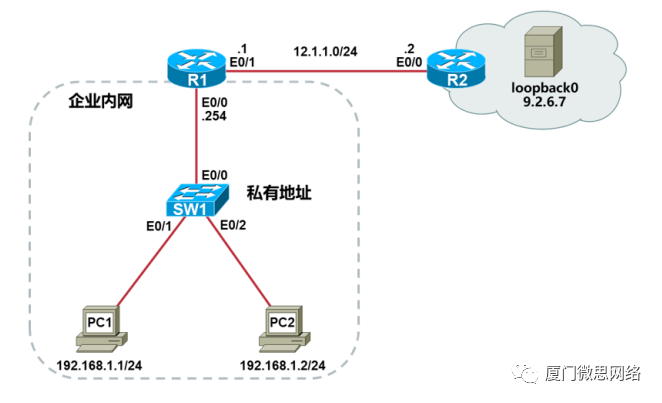
实验需求
-
根据实验拓扑图,完成设备的基本配置;
-
在R2上创建Loopback0接口,IP地址是9.2.6.7/32,模拟公网上的一台服务器;
-
在R1上配置PAT,使得PC1和PC2能够复用E0/1接口地址访问公网服务器。
实验步骤
步骤1:设备的基本配置
配置P C1 :
Router>enable
Router#configure terminal
Router(config)#hostname PC1
PC1(config)#no ip routing
PC1(config)#ip default-gateway 192.168.1.254
PC1(config)#interface ethernet0/0
PC1(config-if)#ip address 192.168.1.1 255.255.255.0
PC1(config-if)#no shutdown
PC1(config-if)#end
PC1#配置PC2:
Router>enable
Router#configure terminal
Router(config)#hostname PC2
PC2(config)#no ip routing
PC2(config)#ip default-gateway 192.168.1.254
PC2(config)#interface ethernet0/0
PC2(config-if)#ip address 192.168.1.2 255.255.255.0
PC2(config-if)#no shutdown
PC2(config-if)#end
PC2#
配置SW 1 :
Switch>ena
Switch#conf t
Switch(config)#no ip domain-lookup
Switch(config)#line console 0
Switch(config-line)# logging s
Switch(config-line)# exec-t 0 0
Switch(config-line)# exit
Switch(config)#hostname SW1
SW1(config)#end
SW1#
配置R1:
Router>enable
Router#configure terminal
Router(config)#hostname R1
R1(config)#no ip domain-lookup
R1(config)#line console 0
R1(config-line)#exec-timeout 0 0
R1(config-line)#logging synchronous
R1(config-line)#exit
R1(config)#interface ethernet0/0
R1(config-if)#ip address 192.168.1.254 255.255.255.0
R1(config-if)#no shutdown
R1(config-if)#exit
R1(config)#interface ethernet0/1
R1(config-if)#ip address 12.1.1.1 255.255.255.0
R1(config-if)#no shutdown
R1(config-if)#end
R1#
配置R2:
Router>enable
Router#configure terminal
Router(config)#hostname R2
R2(config)#no ip domain-lookup
R2(config)#line console 0
R2(config-line)#exec-timeout 0 0
R2(config-line)#logging synchronous
R2(config-line)#exit
R2(config)#interface loopback0
R2(config-if)#ip address 9.2.6.7 255.255.255.255
R2(config-if)#exit
R2(config)#interface ethernet0/0
R2(config-if)#ip address 12.1.1.2 255.255.255.0
R2(config-if)#no shutdown
R2(config-if)#end
R2#
步骤2:配置P AT
配置R 1 :
R1(config)#access-list 1 permit 192.168.1.0 0.0.0.255   //定义ACL
R1(config)#ip nat inside source list 1 interface ethernet 0/1 overload   //关联ACL和outside接口
R1(config)#interface ethernet 0/0
R1(config-if)#ip nat inside   //指定inside接口
R1(config-if)#exit
R1(config)#interface ethernet 0/1
R1(config-if)#ip nat outside   //指定outside接口
R1(config-if)#exit
R1(config)#ip route 0.0.0.0 0.0.0.0 12.1.1.2   //配置到达公网的默认路由测试
P C1 访问服务器:
PC1#ping 9.2.6.7
Type escape sequence to abort.
Sending 5, 100-byte ICMP Echos to 9.2.6.7, timeout is2 seconds:
!!!!!
Success rate is100 percent (5/5), round-trip min/avg/max = 1/1/1 ms测试P C2 访问服务器:
PC2#ping 9.2.6.7
Type escape sequence to abort.
Sending 5, 100-byte ICMP Echos to 9.2.6.7, timeout is2 seconds:
!!!!!
Success rate is100 percent (5/5), round-trip min/avg/max = 1/1/1 ms检查R1的NAT表项:
R1#showipnattranslations
ProInsideglobalInsidelocalOutsidelocalOutsideglobal
icmp 12.1.1.1:7        192.168.1.1:7      9.2.6.7:7          9.2.6.7:7
icmp 12.1.1.1:5        192.168.1.2:5      9.2.6.7:5          9.2.6.7:5
Insideglobal都是12.1.1.1,通过端口号区分不同的主机。
--- 年度热文 ---