LLM的狂风已经吹了几年, 所有人都耳濡目染的会飚上几句行话/名词。切好你自己有台4070的机器,恰好你有时间倒腾, 那就让我们回顾一遍名词,验证狂风吹过的技术车辙。
恰好最近有台4070(12g显存)机器,于是尝试使用ollama部署大模型。
RTX 4070 擅长训练中小型模型;凭借其 184 个 Tensor Core,它可以高效处理矩阵乘法等运算,这对于深度学习任务至关重要。
RTX 4070 适用于实时推理应用,提供快速的推理速度,使其成为聊天机器人和推荐系统等交互式 AI 应用的理想选择。
本次会用到3个名词
- nvidia-smi 英伟达设备管理工具
基于nvidia managemant library(NVML)之上的命令行工具,用于管理和监控nvidia GPU设备, 随显示驱动一起分发。
以下是未部署大模型时候的资源消耗快照, nvidia-smi -l 可持续监控gpu使用。
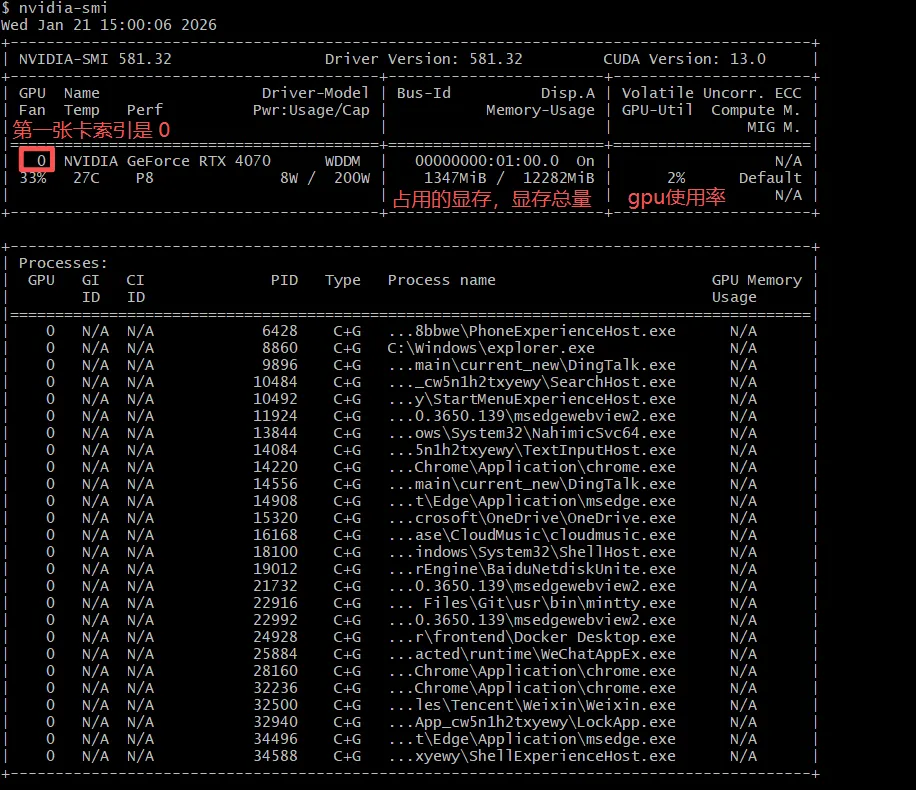
- 第一行显示了nvidia-smi版本/驱动版本/CUDA版本
- 0 表示nvidia 4070是第一张显卡, 索引的概念,下面的进程关联了这块显卡0
- Fan Temp Perf Pwr 分别显示GPU的当前风扇转速、温度、性能状态和功耗
- Memory-Usage 当前显存使用量和总显存(12g)
- GPU_Util 显示当前GPU计算能力的百分比
- Compute M 表示当前计算模型: compute
ollama是mata开源的,定位是模型管理器 和推理框架,帮助用户傻瓜式在本地、k8s集群、虚拟机上部署开源大模型。
ollama -h提供了可用命令,也显示了可用的能力:创建模型、管控部署模型。
ollama是服务端-客户端架构,有后台服务进程olllama.exe,提供了GUI终端和命令行工具可交互,另外提供sdk和restful api,可供各种程序或者语言操作ollama。
 ollama  list
NAME                      ID              SIZE      MODIFIED
qwen3-embedding:latest    64b933495768    4.7 GB    15 hours ago
qwen3:8b                  500a1f067a9f    5.2 GB    23 hours ago

## size 是预估的显存大小- qwen3:8b vs qwen3-embedding
8b表示80亿参数(8 Billion parameters)
除了chat模型, 还有嵌入模型embedding, 嵌入模型是将文本/image数据向量化的最新手段。
下载完ollama, 选择qwen3:8b大模型,开始下载模型。
1. ollama run qwen3:8b
$ ollama  run  qwen3:8b
>>> Send a message (/? for help)
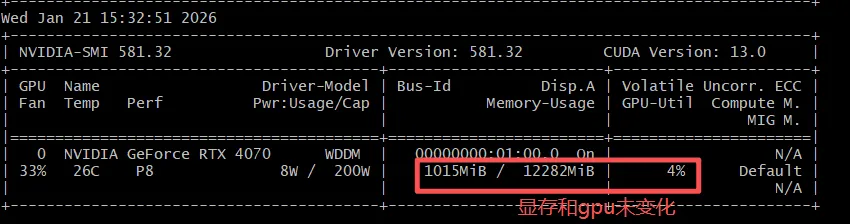
运行千问大模型(未进行首次推理请求), 显存和GPU使用率未发生变化;
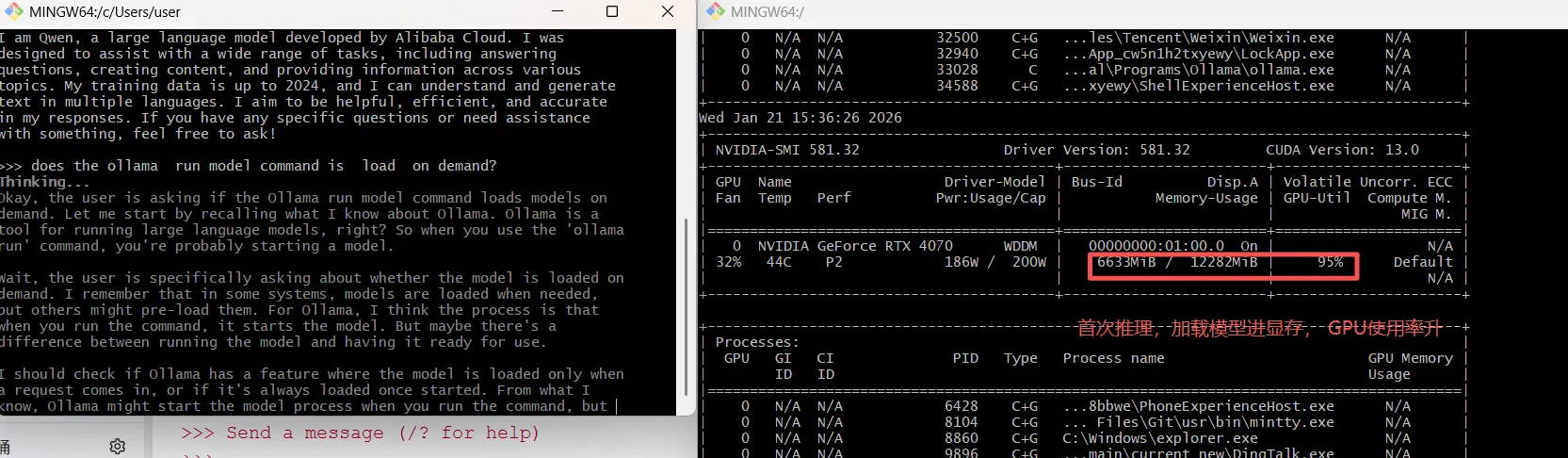
首次推理请求, 显存使用稳定在6g, gpu使用率上升,推理结束,显存使用率不会降, gpu使用率回落, 说明ollama是按需加载大模型。
2. ollama run model vs ollama serve
ollama serve意味着启动ollama作为web服务(不意味着当前启动了大模型),默认在http://127.0.0.1:11434/监听,外部可使用restful api或者client sdk操作ollama、操作模型、与模型对话。
curl http://localhost:11434/api/chat -d '{
  "model": "qwen3:8b",
  "messages": [{
    "role": "user",
    "content": "Hello there!"
  }],
  "stream": false
}'
{"model":"qwen3:8b","created_at":"2026-01-21T07:57:52.9621534Z","message":{"role":"assistant","content":"Hello! How can I assist you today? 😊","thinking":"Okay, the user greeted me with \"Hello there!\" So I need to respond in a friendly and welcoming manner. Let me make sure to acknowledge their greeting and offer assistance. I should keep it simple and positive. Maybe something like, \"Hello! How can I assist you today?\" That sounds good. Let me check if there's anything else I need to consider. No, that should cover it. Ready to respond.\n"},"done":true,"done_reason":"stop","total_duration":1535352700,"load_duration":98539300,"prompt_eval_count":13,"prompt_eval_duration":208148700,"eval_count":101,"eval_duration":1223840500}
这个restful api启动了大模型,且是按需加载, stream: true 就会按照streaming输出, 也就是走chunked transfer encoding watch机制。"think":默认为true表示输出推理思考。
3. ollama部署embeddings嵌入模型
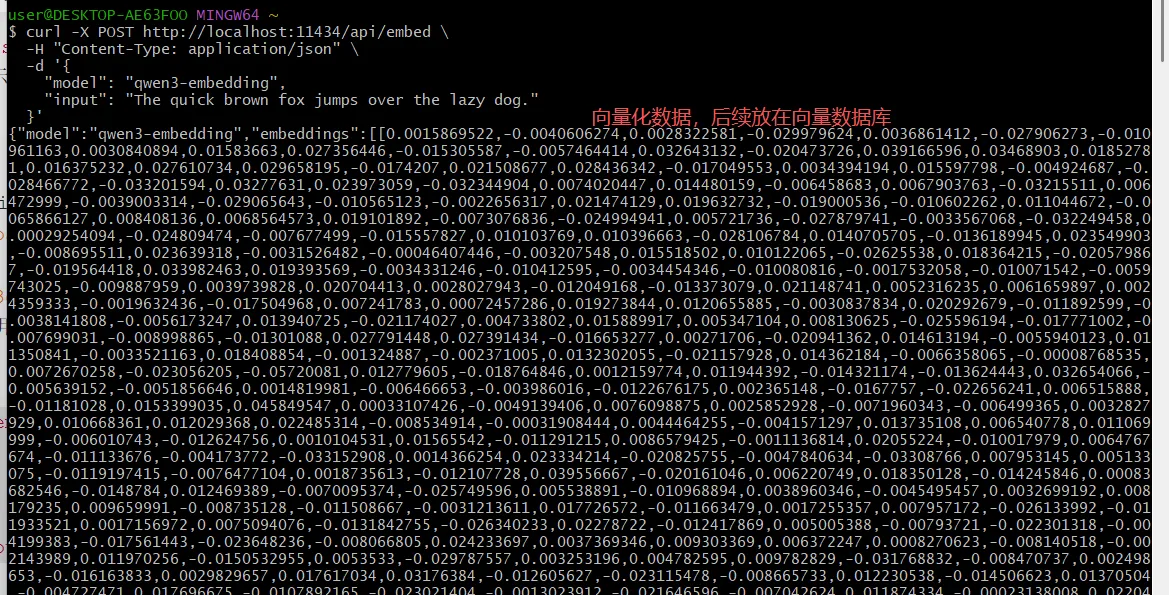
eembeddings嵌入模型不同于对话模型,用于将文本/imgae向量化,用于语义搜索、检索和RAG。这里有最新的嵌入模型榜单
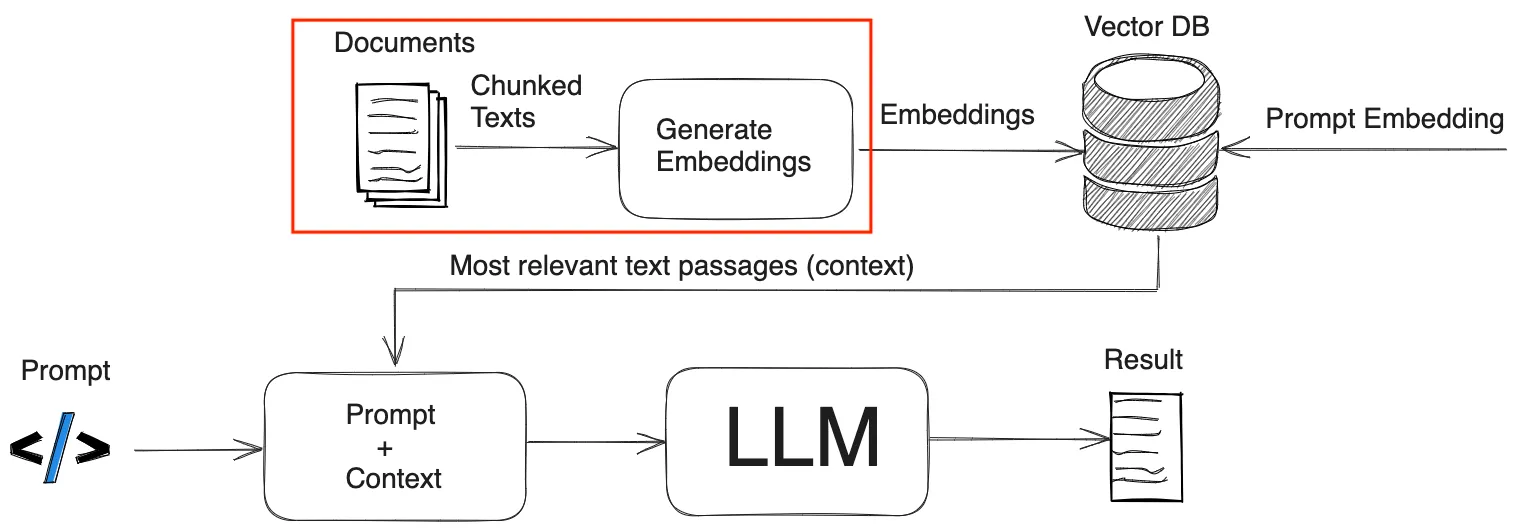
RAG 技术本质上是将Prompt增强技术, 本次利用ollama部署文本嵌入模型,提前将文本数据向量化后,存储在向量数据库。
curl -X POST http://localhost:11434/api/embed \
  -H "Content-Type: application/json" \
  -d '{
    "model": "qwen3-embedding",
    "input": "The quick brown fox jumps over the lazy dog."
  }'
4. function calling
what is the temperature in the capital of china today?
LLM是静态知识,他肯定不知道今天是几号?今天天气怎么样 ?
他的静态知识告诉他中国首部是北京(如果换首都,他也G了)。
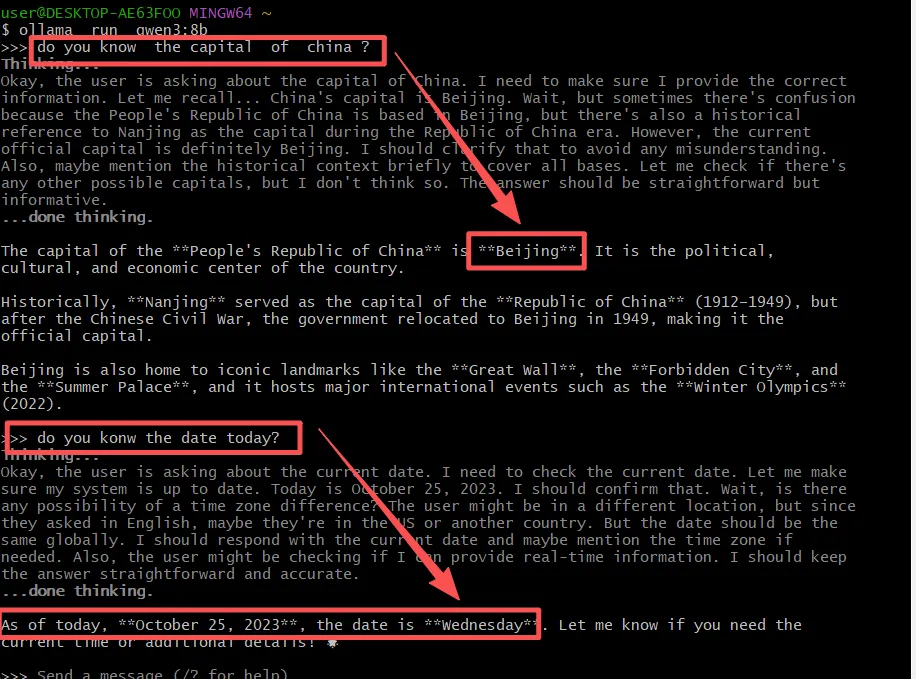
function calling允许模型调用外部工具并将其结果合并到对话响应中
无论是agentic开发,使用LLM APi, 理解function calling 都很重要,特别是底层的请求和响应payload工作方式。function calling需要结合应用能力一起来理解。
function calling 使得LLM具备推理出你想要做的动作(以结构化json的方式给出), app据此执行动作,将调用的结果合并到LLM的输出应答里面。
询问中国首都今天的气温?:
LLM角度:
- 先要要知道今天是几号, 提示应用去调用函数get_currentDate拿到时间
- 然后提示应用拿city= beijing ,date=2016-01-22 去调用天气函数get_temperature(string city, string date)
- 最后信息充足,对话中问类似的都能笑纳。
应用角度:需要提供2个函数
- get_temperature(string city, string date): Get the current temperature for a city
- get_currentDate(): Get the current date
① LLM发起第一次function calling, tools配置节携带了应用提供的2个外部调用函数。
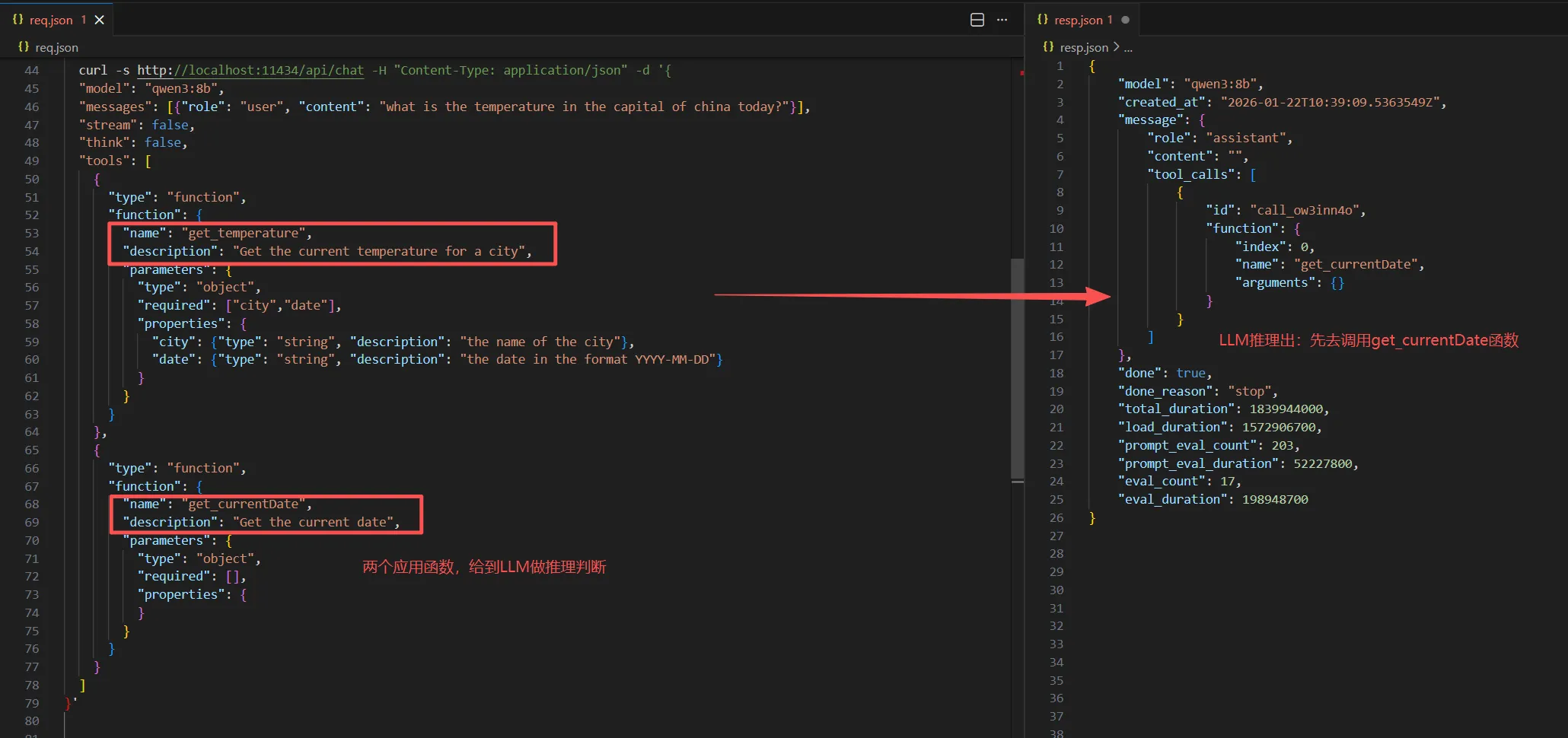
LLM推理提示应用去调用get_currentDate函数。
② 应用拿这个推理信息,去调用准备好的get_currentDate函数,假设结果是2026-01-22。
③ LLM发起第二次function calling,此时message配置节要附带第一次外部调用的信息
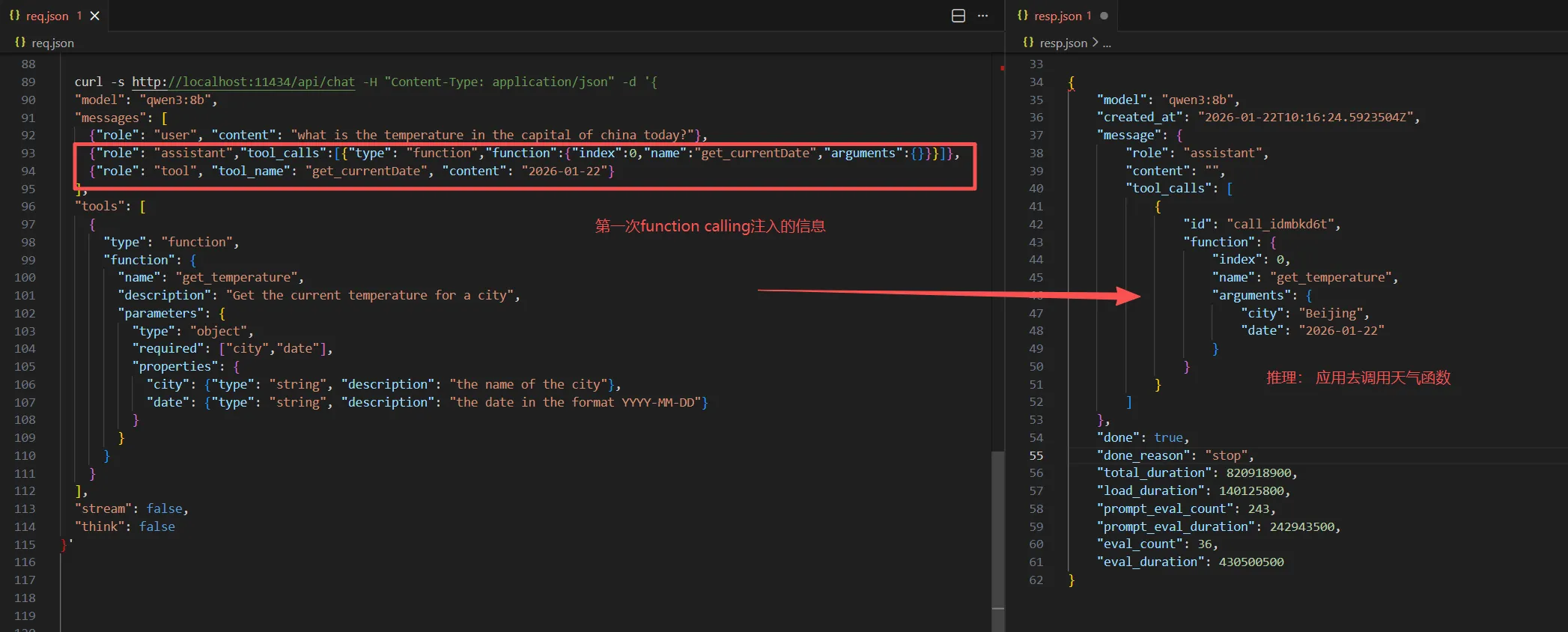
LLM推理提示应用去调用get_temperature函数,此时参数都已经就绪了:beijing是推理已知,2026-01-22是外部调用注入信息。
④ 应用拿到推理信息,去调用get_temperature函数, 假设拿到结果是22°。
⑤ 向LLM发起最终天气对话,喂给他所有信息
  curl -s http://localhost:11434/api/chat -H "Content-Type: application/json" -d '{
  "model": "qwen3:8b",
  "messages": [
    {"role": "user", "content": "what is the temperature in the capital of china today?"},
    {"role": "assistant","tool_calls":[{"type": "function","function":{"index":0,"name":"get_temperature","arguments":{
             "city": "Beijing",
              "date": "2026-01-22" }}}]},
    {"role": "tool", "tool_name": "get_temperature", "content": "22°C"}
  ],
  "stream": false,
  "think": false
}'    // 注入的信息依旧放在`message`配置节。
模型就收到的外部调用的信息,并集成到自己推理系统。
所以一次复杂的对话可能经过几次function calling, 于此同时也需要应用的配合。