Flutter万年历应用开发教程
项目简介
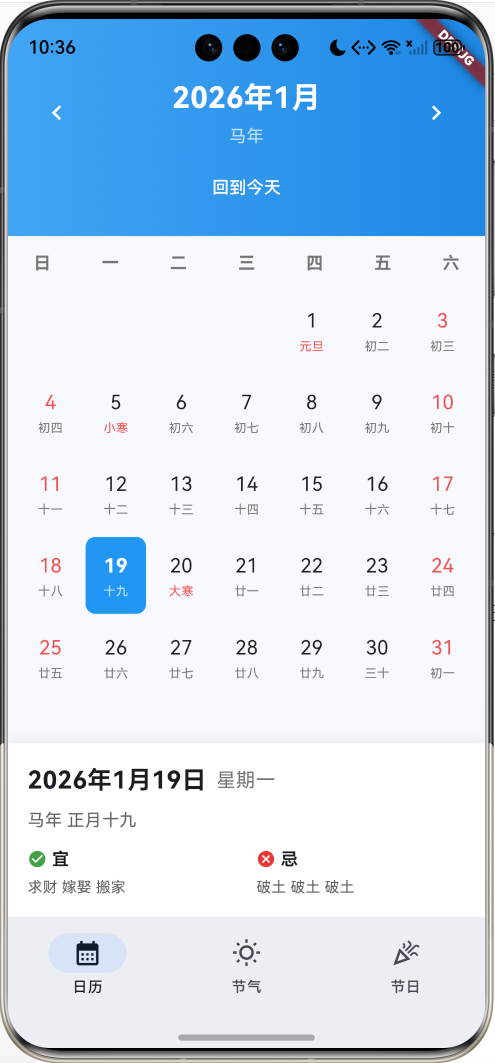
这是一款功能完整的万年历应用,集成了公历、农历、二十四节气、传统节日、黄历宜忌等功能。应用采用Material Design 3设计风格,界面简洁美观,信息展示清晰。
运行效果图
核心特性
- 日历视图:月历展示,支持左右切换月份,快速回到今天
- 双历显示:同时显示公历和农历日期
- 节气节日:自动标注二十四节气和传统节日
- 黄历宜忌:每日宜忌事项提示
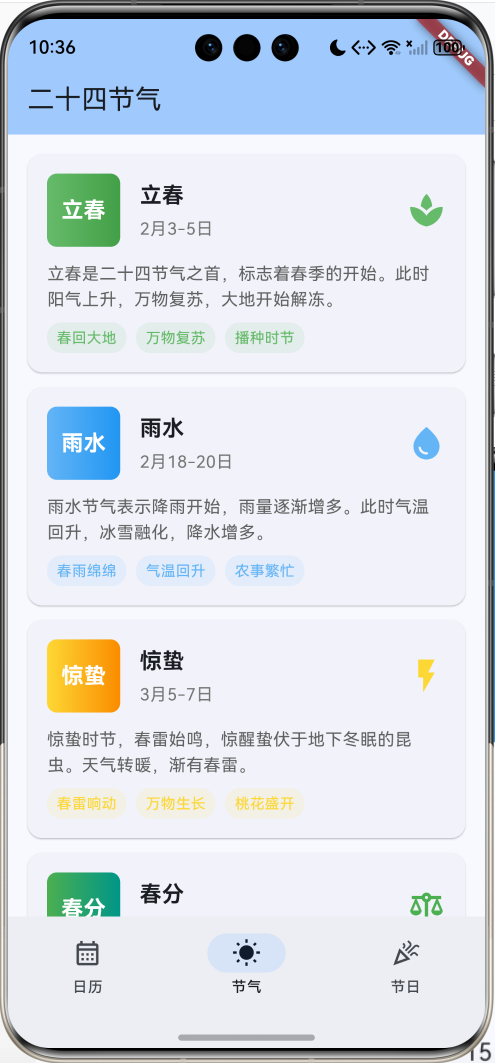
- 节气百科:24个节气的详细介绍和特点
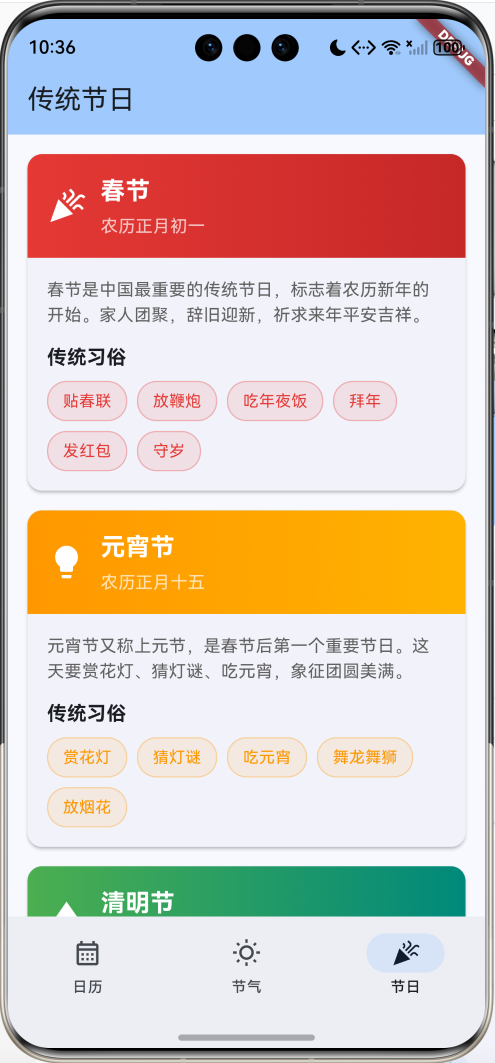
- 节日文化:11个传统节日的由来和习俗
- 日期详情:选中日期显示完整信息
技术栈
- Flutter 3.x
- Material Design 3
- 自定义日历组件
- 渐变UI设计
- 农历算法(简化版)
项目架构
CalendarHomePage
CalendarPage
SolarTermsPage
HolidaysPage
日历网格
日期详情
DateInfo Model
节气数据
节日数据
数据模型设计
DateInfo(日期信息模型)
dart
class DateInfo {
  final DateTime date;         // 公历日期
  final String lunarDate;      // 农历日期(初一、初二等)
  final String lunarMonth;     // 农历月份(正月、二月等)
  final String lunarYear;      // 农历年份(鼠年、牛年等)
  final String solarTerm;      // 节气
  final String festival;       // 节日
  final String suitable;       // 宜
  final String unsuitable;     // 忌
  final bool isHoliday;        // 是否节假日
  final bool isToday;          // 是否今天
}设计要点:
- 整合公历和农历信息
- 节气和节日自动匹配
- 黄历宜忌每日不同
- 标记特殊日期(今天、节假日)
核心功能实现
1. 日历网格布局
使用GridView构建7列日历网格,动态计算每月天数和起始星期。
dart
Widget _buildCalendarGrid() {
  final daysInMonth = _getDaysInMonth(currentMonth);
  final firstDayOfMonth = DateTime(currentMonth.year, currentMonth.month, 1);
  final startWeekday = firstDayOfMonth.weekday % 7; // 0=周日

  return GridView.builder(
    gridDelegate: const SliverGridDelegateWithFixedCrossAxisCount(
      crossAxisCount: 7,
      childAspectRatio: 0.8,
    ),
    itemCount: startWeekday + daysInMonth,
    itemBuilder: (context, index) {
      if (index < startWeekday) {
        return const SizedBox(); // 空白占位
      }

      final day = index - startWeekday + 1;
      final date = DateTime(currentMonth.year, currentMonth.month, day);
      return _buildDateCell(date, _getDateInfo(date));
    },
  );
}关键计算:
daysInMonth:获取当月天数startWeekday:计算1号是星期几index < startWeekday:前面的空白格子
2. 日期单元格设计
每个日期单元格显示公历日期和农历/节日信息。
dart
Widget _buildDateCell(DateTime date, DateInfo dateInfo) {
  final isSelected = date == selectedDate;
  final isToday = dateInfo.isToday;

  return InkWell(
    onTap: () => onDateSelected(date),
    child: Container(
      decoration: BoxDecoration(
        color: isSelected ? Colors.blue : isToday ? Colors.blue.shade50 : null,
        borderRadius: BorderRadius.circular(8),
        border: isToday && !isSelected
            ? Border.all(color: Colors.blue)
            : null,
      ),
      child: Column(
        mainAxisAlignment: MainAxisAlignment.center,
        children: [
          // 公历日期
          Text(
            '${date.day}',
            style: TextStyle(
              fontSize: 16,
              fontWeight: isToday ? FontWeight.bold : FontWeight.normal,
              color: isSelected ? Colors.white : Colors.black87,
            ),
          ),
          // 农历/节日/节气
          Text(
            dateInfo.festival.isNotEmpty ? dateInfo.festival
                : dateInfo.solarTerm.isNotEmpty ? dateInfo.solarTerm
                : dateInfo.lunarDate,
            style: TextStyle(
              fontSize: 10,
              color: isSelected ? Colors.white70
                  : (dateInfo.festival.isNotEmpty || dateInfo.solarTerm.isNotEmpty)
                      ? Colors.red.shade400
                      : Colors.grey.shade600,
            ),
          ),
        ],
      ),
    ),
  );
}显示优先级:
- 节日(红色显示)
- 节气(红色显示)
- 农历日期(灰色显示)
3. 农历转换算法
简化的农历转换实现(实际应用建议使用专业库如lunar)。
dart
DateInfo _getDateInfo(DateTime date) {
  // 农历日期
  final lunarDays = ['初一', '初二', '初三', ..., '三十'];
  final lunarDay = lunarDays[(date.day - 1) % 30];

  // 农历月份
  final lunarMonths = ['正月', '二月', '三月', ..., '腊月'];
  final lunarMonth = lunarMonths[(date.month - 1) % 12];

  // 农历年份(生肖)
  final lunarYears = ['鼠', '牛', '虎', '兔', '龙', '蛇',
                      '马', '羊', '猴', '鸡', '狗', '猪'];
  final yearIndex = (date.year - 4) % 12; // 2020年是鼠年
  final lunarYear = '${lunarYears[yearIndex]}年';

  return DateInfo(
    date: date,
    lunarDate: lunarDay,
    lunarMonth: lunarMonth,
    lunarYear: lunarYear,
    // ...
  );
}生肖计算公式:
生肖索引 = (年份 - 4) % 12其中2020年是鼠年,作为基准年。
4. 节气匹配算法
根据日期匹配对应的二十四节气。
dart
String _getSolarTerm(DateTime date) {
  final solarTerms = {
    '1-5': '小寒', '1-20': '大寒',
    '2-4': '立春', '2-19': '雨水',
    '3-6': '惊蛰', '3-21': '春分',
    '4-5': '清明', '4-20': '谷雨',
    '5-6': '立夏', '5-21': '小满',
    '6-6': '芒种', '6-21': '夏至',
    '7-7': '小暑', '7-23': '大暑',
    '8-8': '立秋', '8-23': '处暑',
    '9-8': '白露', '9-23': '秋分',
    '10-8': '寒露', '10-23': '霜降',
    '11-7': '立冬', '11-22': '小雪',
    '12-7': '大雪', '12-22': '冬至',
  };

  final key = '${date.month}-${date.day}';
  return solarTerms[key] ?? '';
}节气日期:
- 每月两个节气
- 日期相对固定(±1-2天)
- 实际应用需要精确计算
5. 节日匹配算法
匹配公历和农历节日。
dart
String _getFestival(DateTime date) {
  // 公历节日
  final festivals = {
    '1-1': '元旦',
    '2-14': '情人节',
    '3-8': '妇女节',
    '5-1': '劳动节',
    '6-1': '儿童节',
    '10-1': '国庆节',
    '12-25': '圣诞节',
  };

  final key = '${date.month}-${date.day}';
  return festivals[key] ?? '';
}节日类型:
- 公历节日:固定日期
- 农历节日:需要农历转换(春节、端午、中秋等)
- 节气节日:清明、冬至等
6. 黄历宜忌生成
使用随机算法生成每日宜忌(实际应用需要使用专业黄历算法)。
dart
// 使用日期作为随机种子,确保同一天生成相同结果
final random = Random(date.year * 10000 + date.month * 100 + date.day);

final suitableList = ['嫁娶', '祭祀', '出行', '搬家', '开业', '动土', '安葬', '求财'];
final suitable = List.generate(3, (_) =>
    suitableList[random.nextInt(suitableList.length)]
).join(' ');

final unsuitableList = ['诉讼', '破土', '伐木', '开仓', '纳畜', '造船', '入宅', '安门'];
final unsuitable = List.generate(3, (_) =>
    unsuitableList[random.nextInt(unsuitableList.length)]
).join(' ');关键技术:
- 使用日期作为随机种子
- 保证同一天生成相同结果
- 从预定义列表中随机选择
7. 日期详情展示
底部显示选中日期的完整信息。
dart
Widget _buildDateDetail() {
  final dateInfo = _getDateInfo(selectedDate);
  return Container(
    padding: const EdgeInsets.all(16),
    decoration: BoxDecoration(
      color: Colors.white,
      boxShadow: [
        BoxShadow(
          color: Colors.grey.withValues(alpha: 0.2),
          blurRadius: 8,
          offset: const Offset(0, -2),
        ),
      ],
    ),
    child: Column(
      crossAxisAlignment: CrossAxisAlignment.start,
      children: [
        // 公历日期
        Text('${selectedDate.year}年${selectedDate.month}月${selectedDate.day}日'),
        // 农历日期
        Text('${dateInfo.lunarYear} ${dateInfo.lunarMonth}${dateInfo.lunarDate}'),
        // 节日节气标签
        if (dateInfo.festival.isNotEmpty || dateInfo.solarTerm.isNotEmpty)
          Wrap(
            children: [
              if (dateInfo.festival.isNotEmpty) _buildTag(dateInfo.festival, Colors.red),
              if (dateInfo.solarTerm.isNotEmpty) _buildTag(dateInfo.solarTerm, Colors.orange),
            ],
          ),
        // 宜忌
        Row(
          children: [
            Expanded(
              child: Column(
                children: [
                  Row(children: [Icon(Icons.check_circle), Text('宜')]),
                  Text(dateInfo.suitable),
                ],
              ),
            ),
            Expanded(
              child: Column(
                children: [
                  Row(children: [Icon(Icons.cancel), Text('忌')]),
                  Text(dateInfo.unsuitable),
                ],
              ),
            ),
          ],
        ),
      ],
    ),
  );
}
二十四节气页面
节气数据结构
dart
static final List<Map<String, dynamic>> _solarTermsList = [
  {
    'name': '立春',
    'date': '2月3-5日',
    'icon': Icons.spa,
    'colors': [Colors.green.shade400, Colors.green.shade600],
    'description': '立春是二十四节气之首,标志着春季的开始...',
    'features': ['春回大地', '万物复苏', '播种时节'],
  },
  // 其他23个节气...
];数据字段:
name:节气名称date:大致日期范围icon:图标colors:渐变颜色description:详细描述features:特点标签
节气卡片设计
dart
Widget _buildSolarTermCard(Map<String, dynamic> term) {
  return Card(
    child: Padding(
      padding: const EdgeInsets.all(16),
      child: Column(
        children: [
          Row(
            children: [
              // 渐变色方块
              Container(
                width: 60,
                height: 60,
                decoration: BoxDecoration(
                  gradient: LinearGradient(colors: term['colors']),
                  borderRadius: BorderRadius.circular(8),
                ),
                child: Center(
                  child: Text(term['name'], style: TextStyle(color: Colors.white)),
                ),
              ),
              // 名称和日期
              Expanded(
                child: Column(
                  children: [
                    Text(term['name']),
                    Text(term['date']),
                  ],
                ),
              ),
              // 图标
              Icon(term['icon'], color: term['colors'][0]),
            ],
          ),
          // 描述
          Text(term['description']),
          // 特点标签
          Wrap(
            children: term['features'].map((f) => _buildTag(f)).toList(),
          ),
        ],
      ),
    ),
  );
}
节气分类
四季节气:
二十四节气
春季
立春
雨水
惊蛰
春分
清明
谷雨
夏季
立夏
小满
芒种
夏至
小暑
大暑
秋季
立秋
处暑
白露
秋分
寒露
霜降
冬季
立冬
小雪
大雪
冬至
小寒
大寒
传统节日页面
节日数据结构
dart
static final List<Map<String, dynamic>> _holidaysList = [
  {
    'name': '春节',
    'date': '农历正月初一',
    'icon': Icons.celebration,
    'colors': [Colors.red.shade600, Colors.red.shade800],
    'description': '春节是中国最重要的传统节日...',
    'customs': ['贴春联', '放鞭炮', '吃年夜饭', '拜年', '发红包', '守岁'],
  },
  // 其他10个节日...
];
节日卡片设计
dart
Widget _buildHolidayCard(Map<String, dynamic> holiday) {
  return Card(
    child: Column(
      children: [
        // 渐变色头部
        Container(
          decoration: BoxDecoration(
            gradient: LinearGradient(colors: holiday['colors']),
          ),
          child: Row(
            children: [
              Icon(holiday['icon'], color: Colors.white),
              Column(
                children: [
                  Text(holiday['name'], style: TextStyle(color: Colors.white)),
                  Text(holiday['date'], style: TextStyle(color: Colors.white70)),
                ],
              ),
            ],
          ),
        ),
        // 内容区域
        Padding(
          padding: const EdgeInsets.all(16),
          child: Column(
            children: [
              Text(holiday['description']),
              Text('传统习俗', style: TextStyle(fontWeight: FontWeight.bold)),
              Wrap(
                children: holiday['customs'].map((c) => _buildCustomTag(c)).toList(),
              ),
            ],
          ),
        ),
      ],
    ),
  );
}
节日分类
传统节日时间轴:
2026-01-01 2026-02-01 2026-03-01 2026-04-01 2026-05-01 2026-06-01 2026-07-01 2026-08-01 2026-09-01 2026-10-01 2026-11-01 2026-12-01 春节(正月初一) 元宵节(正月十五) 清明节(4月4-6日) 端午节(五月初五) 七夕节(七月初七) 中秋节(八月十五) 重阳节(九月初九) 腊八节(腊月初八) 冬至(12月21-23日) 小年(腊月廿三) 除夕(腊月三十) 春季 夏季 秋季 冬季 传统节日时间分布
UI组件设计
1. 渐变头部
dart
Container(
  padding: const EdgeInsets.fromLTRB(16, 48, 16, 16),
  decoration: BoxDecoration(
    gradient: LinearGradient(
      colors: [Colors.blue.shade400, Colors.blue.shade600],
    ),
  ),
  child: Column(
    children: [
      // 月份切换
      Row(
        mainAxisAlignment: MainAxisAlignment.spaceBetween,
        children: [
          IconButton(icon: Icon(Icons.chevron_left), onPressed: _previousMonth),
          Text('${year}年${month}月'),
          IconButton(icon: Icon(Icons.chevron_right), onPressed: _nextMonth),
        ],
      ),
      // 回到今天按钮
      TextButton(
        onPressed: _goToToday,
        child: Text('回到今天'),
      ),
    ],
  ),
)
2. 标签组件
dart
Widget _buildTag(String text, Color color) {
  return Container(
    padding: const EdgeInsets.symmetric(horizontal: 8, vertical: 4),
    decoration: BoxDecoration(
      color: color.withValues(alpha: 0.1),
      borderRadius: BorderRadius.circular(4),
      border: Border.all(color: color.withValues(alpha: 0.3)),
    ),
    child: Text(
      text,
      style: TextStyle(fontSize: 12, color: color),
    ),
  );
}
3. 阴影卡片
dart
Container(
  decoration: BoxDecoration(
    color: Colors.white,
    boxShadow: [
      BoxShadow(
        color: Colors.grey.withValues(alpha: 0.2),
        blurRadius: 8,
        offset: const Offset(0, -2),
      ),
    ],
  ),
)
4. NavigationBar底部导航
dart
NavigationBar(
  selectedIndex: _selectedIndex,
  onDestinationSelected: (index) {
    setState(() {
      _selectedIndex = index;
    });
  },
  destinations: const [
    NavigationDestination(
      icon: Icon(Icons.calendar_month_outlined),
      selectedIcon: Icon(Icons.calendar_month),
      label: '日历',
    ),
    NavigationDestination(
      icon: Icon(Icons.wb_sunny_outlined),
      selectedIcon: Icon(Icons.wb_sunny),
      label: '节气',
    ),
    NavigationDestination(
      icon: Icon(Icons.celebration_outlined),
      selectedIcon: Icon(Icons.celebration),
      label: '节日',
    ),
  ],
)
功能扩展建议
1. 接入专业农历库
使用lunar包获取精确的农历数据:
yaml
dependencies:
  lunar: ^1.0.0
dart
import 'package:lunar/lunar.dart';

DateInfo _getDateInfo(DateTime date) {
  final solar = Solar.fromDate(date);
  final lunar = solar.getLunar();

  return DateInfo(
    date: date,
    lunarDate: lunar.getDayInChinese(),
    lunarMonth: lunar.getMonthInChinese(),
    lunarYear: '${lunar.getYearInGanZhi()}年',
    solarTerm: lunar.getJieQi() ?? '',
    // ...
  );
}
2. 添加日程提醒
dart
class Schedule {
  final DateTime date;
  final String title;
  final String description;
  final Color color;

  Schedule({
    required this.date,
    required this.title,
    required this.description,
    required this.color,
  });
}

class ScheduleManager {
  static final List<Schedule> _schedules = [];

  static void addSchedule(Schedule schedule) {
    _schedules.add(schedule);
  }

  static List<Schedule> getSchedulesForDate(DateTime date) {
    return _schedules.where((s) =>
      s.date.year == date.year &&
      s.date.month == date.month &&
      s.date.day == date.day
    ).toList();
  }
}
3. 本地通知提醒
dart
import 'package:flutter_local_notifications/flutter_local_notifications.dart';

class NotificationService {
  final FlutterLocalNotificationsPlugin _notifications =
      FlutterLocalNotificationsPlugin();

  Future<void> scheduleNotification(Schedule schedule) async {
    await _notifications.zonedSchedule(
      schedule.hashCode,
      schedule.title,
      schedule.description,
      tz.TZDateTime.from(schedule.date, tz.local),
      const NotificationDetails(
        android: AndroidNotificationDetails(
          'schedule_channel',
          '日程提醒',
          importance: Importance.high,
        ),
      ),
      androidAllowWhileIdle: true,
      uiLocalNotificationDateInterpretation:
          UILocalNotificationDateInterpretation.absoluteTime,
    );
  }
}
4. 天气集成
dart
class WeatherInfo {
  final String condition; // 天气状况
  final int temperature; // 温度
  final String icon; // 图标

  WeatherInfo({
    required this.condition,
    required this.temperature,
    required this.icon,
  });
}

class WeatherService {
  Future<WeatherInfo> getWeather(DateTime date) async {
    // 调用天气API
    final response = await http.get(
      Uri.parse('https://api.weather.com/...'),
    );
    return WeatherInfo.fromJson(json.decode(response.body));
  }
}

// 在日历单元格中显示天气图标
Widget _buildDateCell(DateTime date, DateInfo dateInfo) {
  return FutureBuilder<WeatherInfo>(
    future: WeatherService().getWeather(date),
    builder: (context, snapshot) {
      return Column(
        children: [
          Text('${date.day}'),
          if (snapshot.hasData)
            Icon(snapshot.data!.icon),
          Text(dateInfo.lunarDate),
        ],
      );
    },
  );
}
5. 数据持久化
使用SharedPreferences保存用户设置和日程:
dart
class StorageService {
  static const String _schedulesKey = 'schedules';

  Future<void> saveSchedules(List<Schedule> schedules) async {
    final prefs = await SharedPreferences.getInstance();
    final jsonList = schedules.map((s) => s.toJson()).toList();
    await prefs.setString(_schedulesKey, json.encode(jsonList));
  }

  Future<List<Schedule>> loadSchedules() async {
    final prefs = await SharedPreferences.getInstance();
    final jsonStr = prefs.getString(_schedulesKey);
    if (jsonStr == null) return [];

    final jsonList = json.decode(jsonStr) as List;
    return jsonList.map((j) => Schedule.fromJson(j)).toList();
  }
}
6. 周视图和年视图
dart
// 周视图
class WeekView extends StatelessWidget {
  final DateTime startDate;

  @override
  Widget build(BuildContext context) {
    return Row(
      children: List.generate(7, (index) {
        final date = startDate.add(Duration(days: index));
        return Expanded(
          child: _buildDayColumn(date),
        );
      }),
    );
  }
}

// 年视图
class YearView extends StatelessWidget {
  final int year;

  @override
  Widget build(BuildContext context) {
    return GridView.builder(
      gridDelegate: SliverGridDelegateWithFixedCrossAxisCount(
        crossAxisCount: 3,
      ),
      itemCount: 12,
      itemBuilder: (context, index) {
        return _buildMonthPreview(year, index + 1);
      },
    );
  }
}
7. 导出日历
dart
import 'package:pdf/pdf.dart';
import 'package:pdf/widgets.dart' as pw;

class CalendarExporter {
  Future<void> exportToPdf(int year, int month) async {
    final pdf = pw.Document();

    pdf.addPage(
      pw.Page(
        build: (context) {
          return pw.Column(
            children: [
              pw.Text('$year年$month月'),
              _buildPdfCalendar(year, month),
            ],
          );
        },
      ),
    );

    final file = File('calendar_${year}_${month}.pdf');
    await file.writeAsBytes(await pdf.save());
  }
}
8. 多语言支持
dart
class AppLocalizations {
  static const Map<String, Map<String, String>> _localizedValues = {
    'zh': {
      'calendar': '日历',
      'solar_terms': '节气',
      'holidays': '节日',
      'today': '今天',
      'suitable': '宜',
      'unsuitable': '忌',
    },
    'en': {
      'calendar': 'Calendar',
      'solar_terms': 'Solar Terms',
      'holidays': 'Holidays',
      'today': 'Today',
      'suitable': 'Suitable',
      'unsuitable': 'Unsuitable',
    },
  };

  static String translate(String key, String locale) {
    return _localizedValues[locale]?[key] ?? key;
  }
}
性能优化建议
1. 日期信息缓存
dart
class DateInfoCache {
  static final Map<String, DateInfo> _cache = {};

  static DateInfo getDateInfo(DateTime date) {
    final key = '${date.year}-${date.month}-${date.day}';

    if (_cache.containsKey(key)) {
      return _cache[key]!;
    }

    final dateInfo = _calculateDateInfo(date);
    _cache[key] = dateInfo;
    return dateInfo;
  }

  static void clearCache() {
    _cache.clear();
  }
}
2. 懒加载月份数据
dart
class CalendarController {
  final Map<String, List<DateInfo>> _monthCache = {};

  List<DateInfo> getMonthData(int year, int month) {
    final key = '$year-$month';

    if (_monthCache.containsKey(key)) {
      return _monthCache[key]!;
    }

    final daysInMonth = DateTime(year, month + 1, 0).day;
    final monthData = List.generate(daysInMonth, (index) {
      final date = DateTime(year, month, index + 1);
      return DateInfoCache.getDateInfo(date);
    });

    _monthCache[key] = monthData;
    return monthData;
  }
}
3. 使用const构造函数
dart
// 优化前
NavigationDestination(
  icon: Icon(Icons.calendar_month_outlined),
  label: '日历',
)

// 优化后
const NavigationDestination(
  icon: Icon(Icons.calendar_month_outlined),
  label: '日历',
)
4. 避免不必要的重建
dart
class DateCell extends StatelessWidget {
  final DateTime date;
  final DateInfo dateInfo;
  final bool isSelected;
  final VoidCallback onTap;

  const DateCell({
    super.key,
    required this.date,
    required this.dateInfo,
    required this.isSelected,
    required this.onTap,
  });

  @override
  Widget build(BuildContext context) {
    // 组件内容
  }
}
测试建议
1. 单元测试
dart
void main() {
  group('日期计算测试', () {
    test('获取月份天数', () {
      expect(getDaysInMonth(DateTime(2024, 2)), 29); // 闰年2月
      expect(getDaysInMonth(DateTime(2023, 2)), 28); // 平年2月
      expect(getDaysInMonth(DateTime(2024, 1)), 31);
    });

    test('农历转换', () {
      final dateInfo = getDateInfo(DateTime(2024, 1, 1));
      expect(dateInfo.lunarYear, contains('龙年'));
    });

    test('节气匹配', () {
      final solarTerm = getSolarTerm(DateTime(2024, 2, 4));
      expect(solarTerm, '立春');
    });
  });
}
2. Widget测试
dart
void main() {
  testWidgets('日历网格显示正确天数', (WidgetTester tester) async {
    await tester.pumpWidget(
      MaterialApp(
        home: CalendarPage(
          selectedDate: DateTime(2024, 1, 1),
          currentMonth: DateTime(2024, 1, 1),
          onDateSelected: (_) {},
          onMonthChanged: (_) {},
        ),
      ),
    );

    // 2024年1月有31天
    expect(find.text('31'), findsOneWidget);
    expect(find.text('32'), findsNothing);
  });

  testWidgets('点击日期更新选中状态', (WidgetTester tester) async {
    DateTime? selectedDate;

    await tester.pumpWidget(
      MaterialApp(
        home: CalendarPage(
          selectedDate: DateTime(2024, 1, 1),
          currentMonth: DateTime(2024, 1, 1),
          onDateSelected: (date) {
            selectedDate = date;
          },
          onMonthChanged: (_) {},
        ),
      ),
    );

    await tester.tap(find.text('15'));
    expect(selectedDate?.day, 15);
  });
}
3. 集成测试
dart
void main() {
  IntegrationTestWidgetsFlutterBinding.ensureInitialized();

  testWidgets('完整日历浏览流程', (WidgetTester tester) async {
    await tester.pumpWidget(MyApp());

    // 1. 验证初始显示
    expect(find.text('日历'), findsOneWidget);

    // 2. 切换到下个月
    await tester.tap(find.byIcon(Icons.chevron_right));
    await tester.pumpAndSettle();

    // 3. 选择日期
    await tester.tap(find.text('15'));
    await tester.pumpAndSettle();

    // 4. 验证日期详情显示
    expect(find.text('宜'), findsOneWidget);
    expect(find.text('忌'), findsOneWidget);

    // 5. 切换到节气页面
    await tester.tap(find.text('节气'));
    await tester.pumpAndSettle();
    expect(find.text('立春'), findsOneWidget);

    // 6. 切换到节日页面
    await tester.tap(find.text('节日'));
    await tester.pumpAndSettle();
    expect(find.text('春节'), findsOneWidget);
  });
}
部署发布
1. Android打包
bash
# 生成签名密钥
keytool -genkey -v -keystore ~/calendar-key.jks -keyalg RSA -keysize 2048 -validity 10000 -alias calendar

# 配置android/key.properties
storePassword=your_password
keyPassword=your_password
keyAlias=calendar
storeFile=/path/to/calendar-key.jks

# 构建APK
flutter build apk --release

# 构建App Bundle
flutter build appbundle --release
2. iOS打包
bash
# 安装依赖
cd ios && pod install

# 构建IPA
flutter build ipa --release
3. 应用配置
在pubspec.yaml中配置:
yaml
name: calendar
description: 万年历应用
version: 1.0.0+1

flutter:
uses-material-design: true在AndroidManifest.xml中配置:
xml
<application
    android:label="万年历"
    android:icon="@mipmap/ic_launcher">
项目总结
技术亮点
- 自定义日历组件:GridView实现月历布局,动态计算起始位置
- 双历显示:公历和农历同时展示,信息丰富
- 节气节日:自动匹配24节气和传统节日
- 黄历宜忌:每日宜忌事项提示
- 渐变UI设计:大量使用LinearGradient提升视觉效果
- Material Design 3:使用最新的NavigationBar组件
学习收获
通过本项目,你将掌握:
- GridView网格布局的使用
- 日期时间计算和处理
- 农历算法基础知识
- 自定义日历组件开发
- 数据模型设计
- 列表和卡片布局
- 渐变和阴影效果
- 底部导航栏实现
应用场景
本应用适合以下场景:
- 日常查询:查看公历、农历、节气、节日
- 传统文化:了解二十四节气和传统节日
- 黄历参考:查看每日宜忌事项
- 学习案例:作为Flutter日历组件的学习项目
后续优化方向
- 精确农历:接入专业农历库,提供精确的农历数据
- 日程管理:添加日程提醒和待办事项
- 天气集成:显示每日天气预报
- 多视图:支持周视图、年视图
- 数据同步:云端同步日程数据
- 小组件:添加桌面小组件
- 主题切换:支持多种主题风格
- 导出功能:导出日历为PDF或图片
代码规范
项目遵循以下规范:
- 使用const构造函数优化性能
- 组件拆分,职责单一
- 命名规范:驼峰命名法
- 注释清晰,代码可读性强
- 数据和UI分离
- 响应式布局设计
项目结构
lib/
├── main.dart                 # 主入口文件
├── models/                   # 数据模型(可扩展)
│   ├── date_info.dart
│   └── schedule.dart
├── pages/                    # 页面组件(可扩展)
│   ├── calendar_page.dart
│   ├── solar_terms_page.dart
│   └── holidays_page.dart
├── widgets/                  # 自定义组件(可扩展)
│   ├── date_cell.dart
│   └── tag_widget.dart
└── services/                 # 业务逻辑(可扩展)
    ├── lunar_service.dart
    └── storage_service.dart
相关资源
推荐库:
lunar:专业的农历转换库flutter_local_notifications:本地通知table_calendar:功能强大的日历组件intl:国际化支持
学习资源:
- Flutter官方文档:https://flutter.dev
- 农历算法:https://github.com/6tail/lunar-flutter
- Material Design 3:https://m3.material.io
本项目提供了完整的万年历功能,代码结构清晰,易于扩展。你可以在此基础上添加更多功能,打造一款功能丰富的日历应用。
欢迎加入开源鸿蒙跨平台社区:https://openharmonycrossplatform.csdn.net