蓝牙低功耗音频 (LEA) 可确保用户接收到高保真度的音频,而不必牺牲电池续航时间,并且还可以在不同使用情形之间无缝切换。Android 13(API 级别 33)内置了对 LEA 的支持。
在 LEA 源设备市场份额增长之前,大多数 LEA 耳机将采用双模式。用户应该能够在双模式头显上配对和设置这两种传输方式。
更多的内容可以参照谷歌的链接:ps://developer.android.google.cn/develop/connectivity/bluetooth/ble-audio/overview?hl=zh-cn
一. Android Framework API
这个是APP直接调用Framework的API,当然这里说的APP包含内部系统级的APP以及外部APP,要看权限,如果是系统权限,只能预设APP才能调用
1. connect
|---------------|----------------|----------------|----------------|----------------|----------------|
| Android版本 | Android 12 | Android 13 | Android 14 | Android 15 | Android 16 |
| 支持情况 | Y | Y | Y | Y | Y |
这个API是初始化连接到远程蓝牙设备的LE Audio配置文件的方法。
主要作用
发起与远程蓝牙设备LE Audio配置文件的连接。
关键特性
-
异步操作 - 返回
true只表示请求已发送,不代表连接已建立 -
连接状态广播 - 连接状态变化会通过意图广播
-
检查条件 - 需要蓝牙已开启且设备有效
/packages/modules/Bluetooth/framework/java/android/bluetooth/BluetoothLeAudio.java
/**- Initiate connection to a profile of the remote bluetooth device.
-
This API returns false in scenarios like the profile on the device is already connected or
- Bluetooth is not turned on. When this API returns true, it is guaranteed that connection
- state intent for the profile will be broadcasted with the state. Users can get the connection
- state of the profile from this intent.
- @param device Remote Bluetooth Device
- @return false on immediate error, true otherwise
- @hide
*/
@RequiresBluetoothConnectPermission
@RequiresPermission(BLUETOOTH_CONNECT)
public boolean connect(@Nullable BluetoothDevice device) {
if (DBG) log("connect(" + device + ")");
final IBluetoothLeAudio service = getService();
if (service == null) {
Log.w(TAG, "Proxy not attached to service");
if (DBG) log(Log.getStackTraceString(new Throwable()));
} else if (mAdapter.isEnabled() && isValidDevice(device)) {
try {
return service.connect(device, mAttributionSource);
} catch (RemoteException e) {
Log.e(TAG, e.toString() + "\n" + Log.getStackTraceString(new Throwable()));
}
}
return false;
}
2. disconnect
|---------------|----------------|----------------|----------------|----------------|----------------|
| Android版本 | Android 12 | Android 13 | Android 14 | Android 15 | Android 16 |
| 支持情况 | Y | Y | Y | Y | Y |
这个API是断开与远程蓝牙设备的LE Audio连接的方法。
主要作用
主动断开与指定蓝牙设备在LE Audio配置文件上的连接。
关键特性
- 异步操作 - 返回
true只表示断开请求已发送,不代表连接已断开 - 连接状态广播 - 断开连接过程中会通过意图广播状态变化
- 本地/远程区别:
-
-
本地发起断开 :状态从
STATE_CONNECTED→STATE_DISCONNECTING→STATE_DISCONNECTED -
远程发起断开 :状态从
STATE_CONNECTED→STATE_DISCONNECTED/packages/modules/Bluetooth/framework/java/android/bluetooth/BluetoothLeAudio.java
/**- Initiate disconnection from a profile
-
This API will return false in scenarios like the profile on the Bluetooth device is not in
- connected state etc. When this API returns, true, it is guaranteed that the connection state
- change intent will be broadcasted with the state. Users can get the disconnection state of
- the profile from this intent.
-
If the disconnection is initiated by a remote device, the state will transition from
- {@link #STATE_CONNECTED} to {@link #STATE_DISCONNECTED}. If the disconnect is initiated by
- the host (local) device the state will transition from {@link #STATE_CONNECTED} to state
- {@link #STATE_DISCONNECTING} to state {@link #STATE_DISCONNECTED}. The transition to {@link
- #STATE_DISCONNECTING} can be used to distinguish between the two scenarios.
- @param device Remote Bluetooth Device
- @return false on immediate error, true otherwise
- @hide
*/
@RequiresBluetoothConnectPermission
@RequiresPermission(BLUETOOTH_CONNECT)
public boolean disconnect(@Nullable BluetoothDevice device) {
if (DBG) log("disconnect(" + device + ")");
final IBluetoothLeAudio service = getService();
if (service == null) {
Log.w(TAG, "Proxy not attached to service");
if (DBG) log(Log.getStackTraceString(new Throwable()));
} else if (mAdapter.isEnabled() && isValidDevice(device)) {
try {
return service.disconnect(device, mAttributionSource);
} catch (RemoteException e) {
Log.e(TAG, e.toString() + "\n" + Log.getStackTraceString(new Throwable()));
}
}
return false;
}
-
3. getConnectedGroupLeadDevice
|---------------|----------------|----------------|----------------|----------------|----------------|
| Android版本 | Android 12 | Android 13 | Android 14 | Android 15 | Android 16 |
| 支持情况 | N | Y | Y | Y | Y |
这个API是用于获取LE Audio(低功耗蓝牙音频)群组的Lead设备(主导设备)。让我详细解释一下它的作用:
-
获取群组的代表设备:LE Audio支持多设备组成一个音频群组(比如多个耳机同时播放同一音频)。这个API返回群组中的"领头羊"设备。
-
确定活动设备:系统需要将一个音频流关联到一个具体的蓝牙设备。对于LE Audio群组,系统会使用Lead设备作为整个群组的代表设备。
/packages/modules/Bluetooth/framework/java/android/bluetooth/BluetoothLeAudio.java
/**- Get Lead device for the group.
-
Lead device is the device that can be used as an active device in the system. Active
- devices points to the Audio Device for the Le Audio group. This method returns the Lead
- devices for the connected LE Audio group and this device should be used in the
- setActiveDevice() method by other parts of the system, which wants to set to active a
- particular Le Audio group.
-
Note: getActiveDevice() returns the Lead device for the currently active LE Audio group.
- Note: When Lead device gets disconnected while Le Audio group is active and has more devices
- in the group, then Lead device will not change. If Lead device gets disconnected, for the Le
- Audio group which is not active, a new Lead device will be chosen
- @param groupId The group id.
- @return group lead device.
*/
@RequiresBluetoothConnectPermission
@RequiresPermission(BLUETOOTH_CONNECT)
public @Nullable BluetoothDevice getConnectedGroupLeadDevice(int groupId) {
if (VDBG) log("getConnectedGroupLeadDevice()");
final IBluetoothLeAudio service = getService();
if (service == null) {
Log.w(TAG, "Proxy not attached to service");
if (DBG) log(Log.getStackTraceString(new Throwable()));
} else if (mAdapter.isEnabled()) {
try {
return Attributable.setAttributionSource(
service.getConnectedGroupLeadDevice(groupId, mAttributionSource),
mAttributionSource);
} catch (RemoteException e) {
Log.e(TAG, e.toString() + "\n" + Log.getStackTraceString(new Throwable()));
}
}
return null;
}
4. getConnectedDevices
|---------------|----------------|----------------|----------------|----------------|----------------|
| Android版本 | Android 12 | Android 13 | Android 14 | Android 15 | Android 16 |
| 支持情况 | Y | Y | Y | Y | Y |
获取与当前设备通过LE Audio协议连接的所有蓝牙设备的列表。
返回值
-
类型 :
@NonNull List<BluetoothDevice>(非空列表) -
内容: 所有已连接的LE Audio设备
-
空值情况 : 如果没有连接设备,返回空列表(
Collections.emptyList()),而不是null/** {@inheritDoc} */
@Override
@RequiresBluetoothConnectPermission
@RequiresPermission(BLUETOOTH_CONNECT)
public @NonNull ListgetConnectedDevices() {
if (VDBG) log("getConnectedDevices()");
final IBluetoothLeAudio service = getService();
if (service == null) {
Log.w(TAG, "Proxy not attached to service");
if (DBG) log(Log.getStackTraceString(new Throwable()));
} else if (mAdapter.isEnabled()) {
try {
return Attributable.setAttributionSource(
service.getConnectedDevices(mAttributionSource), mAttributionSource);
} catch (RemoteException e) {
Log.e(TAG, e.toString() + "\n" + Log.getStackTraceString(new Throwable()));
}
}
return Collections.emptyList();
}
5. getDevicesMatchingConnectionStates
|---------------|----------------|----------------|----------------|----------------|----------------|
| Android版本 | Android 12 | Android 13 | Android 14 | Android 15 | Android 16 |
| 支持情况 | Y | Y | Y | Y | Y |
根据指定的连接状态数组,返回所有处于这些状态的LE Audio设备列表。
参数
- @NonNull int[] states: 要匹配的连接状态数组
-
- 可以包含一个或多个连接状态
- 用于筛选设备
返回值
-
@NonNull List
: 匹配指定连接状态的设备列表 -
如果没有匹配的设备,返回空列表(
Collections.emptyList())/** {@inheritDoc} */
@Override
@RequiresBluetoothConnectPermission
@RequiresPermission(BLUETOOTH_CONNECT)
@NonNull
public ListgetDevicesMatchingConnectionStates(@NonNull int[] states) {
if (VDBG) log("getDevicesMatchingStates()");
final IBluetoothLeAudio service = getService();
if (service == null) {
Log.w(TAG, "Proxy not attached to service");
if (DBG) log(Log.getStackTraceString(new Throwable()));
} else if (mAdapter.isEnabled()) {
try {
return Attributable.setAttributionSource(
service.getDevicesMatchingConnectionStates(states, mAttributionSource),
mAttributionSource);
} catch (RemoteException e) {
Log.e(TAG, e.toString() + "\n" + Log.getStackTraceString(new Throwable()));
}
}
return Collections.emptyList();
}
6. getConnectionState
|---------------|----------------|----------------|----------------|----------------|----------------|
| Android版本 | Android 12 | Android 13 | Android 14 | Android 15 | Android 16 |
| 支持情况 | Y | Y | Y | Y | Y |
查询指定蓝牙设备在LE Audio配置文件中的当前连接状态。
参数
- @NonNull BluetoothDevice device: 要查询的蓝牙设备对象
返回值
-
@BtProfileState int: 连接状态值
-
返回
STATE_DISCONNECTED(0)如果出现错误或设备未连接/** {@inheritDoc} */
@Override
@RequiresLegacyBluetoothPermission
@RequiresBluetoothConnectPermission
@RequiresPermission(BLUETOOTH_CONNECT)
public @BtProfileState int getConnectionState(@NonNull BluetoothDevice device) {
if (VDBG) log("getState(" + device + ")");
final IBluetoothLeAudio service = getService();
if (service == null) {
Log.w(TAG, "Proxy not attached to service");
if (DBG) log(Log.getStackTraceString(new Throwable()));
} else if (mAdapter.isEnabled() && isValidDevice(device)) {
try {
return service.getConnectionState(device, mAttributionSource);
} catch (RemoteException e) {
Log.e(TAG, e.toString() + "\n" + Log.getStackTraceString(new Throwable()));
}
}
return STATE_DISCONNECTED;
}
7. registerCallback
|---------------|----------------|----------------|----------------|----------------|----------------|
| Android版本 | Android 12 | Android 13 | Android 14 | Android 15 | Android 16 |
| 支持情况 | N | Y | Y | Y | Y |
这个API是注册LE Audio状态回调 的方法,允许应用监听LE Audio相关的状态变化。这是一个系统级API,只有系统应用可以使用。
主要作用
注册一个回调监听器,用于接收LE Audio的各种状态变化通知。
触发回调的事件
根据文档说明,回调会在以下情况下被触发:
-
编解码器状态变化 - 远程设备的编解码器状态发生变化
-
设备连接/断开 - 设备在特定群组中的连接状态变化
-
群组状态变化 - LE Audio群组的状态发生变化
/**
-
Register a {@link Callback} that will be invoked during the operation of this profile.
-
Repeated registration of the same callback object will have no effect after the
-
first call to this method, even when the executor is different. API caller must
-
call {@link #unregisterCallback(Callback)} with the same callback object before registering
-
it again.
-
The {@link Callback} will be invoked only if there is codec status changed for the remote
-
device or the device is connected/disconnected in a certain group or the group status is
-
changed.
-
@param executor an {@link Executor} to execute given callback
-
@param callback user implementation of the {@link Callback}
-
@throws NullPointerException if a null executor or callback is given
-
@throws IllegalArgumentException the callback is already registered
-
@hide
*/
@SystemApi
@RequiresBluetoothConnectPermission
@RequiresPermission(allOf = {BLUETOOTH_CONNECT, BLUETOOTH_PRIVILEGED})
public void registerCallback(
@NonNull @CallbackExecutor Executor executor, @NonNull Callback callback) {
// Enforcing permission in the framework is useless from security point of view.
// This is being done to help normal app developer to catch the missing permission, since
// the call to the service is oneway and the SecurityException will just be logged
final int pid = Process.myPid();
final int uid = Process.myUid();
mContext.enforcePermission(BLUETOOTH_CONNECT, pid, uid, null);
mContext.enforcePermission(BLUETOOTH_PRIVILEGED, pid, uid, null);mCallbackWrapper.registerCallback(getService(), callback, executor);
}
-
8. unregisterCallback
|---------------|----------------|----------------|----------------|----------------|----------------|
| Android版本 | Android 12 | Android 13 | Android 14 | Android 15 | Android 16 |
| 支持情况 | N | Y | Y | Y | Y |
这个API是注销LE Audio状态回调 的方法,用于取消之前注册的回调监听器。这也是一个系统级API。
主要作用
注销之前通过 registerCallback() 注册的回调监听器,停止接收LE Audio状态变化通知。
关键特性
-
必须使用相同的回调对象 - 必须传入与注册时相同的callback实例
-
自动注销 - 当应用进程退出时,回调会自动注销
-
系统权限 - 需要系统级权限才能调用
/**
-
Unregister the specified {@link Callback}.
-
The same {@link Callback} object used when calling {@link #registerCallback(Executor,
-
Callback)} must be used.
-
Callbacks are automatically unregistered when the application process goes away
-
@param callback user implementation of the {@link Callback}
-
@throws NullPointerException when callback is null
-
@throws IllegalArgumentException when no callback is registered
-
@hide
*/
@SystemApi
@RequiresBluetoothConnectPermission
@RequiresPermission(allOf = {BLUETOOTH_CONNECT, BLUETOOTH_PRIVILEGED})
public void unregisterCallback(@NonNull Callback callback) {
// Enforcing permission in the framework is useless from security point of view.
// This is being done to help normal app developer to catch the missing permission, since
// the call to the service is oneway and the SecurityException will just be logged
final int pid = Process.myPid();
final int uid = Process.myUid();
mContext.enforcePermission(BLUETOOTH_CONNECT, pid, uid, null);
mContext.enforcePermission(BLUETOOTH_PRIVILEGED, pid, uid, null);mCallbackWrapper.unregisterCallback(getService(), callback);
}
-
9. setActiveDevice
|---------------|----------------|----------------|----------------|----------------|----------------|
| Android版本 | Android 12 | Android 13 | Android 14 | Android 15 | Android 16 |
| 支持情况 | Y | Y | Y | Y | Y |
这个API是设置LE Audio活跃设备的方法,用于选择当前用于音频流的设备。
主要作用
将一个已连接的LE Audio设备设置为活跃设备,用于音频流传输。活跃设备的选择是按配置文件(Profile)进行的,每个配置文件的活跃设备是独立的。
关键特性
-
只能选择已连接的设备 - 如果设备未连接,不能设置为活跃设备
-
可以清除活跃设备 - 传入null清除当前活跃设备,停止向蓝牙设备传输音频
-
事件通知 - 设置成功后会广播
ACTION_LE_AUDIO_ACTIVE_DEVICE_CHANGED意图 -
异步操作 - 返回true只表示命令已发送,实际生效需要等待广播
/**
- Select a connected device as active.
-
The active device selection is per profile. An active device's purpose is
- profile-specific. For example, LeAudio audio streaming is to the active LeAudio device. If a
- remote device is not connected, it cannot be selected as active.
-
This API returns false in scenarios like the profile on the device is not connected or
- Bluetooth is not turned on. When this API returns true, it is guaranteed that the {@link
- #ACTION_LE_AUDIO_ACTIVE_DEVICE_CHANGED} intent will be broadcasted with the active device.
- @param device the remote Bluetooth device. Could be null to clear the active device and stop
-
streaming audio to a Bluetooth device. - @return false on immediate error, true otherwise
- @hide
*/
@RequiresBluetoothConnectPermission
@RequiresPermission(BLUETOOTH_CONNECT)
public boolean setActiveDevice(@Nullable BluetoothDevice device) {
if (DBG) log("setActiveDevice(" + device + ")");
final IBluetoothLeAudio service = getService();
if (service == null) {
Log.w(TAG, "Proxy not attached to service");
if (DBG) log(Log.getStackTraceString(new Throwable()));
} else if (mAdapter.isEnabled() && ((device == null) || isValidDevice(device))) {
try {
return service.setActiveDevice(device, mAttributionSource);
} catch (RemoteException e) {
Log.e(TAG, e.toString() + "\n" + Log.getStackTraceString(new Throwable()));
}
}
return false;
}
10. getActiveDevices
|---------------|----------------|----------------|----------------|----------------|----------------|
| Android版本 | Android 12 | Android 13 | Android 14 | Android 15 | Android 16 |
| 支持情况 | Y | Y | Y | Y | Y |
这个API是获取当前活跃的LE Audio设备列表 的方法。注意这里返回的是列表(List),意味着LE Audio可以同时有多个活跃设备。
主要作用
获取当前所有设置为活跃状态的已连接LE Audio设备列表。
关键特性
-
返回列表 - LE Audio支持多个设备同时活跃(比如双耳耳机算两个设备)
-
非空保证 - 使用
@NonNull注解,保证不返回null,而是空列表 -
只返回已连接的设备 - 只会返回当前已连接且被设置为活跃的设备
/**
- Get the connected LeAudio devices that are active
- @return the list of active devices. Returns empty list on error.
- @hide
*/
@NonNull
@RequiresLegacyBluetoothPermission
@RequiresBluetoothConnectPermission
@RequiresPermission(BLUETOOTH_CONNECT)
public ListgetActiveDevices() {
if (VDBG) log("getActiveDevice()");
final IBluetoothLeAudio service = getService();
if (service == null) {
Log.w(TAG, "Proxy not attached to service");
if (DBG) log(Log.getStackTraceString(new Throwable()));
} else if (mAdapter.isEnabled()) {
try {
return Attributable.setAttributionSource(
service.getActiveDevices(mAttributionSource), mAttributionSource);
} catch (RemoteException e) {
Log.e(TAG, e.toString() + "\n" + Log.getStackTraceString(new Throwable()));
}
}
return Collections.emptyList();
}
11. getGroupId
|---------------|----------------|----------------|----------------|----------------|----------------|
| Android版本 | Android 12 | Android 13 | Android 14 | Android 15 | Android 16 |
| 支持情况 | Y | Y | Y | Y | Y |
这个API是获取LE Audio设备所属的群组ID的方法,用于确定设备在哪个音频群组中。
主要作用
获取指定LE Audio设备当前所属的群组ID。群组ID用于标识一组协同工作的LE Audio设备(如左右耳塞、多房间音频设备等)。
关键特性
-
设备分组 - LE Audio支持设备分组,如左右耳塞属于同一组
-
群组标识 - 相同群组ID的设备属于同一逻辑组
-
无效群组 - 如果设备不属于任何群组,返回
GROUP_ID_INVALID/**
- Get device group id. Devices with same group id belong to same group (i.e left and right
- earbud)
- @param device LE Audio capable device
- @return group id that this device currently belongs to, {@link #GROUP_ID_INVALID} when this
-
device does not belong to any group
*/
@RequiresLegacyBluetoothPermission
@RequiresBluetoothConnectPermission
@RequiresPermission(BLUETOOTH_CONNECT)
public int getGroupId(@NonNull BluetoothDevice device) {
if (VDBG) log("getGroupId()");
final IBluetoothLeAudio service = getService();
if (service == null) {
Log.w(TAG, "Proxy not attached to service");
if (DBG) log(Log.getStackTraceString(new Throwable()));
} else if (mAdapter.isEnabled()) {
try {
return service.getGroupId(device, mAttributionSource);
} catch (RemoteException e) {
Log.e(TAG, e.toString() + "\n" + Log.getStackTraceString(new Throwable()));
}
}
return GROUP_ID_INVALID;
}
12. setVolume
|---------------|----------------|----------------|----------------|----------------|----------------|
| Android版本 | Android 12 | Android 13 | Android 14 | Android 15 | Android 16 |
| 支持情况 | N | Y | Y | Y | Y |
这个API是设置LE Audio音频流音量的方法,用于控制正在播放音频的LE Audio设备的音量。
主要作用
统一设置当前正在流式传输音频的LE Audio设备的音量。
关键特性
-
系统级API - 只有系统应用才能调用(
@SystemApi) -
统一音量控制 - 设置所有流式传输设备的音量
-
音量范围 - 0到255(
@IntRange(from = 0, to = 255)) -
需要特权权限 - 需要
BLUETOOTH_PRIVILEGED权限/**
- Set volume for the streaming devices
- @param volume volume to set
- @hide
*/
@SystemApi
@RequiresBluetoothConnectPermission
@RequiresPermission(allOf = {BLUETOOTH_CONNECT, BLUETOOTH_PRIVILEGED})
public void setVolume(@IntRange(from = 0, to = 255) int volume) {
if (VDBG) log("setVolume(vol: " + volume + " )");
final IBluetoothLeAudio service = getService();
if (service == null) {
Log.w(TAG, "Proxy not attached to service");
if (DBG) log(Log.getStackTraceString(new Throwable()));
} else if (mAdapter.isEnabled()) {
try {
service.setVolume(volume, mAttributionSource);
} catch (RemoteException e) {
Log.e(TAG, e.toString() + "\n" + Log.getStackTraceString(new Throwable()));
}
}
}
13. groupAddNode
|---------------|----------------|----------------|----------------|----------------|----------------|
| Android版本 | Android 12 | Android 13 | Android 14 | Android 15 | Android 16 |
| 支持情况 | N | Y | Y | Y | Y |
这个API是将设备添加到指定LE Audio群组的方法,用于动态管理设备分组。
主要作用
将一个活跃的LE Audio设备添加到指定的群组中。
关键特性
-
动态分组 - 可以在运行时动态调整设备分组
-
需要特权权限 - 只有系统应用才能调用
-
设备必须活跃 - 设备需要是活跃状态才能添加到群组
/**
- Add device to the given group.
- @param groupId group ID the device is being added to
- @param device the active device
- @return true on success, otherwise false
- @hide
*/
@RequiresBluetoothConnectPermission
@RequiresPermission(allOf = {BLUETOOTH_CONNECT, BLUETOOTH_PRIVILEGED})
public boolean groupAddNode(int groupId, @NonNull BluetoothDevice device) {
if (VDBG) log("groupAddNode()");
final IBluetoothLeAudio service = getService();
if (service == null) {
Log.w(TAG, "Proxy not attached to service");
if (DBG) log(Log.getStackTraceString(new Throwable()));
} else if (mAdapter.isEnabled()) {
try {
return service.groupAddNode(groupId, device, mAttributionSource);
} catch (RemoteException e) {
Log.e(TAG, e.toString() + "\n" + Log.getStackTraceString(new Throwable()));
}
}
return false;
}
14. groupRemoveNode
|---------------|----------------|----------------|----------------|----------------|----------------|
| Android版本 | Android 12 | Android 13 | Android 14 | Android 15 | Android 16 |
| 支持情况 | N | Y | Y | Y | Y |
这个API是从指定LE Audio群组中移除设备 的方法,与groupAddNode()相对应,用于动态管理设备分组。
主要作用
从指定的LE Audio群组中移除一个设备,使其不再是该群组的成员。
关键特性
-
动态分组管理 - 可以在运行时动态调整设备分组
-
需要特权权限 - 只有系统应用才能调用
-
设备必须活跃 - 设备需要是活跃状态才能从群组中移除
/**
- Remove device from a given group.
- @param groupId group ID the device is being removed from
- @param device the active device
- @return true on success, otherwise false
- @hide
*/
@RequiresBluetoothConnectPermission
@RequiresPermission(allOf = {BLUETOOTH_CONNECT, BLUETOOTH_PRIVILEGED})
public boolean groupRemoveNode(int groupId, @NonNull BluetoothDevice device) {
if (VDBG) log("groupRemoveNode()");
final IBluetoothLeAudio service = getService();
if (service == null) {
Log.w(TAG, "Proxy not attached to service");
if (DBG) log(Log.getStackTraceString(new Throwable()));
} else if (mAdapter.isEnabled()) {
try {
return service.groupRemoveNode(groupId, device, mAttributionSource);
} catch (RemoteException e) {
Log.e(TAG, e.toString() + "\n" + Log.getStackTraceString(new Throwable()));
}
}
return false;
}
15. getAudioLocation
|---------------|----------------|----------------|----------------|----------------|----------------|
| Android版本 | Android 12 | Android 13 | Android 14 | Android 15 | Android 16 |
| 支持情况 | N | Y | Y | Y | Y |
这个API是获取蓝牙设备的音频位置信息的方法,用于确定设备在空间音频系统中的位置(如左声道、右声道、中央声道等)。
主要作用
获取指定LE Audio设备在音频空间中的位置信息,返回一个位字段(bit field),表示设备支持的音频声道位置。
关键特性
-
位字段表示 - 使用位掩码组合表示一个或多个音频位置
-
蓝牙标准定义 - 遵循蓝牙SIG的音频位置定义标准
-
系统级API - 只有系统应用才能调用
-
兼容性处理 - 包含对旧版本API的兼容性处理
/**
-
Get the audio location for the device. The return value is a bit field. The bit definition is
-
included in Bluetooth SIG Assigned Numbers - Generic Audio - Audio Location Definitions. ex.
-
Front Left: 0x00000001 Front Right: 0x00000002 Front Left | Front Right: 0x00000003
-
@param device the bluetooth device
-
@return The bit field of audio location for the device.
-
@hide
*/
@SystemApi
@RequiresBluetoothConnectPermission
@RequiresPermission(allOf = {BLUETOOTH_CONNECT, BLUETOOTH_PRIVILEGED})
@SuppressWarnings("FlaggedApi") // Due to deprecated AUDIO_LOCATION_INVALID
public @AudioLocation int getAudioLocation(@NonNull BluetoothDevice device) {
if (VDBG) log("getAudioLocation()");
final IBluetoothLeAudio service = getService();
if (service == null) {
Log.w(TAG, "Proxy not attached to service");
if (DBG) log(Log.getStackTraceString(new Throwable()));
} else if (mAdapter.isEnabled() && isValidDevice(device)) {
try {
return service.getAudioLocation(device, mAttributionSource);
} catch (RemoteException e) {
Log.e(TAG, e.toString() + "\n" + Log.getStackTraceString(new Throwable()));
}
}if (Flags.leaudioMonoLocationErrataApi()
&& CompatChanges.isChangeEnabled(LEAUDIO_MONO_LOCATION_ERRATA)) {
return AUDIO_LOCATION_UNKNOWN;
}return AUDIO_LOCATION_INVALID;
}
-
16. isInbandRingtoneEnabled
|---------------|----------------|----------------|----------------|----------------|----------------|
| Android版本 | Android 12 | Android 13 | Android 14 | Android 15 | Android 16 |
| 支持情况 | N | N | Y | Y | Y |
这个API是检查指定LE Audio群组是否启用了带内铃声的方法。带内铃声(inband ringtone)是指通过蓝牙音频流传输的铃声,而不是通过手机扬声器播放的铃声。
主要作用
查询指定LE Audio群组是否启用了带内铃声功能。
关键特性
-
群组级别设置 - 检查特定群组的铃声设置
-
系统级API - 只有系统应用才能调用
-
返回布尔值 - 返回
true表示启用,false表示禁用或错误/**
- Check if inband ringtone is enabled by the LE Audio group. Group id for the device can be
- found with {@link BluetoothLeAudio#getGroupId}.
- @param groupId LE Audio group id
- @return {@code true} if inband ringtone is enabled, {@code false} otherwise
- @hide
*/
@SystemApi
@RequiresBluetoothConnectPermission
@RequiresPermission(allOf = {BLUETOOTH_CONNECT, BLUETOOTH_PRIVILEGED})
public boolean isInbandRingtoneEnabled(int groupId) {
if (VDBG) {
log("isInbandRingtoneEnabled(), groupId: " + groupId);
}
final IBluetoothLeAudio service = getService();
if (service == null) {
Log.w(TAG, "Proxy not attached to service");
if (DBG) {
log(Log.getStackTraceString(new Throwable()));
}
} else if (mAdapter.isEnabled()) {
try {
return service.isInbandRingtoneEnabled(mAttributionSource, groupId);
} catch (RemoteException e) {
Log.e(TAG, e.toString() + "\n" + Log.getStackTraceString(new Throwable()));
}
}
return false;
}
17. setConnectionPolicy
|---------------|----------------|----------------|----------------|----------------|----------------|
| Android版本 | Android 12 | Android 13 | Android 14 | Android 15 | Android 16 |
| 支持情况 | Y | Y | Y | Y | Y |
这是一个设置LE Audio配置文件连接策略的API,用于控制设备是否允许自动连接。
主要作用
设置已配对蓝牙设备在LE Audio配置文件上的连接策略,控制设备是否可以自动连接。
连接策略常量
|---------------------------------|----|-------------|
| 策略 | 值 | 说明 |
| CONNECTION_POLICY_ALLOWED | 1 | 允许自动连接 |
| CONNECTION_POLICY_FORBIDDEN | 0 | 禁止自动连接 |
| CONNECTION_POLICY_UNKNOWN | -1 | 未知策略(仅用于查询) |
关键特性
-
设备必须已配对 - 只能设置已配对设备的连接策略
-
系统级API - 需要
BLUETOOTH_PRIVILEGED权限 -
仅允许两种策略 - 代码中只接受
FORBIDDEN(0)或ALLOWED(1),不接受UNKNOWN(-1)/**
- Set connection policy of the profile
-
The device should already be paired. Connection policy can be one of {@link
- #CONNECTION_POLICY_ALLOWED}, {@link #CONNECTION_POLICY_FORBIDDEN}, {@link
- #CONNECTION_POLICY_UNKNOWN}
- @param device Paired bluetooth device
- @param connectionPolicy is the connection policy to set to for this profile
- @return true if connectionPolicy is set, false on error
- @hide
*/
@SystemApi
@RequiresBluetoothConnectPermission
@RequiresPermission(allOf = {BLUETOOTH_CONNECT, BLUETOOTH_PRIVILEGED})
public boolean setConnectionPolicy(
@NonNull BluetoothDevice device, @ConnectionPolicy int connectionPolicy) {
if (DBG) log("setConnectionPolicy(" + device + ", " + connectionPolicy + ")");
final IBluetoothLeAudio service = getService();
if (service == null) {
Log.w(TAG, "Proxy not attached to service");
if (DBG) log(Log.getStackTraceString(new Throwable()));
} else if (mAdapter.isEnabled()
&& isValidDevice(device)
&& (connectionPolicy == CONNECTION_POLICY_FORBIDDEN
|| connectionPolicy == CONNECTION_POLICY_ALLOWED)) {
try {
return service.setConnectionPolicy(device, connectionPolicy, mAttributionSource);
} catch (RemoteException e) {
Log.e(TAG, e.toString() + "\n" + Log.getStackTraceString(new Throwable()));
}
}
return false;
}
18. getConnectionPolicy
|---------------|----------------|----------------|----------------|----------------|----------------|
| Android版本 | Android 12 | Android 13 | Android 14 | Android 15 | Android 16 |
| 支持情况 | Y | Y | Y | Y | Y |
这个API是获取LE Audio配置文件的连接策略的方法,用于查询设备是否允许自动连接。
主要作用
获取指定蓝牙设备在LE Audio配置文件上的当前连接策略。
连接策略返回值
|---------------------------------|----|--------|
| 策略 | 值 | 说明 |
| CONNECTION_POLICY_ALLOWED | 1 | 允许自动连接 |
| CONNECTION_POLICY_FORBIDDEN | 0 | 禁止自动连接 |
| CONNECTION_POLICY_UNKNOWN | -1 | 未知策略 |
关键特性
-
与设置对应 - 与
setConnectionPolicy()方法对应使用 -
系统级API - 需要
BLUETOOTH_PRIVILEGED权限 -
默认返回值 - 出错时返回
CONNECTION_POLICY_FORBIDDEN(0)/**
- Get the connection policy of the profile.
-
The connection policy can be any of: {@link #CONNECTION_POLICY_ALLOWED}, {@link
- #CONNECTION_POLICY_FORBIDDEN}, {@link #CONNECTION_POLICY_UNKNOWN}
- @param device Bluetooth device
- @return connection policy of the device
- @hide
*/
@SystemApi
@RequiresBluetoothConnectPermission
@RequiresPermission(allOf = {BLUETOOTH_CONNECT, BLUETOOTH_PRIVILEGED})
public @ConnectionPolicy int getConnectionPolicy(@Nullable BluetoothDevice device) {
if (VDBG) log("getConnectionPolicy(" + device + ")");
final IBluetoothLeAudio service = getService();
if (service == null) {
Log.w(TAG, "Proxy not attached to service");
if (DBG) log(Log.getStackTraceString(new Throwable()));
} else if (mAdapter.isEnabled() && isValidDevice(device)) {
try {
return service.getConnectionPolicy(device, mAttributionSource);
} catch (RemoteException e) {
Log.e(TAG, e.toString() + "\n" + Log.getStackTraceString(new Throwable()));
}
}
return CONNECTION_POLICY_FORBIDDEN;
}
19. getCodecStatus
|---------------|----------------|----------------|----------------|----------------|----------------|
| Android版本 | Android 12 | Android 13 | Android 14 | Android 15 | Android 16 |
| 支持情况 | N | Y | Y | Y | Y |
这个API是获取LE Audio群组的编解码器状态的方法,用于查询指定群组当前使用的音频编解码器配置和支持的能力。
主要作用
获取指定LE Audio群组的当前编解码器状态信息,包括:
- 当前编解码器配置 - 群组正在使用的编解码器参数
- 编解码器能力 - 群组支持的编解码器选项
关键特性
-
群组级别 - 编解码器状态是群组级别的,群组内设备共享相同的编解码器配置
-
系统级API - 只有系统应用才能调用
-
可能返回null - 如果出错或服务不可用,返回
null/**
-
Gets the current codec status (configuration and capability).
-
@param groupId The group id
-
@return the current codec status
-
@hide
*/
@SystemApi
@RequiresBluetoothConnectPermission
@RequiresPermission(allOf = {BLUETOOTH_CONNECT, BLUETOOTH_PRIVILEGED})
public @Nullable BluetoothLeAudioCodecStatus getCodecStatus(int groupId) {
if (DBG) {
Log.d(TAG, "getCodecStatus(" + groupId + ")");
}final IBluetoothLeAudio service = getService();
if (service == null) {
Log.w(TAG, "Proxy not attached to service");
if (DBG) log(Log.getStackTraceString(new Throwable()));
} else if (mAdapter.isEnabled()) {
try {
return service.getCodecStatus(groupId, mAttributionSource);
} catch (RemoteException e) {
Log.e(TAG, e.toString() + "\n" + Log.getStackTraceString(new Throwable()));
}
}
return null;
}
-
20. setCodecConfigPreference
|---------------|----------------|----------------|----------------|----------------|----------------|
| Android版本 | Android 12 | Android 13 | Android 14 | Android 15 | Android 16 |
| 支持情况 | N | Y | Y | Y | Y |
这个API是设置LE Audio编解码器配置偏好的方法,用于指定输入和输出音频流的编解码器配置。
主要作用
为指定的LE Audio群组设置编解码器配置偏好,包括:
- 输入编解码器配置 - 用于音频输入(麦克风、录音等)
- 输出编解码器配置 - 用于音频输出(扬声器、播放等)
关键特性
-
区分输入输出 - 可以分别设置输入和输出的编解码器配置
-
系统级API - 只有系统应用才能调用
-
非空参数 - 输入和输出配置都不能为null
-
异常处理 - 可能抛出
IllegalStateException或NullPointerException/**
-
Sets the codec configuration preference.
-
@param groupId the groupId
-
@param inputCodecConfig the input codec configuration preference
-
@param outputCodecConfig the output codec configuration preference
-
@throws IllegalStateException if LE Audio Service is null
-
@throws NullPointerException if any of the configs is null
-
@hide
*/
@SystemApi
@RequiresBluetoothConnectPermission
@RequiresPermission(allOf = {BLUETOOTH_CONNECT, BLUETOOTH_PRIVILEGED})
public void setCodecConfigPreference(
int groupId,
@NonNull BluetoothLeAudioCodecConfig inputCodecConfig,
@NonNull BluetoothLeAudioCodecConfig outputCodecConfig) {
if (DBG) Log.d(TAG, "setCodecConfigPreference(" + groupId + ")");requireNonNull(inputCodecConfig);
requireNonNull(outputCodecConfig);final IBluetoothLeAudio service = getService();
if (service == null) {
Log.w(TAG, "Proxy not attached to service");
if (DBG) log(Log.getStackTraceString(new Throwable()));
throw new IllegalStateException("Service is unavailable");
} else if (mAdapter.isEnabled()) {
try {
service.setCodecConfigPreference(
groupId, inputCodecConfig, outputCodecConfig, mAttributionSource);
} catch (RemoteException e) {
Log.e(TAG, e.toString() + "\n" + Log.getStackTraceString(new Throwable()));
}
}
}
-
21. setBroadcastToUnicastFallbackGroup
|---------------|----------------|----------------|----------------|----------------|----------------|
| Android版本 | Android 12 | Android 13 | Android 14 | Android 15 | Android 16 |
| 支持情况 | N | N | N | N | Y |
这个API是设置广播到单播的回退群组的方法,用于在广播切换到单播失败时提供一个备用方案。
主要作用
当广播(Broadcast)需要切换到单播(Unicast)但切换失败时,指定一个群组作为回退目标。
关键概念
- 广播(Broadcast):一个音频源同时向多个设备发送音频(如音频共享)
- 单播(Unicast):点对点的音频传输(如普通蓝牙耳机连接)
- 回退群组:广播切换到单播失败时的备选音频输出目标
触发场景
-
正在进行广播时,有单播音频流请求(如接听电话)
-
系统尝试将广播切换到单播
-
如果单播连接失败,则回退到指定的群组
/**
-
Sets broadcast to unicast fallback group.
-
In broadcast handover situations where unicast is unavailable, this group acts as the
-
fallback.
-
A handover can occur when ongoing broadcast is interrupted with unicast streaming request.
-
On fallback group changed, {@link Callback#onBroadcastToUnicastFallbackGroupChanged} will
-
be invoked.
-
@param groupId the ID of the group to switch to if unicast fails during a broadcast handover,
-
{@link #GROUP_ID_INVALID} when there should be no such fallback group. -
@see BluetoothLeAudio#getGroupId()
-
@hide
*/
@FlaggedApi(Flags.FLAG_LEAUDIO_BROADCAST_API_MANAGE_PRIMARY_GROUP)
@SystemApi
@RequiresBluetoothConnectPermission
@RequiresPermission(allOf = {BLUETOOTH_CONNECT, BLUETOOTH_PRIVILEGED})
public void setBroadcastToUnicastFallbackGroup(int groupId) {
if (DBG) Log.d(TAG, "setBroadcastToUnicastFallbackGroup(" + groupId + ")");final IBluetoothLeAudio service = getService();
if (service == null) {
Log.w(TAG, "Proxy not attached to service");
if (DBG) log(Log.getStackTraceString(new Throwable()));
} else if (mAdapter.isEnabled()) {
try {
service.setBroadcastToUnicastFallbackGroup(groupId, mAttributionSource);
} catch (RemoteException e) {
Log.e(TAG, e.toString() + "\n" + Log.getStackTraceString(new Throwable()));
}
}
}
-
22. getBroadcastToUnicastFallbackGroup
|---------------|----------------|----------------|----------------|----------------|----------------|
| Android版本 | Android 12 | Android 13 | Android 14 | Android 15 | Android 16 |
| 支持情况 | N | N | N | N | Y |
这个API是获取当前设置的广播到单播回退群组 的方法,与setBroadcastToUnicastFallbackGroup方法配对使用。
主要作用
获取当前设置的广播到单播回退群组的ID。
返回值
- 有效的群组ID:如果已经设置了回退群组
- GROUP_ID_INVALID:如果没有设置回退群组,或者蓝牙适配器未启用,或者服务不可用
关键特性
- 与设置方法对应 :与
setBroadcastToUnicastFallbackGroup方法配对使用 - 系统级API:需要系统权限
- 实时查询:返回当前设置的回退群组ID
23. 实际使用示例
/**
 * Gets broadcast to unicast fallback group.
 *
 * <p>In broadcast handover situations where unicast is unavailable, this group acts as the
 * fallback.
 *
 * <p>A broadcast handover can occur when a {@link BluetoothLeBroadcast#startBroadcast} call is
 * successful and there's an active unicast group.
 *
 * @return groupId the ID of the fallback group, {@link #GROUP_ID_INVALID} when adapter is
 *     disabled
 * @hide
 */
@FlaggedApi(Flags.FLAG_LEAUDIO_BROADCAST_API_MANAGE_PRIMARY_GROUP)
@SystemApi
@RequiresBluetoothConnectPermission
@RequiresPermission(allOf = {BLUETOOTH_CONNECT, BLUETOOTH_PRIVILEGED})
public int getBroadcastToUnicastFallbackGroup() {
    if (DBG) Log.d(TAG, "getBroadcastToUnicastFallbackGroup()");

    final IBluetoothLeAudio service = getService();

    if (service == null) {
        Log.w(TAG, "Proxy not attached to service");
        if (DBG) log(Log.getStackTraceString(new Throwable()));
    } else if (mAdapter.isEnabled()) {
        try {
            return service.getBroadcastToUnicastFallbackGroup(mAttributionSource);
        } catch (RemoteException e) {
            Log.e(TAG, e.toString() + "\n" + Log.getStackTraceString(new Throwable()));
        }
    }

    return GROUP_ID_INVALID;
}
二. Android Frameowrk Callback
这个是APP注册callback到framework,然后有了特定的动作,framework回调到APP
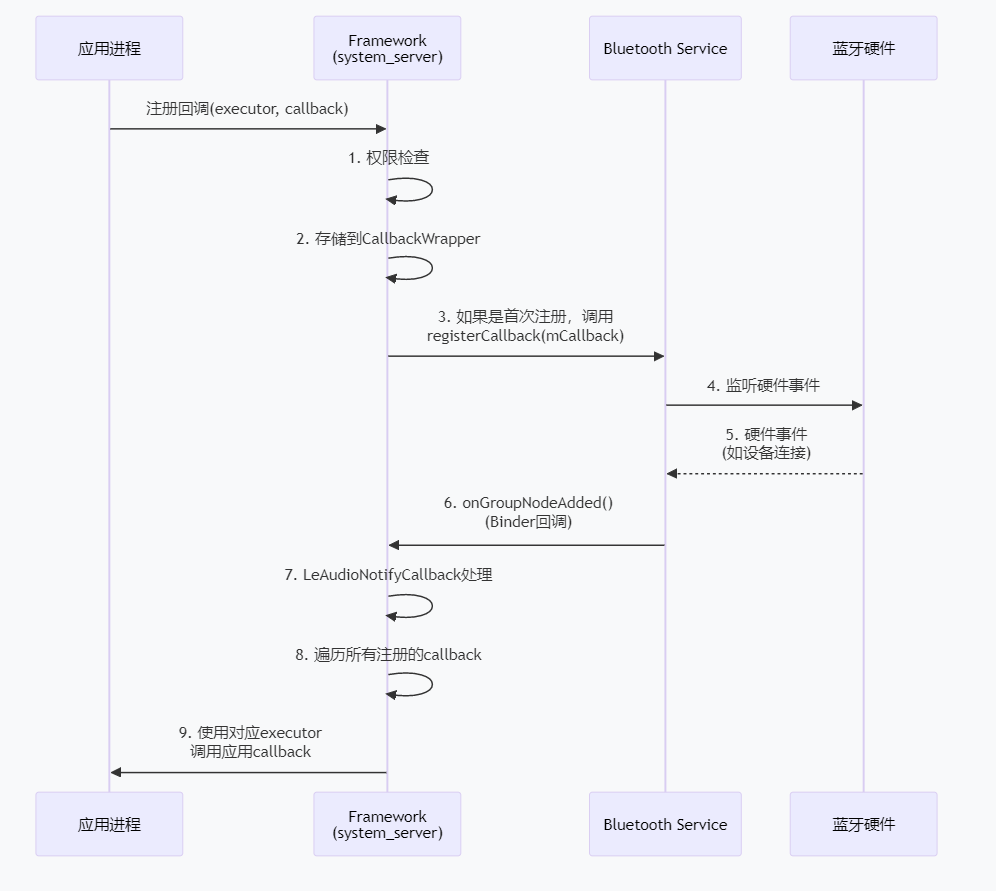
真个callback的interface定义如下:
/**
 * This class provides a callback that is invoked when audio codec config changes on the remote
 * device.
 *
 * @hide
 */
@SystemApi
public interface Callback {
    /** @hide */
    @Retention(RetentionPolicy.SOURCE)
    @IntDef(
            value = {
                GROUP_STATUS_ACTIVE,
                GROUP_STATUS_INACTIVE,
            })
    @interface GroupStatus {}

    /** @hide */
    @Retention(RetentionPolicy.SOURCE)
    @IntDef(
            value = {
                 GROUP_STREAM_STATUS_IDLE,
                 GROUP_STREAM_STATUS_STREAMING,
             })
     @interface GroupStreamStatus {}

     /**
      * Callback invoked when callback is registered and when codec config changes on the remote
      * device.
      *
      * @param groupId the group id
      * @param status latest codec status for this group
      * @hide
      */
     @SystemApi
     void onCodecConfigChanged(int groupId, @NonNull BluetoothLeAudioCodecStatus status);

     /**
      * Callback invoked when a device has been added to the group. It usually happens after
      * connection or on bluetooth startup if the device is bonded.
      *
      * @param device the device which is added to the group
      * @param groupId the group id
      * @hide
      */
     @SystemApi
     void onGroupNodeAdded(@NonNull BluetoothDevice device, int groupId);

     /**
      * Callback invoked when a device has been removed from the group. It usually happens when
      * device gets unbonded.
      *
      * @param device the device which is removed from the group
      * @param groupId the group id
      * @hide
      */
     @SystemApi
     void onGroupNodeRemoved(@NonNull BluetoothDevice device, int groupId);

     /**
      * Callback invoked the group's active state changes.
      *
      * @param groupId the group id
      * @param groupStatus active or inactive state.
      * @hide
      */
     @SystemApi
     void onGroupStatusChanged(int groupId, @GroupStatus int groupStatus);

     /**
      * Callback invoked when the group's stream status changes.
      *
      * @param groupId the group id
      * @param groupStreamStatus streaming or idle state.
      * @hide
      */
     @SystemApi
     default void onGroupStreamStatusChanged(
             int groupId, @GroupStreamStatus int groupStreamStatus) {
         if (DBG) {
             Log.d(TAG, " onGroupStreamStatusChanged is not implemented.");
         }
     }

     /**
      * Callback invoked when the broadcast to unicast fallback group changes.
      *
      * <p>This callback provides the new broadcast to unicast fallback group ID. It is invoked
      * when the broadcast to unicast fallback group is initially set, or when it subsequently
      * changes.
      *
      * @param groupId The ID of the new broadcast to unicast fallback group.
      * @hide
      */
     @FlaggedApi(Flags.FLAG_LEAUDIO_BROADCAST_API_MANAGE_PRIMARY_GROUP)
     @SystemApi
     default void onBroadcastToUnicastFallbackGroupChanged(int groupId) {
         if (DBG) {
             Log.d(TAG, "onBroadcastToUnicastFallbackGroupChanged is not implemented.");
         }
     }
 }
这是典型的 Android 蓝牙 LE Audio 回调接口设计:
特点:
- 定义在某个类内部 - 从注释看,它是外部类的一个内部接口
- 系统级 API - 使用
@SystemApi和@hide注解,表示这是供系统应用使用的隐藏 API - 事件驱动 - 当蓝牙设备状态发生变化时,系统会通过这个接口通知应用程序
包含的回调方法:
- onCodecConfigChanged - 远程设备音频编解码器配置变化时调用
- onGroupNodeAdded - 设备加入组时调用(连接或配对后)
- onGroupNodeRemoved - 设备从组移除时调用(取消配对时)
- onGroupStatusChanged - 组的激活状态变化时调用
- onGroupStreamStatusChanged - 音频流状态变化时调用(默认空实现)
- onBroadcastToUnicastFallbackGroupChanged - 广播到单播回退组变化时调用(默认空实现)
|------------------------------------------|----------------|----------------|----------------|----------------|----------------|
| Android版本 | Android 12 | Android 13 | Android 14 | Android 15 | Android 16 |
| onCodecConfigChanged | N | Y | Y | Y | Y |
| onGroupNodeAdded | N | Y | Y | Y | Y |
| onGroupNodeRemoved | N | Y | Y | Y | Y |
| onGroupStatusChanged | N | Y | Y | Y | Y |
| onGroupStreamStatusChanged | N | N | N | Y | Y |
| onBroadcastToUnicastFallbackGroupChanged | N | N | N | N | Y |
三. Service发送广播给APP
1. ACTION_LE_AUDIO_CONNECTION_STATE_CHANGED
|---------------|----------------|----------------|----------------|----------------|----------------|
| Android版本 | Android 12 | Android 13 | Android 14 | Android 15 | Android 16 |
| 支持情况 | Y | Y | Y | Y | Y |
当le audio连接状态发生改变的时候,le service会发送一个广播
/packages/modules/Bluetooth/android/app/src/com/android/bluetooth/le_audio/LeAudioService.java
/**
 * Send broadcast intent about LeAudio connection state changed. This is called by
 * LeAudioStateMachine.
 */
void notifyConnectionStateChanged(BluetoothDevice device, int newState, int prevState) {
    Log.d(
            TAG,
            "Notify connection state changed."
                    + device
                    + "("
                    + prevState
                    + " -> "
                    + newState
                    + ")");

    mAdapterService.notifyProfileConnectionStateChangeToGatt(
            BluetoothProfile.LE_AUDIO, prevState, newState);
    mAdapterService.handleProfileConnectionStateChange(
            BluetoothProfile.LE_AUDIO, device, prevState, newState);
    mAdapterService
            .getActiveDeviceManager()
            .profileConnectionStateChanged(
                    BluetoothProfile.LE_AUDIO, device, prevState, newState);
    mAdapterService.updateProfileConnectionAdapterProperties(
            device, BluetoothProfile.LE_AUDIO, newState, prevState);

    Intent intent = new Intent(BluetoothLeAudio.ACTION_LE_AUDIO_CONNECTION_STATE_CHANGED);
    intent.putExtra(BluetoothProfile.EXTRA_PREVIOUS_STATE, prevState);
    intent.putExtra(BluetoothProfile.EXTRA_STATE, newState);
    intent.putExtra(BluetoothDevice.EXTRA_DEVICE, device);
    intent.addFlags(
            Intent.FLAG_RECEIVER_REGISTERED_ONLY_BEFORE_BOOT
                    | Intent.FLAG_RECEIVER_INCLUDE_BACKGROUND);
    sendBroadcastAsUser(
            intent,
            UserHandle.ALL,
            BLUETOOTH_CONNECT,
            Utils.getTempBroadcastOptions().toBundle());
}
应用注册广播
private void registerConnectionStateReceiver() {
    Log.d(TAG, "registerConnectionStateReceiver()");
    IntentFilter filter =
        new IntentFilter(BluetoothLeAudio.ACTION_LE_AUDIO_CONNECTION_STATE_CHANGED);
    filter.addAction(BluetoothDevice.ACTION_UUID);
    mContext.registerReceiver(mConnectionStateReceiver, filter);
    mConnectionStateReceiverRegistered = true;
}
广播的处理
private BroadcastReceiver mConnectionStateReceiver = new BroadcastReceiver() {
    @Override
    public void onReceive(Context context, Intent intent) {
        BluetoothDevice device =
                (BluetoothDevice) intent.getParcelableExtra(BluetoothDevice.EXTRA_DEVICE);
        if (DEBUG) {
            Log.d(TAG, "There was a connection status change for: " + device.getAddress());
        }

        if (!device.equals(mTarget)) {
            return;
        }

        if (BluetoothDevice.ACTION_UUID.equals(intent.getAction())) {
            // regardless of the UUID content, at this point, we're sure we can initiate a
            // profile connection.
            Log.d(TAG,
                "mHandler.sendEmptyMessageDelayed(MSG_CONNECT_TIMEOUT, CONNECT_TIMEOUT_MS)");
            mHandler.sendEmptyMessageDelayed(MSG_CONNECT_TIMEOUT, CONNECT_TIMEOUT_MS);
            if (!mHandler.hasMessages(MSG_CONNECT)) {
                Log.d(TAG,
                    "mHandler.sendEmptyMessageDelayed(MSG_CONNECT, CONNECT_DELAY) now 10");
                mHandler.sendEmptyMessageDelayed(MSG_CONNECT, CONNECT_DELAY);
             }
         } else { // BluetoothLeAudio.ACTION_CONNECTION_STATE_CHANGED

             int previousState = intent.getIntExtra(
                     BluetoothLeAudio.EXTRA_PREVIOUS_STATE, BluetoothLeAudio.STATE_CONNECTING);
             int state = intent.getIntExtra(
                     BluetoothLeAudio.EXTRA_STATE, BluetoothLeAudio.STATE_CONNECTING);

             if (DEBUG) {
                 Log.d(TAG, "Connection states: old = " + previousState + ", new = " + state);
             }

             if (previousState == BluetoothLeAudio.STATE_CONNECTING) {
                 if (state == BluetoothLeAudio.STATE_CONNECTED) {
                     Log.i(TAG, "onReceive(): connected");
                     succeeded();
                 } else if (state == BluetoothLeAudio.STATE_DISCONNECTED) {
                     Log.e(TAG, "onReceive(): Failed to connect");
                     failed();
                 }

                 // TODO: Evaluate the correct action for LE Audio

                 Log.d(TAG, "Normally we would unregister and close here: "
                     + device.getAddress());
                 //unregisterConnectionStateReceiver();
                 //closeLeAudioProfileProxy();
             }
         }
     }
 };
2. ACTION_LE_AUDIO_ACTIVE_DEVICE_CHANGED
|---------------|----------------|----------------|----------------|----------------|----------------|
| Android版本 | Android 12 | Android 13 | Android 14 | Android 15 | Android 16 |
| 支持情况 | Y | Y | Y | Y | Y |
service发送广播
/packages/modules/Bluetooth/android/app/src/com/android/bluetooth/le_audio/LeAudioService.java
void sendActiveDeviceChangeIntent(BluetoothDevice device) {
    Intent intent = new Intent(BluetoothLeAudio.ACTION_LE_AUDIO_ACTIVE_DEVICE_CHANGED);
    intent.putExtra(BluetoothDevice.EXTRA_DEVICE, device);
    intent.addFlags(
            Intent.FLAG_RECEIVER_REGISTERED_ONLY_BEFORE_BOOT
                    | Intent.FLAG_RECEIVER_INCLUDE_BACKGROUND);
    createContextAsUser(UserHandle.ALL, /* flags= */ 0)
            .sendBroadcastWithMultiplePermissions(
                    intent, new String[] {BLUETOOTH_CONNECT, BLUETOOTH_PRIVILEGED});
    mEventLogger.logd(
            TAG, "[Intent] Active Device Changed:" + mExposedActiveDevice + " -> " + device);
    mExposedActiveDevice = device;
}