参考资料
- https://github.com/kubernetes-sigs/aws-load-balancer-controller/releases?q=Gateway+API\&expanded=true
- Gateway API:Kubernetes 和服务网格入口中网关的未来
- Envoy Gateway 概述使用 Gateway API 的现代 Kubernetes 入口
- Kubernetes Gateway API 深入解读和落地指南
- Kubernetes Gateway API 网关选型全景对比
虽然截至版本2.17(目前)不建议在生产工作负载中使用 LBC 和网关 API,从发布信息上来看对于Gateway API的支持即将GA。
Gateway API - GA Release Candidate : The Gateway API implementation in this release is considered a Release Candidate for its General Availability (GA) release planned for next month. We encourage extensive testing in production-like environments and welcome your feedback via GitHub issues to ensure a stable GA release. What's new in this release:
负载均衡控制器(LBC)支持对 Kubernetes Gateway API 对象进行协调。它使用 AWS NLB 满足 L4 路由(TCPRoute、UDPRoute、TLSRoute)。它使用 AWS ALB 满足 L7 路由(HTTPRoute、GRPCRoute)。但是不支持在同一网关上混合协议层,例如 TCPRoute 和 HTTPRoute。
此外,目前AWS ALB Gateway对于Standard Gateway API的支持时有限的,具体的对比可以参考表,https://kubernetes-sigs.github.io/aws-load-balancer-controller/v2.17/guide/gateway/l7gateway/#feature-comparison-alb-gateways-vs-standard-gateway-api
使用gateway API要求的LBC版本>= v2.13.0
首先进行gateway API CRD的安装,命令如下
shell
# 标准网关 API CRD
# kubectl apply -f https://github.com/kubernetes-sigs/gateway-api/releases/download/v1.2.0/standard-install.yaml
kubectl apply -f https://github.com/kubernetes-sigs/gateway-api/releases/download/v1.2.0/experimental-install.yaml

# LBC 网关 API 特定 CRD
kubectl apply -f https://raw.githubusercontent.com/kubernetes-sigs/aws-load-balancer-controller/refs/heads/main/config/crd/gateway/gateway-crds.yaml
默认情况下,LBC 不会监听 Gateway API CRDs。在 LBC 部署中指定以下功能标志启用支持,安装命令如下
shell
helm upgrade -i aws-load-balancer-controller eks/aws-load-balancer-controller \
  -n kube-system \
  --set clusterName=test127 \
  --set vpcId=vpc-071a486ff59f110d0 \
  --set "controllerConfig.featureGates.NLBGatewayAPI=true" \
  --set "controllerConfig.featureGates.ALBGatewayAPI=true"
启动后LBC日志会出现
json
{"level":"info","ts":"2026-01-23T06:28:00Z","logger":"setup","msg":"starting gateway route reconciler"}LBC 在集群中运行一个reconciliation loop
- 控制器持续监控 Kubernetes API,监听上述CRD资源配置变更
- 当检测到这些资源(gateway,route)的任何修改、创建或删除时,相应的对象会被添加到内部处理队列中
- controller从队列中检索并验证,之后转换为aws资源的期望等效配置
- 将期望和现状比较,并使用api修改资源使状态保持一致
- 更新完毕后将资源的状态填充在 Gateway API 资源的
status字段
4层路由和配置
部署gateway示例配置如下
yaml
apiVersion: gateway.networking.k8s.io/v1beta1
kind: GatewayClass
metadata:
  name: aws-nlb-gateway-class
spec:
  controllerName: gateway.k8s.aws/nlb
---
apiVersion: gateway.networking.k8s.io/v1beta1
kind: Gateway
metadata:
  name: my-tcp-gateway
  namespace: default
spec:
  gatewayClassName: aws-nlb-gateway-class
  listeners:
  - name: tcp-app
    protocol: TCP
    port: 8080
    allowedRoutes:
      namespaces:
        from: Same
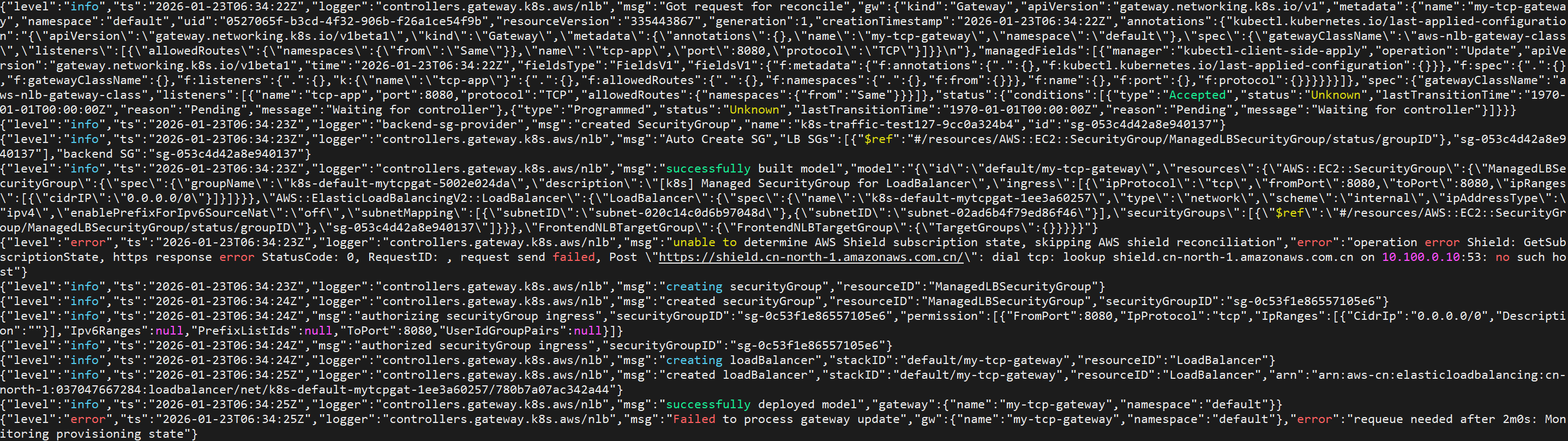
创建gateway资源后lbc日志如下,此时nlb已经创建出来,但是没有监听器
创建route
yaml
apiVersion: gateway.networking.k8s.io/v1alpha2
kind: TCPRoute
metadata:
  name: my-tcp-app-route
  namespace: default
spec:
  parentRefs:
  - group: gateway.networking.k8s.io
    kind: Gateway
    name: my-tcp-gateway
    sectionName: tcp-app # Refers to the specific listener on the Gateway
  rules:
  - backendRefs:
    - name: foo-service # Kubernetes Service
      port: 5678
      # weight: 0
LBC出现一些报错如下。ateway API (TCPRoute) 规范规定:如果未指定 weight,默认为 1。所以尽管我并没有指定weight仍旧出现了报错
json
{"level":"error","ts":"2026-01-23T06:39:18Z","logger":"controllers.gateway.k8s.aws/nlb","msg":"Failed to process gateway update","gw":{"name":"my-tcp-gateway","namespace":"default"},"error":"operation error Elastic Load Balancing v2: CreateListener, https response error StatusCode: 400, RequestID: 604adae9-aaac-40a9-a5bf-400b134c04c8, api error ValidationError: You cannot specify a target group weight on load balancers of type 'network'"}将weight显示设置为0,model部署成功了,但是实际没有listener创建成功,日志显示跳过了backend
json
{"level":"info","ts":"2026-01-23T06:52:50Z","logger":"controllers.gateway.k8s.aws/nlb","msg":"Ignoring NLB backend with 0 weight.","route":{"name":"my-tcp-app-route","namespace":"default"}}社区没有检索到这个issue,这可能是个未修复的异常。
7层路由和配置
对于每一个引用了 GatewayClass 且 controllerName 设置为 gateway.k8s.aws/alb 的网关,LBC 会创建一个 AWS ALB。支持如下route类型
HTTPRoute: 定义了 HTTP 特定的路由规则,使负载均衡器和后端目标之间能够进行 HTTP 通信。GRPCRoute: 定义了 GRPC 特定的路由规则,使负载均衡器和后端目标之间能够进行 GRPC 通信。
部署gatewayclass和gateway
yaml
apiVersion: gateway.networking.k8s.io/v1beta1
kind: GatewayClass
metadata:
  name: aws-alb-gateway-class
spec:
  controllerName: gateway.k8s.aws/alb
---
apiVersion: gateway.networking.k8s.io/v1beta1
kind: Gateway
metadata:
  name: my-alb-gateway
  namespace: default
spec:
  gatewayClassName: aws-alb-gateway-class
  listeners:
  - name: http
    protocol: HTTP
    port: 80
    allowedRoutes:
      namespaces:
        from: Same
创建http路由
yaml
apiVersion: gateway.networking.k8s.io/v1beta1
kind: HTTPRoute
metadata:
  name: my-http-app-route
  namespace: default
spec:
  parentRefs:
  - group: gateway.networking.k8s.io
    kind: Gateway
    name: my-alb-gateway
    sectionName: http
  rules:
  - backendRefs:
    - name: foo-service
port: 5678官方提供了一些证书和标头匹配规则的例子,https://kubernetes-sigs.github.io/aws-load-balancer-controller/v2.17/guide/gateway/l7gateway/#examples
扩展CRD配置
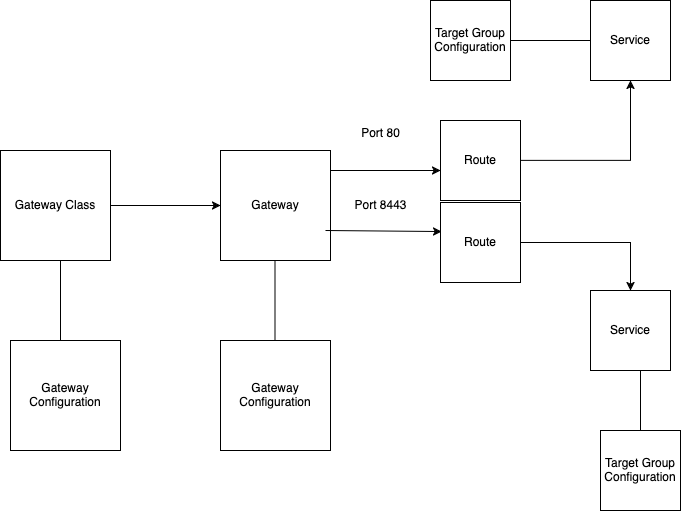
在CRD部分我们安装了LBC 网关 API 特定 CRD,这是为了LBC为了适应不同的使用案例和特定的操作需求,通过通过三个自定义资源定义 (CRD):LoadBalancerConfiguration、TargetGroupConfiguration 和 ListenerRuleConfiguration进行扩展,关联关系如下
例如指定负载均衡器是否面向公网
apiVersion: gateway.k8s.aws/v1beta1
kind: LoadBalancerConfiguration
metadata:
  name: internet-facing-config
  namespace: example-ns
spec:
  scheme: internet-facing
之后可以在Gateway上关联,如果附加在 GatewayClass ,则该配置将成为所有引用此 GatewayClass 的 Gateway 资源的默认配置。
yaml
apiVersion: gateway.networking.k8s.io/v1beta1
kind: Gateway
metadata:
  name: my-alb-gateway
  namespace: example-ns
spec:
  gatewayClassName: aws-alb-gateway-class
  infrastructure:
    parametersRef:
      kind: LoadBalancerConfiguration
      name: internet-facing-config
      group: gateway.k8s.aws
  listeners:
    - name: https
      protocol: HTTPS
      port: 443
      allowedRoutes:
        namespaces:
          from: Same
通过TargetGroupConfiguration指定目标组的属性配置。通过任何路由为 my-service 创建的任何目标组将继承这些默认设置。这里的my-service是k8s svc的name。每个服务只能声明一个 TargetGroupConfiguration CRD
yaml
apiVersion: gateway.k8s.aws/v1beta1
kind: TargetGroupConfiguration
metadata:
  name: custom-tg-config
  namespace: default
spec:
  targetReference:
    kind: Service
    name: foo-service
  defaultConfiguration:
    targetType: ip
    healthCheckConfig:
      healthCheckPath: /health
      healthCheckInterval: 30
      healthyThresholdCount: 3
通过ListenerRuleConfiguration对Listener Rules 进行规则特定定制的自定义资源定义,关联到一个或多个 HTTPRoute 或 GRPCRoute。例如如下指定端口返回默认404响应
yaml
apiVersion: gateway.k8s.aws/v1beta1
kind: ListenerRuleConfiguration
metadata:
  name: example-lrc-config
  namespace: default
spec:
  actions:
    - type: "fixed-response"
      fixedResponseConfig:
        statusCode: 404
        contentType: "text/plain"
        messageBody: "my fixed response"
---
apiVersion: gateway.networking.k8s.io/v1beta1
kind: HTTPRoute
metadata:
  name: my-http-app-route
  namespace: default
spec:
  parentRefs:
  - group: gateway.networking.k8s.io
    kind: Gateway
    name: my-alb-gateway
    sectionName: http
  rules:
  - backendRefs:
    - name: foo-service
      port: 5678
    filters:
      - type: ExtensionRef
        extensionRef:
          group: "gateway.k8s.aws"
          kind: "ListenerRuleConfiguration"
          name: "example-lrc-config"