点击定位原文后平滑滚动到所匹配的内容区域并高亮显示
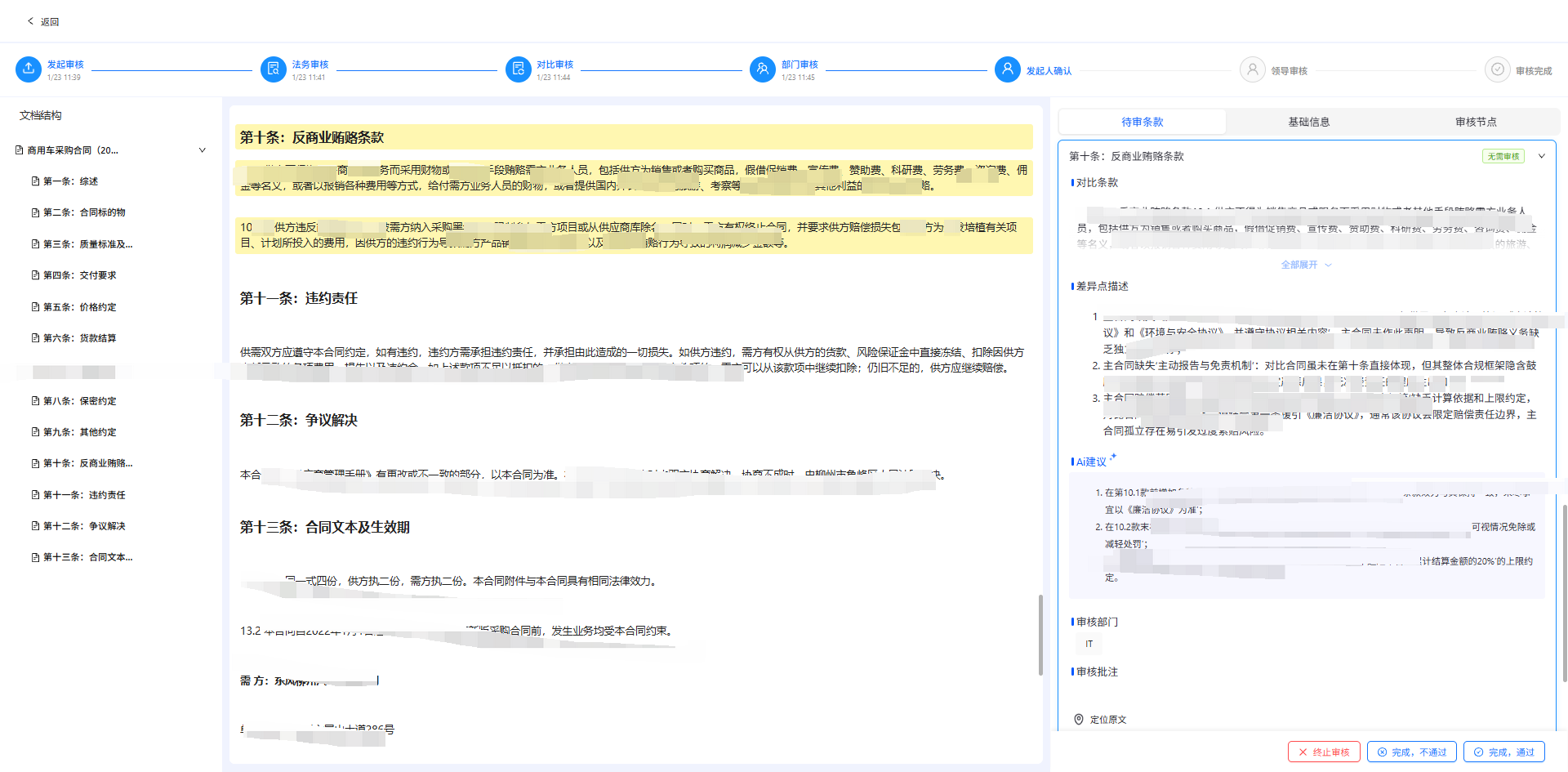
功能概述
实现了在对比审核页面中,通过条款标题在左侧文档中快速定位并高亮显示整个章节内容的功能。与 handleLocate 不同,见
https://blog.csdn.net/qq_70172010/article/details/157296853?sharetype=blogdetail&sharerId=157296853&sharerefer=PC&sharesource=qq_70172010&spm=1011.2480.3001.8118,该函数通过标题匹配 来定位,并会高亮从该标题到下一个同级或更高级标题之间的全部内容。
函数签名
const handleLocateByTitle = (index, title) => { ... }参数说明:
index- 当前对比条款卡片在列表中的索引title- 需要定位的条款标题文本
工作流程
┌─────────────────────────────────────────────────────────────┐
│                    1. 设置当前选中卡片                        │
│                   setSelectedCardIndex(index)                │
└─────────────────────────────────────────────────────────────┘
                              ↓
┌─────────────────────────────────────────────────────────────┐
│                    2. 清除旧的高亮样式                        │
│      document.querySelectorAll('.heading-highlight')         │
└─────────────────────────────────────────────────────────────┘
                              ↓
┌─────────────────────────────────────────────────────────────┐
│              3. 延迟 100ms 后执行查找                         │
│         确保 DOM 完全渲染后再进行操作                         │
└─────────────────────────────────────────────────────────────┘
                              ↓
┌─────────────────────────────────────────────────────────────┐
│         4. 获取所有标题元素并标准化处理                        │
│    • 查询所有 h1-h6 标题元素                                  │
│    • 标准化函数:去除空格和标点符号                            │
└─────────────────────────────────────────────────────────────┘
                              ↓
┌─────────────────────────────────────────────────────────────┐
│              5. 多策略匹配标题                                │
│   • 精确匹配:headingText === title                          │
│   • 包含匹配:headingText.includes(title)                    │
│   • 反向包含:title.includes(headingText)                    │
│   • 标准化匹配:normalizedHeading === normalizedTitle        │
│   → 按标题长度排序,选择最短的(最精确)                       │
└─────────────────────────────────────────────────────────────┘
                              ↓
┌─────────────────────────────────────────────────────────────┐
│         6. 确定高亮范围(章节边界)                           │
│   • 一级标题:找到下一个任意级别的标题                         │
│   • 其他级别:找到下一个同级或更高级别的标题                   │
└─────────────────────────────────────────────────────────────┘
                              ↓
┌─────────────────────────────────────────────────────────────┐
│            7. 高亮整个章节并滚动定位                          │
│   • 从当前标题到结束标题之间的所有元素添加高亮                 │
│   • 使用 scrollIntoView 滚动到可视区域                        │
└─────────────────────────────────────────────────────────────┘
匹配策略详解
// 四种匹配方式(按优先级排列)
1. headingText === title              // 完全相同
2. headingText?.includes(title)        // 标题包含目标
3. title?.includes(headingText)        // 目标包含标题
4. normalizedHeading === normalizedTitle // 标准化后相同(去除空格和标点)

// 精确匹配选择
matches.sort((a, b) => a.length - b.length);  // 选择标题最短的
高亮范围规则
| 当前标题级别 | 结束位置查找规则 | 示例 |
|---|---|---|
| H1 (一级) | 下一个任意标题 | H1 → H2/H3/H4/H5/H6 |
| H2 (二级) | 下一个 H1 或 H2 | H2 → H1/H2 |
| H3 (三级) | 下一个 H1/H2/H3 | H3 → H1/H2/H3 |
| H4-H6 | 同理,找同级或更高级 | H4 → H1/H2/H3/H4 |
调用位置
在对比条款卡片底部操作区的"定位原文"按钮上绑定:
<Button onClick={() => handleLocateByTitle(index, item.title)}>
    定位原文
</Button>
CSS 样式类
| 类名 | 作用 | 使用场景 |
|---|---|---|
.heading-highlight |
标题章节高亮样式 | 按标题定位时高亮整个章节 |
.collapseSelected |
卡片选中样式 | 当前选中的条款卡片 |
/* --- 标题高亮样式 --- */
:global(.heading-highlight) {
  background-color: rgba(255, 235, 59, 0.4);
  border-radius: 4px;
  padding: 4px 8px;
  margin: -4px -8px;
  transition: all 0.3s ease;
  animation: highlightPulse 1s ease-in-out;
}

@keyframes highlightPulse {
  0% {
    background-color: rgba(255, 235, 59, 0.8);
  }

  100% {
    background-color: rgba(255, 235, 59, 0.4);
  }
}
与 ContractReview 的 handleLocate 对比
| 特性 | handleLocateByTitle (Audit) | handleLocate (ContractReview) |
|---|---|---|
| 定位依据 | 标题文本 | 原文内容片段 |
| 高亮范围 | 整个章节(标题到下一个标题) | 单个父级元素 |
| 匹配策略 | 4种匹配 + 长度排序 | 精确匹配 + 模糊正则 + 相似度计算 |
| 算法复杂度 | 较低(标题元素较少) | 较高(TreeWalker 遍历文本节点) |
| 容错能力 | 中等(标准化文本) | 较高(编辑距离算法) |
| 使用场景 | 对比审核 - 条款级别定位 | 法务审核 - 原文片段定位 |
特性
- 章节级高亮: 一次性高亮整个章节内容,适合快速浏览完整条款
- 智能边界: 根据标题层级自动确定章节结束位置
- 多重匹配: 支持 4 种匹配策略,提高查找成功率
- 精确优先: 按标题长度排序,优先选择最短的匹配结果(通常是最精确的)
- 延迟执行: 100ms 延迟确保 DOM 完全渲染后再执行
完整代码
const handleLocateByTitle = (index, title) => {
    setSelectedCardIndex(index);

    if (!title) {
      return;
    }

    // 清除之前的高亮
    document.querySelectorAll('.heading-highlight').forEach(el => {
      el.classList.remove('heading-highlight');
    });

    setTimeout(() => {
      const allHeadings = Array.from(document.querySelectorAll('h1, h2, h3, h4, h5, h6'));
      let foundHeading = null;
      let foundIndex = -1;

      // 标准化标题函数:去除空格和特殊字符
      const normalizeText = (text) => {
        if (!text) return '';
        return text.replace(/\s+/g, '').replace(/[,。、;:,.:;()()《》【】]/g, '');
      };

      const normalizedTitle = normalizeText(title);

      // 收集所有匹配的标题,然后选择最短最精确的
      const matches = [];

      allHeadings.forEach((heading, idx) => {
        const headingText = heading.textContent?.trim();
        const normalizedHeading = normalizeText(headingText);

        // 多种匹配方式
        if (headingText === title ||
          headingText?.includes(title) ||
          title?.includes(headingText) ||
          normalizedHeading === normalizedTitle) {
          matches.push({ heading, idx, text: headingText, length: headingText.length });
        }
      });

      if (matches.length > 0) {
        // 按标题长度排序,选择最短的(最精确的匹配)
        matches.sort((a, b) => a.length - b.length);
        foundHeading = matches[0].heading;
        foundIndex = matches[0].idx;
      }

      if (foundHeading) {
        // 查找下一个标题作为结束位置
        const currentLevel = parseInt(foundHeading.tagName.charAt(1));
        let nextHeading = null;

        // 一级标题:找到下一个任意级别的标题
        // 其他级别标题:找到下一个同级或更高级的标题
        for (let i = foundIndex + 1; i < allHeadings.length; i++) {
          const nextLevel = parseInt(allHeadings[i].tagName.charAt(1));
          if (currentLevel === 1) {
            // 一级标题:任意下一个标题都作为结束位置
            nextHeading = allHeadings[i];
            break;
          } else {
            // 其他级别:同级或更高级的标题作为结束位置
            if (nextLevel <= currentLevel) {
              nextHeading = allHeadings[i];
              break;
            }
          }
        }

        // 给从当前标题到下一个标题之间的所有元素添加高亮
        let currentElement = foundHeading;
        let highlightCount = 0;

        while (currentElement && currentElement !== nextHeading) {
          currentElement.classList.add('heading-highlight');
          currentElement = currentElement.nextElementSibling;
          highlightCount++;
        }

        // 滚动到可见区域
        foundHeading.scrollIntoView({
          behavior: 'smooth',
          block: 'start'
        });
      } else {
        console.log('✗ 未找到标题:', title);
      }

    }, 100);
  };