点击定位原文后平滑滚动到所匹配的内容区域并高亮显示
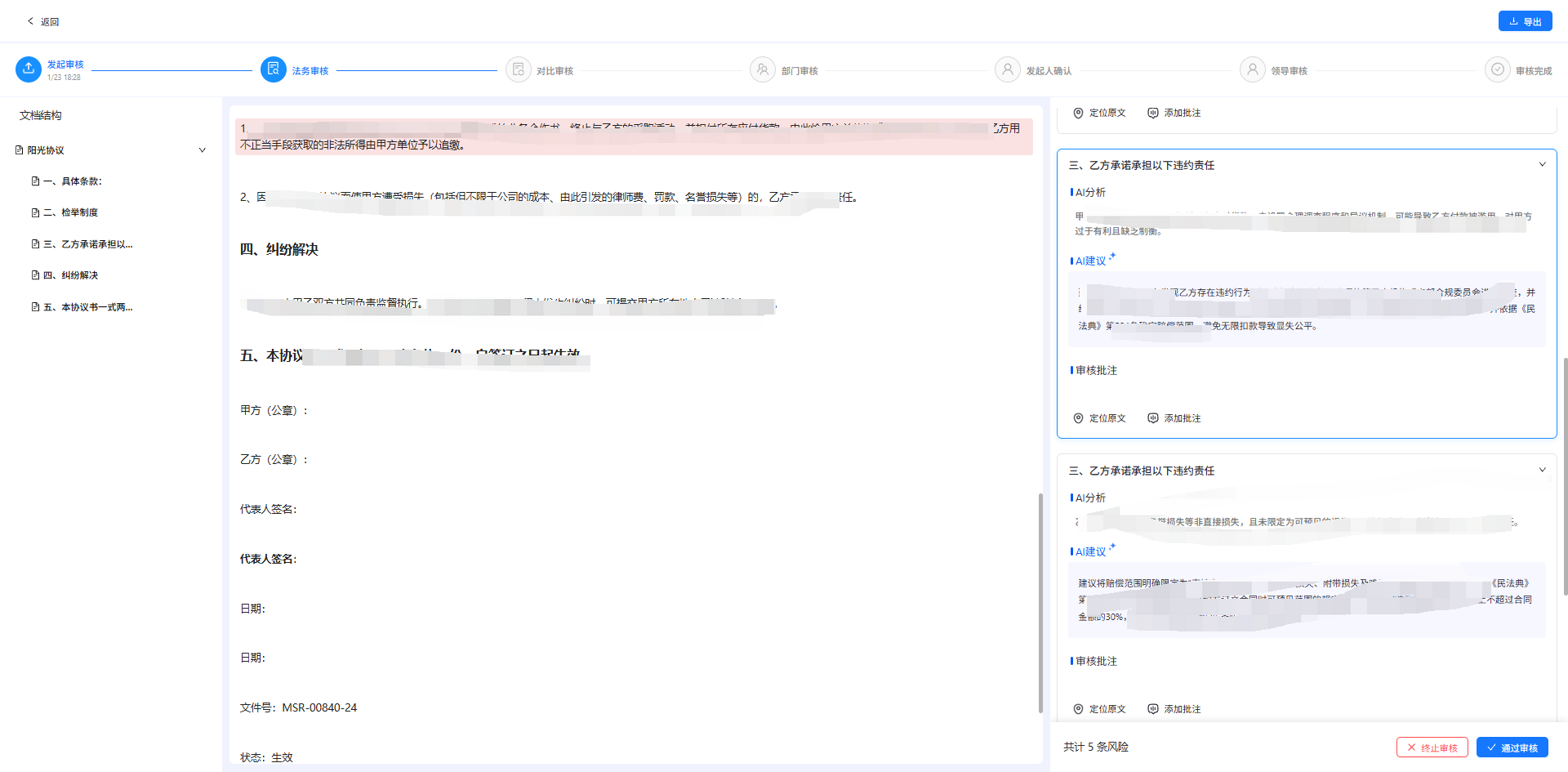
功能概述
实现了在合同审核页面中,从右侧风险点列表快速定位到中间文档对应原文内容的功能。点击"定位原文"按钮后,系统会在 Markdown 文档中查找匹配的文本,高亮显示并自动滚动到该位置。
函数签名
const handleLocate = (index, originalText) => { ... }参数说明:
index- 当前风险点卡片在列表中的索引originalText- 需要定位的原文文本内容
工作流程
┌─────────────────────────────────────────────────────────────┐
│                    1. 设置当前选中卡片                        │
│                   setSelectedCardIndex(index)                │
└─────────────────────────────────────────────────────────────┘
                              ↓
┌─────────────────────────────────────────────────────────────┐
│                    2. 清除旧的高亮样式                        │
│      document.querySelectorAll('.risk-locate-highlight')     │
└─────────────────────────────────────────────────────────────┘
                              ↓
┌─────────────────────────────────────────────────────────────┐
│              3. 查找 Markdown 容器元素                        │
│      #markdownContent 或 .centerContent                      │
└─────────────────────────────────────────────────────────────┘
                              ↓
┌─────────────────────────────────────────────────────────────┐
│          4. 构建正则表达式(精确匹配 + 模糊匹配)              │
│  • 转义特殊字符                                               │
│  • 处理空格变体(\s+)                                        │
│  • 支持标点后跟括号的模糊匹配模式                              │
└─────────────────────────────────────────────────────────────┘
                              ↓
┌─────────────────────────────────────────────────────────────┐
│              5. 遍历 DOM 树查找匹配节点                        │
│         使用 TreeWalker 遍历文本节点                          │
│         • 优先精确匹配                                        │
│         • 失败时使用模糊匹配 + 相似度计算(阈值 > 0.8)        │
└─────────────────────────────────────────────────────────────┘
                              ↓
┌─────────────────────────────────────────────────────────────┐
│           6. 高亮显示并滚动到可视区域                          │
│  • 查找合适的父级元素(p/div/li/span/td/th)                 │
│  • 添加 .risk-locate-highlight 高亮样式                       │
│  • 滚动容器使目标元素位于可视区域顶部(预留 150px 间距)       │
└─────────────────────────────────────────────────────────────┘
辅助函数
calculateSimilarity计算两个字符串的相似度,用于模糊匹配场景。
算法: 基于编辑距离(Levenshtein Distance)
const calculateSimilarity = (str1, str2) => {
    // 1. 清理字符串(移除空格和标点符号)
    // 2. 计算编辑距离矩阵
    // 3. 返回相似度分数: 1 - (编辑距离 / 最大长度)
}
调用位置
在风险点卡片底部操作区的"定位原文"按钮上绑定:
<Button onClick={() => handleLocate(index, item.originalText)}>
    定位原文
</Button>
CSS 样式类
| 类名 | 作用 |
|---|---|
.risk-locate-highlight |
定位到原文时的高亮样式 |
.heading-highlight |
目录树点击时标题的高亮样式 |
:global(.risk-locate-highlight) {
  background-color: rgba(241, 160, 160, 0.3) !important;
  border-radius: 4px;
  padding: 4px 8px;
  margin: -4px -8px;
  transition: all 0.3s ease;
  animation: riskLocatePulse 1.5s ease-in-out;
  scroll-margin-top: 40px;
}
特性
- 双重匹配策略: 优先精确匹配,失败时使用模糊匹配 + 相似度评分
- 智能元素选择: 自动向上查找合适的父级元素进行高亮
- 平滑滚动 : 使用
behavior: 'smooth'提供流畅的滚动体验 - 容错处理: 支持空格变体、标点符号后跟括号等常见格式差异
完整代码
// 定位原文功能
    const handleLocate = (index, originalText) => {
        setSelectedCardIndex(index);

        if (!originalText) {
            return;
        }

        document.querySelectorAll('.risk-locate-highlight').forEach(el => {
            el.classList.remove('risk-locate-highlight');
        });

        const markdownContainer = document.querySelector('#markdownContent') || document.querySelector('.centerContent');
        if (!markdownContainer) {
            message.warning('未找到文档内容');
            return;
        }
        const escapedSearchText = originalText.replace(/[.*+?^${}()|[\]\\]/g, '\\$&');
        const normalizedPattern = escapedSearchText.replace(/\s+/g, '\\s+');
        const fuzzyPattern = normalizedPattern
            .split('')
            .map(char => {
                if (/[,。、;:,.:;]|[\u4e00-\u9fa5]/.test(char)) {
                    return char + '(?:[^,。、;:,.:;]*?([^)]*?))?';
                }
                return char;
            })
            .join('');

        // 同时尝试精确匹配和模糊匹配
        const searchRegex = new RegExp(fuzzyPattern, 'i');
        const exactRegex = new RegExp(normalizedPattern, 'i');

        const walker = document.createTreeWalker(
            markdownContainer,
            NodeFilter.SHOW_TEXT,
            null
        );

        let foundNode = null;
        let bestMatch = null;
        let bestMatchScore = 0;
        let currentNode;

        while (currentNode = walker.nextNode()) {
            const nodeText = currentNode.textContent;
            if (nodeText) {
                // 优先尝试精确匹配
                if (exactRegex.test(nodeText)) {
                    foundNode = currentNode;
                    break;
                }
                // 如果精确匹配失败,尝试模糊匹配并计算匹配度
                if (searchRegex.test(nodeText)) {
                    const score = calculateSimilarity(originalText, nodeText);
                    if (score > bestMatchScore && score > 0.8) {
                        bestMatch = currentNode;
                        bestMatchScore = score;
                    }
                }
            }
        }

        // 使用找到的最佳匹配节点
        foundNode = foundNode || bestMatch;

        if (foundNode) {
            let parentElement = foundNode.parentElement;
            let elementToHighlight = null;

            while (parentElement && parentElement !== markdownContainer) {
                const tagName = parentElement.tagName.toLowerCase();
                if (['p', 'div', 'li', 'span', 'td', 'th'].includes(tagName)) {
                    if (parentElement !== markdownContainer && !parentElement.classList.contains('markdown-body')) {
                        elementToHighlight = parentElement;
                        break;
                    }
                }
                parentElement = parentElement.parentElement;
            }

            if (!elementToHighlight && foundNode.parentElement) {
                elementToHighlight = foundNode.parentElement;
            }
            if (elementToHighlight) {
                elementToHighlight.classList.add('risk-locate-highlight');
                const scrollContainer = document.querySelector('.centerContent');
                if (scrollContainer) {
                    setTimeout(() => {
                        const containerRect = scrollContainer.getBoundingClientRect();
                        const elementRect = elementToHighlight.getBoundingClientRect();
                        const relativeTop = elementRect.top - containerRect.top + scrollContainer.scrollTop;
                        scrollContainer.scrollTo({
                            top: relativeTop - 150,
                            behavior: 'smooth'
                        });
                    }, 100);
                } else {
                    elementToHighlight.scrollIntoView({ behavior: 'smooth', block: 'start' });
                }
            }
        } else {
            message.warning('未找到对应的原文内容');
        }
    };

    // 计算两个字符串的相似度(基于字符重合度)
    const calculateSimilarity = (str1, str2) => {
        const len1 = str1.length;
        const len2 = str2.length;
        if (len1 === 0 || len2 === 0) return 0;

        // 移除空格和标点符号进行比较
        const cleanStr1 = str1.replace(/[\s,。、;:,.:;()()]/g, '');
        const cleanStr2 = str2.replace(/[\s,。、;:,.:;()()]/g, '');

        // 计算编辑距离(Levenshtein距离)
        const matrix = [];
        for (let i = 0; i <= cleanStr1.length; i++) {
            matrix[i] = [i];
        }
        for (let j = 0; j <= cleanStr2.length; j++) {
            matrix[0][j] = j;
        }
        for (let i = 1; i <= cleanStr1.length; i++) {
            for (let j = 1; j <= cleanStr2.length; j++) {
                if (cleanStr1.charAt(i - 1) === cleanStr2.charAt(j - 1)) {
                    matrix[i][j] = matrix[i - 1][j - 1];
                } else {
                    matrix[i][j] = Math.min(
                        matrix[i - 1][j - 1] + 1,
                        matrix[i][j - 1] + 1,
                        matrix[i - 1][j] + 1
                    );
                }
            }
        }

        const maxLen = Math.max(cleanStr1.length, cleanStr2.length);
        return 1 - matrix[cleanStr1.length][cleanStr2.length] / maxLen;
    };