Vditor 的 Markdown 格式的渲染见博客:
https://blog.csdn.net/qq_70172010/article/details/157431883?spm=1001.2014.3001.5501
实现效果
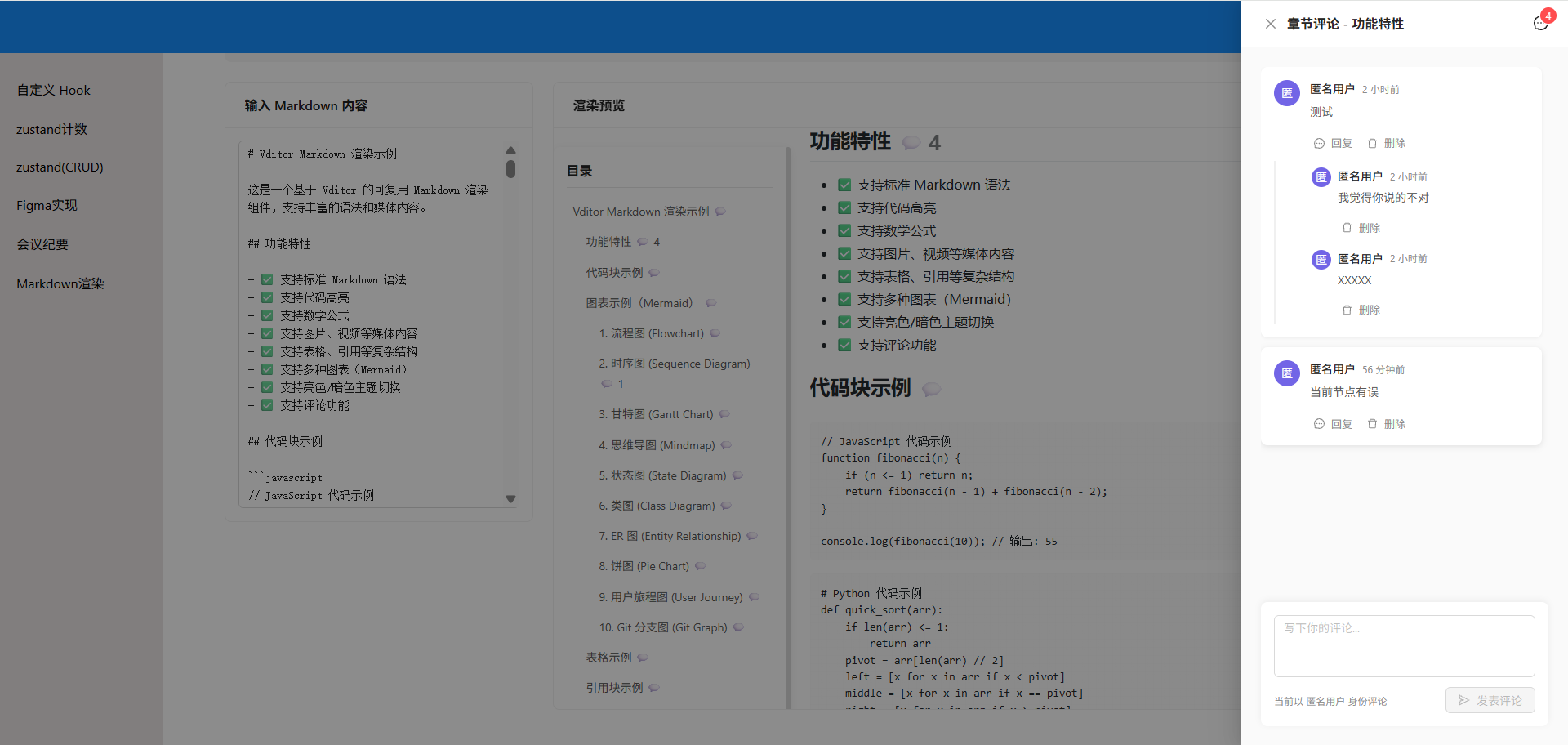
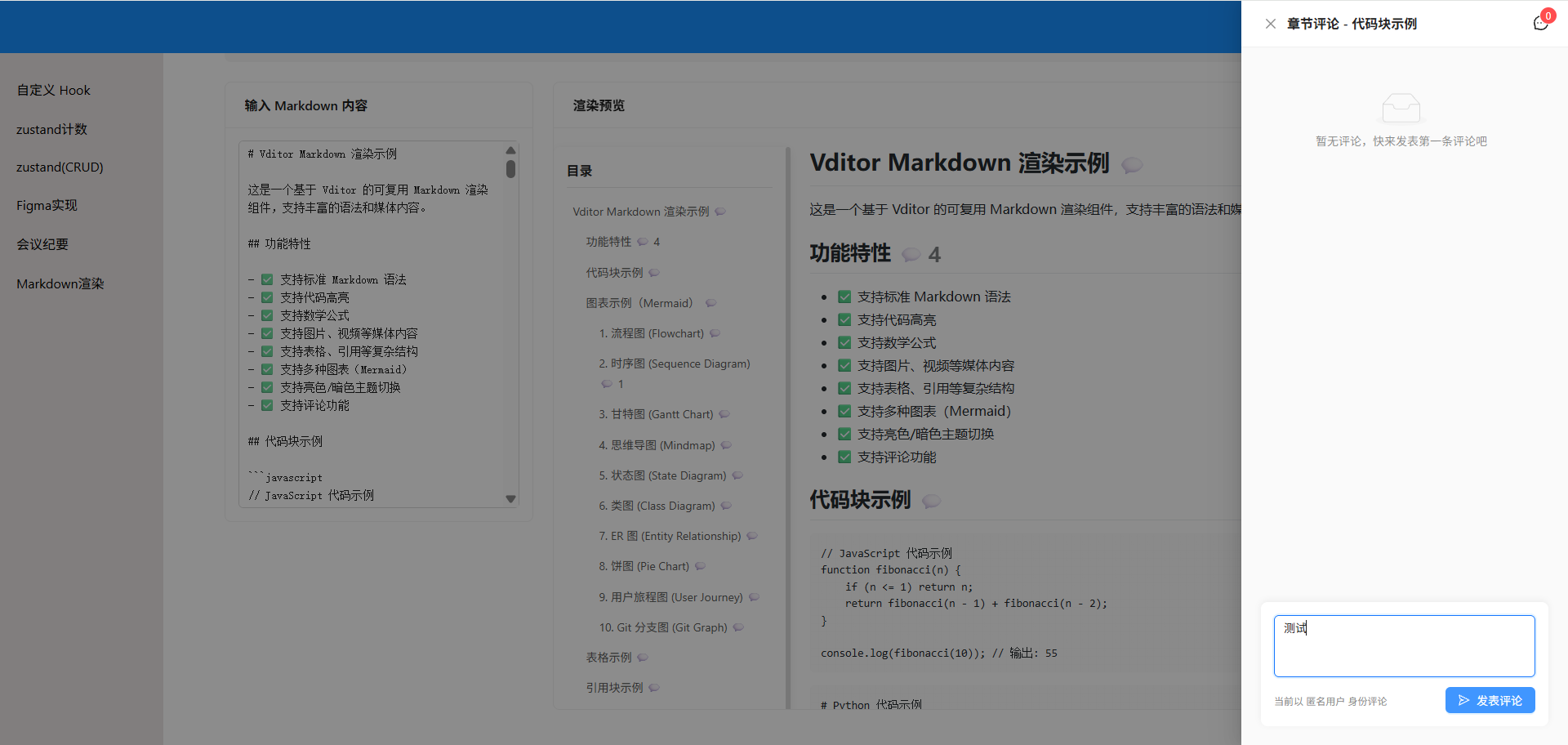
点击标题或者段落的评论按钮实现 Drawer 组件内容的渲染实现本地的评论。
创建评论数据的 Zustand store
javascript
import { create } from 'zustand';
import { persist } from 'zustand/middleware';

/**
 * 评论数据结构
 * @typedef {Object} Comment
 * @property {string} id - 评论唯一标识
 * @property {'heading' | 'paragraph'} targetType - 评论目标类型
 * @property {string} targetId - 目标元素 ID
 * @property {string} content - 评论内容
 * @property {string} author - 评论作者
 * @property {number} timestamp - 评论时间戳
 * @property {Comment[]} replies - 回复列表
 */

/**
 * 评论 Store - 使用 Zustand + localStorage 持久化
 */
export const useCommentStore = create(
    persist(
        (set, get) => ({
            // 状态
            comments: [],

            // Actions

            /**
             * 添加评论
             * @param {Object} commentData - 评论数据
             * @param {'heading' | 'paragraph'} commentData.targetType - 目标类型
             * @param {string} commentData.targetId - 目标 ID
             * @param {string} commentData.content - 评论内容
             * @param {string} commentData.author - 评论作者
             */
            addComment: ({ targetType, targetId, content, author }) => {
                const newComment = {
                    id: `comment-${Date.now()}-${Math.random().toString(36).substr(2, 9)}`,
                    targetType,
                    targetId,
                    content,
                    author,
                    timestamp: Date.now(),
                    replies: []
                };

                set((state) => ({
                    comments: [...state.comments, newComment]
                }));

                return newComment;
            },

            /**
             * 回复评论
             * @param {string} commentId - 父评论 ID
             * @param {string} content - 回复内容
             * @param {string} author - 回复作者
             */
            replyToComment: (commentId, content, author) => {
                const newReply = {
                    id: `reply-${Date.now()}-${Math.random().toString(36).substr(2, 9)}`,
                    content,
                    author,
                    timestamp: Date.now()
                };

                set((state) => ({
                    comments: state.comments.map((comment) =>
                        comment.id === commentId
                            ? {
                                  ...comment,
                                  replies: [...comment.replies, newReply]
                              }
                            : comment
                    )
                }));

                return newReply;
            },

            /**
             * 删除评论
             * @param {string} commentId - 评论 ID
             */
            deleteComment: (commentId) => {
                set((state) => ({
                    comments: state.comments.filter((comment) => comment.id !== commentId)
                }));
            },

            /**
             * 删除回复
             * @param {string} commentId - 父评论 ID
             * @param {string} replyId - 回复 ID
             */
            deleteReply: (commentId, replyId) => {
                set((state) => ({
                    comments: state.comments.map((comment) =>
                        comment.id === commentId
                            ? {
                                  ...comment,
                                  replies: comment.replies.filter((reply) => reply.id !== replyId)
                              }
                            : comment
                    )
                }));
            },

            // Selectors

            /**
             * 获取指定目标的所有评论
             * @param {'heading' | 'paragraph'} targetType - 目标类型
             * @param {string} targetId - 目标 ID
             * @returns {Comment[]} 评论列表
             */
            getCommentsByTarget: (targetType, targetId) => {
                return get().comments.filter(
                    (comment) => comment.targetType === targetType && comment.targetId === targetId
                );
            },

            /**
             * 获取指定目标的所有评论数量
             * @param {'heading' | 'paragraph'} targetType - 目标类型
             * @param {string} targetId - 目标 ID
             * @returns {number} 评论数量
             */
            getCommentCount: (targetType, targetId) => {
                const comments = get().comments.filter(
                    (comment) => comment.targetType === targetType && comment.targetId === targetId
                );
                // 主评论数 + 所有回复数
                return comments.reduce((total, comment) => total + 1 + comment.replies.length, 0);
            },

            /**
             * 获取所有评论总数
             * @returns {number} 评论总数
             */
            getTotalCommentCount: () => {
                const comments = get().comments;
                return comments.reduce((total, comment) => total + 1 + comment.replies.length, 0);
            },

            /**
             * 清空所有评论
             */
            clearAllComments: () => {
                set({ comments: [] });
            }
        }),
        {
            name: 'markdown-comments-storage', // localStorage key
            getStorage: () => localStorage
        }
    )
);
创建评论浮动面板组件
javascript
import { useState, useEffect } from 'react';
import { Avatar, Button, Input, Drawer, Badge, Empty, message } from 'antd';
import { MessageOutlined, CloseOutlined, SendOutlined, DeleteOutlined } from '@ant-design/icons';
import { useCommentStore } from './commentStore';
import styles from './CommentPanel.module.scss';
const { TextArea } = Input;
/**
* CommentPanel - 评论浮动面板组件
*
* @param {Object} props
* @param {boolean} props.open - 面板是否打开
* @param {Function} props.onClose - 关闭面板回调
* @param {string} props.targetType - 当前目标类型:'heading' | 'paragraph'
* @param {string} props.targetId - 当前目标 ID
* @param {string} props.targetTitle - 当前目标标题(用于显示)
* @param {string} props.currentUser - 当前用户名
*/
const CommentPanel = ({
open = false,
onClose,
targetType = null,
targetId = null,
targetTitle = '',
currentUser = '匿名用户'
}) => {
const [newComment, setNewComment] = useState('');
const [replyingTo, setReplyingTo] = useState(null); // { commentId, author }
const [replyContent, setReplyContent] = useState('');
const {
getCommentsByTarget,
getCommentCount,
addComment,
replyToComment,
deleteComment,
deleteReply
} = useCommentStore();
// 获取当前目标的评论
const comments = targetType && targetId ? getCommentsByTarget(targetType, targetId) : [];
const commentCount = targetType && targetId ? getCommentCount(targetType, targetId) : 0;
// 切换目标时清空输入
useEffect(() => {
setNewComment('');
setReplyingTo(null);
setReplyContent('');
}, [targetId, targetType]);
/**
* 提交新评论
*/
const handleSubmitComment = () => {
if (!newComment.trim()) {
message.warning('请输入评论内容');
return;
}
if (!targetType || !targetId) {
message.error('未选择评论目标');
return;
}
addComment({
targetType,
targetId,
content: newComment.trim(),
author: currentUser
});
setNewComment('');
message.success('评论发布成功');
};
/**
* 提交回复
*/
const handleSubmitReply = () => {
if (!replyContent.trim()) {
message.warning('请输入回复内容');
return;
}
replyToComment(replyingTo.commentId, replyContent.trim(), currentUser);
setReplyContent('');
setReplyingTo(null);
message.success('回复成功');
};
/**
* 删除评论
*/
const handleDeleteComment = (commentId) => {
deleteComment(commentId);
message.success('评论已删除');
};
/**
* 删除回复
*/
const handleDeleteReply = (commentId, replyId) => {
deleteReply(commentId, replyId);
message.success('回复已删除');
};
/**
* 格式化时间戳
*/
const formatTimestamp = (timestamp) => {
const date = new Date(timestamp);
const now = new Date();
const diff = now - date;
// 小于 1 分钟
if (diff < 60000) {
return '刚刚';
}
// 小于 1 小时
if (diff < 3600000) {
const minutes = Math.floor(diff / 60000);
return `${minutes} 分钟前`;
}
// 小于 1 天
if (diff < 86400000) {
const hours = Math.floor(diff / 3600000);
return `${hours} 小时前`;
}
// 小于 7 天
if (diff < 604800000) {
const days = Math.floor(diff / 86400000);
return `${days} 天前`;
}
// 显示完整日期
return date.toLocaleString('zh-CN', {
year: 'numeric',
month: '2-digit',
day: '2-digit',
hour: '2-digit',
minute: '2-digit'
});
};
/**
* 生成头像颜色
*/
const getAvatarColor = (name) => {
const colors = ['#f56a00', '#7265e6', '#ffbf00', '#00a2ae', '#1890ff'];
const index = name.charCodeAt(0) % colors.length;
return colors[index];
};
return (
<Drawer
title={
<div className={styles.drawerTitle}>
<span>
{targetType === 'heading' ? '章节' : '段落'}评论
{targetTitle && ` - ${targetTitle}`}
</span>
</div>
}
placement="right"
width={400}
open={open}
onClose={onClose}
closeIcon={<CloseOutlined />}
className={styles.commentDrawer}
extra={
<Badge count={commentCount} showZero>
<MessageOutlined style={{ fontSize: '18px' }} />
</Badge>
}
>
<div className={styles.commentPanel}>
{/* 未选择目标时的提示 */}
{!targetType || !targetId ? (
<Empty
description="请点击文档中的评论图标"
image={Empty.PRESENTED_IMAGE_SIMPLE}
className={styles.emptyState}
/>
) : (
<>
{/* 评论列表 */}
<div className={styles.commentList}>
{comments.length === 0 ? (
<Empty
description="暂无评论,快来发表第一条评论吧"
image={Empty.PRESENTED_IMAGE_SIMPLE}
/>
) : (
comments.map((comment) => (
<div key={comment.id} className={styles.commentItem}>
{/* 主评论 */}
<div className={styles.commentWrapper}>
<Avatar
style={{
backgroundColor: getAvatarColor(comment.author)
}}
>
{comment.author.charAt(0).toUpperCase()}
</Avatar>
<div className={styles.commentBody}>
<div className={styles.commentAuthor}>
<span>{comment.author}</span>
<span className={styles.commentTime}>
{formatTimestamp(comment.timestamp)}
</span>
</div>
<div className={styles.commentContent}>
<p>{comment.content}</p>
</div>
<div className={styles.commentActions}>
<Button
type="link"
size="small"
icon={<MessageOutlined />}
onClick={() =>
setReplyingTo({
commentId: comment.id,
author: comment.author
})
}
>
回复
</Button>
<Button
type="link"
size="small"
danger
icon={<DeleteOutlined />}
onClick={() =>
handleDeleteComment(comment.id)
}
>
删除
</Button>
</div>
</div>
</div>
{/* 回复列表 */}
{comment.replies && comment.replies.length > 0 && (
<div className={styles.replyList}>
{comment.replies.map((reply) => (
<div
key={reply.id}
className={styles.replyItem}
>
<Avatar
size="small"
style={{
backgroundColor: getAvatarColor(
reply.author
)
}}
>
{reply.author.charAt(0).toUpperCase()}
</Avatar>
<div className={styles.replyBody}>
<div className={styles.commentAuthor}>
<span>{reply.author}</span>
<span className={styles.commentTime}>
{formatTimestamp(reply.timestamp)}
</span>
</div>
<div className={styles.commentContent}>
<p>{reply.content}</p>
</div>
<div className={styles.commentActions}>
<Button
type="link"
size="small"
danger
icon={<DeleteOutlined />}
onClick={() =>
handleDeleteReply(
comment.id,
reply.id
)
}
>
删除
</Button>
</div>
</div>
</div>
))}
</div>
)}
{/* 回复输入框 */}
{replyingTo &&
replyingTo.commentId === comment.id && (
<div className={styles.replyInput}>
<TextArea
placeholder={`回复 @${replyingTo.author}...`}
autoSize={{ minRows: 2, maxRows: 4 }}
value={replyContent}
onChange={(e) =>
setReplyContent(e.target.value)
}
className={styles.textarea}
/>
<div className={styles.replyActions}>
<Button
size="small"
onClick={() => {
setReplyingTo(null);
setReplyContent('');
}}
>
取消
</Button>
<Button
type="primary"
size="small"
icon={<SendOutlined />}
onClick={handleSubmitReply}
>
发送
</Button>
</div>
</div>
)}
</div>
))
)}
</div>
{/* 新评论输入框 */}
<div className={styles.newCommentSection}>
<TextArea
placeholder="写下你的评论..."
autoSize={{ minRows: 3, maxRows: 6 }}
value={newComment}
onChange={(e) => setNewComment(e.target.value)}
className={styles.textarea}
/>
<div className={styles.newCommentActions}>
<span className={styles.hint}>
当前以 {currentUser} 身份评论
</span>
<Button
type="primary"
icon={<SendOutlined />}
onClick={handleSubmitComment}
disabled={!newComment.trim()}
>
发表评论
</Button>
</div>
</div>
</>
)}
</div>
</Drawer>
);
};
export default CommentPanel;创建评论面板样式文件
css
// 评论面板组件样式

.commentDrawer {
  :global {
    .ant-drawer-header {
      border-bottom: 1px solid #f0f0f0;
      padding: 16px 24px;
    }

    .ant-drawer-body {
      padding: 0;
      display: flex;
      flex-direction: column;
      height: calc(100vh - 56px);
    }
  }
}

.drawerTitle {
  display: flex;
  align-items: center;
  gap: 12px;
  font-size: 16px;
  font-weight: 600;
  color: #262626;
}

.commentPanel {
  display: flex;
  flex-direction: column;
  height: 100%;
  padding: 24px;
  background: #fafafa;
}

.emptyState {
  display: flex;
  align-items: center;
  justify-content: center;
  height: 100%;
  min-height: 400px;
}

.commentList {
  flex: 1;
  overflow-y: auto;
  margin-bottom: 16px;
  padding-right: 8px;

  // 自定义滚动条
  &::-webkit-scrollbar {
    width: 6px;
  }

  &::-webkit-scrollbar-thumb {
    background: #d9d9d9;
    border-radius: 3px;

    &:hover {
      background: #bfbfbf;
    }
  }
}

.commentItem {
  background: #fff;
  border-radius: 8px;
  padding: 16px;
  margin-bottom: 12px;
  box-shadow: 0 1px 4px rgba(0, 0, 0, 0.06);
  transition: all 0.2s;

  &:hover {
    box-shadow: 0 2px 8px rgba(0, 0, 0, 0.1);
  }
}

.commentWrapper {
  display: flex;
  gap: 12px;
}

.commentBody {
  flex: 1;
  min-width: 0;
  display: flex;
  flex-direction: column;
  gap: 8px;
}

.commentAuthor {
  display: flex;
  align-items: center;
  gap: 8px;
  font-size: 14px;
  font-weight: 500;
  color: #262626;
}

.commentTime {
  font-size: 12px;
  font-weight: 400;
  color: #8c8c8c;
}

.commentContent {
  p {
    margin: 0;
    color: #595959;
    line-height: 1.6;
    word-break: break-word;
  }
}

.commentActions {
  display: flex;
  gap: 8px;
  margin-top: 8px;

  :global {
    .ant-btn-link {
      padding: 0 4px;
      height: auto;
      font-size: 13px;
      color: #8c8c8c;

      &:hover {
        color: #1890ff;
      }

      &.ant-btn-dangerous:hover {
        color: #ff4d4f;
      }
    }
  }
}

.replyList {
  margin-top: 12px;
  padding-left: 44px;
  border-left: 2px solid #f0f0f0;
}

.replyItem {
  display: flex;
  gap: 8px;
  padding: 8px 0;
  border-bottom: 1px solid #f0f0f0;

  &:last-child {
    border-bottom: none;
  }
}

.replyBody {
  flex: 1;
  min-width: 0;
  display: flex;
  flex-direction: column;
  gap: 6px;
}

.replyInput {
  margin-top: 12px;
  padding: 12px;
  background: #f5f5f5;
  border-radius: 6px;
}

.replyActions {
  display: flex;
  justify-content: flex-end;
  gap: 8px;
  margin-top: 8px;
}

.newCommentSection {
  background: #fff;
  border-radius: 8px;
  padding: 16px;
  box-shadow: 0 -2px 8px rgba(0, 0, 0, 0.06);
}

.textarea {
  margin-bottom: 12px;

  :global {
    .ant-input {
      border-radius: 6px;
      transition: all 0.2s;

      &:focus {
        box-shadow: 0 0 0 2px rgba(24, 144, 255, 0.2);
      }
    }
  }
}

.newCommentActions {
  display: flex;
  justify-content: space-between;
  align-items: center;
}

.hint {
  font-size: 12px;
  color: #8c8c8c;
}
修改核心组件添加评论锚点和集成
导入相关文件
javascript
import CommentPanel from './CommentPanel';
import { useCommentStore } from './commentStore';
初始化
javascript
 * @param {boolean} props.enableComment - 是否启用评论功能,默认 true
 * @param {string} props.currentUser - 当前用户名,默认 '匿名用户'
javascript
const MarkdownRenderer = ({
    content = '',
    theme = 'light',
    lang = 'zh_CN',
    className = '',
    onAfterRender,
    enableImagePreview = true,
    enableOutline = true,
    enableComment = true,
    currentUser = '匿名用户'
}) => {
javascript
// 评论相关状态
    const [commentPanelOpen, setCommentPanelOpen] = useState(false);
    const [selectedTarget, setSelectedTarget] = useState({
        type: null, // 'heading' | 'paragraph'
        id: null,
        title: ''
    });

    const { getCommentCount } = useCommentStore();
添加评论按钮功能
javascript
// 为标题添加 ID 和评论按钮
    const addHeadingsCommentButtons = () => {
        if (!containerRef.current || !enableComment) return;

        const headings = containerRef.current.querySelectorAll('h1, h2, h3, h4, h5, h6');

        headings.forEach((heading, index) => {
            const text = heading.textContent || '';
            const id = `heading-${index}`;

            // 为标题添加 ID(如果还没有)
            if (!heading.id) {
                heading.id = id;
            }

            // 为标题添加评论按钮
            addCommentButton(heading, 'heading', heading.id, text);
        });
    };

// 为段落添加评论按钮
    const addParagraphCommentButtons = () => {
        if (!containerRef.current || !enableComment) return;

        const paragraphs = containerRef.current.querySelectorAll('p');
        paragraphs.forEach((p, index) => {
            const id = `paragraph-${index}`;
            p.id = id;
            addCommentButton(p, 'paragraph', id, p.textContent?.substring(0, 30) + '...');
        });
    };

    // 添加评论按钮到元素
    const addCommentButton = (element, targetType, targetId, targetTitle) => {
        // 避免重复添加
        if (element.querySelector('.comment-trigger-btn')) return;

        const commentCount = getCommentCount(targetType, targetId);

        const button = document.createElement('div');
        button.className = 'comment-trigger-btn';
        button.innerHTML = `
            <span class="comment-icon">💬</span>
            ${commentCount > 0 ? `<span class="comment-count">${commentCount}</span>` : ''}
        `;

        button.style.cssText = `
            display: inline-flex;
            align-items: center;
            gap: 4px;
            margin-left: 8px;
            cursor: pointer;
            opacity: 0.6;
            transition: opacity 0.2s;
            vertical-align: middle;
        `;

        button.addEventListener('mouseenter', () => {
            button.style.opacity = '1';
        });

        button.addEventListener('mouseleave', () => {
            button.style.opacity = '0.6';
        });

        button.addEventListener('click', () => {
            setSelectedTarget({
                type: targetType,
                id: targetId,
                title: targetTitle
            });
            setCommentPanelOpen(true);
        });

        // 对于标题,追加到标题文本后面
        // 对于段落,添加到段落后面
        if (element.tagName.match(/^H[1-6]$/)) {
            const textNode = element.lastChild;
            if (textNode && textNode.nodeType === Node.TEXT_NODE) {
                const span = document.createElement('span');
                span.appendChild(textNode);
                element.appendChild(span);
            }
            element.appendChild(button);
        } else {
            element.appendChild(button);
        }
    };
渲染完成后
javascript
// 为标题和段落添加评论按钮
                    if (enableComment) {
                        addHeadingsCommentButtons();
                        addParagraphCommentButtons();
                    }
javascript
  添加enableComment依赖
 }, [content, theme, lang, enableImagePreview, enableOutline, enableComment]);
DOM中使用评论组件
javascript
 {/* 评论面板 */}
            {enableComment && (
                <CommentPanel
                    open={commentPanelOpen}
                    onClose={() => setCommentPanelOpen(false)}
                    targetType={selectedTarget.type}
                    targetId={selectedTarget.id}
                    targetTitle={selectedTarget.title}
                    currentUser={currentUser}
                />
            )}
css
// 评论触发按钮样式(全局)
    :global(.comment-trigger-btn) {
        display: inline-flex !important;
        align-items: center;
        gap: 4px;
        margin-left: 8px;
        cursor: pointer;
        opacity: 0.6;
        transition: all 0.2s;
        vertical-align: middle;
        user-select: none;

        &:hover {
            opacity: 1 !important;
            transform: scale(1.1);
        }

        .comment-icon {
            font-size: 16px;
            line-height: 1;
        }

        .comment-count {
            display: inline-flex;
            align-items: center;
            justify-content: center;
            min-width: 18px;
            height: 18px;
            padding: 0 6px;
            background: #1890ff;
            color: #fff;
            font-size: 12px;
            font-weight: 500;
            border-radius: 9px;
            line-height: 1;
        }
    }

    // 段落评论按钮特殊样式
    :global(p .comment-trigger-btn) {
        margin-left: 0;
        margin-top: 4px;
        font-size: 12px;

        .comment-icon {
            font-size: 14px;
        }
    }
如遇到?
css
MarkdownRenderer.jsx:279 Error rendering Markdown: Event {isTrusted: true, type: 'error', target: script, currentTarget: script, eventPhase: 2, ...}因项目中已经安装了 Vditor,但代码中使用了 CDN 加载,导致资源加载失败。直接干掉:
css
cdn: 'https://unpkg.com/vditor@3.11.2',功能实现
- 混合模式:支持标题和段落两种评论粒度
- 浮动面板:右侧固定面板,体验流畅(类似于博客评论面板)
- 评论回复:支持多级回复
- 实时统计:显示评论数量
- 持久化存储:数据自动保存到 localStorage
- 零配置使用 :只需添加
enableComment={true}
评论功能与后端对接?
-
修改 `commentStore.js`,移除 persist 中间件
-
在 actions 中添加 API 调用
-
实现 fetch/axios 请求与后端同步数据
比如:
css
addComment: async ({ targetType, targetId, content, author }) => {
    const newComment = {
        id: `comment-${Date.now()}-${Math.random().toString(36).substr(2, 9)}`,
        targetType,
        targetId,
        content,
        author,
        timestamp: Date.now(),
        replies: []
    };

    // 调用后端 API
    await fetch('/api/comments', {
        method: 'POST',
        headers: { 'Content-Type': 'application/json' },
        body: JSON.stringify(newComment)
    });

    set((state) => ({
        comments: [...state.comments, newComment]
    }));
}
当然如果是有专门的 service 层(如api.js),直接封装接口按需引入使用即可。
注意:当前文章的内容可参考官网: https://b3log.org/vditor/ 进行按需修改添加,本文只做示例的内容分享!!!