随着 的持续演进,鸿蒙原生应用在性能、开发体验以及生态能力上都更加成熟。本文讲解HarmonyOS 6开发应用实战案例,讲解蜜雪冰城 App应用,从项目背景、功能拆解、核心技术实现到鸿蒙特性应用,系统性地梳理一次完整的实战开发过程。
1. 项目背景与实战意义
蜜雪冰城作为高频消费的连锁饮品品牌,其 App 具备典型的 "高并发 + 强交互 + 重业务流程" 特点,非常适合作为 HarmonyOS 6 的实战案例:
- 功能完整:登录、点单、支付、优惠券、门店定位
- 页面复杂:列表、详情、弹窗、状态切换频繁
通过该项目,可以快速掌握 HarmonyOS 6 在 原生应用开发中的核心能力与最佳实践。
2. 功能需求拆解
2.1 核心功能模块
蜜雪冰城 App 可拆分为以下几个核心模块:
- 启动页面
- 用户模块:登录 / 用户信息
- 商品模块:饮品分类、商品列表、商品详情
- 订单模块:购物车、下单、订单列表
3. APP效果展示
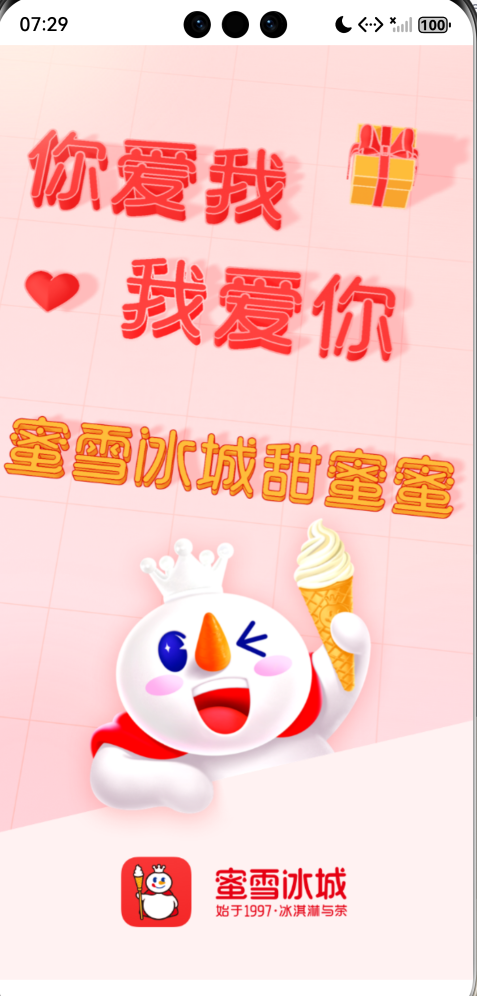
1. 启动页
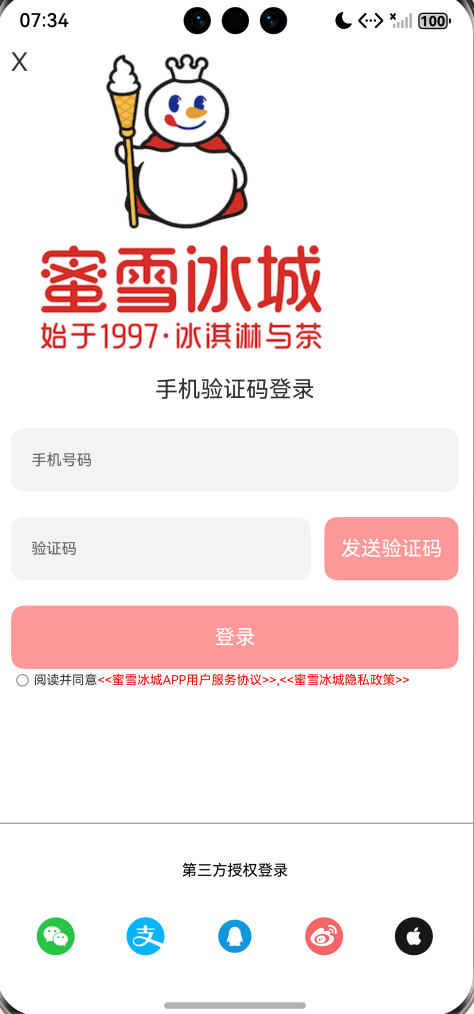
2.登录页面
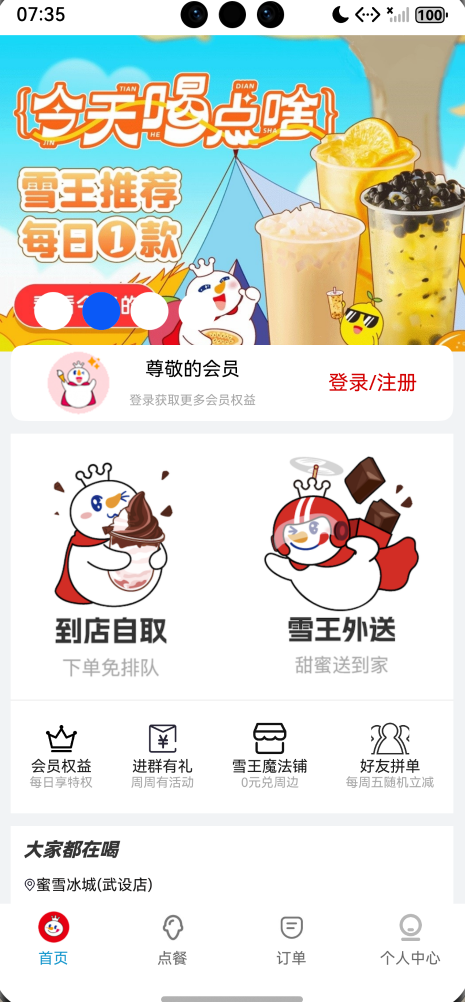
3. 首页面
4. HarmonyOS6开发蜜雪冰城App
4.1 开发环境
- 开发工具:DevEco Studio 6
- SDK 版本:HarmonyOS 6(API 20+)
- 开发语言:ArkTS
- UI 框架:ArkUI(声明式 UI)
4.2 启动页代码
启动页:当app打开会自动加载,延迟3秒,使用定时器设置。
html/xml
// entry/src/main/ets/pages/SplashPage.ets
import router from '@ohos.router';

@Entry
@Component
struct Demo {
  aboutToAppear() {
    // 3秒后跳转到首页
    setTimeout(() => {
      router.replaceUrl({
        url: 'pages/Index'
      });
    }, 3000);
  }

  build() {
    Column() {
      Image($r('app.media.aa'))
        .width('100%')
        .height('100%')
        .objectFit(ImageFit.Cover)
    }
    .width('100%')
    .height('100%')
  }
}
4.3 登录页面代码
pages/Login.ets:通过利用ArkUI组件及装饰器的使用,当用户输入手机号码,发送验证码按钮禁用取消,登录按钮禁用取消,当输入错误手机号,按钮一样禁用,多方面进行判断。
html/xml
import promptAction from '@ohos.promptAction'  //弹框
import LoginViewData from '../data/LoginViewData'
import ImgModel from '../model/ImgModel'
import router from '@ohos.router'
import UserModel from '../model/UserModel'

//统一设置TextInput组件的样式
@Extend(TextInput)
function textInputStyle(){
  .height(50)
  .placeholderFont({size:12})
  .borderRadius(10)
}

@Entry
@Component
struct Login {

  //验证码按钮的状态控制索引
  @State codeState:boolean=false

  //登录按钮的状态索引
  @State loginBtnState:boolean=false

  //复选框的状态索引
  @State checkState:boolean=false

  //声明一个电话号码
  @State phoneNumber:string=""

  //声明一个验证码(用户输入的)
  @State verificationCode:string=""


  //登录方式的数据列表
  @State methodArray:Array<ImgModel>=[]
   //生命周期函数,加载数据
  aboutToAppear(){
    this.methodArray=new LoginViewData().getLoginMethod()
  }

  //自定义登录的函数
  login(phoneNumber:string,code:string){
    //向服务器 发送请求
    let v_code=AppStorage.get<string>("code")
    if(v_code==code){
      //判断用户存在
      let userArray=new LoginViewData().getUserData()
      for(const item of userArray){
        if(item.tel==phoneNumber){
          item.tel=item.tel.replace(/(\d{3})\d{5}(\d{3})/,"$1*********$2")
          AppStorage.setOrCreate("userInfo",item)
          router.back()
          return
        }
      }
      //创建一个新的用户,将其存储在数据库中
      //将用户信息存放到全局容器中
      let delNum=phoneNumber.replace(/(\d{3})\d{5}(\d{3})/,"$1*********$2")
      AppStorage.setOrCreate("userInfo",new UserModel(1,delNum))
      router.back()

    }else{
      promptAction.showToast({
        message:"验证码错误"
      })
    }

  }


  build() {

    Column(){
      //登录的头部开始---------------------
      Row(){
        //返回的按钮
        Text("X")
          .fontSize(20)
          .onClick(()=>{
             router.back() //返回上一级
          })
        Image($r("app.media.mxt"))
          .width(250)
          .height(250)
      }
      .width("94%")
      .margin({top:5})
      .alignItems(VerticalAlign.Top)
      //登录的头部结束----------------------------
      //输入框
      Column({space:20}){
        //账号
        Text("手机验证码登录")
          .fontSize(18)
          .fontWeight(400)
        TextInput({placeholder:"手机号码"})
          .textInputStyle()
          .width("100%")
          .type(InputType.PhoneNumber)
          .maxLength(11)
          //输入值改变事件
          .onChange((value:string)=>{
            if(value.length==11){
              this.phoneNumber=value
              this.codeState=true
            }else{
              this.phoneNumber=""
              this.codeState=false
            }
          })
        //密码
        Row(){
          TextInput({placeholder:"验证码"})
            .type(InputType.Number)
            .textInputStyle()
            .maxLength(6)
            .width("67%")
          .onChange((value:string)=>{
            if(value.length==6 && this.phoneNumber.length==11){
              this.verificationCode=value
              this.loginBtnState=true
            }else{
              this.loginBtnState=false
            }
          })
          Button({type:ButtonType.Normal}){
            Text("发送验证码")
              .fontColor(Color.White)
          }
          .onClick(()=>{
              //通过正则表达式验证手机号是否正确
            let reg=/^1[3456789]\d{9}$/
            if(reg.test(this.phoneNumber)){
              //向短信服务器接口发送请求
                promptAction.showToast({
                  message:"您的验证码为:123456"
                })
              //将获取到的验证码存储起来
              AppStorage.setOrCreate("code","123456")
            }else{
              promptAction.showToast({
                message:"手机号错误!!"
              })
            }
          })
          .width("30%")
          .height("100%")
          .borderRadius(10)
          .backgroundColor(Color.Red)
          .enabled(this.codeState)
        }
        .width("100%")
        .height(50)
        .justifyContent(FlexAlign.SpaceBetween)

        Button({type:ButtonType.Normal}){
          Text("登录")
            .fontColor(Color.White)
        }
        .width("100%")
        .height(50)
        .borderRadius(10)
        .backgroundColor(Color.Red)
        .enabled(this.loginBtnState)
        //点击事件
        .onClick(()=>{
          //判断复选框是否勾选
          if(!this.checkState){
            //弹框
            promptAction.showDialog({
              message: '请阅读并确认协议',
              buttons: [
                {
                  text: '确认',
                  color: '#000000',
                },
                {
                  text: '取消',
                  color: '#000000',
                }
              ],
            }).then(data => {
              if(data.index==0){
                //将复选框勾上
                this.checkState=true
              }
            })
          }else{
            //登录
            this.login(this.phoneNumber,this.verificationCode)
          }
        })
      }
      .width("94%")
      .margin({top:10})

      //输入框结束---------------------------------
      //协议
      Row(){
        Checkbox()
          .width(10)
          .select(this.checkState)
          .onChange((isChecked:boolean)=>{
              this.checkState=isChecked
          })

        Text("阅读并同意")
          .fontSize(10)
        Text("<<蜜雪冰城APP用户服务协议>>,<<蜜雪冰城隐私政策>>")
          .fontSize(10)
          .fontColor(Color.Red)
          .textOverflow({overflow:TextOverflow.Ellipsis})
          .maxLines(1)
          .width(250)
      }
      .width("94%")
      Blank(100) //空白填充
      //第三方授权
      Line()
        .width("100%")
        .height(1)
        .backgroundColor("#A7A7A7")
      Text("第三方授权登录")
        .fontColor(Color.Black)
        .fontSize(12)
        .margin({top:30,bottom:30})
      //登录方式
      Row(){
       ForEach(this.methodArray,(item:ImgModel)=>{
         Image(item.src)
           .width(30)
           .height(30)
       })

      }
      .width("94%")
      .justifyContent(FlexAlign.SpaceAround)
      .margin({bottom:20})

    }
    .width("100%")
    .height("100%")
    .backgroundColor(Color.White)
  }
}
4.3 首页代码
首页:pages/Index.ets:运用ArkUI组件库,tabs组件等以及对应的布局组件的使用。
html/xml
import OrderViewData from '../data/OrderViewData'
import OrderModel from '../model/OrderModel'
import UserModel from '../model/UserModel'
import CommonData from '../util/CommonData'
import ListView from "../view/ListView"  //../返回上一级
import MenuFood from "../view/MenuFood"
import OrderUI from "../view/OrderUI"
@Entry
@Component
struct Index{

  pathStack: NavPathStack = new NavPathStack();

  private controller: TabsController = new TabsController()

  //状态变量,当State修饰的变量改变时,build里面的变量会跟着改变
  @State @Watch("changeIndex") currentIndex:number=0
  changeIndex(){
    this.controller.changeIndex(this.currentIndex)
  }

  //用户登录信息对象
  @State userInfo:UserModel=new UserModel(0,"")

  //当前用户订单列表
  @State currentOrderArray:Array<OrderModel>=[]

  //装饰器,自定义封装一个UI描述的方法
  @Builder TabBuilder(title:string,normalImg:Resource,selectedImg:Resource,index:number){
    Column(){
      Image(this.currentIndex===index?selectedImg:normalImg)
        .width($r("app.float.tab_img_size"))
        .height($r("app.float.tab_img_size"))
      Text(title)
        .fontSize($r("app.float.tab_title_fontSize"))
        .fontColor(this.currentIndex===index?"#1698CE":"#6B6B6B")
    }
    .justifyContent(FlexAlign.SpaceEvenly)
    .width(CommonData.DEFAULT_WIDTH)
    .height($r("app.float.ta_barHeight"))
  }

  //页面的生命周期
  onPageShow(){
    //从全局存储对象获取用户信息
    let users=AppStorage.get<UserModel>("userInfo")
    //判断用户是否登录
    if(users !=undefined){
      this.userInfo=users
      for(const order of new OrderViewData().getOrderData()){
        if(order.userId==users.id){
          this.currentOrderArray.push(order)
        }
      }

    }else{
      //没有登录的情况,把存放订单的列表设置为[]
      this.currentOrderArray=[]
    }

  }
  // 全局设置一个NavPathStack
  //组件的生命周期
  aboutToAppear(){
    AppStorage.setOrCreate('PathStack', this.pathStack);
    this.currentOrderArray=new OrderViewData().getOrderData()
  }

  build(){
    Navigation(this.pathStack) {
      Column(){
        //tabs导航组件
        Tabs({barPosition:BarPosition.End,index:0,controller:this.controller}){
          TabContent(){
            //页面内容
            ListView()
          }
          .backgroundColor($r("app.color.tab_page_backgroundColor"))
          .tabBar(this.TabBuilder(CommonData.TAB_INDEX,$r("app.media.index"),$r("app.media.mainselected"),CommonData.TAB_ONE))
          TabContent(){
            //点餐
            MenuFood({currentIndex:$currentIndex,currentOrderArray:$currentOrderArray})
          }
          .backgroundColor($r("app.color.tab_page_backgroundColor"))
          .tabBar(this.TabBuilder(CommonData.TAB_MENU,$r("app.media.menu"),$r("app.media.menuselected"),CommonData.TAB_TWO))
          TabContent(){
            //订单
            OrderUI({currentOrderArray:$currentOrderArray})
          }
          .backgroundColor($r("app.color.tab_page_backgroundColor"))
          .tabBar(this.TabBuilder(CommonData.TAB_ORDER,$r("app.media.order"),$r("app.media.orderselected"),CommonData.TAB_THREE))
          TabContent(){

          }
          .backgroundColor($r("app.color.tab_page_backgroundColor"))
          .tabBar(this.TabBuilder(CommonData.TAB_MY,$r("app.media.my"),$r("app.media.my1"),CommonData.TAB_FOUR))
        }
        //事件:切换tab页触发
        .onChange((index)=>{
          this.currentIndex=index
        })
      }
      .width("100%")  //属性
      .height("100%")
    }
    .mode(NavigationMode.Stack)

  }

}
4.4 工具类
- CommonData:设置一些常量
html/xml
//设置一些常量
export default class CommonData{

  static readonly DEFAULT_WIDTH="100%"   //宽度

  static readonly DEFAULT_HEIGHT="100%"  //高度

  static readonly TAB_ONE=0    //tab栏的第一个下标

  static readonly TAB_TWO=1   //tab栏的第二个下标

  static readonly TAB_THREE=2  //tab栏的第三个下标

  static readonly TAB_FOUR=3  //tab栏的第四个下标

  static readonly TAB_INDEX="首页"

  static readonly TAB_MENU="点餐"

  static readonly TAB_ORDER="订单"

  static readonly TAB_MY="个人中心"
}- CommonUtil:工具类:生成一个随机的字符串/处理时间格式
html/xml
//工具类
export  class CommonUtil{
  //生成一个随机的字符串
  getRandomString(){
    return Math.random().toString().substring(2,15)+Date.now().toString(16)
  }

  //处理时间格式:YYYY-MM--DD hh:mm:ss

  dateFormat(customDate:Date){
    let nowDate=customDate
    //获取年
    let year=nowDate.getFullYear()
    //月
    let month=nowDate.getMonth()
    //日
    let date=nowDate.getDate()
    //获取时
    let hours=nowDate.getHours()
    //分
    let minutes=nowDate.getMinutes()
    //秒
    let seconds=nowDate.getSeconds()
    return year+"-"+month+"-"+date+" "+hours+":"+minutes+":"+seconds
  }

}
export default new CommonUtil()- Request:发送请求
html/xml
import { http } from "@kit.NetworkKit"

//定义后台接口地址
const baseURL=""

//发送请求
export const request=<T,R>(path:string,method:string,data:T):Promise<R>=>{
  const httpRequest=http.createHttp()
  return httpRequest.request(
    baseURL+path,
    {
      method:method==="get"?http.RequestMethod.GET:http.RequestMethod.POST,
      header:{},
      extraData:data as object
    }
  )
    .then((res):R=>{
        return JSON.parse(res.result as string)
    })


}