项目创建传送门:
 https://blog.csdn.net/qq_39731011/article/details/157513416?spm=1001.2014.3001.5501
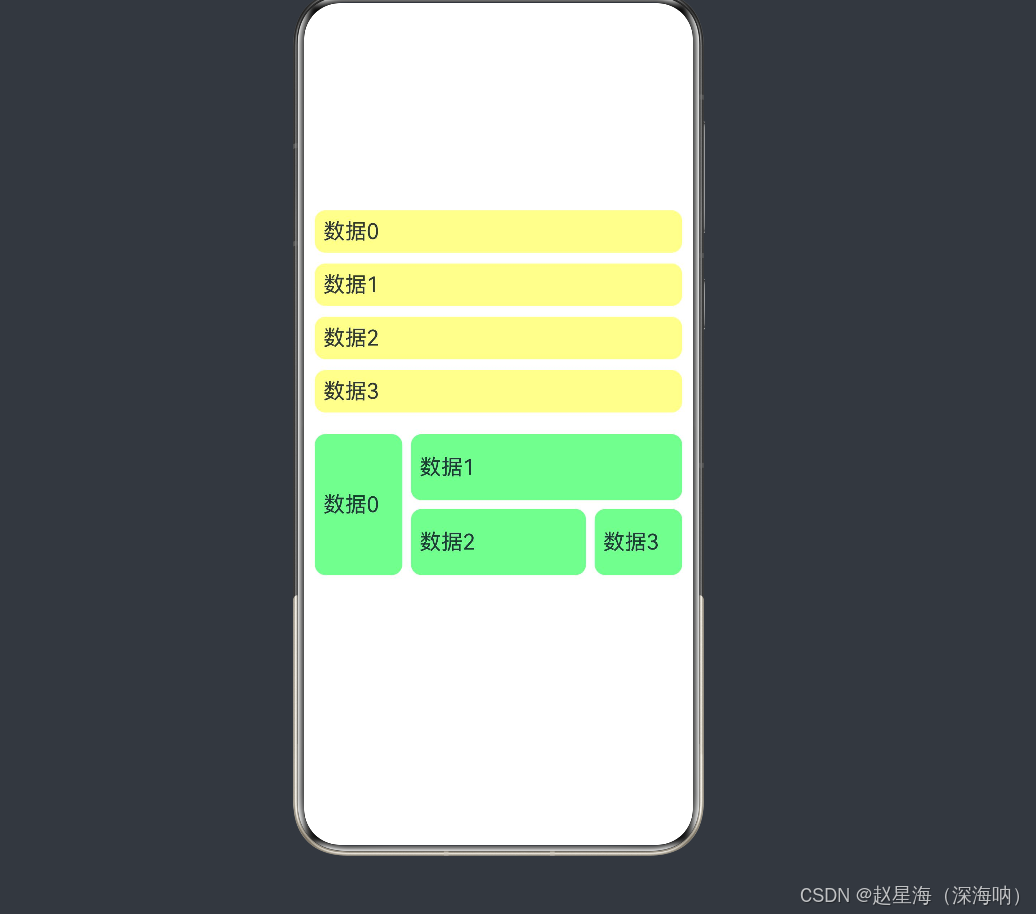
1、代码示例:pages目录下的Index.ets
TypeScript
@Entry
@Component
struct Index {
  @State listData: string[] = ['数据0', '数据1', '数据2', '数据3'];

  build() {
    Row() { //水平居中
      Column() { //垂直居中
        //-------------------------------------列表相关---------------------------------
        List({ space: 10 }) {
          ForEach(this.listData, (item: string) => {
            ListItem() {
              Text(item)
                .fontSize(20)
                .width('100%')
                .padding(8)
                .backgroundColor($r('app.color.listBack'))
                .borderRadius(10)
            }

          }, (item: string) => item) // 防止重新渲染
        }.margin(10)

        Grid() {
          GridItem() {
            Text(this.listData[0])
              .fontSize(20)
              .width('100%')
              .height('100%')
              .padding(8)
              .backgroundColor($r('app.color.gridBack'))
              .borderRadius(10)
          }.rowStart(1).rowEnd(2) //占两行
          GridItem() {
            Text(this.listData[1])
              .fontSize(20)
              .width('100%')
              .height('100%')
              .padding(8)
              .backgroundColor($r('app.color.gridBack'))
              .borderRadius(10)
          }.columnStart(1).columnEnd(2) //占两列
          GridItem() {
            Text(this.listData[2])
              .fontSize(20)
              .width('100%')
              .height('100%')
              .padding(8)
              .backgroundColor($r('app.color.gridBack'))
              .borderRadius(10)
          }

          GridItem() {
            Text(this.listData[3])
              .fontSize(20)
              .width('100%')
              .height('100%')
              .padding(8)
              .backgroundColor($r('app.color.gridBack'))
              .borderRadius(10)
          }
        }
        .rowsTemplate('1fr 1fr 1fr') //行数
        .rowsGap(8) //行间距
        .columnsTemplate('1fr 2fr 1fr') //列数
        .columnsGap(8) //列间距
        .margin(10)
        .height(200)
      }
      .width('100%')
    }
    .height('100%')
  }
}
2、运行结果: