文章目录
一、基本使用:directives
除了 Vue 内置的一系列指令 (比如 v-model 或 v-show) 之外,Vue 还允许你注册自定义的指令 (Custom Directives)。
在不使用 <script setup> 的情况下,自定义指令需要通过 directives 选项注册:
-
注册:
javascript// main.js文件 app.directive('指令名', { mounted(el) { // el: 指令所在的DOM元素 } }) -
使用:
javascript<p v-指令名></p>
💥注意事项: 元素挂载后 (成为DOM树的一部分时) 自动执行 mounted 钩子。
代码示例:(当页面加载时,让元素获取焦点)
main.js文件:
javascript
app.directive('focus', {
  mounted(el) {
    console.log(el) // 拿到input元素
    el.focus()
  }
})App.vue文件:
javascript
<script setup></script>

<template>
  <div class="app">
    <input type="text" v-focus />
  </div>
</template>
二、什么是指令钩子
上述 mounted 指的是 指令钩子函数 ,和组件的生命周期钩子同名但不是一回事。
- 组件生命周期钩子 :围绕 组件实例。
- 指令钩子 :围绕 指令绑定的 DOM 元素。
常见的指令钩子如下表所示:
| 阶段 | 钩子名 | 说明 |
|---|---|---|
| 绑定 | created |
指令第一次绑定到元素时调用(元素还没插入 DOM) |
| 挂载 | beforeMount |
元素即将插入 DOM 时调用 |
| 挂载完成 | mounted |
元素插入 DOM 后调用(常用,比如 el.focus()) |
| 更新前 | beforeUpdate |
元素所在组件更新前调用 |
| 更新后 | updated |
元素所在组件更新后调用 |
| 卸载前 | beforeUnmount |
元素所在组件卸载前调用 |
| 卸载后 | unmounted |
元素卸载后调用 |
三、指令钩子的参数
一个指令的定义对象可以提供几种钩子函数 (都是可选的):
javascript
const myDirective = {
  // 指令第一次绑定到元素时调用(元素还没插入 DOM)
  created(el, binding, vnode) {},

  // 在元素被插入到 DOM 前调用
  beforeMount(el, binding, vnode) {},

  // 在绑定元素的父组件
  // 及他自己的所有子节点都挂载完成后调用
  mounted(el, binding, vnode) {},

  // 绑定元素的父组件更新前调用
  beforeUpdate(el, binding, vnode, prevVnode) {},

  // 在绑定元素的父组件
  // 及他自己的所有子节点都更新后调用
  updated(el, binding, vnode, prevVnode) {},

  // 绑定元素的父组件卸载前调用
  beforeUnmount(el, binding, vnode) {},

  // 绑定元素的父组件卸载后调用
  unmounted(el, binding, vnode) {}
}el:指令当前绑定到的元素。这可以用于直接操作 DOM。binding:一个对象,包含以下属性:value:传递给指令的值。例如在v-my-directive="1 + 1"中,值是2。oldValue:之前的值,仅在beforeUpdate和updated中可用。无论值是否更改,它都可用。arg:传递给指令的参数 (如果有的话)。例如在v-my-directive:foo中,参数是"foo"。modifiers:一个包含修饰符的对象 (如果有的话)。例如在v-my-directive.foo.bar中,修饰符对象是{ foo: true, bar: true }。instance:使用该指令的组件实例。dir:指令的定义对象。
vnode:代表当前绑定元素的底层 VNode。用于了解绑定的虚拟 DOM 信息,一般用得不多。prevVnode:代表之前的渲染中指令所绑定元素的 VNode(只在beforeUpdate和updated中有用)。
💥注意事项: 除了 el 外,其他参数都是只读的,不要更改它们。
📌 举个例子:带参数和修饰符的自定义指令
- 背景色蓝色(
arg = "blue") - 加粗(
modifiers.bold = true) - 绑定值
msg也可以用来动态控制颜色。
javascript
app.directive('highlight', {
  mounted(el, binding) {
    console.log(binding)

    // 默认颜色
    let color = 'yellow'

    // 如果传了参数(比如 :blue)
    if (binding.arg) {
      color = binding.arg
    }

    // 如果有修饰符,比如 .bold
    if (binding.modifiers.bold) {
      el.style.fontWeight = 'bold'
    }

    el.style.backgroundColor = color
  }
})
使用:
javascript
<p v-highlight:blue.bold="msg">Hello Vue!</p>四、绑定数据
1. 需求
实现一个 color 指令:传入不同的颜色,给标签设置文字颜色
2. 语法
-
在绑定指令时,可以通过 "等号" 的形式为指令绑定具体的参数值
javascript<div v-color="colorStr">Some Text</div> -
通过
binding.value可以拿到指令值,指令值修改会触发updated钩子javascriptapp.directive('指令名', { // 挂载后自动触发一次 mounted(el, binding) { }, // 数据更新, 每次都会执行 updated(el, binding) { } })
3. 代码示例
main.js文件:
javascript
//
app.directive('color', {
  mounted(el, binding) {
    el.style.color = binding.value
  },
  updated(el, binding) {
    el.style.color = binding.value
  }
})App.vue文件:
javascript
<script setup>
    import { ref } from 'vue'
    const colorStr = ref('red') // 颜色
</script>

<template>
  <p v-color="colorStr"></p>
</template>
4. 简化写法
对于自定义指令来说,一个很常见的情况是仅仅需要在 mounted 和 updated 上实现相同的行为。这种情况下我们可以直接用一个箭头函数来定义指令,如下所示:
javascript
app.directive('color', (el, binding) => {
  // 这会在 mounted 和 updated 时都调用
  el.style.color = binding.value
})
👉 这种写法其实就是 语法糖。
Vue 规定: 如果你注册指令时传入的是一个函数,而不是对象,那么它会自动把这个函数同时当作 mounted 和 updated 两个钩子。
案例:图片懒加载
实际开发过程中,如果项目中图片过多,我们不会一次加载所有的图片,而是当图片出现在可视区的时候才去加载,比如京东、淘宝等都采用了这种方案。
解决方案:封装一个 v-lazyload 自定义指令,实现图片懒加载,从而节省资源、提高性能。
认识 IntersectionObserver
- MDN:https://developer.mozilla.org/zh-CN/docs/Web/API/IntersectionObserver
- 掘金:https://article.juejin.cn/post/6844903560434417677
IntersectionObserver 接口(从属于Intersection Observer API)为开发者提供了一种可以异步监听目标元素与其祖先或视窗(viewport)交叉状态的手段。
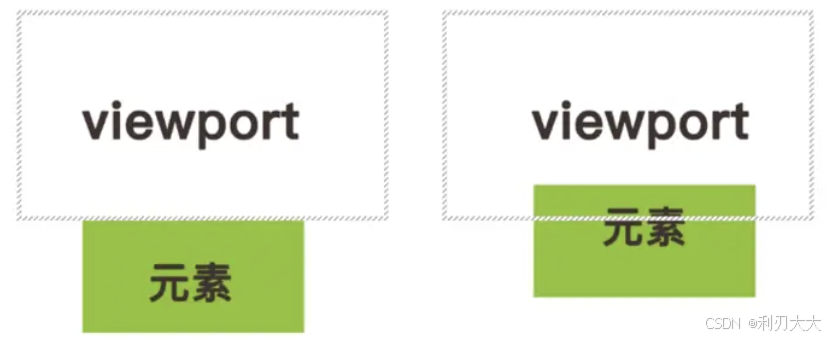
完整代码
App.vue文件:
javascript
<script setup>
    const imgList = [
        'https://img1.baidu.com/it/u=14492133,1259363498&fm=253&fmt=auto&app=138&f=JPEG?w=667&h=500',
        'https://img0.baidu.com/it/u=1764531212,1643995922&fm=253&fmt=auto&app=120&f=JPEG?w=750&h=500',
        'https://img1.baidu.com/it/u=3461494820,2726880132&fm=253&fmt=auto&app=138&f=JPEG?w=773&h=500',
        'https://img1.baidu.com/it/u=2991964469,2851730176&fm=253&fmt=auto&app=138&f=JPEG?w=889&h=500',
        'https://img2.baidu.com/it/u=1519104236,3241953583&fm=253&fmt=auto&app=138&f=JPEG?w=781&h=500',
        'https://img0.baidu.com/it/u=3431675376,3243768390&fm=253&fmt=auto&app=138&f=JPEG?w=712&h=447',
        'https://img1.baidu.com/it/u=2111075854,406597938&fm=253&fmt=auto&app=138&f=JPEG?w=888&h=500',
        'https://img0.baidu.com/it/u=1615464091,2840643412&fm=253&fmt=auto?w=945&h=605',
        'https://img0.baidu.com/it/u=3926979850,631936366&fm=253&fmt=auto&app=120&f=JPEG?w=785&h=500',
        'https://img1.baidu.com/it/u=469866567,781924764&fm=253&fmt=auto&app=120&f=JPEG?w=750&h=500'
    ]
</script>

<template>
    <div class="container">
        <img v-for="item in imgList" v-lazyload="item"
            width="600" height="320" />
    </div>
</template>

<style lang="scss">
* {
    margin: 0;
}
.container {
    width: 600px;
    display: flex;
    flex-direction: column;
    margin: 0 auto;
}
</style>main.js文件中:
javascript
app.directive('lazyload', (el, binding) => {
    const io = new IntersectionObserver(([entry]) => {
        // entry:交叉状态对象
        if(entry.isIntersecting) {
            // 到这说明图片与可视区发送交叉,说明要渲染出来
            el.src = binding.value

            // 监听图片加载错误事件
            el.addEventListener('error', (error) => {
                console.log('图片加载失败', error);
            })

            // 停止监听,关闭监听
            io.unobserve(el)
            io.disconnect()
        }
    })
    // 开启监视
    io.observe(el)
})