思科CCNA:网络工程师都要懂的IPv6编址与路由
思科CCNA:网工必看:生成树基础配置
实验目的
-
理解生成树的运行原理
-
掌握生成树的配置方法
实验拓扑
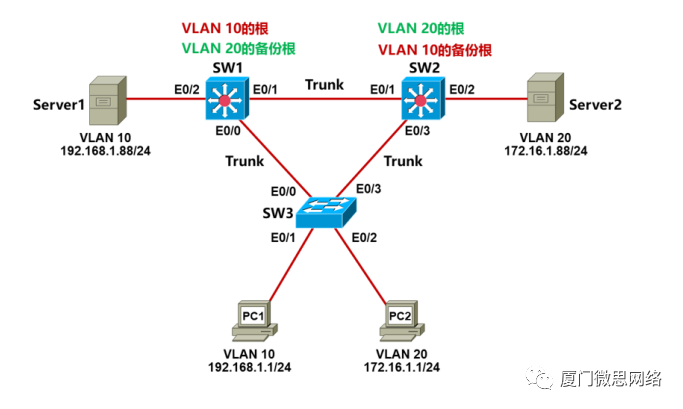
实验需求
-
根据实验拓扑图,完成设备的基本配置;
-
把交换机互连的链路配置成Trunk,采用Dot1q封装;
-
分别在SW1、SW2和SW3上创建VLAN10和VLAN20,并将相应的接口划到对应的VLAN;
-
SW1要作为VLAN10的根,VLAN20的备份根,使PC1访问Server1的路径通过:PC1->SW3->SW1->Server1;
-
SW2要作为VLAN20的根,VLAN10的备份根,使PC2访问Server2的路径通过:PC2->SW3->SW2->Server2;
实验步骤
步骤1:设备的基本配置
配置P C1 :
VPCS> set pcname PC1   //设置主机名
PC1> ip 192.168.1.1/24      //设置IP地址
配置P C2 :
VPCS> set pcname PC2
PC2> ip 172.16.1.1/24
配置Server 1 :
VPCS> set pcname Server1
Server1> ip 192.168.1.88/24
配置 Server2 :
VPCS> set pcname Server2
Server2> ip 172.16.1.88/24
配置S W1 :
Switch>enable
Switch#configure terminal
Switch(config)#hostname SW1
SW1(config)#no ip domain-lookup
SW1(config)#line console 0
SW1(config-line)#exec-timeout 0 0
SW1(config-line)#logging synchronous
SW1(config-line)#end
SW1#
配置S W2 :
Switch>enable
Switch#configure terminal
Switch(config)#hostname SW2
SW2(config)#no ip domain-lookup
SW2(config)#line console 0
SW2(config-line)#exec-timeout 0 0
SW2(config-line)#logging synchronous
SW2(config-line)#end
SW2#
配置S W3 **:**
Switch>enable
Switch#configure terminal
Switch(config)#hostname SW3
SW3(config)#no ip domain-lookup
SW3(config)#line console 0
SW3(config-line)#exec-timeout 0 0
SW3(config-line)#logging synchronous
SW3(config-line)#end
SW3#
步骤2:配置Trunk与V LAN
配置SW1:
SW1(config)#interface range Eth0/0 - 1
SW1(config-if-range)#switchport trunk encapsulation dot1q
SW1(config-if-range)#switchport mode trunk
SW1(config-if-range)#exit
SW1(config)#vlan 10
SW1(config-vlan)#name IT
SW1(config-vlan)#exit
SW1(config)#vlan 20
SW1(config-vlan)#name HR
SW1(config-vlan)#exit
SW1(config)#interface Eth0/2
SW1(config-if)#switchport mode access
SW1(config-if)#switchport access vlan 10
SW1(config-if)#exit
SW1(config)#end
SW1#**配置SW2:**
SW2(config)#interface range Eth0/1 , Eth0/3
SW2(config-if-range)#switchport trunk encapsulation dot1q
SW2(config-if-range)#switchport mode trunk
SW2(config-if-range)#exit
SW2(config)#vlan 10
SW2(config-vlan)#name IT
SW2(config-vlan)#exit
SW2(config)#vlan 20
SW2(config-vlan)#name HR
SW2(config-vlan)#exit
SW2(config)#interface Eth0/2
SW2(config-if)#switchport mode access
SW2(config-if)#switchport access vlan 20
SW2(config-if)#exit
SW2(config)#end
SW2#**配置SW3:**
SW3(config)#interface range Eth0/0 , Eth0/3
SW3(config-if-range)#switchport trunk encapsulation dot1q
SW3(config-if-range)#switchport mode trunk
SW3(config-if-range)#exit
SW3(config)#vlan 10
SW3(config-vlan)#name IT
SW3(config-vlan)#exit
SW3(config)#vlan 20
SW3(config-vlan)#name HR
SW3(config-vlan)#exit
SW3(config)#interface Eth0/1
SW3(config-if)#switchport mode access
SW3(config-if)#switchport access vlan 10
SW3(config-if)#exit
SW3(config)#interface Eth0/2
SW3(config-if)#switchport mode access
SW3(config-if)#switchport access vlan 20
SW2(config-if)#exit
SW3(config)#end
SW3#
步骤3:配置生成树
配置SW1:
SW1(config)#spanning-tree vlan 10 root primary
SW1(config)#spanning-tree vlan 20 root secondary

配置SW2:
SW2(config)#spanning-tree vlan 20 root primary
SW2(config)#spanning-tree vlan 10 root secondary
实验检查
步骤1:检查V LAN10 的生成树
检查SW 1 :
SW1#show spanning-tree vlan 10
VLAN0010
 Spanning tree enabled protocol ieee
 Root ID Priority 24586
 Address aabb.cc00.1000
 This bridge is the root
 Hello Time 2 sec Max Age 20 sec Forward Delay 15 sec

 Bridge ID Priority 24586 (priority 24576 sys-id-ext 10)
 Address aabb.cc00.1000
 Hello Time 2 sec Max Age 20 sec Forward Delay 15 sec
 Aging Time 15 sec

Interface Role Sts Cost Prio.Nbr Type
------------------- ---- --- --------- -------- --------------------------------
Et0/0 Desg FWD 100 128.1 P2p
Et0/1 Desg FWD 100 128.2 P2p
Et0/2 Desg FWD 100 128.3 P2p
SW1是VLAN10的根网桥,因为SW2是VLAN10的备份根网桥,所以SW3的E0/3针对VLAN10肯定是阻塞状态。
检查SW 3 :
SW3#show spanning-tree vlan 10
VLAN0010
  Spanning tree enabled protocol ieee
  Root ID    Priority    24586
             Address     aabb.cc00.1000
             Cost        100
             Port        1 (Ethernet0/0)
             Hello Time   2 sec  Max Age 20 sec  Forward Delay 15 sec


  Bridge ID  Priority    32778  (priority 32768 sys-id-ext 10)
             Address     aabb.cc00.3000
             Hello Time   2 sec  Max Age 20 sec  Forward Delay 15 sec
             Aging Time  300 sec


Interface           Role Sts Cost      Prio.Nbr Type
------------------- ---- --- --------- -------- --------------------------------
Et0/0               Root FWD 100       128.1    P2p
Et0/1               Desg FWD 100       128.2    P2p
Et0/3               Altn BLK 100       128.4    P2p
针对VLAN10,SW3的E0/3是阻塞的,E0/0是转发的,这样PC1访问Server1的路径就是:PC1->SW3->SW1->Server1

步骤2:检查VLAN20的生成树
检查SW2:

SW2#show spanning-tree vlan 20
VLAN0020
  Spanning tree enabled protocol ieee
  Root ID    Priority    24596
             Address     aabb.cc00.2000
             This bridge is the root
             Hello Time   2 sec  Max Age 20 sec  Forward Delay 15 sec


  Bridge ID  Priority    24596  (priority 24576 sys-id-ext 20)
             Address     aabb.cc00.2000
             Hello Time   2 sec  Max Age 20 sec  Forward Delay 15 sec
             Aging Time  300 sec


Interface           Role Sts Cost      Prio.Nbr Type
------------------- ---- --- --------- -------- --------------------------------
Et0/1               Desg FWD 100       128.2    P2p
Et0/2               Desg FWD 100       128.3    P2p
Et0/3               Desg FWD 100       128.4    P2p
SW2是VLAN20的根网桥,因为SW1是VLAN10的备份根网桥,所以SW3的E0/0针对VLAN20肯定是阻塞状态。

检查SW3:

SW3#show spanning-tree vlan 20
VLAN0020
  Spanning tree enabled protocol ieee
  Root ID    Priority    24596
             Address     aabb.cc00.2000
             Cost        100
             Port        4 (Ethernet0/3)
             Hello Time   2 sec  Max Age 20 sec  Forward Delay 15 sec


  Bridge ID  Priority    32788  (priority 32768 sys-id-ext 20)
             Address     aabb.cc00.3000
             Hello Time   2 sec  Max Age 20 sec  Forward Delay 15 sec
             Aging Time  300 sec


Interface           Role Sts Cost      Prio.Nbr Type
------------------- ---- --- --------- -------- --------------------------------
Et0/0               Altn BLK 100       128.1    P2p
Et0/2               Desg FWD 100       128.3    P2p
Et0/3               Root FWD 100       128.4    P2p
针对VLAN20,SW3的E0/0是阻塞的,E0/3是转发的,这样PC2访问Server2的路径就是:PC2->SW3->SW2->Server2。