实验要求:
1.按照图示配置ip地址和网关
2.在sw1sw2sw3上创建vlan10 vlan20,对应IP网段如图,交换机之间链路允许所有vlan通过
3.在sw2sw3上配置vrrp,要求sw2成为valn10的主网关,sw3成为vlan20的主网关。sw2和sw3互为备份
4.sw2和sw3上行接口进行监视,如上行接口故障,会触发vrrp角色切换
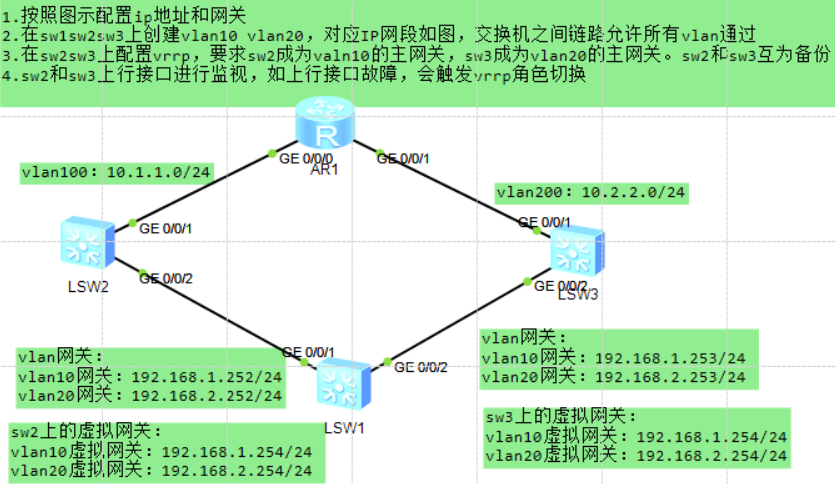
sw1(Vlan+Trunk接口配置)
<Huawei>undo terminal monitor Info: Current terminal monitor is off.
<Huawei>sys
Huaweisysname sw1
sw1vlan batch 10 20
交换机与交换机之间trunk干道
sw1int g0/0/1
sw1-GigabitEthernet0/0/1port link-type trunk
sw1-GigabitEthernet0/0/1port trunk allow-pass vlan 10 20
sw1-GigabitEthernet0/0/1q
sw1int g 0/0/2
sw1-GigabitEthernet0/0/2po li t
sw1-GigabitEthernet0/0/2po t a v 10 20
sw1display vlan(查)
[sw1]dis vlan
The total number of vlans is : 3
--------------------------------------------------------------------------------
U: Up;         D: Down;         TG: Tagged;         UT: Untagged;
MP: Vlan-mapping;               ST: Vlan-stacking;
#: ProtocolTransparent-vlan;    *: Management-vlan;
--------------------------------------------------------------------------------

VID  Type    Ports
--------------------------------------------------------------------------------
1    common  UT:GE0/0/1(U)      GE0/0/2(U)      GE0/0/3(D)      GE0/0/4(D)
                GE0/0/5(D)      GE0/0/6(D)      GE0/0/7(D)      GE0/0/8(D)
                GE0/0/9(D)      GE0/0/10(D)     GE0/0/11(D)     GE0/0/12(D)
                GE0/0/13(D)     GE0/0/14(D)     GE0/0/15(D)     GE0/0/16(D)
                GE0/0/17(D)     GE0/0/18(D)     GE0/0/19(D)     GE0/0/20(D)
                GE0/0/21(D)     GE0/0/22(D)     GE0/0/23(D)     GE0/0/24(D)

10   common  TG:GE0/0/1(U)      GE0/0/2(U)

20   common  TG:GE0/0/1(U)      GE0/0/2(U)


VID  Status  Property      MAC-LRN Statistics Description
--------------------------------------------------------------------------------

1    enable  default       enable  disable    VLAN 0001
10   enable  default       enable  disable    VLAN 0010
20   enable  default       enable  disable    VLAN 0020
sw2(Vlan+Trunk+Access+Vlanif接口配置)
sw2vlan b 10 20 100
sw2int g0/0/2
sw2-GigabitEthernet0/0/2po li t
sw2-GigabitEthernet0/0/2po t a v 10 20
sw2-GigabitEthernet0/0/2q
交换机和路由器之间是access接入模式
---------->(1)是路由器的那个接口无法识别带标签的
---------->(2)是这两个线上只需要跑vlan100即可所以access干道可以满足
sw2int g0/0/1
sw2-GigabitEthernet0/0/1port link access
sw2-GigabitEthernet0/0/1port default vlan 100
sw2-GigabitEthernet0/0/1q
sw2interface Vlanif 10(虚拟子接口配IP地址)
sw2-Vlanif10ip add 192.168.1.252 24
sw2-Vlanif10int v 20
sw2-Vlanif20ip add 192.168.2.252 24
sw2-Vlanif20q
sw2int v 100
sw2-Vlanif100ip add 10.1.1.2 24
sw2-Vlanif100q
sw2display ip interface brief (查)
[sw2]dis ip int b
*down: administratively down
^down: standby
(l): loopback
(s): spoofing
The number of interface that is UP in Physical is 5
The number of interface that is DOWN in Physical is 1
The number of interface that is UP in Protocol is 4
The number of interface that is DOWN in Protocol is 2

Interface                         IP Address/Mask      Physical   Protocol
MEth0/0/1                         unassigned           down       down
NULL0                             unassigned           up         up(s)
Vlanif1                           unassigned           up         down
Vlanif10                          192.168.1.252/24     up         up
Vlanif20                          192.168.2.252/24     up         up
Vlanif100                         10.1.1.2/24          up         up
sw3(Vlan+Trunk+Access+Vlanif接口配置)
Huaweisys sw3
sw3vlan batch 10 20 200
sw3int g0/0/2
sw3-GigabitEthernet0/0/2po li t
sw3-GigabitEthernet0/0/2po t a v 10 20
sw3-GigabitEthernet0/0/2q
sw3int g0/0/1
sw3-GigabitEthernet0/0/1po li ac
sw3-GigabitEthernet0/0/1po de v 200
sw3-GigabitEthernet0/0/1q
sw3interface Vlanif 10 (只有三层交换机支持 Vlanif 接口,用于实现 VLAN 间路由)
sw3-Vlanif10ip add 192.168.1.253 24
sw3-Vlanif10int v 20
sw3-Vlanif20ip add 192.168.2.253 24
sw3-Vlanif20int v 200
sw3-Vlanif200ip add 10.2.2.3 24
sw3-Vlanif200q
sw3display ip interface brief(查)
[sw3]dis ip int b
*down: administratively down
^down: standby
(l): loopback
(s): spoofing
The number of interface that is UP in Physical is 5
The number of interface that is DOWN in Physical is 1
The number of interface that is UP in Protocol is 4
The number of interface that is DOWN in Protocol is 2

Interface                         IP Address/Mask      Physical   Protocol
MEth0/0/1                         unassigned           down       down
NULL0                             unassigned           up         up(s)
Vlanif1                           unassigned           up         down
Vlanif10                          192.168.1.253/24     up         up
Vlanif20                          192.168.2.253/24     up         up
Vlanif200                         10.2.2.3/24          up         up
r1
Huaweisys r1
r1int g 0/0/0
r1-GigabitEthernet0/0/0ip add 10.1.1.1 24
r1-GigabitEthernet0/0/0int g0/0/1
r1-GigabitEthernet0/0/1ip add 10.2.2.1 24
r1display ip interface brief (查)
[r1]display ip interface brief
*down: administratively down
^down: standby
(l): loopback
(s): spoofing
The number of interface that is UP in Physical is 3
The number of interface that is DOWN in Physical is 1
The number of interface that is UP in Protocol is 3
The number of interface that is DOWN in Protocol is 1

Interface                         IP Address/Mask      Physical   Protocol
GigabitEthernet0/0/0              10.1.1.1/24          up         up
GigabitEthernet0/0/1              10.2.2.1/24          up         up
GigabitEthernet0/0/2              unassigned           down       down
NULL0                             unassigned           up         up(s)
sw2虚拟IP地址 修改主设备优先级
sw2interface Vlanif 10
sw2-Vlanif10vrrp vrid 1 virtual-ip 192.168.1.254 (虚拟IP地址)
sw2-Vlanif10vrrp vrid 1 priority 120 (修改优先级为120master)
sw2-Vlanif10q
sw2interface Vlanif 20
sw2-Vlanif20vrrp vrid 2 virtual-ip 192.168.2.254
sw2-Vlanif20q(默认优先级为100不改!)
sw2display vrrp brief (查看vrrp的主备情况)
[sw2]dis vrrp brief
VRID  State        Interface                Type     Virtual IP
----------------------------------------------------------------
1     Master       Vlanif10                 Normal   192.168.1.254
2     Backup       Vlanif20                 Normal   192.168.2.254
----------------------------------------------------------------
Total:2     Master:1     Backup:1     Non-active:0

[sw2]dis vrrp
  Vlanif10 | Virtual Router 1
    State : Master
    Virtual IP : 192.168.1.254
    Master IP : 192.168.1.252
    PriorityRun : 120
    PriorityConfig : 120
    MasterPriority : 120
    Preempt : YES   Delay Time : 0 s
    TimerRun : 1 s
    TimerConfig : 1 s
    Auth type : NONE
    Virtual MAC : 0000-5e00-0101
    Check TTL : YES
    Config type : normal-vrrp
    Create time : 2026-07-16 09:47:19 UTC-08:00
    Last change time : 2026-07-16 09:47:22 UTC-08:00

  Vlanif20 | Virtual Router 2
    State : Backup
    Virtual IP : 192.168.2.254
    Master IP : 192.168.2.253
    PriorityRun : 100
    PriorityConfig : 100
    MasterPriority : 120
    Preempt : YES   Delay Time : 0 s
    TimerRun : 1 s
    TimerConfig : 1 s
    Auth type : NONE
    Virtual MAC : 0000-5e00-0102
    Check TTL : YES
    Config type : normal-vrrp
    Create time : 2026-07-16 09:48:14 UTC-08:00
Last change time : 2026-07-16 19:28:58 UTC-08:00sw2display vrrp
[sw2]dis vrrp
  Vlanif10 | Virtual Router 1
    State : Master(状态)
    Virtual IP : 192.168.1.254(虚拟IP地址)
    Master IP : 192.168.1.252(真实IP地址)
    PriorityRun : 120
    PriorityConfig : 120
    MasterPriority : 120(优先级)
    Preempt : YES (开启抢占模式)  Delay Time : 0 s(抢占延迟时间)
    TimerRun : 1 s(vrrp心跳报文的发送时间间隔)
    TimerConfig : 1 s(vrrp心跳报文的发送时间间隔)
    Auth type : NONE(备份组之间发送报文不需要密码验证)
    Virtual MAC : 0000-5e00-0101(虚拟mac地址,最后面的01就是vrrp的编号)
    Check TTL : YES
    Config type : normal-vrrp
    Create time : 2026-07-16 09:47:19 UTC-08:00
    Last change time : 2026-07-16 09:47:22 UTC-08:00

  Vlanif20 | Virtual Router 2
    State : Backup
    Virtual IP : 192.168.2.254
    Master IP : 192.168.2.253
    PriorityRun : 100
    PriorityConfig : 100
    MasterPriority : 120
    Preempt : YES   Delay Time : 0 s
    TimerRun : 1 s
    TimerConfig : 1 s
    Auth type : NONE
    Virtual MAC : 0000-5e00-0102
    Check TTL : YES
    Config type : normal-vrrp
    Create time : 2026-07-16 09:48:14 UTC-08:00
    Last change time : 2026-07-16 19:28:58 UTC-08:00
sw3虚拟IP地址 修改主设备优先级
sw3interface Vlanif 10
sw3-Vlanif10vrrp vrid 1 virtual-ip 192.168.1.254
sw3-Vlanif10q(默认优先级为100不改!)
sw3interface Vlanif 20
sw3-Vlanif20vrrp vrid 2 virtual-ip 192.168.2.254
sw3-Vlanif20vrrp vrid 2 priority 120 (修改优先级为120master)
sw3-Vlanif20q
sw3display vrrp brief (查看vrrp的主备情况)
[sw3]dis vrrp brief
VRID  State        Interface                Type     Virtual IP
----------------------------------------------------------------
1     Backup       Vlanif10                 Normal   192.168.1.254
2     Master       Vlanif20                 Normal   192.168.2.254
----------------------------------------------------------------
Total:2     Master:1     Backup:1     Non-active:0
配置完成后,r1的g0/0/0接口,shut线路变红,sw2和sw3查vrrp简表没有变化,是因为还没有开启监控上行链路
sw2开启监控上行链路
---------->在master节点上配置,优先级剪掉后一定要小于backup
sw2interface Vlanif10
sw2-Vlanif10vrrp vrid 1 track interface GigabitEthernet 0/0/1 reduced 30
sw3开启监控上行链路
sw3interface Vlanif20
sw3-Vlanif20vrrp vrid 2 track interface Vlanif 20 reduced 30
两种方式都可!!!
抢占延迟
---------->抢占延迟只能配置在主网关上,延迟15s,让主网关故障恢复后,稳定运行15s再抢占,目的是避免震荡。
sw2-Vlanif10vrrp vrid 1 preempt-mode timer delay 15
sw3-Vlanif20vrrp vrid 2 preempt-mode timer delay 15
VRRP虚拟路由器冗余协议(virtual router redudany protocol)
···Master主设备 Backup备份设备
···VRRP协议在IPv4环境里,专门用来收发协议报文的组播IP地址224.0.0.18
···VRRP虚拟mac地址固定地址:标准格式------00-00-5E-00-01{VRID}
如何选举主设备master,备份设备backup,选举顺序固定不变?
(1)设备VRRP优先级
优先级数值越大,越优先成为主网关
(2)真实接口IP地址
IP地址数值越大,优先成为主网关
···备份设备连续3秒没有收到主设备发来的心跳报文,直接判定主设备故障宕机,备份设备立即升级为新主网关,接管全网网关转发业务,内网终端全程无感知!