前端项目是基于vue2版本的,UI框架为elementUI
引入插件,github地址 poplar-annotation
组件包括文本的划词选中 、根据选中文本新增实体 、文本之间的连接线显示 等。
其中还包括:新增文本、删除文本、新增连接线、删除连接线、删除文本及连接线等操作。
javascript
npm install poplar-annotation // 我的版本为 2.0.3基于poplar-annotation插件封装前端组件
1、定义组件
javascript
<template>
	<div class="label-contain">
		<el-radio-group v-if="showsize"v-model="size" style="margin-bottom: 20px;">
			<el-radio-button label="big">大</el-radio-button>
			<el-radio-button label="middle">中</el-radio-button>
			<el-radio-button label="small"></el-radio-button>
		</el-radio-group>
		<!--标注dom -->
		<div ref="relation" class="container"
	</div>
</template>
<script>
export default {
	name : 'LabelAnnotation',
	props : {
		entityData: { // 标注数据
			type: object,
			default:()=>{}
		},
		operateData: { // 操作标识,区分是操作文本还是操作两个文本之间的关系
			type: object
			default:()=>{}
		},
		editable:{ // 是否可编辑
			type: Boolean,
			default: false
		},
		update:{ // 是否更新渲染
			type: Boolean,
			default: false
		}
		showsize:{ // 标注尺寸
			type: Boolean,
			default: true
		},
		supportRelation:{ // 文本开始连接时的展示的连接线(并非连接完成之后的连接线)
			type: Boolean,
			default: true
		}
	},
	data(){
		return{
			size: 'middle',//默认"中"
			relation:{},
			config:{
				contentclasses:['mid-content'],
				allowMultipleLabel: 'allowed',
				labelwidthCalcMethod:'max',
				contentEditable: false,
				labelclasses:['annotation-label'],
				unconnectedLinestyle:this.supportRelation ?'curve':'none'
			}
		}
	},
	watch: {
		size(val){
			let className ='mid-content'
			if (val === 'big') {
				className ='big-content'
			} else if (val ==='middle') {
				className ='mid-content'
			} else if (val === 'small') {
				className ='min-content'
			}
			this.config.contentclasses = [className]
			this.init()
		},
		operateData(val) {
			console.log(val)
			if (val.type ==='add') { // 新增
					const { id, from, to, isBatch, index } = val.value
					if (val.text === 'label') { // 文本
						if (isBatch) {
							index.forEach(item =>{
								this.relation.applyAction(Action.Label.create(item.id, item.from, item.to))
							})
					} else {
						this.relation.applyAction(Action.Label.create(id, from, to))
					}
					this.$emit('updateAnnotatorData', this.relation)
				} else if (val.text === 'connection') { // 关系(连接线)
					this.addconnection(id,from, to)
				}
			} else if (val.type ==='delete') { // 删除
				if (val.text === 'label') { // 文本
					const { labelId, isBatch, idsArr }= val.value
					if (isBatch) {
						idsArr.forEach(id =>{
							this.deleteLabel(id)
						})
					} else {
						this .deleteLabel(labelId)
					}
				} else if (val.text ==='connection') { // 关系(连接线)
					this.deleteConnection(val.value.connectionId)
				} else {
					const { connectionIds =null, labelIds =null }= val.value
					connectionIds && connectionIds.forEach(id =>{ this.deleteconnection(id)})
					labelIds && labelIds.forEach(id => this.deleteLabel(id))
				}
			} else if (val.type === 'update') { // 更新
				const { id, categoryId }= val.value
				if (val.text === 'label') { // 文本
					this.updateLabel(id, categoryId)
				} else if (val.text === 'connection') { // 关系(连接线)
					this.updateConnection(id, categoryId)
				}
			} else if (val.type ==='all' && val.text === 'label') {
				const{ isBatch, removeIds, addLabels} = val.value
				if (isBatch){
					removeIds.forEach(id =>{
						this.relation.applyAction(Action.Label.Delete(id))
					})
					addLabels.forEach(item =>{
						this.relation.applyAction(Action.Label.create(item.id, item.from, item.to))
					}
					this.$emit('updateAnnotatorData', this.relation)
				}
			}
		},
		update (val) {
			if (val) {
				console.log('display===entityData', this.entityData)
				this.init()
			}
		}
		supportRelation (val) {
			this.config.unconnectedLinestyle = val ? 'curve' : 'none'
			this.init()
		}
	},
	methods: {
		addLabel (id, from, to) {
			this.relation.applyAction(Action.Label.create(id, from, to))
			this.$emit('updateAnnotatorData', this.relation)
		},
		addConnection (id, from, to) {
			this.relation.applyAction(Action.connection.Create(id, from, to))
			this.$emit('updateAnnotatorData', this.relation)
		},
		deleteLabel (val) {
			this.relation.applyAction(Action.Label.Delete(val))
			this.$emit('updateAnnotatorData', this.relation)
		},
		deleteConnection (val) {
			this.relation.applyAction(Action.Connection.Delete(val))
			this.$emit('updateAnnotatorData', this.relation)
		},
		updateLabel (id, categoryId) {
			this.relation.applyAction(Action.Label.Update(id, categoryId))
			this.$emit('updateAnnotatorData', this.relation)
		},
		updateConnection (id, categoryId) {
			this.relation.applyAction(Action.connection.Update(id, categoryId))
			this.$emit('updateAnnotatorData', this.relation)
		},
		init(){
			if(this.relation.store){
				this.relation.remove()
			}
			this.relation = new Annotator(
				this.entityData,
				this.$refs.relation,
				this.config
			)
			if (this.editable) {
				this.relation.on('textselected', (startIndex, endIndex) => {
					this.$emit('textselected', startIndex, endIndex)
				})
				this.relation.on('labelclicked', (id, event) => {
					this.$emit('labelclicked', id)
				})
				this.relation.on('twolabelsclicked', (fromlabelId, toLabelId) => {
					this.$emit('twoLabelsclicked', fromLabelId, toLabelId)
				})
				this.relation.on('labelRightclicked',(id)=>{
					this.$emit('labelRightclicked', id)
				})
				this.relation.on('connectionRightclicked',(connectionId, event) => {
					this.$emit('connectionRightclicked', connectionId)
				})
			}
			this.$emit('updateAnnotatorData', this.relation)
		}
	}
}
</script>
<style scoped>
.label-contain {
	height:calc(100vh-190px);
	width: 100%;
	min-height:calc(100vh-300px);
	overflow: auto;
}
.size-control {
	margin-left: 25px;
}
.container >svg {
	width:100% !important;
}
.poplar-annotation-connection-line.hover-from {
	stroke:#fa4d4d;
	stroke-width:3px;
}
.poplar-annotation-connection-line.hover-to {
	stroke: #4747de;
	stroke-width:3px;
}
.poplar-annotation-connection-line.hover {
	stroke: #62f358;
	stroke-width:3px;
}
.big-content{
	font-family:"Helvetica Neue",Helvetica, "pingFang sc"
	"Hiragino Sans GB"
	"Microsoft YaHei",Arial,sans-serif !important;
	width:100% !important;
	font-size:28px;
	word-wrap:break-word;
}
.mid-content {
	font-family: "Helvetica Neue",Helvetica, "pingFang sc","Hiragino sans GB"
	"Microsoft YaHei",Arial,sans-serif !important;
	width: 100% !important;
	font-size:18px;
	word-wrap: break-word;
}
.min-content {
	font-family: "Helvetica Neue",Helvetica, "pingFang sc"
	"Hiragino sans GB",
	"Microsoft YaHei",Arial,sans-serif !important;
	width:100% !important;
	font-size: 16px;
	word-wrap: break-word;
}
.high-light {
	stroke:yellow;
	font-size:48px;
}
.annotation-label text {
	fill: #fff;
}
</style>
2、使用组件
javascript
<div>
	<LabelAnnotation
		v-show="Object.keys(entityData).length > e"
		:entityData="entityData" // 获取的接口数据
		:operateData="operateData" // 操作类型数据集
		:editable="annotationEdit" // 是否可编辑 此组件亦可用于查看"标注结果"
		:update="updateAnnotator" // 更新标注数据
		:supportRelation="supportRelation" // 支持实体开始的关系线
		@textselected="textselected"
		@twoLabelsclicked="twoLabelsclicked"
		@labelRightclicked="labelRightclicked"
		@updateAnnotatorData="updateAnnotatorData"
		@connectionRightclicked="connectionRightclicked"
	/>
	<el-empty v-show="!Object.keys(entityData).length" :image-size="100" />
</div>
<script>
export default {
	data () {
		return {
			row: {},
			selectedWord: '', // 选中文本
			entityData: {}, // 标注数据
			annotatorData: {}, // 标注更新后的数据
			startIndex: 0, // 开始索引
			endIndex: 0, // 结束索引
			operateData: {}, // 标注插件操作数据
			originEntityDictData: [], // 实体字典原始数据
			originRelationDictData: [], // 关系字典原始数据
		}
	},
	methods: {
		// 文本划词(注意区分新增还是编辑)(划词之后在实体列表中选择对应实体)
		textSelected (startIndex, endIndex) {
			this.startIdx= startIndex
			this.endIdx= endIndex
			this.selectedword = this.entityData.content.slice(startIndex,endIndex)
			const id= this.row.id
			// 打开弹窗选择某一项数据后,点击弹窗确定后
			const entity = xxxx // 选择实体列表(originEntityDictData)的某一项的entity
			// 判断是划词还是修改
			if(id !== undefined){//修改
				this.operateData ={
					text: 'label',
					type: 'update',
					value: {
						id: id,
						categoryId: entity
					}
				}
			} else { // 划词
				this.operateData={
					text: 'label',
					type: 'add',
					value:{
						id: entity,
						from: this.startIdx,
						to: this.endIdx
					}
				}
			}
			setTimeout(()=>{
				this.addItemofEntityList() // 更新实体列表
				this.addDictVisible=false // 关闭弹窗
				this.row ={}
			50)
		},
		addItemofEntityList(){
			//实体列表增加 新实体
			this.labelEntitys = []
			const tLabels =this.annotatorData.store.json.labels
			this.originEntityDictData.forEach((item)=> {
				tLabels.forEach((item1)=>{
					if (item.entity === item1.categoryId) {
						this.labelEntitys.push({
							categoryId: item1.categoryId,
							startIndex:item1.startIndex,
							endIndex: item1.endIndex,
							id: item1.id,
							confidence:8.
							type: item1.categoryId,
							entityName:item.entityName,
							text: this.annotatorData.store.json.content.
							substring(item1.startIndex,item1.endIndex)
						})
					}
				})
			)}
			this.entityData.labels=[...this.labelEntitys ] // 更新entityData数据
		},
		// 文本实体修改
		editLabel(row) {
			this.selectedWord = this.entityData.content.substring(row.startIndex,
			row.endIndex)
			// 判断实体上是否存在关系
			const flag = this.entityData.connections.some(item =>(item.fromId === row.id || item.toId === row.id))
			if(flag){
			this.$confirm('修改实体会删除实体上对应的关系", '提示', {
				confirmButtonText: '确定',
				cancelButtonText: '取消'
				type: 'error'
			}).then(()=>{
				const connections = this.entityData.connections.filter(item =>item.fromId === row.id || item.toId === row.id)
				const connectionIds = connections.map(item => item.id)
				if (connections && connections.length >0) {
					this.operateData = {
						text:'all',
						type: 'delete'
						value: {
							connectionIds:connectionIds
						}
					}
					setTimeout(() => {
						const index= this.entityData.labels.findIndex(item => item.id === row.id)
						// 关系列表删除
						connectionIds.forEach(item =>f
						const rIndex = this.entityData.connections.findIndex(e =>e.id === item)
						index > -1 && this.entityData.connections.splice(rIndex,1)
						this.row = row
					}, 50)
				}).catch(()=>{})
			} else {
				this.row = row
			}
		},
		// 文本右击删除
		labelRightClicked (id) {
			const = this.$createElement;
			const index = this.entityData.labels.findIndex((x) => x.id === id)
			const entity = this.entityData.labels[index]
			// 判断实体上是否存在关系(判断当前id是否跟fromId、toId相等的情况)
			const flag = this.entityData.connections.some(item =>(item.fromId === entity.id || item.toId === entity.id)
			if (flag) {
				this.$confirm('确定要删除当前实体以及当前实体上的对应的关系吗?', '提示',
				{
					confirmButtonText:'确定'
					cancelButtonText:'取消'
					type: 'warning'
				}).then(()=>{
					const connections = this.entityData.connections.filter(item => item.fromId === id || item.toId === id)
					const connectionIds =connections.map(item => item.id)
					if (connections && connections.length>0) {
						this.operateData={
							text:'all'
							type: 'delete',
							value:{
								connectionIds: connectionIds
								labelIds: [id]
							}
						}
					}
					setTimeout(()=>
						// 实体列表删除
						const index = this.entityData.labels.findIndex(item => item.id === id)
						index >-1 && this.entityData.labels.splice(index, 1)
						// 关系列表删除
						connectionIds.forEach(item =>{
							const rIndex = this.entityData.connections.findIndex(e => e.id === item
							index >-1 && this.entityData.connections.splice(rIndex, 1)
						})
					}, 50)
				}).catch(()=>{})
		} else { // 不存在关系
			this.operateData = {
				text: 'label'
				type: 'delete'
				value: {
					labelId: row.id
				}
			}
			setTimeout(()=>
				// 实体列表删除
				const index = this.entityData.labels.findIndex(item => item.id === row.id)
				index >-1 && this.entityData.labels.splice(index, 1)
			}, 50)
		},
		// 两个实体连接
		twoLabelsClicked (fromLabelId, toLabelId) {
			if (fromLabelId !== toLabelId) {
				const h= this.$createElement
				const startItem = this.entityData.labels.find(e =>e.id === fromlabelId)
				const endItem = this.entityData.labels.find(e =>e.id === toLabelId)
				console.log(startItem,endItem)
				const findResult= this.originRelationDictData.find(item =>f
				return item,entityStart === startItem.categoryId && item.entityEnd === endItem.categoryId
				console.log('findResult',findResult)
				if(!findResult){ //关系不存在
					this .$confirm('',{
						title:'关系不存在',type:'warning',message:h('div', null, [
							h('p', { textAlign:'center' }, "该关系不存在,请联系算法团队添加该关系。"),
							h('p', { textAlign:'center' }, `开始实体:${startItem.entityName} ${startItem.categoryId}`),
							h('p', { textAlign: 'center' },`结束实体:${endItem.entityName}${endItem.categoryId}`)
						]),
						confirmButtonText:'我知道了',
						showCancelButton:false
					}).then(()=>{}).catch(()=>{})
					return
				}
				// 更新标注插件
				this.operateData ={
					text:'connection',
					type: 'add',
					value:{
						id: findResult.relation,
						from: fromLabelId,
						to: toLabelId
					}
				}
			}
		},
		// 连接线删除
		connectionRightClicked (id) {
			if (this.supportRelation) {
				this.operateData = {
					text: 'connection',
					type: 'delete',
					value: {
						connectionId: id
					}
				}
				setTimeOut(() => {
					const rIndex = this.entityData.connections.findIndex(item => item.id === id)
					rIndex > -1 && this.entityData.connections.splice(rIndex, 1)
				}, 50)
			}
		}
	}
}
</script>
效果图如下(红框内):
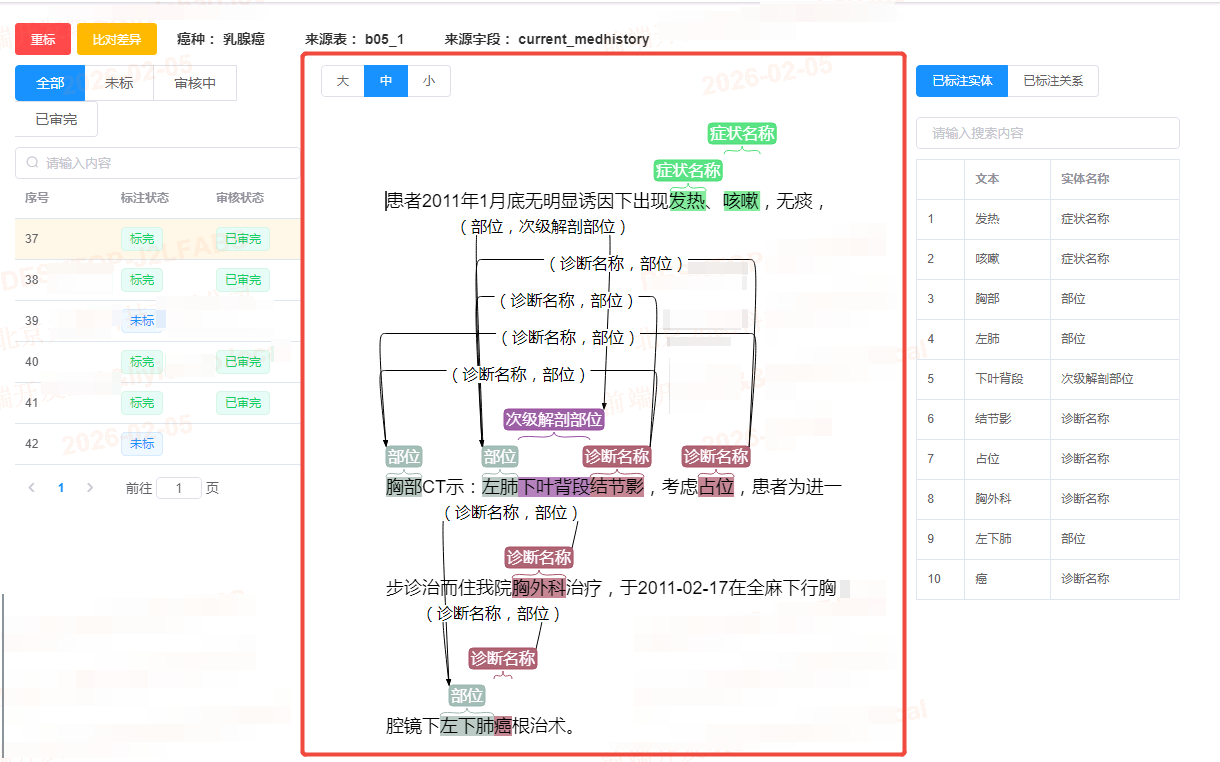
注意:当如果有产品要求,默认不展示"关系连接线" ,如果通过控制css样式,只是隐藏了连接线,但是依然占位(因为svg已经渲染完成了)。
所以必须通过操作数据的connections,当赋值为空数组时,则不再展示连接线。
仅作个人总结,如有帮助到您也是我的荣幸!