欢迎加入开源鸿蒙跨平台社区:https://openharmonycrossplatform.csdn.net
记得上次说要提审,被拒了。其中一项就是功能无法正常响应,还记得我的有个功能模块,只实现了退出登录。现在就要实现打卡日历页面
1.打卡日历页面先看截图效果
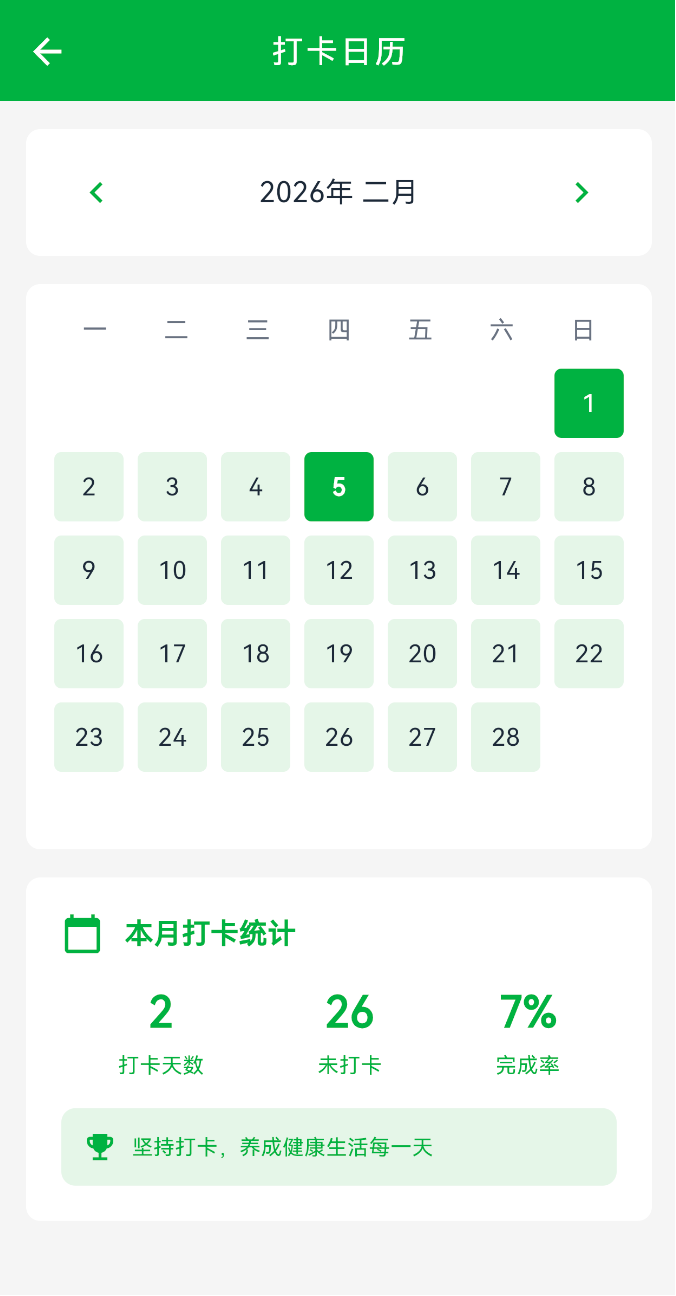
这是一个以日历为主的页面,核心目的其实很简单:让用户一眼就能看清楚------这个月我哪几天打卡了,哪几天没打卡。
页面打开的时候,默认展示的是当前月份。整个页面的视觉重心就在中间这块日历上,布局和我们平时用的系统日历差不多,按"周一到周日"横向排,一行一周,一格一天,看起来不会有学习成本。
每一个日期格子都对应当天的打卡状态。
像图里这种深绿色的格子,就代表当天已经成功打卡了;没有打卡的日期则是浅绿色背景,对比很明显,不需要点进去,扫一眼就知道这个月的完成情况。比如现在这个月已经有两天是深绿色,那就很直观地告诉用户:我这个月已经打卡 2 天了。
日期本身还是正常显示数字,不会因为样式而影响可读性。今天如果还没打卡,一般还会有一个额外的强调(比如边框),提醒用户"今天还可以打卡",但不会太抢眼,更多是轻提醒。
在交互上,支持上下或左右切换月份(具体形式看设计),用户可以很方便地翻到上个月、再往前看几个月,或者看看之前某个月的打卡情况。切换之后,日历会完整刷新成对应月份的样子,天数、星期位置、打卡标记都会跟着变,不会出现错位。
整体体验更偏向"记录 + 回顾",而不是复杂操作。
2.页面功能
1.顶部有月份切换器,可以左右切换查看不同月份
2.中间是日历网格,打卡的日子显示绿色,没打卡的显示淡绿色
3.今天的日期有绿色边框高亮
4.底部有统计卡片,显示本月打卡天数、未打卡天数、完成率。
5.还有一句话"坚持打卡,养成健康生活每一天" 嘿嘿 写死的
3.代码功能
Dart
class _CalendarPageState extends State<CalendarPage> {
  late DateTime _currentMonth;              // 当前选中的月份
  Map<String, CalendarDate> _checkInData = {}; // 打卡数据,key 是日期字符串
  bool _loading = true;                     // 加载状态
}
Dart
class CalendarDate {
  final String date;           // 日期,格式 "2025-02-05"
  final bool hasCheckedIn;     // 是否打卡
  final String? checkInTime;   // 打卡时间
  final int energyPoints;      // 能量值
}

class CalendarResponse {
  final int year;              // 年份
  final int month;             // 月份
  final List<CalendarDate> calendar; // 日历数据列表
}
4.核心实现
4.1 第一步初始化加载数据
页面打开时,初始化为当前年月,然后加载数据
Dart
@override
void initState() {
  super.initState();
  final now = DateTime.now();
  _currentMonth = DateTime(now.year, now.month);
  _loadCalendarData();
}

Future<void> _loadCalendarData() async {
  setState(() => _loading = true);

  // 保存请求的年月,不要被后端返回值覆盖
  final requestYear = _currentMonth.year;
  final requestMonth = _currentMonth.month;

  final response = await CheckInApi.getCheckInCalendar(
    year: requestYear,
    month: requestMonth,
  );

  if (response != null && mounted) {
    // 把列表转成 Map,方便查找
    final dataMap = <String, CalendarDate>{};
    for (var item in response.calendar) {
      dataMap[item.date] = item;
    }

    setState(() {
      _checkInData = dataMap;
      _currentMonth = DateTime(requestYear, requestMonth);
      _loading = false;
    });
  }
}
4.2 左右箭头切换月份
Dart
Widget _buildMonthSelector() {
  return Container(
    margin: const EdgeInsets.symmetric(horizontal: 16),
    padding: const EdgeInsets.symmetric(horizontal: 16, vertical: 12),
    decoration: BoxDecoration(
      color: Colors.white,
      borderRadius: BorderRadius.circular(8),
    ),
    child: Row(
      mainAxisAlignment: MainAxisAlignment.spaceBetween,
      children: [
        // 左箭头
        IconButton(
          icon: const Icon(Icons.chevron_left, color: Color(0xFF008236)),
          onPressed: () {
            setState(() {
              _currentMonth = DateTime(
                _currentMonth.year,
                _currentMonth.month - 1,  // 月份减 1
              );
            });
            _loadCalendarData();
          },
        ),

        // 月份显示
        Text(
          '${_currentMonth.year}年 ${_monthNames[_currentMonth.month - 1]}',
          style: const TextStyle(
            fontSize: 16,
            fontWeight: FontWeight.w500,
            color: Color(0xFF1F2937),
          ),
        ),

        // 右箭头
        IconButton(
          icon: const Icon(Icons.chevron_right, color: Color(0xFF008236)),
          onPressed: () {
            setState(() {
              _currentMonth = DateTime(
                _currentMonth.year,
                _currentMonth.month + 1,  // 月份加 1
              );
            });
            _loadCalendarData();
          },
        ),
      ],
    ),
  );
月份名称用中文数组
static const List<String> _monthNames = [
'一月', '二月', '三月', '四月', '五月', '六月',
'七月', '八月', '九月', '十月', '十一月', '十二月',
];
4.3 日历渲染
这是最核心的部分,要算出每个月的第一天是星期几,然后渲染日期。
4.3.1 星期标题
Dart
Widget _buildWeekdayHeader() {
  const weekdays = ['一', '二', '三', '四', '五', '六', '日'];
  return Row(
    mainAxisAlignment: MainAxisAlignment.spaceAround,
    children: weekdays.map((day) {
      return Expanded(
        child: Center(
          child: Text(
            day,
            style: const TextStyle(
              fontSize: 14,
              color: Color(0xFF6B7280),
              fontWeight: FontWeight.w500,
            ),
          ),
        ),
      );
    }).toList(),
  );
}
4.3.2 日期
Dart
Widget _buildDateGrid() {
  // 获取当月第一天
  final firstDay = DateTime(_currentMonth.year, _currentMonth.month, 1);
  // 获取当月最后一天
  final lastDay = DateTime(_currentMonth.year, _currentMonth.month + 1, 0);
  // 获取第一天是星期几 (1=周一, 7=周日)
  final firstWeekday = firstDay.weekday;
  // 获取当月天数
  final daysInMonth = lastDay.day;

  List<Widget> dateWidgets = [];

  // 添加空白占位符(第一天前面的空格)
  for (int i = 1; i < firstWeekday; i++) {
    dateWidgets.add(const SizedBox(width: 40, height: 40));
  }

  // 添加日期
  for (int day = 1; day <= daysInMonth; day++) {
    final date = DateTime(_currentMonth.year, _currentMonth.month, day);
    final dateKey = _formatDate(date);  // 格式化成 "2025-02-05"
    final calendarDate = _checkInData[dateKey];
    final isCheckedIn = calendarDate?.hasCheckedIn ?? false;
    final isToday = _isToday(date);

    dateWidgets.add(_buildDateCell(day, isCheckedIn, isToday));
  }

  return GridView.count(
    shrinkWrap: true,
    physics: const NeverScrollableScrollPhysics(),
    crossAxisCount: 7,  // 一周 7 天
    mainAxisSpacing: 8,
    crossAxisSpacing: 8,
    children: dateWidgets,
  );
}
注意点
firstWeekday是第一天是星期几,用来算前面要空几格
daysInMonth是当月有多少天
用GridView.count渲染 7 列的网格
shrinkWrap: true让网格自适应高度
physics: const NeverScrollableScrollPhysics()禁止网格滚动(外层有 ScrollView)
4.3.3 日期小方块
Dart
Widget _buildDateCell(int day, bool isCheckedIn, bool isToday) {
  return Container(
    decoration: BoxDecoration(
      color: isCheckedIn
          ? const Color(0xFF008236)      // 打卡了:深绿色
          : const Color(0xFFE8F5E9),     // 没打卡:淡绿色
      borderRadius: BorderRadius.circular(4),
      border: isToday && !isCheckedIn
          ? Border.all(color: const Color(0xFF008236), width: 1)  // 今天加边框
          : null,
    ),
    child: Center(
      child: Text(
        '$day',
        style: TextStyle(
          fontSize: 14,
          color: isCheckedIn
              ? Colors.white                    // 打卡了:白字
              : (isToday
                  ? const Color(0xFF008236)     // 今天:绿字
                  : const Color(0xFF1F2937)),   // 其他:黑字
          fontWeight: isToday ? FontWeight.bold : FontWeight.normal,
        ),
      ),
    ),
  );
}
Dart
// 格式化日期为 yyyy-MM-dd
String _formatDate(DateTime date) {
  return '${date.year}-${date.month.toString().padLeft(2, '0')}-${date.day.toString().padLeft(2, '0')}';
}
Dart
// 判断是否是今天
bool _isToday(DateTime date) {
  final now = DateTime.now();
  return date.year == now.year &&
      date.month == now.month &&
      date.day == now.day;
}
4.4 统计卡片
Dart
Widget _buildStatsCard() {
  // 计算统计数据
  final checkedDays = _checkInData.values.where((v) => v.hasCheckedIn).length;
  final daysInMonth = DateTime(_currentMonth.year, _currentMonth.month + 1, 0).day;
  final uncheckedDays = daysInMonth - checkedDays;
  final achievementRate = daysInMonth > 0
      ? ((checkedDays / daysInMonth) * 100).round()
      : 0;

  return Container(
    margin: const EdgeInsets.symmetric(horizontal: 16),
    padding: const EdgeInsets.all(20),
    decoration: BoxDecoration(
      color: Colors.white,
      borderRadius: BorderRadius.circular(8),
    ),
    child: Column(
      crossAxisAlignment: CrossAxisAlignment.start,
      children: [
        // 标题
        const Row(
          children: [
            Icon(Icons.calendar_today, color: Color(0xFF008236), size: 24),
            SizedBox(width: 12),
            Text(
              '本月打卡统计',
              style: TextStyle(
                fontSize: 16,
                fontWeight: FontWeight.bold,
                color: Color(0xFF008236),
              ),
            ),
          ],
        ),
        const SizedBox(height: 16),

        // 三个统计项
        Row(
          mainAxisAlignment: MainAxisAlignment.spaceAround,
          children: [
            _buildStatItem('$checkedDays', '打卡天数'),
            _buildStatItem('$uncheckedDays', '未打卡'),
            _buildStatItem('$achievementRate%', '完成率'),
          ],
        ),
        const SizedBox(height: 16),

        // 鼓励语
        Container(
          padding: const EdgeInsets.all(12),
          decoration: BoxDecoration(
            color: const Color(0xFFE8F5E9),
            borderRadius: BorderRadius.circular(8),
          ),
          child: const Row(
            children: [
              Icon(Icons.emoji_events, color: Color(0xFF008236), size: 20),
              SizedBox(width: 8),
              Expanded(
                child: Text(
                  '坚持打卡,养成健康生活每一天',
                  style: TextStyle(fontSize: 12, color: Color(0xFF008236)),
                ),
              ),
            ],
          ),
        ),
      ],
    ),
  );
}

// 单个统计项
Widget _buildStatItem(String value, String label) {
  return Column(
    children: [
      Text(
        value,
        style: const TextStyle(
          fontSize: 24,
          fontWeight: FontWeight.bold,
          color: Color(0xFF008236),
        ),
      ),
      const SizedBox(height: 4),
      Text(
        label,
        style: const TextStyle(fontSize: 12, color: Color(0xFF008236)),
      ),
    ],
  );
}
4.5 页面结构
Dart
body: _loading
    ? const Center(child: CircularProgressIndicator())
    : SingleChildScrollView(
        child: Column(
          children: [
            const SizedBox(height: 16),
            _buildMonthSelector(),    // 月份选择器
            const SizedBox(height: 16),
            _buildCalendarView(),     // 日历视图
            const SizedBox(height: 16),
            _buildStatsCard(),        // 统计卡片
            const SizedBox(height: 20),
          ],
        ),
      ),
5. 接口
调用的是CheckInApi.getCheckInCalendar
Dart
static Future<CalendarResponse?> getCheckInCalendar({
  int? year,
  int? month,
}) async {
  try {
    final queryParams = <String, dynamic>{};
    if (year != null) queryParams['year'] = year;
    if (month != null) queryParams['month'] = month;

    final response = await httpClient.get(
      '/api/check-in/calendar',
      query: queryParams.isNotEmpty ? queryParams : null,
    );

    if (response.success && response.data != null) {
      return CalendarResponse.fromJson(response.data);
    }
    return null;
  } catch (e) {
    return null;
  }
}
6.总结
这个页面其实核心就一个:日历一定要算准,别的都是围着它转。
先说排版逻辑。比如 2025 年 2 月 1 号是周六,那第一行前面就必须空出周一到周五这 5 个格子,第 6 个格子才放 1 号。不把这个算对,后面日期和星期就全乱了。
然后是每个月的天数。这个不用硬算,直接用
DateTime(year, month + 1, 0).day
就能拿到当月最后一天是几号,2 月 28 天、闰年 29 天,30 天、31 天都能自动处理,省事也不容易出错。
数据匹配这块也要注意格式。后端给的是 "2025-02-05" 这种字符串,所以前端在生成日期 key 的时候也得按这个格式来。月份和日期不够两位的一定要补 0,比如 2 月 5 号必须是 "2025-02-05",不能是 "2025-2-5",不然在 Map 里根本查不到打卡数据。
样式状态其实就三种,但判断要清楚:
已打卡:深绿色背景 + 白色文字
未打卡:浅绿色背景 + 黑色文字
今天没打卡:在"未打卡"的基础上再加一圈绿色边框
这几个条件一旦混了,视觉上马上就会很怪。
月份切换反而比较简单,直接 month + 1 或 month - 1 就行,DateTime 会自动处理跨年,比如 12 月加 1 变成下一年 1 月。但有一点别忘了:切完月一定要重新调接口拿当月数据,不能只换 UI,不然统计和标记都会不对。
统计部分就更直白了,遍历一遍 _checkInData,数一数 hasCheckedIn == true 的有多少个,再用当月实际天数去算百分比,别偷懒写死 30 天。
整体来看,这个页面就是一个日历控件加点数据展示,没有什么复杂交互,主要考验的就是日期、格式和状态判断,只要这些细节不出问题,写起来还是挺顺的。